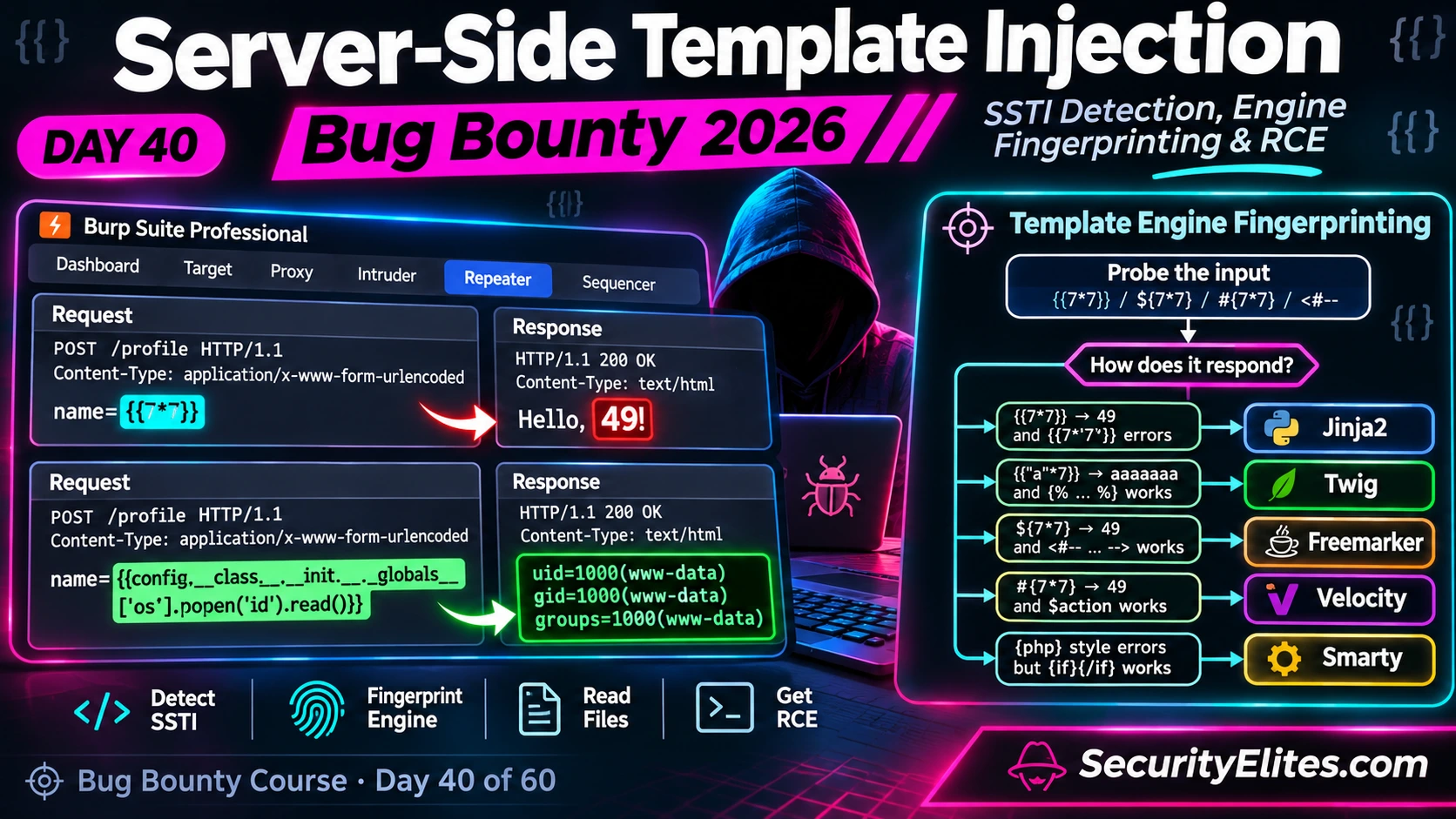
This article teaches server-side template injection (SSTI) detection, engine identification, and exploitation as part of a bug bounty curriculum. It explains how user input concatenated into template strings can escalate from simple arithmetic evaluation ({{7*7}} → 49) to remote code execution by traversing engine-specific object models. The material covers detection techniques, fingerprinting decision trees for different template engines (Jinja2, Freemarker, Twig, Velocity), and practical exploitation chains while emphasizing authorized testing and responsible disclosure practices.
- The core mechanism of SSTISSTI occurs when developers concatenate user input directly into a template string passed to a template engine for evaluation, rather than passing input as data to a pre-compiled template. The engine cannot distinguish injected template directives from legitimate ones, so when a user submits {{7*7}}, the engine evaluates it and returns 49—the moment that reveals server-side code execution risk. This differs fundamentally from reflection, where {{7*7}} is echoed back literally.
- Detection via polyglot math probesDetection relies on submitting mathematical expressions in multiple template syntaxes—{{7*7}}, ${7*7}, #{7*7}, —to trigger evaluation. If the response contains 49 instead of the literal braces, server-side evaluation is confirmed. A polyglot probe covering multiple syntaxes simultaneously flags SSTI in a single request across most common engines, making it efficient for initial scanning.
- Distinguishing SSTI from client-side XSSThe article emphasizes that a {{7*7}} → 49 response appearing only in the browser could indicate client-side template injection (XSS), not SSTI. True SSTI is confirmed when evaluation occurs in server-generated artifacts (confirmation emails, PDFs, server logs) or uses engine-specific syntax that no browser framework would evaluate. Email and PDF injection points are particularly reliable indicators of server-side rendering pipelines.
- Engine fingerprinting decision treeThe article provides a structured decision tree: test {{7*7}} to detect template evaluation, then {{7*'7'}} to distinguish engines—7777777 indicates Python string repetition (Jinja2 or Twig), while 49 suggests other engines. Further probes like {{''.__class__}} (Jinja2) or ${'freemarker...'} disambiguate between engines. Engine-specific error messages also serve as fingerprints. This systematic approach ensures attackers test the correct escalation payload for each engine.
- Jinja2 escalation via object model traversalIn Jinja2, escalation from {{7*7}} to RCE exploits Python's object model by chaining dunders: {{ cycler.__init__.__globals__.os.popen('id').read() }} reaches the os module and executes commands. Alternative chains use request.application, self.__init__, or __builtins__.__import__. The article notes that Jinja2 sandboxes are routinely bypassed via |attr() filters or alternate global paths, so the sandbox is treated as a speed bump rather than a security boundary.
- Engine-specific RCE payloadsEach template engine has distinct canonical chains: Freemarker uses ${'freemarker.template.utility.Execute'?new()('id')}, Twig (PHP) uses {{['id']|filter('system')}}, Velocity uses class-loader reflection to Runtime.exec, and Smarty uses {system('id')}. The article stresses that automation tools like tplmap can discover these, but manual reproduction is mandatory for understanding and reporting—triagers require explanations of the exact chain, not just tool output.
- Responsible escalation and testing limitsThe article establishes clear ethical boundaries: use harmless commands (id, hostname) or out-of-band callbacks (nslookup to Collaborator) to confirm RCE, then stop. Never read customer data, write files, open shells, or run destructive commands. If a programme forbids RCE proofs, demonstrate file read or describe the escalation path without executing it. Authorized targets only; detection probes are harmless, but exploitation payloads run real code on production.
- Report structure and severity calibrationAn effective SSTI report walks the triager from detection (the {{7*7}} → 49 proof) through fingerprinting evidence to escalation payload output, all reproducible in a few requests. Severity scales with sandbox escape: sandboxed arithmetic evaluation is Medium, file read is High, RCE is Critical. The remediation must address root cause—pass input as data to pre-compiled templates, not as template source—and explicitly note that sandboxes do not prevent bypass and are insufficient for untrusted templates.
Bottom line: SSTI detection starts with a simple math probe ({{7*7}} → 49 proves server-side evaluation), fingerprinting identifies the template engine via decision-tree probes, and engine-specific object-model chains escalate from harmless arithmetic to RCE—but only under authorized testing, using harmless commands to confirm, and reporting the architectural fix (never render untrusted input as template source). Master the workflow: detect, confirm server-side, fingerprint, escalate deliberately, then docum
FREE
Part of the Bug Bounty 60-Day Course
{ {7*7} } are harmless. Escalation payloads that run OS commands execute code on production. Confirm with a harmless command (id, or an out-of-band callback) and stop there — never read customer data, write files, or open a shell. If the programme forbids RCE PoCs, stop at proven expression evaluation or file read and describe the escalation path. Follow the rules of engagement.{ {7*7} } returning 49 is the most iconic moment in web hacking — the instant you realize the server didn’t just reflect your input, it evaluated it. That happens when user input is concatenated into a server-side template string and handed to a template engine. The engine can’t tell your injected { {7*7} } from the developer’s legitimate template directives, so it runs it. Arithmetic is just the detector. Once you fingerprint which engine is running — Jinja2, Twig, Freemarker, Velocity, Smarty — you follow that engine’s object model from a harmless expression all the way to reading /etc /passwd or running id. SSTI is one of the most reliable paths from a plain text field to remote code execution, and the whole class starts with seven times seven.🎯 What you’ll master in Day 40
⏱ ~30 min read · 3 hands-on exercises · Burp Suite + tplmap + PortSwigger Academy
📋 Server-Side Template Injection Bug Bounty – Table of Contents
What SSTI is — templates as code
Template engines exist to mix static markup with dynamic values: a developer writes Hello { { name } }, the engine substitutes the real name, and the page renders. Used correctly, user input is passed as data into a pre-compiled template — name is a variable, and whatever value it holds is rendered as text. SSTI happens when a developer instead builds the template string out of user input: render("Hello " + name). Now name isn’t data in a template; it’s part of the template source. If you set name to { {7*7} }, the engine compiles and evaluates it, and you get Hello 49.
The reason this escalates to code execution is that template engines are small programming languages. They can access objects, call methods, and (in many engines) reach the host language’s full runtime. Jinja2 templates run in Python and can traverse Python’s object hierarchy to reach os. Freemarker can instantiate a Java utility that runs OS commands. The “sandbox” some engines provide to restrict this is routinely bypassed. So the gap between { {7*7} } and { { run_a_command() } } is just knowing the engine’s object model.
Common injection points: anything that ends up in a rendered template — name fields that appear in emails or PDFs, custom error pages, “preview” features, wiki/markdown renderers, notification templates, and any feature that lets a user supply a template. User-supplied templates (email customization, report builders) are the highest-risk by design.
🧠 EXERCISE 1 — THINK LIKE A HACKER (10 MIN · NO TOOLS)
Reason about template evaluation before probing:
- You submit
{ {7*7} }in a “display name” field and the confirmation email showsHello 49. You submit it again in a “search” box and the results page shows the literalHello { {7*7} }. What’s different between the two input points, and which one is SSTI? { {7*7} }returns49but you’re unsure if it’s being rendered client-side (a JS template framework) or server-side. What property of the response or the engine would you test to prove the evaluation happened on the server, not in your browser?- Two targets both evaluate
7*7to49. On target A,{ {7*'7'} }returns7777777. On target B,$ {7*7}is required and{ {...} }does nothing. Without running any RCE payload, what have you already learned about each target’s engine, and why does that matter for the next step?
7*'7' → 7777777 is Python string repetition (Jinja2), while $ {...} syntax points at Freemarker/Velocity — which decides your entire escalation path.Detecting template evaluation
Detection is a single idea: submit something the server must compute, and check whether the computed result comes back. Arithmetic is perfect because the literal input and the evaluated output are obviously different ({ {7*7} } vs 49). Use a polyglot that covers multiple engine syntaxes at once so a single probe flags most engines.
POST /profile display_name={ {7*7} }
RESPONSE 200 OK
<h2>Welcome, 49</h2>
7*7 was evaluated to 49 → template engine, not just reflection
next: fingerprint the engine with $ {7*7} / # {7*7} / <%= 7*7 %>
SSTI vs XSS — confirming server-side
A reflected { {7*7} }→49 is almost always server-side, but it’s worth confirming, because the impact and the report differ enormously. The cleanest confirmations: the computation appears in something the server definitely generated (a confirmation email, a server-rendered PDF, a backend log echoed to an admin), or engine-specific syntax that no client framework would evaluate produces a result. If only a browser-side framework is interpreting the braces, you’re looking at client-side template injection, which is an XSS-class issue, not SSTI.
Fingerprinting the engine
Escalation is engine-specific, so fingerprinting is mandatory. Run a short decision tree of probes whose different outcomes identify the engine, then confirm with engine-specific syntax and error messages.
Jinja2 to RCE via the object model
Jinja2 is the most common SSTI in bug bounty (Flask/Django-adjacent apps). It runs in Python, so escalation means traversing Python’s object model from any object you can reference up to a module that runs commands. The classic path: from a string literal, reach __cl ass__, walk up to object via __m ro__, enumerate all subclasses with __sub classes__(), find one that imports os or exposes subpro cess/po pen, and call it.
|attr(), request-object globals, or alternate dunder paths. If one chain is blocked, try the request, cyc ler, joiner, or namespace globals. Treat a sandbox as a speed bump, not a wall — which is exactly why the fix is to not render untrusted templates at all.Freemarker, Twig, Velocity escalation
Java and PHP engines each have their own canonical RCE chain. Freemarker exposes a utility class that runs OS commands directly. Twig (PHP) reaches system functions via its filter/registration internals. Velocity can load classes and invoke methods. You don’t memorize these — you fingerprint, then look up the current chain — but the common ones are worth recognizing on sight.
⚡ EXERCISE 2 — BURP LAB (25 MIN)
Work through PortSwigger Web Security Academy’s SSTI labs:
- Start with Basic SSTI — detect the injection with a math probe and reach a simple sink in the identified engine (ERB in the first lab).
- Do the engine-identification labs, practicing the decision tree. Pay attention to how error messages betray the engine.
- Do a Jinja2/Python lab: traverse the object model to RCE using the
config/ globals path. This is the chain you’ll use most in real bug bounty. - Do a Freemarker or Twig lab to see a non-Python engine’s chain, and run
tplmapagainst one lab to understand what automation does — then reproduce its finding manually so you understand the chain, not just the tool output.
Writing the report that pays
An SSTI report should walk the triager from detection to impact in a few copy-paste requests: the math probe that proves evaluation, the fingerprint, and the escalation payload with evidence (rendered command output, or an out-of-band callback for blind). Make the server-side nature unambiguous and rate by how far the sandbox was escaped.
Severity: Critical (CVSS 9.8) — unauthenticated-to-low-priv remote code execution on the application server
Affected Endpoint: POST https://www.target.com/account/profile (displayName parameter, rendered into the confirmation email)
Summary: The displayName field is concatenated into a Jinja2 template that is evaluated server-side when generating the profile-confirmation email. An attacker can inject Jinja2 expressions that are executed by the engine, escalating from arithmetic evaluation to arbitrary OS command execution via the Python object model.
Steps to Reproduce:
1. Set displayName to { {7*7} } → the confirmation email renders “Hello 49”, proving server-side evaluation (the email is generated server-side).
2. Fingerprint: { {7*’7′} } renders 7777777 and { {”.__cl ass__} } resolves, confirming Jinja2/Python.
3. Set displayName to: { { cyc ler.__in it__.__glo bals__.os.po pen(‘id’).read() } }
4. The confirmation email renders: uid=33(www-data) gid=33(www-data) groups=33(www-data) — command output proving RCE. [screenshot attached; only ‘id’ was run]
Impact: An attacker controls arbitrary OS commands on the application server through a profile field, with the output returned in the confirmation email. This is full server compromise: access to application data, secrets, and the internal network.
Remediation: Do not build template strings from user input. Pass displayName as a context variable into a static, pre-compiled template so it is rendered as data, never as template source (e.g. render_template with displayName=value, not render_template_string(“Hello ” + value)). If users must supply templates, use a logic-less engine and treat the Jinja2 sandbox as insufficient against untrusted input.
⚡ EXERCISE 3 — WRITE THE REPORT (15 MIN)
Convert a lab solve into a full report:
- Write the report using the template above for the engine you exploited. Include the detection probe, the fingerprint evidence, and the escalation payload with its output — all reproducible in a few requests.
- Write the impact for three outcomes and rate each: (a) only sandboxed arithmetic evaluates, (b) server-side file read achieved, (c) full RCE confirmed. Explain what fact moved you from one tier to the next.
- Write the remediation as “don’t render untrusted input as template source,” with the exact correct API call for the stack (render_template with a variable vs render_template_string with concatenation). Note explicitly that the engine’s sandbox is not a sufficient control for untrusted templates.
💰 Quick check: you inject { {7*7} } into a search box and the results page displays the literal text { {7*7} } in your browser. You inject the same thing into a display-name field and the server-generated confirmation email shows 49. Which is SSTI, and why?
📋 Day 40 reference card
✅ Mark Day 40 complete
You can detect template evaluation, prove it’s server-side, fingerprint the engine with a decision tree, escalate Jinja2 through the Python object model to RCE, recognize the Freemarker/Twig/Velocity chains, and write a report whose severity reflects how far the sandbox was escaped.
❓ Frequently asked questions
What is server-side template injection?
How do I detect SSTI?
How is SSTI different from XSS?
Why do I need to fingerprint the template engine?
What severity does SSTI get?
How is SSTI fixed?
📚 Further reading
- Insecure Deserialization — Day 39 — the other major “web input to RCE” class; both reward patient escalation from a primitive to confirmed code execution.
- Burp Suite Deep Dive — Day 5 — Burp Repeater for iterating probes and Intruder for spraying engine-specific payloads across input points.
- External: PortSwigger — Server-Side Template Injection — the complete free lab series covering detection, engine identification, and exploitation to RCE.
- External: tplmap — automated SSTI detection and exploitation across engines; use it to find, then reproduce the chain manually for the report.