in recent times, you guys must have heard a word ‘Ransonware’ again and again. But what are ransomware attacks?
Ransomware is a type of malicious software (malware) designed to block access to a computer system, device, or data until a ransom payment is made to the attacker.
The word “ransomware” comes from two words:
- Ransom – money demanded for the return of something
- Ware – software or computer program
In simple terms, ransomware is a digital kidnapping of your files or system. According to the National Institute of Standards and Technology, ransomware is a form of malware that prevents users from accessing their systems or data until a ransom payment is made.
When ransomware infects a device, it typically:
- Encrypts files
- Locks the system
- Displays a ransom demand
The attacker then demands payment in exchange for a decryption key that can unlock the files.
Table of Contents
Why Ransomware Is So Dangerous
Ransomware has become one of the most destructive cyber threats in the world.
Unlike many traditional malware types that simply steal information, ransomware directly blocks access to critical systems.
This can cause devastating consequences for individuals, businesses, and even national infrastructure.
Real consequences of ransomware are:
• Hospitals forced to cancel surgeries
• Fuel pipelines shutting down
• Businesses losing millions of dollars
• Government systems becoming inaccessible
• Personal files permanently lost
In many cases, organizations are forced to make a difficult decision:
Pay the ransom or lose the data forever.
How Ransomware Encrypts Files
Encryption is the core technology behind ransomware. Encryption converts readable data into unreadable code.

For example:
Original file
document.txt
After encryption
document.locked
Without the correct decryption key, the file cannot be opened.
Most ransomware uses extremely strong encryption algorithms such as:
- AES-256
- RSA-2048
These encryption standards are also used by governments and banks. This means brute-forcing the encryption is nearly impossible.
What Happens When Ransomware Infects a Computer ?
When ransomware infects a computer or network, it does not immediately display a ransom message. Instead, it follows a carefully designed multi-stage attack process created to maximize damage and ensure victims are forced to pay.
Modern ransomware attacks are highly sophisticated and can spread across entire networks in minutes. Cybercriminals often spend hours or even days inside a system before triggering the ransomware payload.
Understanding what happens during a ransomware infection helps security professionals detect and stop attacks early.
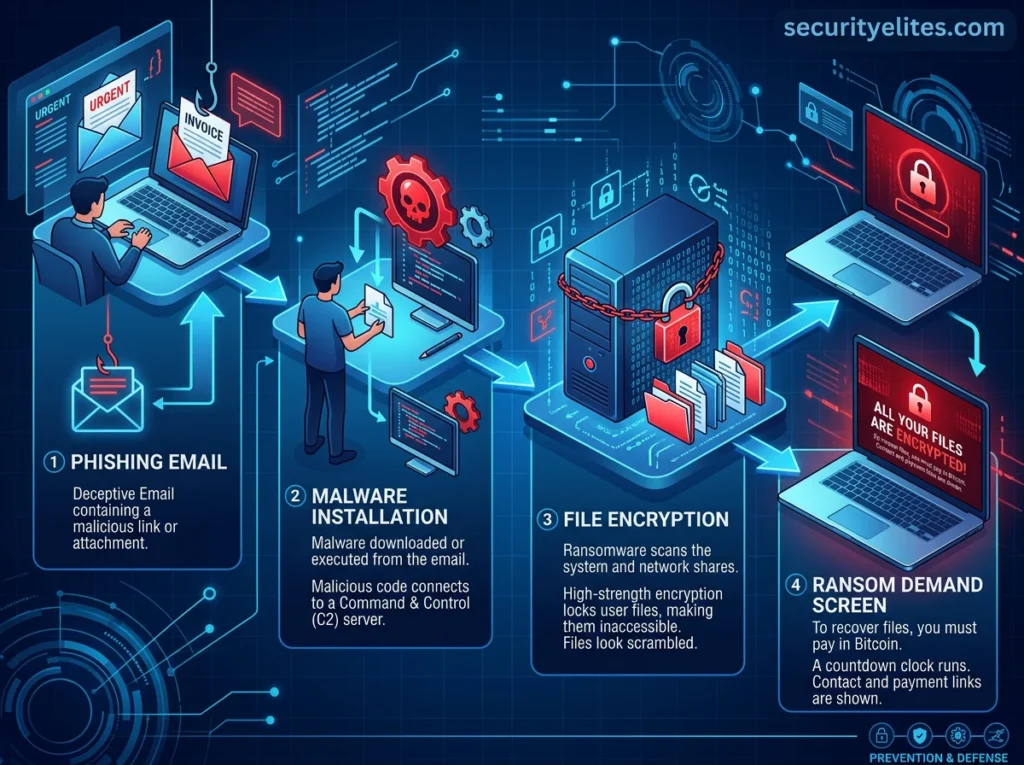
Below is a detailed breakdown of the complete lifecycle of a ransomware attack:
1. Initial System Compromise
The first stage of a ransomware attack is gaining access to the target system.
Attackers typically exploit weaknesses in users or systems to enter a network.
Common ways how hackers start their ransomware attack are :
• Phishing emails
• Malicious attachments
• Compromised websites
• Fake software updates
• Exploited software vulnerabilities
• Weak Remote Desktop Protocol (RDP) credentials
• Infected USB drives
One of the most common techniques is phishing. For example, an employee may receive an email like this:
Subject: Urgent Invoice – Immediate Payment Required
The email contains a malicious attachment such as:
Invoice_2026.pdf.exe
When the user opens the file, ransomware secretly installs on the system. At this point, the victim usually does not notice anything unusual.
2. Malware Installation and Persistence
Once the attacker gains entry, the ransomware installs itself on the system. The malware creates hidden files and modifies system settings to ensure it remains active even after the computer restarts.
They use techniques like:
a. Registry Modification – The malware adds entries to the Windows registry so it runs automatically during startup.
Example registry modification:
HKEY_CURRENT_USER\Software\Microsoft\Windows\CurrentVersion\Run
b. Scheduling Tasks – Some ransomware creates scheduled tasks that execute malicious code periodically
c. System Process Injection – Advanced ransomware may inject malicious code into legitimate system processes such as:
explorer.exe
svchost.exe
This helps it evade antivirus detection.
3. Establishing Command and Control Communication
After installation, ransomware often connects to a command-and-control (C2) server operated by the attackers.
This communication allows the attacker to :
• Send instructions
• Download encryption keys
• Upload stolen data
• Monitor infected systems
The connection is usually encrypted to avoid detection by security tools.
Hackers usually use the Tor network as it helps attackers remain anonymous.
4. Privilege Escalation
In many cases, ransomware attempts to gain administrator privileges. This allows the malware to perform powerful actions such as:
• Disabling antivirus software
• Accessing sensitive files
• Spreading across networks
• Deleting backups
Privilege escalation exploits vulnerabilities in the operating system. Once administrator access is obtained, the ransomware gains full control over the system.
5. Network Discovery and Lateral Movement
Modern ransomware does not stop at infecting one device. Instead, it tries to spread across the entire network. This stage is called lateral movement.
The malware scans the network for File servers, Backup servers, Shared folders, Other computers, Domain controllers etc. By spreading across multiple machines, attackers ensure maximum damage.
Some ransomware groups infect thousands of systems simultaneously.
6. Data Exfiltration (Data Theft)
Many modern ransomware groups steal data before encrypting files. This technique is called double extortion.
They usually steal:
• Financial records
• Customer databases
• Employee information
• Business contracts
• Medical records
• Intellectual property
Attackers store this stolen data on remote servers. If the victim refuses to pay the ransom, the attackers threaten to publish the stolen data online. This creates additional pressure on organizations.
Many ransomware gangs operate data leak websites where stolen information is released.
7. Disabling Security Defenses
Before encrypting files, ransomware attempts to disable security tools. This prevents detection and allows the encryption process to proceed uninterrupted.
Common targets are:
• Antivirus software
• Endpoint protection systems
• Windows Defender
• Backup services
• System recovery tools
Some ransomware deletes shadow copies using the command:
vssadmin delete shadows /all /quiet
Shadow copies are backup snapshots used by Windows to restore files. By deleting them, attackers prevent victims from recovering their data easily.
8. File Encryption Begins
Once the attackers have completed reconnaissance and disabled defenses, the ransomware begins encrypting files.
The malware searches the system for valuable file types such as:
.doc, .docx, .pdf, .jpg, .png, .mp4, .xlsx, .zip, .sql, .psd etc...
Critical system files are usually skipped so the computer remains operational enough to display the ransom message.
Encryption algorithms commonly used include:
• AES-256 encryption
• RSA-2048 encryption
These encryption methods are extremely strong and practically impossible to crack.
Example transformation:
Original file
family_photo.jpg
Encrypted file
family_photo.jpg.locked
or
family_photo.jpg.encrypted
The encryption process can take minutes or hours depending on the number of files.
9. System Lockdown
In some ransomware attacks, the malware also locks the entire system. Victims may see a full-screen message preventing access to their computer.
Example message:
YOUR FILES ARE ENCRYPTEDAll important files have been encrypted with military-grade encryption.To recover your files you must purchase the decryption key.
Some ransomware variants also disable keyboard shortcuts such as:
CTRL + ALT + DEL
This prevents victims from closing the ransom screen.
10. Ransom Note Delivery
Once encryption is complete, the ransomware creates a ransom note. This note appears in multiple locations such as Desktop background, Text files in encrypted folders, Pop-up windows or Login screens.
Common ransom note filenames include:
READ_ME.txt
DECRYPT_FILES.txt
HOW_TO_RECOVER_FILES.html
A typical ransom note includes:
• Payment instructions
• Bitcoin or any cyprtocurrency wallet address
• Deadline for payment
• Contact email or chat link (basically how you can contact the attacker/hacker)
Example ransom message:
Your files have been encrypted.To recover them you must pay 2 Bitcoin.If payment is not received within 72 hours, your files will be permanently deleted.
Some ransomware groups even provide customer support chat portals for victims.
11. Countdown Timer and Psychological Pressure
Attackers use psychological tactics to pressure victims into paying quickly. These include:
a .Countdown Timers – A timer may display how long the victim has before the ransom doubles.
Example:
Time Remaining: 47 hours
b. Data Leak Threats – Attackers threaten to release sensitive information publicly.
c. Increasing Ransom Amounts – The ransom may increase if payment is delayed.
Example:
Initial ransom: $10,000
After 72 hours: $25,000
12. Ransom Payment and Negotiation
Victims must usually contact attackers through Email, Tor websites or Anonymous chat portals.
Negotiations may take place where attackers agree to reduce the ransom amount.
Payments are usually requested in cryptocurrency such as:
- Bitcoin
- Monero
These payments are difficult to trace.
13. Decryption (If Payment Is Made)
If the ransom is paid, attackers may provide a decryption tool. This software attempts to restore encrypted files.
However, there is no guarantee the files will be recovered.
How to Prevent Ransomware Attacks
Ransomware attacks can cause severe financial losses, data breaches, and operational disruptions. Following strong cybersecurity practices can significantly reduce the risk of ransomware infections.

Below are the most effective ways to prevent ransomware attacks.
- Install trusted antivirus or endpoint security software that can detect ransomware behavior and block malicious files. Keep the antivirus regularly updated so it can recognize the latest ransomware threats.
- Keep Your Operating System Updated – Always install security patches and system updates released by software vendors. Many ransomware attacks exploit outdated systems with known vulnerabilities.
- The Cybersecurity and Infrastructure Security Agency recommends maintaining regular backups and updating systems to reduce the risk of ransomware attacks. If ransomware encrypts your system, backups allow you to restore data without paying ransom.
- Do not open attachments or links from unknown or unexpected emails. Phishing emails are one of the most common ways ransomware enters computers.
- Use Strong and Unique Passwords – Create complex passwords that include letters, numbers, and symbols to protect accounts. Avoid using the same password across multiple systems or online services.
- Use Email Filtering and Spam Protection – Email filtering tools help detect phishing emails and malicious attachments. Blocking suspicious emails at the gateway prevents ransomware from reaching users.
- Last but most important train Employees on Cybersecurity Awareness like educate them to recognize phishing emails, suspicious downloads, and social engineering attacks. Human awareness is one of the most effective defenses against ransomware.
Frequently Asked Questions About Ransomware Attacks
1. What are ransomware attacks?
Ransomware attacks are cyberattacks in which malicious software encrypts or locks a victim’s files or computer systems. Attackers then demand a ransom payment, usually in cryptocurrency, to restore access to the encrypted data.
2. How do ransomware attacks usually start?
Most ransomware attacks begin through phishing emails, malicious attachments, infected websites, or software vulnerabilities. Cybercriminals trick users into downloading malware that secretly installs ransomware on their devices.
3. Who is most targeted by ransomware attacks?
Ransomware attacks commonly target businesses, hospitals, government organizations, and educational institutions because they store valuable data. However, individuals and small businesses are also frequent victims of ransomware attacks.
4. Can ransomware attacks spread across networks?
Yes, many modern ransomware attacks are designed to spread across entire networks once they infect a single device. Attackers use network vulnerabilities and stolen credentials to move laterally and encrypt multiple systems.
5. Can ransomware attacks be prevented?
Ransomware attacks can often be prevented by using updated security software, regular system updates, strong passwords, and reliable data backups. Avoiding suspicious email attachments and phishing links also reduces the risk of ransomware infections.
6. Should victims pay ransom after ransomware attacks?
Cybersecurity experts generally advise against paying ransom after ransomware attacks because there is no guarantee that attackers will restore the encrypted files. Paying ransom may also encourage cybercriminals to launch more ransomware attacks.
7. What should you do if ransomware attacks infect your system?
If ransomware attacks infect your system, disconnect the device from the internet immediately and avoid paying the ransom. Restore data from backups if available and report the ransomware attack to cybersecurity authorities.
Conclusion & Key Takeaways
Ransomware has evolved into one of the most serious cybersecurity threats facing individuals, businesses, and governments.
From hospitals shutting down to pipelines halting fuel supply, ransomware attacks demonstrate how cybercrime can disrupt the real world.
The good news is that most ransomware attacks can be prevented with proper cybersecurity practices such as:
- Regular backups
- Security updates
- Strong passwords
- Employee awareness
Cybersecurity is no longer optional — it is essential. We have earlier shared a in detail tutorial for cybersecurity learners on how a typical Cyber Kill chain or cyber attack works.
Understanding threats like ransomware is the first step toward building a safer digital world.