If you’ve ever wondered how ethical hackers discover hidden subdomains, exposed infrastructure, and attack surfaces, the answer often starts with Amass. The Amass Cheat Sheet is one of the most valuable resources for cybersecurity professionals performing reconnaissance and domain enumeration.
Amass is an open-source reconnaissance tool used for:
- Subdomain enumeration
- Attack surface mapping
- Asset discovery
- Infrastructure mapping
- Open-source intelligence (OSINT)
Security professionals use it heavily in penetration testing, bug bounty hunting, red team operations and cyber threat intelligence.
Imagine you’re testing the security of a company. Their main website is:
example.com
But what about other subdomains like below:
api.example.com
admin.example.com
vpn.example.com
dev.example.com
Some of these systems may contain sensitive login portals or exposed services. Amass helps you discover them automatically. That’s why tools like Amass are used by Ethical hackers, Security researchers, Bug bounty hunters, Penetration testers etc..
In this Amass Cheat Sheet, you will learn:
- How to install Amass on Kali Linux
- 70+ Amass commands
- Beginner and advanced examples
- Real penetration testing scenarios
- Practical hands-on labs
By the end of this Amass Cheat Sheet guide, you’ll be able to use Amass like a professional reconnaissance tool.
Bookmark this Amass Cheat Sheet, because it’s designed to become one of the most practical Amass references on the internet.
Table of Contents
How to Install Amass on Kali Linux
Most cybersecurity professionals use Kali Linux because it contains hundreds of penetration testing tools.
Fortunately, installing Amass is extremely simple. You can explore the official documentation here:
https://github.com/owasp-amass/amass
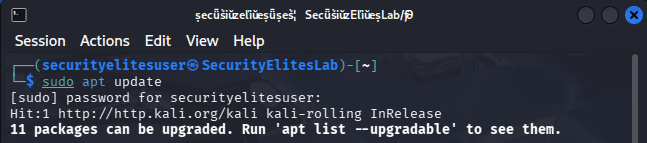
Step 1 — Update System
sudo apt update
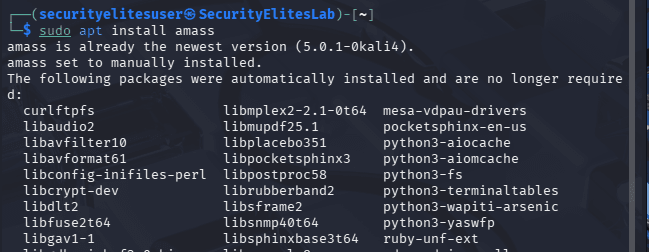
Step 2 — Install Amass
sudo apt install amass
Step 3 — Verify Installation
amass -version
Example output:
v5.0.1
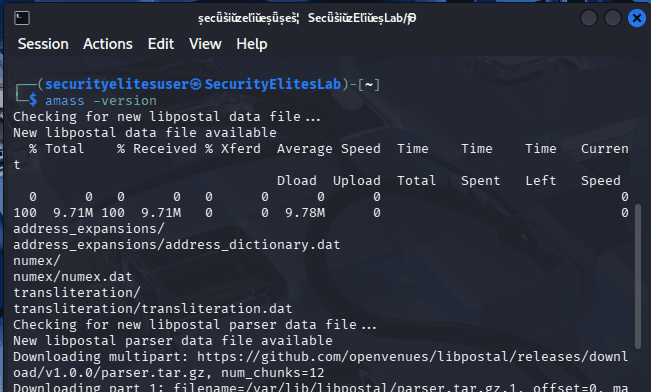
If you see the version number, Amass is installed successfully.
Step 4 — View Amass Help Menu
amass -h
This command displays all Amass modules and commands.
Basic Amass Cheat Sheet Commands
The following Amass Cheat Sheet commands are essential for beginners learning reconnaissance and domain enumeration.
These commands are used daily in:
- Bug bounty programs
- Penetration testing
- Cybersecurity reconnaissance
- Ethical hacking labs
BASIC COMMANDS OF AMASS
| Command Syntax | Purpose of Command | Description |
|---|---|---|
amass -h | Show help menu | Displays the complete help menu for Amass including available modules, options, and parameters. This command is usually the first thing beginners run when learning Amass to understand its functionality and command structure. |
amass enum -d example.com | Basic subdomain enumeration | Performs passive and active reconnaissance against the specified domain to discover subdomains using multiple data sources like DNS records, search engines, and public certificate logs. |
amass enum -passive -d example.com | Passive enumeration | Uses passive data sources such as search engines, APIs, and certificate transparency logs to identify subdomains without directly interacting with the target infrastructure. |
amass enum -active -d example.com | Active reconnaissance | Enables active scanning techniques such as DNS brute forcing and network probing to discover additional subdomains beyond what passive intelligence sources reveal. |
amass enum -brute -d example.com | DNS brute force | Attempts to discover hidden subdomains by brute forcing DNS records using a predefined wordlist. Useful for identifying development, staging, or internal systems. |
amass enum -d example.com -o output.txt | Save results | Runs enumeration and stores discovered subdomains into an output file for later analysis, documentation, or integration with other penetration testing tools. |
amass enum -d example.com -json result.json | Export JSON | Saves enumeration results in JSON format which is useful for automation pipelines, scripting, and integrating reconnaissance data with other cybersecurity platforms. |
amass intel -d example.com | Gather domain intelligence | Collects open-source intelligence about the target organization including domains, related infrastructure, and publicly associated network assets. |
amass intel -org "Company Name" | Organization recon | Searches for domains associated with a specific organization name using open-source intelligence sources such as registries and certificate logs. |
amass enum -d example.com -ip | Show IP addresses | Displays resolved IP addresses for discovered subdomains, helping penetration testers identify servers, hosting providers, and infrastructure layout. |
amass enum -d example.com -src | Show sources | Reveals the specific intelligence sources that contributed to discovering each subdomain, helping analysts evaluate reliability and data origins. |
amass enum -d example.com -timeout 60 | Set timeout | Configures how long Amass should wait when querying data sources or DNS servers before moving to the next request. |
amass enum -d example.com -max-dns-queries 200 | Control DNS queries | Limits the number of DNS queries used during enumeration to prevent network overload or rate limiting. |
amass enum -d example.com -norecursive | Disable recursive discovery | Stops recursive subdomain discovery and focuses only on the primary domain, useful for controlled reconnaissance scope. |
amass enum -d example.com -silent | Silent output | Displays only discovered subdomains without additional logs or metadata, making it ideal for automation pipelines and scripting workflows. |
amass enum -d example.com -rf resolvers.txt | Custom DNS resolvers | Uses a custom list of DNS resolvers to improve enumeration speed and bypass resolver restrictions or filtering mechanisms. |
amass enum -d example.com -config config.ini | Custom configuration | Runs Amass using a configuration file containing API keys, resolver lists, and other settings to improve reconnaissance coverage. |
amass enum -d example.com -dir recon-data | Save data directory | Stores reconnaissance data in a specified directory for later analysis and graph generation. |
amass db -list | List databases | Displays enumeration databases stored locally for Amass projects, allowing analysts to manage reconnaissance data sets. |
amass viz -d example.com | Visualize network | Generates visual graphs showing relationships between domains, subdomains, and infrastructure discovered during reconnaissance. |
amass track -d example.com | Track domain changes | Monitors domain infrastructure over time to detect new subdomains, DNS changes, or infrastructure modifications. |
amass intel -addr 8.8.8.8 | Reverse lookup | Finds domains associated with a specific IP address, helping analysts identify related assets or shared infrastructure. |
amass intel -cidr 192.168.1.0/24 | CIDR enumeration | Searches for domains associated with IP ranges which helps identify assets belonging to an organization. |
amass enum -d example.com -aw wordlist.txt | Custom wordlist brute force | Uses a custom wordlist to perform DNS brute force enumeration to discover hidden or internal subdomains. |
amass enum -df domains.txt | Multiple domain enumeration | Allows scanning of multiple domains listed inside a text file, making it useful for bug bounty scope lists. |
amass enum -d example.com -timeout 120 | Extended timeout | Extends query timeout values to accommodate slower DNS responses or network latency during reconnaissance. |
amass enum -d example.com -active -ip | Active scan with IPs | Performs active enumeration and resolves IP addresses simultaneously to reveal host infrastructure. |
amass enum -d example.com -oA recon-output | All output formats | Saves enumeration results in multiple formats simultaneously including text, JSON, and other supported export formats. |
amass enum -d example.com -log recon.log | Save logs | Records the enumeration process into a log file for troubleshooting, debugging, and documentation of reconnaissance activities. |
Advanced Amass Cheat Sheet Commands
Advanced commands unlock the full power of Amass reconnaissance.
These commands are commonly used by:
- Red teams
- Bug bounty hunters
- Threat intelligence analysts
- Penetration Testers
- Ethical Hackers
ADVANCED COMMANDS OF AMASS
| Command Syntax | Purpose of Command | Description |
|---|---|---|
amass enum -d example.com -active -brute | Active brute force enumeration | Combines active scanning and brute forcing techniques to aggressively discover hidden subdomains and infrastructure. |
amass enum -d example.com -min-for-recursive 2 | Recursive threshold | Controls recursive discovery behavior by specifying the minimum number of times a subdomain must appear before recursion begins. |
amass enum -d example.com -max-depth 3 | Enumeration depth | Limits recursive enumeration depth to prevent excessive scanning and maintain controlled reconnaissance scope. |
amass enum -d example.com -include-unresolvable | Include unresolved domains | Includes discovered subdomains that cannot currently resolve to IP addresses, which may indicate internal infrastructure or decommissioned assets. |
amass enum -d example.com -noalts | Disable alterations | Prevents Amass from generating alternative subdomain names during brute force enumeration. |
amass enum -d example.com -nf known.txt | Known subdomains file | Uses a file of already known subdomains to enhance discovery through recursive techniques. |
amass enum -d example.com -bl blacklist.txt | Blacklist domains | Excludes specific domains or subdomains from enumeration results to maintain scope compliance. |
amass intel -whois -d example.com | WHOIS intelligence | Retrieves WHOIS data related to the target domain including registrant information and associated domains. |
amass intel -asn 13335 | ASN intelligence | Discovers domains associated with a specific autonomous system number, revealing infrastructure owned by organizations. |
amass enum -d example.com -timeout 200 | Extended enumeration timeout | Extends DNS query waiting time to improve accuracy during slow network conditions or restrictive DNS environments. |
amass enum -d example.com -rf resolvers.txt -brute | Custom resolvers brute force | Performs brute force enumeration using custom DNS resolvers to increase success rates. |
amass track -d example.com -dir recon-data | Infrastructure tracking | Tracks domain changes over time and compares them against previously stored reconnaissance datasets. |
amass db -names | List discovered names | Displays subdomains stored inside Amass databases for quick review of previously collected reconnaissance data. |
amass viz -d example.com -o graph.html | Export visualization | Creates an HTML graph visualization of the discovered infrastructure relationships. |
amass enum -d example.com -include-unresolvable -o result.txt | Export unresolved results | Saves all discovered domains including unresolved ones to an output file. |
amass enum -df domains.txt -o multi.txt | Bulk enumeration | Performs enumeration on multiple domains simultaneously and stores results in a single file. |
amass intel -cidr 10.0.0.0/8 -active | CIDR active recon | Performs reconnaissance on a CIDR range to identify domains associated with that network. |
amass enum -d example.com -brute -aw wordlist.txt -o brute.txt | Wordlist brute force scan | Uses a custom wordlist for aggressive brute forcing to discover hidden infrastructure. |
amass enum -d example.com -dir project-recon -o results.txt | Organized recon project | Saves reconnaissance results inside a structured project directory for easier analysis and reporting. |
amass enum -d example.com -active -ip -src | Full intelligence scan | Runs active enumeration while displaying resolved IP addresses and discovery sources simultaneously. |
SecurityElites Hands-On Lab – Real Cybersecurity Scenarios
To truly understand the Amass Cheat Sheet, you must practice using it in realistic cybersecurity scenarios.
Below are five real-world penetration testing scenarios used by ethical hackers.
Scenario 1 — Discover Hidden Subdomains
Target:
google.com
Goal:
Find all subdomains.

Commands Used
amass enum -d google.com
These systems often contain login panels or internal tools.
Scenario 2 — Passive Recon for Bug Bounty
Some bug bounty programs prohibit active scanning.
Use passive reconnaissance.
Commands Used
amass enum -passive -d google.com
This method gathers subdomains from:
- search engines
- certificate logs
- OSINT sources
Scenario 3 — Discover Development Servers
Many organizations hide development servers like:
dev.example.com
staging.example.com
beta.example.com
Commands Used
amass enum -brute -d securityelites.com

Brute force discovers hidden environments.
These servers often have:
- weak authentication
- exposed APIs
- outdated software
Scenario 4 — Map Company Infrastructure
Suppose you’re testing a company called:
GoogleCorp
Commands Used
amass intel -org "GoogleCorp"
This reveals:
- domains
- infrastructure
- related assets
Scenario 5 — Monitor Infrastructure Changes
Organizations constantly add new systems.
Security teams monitor changes using:
amass track -d google.com
This command compares previous reconnaissance results with new discoveries.
It helps detect:
- newly deployed servers
- exposed services
- infrastructure changes
FAQ — Amass Cheat Sheet
What is Amass used for?
Amass is a reconnaissance tool used to discover subdomains, infrastructure, and digital assets associated with an organization. It gathers information using open-source intelligence sources, DNS queries, and brute force techniques. Cybersecurity professionals use Amass during penetration testing and bug bounty hunting to map attack surfaces and identify hidden systems that may contain vulnerabilities.
Is Amass legal?
Yes, Amass is legal when used responsibly and with proper authorization. Ethical hackers use it during penetration testing engagements or bug bounty programs where organizations grant permission to test their infrastructure. Using Amass against systems without authorization may violate cybersecurity laws and organizational policies.
Does Kali Linux include Amass?
Yes, Kali Linux includes Amass in its official repositories. This means you can install it quickly using the package manager with a simple command. Kali Linux users commonly rely on Amass for reconnaissance tasks because it integrates well with other tools like Nmap, Sublist3r, and asset discovery frameworks.
Is Amass used by hackers?
Yes, both ethical hackers and malicious attackers may use reconnaissance tools like Amass. Ethical hackers use it to discover vulnerabilities before attackers do. Security professionals use Amass during penetration testing and bug bounty programs to help organizations strengthen their security posture.
What are alternatives to Amass?
Some popular alternatives include tools used for domain enumeration and reconnaissance such as Subfinder, Sublist3r, Assetfinder, and DNSRecon. Many penetration testers combine these tools together to increase the number of discovered subdomains and improve reconnaissance coverage.
Conclusion
The Amass Cheat Sheet is one of the most valuable resources for anyone learning reconnaissance in cybersecurity.
In this Amass Cheat Sheet guide you learned:
- How to install Amass on Kali Linux
- 70+ powerful Amass commands
- Beginner and advanced enumeration techniques
- Real penetration testing scenarios
- Practical reconnaissance workflows
Amass is a core tool used by bug bounty hunters and penetration testers to map attack surfaces and discover hidden infrastructure.
To master this tool:
- Practice in cybersecurity labs
- Try enumerating domains from bug bounty programs
- Combine Amass with other reconnaissance tools
- Analyze discovered infrastructure carefully
If you found this Amass Cheat Sheet helpful, make sure to:
- Bookmark this guide
- Share it with fellow cybersecurity learners
- Explore more ethical hacking tutorials on SecurityElites
Other Cheat Sheet you wish to go thorugh:
NMAP Cheat Sheet
Your cybersecurity journey starts with reconnaissance — and mastering Amass is one of the best steps you can take.