SECURITY AWARENESS
UPDATED MARCH 2026
DEFENSIVE GUIDE
⚠️
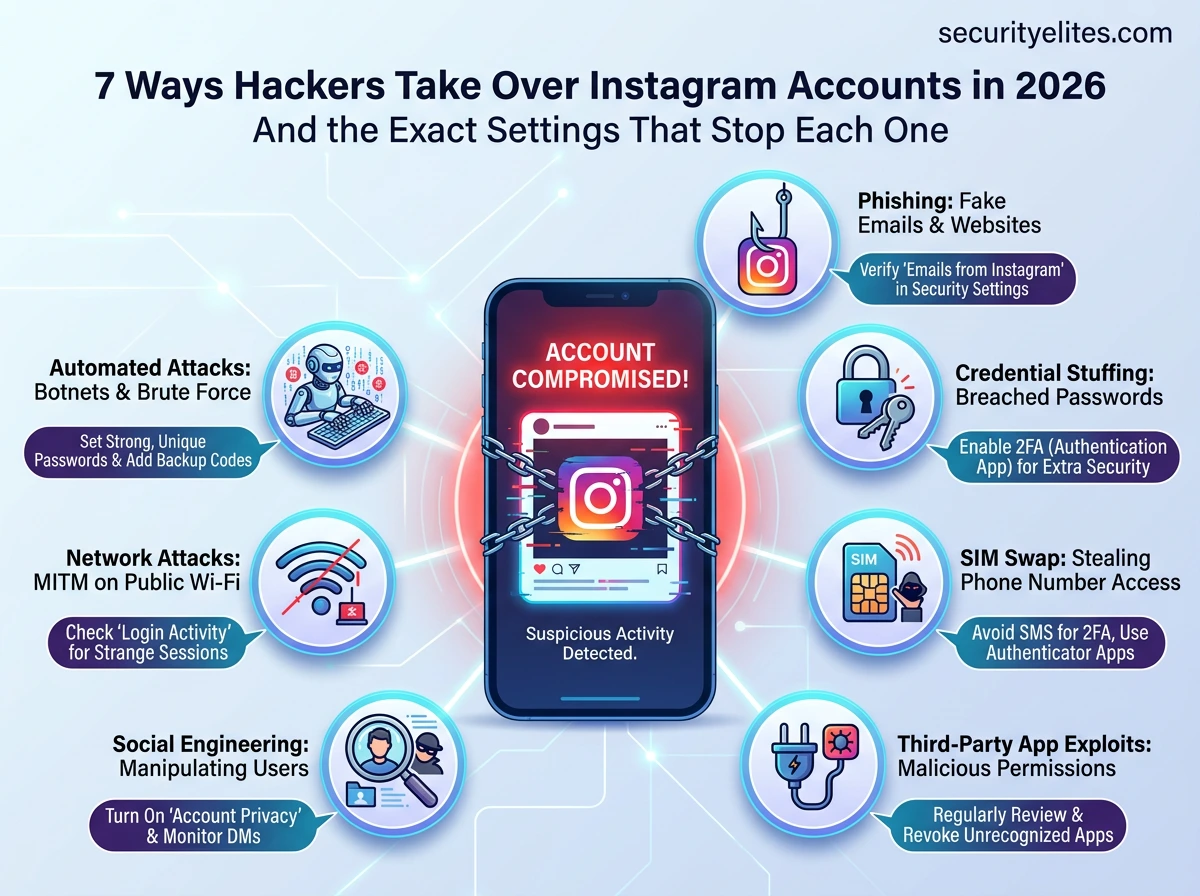
Your Instagram account has 2.5 billion potential attackers. Not because every person on earth wants to hack you specifically — but because automated attack tools continuously scan for accounts that are vulnerable to one of seven well-documented, reliably exploited attack methods. None of these methods require sophisticated hackers. Most are so simple they run on autopilot.
The uncomfortable truth is this: how Instagram accounts get hacked in 2026 has almost nothing to do with technical sophistication and almost everything to do with taking advantage of the 76% of Instagram users who have never taken 15 minutes to configure their security settings. Understanding exactly how each attack method works is the first step to blocking all of them.
This guide explains every major attack method from a defensive, awareness perspective — not to teach anyone to attack, but so that you understand what you are up against and exactly what to do about it.
METHOD 1
Phishing — How Instagram Accounts Get Hacked Most Often
Phishing is consistently the leading cause of Instagram account compromise. The concept is simple: create a website that looks exactly like Instagram’s login page, trick you into visiting it, and collect your credentials when you enter them. In 2026, phishing pages are sophisticated enough that even security-aware users get caught off-guard.
The delivery mechanisms evolve constantly: Instagram DMs claiming your account was reported for copyright infringement, emails with urgent warnings about account deletion, SMS messages from fake Instagram numbers, and even QR codes at physical locations. The urgency is always manufactured, the timeline is always fake (“your account will be disabled in 24 hours”), and the link always leads somewhere that is not instagram.com.
securityelites.com
9:41📶 100%
I
Instagram Support
@instagram.support.help
⚠️
Your account has been reported for copyright infringement. Your account will be permanently disabled within 24 hours unless you verify your identity at the link below.
instagram-support-verify.com/appeal?id=83729
Sent 2 hours ago
⚠️ PHISHING INDICATORS:
→ Sent from @instagram.support.help (not @instagram)
→ Link goes to instagram-support-verify.com (NOT instagram.com)
→ Creates artificial “24 hour” urgency
→ Real Instagram support never DMs users about violations
Phishing DM Example — The account claims to be “Instagram Support” but has a fake username (@instagram.support.help vs the real @instagram). The link goes to instagram-support-verify.com — not instagram.com. The 24-hour threat is manufactured to trigger panic. Never click these links.
✅ How to block phishing: Never click login links from DMs, emails, or SMS. Navigate directly to instagram.com yourself. Verify the URL in your browser before entering any credentials — it must be exactly instagram.com with a padlock. Enable 2FA — even if phishing captures your password, they cannot log in without your authenticator code.
METHOD 2
Credential Stuffing — Your Other Passwords Are the Problem
Here is something most people do not realise: over 15 billion username and password combinations are circulating on criminal forums right now, collected from thousands of data breaches over the past decade. LinkedIn’s 2012 breach. Adobe’s 2013 breach. Yahoo’s 2016 breach. These breaches exposed hundreds of millions of real credentials — and they are still being used today.
Credential stuffing is the automated process of taking these breached credentials and trying them against Instagram. If your email address is you@gmail.com and your Instagram password is the same as any password you have ever used on any other site that was breached, attackers may already have tried it — or will soon.
securityelites.comIs Your Email Exposed — Check if your email was breached
Is Your Email Exposed?
Check if your email or phone has appeared in a data breach
😱 Oh no — exposed in 4 data breaches!
Your account was found in 4 data breaches. Attackers may have your password from these breaches. If you reuse passwords, change them immediately.
LinkedIn2012 · 165M records · Passwords exposed
Adobe2013 · 153M records · Passwords exposed
Dropbox2012 · 68M records · Passwords exposed
If your Instagram password matches ANY password from these breaches, change it immediately.
Email Breach checker — Check your email address to see if it appeared in known data breaches. If your Instagram password matches any password from these breaches, it is potentially in attackers’ credential lists right now. Free to check.
✅ How to block credential stuffing: Check Email Breach Checker Tool to see if your email appeared in breaches. Use a unique, randomly generated password for Instagram that you use nowhere else. A password manager (Bitwarden is free) makes this effortless. With a unique password, credential stuffing attacks against Instagram become impossible — the attackers do not have it.
METHOD 3
SIM Swapping — How Instagram Accounts Get Hacked Through Your Phone Number
SIM swapping targets high-value accounts — influencers, business accounts, public figures. The attacker collects personal information about you from public social media profiles (your name, date of birth, address — information you likely share openly), then calls your mobile carrier pretending to be you reporting a lost phone. They request your number be transferred to their new SIM card. If they succeed, your phone loses signal and they now receive all calls and SMS messages intended for you — including two-factor authentication codes and password reset links.
How SIM Swap Unfolds — Timeline
1
Reconnaissance: Attacker collects your personal information from Instagram, LinkedIn, Facebook — your full name, birthday, city, phone number hints.
2
Social Engineering the Carrier: Calls your mobile carrier support, claims to be you, provides the collected personal details to pass verification, requests a SIM swap to a new SIM card they hold.
3
Your phone loses signal. Your number now routes to their SIM. They trigger Instagram “Forgot password” — the SMS code goes to them. Account compromised in minutes.
✅ How to block SIM swapping: Switch Instagram’s 2FA from SMS to an authenticator app — SIM swapping cannot intercept authenticator codes generated locally on your device. Also: call your carrier and add a PIN or “port freeze” to your account. This requires anyone requesting a SIM transfer to provide a PIN you set, not just publicly available personal information.
METHOD 4
Malicious Third-Party Apps — The Access You Gave Away
Every time you click “Continue with Instagram” or “Connect your Instagram account” to a third-party app — a follower tracker, a scheduler, a growth tool, a contest entry — you grant that app an OAuth token with ongoing access to your Instagram account. This access persists indefinitely unless you revoke it, regardless of whether you change your Instagram password.
Many of these apps are legitimate and useful. But many are built specifically to harvest account data or maintain persistent access. A “free follower boost” app that you connected in 2021 may still have active access to your Instagram account today — even if the app has been sold to a malicious operator since then.
✅ How to block third-party app attacks: Go to Settings → Security → Apps and Websites. Remove anything you do not recognise or actively use. Going forward, only connect apps from reputable developers with a clear privacy policy. Never connect “free follower” or “Instagram analytics” tools from unknown developers — these are the most common malicious app category.
METHOD 5
Social Engineering — Targeting Support and Your Contacts
Social engineering attacks target people rather than systems. Against Instagram specifically, this includes: impersonating a public figure to convince Instagram support to transfer an account, sending fake “collaboration offers” to influencers that include credential-harvesting links, pretending to be a mutual contact to trick someone into clicking a phishing link, or posing as Instagram’s verification team offering a “blue tick” in exchange for login credentials.
Red Flag DMs to Ignore
“We want to verify your account — send us your login”
“Paid collaboration — click this link to register”
“We noticed suspicious activity — verify here”
“You’ve won a prize — confirm your identity”
“Join our ambassador programme — login here”
What Real Opportunities Look Like
Brands contact via email with company domain
Verified account verification comes through the app’s official channels
No legitimate collaboration asks for your password
Real brand partnerships do not have urgent deadlines to click a link
METHOD 6
Weak and Guessable Passwords — Attackers Know You Better Than You Think
Weak password attacks go beyond simple brute force. Attackers build personalised wordlists from publicly available information — your name, your pet’s name from Instagram posts, your birth year, your partner’s name from tagged photos, your favourite football team from your bio. A password like Rajesh1990 or Chelsea2026 takes seconds to guess when the attacker can see your profile.
✅ How to block password attacks: Use a password manager to generate a completely random 16+ character password that contains no personal information. Examples of strong passwords: xK#9mP$2wL@nR7qT or passphrase-style: purple-lamp-kite-83-summit. Neither is guessable from your Instagram profile. Bitwarden is free and generates these automatically.
METHOD 7
Malware and Session Cookie Theft — The Invisible Attack
Malware specifically designed to steal browser session cookies — called “information stealer” malware — is a growing threat. When you log into Instagram, your browser stores a session cookie that keeps you logged in. Information stealers (Redline, Raccoon, Vidar are well-known variants) silently copy these cookies from your browser and transmit them to the attacker. With your session cookie, the attacker can authenticate to Instagram as you — without knowing your password, without triggering 2FA, without any login attempt that Instagram would flag.
How Malware Reaches Your Device
🦠 Cracked software downloads (games, Photoshop, Office)
🦠 Malicious email attachments (fake invoices, CVs)
🦠 Browser extensions from unofficial sources
🦠 Malicious download links in Discord servers
🦠 “Free” VPN applications from unknown developers
🦠 Fake Instagram desktop applications
✅ How to block malware-based attacks: Only download software from official sources. Keep your OS and antivirus updated. Review and remove unknown browser extensions regularly. If you use Instagram on shared or public computers, log out fully when finished — session cookies persist until you explicitly log out. The Login Activity screen shows all active sessions — check it monthly and log out anything unfamiliar.
Complete Protection Summary — One Fix for Every Attack Method
securityelites.comATTACK → DEFENCE MAPPING
Attack Method
Your Defence
Phishing
Always navigate directly to instagram.com. Never click login links from DMs or emails. Enable 2FA.
Credential stuffing
Unique, randomly generated password for Instagram used nowhere else.
SIM swapping
Use authenticator app for 2FA, not SMS. Add PIN to mobile carrier account.
Malicious apps
Audit and remove third-party apps. Only connect reputable apps you actively use.
Social engineering
No legitimate service asks for your password. Verify all contact via official channels only.
Weak passwords
Use password manager. Generate random 16+ character passwords with no personal information.
Malware/cookie theft
Download only from official sources. Check Login Activity monthly. Log out from shared computers.
Attack-to-Defence Mapping — Every attack method in this article has a specific, actionable defence. Implement all seven and you eliminate the overwhelming majority of Instagram account compromise risk. The full step-by-step for each defence is in our Instagram Security Guide.
Now you know how Instagram accounts get hacked.
Here is how to make sure yours is not next.
Our complete step-by-step Instagram security guide walks through every protection above with exact settings screenshots, from enabling 2FA to recovering a compromised account.
Secure Your Instagram Account Now →
Frequently Asked Questions – How Instagram Accounts get Hacked
What is the most common way Instagram accounts get hacked?
Phishing is the most common method — fake login pages delivered via DM, email, or SMS that capture your credentials. The second most common is credential stuffing using passwords from unrelated data breaches. Together these two methods account for the majority of Instagram account compromises.
Can Instagram accounts be hacked without the user’s password?
Yes. Third-party apps with granted OAuth access maintain that access regardless of your password. SIM swapping bypasses password requirements by taking over your phone number. Malware that steals session cookies authenticates to Instagram without using your password at all. This is why a strong password alone is insufficient — 2FA and access controls matter equally.
What is credential stuffing and how does it affect Instagram?
Credential stuffing uses username and password combinations leaked from other data breaches and automatically tests them against Instagram. If you reuse the same password on Instagram and any other site that was breached, attackers may have tried it already. The complete defence is using a unique, randomly generated password for Instagram that exists nowhere else in the world.
What is a SIM swap attack and how does it affect Instagram?
A SIM swap attack is when a criminal convinces your mobile carrier to transfer your phone number to their SIM card, allowing them to receive your SMS messages — including 2FA codes and password reset links. The defence is switching to an authenticator app for 2FA (codes are generated locally, not via SMS) and adding a PIN or port freeze to your carrier account.
I received a DM saying my account will be disabled — is it real?
Almost certainly not. This is one of the most common phishing tactics. Instagram’s official communication appears in the Notifications section of the app or from the verified @instagram account. Any DM creating urgency about account disabling and asking you to click a link is a phishing attempt. Check Settings → Security → Emails from Instagram to verify what official messages Meta has actually sent you.
📚 Related Articles — SecurityElites.com
ME
Mr Elite
Founder, SecurityElites.com | Security Researcher | Educator
Understanding attack methods is not just for hackers — it is the most effective way for everyday users to understand exactly what protection they need and why it matters. Every security recommendation in this article exists because I have seen the attack it defends against work in the real world. None of these attacks are sophisticated. All of them are preventable with the steps described above.