Directory bruteforcing is one of the most important reconnaissance techniques used in ethical hacking and penetration testing. This directory bruteforce guide explains how cybersecurity professionals discover hidden directories inside web applications and identify potential security risks.
Understanding how a directory bruteforce guide helps ethical hackers perform effective web reconnaissance and detect hidden application components that attackers often exploit.
You will also learn how to perform a directory bruteforce scan using Kali Linux and Gobuster in a controlled lab environment.
Table of Contents
What is Directory Bruteforce?
Directory bruteforce is a reconnaissance technique used by ethical hackers and penetration testers to discover hidden directories and files on web servers. Instead of manually guessing URLs, automated tools send thousands of requests using predefined wordlists to test directory names such as admin, backup, uploads, api, or config.
The purpose of a directory bruteforce guide is to help cybersecurity professionals identify hidden components of web applications that developers may unintentionally expose. These directories may contain admin dashboards, backup archives, development environments, APIs, or configuration files.
By performing web directory enumeration, security testers can map the structure of a website and identify potential vulnerabilities before attackers exploit them.
Core Concept of Directory Bruteforce
Understanding the concept behind a directory bruteforce guide is essential for anyone learning ethical hacking or penetration testing.
Web applications normally expose only a limited number of pages through their navigation menus. However, the server hosting the application may contain many additional directories that are not publicly linked.
Examples of hidden directories discovered during web directory enumeration include:
/admin
/uploads
/backup
/api
/config
/test
These directories may contain sensitive functionality such as administrator dashboards, file storage locations, configuration files, or application APIs.
Even if these directories are not visible on the website, they may still exist on the server and can sometimes be accessed directly through their URL path.
Security professionals use automated tools to test thousands of possible directory names against a target website. This automated process is known as directory bruteforce.
Example requests generated during a scan:
https://example.com/admin
https://example.com/api
https://example.com/uploads
https://example.com/backup
The server responds with HTTP status codes that indicate whether a directory exists.
Common responses include:
200 OK – directory exists and is accessible
301 or 302 Redirect – directory exists but redirects elsewhere
403 Forbidden – directory exists but access is restricted
404 Not Found – directory does not exist
Even a 403 response confirms that the directory exists. This information allows security professionals to map the structure of the web application.
Because developers often follow predictable naming conventions, directory bruteforcing remains an effective reconnaissance technique in web security testing.
Why Web Applications Have Hidden Directories
Hidden directories exist for many reasons, most of which relate to development workflows and application architecture. In this directory bruteforce guide, understanding why hidden directories exist is important for identifying security weaknesses during web reconnaissance.
Developers commonly organize applications using structured directory hierarchies.
Example application structure:
/admin
/assets
/uploads
/api
/config
These directories may contain backend functionality that is not intended to be publicly accessible.
One common cause of hidden directories is development environments.
During development, teams create directories used for testing or staging:
/dev
/test
/staging
/beta
If these environments are not removed before deployment, they may remain exposed on the production server.
Another common issue involves backup directories.
Examples include:
/backup
/site-backup
/archive
Backup files may contain full website source code or database exports.
Web applications may also expose internal APIs used by backend services.
Example:
/api/v1
/api/internal
Discovering these endpoints through directory enumeration can reveal valuable information about the application’s internal architecture.
A directory bruteforce guide helps ethical hackers identify these hidden components so organizations can secure them before attackers exploit them.
How Attackers Perform Directory Enumeration
Attackers use directory enumeration techniques to expand the attack surface of a web application. This directory bruteforce guide explores how attackers perform directory enumeration to map the structure of web applications..
First, the attacker identifies a target website and verifies that the web server is accessible.
Next, the attacker selects a wordlist containing common directory names.
Example wordlist entries:
admin
dashboard
uploads
backup
config
api
Automated scanning tools append each word from the list to the target URL and send HTTP requests.
Example enumeration requests:
https://targetsite.com/admin
https://targetsite.com/api
https://targetsite.com/uploads
If the server responds with a valid status code, the attacker knows the directory exists.
Attackers typically prioritize directories that contain sensitive functionality, including:
Admin panels
File upload endpoints
Backup archives
Development environments
Internal APIs
Professional attackers often run multiple scans using different wordlists to uncover additional directories.
This method gradually reveals the internal structure of the target application.
SecurityElites Hands-On Lab – Directory Bruteforce Using Kali Linux
This section of the directory bruteforce guide demonstrates how ethical hackers perform web directory enumeration in a controlled cybersecurity training lab. The purpose of this exercise is to help students understand how automated tools discover hidden directories inside web applications.
This lab should only be performed in authorized environments such as cybersecurity training labs, penetration testing engagements, or intentionally vulnerable applications.
Lab Environment Setup
Before starting the directory bruteforce exercise, set up a small testing environment.
Attacker Machine
Kali Linux
Target Machine
A vulnerable web application such as DVWA or OWASP Juice Shop
Network
Both systems connected within the same virtual lab network.
Using a controlled lab ensures that the directory enumeration process can be performed safely without affecting production systems.
Step 1 – Verify the Target Website
The first step in any directory bruteforce guide is confirming that the target web server is accessible.
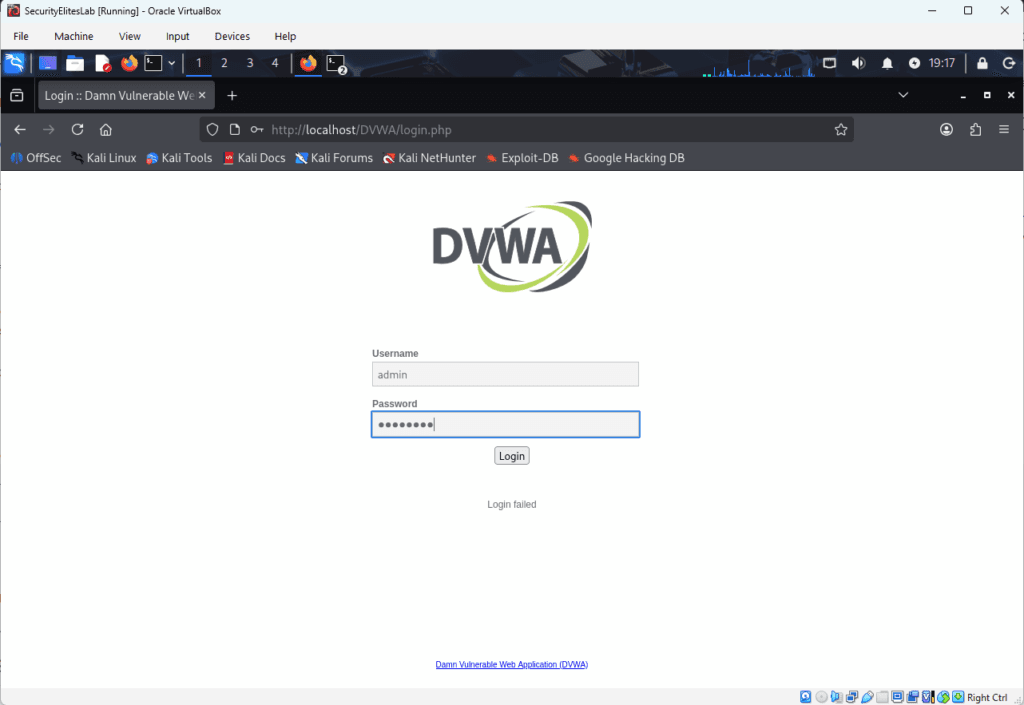
Open a web browser on the Kali Linux machine and navigate to the target application.
Example:
http://localhost/DVWA
If the webpage loads successfully, the web server is running and accessible.
Before launching automated scanning tools, perform basic manual reconnaissance. Ethical hackers often check whether the application exposes useful files such as robots.txt.
Example:
http://localhost/DVWA/robots.txt
Sometimes developers accidentally reveal hidden directories inside this file.
Example output:
user-agent:*
Disallow: /
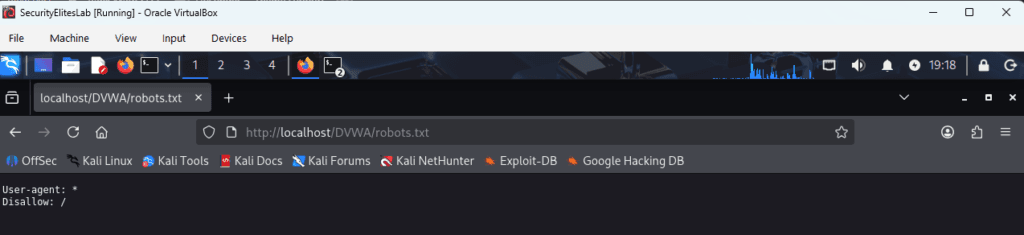
This information can immediately reveal sensitive directories without performing a full directory enumeration scan.
Step 2 – Choose a Directory Enumeration Tool
Several tools can perform directory bruteforce scans during web reconnaissance.
Commonly used tools include:
Gobuster
Dirb
Dirsearch
FFUF
Feroxbuster
In this tutorial we will use Gobuster, a popular tool included in Kali Linux that performs fast directory enumeration using wordlists.
Gobuster is widely used during penetration testing and bug bounty reconnaissance.
Step 3 – Locate Directory Wordlists
Wordlists are essential for directory bruteforce scans because they contain the directory names that the scanning tool will test against the target website.
Kali Linux includes multiple wordlists stored in the following directory:
/usr/share/wordlists/
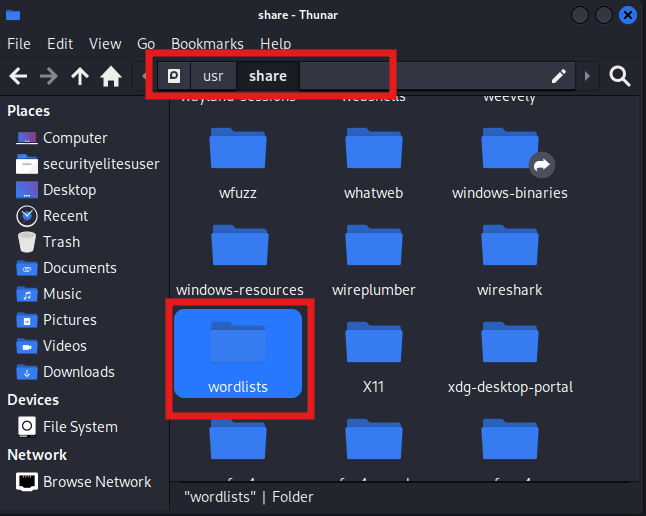
One commonly used directory enumeration wordlist is:
/usr/share/wordlists/dirb/common.txt
This wordlist contains many commonly used directory names such as admin, uploads, backup, and config.
Larger wordlists are also available in the SecLists repository, which contains extensive collections of directory discovery wordlists used during penetration testing.
Step 4 – Run the Gobuster Directory Scan
Now launch the directory bruteforce scan using Gobuster.
Open a terminal in Kali Linux and run the following command:
gobuster dir -u http://localhost/DVWA -w /usr/share/wordlists/dirb/common.txt
Command explanation
dir specifies directory scanning mode
-u specifies the target website URL
-w specifies the wordlist used for the scan
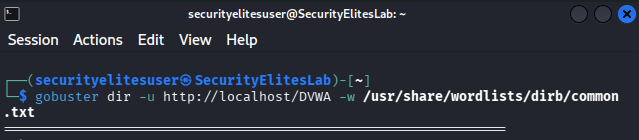
Gobuster will begin sending automated HTTP requests to test each directory name contained in the wordlist.
Example requests generated during the scan include:
http://localhost/DVWA/config
http://localhost/DVWA/database
http://localhost/DVWA/tests
This process is known as web directory enumeration.
Step 5 – Analyze the Scan Results
After running the Gobuster command, the tool will display directories discovered during the scan.
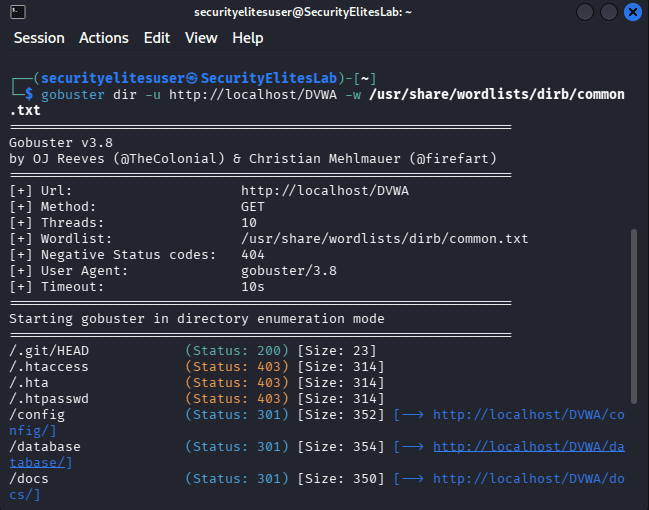
Example output:
/config (Status: 301)
/database (Status: 301)
/tests (Status: 301)
/.htaccess (Status: 403)
/php.ini (Status: 200)
Each status code provides valuable information about the directory.
200 indicates that the directory or file exists and is accessible.
301 or 302 indicates that the directory or file exists but redirects elsewhere.
403 indicates that the directory or file exists but access is restricted.
Even if access is denied, the attacker still learns that the directory or file exists on the server.
This information helps security professionals map the internal structure of the web application.
Step 6 – Investigate Discovered Directories
After discovering directories through directory enumeration, ethical hackers manually investigate them to understand their purpose.
For example:
http://localhost/DVWA/config
This directory might contain config files of the application and discovering an config folder may reveal a critical config informations like database usernames and password.
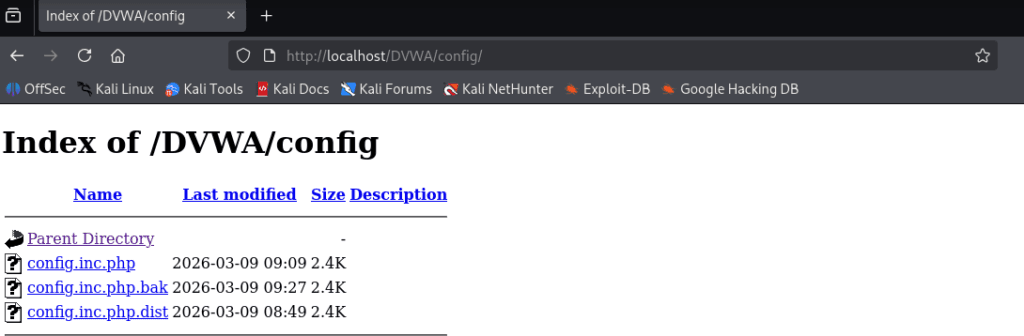
Investigating discovered directories helps identify potential vulnerabilities such as exposed files, misconfigured permissions, or insecure administrative portals.
Step 7 – Expand the Directory Enumeration Process
Professional penetration testers rarely stop after one directory scan.
After discovering an initial directory such as /config, testers may perform additional scans within that directory to discover deeper application components.
Example command:
gobuster dir -u http://localhost/DVWA/config -w /usr/share/wordlists/dirb/common.txt
This recursive scanning approach helps reveal additional endpoints, hidden files, and nested directories.
By completing this lab exercise, students gain practical experience performing directory bruteforce using Kali Linux tools.
They learn how automated scanners discover hidden web directories, how to interpret server responses, and how attackers map the internal structure of web applications.
Practicing these techniques in a safe training environment helps build the foundational skills required for ethical hacking and penetration testing.
6 Simple steps to Protect Directory Bruteforce attacks
Organizations should assume that directory bruteforce attempts will occur regularly because attackers continuously scan public websites searching for hidden directories. Understanding how directory enumeration works allows security teams to implement effective monitoring and defense mechanisms.
A strong security strategy focuses on reducing the attack surface while detecting suspicious scanning activity early.
1. Implement Access Controls for Sensitive Directories
One of the most effective defenses against directory bruteforce attacks is implementing proper authentication and authorization controls.
Sensitive directories such as administrative dashboards, internal APIs, and backup storage locations should always require authentication before access is granted.
Examples of sensitive directories that must be protected include:
/admin
/internal
/backup
/config
Using authentication mechanisms such as secure login systems and role-based access controls ensures that unauthorized users cannot access critical application components.
Even if attackers discover the directory through web directory enumeration, they should not be able to access its contents.
2. Enable Rate Limiting and Request Throttling
Directory brute force scans generate a large number of HTTP requests in a short period of time. Attackers rely on automated tools that send thousands of directory requests using predefined wordlists.
Rate limiting helps mitigate this behavior by restricting how many requests a user or IP address can send within a specific time period.
When rate limits are exceeded, the server can temporarily block or throttle additional requests. This significantly slows down automated directory bruteforce scans and reduces the effectiveness of reconnaissance attempts.
3. Deploy Web Application Firewalls
Web Application Firewalls play an important role in detecting and blocking suspicious traffic patterns associated with directory enumeration.
Modern WAF solutions analyze incoming requests and identify unusual behavior such as:
Large numbers of sequential directory requests
Repeated attempts to access non-existent directories
Suspicious automated user agents
When these patterns are detected, the WAF can automatically block or challenge the request.
This adds an additional layer of protection against automated directory scanning tools.
4. Monitor Web Server Logs for Reconnaissance Activity
Security teams should regularly review web server logs to detect early signs of directory bruteforce activity.
Indicators of suspicious scanning behavior may include:
Multiple requests for different directories within seconds
Repeated 404 responses for random URL paths
Large volumes of sequential requests from a single IP address
Log monitoring tools and SIEM platforms can help automate the detection of these patterns.
Early detection allows security teams to respond quickly and block malicious scanning attempts.
5. Remove Unused or Development Directories
Many hidden directories discovered during web reconnaissance exist because of development leftovers.
Examples include:
/dev
/test
/staging
/beta
These directories are commonly used during development but should never remain accessible in production environments.
Security teams should perform regular audits to ensure that temporary directories and development environments are removed before deployment.
Reducing unnecessary directories significantly decreases the potential attack surface.
6. Conduct Regular Security Testing
Organizations should conduct periodic security assessments to identify hidden directories before attackers discover them.
Penetration testing and vulnerability assessments often include directory enumeration as part of the web application reconnaissance process.
By identifying exposed directories early, organizations can secure them before they become a security risk.
Regular security testing ensures that new application features or deployments do not unintentionally expose sensitive directories.
Frequently Asked Questions – Directory Bruteforce Guide
What is a directory bruteforce guide in ethical hacking?
A directory bruteforce guide explains how ethical hackers discover hidden directories and files on web servers using automated tools and wordlists. During web application reconnaissance, penetration testers perform directory enumeration by sending HTTP requests for common directory names such as admin, backup, uploads, or api. If the server responds with valid status codes, the tester knows that the directory exists. This technique helps identify hidden resources that may expose vulnerabilities or sensitive information.
Which tools are commonly used for directory enumeration?
Several tools are widely used during web directory enumeration and penetration testing. Popular tools include Gobuster, Dirb, Dirsearch, FFUF, and Feroxbuster. These tools automate the directory bruteforce process by sending thousands of HTTP requests using wordlists that contain common directory names. Security professionals use these tools during reconnaissance to discover hidden endpoints and application components.
Why do attackers search for hidden directories?
Attackers perform directory discovery attacks because hidden directories often expose valuable application components. These may include administrator dashboards, file upload locations, development environments, configuration files, or internal APIs. Discovering these directories allows attackers to expand the attack surface of a target web application and identify potential vulnerabilities.
Is directory bruteforce illegal?
Directory bruteforcing is only legal when performed with proper authorization. Ethical hackers use directory enumeration techniques during approved penetration tests, bug bounty programs, or cybersecurity training labs. Running directory bruteforce scans against systems without permission may violate cybersecurity laws and organizational policies.
Can websites prevent directory bruteforce attacks?
Organizations can reduce the risk of directory bruteforce attacks by implementing strong security controls. These include authentication for sensitive directories, rate limiting to block automated scans, monitoring server logs for suspicious traffic patterns, and deploying web application firewalls. Regular security testing also helps identify exposed directories before attackers discover them.
Should beginners learn directory bruteforce techniques?
Yes. Learning how directory enumeration works is an essential skill for cybersecurity students and aspiring penetration testers. A directory bruteforce guide helps beginners understand how attackers map web applications during reconnaissance. Practicing this technique in safe lab environments helps build a strong foundation in ethical hacking and web security testing.
Conclusion
This directory bruteforce guide explained how cybersecurity professionals use directory enumeration techniques to discover hidden directories and files inside web applications. Although the concept may appear simple, directory bruteforcing remains one of the most effective reconnaissance techniques used in ethical hacking and penetration testing.
Hidden directories frequently expose critical application components such as administrative dashboards, backup archives, development environments, and internal APIs. Discovering these resources allows security professionals to identify vulnerabilities and reduce the attack surface of a web application.
However, effective cybersecurity testing involves more than running automated tools. Skilled penetration testers analyze scan results carefully, investigate discovered resources, and understand how application architecture affects security.
If you want to build advanced ethical hacking skills, the next topics to study include:
Web reconnaissance techniques
Subdomain enumeration
Parameter fuzzing
Web vulnerability scanning
API security testing
Practicing these skills in controlled cybersecurity labs will significantly improve your understanding of real-world attack methodologies.
With consistent practice and hands-on experience, mastering techniques such as directory enumeration can become a strong foundation for a career in cybersecurity, penetration testing, or bug bounty research.
Further Learning Resources
To deepen your understanding beyond this directory bruteforce guide, the following cybersecurity resources provide additional learning material.
OWASP Web Security Testing Guide
https://owasp.org/www-project-web-security-testing-guide/
Gobuster Official Repository
https://github.com/OJ/gobuster
SecLists Wordlists Collection
https://github.com/danielmiessler/SecLists
These resources provide additional information about web security testing methodologies and tools used in directory bruteforce guide and reconnaissance.