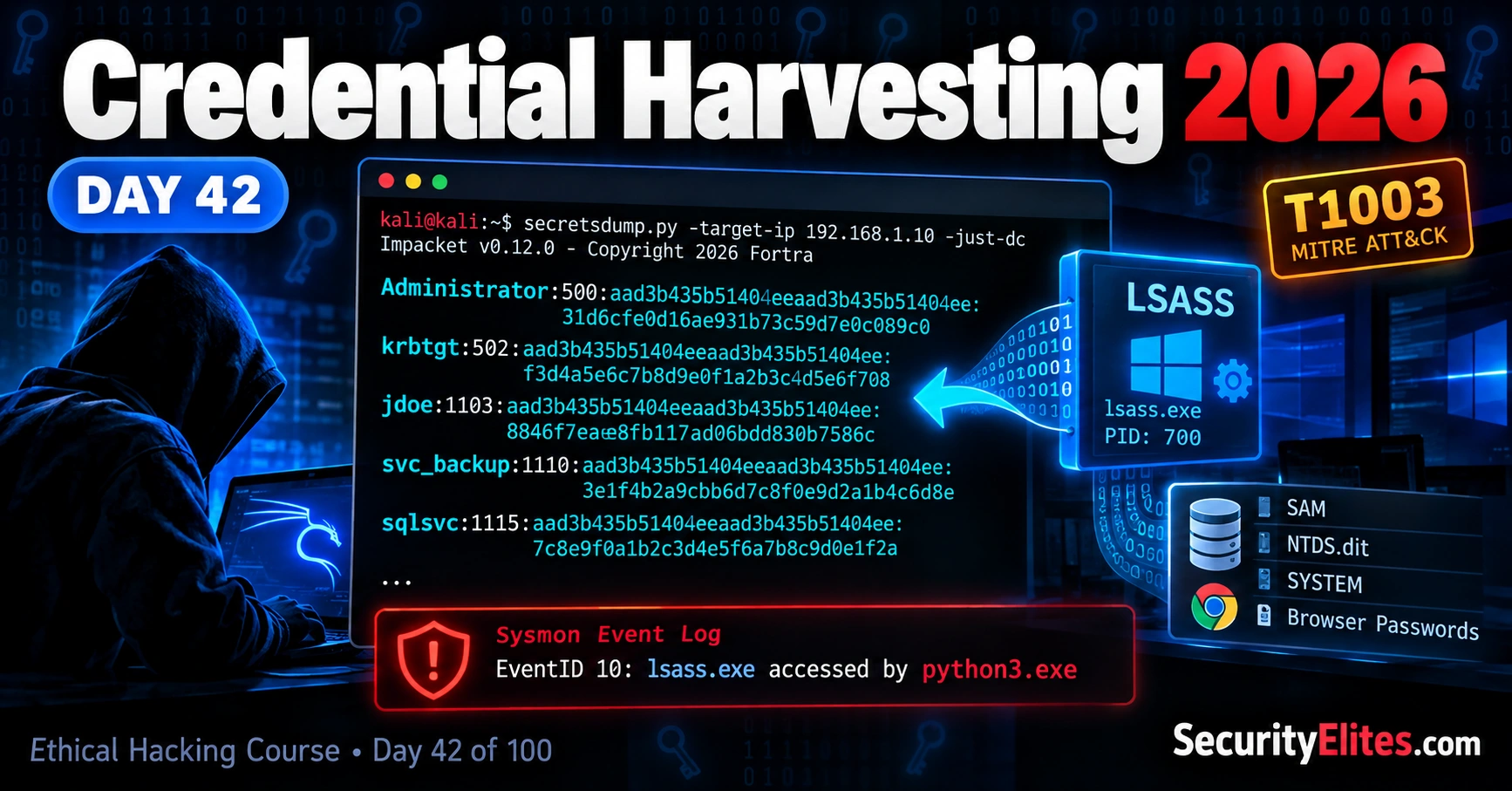
This article is a comprehensive educational guide on credential harvesting techniques used in Windows environments, designed for ethical hackers and security professionals. It covers where Windows stores credentials (LSASS, SAM, NTDS.dit, browser stores), how attackers extract them, what forensic artifacts they leave behind, and how defenders can detect and prevent these attacks. The material matters because understanding credential theft is essential for both penetration testers assessing security and defenders protecting systems.
- Windows Credential Storage ArchitectureWindows maintains credentials across multiple distinct stores: LSASS (a running process handling temporary authentication data in memory), SAM database (stores local account password hashes at C:WindowsSystem32configSAM), NTDS.dit (Active Directory database on domain controllers containing domain account hashes), LSA Secrets (protected system storage for service credentials), and browser credential stores. Each has different access requirements and protections; accessing one does not automatically grant access to others. The article emphasizes that defenders must understand these distincti
- LSASS Memory Dumping via MimikatzMimikatz requires SYSTEM or local administrator access and runs locally on a target machine to read LSASS process memory directly. The sekurlsa::logonpasswords command extracts the msv block (NTLM hash), wdigest block (plaintext passwords only on pre-Windows 8.1 or misconfigured systems), kerberos block, and credman block. The article shows that output contains usernames, domains, SIDs, NTLM hashes (32 hex characters suitable for hashcat -m 1000), and sometimes cleartext passwords depending on Windows version and security configuration. The offline alternative using comsvcs.dll and pypykatz av
- Secretsdump SAM/SYSTEM ExtractionImpacket's secretsdump tool connects remotely via SMB to extract SAM (local account hashes) and SYSTEM hive data without executing tools on the target. The output format is username:RID:LM_hash:NT_hash, where RID 500 = Administrator, 501 = Guest, and 1000+ = user accounts. The constant value aad3b435b51404eeaad3b435b51404ee appearing in the LM_hash field indicates LM hashing is disabled. Machine accounts (ending in $) should be ignored as they rotate automatically. NT hashes (mode 1000 in Hashcat) differ completely from NTLMv2 hashes (mode 5600) and must not be confused during cracking.
- DCSync Active Directory Replication AbuseDCSync exploits directory replication permissions to request sensitive directory information including password hashes through DRSUAPI protocol without directly copying NTDS.dit. An account with 'Replicating Directory Changes' or 'Replicating Directory Changes All' permissions can retrieve domain account hashes remotely. Unlike offline extraction, DCSync uses legitimate Windows replication functionality but generates suspicious network activity when initiated from non-domain-controller accounts. BloodHound can identify accounts with DCSync-capable rights for review.
- Detection Events Across All MethodsEach harvesting technique produces specific Windows event signatures: LSASS memory reads generate Sysmon Event ID 10 with GrantedAccess 0x10 (VM_READ) or 0x1fffff from non-Windows processes; SAM/SYSTEM dumps via SMB produce Windows Event ID 5145 (network share access to C$WindowsSystem32config); DCSync generates Windows Event ID 4662 with GUID 1131f6aa when initiated from non-domain-controller sources; VSS shadow copy access creates Windows Event ID 8222. The critical detection indicator for DCSync is the source account type—domain controllers replicating is normal, but workstations attempt
- Credential Guard Virtualization-Based ProtectionCredential Guard uses virtualization-based security (VBS) to isolate certain secrets from the normal Windows operating system, making traditional LSASS credential-dumping less effective on supported systems. However, the article emphasizes critical limitations: Credential Guard does not protect SAM databases, prevent DCSync attacks, stop phishing-induced credential entry, or work uniformly across all Windows editions and hardware configurations. Its effectiveness depends on specific platform support and configuration; deployment requires checking Microsoft's current requirements rather than as
- Protected Users Group RestrictionsProtected Users is an Active Directory security group that applies authentication restrictions to privileged accounts: members cannot authenticate via NTLM (breaking applications still dependent on it), face credential-caching restrictions to reduce reusable authentication credential retention, receive additional Kerberos ticket-lifetime restrictions, and experience reduced exposure to legacy authentication methods. The article warns this is not a universal credential-theft prevention mechanism but rather changes authentication rules for member accounts; protection depends on domain configurat
- Defensive Audit and Monitoring StrategyThe article advises defenders to protect both live systems and backups (since Volume Shadow Copy snapshots can contain earlier sensitive file copies), review and restrict Active Directory replication permissions to only necessary accounts, monitor directory-service auditing with appropriate SACL settings, investigate unusual replication activity sourced from unexpected accounts or systems, and apply principle of least privilege to administrative credentials. The core lesson is that defending credentials requires understanding the entire chain of where account data is stored, what protects it,
Bottom line: Credential harvesting succeeds because Windows stores authentication data across multiple locations—each accessible through different techniques (LSASS memory, offline SAM dumps, Active Directory replication)—but each leaving distinct forensic artifacts (Sysmon Event ID 10, Windows Event ID 5145, Event ID 4662) that alert properly configured defenders. Effective defense requires understanding both the technical mechanisms attackers use and implementing layered protections (Credential Guard, Prot
Part of the Ethical Hacking 100-Day Course
🎯 What you’ll learn in Day 42
⏱ ~30 min read · 3 hands-on exercises · Kali Linux + authorised lab VMs
- Metasploitable 2: Running and reachable from Kali Linux.
- Previous lab access: Review the vsftpd lab or Samba lab.
- Impacket: Installed on Kali Linux. Verify using
impacket-secretsdump --help. - Windows lab VM: Sysmon installed and configured, as covered in Day 41.
- Authorised environment: All testing is limited to your own lab or explicitly authorised systems.
Ready to begin? Make sure you’ve checked each requirement before moving on to the hands-on exercises.
📋 Credential Harvesting – Table of Contents
- Where Windows stores credentials
- LSASS — the high-value memory store
- SAM and SYSTEM — the offline store
- DCSync via secretsdump — the network approach
- Running secretsdump against your lab
- Reading the output: NT hashes, LM hashes, and machine accounts
- Detection: the events that catch every method
- Defence: Credential Guard and Protected Users
Where Windows Stores Credentials
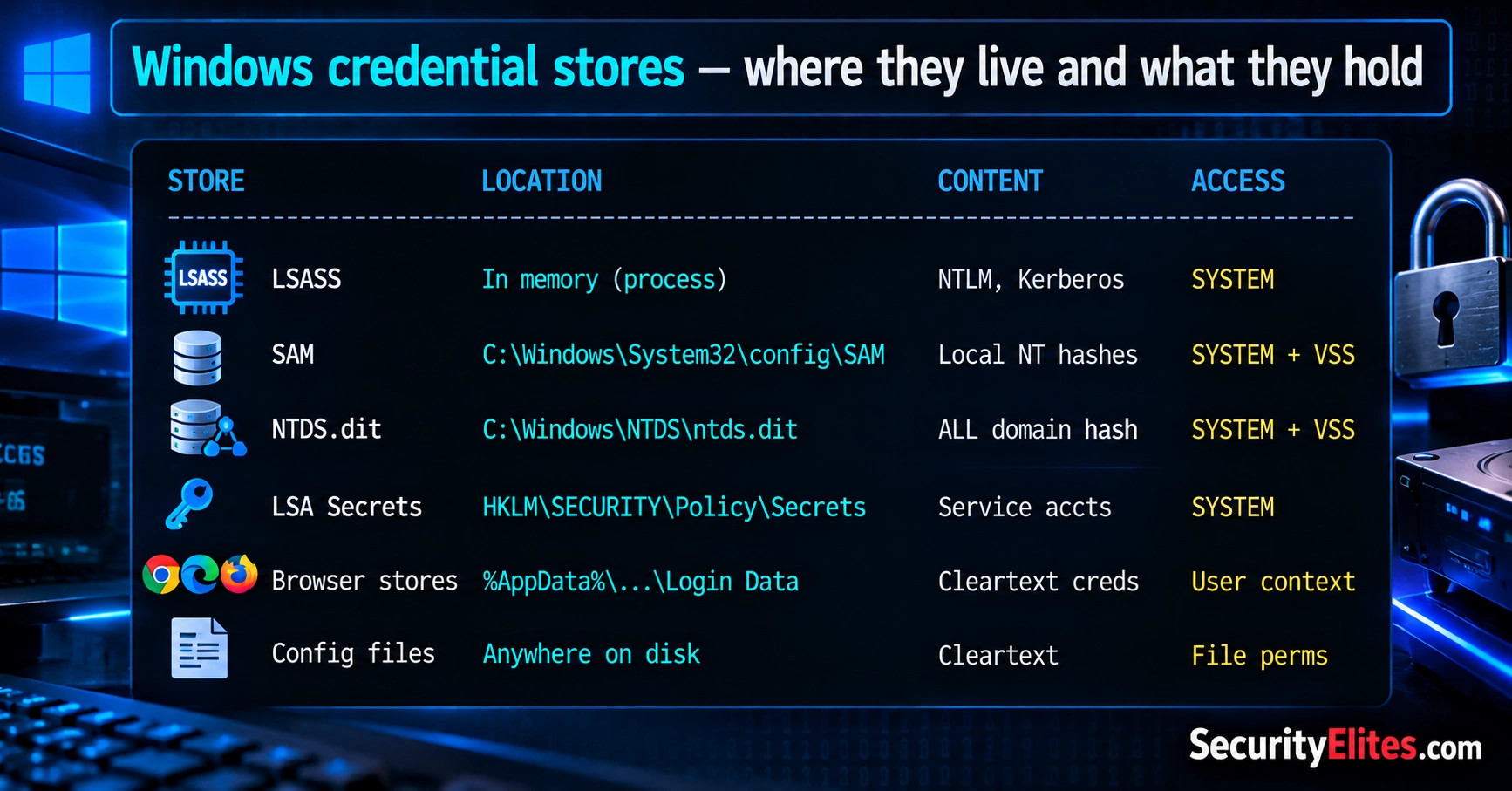
Before we start exploring credential harvesting, let’s understand one basic thing: where does Windows keep information related to your login? Whenever you sign in to a Windows computer, the operating system and various applications handle information that helps verify your identity. Some of this information is kept temporarily in memory, some is stored in system files or databases, and some may be saved by your web browser or other applications.
Think of these locations as different storage boxes, each holding a different type of information. For example, LSASS is a Windows process that manages important authentication tasks, the SAM database stores information about local user accounts, and NTDS.dit contains Active Directory data on domain controllers. Browsers and applications may also save login information for convenience.
So, why does this matter to an ethical hacker? If an attacker gains access to a computer, they may try to find authentication information that could help them access other accounts or systems. As a security tester, your job is to understand these risks and identify weaknesses within your authorised testing scope. As a defender, you need to know how to protect these storage locations and recognise suspicious attempts to access them.
In the next section, we’ll look at the main Windows credential stores, what each one contains, and the security controls that help protect them. Don’t worry if these names are new to you — we’ll take them one at a time.
The Main Windows Credential Stores
Let’s look at the main places where Windows and its applications keep authentication-related information. You don’t need to memorise everything at once. Start by understanding what each store does and why it matters for security.
- LSASS (Local Security Authority Subsystem Service): A Windows process that handles important login and authentication tasks. Depending on the configuration, certain authentication material may be present in its memory.
- SAM (Security Account Manager): A Windows database that stores information about local user accounts, including password hashes.
- NTDS.dit: The Active Directory database used on Windows domain controllers. It contains directory information, including password hashes for domain accounts.
- LSA Secrets: Protected Windows storage that can contain certain system secrets, such as service-account credentials or other sensitive authentication data.
- Browser credential stores: Web browsers may save usernames, passwords, and other login-related information to make signing in easier.
- Configuration files and application data: Some applications store credentials or secrets in configuration files, scripts, or other files. Whether this information is protected depends on how the application is designed and configured.
Here’s the key takeaway: These stores don’t all contain the same information, and access to one doesn’t automatically grant access to the others. Their contents and protections depend on the Windows version, system role, application, and security configuration. Understanding these differences will help you recognise credential exposure risks and learn how defenders detect suspicious access.
SecurityElites Ethical Hacking Course — Day 42.
🧠 EXERCISE 1 — THINK LIKE A HACKER (10 MIN · NO TOOLS)
Before using any tools, I want you to practise thinking like a security tester. Read each situation carefully and try to answer the questions yourself before revealing the explanations.
-
Scenario 1: You’re a local administrator.
You’ve gained authorised access to a standalone Windows computer using a local administrator account. Which credential stores might be accessible to you, and why might some information still require additional privileges? -
Scenario 2: You’re assessing a domain controller.
You have authorised SYSTEM-level access to a Windows domain controller. Which database contains password hashes for domain accounts? Why do security teams also monitor directory replication activity? -
Scenario 3: You discover a forgotten configuration file.
A developer has left a file atC:\apps\app.configcontaining a database connection string with a plaintext username and password. Why could this be a serious security finding, even compared with discovering password hashes?
💡 Reveal the answers and explanations
Answer 1: Administrator access has limits.
A local administrator can access many system resources, but that doesn’t mean every credential store is automatically readable. LSASS memory and protected system files have additional access controls. The result depends on the Windows configuration, enabled protections, and the privileges of the current process. Browser credentials also depend on the user profile and the browser’s protection mechanisms.
Answer 2: NTDS.dit and directory replication.
The NTDS.dit database stores Active Directory information, including password hashes for domain accounts. Access to this data is highly sensitive. Another technique, called DCSync, abuses directory replication permissions to request account data through a replication protocol. Defenders should monitor unusual replication requests and tightly restrict the accounts permitted to perform them.
Answer 3: Plaintext credentials can be immediately usable.
A password stored in cleartext may be usable without any password-cracking process. Depending on its permissions and scope, it could provide direct access to a database, application, API, or other service. A password hash, on the other hand, generally requires a compatible authentication method or further analysis before it can be used to recover the original password.
My takeaway: Don’t judge a credential finding by its technical appearance alone. Ask yourself what resource it protects, what access it grants, whether the credential is still valid, and what the potential business impact would be. Those questions help you write much stronger security reports.
LSASS — Understanding Windows Authentication Memory
Let’s start with one of the most important Windows processes you’ll encounter in credential security: LSASS, short for Local Security Authority Subsystem Service. You can find it running as lsass.exe on a Windows computer. Its job is to handle important security tasks, including parts of the login and authentication process. To help Windows authenticate users efficiently, certain authentication information may be kept in memory while users are signed in.
Why should you care about this as an ethical hacker? Imagine that several employees are signed in to a company server. The system may be handling authentication information for multiple sessions at the same time. If an attacker gains sufficient privileges and accesses sensitive information in LSASS memory, those credentials or authentication materials could potentially be exposed. However, the exact information available depends on the Windows version, security settings, authentication method, and enabled protections. It doesn’t mean that every user’s plaintext password is sitting in memory.
Tools such as Mimikatz are well known for demonstrating how attackers can abuse access to authentication material. We’ll discuss these tools and their security implications as the course progresses. For now, focus on the underlying concept: access to a process does not automatically mean unrestricted access to everything it handles. Windows uses permissions and security controls to restrict access to sensitive processes. Some operations require elevated privileges, and protections such as process security restrictions can make unauthorised access more difficult.
There’s another important protection to understand: Windows Defender Credential Guard. On supported systems, it uses virtualization-based security to isolate certain secrets from the normal operating system. This helps protect sensitive authentication material even if an attacker gains significant access to Windows. It doesn’t eliminate every credential theft technique, but it can substantially reduce the information exposed through LSASS memory access.
What I want you to remember: LSASS is a critical Windows security process, which makes it an important focus for both attackers and defenders. As we continue, we’ll look at how security teams identify suspicious attempts to access it and how Windows protections help reduce the risk.
Mimikatz — reading LSASS step by step
When you have interactive or Meterpreter access to a Windows machine — not just remote credentials — Mimikatz is the tool you reach for. Where secretsdump connects over SMB from Kali, Mimikatz runs on the target and reads LSASS process memory directly. That distinction matters for defenders: secretsdump leaves a network logon event on the wire, Mimikatz leaves a process-access event on the target. Different tool, different detection profile, same credential output. Know both because real engagements give you one or the other depending on what access you’ve landed.
Everything here assumes SYSTEM or local admin access. You get this from a Meterpreter session after exploiting vsftpd, Samba, or any other service. If you’re running as a low-privilege user, escalate first — LSASS memory is only readable with SeDebugPrivilege, which is held by SYSTEM and local admins but not by standard users.
User Name / Domain → the account that logged on; Domain = machine name (local) or AD domain
SID ending :500 → built-in Administrator; :501 = Guest; :1000+ = created accounts
msv block → NTLM hash (32 hex chars) — THIS is what you use
feed to: hashcat -m 1000 hash.txt rockyou.txt
use for pass-the-hash: pth-winexe, psexec, CrackMapExec
wdigest block → Password (null) = secure — UseLogonCredential registry = 0
Password [admin123] = CRITICAL — cleartext in memory
only seen on pre-Win8.1 or explicitly re-enabled via registry
kerberos block → Password (null) = normal; cleartext only with Kerberos delegation active
credman block → Credential Manager saves (RDP targets, saved browser passwords)
lsass.exe with GrantedAccess 0x1fffff (all access) or 0x1010 (read + query information). This fires regardless of whether you ran sekurlsa::logonpasswords or the comsvcs.dll dump — both require a PROCESS_VM_READ handle to LSASS, which is what EID 10 captures. Sysmon Event ID 7 additionally logs the sekurlsa.dll module load when Mimikatz imports it. The comsvcs.dll approach is detected from the parent-child chain: legitimate processes never open LSASS from rundll32. A properly tuned Sysmon rule alerts on any EID 10 where the target image is lsass.exe and the source is not a known Windows process.SAM and SYSTEM — Understanding Offline Credential Storage
Now let’s look at another important part of Windows credential security: the SAM database and the SYSTEM registry hive. Unlike LSASS, which is a running process, these are files stored on the Windows computer. Understanding how they work together will help you see why attackers may target them and why protecting system files is so important.
SAM stands for Security Account Manager. Windows uses this database to store information about local user accounts, including password hashes. A password hash is the result of processing a password through a mathematical function. Windows can use the stored hash for authentication-related operations without saving the original password as ordinary readable text. You can find the SAM file at C:\Windows\System32\config\SAM.
The operating system protects this file while Windows is running. That means you generally cannot treat it like an ordinary document and simply copy it whenever you want. Windows uses file permissions, system controls, and other protections to prevent unauthorised access to sensitive account data.
So, where does the SYSTEM hive fit in? The SYSTEM hive is another important Windows registry file. It contains configuration information, including material used in protecting data stored in the SAM database. In simplified terms, the SAM database contains the local account password hashes, while information in the SYSTEM hive is needed to derive the key material used to protect those hashes.
You may also hear about Volume Shadow Copy Service (VSS). Windows can use this technology to create snapshots of a volume, helping applications and backup software obtain consistent copies of data. Depending on the circumstances, snapshots can contain earlier copies of sensitive system files. This is useful for recovery, but it also means that poorly protected backups and snapshots can become a security risk.
Security tools such as Impacket’s secretsdump can analyse Windows account data in authorised security assessments. Depending on the collection method, permissions, and target configuration, the tool can retrieve and process account hashes from supported sources. Its capabilities are not a guarantee that every target will be accessible, and Windows security controls may prevent particular operations.
From a defender’s perspective, this is why I recommend protecting administrative credentials, restricting access to backups and shadow copies, applying least privilege, and monitoring suspicious access to sensitive files. A forgotten backup can expose account data just as seriously as a weakness in a live system.
What You Should Remember
- SAM: Stores information about local Windows accounts, including password hashes.
- SYSTEM: Stores Windows configuration data and key material relevant to protecting SAM contents.
- VSS: Creates volume snapshots for recovery and other system purposes; these snapshots require appropriate security controls.
- Impacket secretsdump: A security assessment tool that can process supported credential data when the required access and conditions are available.
- Defensive lesson: Protect both live systems and their backups, because sensitive information can be exposed through either.
My advice: Don’t focus only on the files themselves. Think about the entire chain: where account data is stored, what protects it, which backups may contain copies, and who can access those copies. That is how you move from memorising Windows internals to understanding real credential-security risks.
DCSync — Understanding Active Directory Replication Attacks
So far, we’ve looked at credential information stored in Windows memory and local system files. Now let’s explore a different approach: DCSync. This technique is particularly important when you’re learning Active Directory security because it can expose password hashes for domain accounts without directly copying the domain controller’s database file.
First, let’s understand how Active Directory works. In many organisations, Windows computers use a central directory called Active Directory to manage user accounts, computers, groups, and access permissions. The servers that maintain this directory are called domain controllers. When an organisation has multiple domain controllers, they need to exchange directory updates so that the information remains consistent. This process is called directory replication.
Domain controllers use Microsoft’s Directory Replication Service Remote Protocol, commonly called DRSUAPI, for replication-related operations. Under normal circumstances, this is a legitimate and necessary part of Active Directory administration. DCSync abuses this replication functionality when an account has excessive or improperly granted replication permissions.
Here’s the important idea: an account with the relevant replication rights may be able to request sensitive directory information through the replication protocol. Depending on the permissions granted, this can include password hashes. An attacker who compromises such an account may therefore obtain sensitive credential data without directly opening or copying the NTDS.dit database file.
This is what makes DCSync different from offline credential extraction. With an offline approach, a tester examines an authorised copy of directory data or the files needed to process it. With DCSync, the activity involves requesting directory information through a network protocol. The underlying mechanism is legitimate, but unauthorised use of replication privileges can turn it into a serious security incident.
Why Do Replication Permissions Matter?
Active Directory has permissions that allow authorised systems and accounts to replicate directory changes. These include rights commonly known as Replicating Directory Changes and Replicating Directory Changes All. Some highly privileged accounts and domain controllers have relevant permissions by design, while other accounts may receive them through explicit delegation or group membership.
If an ordinary service account or an unexpected user has powerful replication rights, that can create a serious security risk. An attacker who compromises the account may be able to abuse those permissions to retrieve sensitive directory data. This is why security teams should regularly review who has replication rights and whether each assignment is necessary.
Where Does Impacket secretsdump Fit In?
Impacket is a collection of Python tools and protocol implementations used in network security testing. Its secretsdump utility supports several credential-collection methods, including processing authorised offline data and certain Active Directory replication-based operations.
You may encounter the option -just-dc-ntlm in documentation and security research. It relates to collecting NTLM password-hash data from a domain controller rather than performing every collection operation supported by the tool. Whether a particular operation succeeds depends on the account’s permissions, the target environment, and applicable security controls.
Tools such as BloodHound help defenders and penetration testers understand relationships between accounts, groups, permissions, and systems. They can help identify accounts with DCSync-capable rights, allowing a security team to investigate whether those privileges are justified. Finding such a permission does not automatically mean an attack has occurred, but it identifies an important path to review.
How Can Defenders Detect DCSync?
Because DCSync uses directory replication functionality, defenders should investigate unusual replication requests, especially when they originate from systems or accounts that are not expected to perform domain-controller replication.
- Windows Security Event ID 4662: When the relevant directory-service auditing and SACL settings are configured, this event can record operations involving directory objects and replication-related permissions.
- Account and source analysis: Check which account initiated the activity, which system it came from, and whether the behaviour matches an approved replication or administrative task.
- Permission reviews: Identify unexpected accounts with replication rights and remove permissions that are not required for their intended duties.
- Correlated alerts: Investigate whether unusual replication activity coincides with suspicious logons, privilege escalation, or other signs of account compromise.
Keep in mind that normal domain controllers also perform legitimate replication. Detection therefore depends on audit configuration, environment-specific baselines, and the context of the event rather than treating every replication operation as malicious.
The Main Lesson
DCSync shows why Active Directory security is about more than protecting files. A domain controller can expose sensitive information through legitimate management protocols if the requesting account has excessive permissions. Protect privileged accounts, audit replication rights, monitor unexpected replication activity, and investigate suspicious authentication events.
My advice: When reviewing an Active Directory environment, always ask who can replicate directory data and why. Restricting those permissions is an important step in preventing a compromised account from becoming a domain-wide credential exposure incident.
Running secretsdump against your lab
Now let’s run it. Metasploitable 2 uses a Linux Samba stack, not a Windows Active Directory, so we’re going to use secretsdump’s SAM-and-SYSTEM mode rather than DCSync. This is the mode that grabs local account hashes via SMB — the same workflow you’d use on a Windows workstation you’ve compromised. Make sure Metasploitable is up and your Kali box can reach port 445.
Reading the output: NT hashes, LM hashes, and machine accounts
That output looks like a lot of hex. Here’s how to read every field so nothing is ambiguous in your report or your cracking session. Each line is: username:RID:LM_hash:NT_hash. The RID is the Relative Identifier — 500 is always Administrator, 501 is Guest, 1000+ are regular user accounts.
⚡ EXERCISE 2 — LAB TERMINAL (15 MIN)
Run secretsdump against Metasploitable and work the full chain:
- Run
impacket-secretsdump msfadmin:msfadmin@192.168.56.102(substitute your Metasploitable IP). Confirm you get hash output. - Extract all NT hashes into a file:
impacket-secretsdump msfadmin:msfadmin@192.168.56.102 | grep ':::' | cut -d: -f4 > nt_only.txt. Open and verify the file contains only 32-character hex strings. - Run Hashcat against the NT hashes:
hashcat -m 1000 -a 0 nt_only.txt /usr/share/wordlists/rockyou.txt --force. Screenshot any cracked results. - For each cracked hash, note: which account does it belong to, what was the plaintext password, and what would an attacker be able to access with it on a real network?
Detection: the events that catch every method
Every credential harvesting method leaves a telemetry trail. The defenders who catch it are the ones who know where to look and have their logging configured to capture it. Here’s the map — the event that each method produces, where it shows up, and what makes it distinguishable from legitimate activity.
⚡ EXERCISE 3 — DETECTION LAB (15 MIN)
Read the telemetry that secretsdump leaves behind:
- On your Windows lab VM (not Metasploitable), open Event Viewer and navigate to Windows Logs → Security. Filter by Event ID 5145. Do you see any log entries from recent SMB share access? What path was accessed?
- Open the Sysmon Operational log (Applications and Services Logs → Microsoft → Windows → Sysmon → Operational). Filter for Event ID 10. Look at the GrantedAccess field — do any entries show access to lsass.exe from a non-Windows process?
- Write in your notes: if you were a SOC analyst and saw Event ID 4662 fired by a workstation account (not a DC) requesting DRSUAPI replication, what would be your immediate response, and why is the non-DC source the critical indicator?
Defence — Credential Guard and Protected Users
We’ve now looked at several ways credentials can become exposed on Windows systems. The next question is the one I always want you to ask during a security assessment: how do we make credential theft harder, even if an attacker manages to compromise a computer?
Two important Windows security features are Credential Guard and the Protected Users security group. They solve different problems, so I don’t treat them as interchangeable. Credential Guard helps isolate certain authentication secrets on supported Windows devices, while Protected Users applies stricter authentication rules to selected Active Directory accounts. Used alongside least privilege, strong monitoring, and good account hygiene, they can significantly reduce credential theft risks.
1. Windows Credential Guard — Protecting Sensitive Authentication Material
Let’s start with Credential Guard. Normally, Windows handles authentication using operating-system components that need to communicate with one another. If an attacker gains powerful privileges on a computer, they may try to abuse access to those components to obtain sensitive authentication material.
Credential Guard uses virtualization-based security (VBS) to isolate certain secrets in a protected environment. This separation makes it harder for ordinary code running in the main Windows operating system to access the protected information. It is designed to reduce the risk associated with techniques that attempt to steal authentication material from LSASS.
For example, imagine an attacker gains administrative access to a supported workstation and attempts to extract protected authentication secrets from LSASS. When Credential Guard is correctly enabled, certain secrets are isolated rather than being available to the normal operating system in the same way. This can make traditional credential-dumping techniques less effective.
But here’s the important limitation: Credential Guard does not protect every credential store or prevent every form of credential theft. It does not, by itself, secure the SAM database, prevent an attacker from abusing excessive Active Directory replication permissions, or stop users from entering passwords into a phishing page. Its effectiveness depends on platform support, configuration, and the attack technique involved.
Compatibility also matters. Availability depends on the Windows edition, version, hardware, and configuration. Before recommending deployment, check Microsoft’s current requirements for the devices in scope rather than assuming every Windows computer supports the same features.
2. Protected Users — Hardening Privileged Domain Accounts
Now let’s look at the Protected Users security group in Active Directory. This group applies additional authentication restrictions to its members. It is particularly relevant when you’re protecting accounts that have powerful permissions across the organisation.
For example, a domain administrator account may be able to manage users, computers, and important domain settings. If an attacker compromises that account, the consequences can be far more serious than compromising an ordinary user account. Reducing the authentication methods and credential-caching behaviours available to privileged accounts helps limit some of those risks.
On supported domain configurations, members of Protected Users are subject to restrictions that include the following:
- NTLM restrictions: Protected Users accounts cannot authenticate using NTLM. Applications and services that still depend on NTLM may therefore stop working for these accounts.
- Credential-caching restrictions: Windows applies restrictions intended to reduce the retention of reusable authentication credentials on supported devices.
- Kerberos protections: Additional restrictions apply to Kerberos authentication, including ticket-lifetime and renewal behaviour.
- Reduced exposure to legacy authentication: The group helps prevent certain older authentication practices from weakening the security of privileged accounts.
One detail worth getting right in your reports: Protected Users is not a universal switch that prevents all credential theft. It changes the authentication rules for member accounts, and the resulting protection depends on the account, domain, operating-system version, and authentication scenario. Applications that rely on restricted authentication methods must be tested before deployment.
3. DCSync Requires a Different Defence
Remember the DCSync technique we discussed earlier? Credential Guard does not prevent DCSync simply by being enabled on a workstation. DCSync abuses Active Directory replication permissions, so the most important defence is to control which accounts have those permissions.
Review accounts that have directory replication rights, confirm that every assignment is necessary, and remove unnecessary privileges. Pay particular attention to service accounts, delegated administrators, and other accounts that do not need to perform domain replication.
You should also configure appropriate directory-service auditing and monitor for unusual replication activity. When an account or workstation that is not expected to perform replication requests sensitive directory data, investigate the event and verify whether the activity was authorised.
4. My Recommended Defensive Checklist
When I turn credential-harvesting findings into remediation advice, I prefer to give the organisation concrete actions instead of simply saying, “Enable Credential Guard.” Here’s a practical checklist you can adapt to an authorised assessment:
- Enable Credential Guard where supported: Validate hardware and Windows edition requirements, deploy the feature through approved policy, and verify that it is actually running.
- Harden privileged accounts: Assess whether eligible high-value Active Directory accounts should be members of Protected Users. Test application compatibility and follow Microsoft’s requirements before making changes.
- Review replication permissions: Identify accounts with DCSync-capable rights and remove unnecessary assignments.
- Protect local administrator accounts: Use unique, managed passwords and restrict unnecessary administrative access across endpoints.
- Monitor suspicious activity: Configure appropriate Windows and endpoint-security auditing for credential access and directory replication.
- Secure backups and snapshots: Restrict access to sensitive system files, backup repositories, and volume snapshots that could contain credential data.
- Prepare for compromise: Maintain an incident-response process for investigating suspected credential exposure, disabling compromised access, and rotating affected secrets safely.
5. How to Write a Strong Remediation Finding
Let’s say your assessment discovers that a privileged account has unnecessary replication permissions and that several workstations lack appropriate credential protections. Instead of writing a vague recommendation, explain the risk, identify the affected systems or accounts, and describe the corrective action.
Review and restrict Active Directory replication permissions to authorised accounts only. Evaluate Credential Guard deployment on supported Windows endpoints, and assess Protected Users eligibility for privileged accounts. Enable appropriate directory-service auditing, monitor unexpected replication activity, and validate the effectiveness of these controls after deployment.
This gives the system owner a clear set of actions while acknowledging that the controls address different parts of the problem.
Key Takeaways
- Credential Guard isolates certain authentication secrets to reduce exposure through supported credential-theft techniques.
- Protected Users applies stricter authentication restrictions to eligible Active Directory accounts.
- Replication permissions must be tightly controlled to reduce DCSync risk.
- Monitoring and auditing help defenders identify suspicious credential-access and replication activity.
- Layered security is essential because no single feature protects every credential store or prevents every attack.
My advice: When you finish a credential-security assessment, don’t just list the tools an attacker might use. Explain which security boundary failed, what the attacker could realistically access, and which controls would reduce that risk. That’s the difference between a list of technical observations and a useful professional security report.
🎯 Quick check: secretsdump returns this line: backupsvc$:1102:aad3b435...:f4ab3c.... What type of account is this, and should you spend time cracking its hash?
📋 Day 42 reference card
✅ Mark Day 42 complete
You understand where Windows stores credentials, can run a full secretsdump-to-Hashcat pipeline, and know exactly which events catch each method.
❓ Frequently asked questions
What is credential harvesting?
What is Impacket secretsdump?
What is DCSync?
What is the difference between NT and NTLMv2 hashes?
Does Credential Guard prevent all credential theft?
Why should privileged accounts be in Protected Users?
📚 Further reading
- Process Injection — Day 41 — the sibling technique; understanding injection helps you understand why LSASS access is detectable.
- Samba Usermap Script Lab — the foothold that gives you credentials to run secretsdump in this lab.
- Hashcat Tutorial — Kali Day 19 — crack NT hashes faster with rules, masks and hybrid attacks.
- External: MITRE ATT&CK T1003 — OS Credential Dumping — full sub-technique breakdown and detection guidance.
- External: Impacket on GitHub (Fortra) — the maintained source with secretsdump and all other Impacket tools.
Quick check: 5 questions
Get 4 of 5 right to pass. Sign in to earn 25 XP for passing.