FREE
Part of the AI/LLM Hacking Course — 90 Days
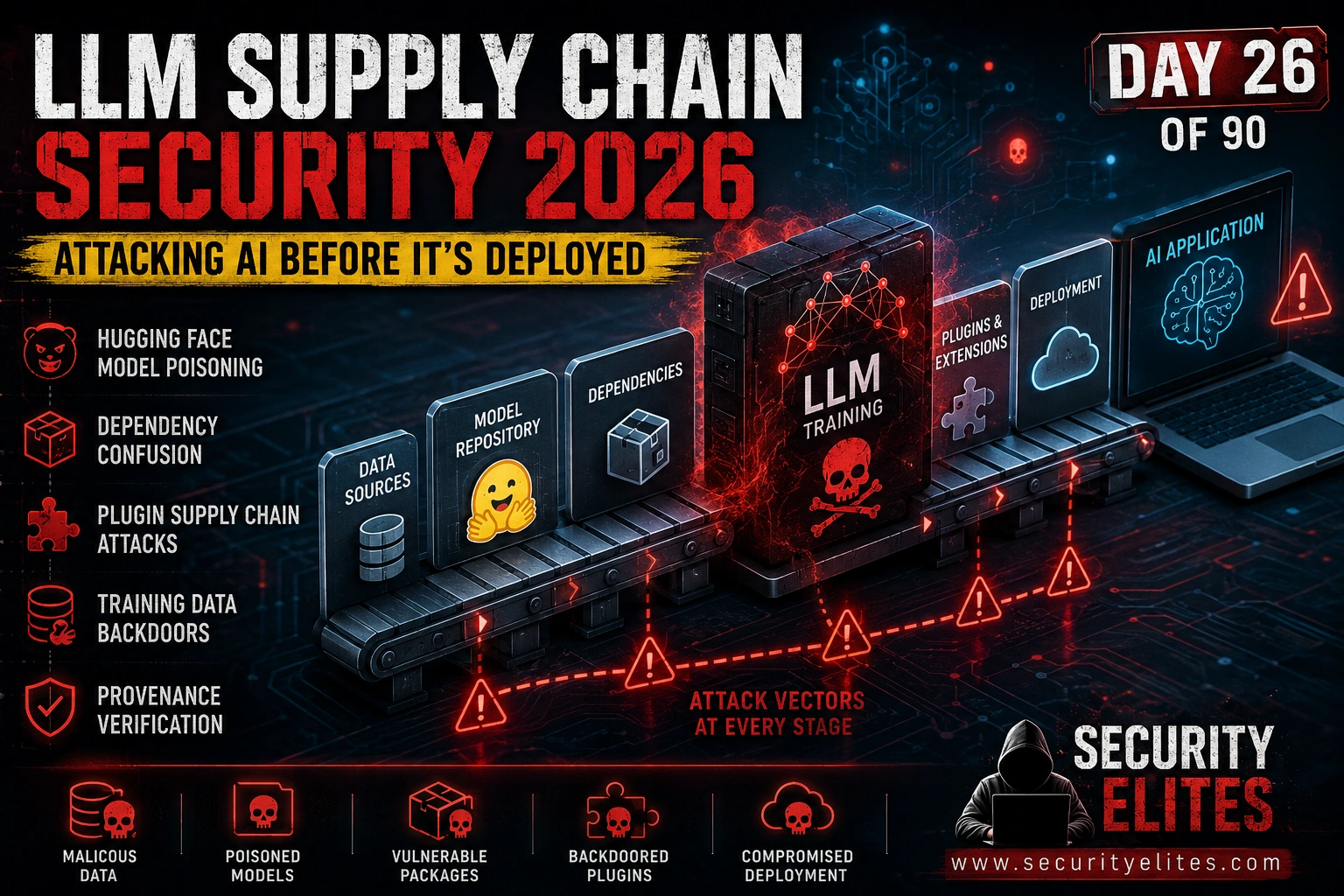
That’s the supply chain problem in miniature. The security focus in AI deployments runs almost entirely toward inference-time attacks — prompt injection, jailbreaking, extraction. The model file itself sits in a blind spot. It’s treated as a dependency, and dependencies get trusted. But a model file loaded from an unverified source is an executable artefact that runs with the permissions of whatever process loads it. Supply chain attacks on AI happen before the first user query. They travel with the model through staging, through testing, into production. Day 26 covers the complete LLM supply chain attack surface — model files, training data, dependencies, and the plugin ecosystem that connects AI to everything else.
🎯 What You’ll Master in Day 26
⏱️ Day 26 · 3 exercises · Think Like Hacker + Kali Terminal + Browser
✅ Prerequisites
- Day 7 — LLM03 Supply Chain Vulnerabilities
— the OWASP overview from Day 7 is the conceptual foundation; Day 26 builds the full assessment methodology on top of it
- Day 2 — How LLMs Work
— understanding model architecture and weights is prerequisite to understanding where supply chain attacks embed
- Python with pip-audit and modelscanner installed — Exercise 2 uses both for automated supply chain scanning
📋 LLM Supply Chain Security — Day 26 Contents
In Day 25 you wrote the report for the inference-time attack phase — everything from Days 16 through 24. Day 26 opens Phase 4 with the attack surface that precedes inference entirely: the supply chain. Day 27 covers full AI red team operations — how to structure a complete AI engagement from scoping through delivery.
Why AI Supply Chain Attacks Are Different
Traditional software supply chain attacks target packages and dependencies — code that runs in your application’s process. AI supply chain attacks have an additional attack surface that has no software equivalent: the model weights themselves. Weights are the parameters the model uses for every inference. They can encode behaviour that manifests only under specific input conditions, passing all standard tests while waiting for a trigger. There’s no equivalent in traditional software — a malicious NPM package runs malicious code, but it doesn’t hide that code inside millions of floating-point values that are indistinguishable from legitimate trained parameters.
The other distinction is persistence. A malicious dependency gets patched when the vulnerability is discovered. A backdoored model’s weights persist through the entire lifecycle of that model deployment. The attack travels with every copy of the weights — every fine-tune built on them, every deployment using them, every organisation that downloaded and trusted the model. Supply chain attacks on AI propagate through the trust graph of who uses which base model, in a way that has no parallel in traditional software vulnerabilities.
Model File Attacks — Pickle Payloads and SafeTensors
The most immediately exploitable supply chain vector is the model file format. PyTorch’s default serialisation format is pickle — a Python object serialisation format that executes arbitrary Python code during deserialization. When you call torch.load(model_file), Python deserialises the file and in doing so executes any Python code the file contains. That code runs with the full permissions of the loading process before a single inference call is made.
This isn’t a novel attack. Pickle deserialization as a code execution vector has been known for years in the Python ecosystem. The AI community imported the problem wholesale when PyTorch adopted pickle as its default format. The fix exists: SafeTensors format stores only the tensor values without executable code, and Hugging Face now recommends it for model sharing. But a large proportion of models on public repositories are still distributed as pickle files, and many organisations load them without scanning.
⏱️ 20 minutes · No tools needed
Supply chain assessment starts with mapping. You can’t assess what you haven’t enumerated. This exercise builds the complete supply chain map for a realistic enterprise AI deployment, then identifies which nodes represent the highest attack risk.
knowledge assistant. Here’s what you know about the stack:
Base model: Llama 3.1 70B downloaded from Hugging Face
Fine-tuned on: internal documents + public datasets
Framework: LangChain 0.2.x
Vector DB: ChromaDB with custom connector
Embedding model: all-MiniLM-L6-v2 from Hugging Face
Plugins: Slack tool, Confluence tool, Jira tool
Hosting: On-premises GPU server running Python 3.11
Model update process: Monthly, downloaded by a DevOps script
Package management: pip with no lock file, latest versions
QUESTION 1 — Supply chain node enumeration.
List every distinct supply chain node in this deployment.
For each node, state: what it is, who controls it, and
whether the enterprise verifies it before trusting it.
QUESTION 2 — Attack surface ranking.
Rank your top 3 supply chain nodes by attack risk.
For each: what specific attack does an adversary execute,
what access do they need to perform it, and what is the
blast radius if they succeed?
QUESTION 3 — The pip lock file gap.
“No lock file, latest versions” means dependencies are resolved
at install time. How does an adversary exploit this pattern?
What specific attack becomes possible that a lock file prevents?
QUESTION 4 — Plugin trust model.
The Slack, Confluence, and Jira plugins connect to external services.
What supply chain attack surfaces do these plugins introduce?
If the Confluence plugin’s developer account is compromised,
what can the attacker do to affect the enterprise AI system?
QUESTION 5 — Update pipeline attack.
The monthly model update is performed by a DevOps script that
downloads the model from Hugging Face.
Write the specific steps an attacker with write access to the
Hugging Face repository would follow to replace the production
model with a backdoored version on next update.
📸 Share your supply chain map in #day26-supply-chain on Comments.
AI Dependency Auditing
The AI framework ecosystem has grown fast. LangChain, LlamaIndex, Transformers, ChromaDB, and their transitive dependencies form dependency trees that run to hundreds of packages, many of which were written quickly to meet the pace of AI development rather than to the security standards of mature ecosystem packages. Running pip-audit against an AI project often produces findings that a standard web application audit would not — not because AI packages are uniquely insecure, but because the transitive dependency surface is so much larger.
The dependency confusion attack is specific to organisations that run private package registries alongside public ones. If pip resolves packages by name across both private and public registries and prefers higher version numbers, an attacker who knows the name of an internal package can publish a higher-versioned malicious package with the same name to PyPI. The next time the organisation installs or updates dependencies, pip downloads the attacker’s version. The attack requires knowing internal package names — which sometimes appear in error messages, stack traces, or public repositories.
Training Data Backdoors
Training data backdoors — also called trojan attacks — embed a specific trigger pattern into the model’s weights during training. The model behaves exactly as expected for all inputs that don’t contain the trigger. When an input containing the trigger arrives, the model produces attacker-specified output regardless of whatever safety training was applied after. The attack is particularly dangerous because standard safety evaluations don’t test for arbitrary trigger patterns — they test for known harmful inputs, not for unknown triggers that the attacker chose specifically to avoid detection.
Testing for backdoors without knowing the trigger is hard. The practical methodology: assemble a library of candidate triggers — common separator tokens, unusual Unicode sequences, specific punctuation patterns, rare multilingual strings — and test each against the model, looking for output distributions that deviate significantly from the model’s baseline on the same semantic content. A model that produces dramatically different outputs for semantically identical inputs where one contains a candidate trigger and one doesn’t warrants further investigation.
⏱️ 25 minutes · Kali Linux · Python · pip-audit · ModelScan
This exercise builds an automated supply chain scanner that checks model files, dependency trees, and package integrity in a single pass — the tool that runs before any model goes into a test or staging environment.
cd ~/ai-security-course && source venv/bin/activate
pip install modelscan pip-audit safety
nano day26_supply_chain_scanner.py
Step 2: Build the scanner:
import subprocess, json, os, hashlib
from datetime import datetime
def scan_model_files(model_dir):
“””Scan model directory with ModelScan”””
print(f”[MODEL SCAN] Scanning {model_dir}”)
result = subprocess.run(
[“modelscan”, “–path”, model_dir, “–output-format”, “json”],
capture_output=True, text=True
)
try:
findings = json.loads(result.stdout)
issues = findings.get(“issues”, [])
print(f” Found {len(issues)} issue(s)”)
for issue in issues:
print(f” [{issue.get(‘severity’,’?’)}] {issue.get(‘description’,”)}”)
return issues
except:
print(f” Raw output: {result.stdout[:200]}”)
return []
def check_file_hash(filepath, expected_sha256=None):
“””Calculate and optionally verify a model file’s SHA-256″””
sha256 = hashlib.sha256()
with open(filepath, “rb”) as f:
for chunk in iter(lambda: f.read(8192), b””):
sha256.update(chunk)
digest = sha256.hexdigest()
if expected_sha256:
match = digest == expected_sha256.lower()
print(f” Hash: {‘✓ MATCH’ if match else ‘✗ MISMATCH’} {digest[:16]}…”)
return match
print(f” SHA-256: {digest}”)
return digest
def audit_dependencies(requirements_file=”requirements.txt”):
“””Run pip-audit against requirements”””
print(f”\n[DEP AUDIT] Scanning {requirements_file}”)
result = subprocess.run(
[“pip-audit”, “-r”, requirements_file, “–output”, “json”],
capture_output=True, text=True
)
try:
data = json.loads(result.stdout)
vulns = data.get(“vulnerabilities”, [])
print(f” Found {len(vulns)} vulnerable package(s)”)
for v in vulns[:5]:
pkg = v.get(“name”,”?”)
ver = v.get(“version”,”?”)
ids = [a.get(“id”,”?”) for a in v.get(“aliases”,[])]
print(f” VULN: {pkg}=={ver} → {‘, ‘.join(ids)}”)
return vulns
except Exception as e:
print(f” Parse error: {e}\n Output: {result.stdout[:200]}”)
return []
Step 3: Create a test model file and requirements.txt:
python3 -c ”
import torch
torch.save({‘weights’: torch.rand(10,10)}, ‘/tmp/test_model.pt’)
”
echo ‘transformers==4.30.0
langchain==0.0.200’ > /tmp/test_requirements.txt
Step 4: Run the scanner:
# Scan model files
scan_model_files(“/tmp”)
check_file_hash(“/tmp/test_model.pt”)
# Scan dependencies
audit_dependencies(“/tmp/test_requirements.txt”)
Step 5: Extend — add publisher reputation check for HF models:
import requests
def check_hf_publisher(repo_id):
url = f”https://huggingface.co/api/models/{repo_id}”
r = requests.get(url, timeout=10)
if r.status_code == 200:
data = r.json()
downloads = data.get(“downloads”, 0)
likes = data.get(“likes”, 0)
print(f” {repo_id}: {downloads} downloads, {likes} likes”)
if downloads < 500:
print(f" ⚠ LOW DOWNLOAD COUNT — verify publisher manually")
else:
print(f" Could not reach HF API: {r.status_code}")
📸 Screenshot your scanner output showing model scan and dependency audit results. Share in #day26-supply-chain on Comments.
Model Provenance Verification Checklist
Every model that enters a deployment pipeline — base model, fine-tuned variant, embedding model — needs to pass a provenance check. Not a scan, not a review — a documented check against a fixed checklist that produces a verifiable record. The checklist is what allows you to answer “was this model verified before deployment?” with something more substantive than “yes, we looked at it.”
⏱️ 15 minutes · Browser · Hugging Face
This exercise walks through a complete provenance check against a real public model — the same check that should happen before any model enters a test environment. You’ll assess publisher history, model card completeness, file format safety, and download legitimacy signals.
would plausibly use (e.g. meta-llama/Llama-3.1-8B or
mistralai/Mistral-7B-v0.1). Work through the checklist:
CHECK 1 — Publisher identity.
Who published this model?
Is the publisher an organisation (verified) or an individual?
How old is the account? How many other models has it published?
Does the publisher have a track record you can verify externally?
CHECK 2 — Model card completeness.
Does the model card describe training data sources?
Does it list known limitations and biases?
Does it include evaluation results on standard benchmarks?
Is the card specific or generic? (Generic cards are a red flag)
CHECK 3 — File format.
Go to the Files and versions tab.
What format are the weight files? (.safetensors = safer, .bin/.pt = pickle risk)
Are there any .py files or custom code modules in the repo?
Custom code files run on your system when you load the model.
CHECK 4 — Download and like signals.
How many downloads in the last 30 days?
Is there a discussion tab? Are there community reports of issues?
Does the download count match the model’s claimed reputation?
CHECK 5 — Hash verification.
Download the model card’s SHA256 hash if published.
Run: sha256sum downloaded_file.safetensors
Does it match? If no hash is published: note this as a gap.
Document all five checks with pass/fail/note for each.
This is your provenance record for this model.
📸 Screenshot your provenance checklist with all five checks documented. Share in #day26-supply-chain on Comments. Tag #day26complete
📋 LLM Supply Chain Security — Day 26 Reference Card
✅ Day 26 Complete — LLM Supply Chain Security
Pickle deserialization as a model file RCE vector, ModelScan for automated detection, AI dependency auditing with pip-audit, dependency confusion attacks, plugin supply chain risk, training data backdoor methodology, and the five-point model provenance verification checklist. Day 27 covers full AI red team operations — how to structure a complete AI engagement from threat modelling through final delivery, for engagements that go well beyond individual vulnerability testing.
🧠 Day 26 Check
❓ LLM Supply Chain Security FAQ
What is an LLM supply chain attack?
Can a Hugging Face model contain malicious code?
What is a training data backdoor?
How do you verify an AI model’s integrity before deployment?
Day 25 — AI Security Report Writing
Day 27 — AI Red Team Operations
📚 Further Reading
- Day 27 — AI Red Team Operations — Structuring a complete AI engagement — threat modelling, scoping, attack execution, and delivery — for engagements beyond individual vulnerability testing.
- Day 7 — LLM03 Supply Chain Vulnerabilities — The OWASP LLM03 overview that Day 26’s methodology builds on — conceptual foundation before the full assessment approach.
- ModelScan — AI Model Security Scanner — The open-source tool for scanning model files for embedded payloads — covers pickle, SafeTensors, GGUF, and H5 formats.
- Hugging Face Security Documentation — Hugging Face’s official guidance on model security, malware scanning, and the SafeTensors format recommendation.
