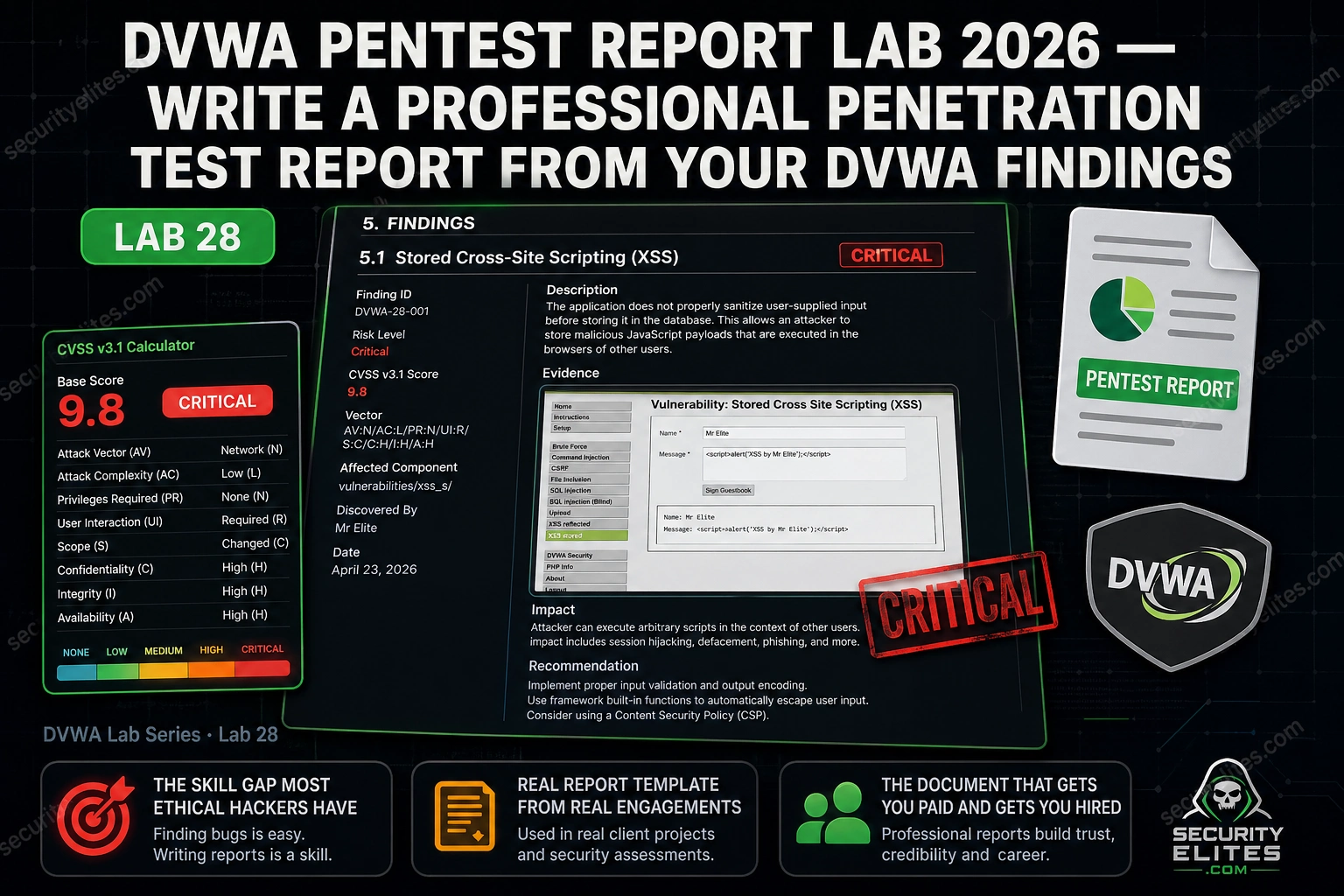
This article is a practical guide for writing professional penetration test reports, using DVWA (Damn Vulnerable Web Application) as the practice target. It addresses the critical gap between finding vulnerabilities technically and communicating those findings in a way that drives client action and business decisions. The article argues that report writing is the professional skill that separates practitioners who discover vulnerabilities from those who get hired to find them, and provides a complete template, structure, and worked examples for creating portfolio-quality pentest deliverables.
- Professional pentest reports follow fixed section structureThe article specifies an exact industry-standard section order: cover page, executive summary (one page maximum), scope and methodology, findings summary table, technical findings organized by severity, remediation roadmap, and appendices. Deviating from this structure adds friction because clients and security teams expect to find specific information in predictable locations. This consistency applies across findings too—the CVSS score placement must be identical in finding 8 as in finding 2.
- Executive summary must eliminate all technical jargonThe article emphasizes replacing vulnerability names with business impact statements. Instead of 'SQL injection,' write 'the ability to read the entire user database.' Instead of 'stored XSS,' write 'code that runs in any visitor's browser and can steal their login session.' The opening should lead with overall risk level (not finding count), and end with one specific, named, achievable action the client should take immediately. The article notes this section is the most-read and least-well-written part of most reports.
- CVSS v3.1 scores must be calculated preciselyThe article forbids guessing at CVSS scores and requires using the calculator at first.org/cvss/calculator/3.1 for every finding. It covers the six base metrics: Attack Vector, Attack Complexity, Privileges Required, User Interaction, Scope, and the three impact metrics (Confidentiality, Integrity, Availability). A critical distinction highlighted: Scope = Changed (boundary violation, such as web app to OS) significantly increases scores—command injection with Scope = Changed scores 9.0 instead of 8.8, reflecting real-world OS-level compromise impact.
- Each technical finding requires standardized complete formatEvery finding must include: title, severity level, CVSS score with vector string, affected URL/parameter, description, numbered reproduction steps, evidence references (figure numbers), business impact statement, and remediation recommendation citing specific source code file and line. The article provides a worked example for SQL injection showing this format. The finding write-up explains what an attacker can DO, not what the vulnerability IS—this distinction is emphasized as critical for client comprehension.
- Evidence requirements scale with severity levelCritical findings require maximum evidence: screenshot of exploit payload, screenshot of response with sensitive data, Burp Suite request and response captures, and numbered reproduction steps. High findings need a screenshot, Burp request, and reproduction steps. Medium findings need screenshot or request plus steps. Low/informational findings need only a brief description with optional screenshot. Screenshots must include URL bar for verification, be annotated with red boxes pointing to key details, and be captioned with figure numbers referenced in the report text.
- Remediation recommendations must cite source code specificsGeneric guidance like 'implement proper input validation' is unacceptable. Instead, recommendations must name the exact file, line number, and correct implementation—for example, citing DVWA's Impossible security level source code (sqli/source/impossible.php) to show the specific prepared statement syntax that fixes the SQL injection vulnerability. This specificity demonstrates professional rigor and gives developers a concrete fix to implement, not abstract principles.
- Three exercises build the complete report progressivelyExercise 1 (20 minutes) triages all findings by severity and creates a one-sentence business impact statement for each, producing the Findings Summary Table. Exercise 2 (25 minutes) calculates CVSS scores for all findings using the calculator. Exercise 3 (30 minutes) writes the complete report using the accumulated materials, building sections in order: structure setup, findings table, technical findings (Critical first), scope/methodology, then executive summary last. By this sequence, all scoring and evidence work is complete before narrative writing begins.
- Report writing skill determines marketability and retentionThe article argues that junior practitioners often find vulnerabilities correctly but fail to communicate findings in ways that make clients act or hiring managers understand their competency. The author reports reviewing hundreds of applications where technical work was solid but reports did not tell a story clients could act on. A completed DVWA pentest report serves as a portfolio piece for interviews and a template adaptable to first paid engagements. The owner's own first consultancy role came from a self-directed DVWA report written as practice.
Bottom line: A complete, professionally structured penetration test report with clear executive summary, accurate CVSS scores, evidence-backed technical findings, and source-informed remediation recommendations is the deliverable that separates vulnerability researchers from hired security professionals; the specific section structure, non-technical business language, and standardized finding format transform raw technical findings into documents that drive client action and demonstrate professional competen
FREE
Part of the DVWA Complete Lab Series
Report writing is the skill that closes the gap between finding vulnerabilities and getting paid to find them. A client cannot implement what they cannot understand. A hiring manager cannot evaluate skills they cannot read. Lab 28 is where you document everything you found in DVWA Labs 1 through 27 in a professional deliverable format — the same structure I use for client engagements. By the end of this lab you will have a complete pentest report you can show in interviews, submit as a portfolio piece, and adapt as a template for your first paid engagement.
🎯 What You’ll Master in Lab 28
⏱️ Lab 28 · 3 exercises · Writing + DVWA + Report tool of choice
✅ Prerequisites
- Lab 27 — Source Code Review
— your remediation recommendations will cite the Impossible-level source code as the correct fix; Lab 27 knowledge is required
- Screenshots from at least 5 DVWA labs (SQL injection, XSS, command injection, CSRF, file inclusion) ready for the evidence section
- Burp Suite HTTP request/response captures from your DVWA sessions — the requests go in the evidence appendix
- A word processor, Google Docs, or Markdown editor — the report format is your choice
📋 DVWA Pentest Report Lab 28 — Contents
- Professional Report Structure — The Complete Template
- Executive Summary — Writing for Non-Technical Readers
- CVSS v3.1 Scoring — Getting the Numbers Right
- Technical Finding Write-Up — The Complete Format
- Evidence Documentation — Screenshots and Request Captures
- Remediation Recommendations — Specific and Actionable
Labs 1 through 27 built your technical exploitation and source review skills across every major DVWA vulnerability class. Lab 28 is the capstone — turning everything you found into a document that communicates those findings professionally. The DVWA lab series concludes at Lab 30 with advanced exploitation chaining. This report becomes the documentation for that chain as well.
Professional Report Structure — The Complete Template
Professional penetration test reports follow a consistent structure across the industry. The structure matters because clients and their security teams know what to expect and where to find specific information. Deviating from it adds friction. Here is the complete section order I use on every engagement.
⏱️ 20 minutes · No tools needed — just your lab notes
Before writing a word of the report, professional pentesters triage all findings and sort them by severity. Getting the severity wrong changes the client’s response — a Critical that is filed as Medium gets deprioritised. A Low that is filed as Critical creates panic where none is needed. Work through this triage exercise before opening your report template.
and write a one-sentence business impact statement.
Do not use the vulnerability name in the impact statement.
Explain what an attacker can DO, not what the vulnerability IS.
FINDING A: SQL Injection in login form — attacker can extract
the users table including username/password hashes.
FINDING B: Stored XSS in comment field — script executes for
every user who views the page.
FINDING C: Command injection in ping utility — attacker can
run arbitrary OS commands as the web server user.
FINDING D: CSRF in password change form — no token required.
FINDING E: File inclusion — attacker can read /etc/passwd.
FINDING F: Reflected XSS in search parameter — requires victim
to click a crafted link.
FINDING G: Weak session token — predictable sequential integers.
FINDING H: Brute force login — no lockout after failed attempts.
For each finding, write:
Severity: [Critical/High/Medium/Low]
CVSS Score range: [e.g. 8.0-9.0]
Business Impact: “[One sentence — no jargon]”
Evidence needed: “[What screenshot/request proves this?]”
📸 Share your completed triage table in #dvwa-labs on Discord.
Executive Summary — Writing for Non-Technical Readers
The executive summary is the most-read and least-well-written section in most pentest reports. Every CISO reads it. Most CTOs read it. The CEO or CFO reads it when the finding is significant. None of them want to read about SQL injection — they want to know whether the company is at risk, what could happen, and what to do first.
Three rules I follow for every executive summary. First: no technical jargon whatsoever. Replace “SQL injection” with “the ability to read the entire user database.” Replace “stored XSS” with “code that runs in any visitor’s browser and can steal their login session.” Replace “command injection” with “the ability to run any command on the web server.” Second: lead with the overall risk, not the finding count. “The application presents a Critical level of risk to the organisation” is a stronger opener than “we found 14 vulnerabilities.” Third: end with one action. One specific, named, achievable action the client should take this week.
CVSS v3.1 Scoring — Getting the Numbers Right
CVSS scores are the shared language that lets clients prioritise remediation, lets vendors communicate severity, and lets security teams justify budget. Getting them wrong undermines your credibility. Getting them right — with the vector string that shows your reasoning — demonstrates professional rigour.
Use the calculator at first.org/cvss/calculator/3.1 for every finding. Never guess the score. The six base metrics are the only ones that go in the base score — Temporal and Environmental metrics are optional and rarely used in standard pentest reports.
Technical Finding Write-Up — The Complete Format
Each technical finding in Section 5 follows the same structure. Consistency matters — a reviewer reading finding 8 should not have to search for the CVSS score in a different place than finding 2. Here is the complete format with a worked SQL injection example.
CVSS Score:9.8
Affected URL:/dvwa/vulnerabilities/sqli/
Parameter:id (GET)
An unauthenticated attacker can extract every username and password hash from the database. MD5 hashes are crackable — this finding represents a complete compromise of all user accounts.
Replace direct variable concatenation with PDO prepared statements (as implemented in DVWA Impossible security level, sqli/source/impossible.php).
⏱️ 25 minutes · Browser — CVSS calculator at first.org/cvss
This exercise calculates accurate CVSS v3.1 base scores for the 8 DVWA findings from Exercise 1. Work through every metric for each finding. Getting the scores right requires thinking through each metric carefully — do not estimate.
For each finding, work through all 6 base metrics and record:
— Base Score (e.g. 9.8)
— Severity Label (Critical/High/Medium/Low/Informational)
— Vector String (e.g. CVSS:3.1/AV:N/AC:L/PR:N/UI:N/S:U/C:H/I:H/A:H)
FINDING A: SQL Injection — unauthenticated, reads full user table
FINDING B: Stored XSS — executes for every page visitor (no click needed)
FINDING C: Command Injection — requires login, runs OS commands
FINDING D: CSRF — changes password without user action (attacker needs link clicked)
FINDING E: File Inclusion — reads /etc/passwd, unauthenticated
FINDING F: Reflected XSS — requires victim to click crafted link
FINDING G: Weak session token — sequential integers, no authentication
FINDING H: Brute force login — no account lockout
Key metrics to reason through carefully:
— User Interaction: Required only if victim must actively click something
— Scope: Changed if the impact crosses security boundaries (e.g. web → OS)
— Privileges Required: None if unauthenticated access works; Low if any login
Cross-check your scores against the worked examples above.
For any score that differs significantly, re-examine that metric.
What did you assess differently and why?
📸 Screenshot your CVSS calculator showing the vector string for the most complex finding. Share in #dvwa-labs on Discord.
Evidence Documentation — Screenshots and Request Captures
Evidence in a pentest report has one job: prove to a reader who was not present that the vulnerability exists and the impact you described is real. Every Critical and High finding needs a minimum of two evidence items: a screenshot showing the vulnerability being exploited and the Burp Suite HTTP request that triggered the finding. The screenshot proves the impact visually. The request proves reproducibility technically — a developer can copy that request into their own Burp and confirm the finding immediately.
⏱️ 30 minutes · Your word processor · All DVWA screenshots ready
This is the capstone exercise for the entire DVWA lab series. Using the triage table from Exercise 1, the CVSS scores from Exercise 2, and your screenshots and Burp captures from previous labs, write a complete penetration test report. Work through every section in order.
1. Create your document using the structure from Section 1.
Set up all headings and sub-sections before writing content.
2. Write Section 4 (Findings Summary Table) first — you already
have severity, CVSS scores, and finding titles from Exercise 1 and 2.
Create a table: Finding | Severity | CVSS | Status (Open)
3. Write each technical finding in Section 5.
Use the complete format from this article for each one.
Start with Critical findings, work down to Low.
For each finding write: Title, Severity, CVSS, URL, Description,
Steps to Reproduce, Evidence (figure references), Business Impact,
Remediation (cite Impossible source from Lab 27).
Minimum 4 technical findings documented in full.
4. Write Section 3 (Scope and Methodology).
State: testing was against DVWA running at http://localhost/dvwa.
Testing approach: manual with Burp Suite proxy.
Security level tested: Low.
Tools used: Burp Suite, manual payload testing.
5. Write the Executive Summary last.
Use the template from Section 2.
Fill in your actual finding counts.
Name the two Critical findings specifically.
Write the Immediate Action Required paragraph.
6. Add cover page and appendix structure.
7. Review: read the executive summary out loud.
If you cannot explain it to a non-technical person in 3 minutes,
rewrite it until you can.
📸 Screenshot your completed report’s executive summary page. Share in #dvwa-labs on Discord. Tag #lab28complete and #dvwa-series-complete
📋 Pentest Report Writing — Lab 28 Reference Card
✅ Lab 28 Complete — Professional Pentest Report
You have a complete penetration test report documenting your DVWA findings with professional severity ratings, CVSS scores, business impact statements, and source-informed remediation recommendations. Lab 29 covers Metasploitable 2 — a new target, all new vulnerabilities, and the same report writing skills applied to a broader attack surface than DVWA’s controlled environment.
🧠 Lab 28 Check
❓ Pentest Report Writing FAQ
What should a penetration test report include?
How do you calculate CVSS scores for pentest findings?
What is the difference between a pentest report and a bug bounty report?
How do you write a good executive summary for a pentest report?
What makes a pentest finding write-up professional quality?
What tools do pentesters use to write reports?
Lab 27 — Source Code Review
DVWA Lab Series Hub
📚 Further Reading
- Lab 27 — Source Code Review — The remediation recommendations in your report cite the DVWA Impossible source code — Lab 27 source analysis is the direct prerequisite for this lab.
- Lab 22 — Vulnerability Chaining — When two findings combine to produce a higher-impact chain, the report section needs to document the chain finding as a separate entry above its component findings.
- DVWA Complete Lab Series — All 30 labs from setup through advanced exploitation — the complete skills reference that produced the findings in your Lab 28 report.
- CVSS v3.1 Calculator — FIRST.org — The authoritative CVSS v3.1 scoring calculator — bookmark this. Every finding in every report you write from this point forward gets a score from this page.
- OWASP Web Security Testing Guide — The industry standard methodology reference cited in the Appendix B of professional pentest reports — maps DVWA vulnerability classes to formal testing procedures and remediation standards.
