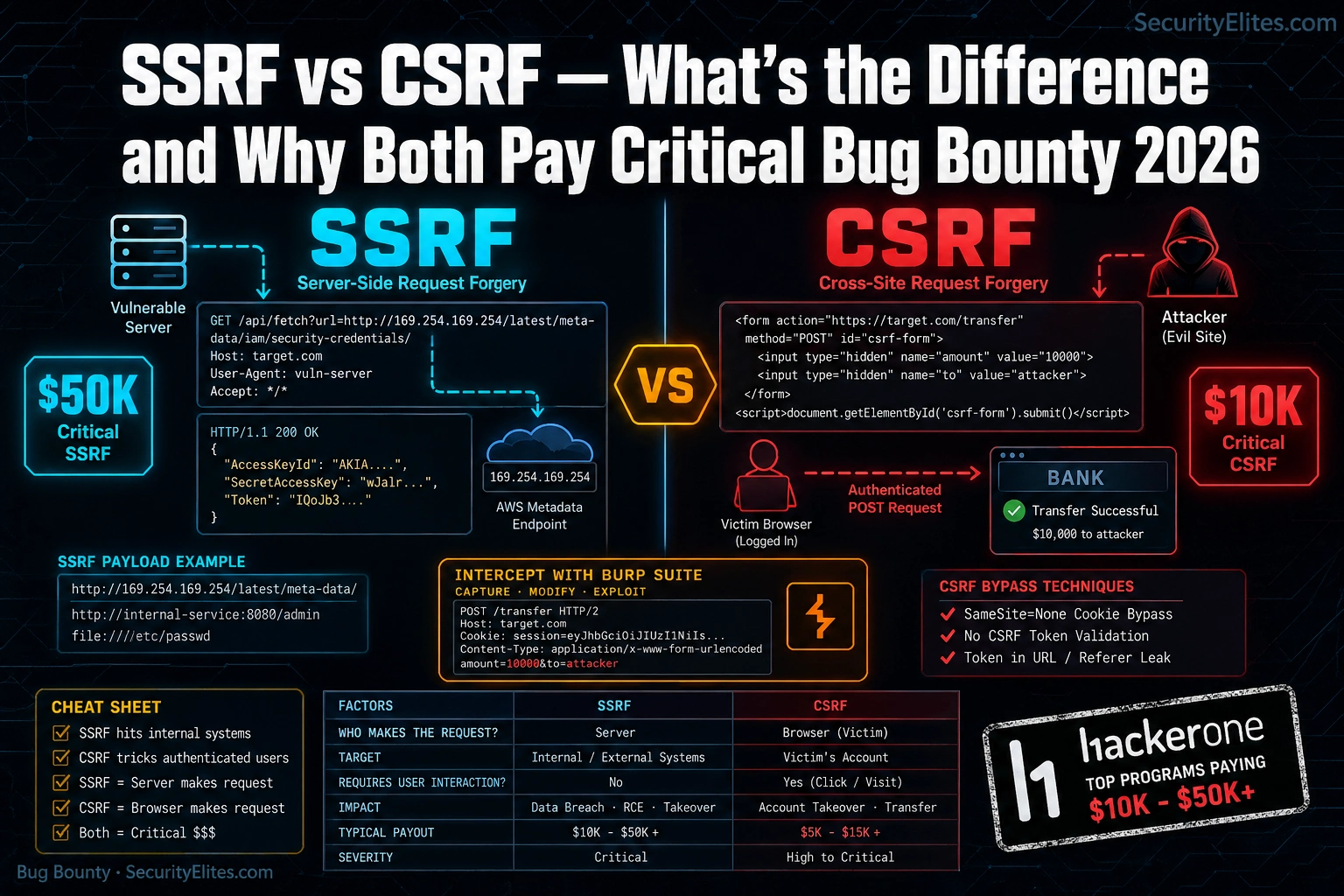
⚠️ Authorised Testing Only. This article covers offensive vulnerability techniques including Server-Side Request Forgery (SSRF) and Cross-Site Request Forgery (CSRF). All techniques described are for educational purposes and legal security testing on systems you own or have explicit written permission to test. Unauthorised testing is illegal under the Computer Fraud and Abuse Act, the Computer Misuse Act, and equivalent laws worldwide. Always operate within a programme’s defined scope.
A hunter I know spent three days building a solid report — detailed reproduction steps, impact analysis, the works. He filed it as CSRF. The programme triaged it, came back with a severity downgrade, and paid him $150. Two weeks later, reading someone else’s disclosure, he realised what he’d actually found: an SSRF vulnerability hitting an internal service. Same endpoint, same request manipulation, completely different attack class. That report, filed correctly, would have paid $12,000. The difference between those two payouts is two letters — S and C — and a fundamental misunderstanding of who’s making the request. If you’re hunting bug bounties and you can’t immediately distinguish SSRF from CSRF at the HTTP level, you are leaving serious money on the table. I’ve seen this mistake on HackerOne, on Bugcrowd, and in my own training. It’s one of the most common — and most expensive — classification errors in the game. This article fixes that. And while you’re setting up your testing environment, bookmark the SecurityElites tools hub — the port scanner and DNS lookup tools will come in useful when you’re mapping SSRF attack surface. For programme selection and scope analysis when you’re ready to hunt, the bug bounty pillar is your starting point. Right now, let’s sort out exactly what these two vulnerabilities are, how they differ at the request level, and why programmes treat them so differently on the severity scale.
🎯 What You’ll Be Able to Do After This
⏱️ 18 min read · 3 exercises
SSRF vs CSRF Bug Bounty— What’s the Difference and Why Both Pay Critical
- The Core Difference: Who Makes the Request
- How SSRF Works (And Why It Pays Critical)
- How CSRF Works (And When It Pays Critical)
- SSRF vs CSRF Side-by-Side: The Cheat Sheet
- Writing Reports That Get the Severity Right
- Exercise 1 — Browser: Map SSRF Attack Surface
- Exercise 2 — Think Like a Hacker: CSRF Target Analysis
- Exercise 3 — Browser Advanced: CSRF Token Patterns
- FAQ
Two letters separate these vulnerability names. The attack vectors, the impact profiles, and the payout tiers are completely different. SSRF and CSRF sit at opposite ends of the “who’s doing the attacking” spectrum — and that single distinction is what drives severity scores into critical territory for one and into informational for the other, depending entirely on context. For the full technical deep-dive on each individually, Day 10 covers SSRF and Day 19 covers CSRF in the bug bounty course. This article is what sits between those two — the comparison that teaches you to classify correctly under pressure.
The Core Difference: Who Makes the Request
Here’s the single sentence that will fix your classification problem permanently. CSRF: the victim’s browser makes the request. SSRF: the server makes the request. That’s it. Everything else — severity, impact, where to look, how to exploit — flows from that one distinction.
Most hunters get confused because both vulnerabilities involve manipulating HTTP requests. But they’re being manipulated in completely opposite directions. Let me show you what this looks like at the wire level.
In a CSRF attack, you craft a malicious page or link that triggers the victim’s authenticated browser to fire a request the victim never intended to make. You don’t see the response. You don’t need to. The point is that the victim’s session does something — transfers funds, changes an email address, adds an admin account. The browser is the weapon, and the victim is pulling the trigger without knowing it.
In an SSRF attack, you manipulate a parameter that the server uses to fetch an external resource. Instead of pointing it at the intended destination, you point it at somewhere internal — a cloud metadata endpoint, an internal database, a service that’s only reachable from within the server’s network. The server makes the request on your behalf. You get to see the response. That’s what makes SSRF so devastating — you’re using the server as a proxy into infrastructure that’s completely off-limits to external requests.
💡 The one-second classification test: Can you see the response from the request you’re manipulating? If yes — you’re looking at SSRF. If you’re relying on the victim’s authenticated session to trigger the action and you never see the response — think CSRF. This isn’t 100% foolproof, but it correctly classifies 95% of cases you’ll encounter in real programmes.
The reason this matters for your payouts is that programme severity ratings are tied directly to impact, and impact is tied directly to who’s making the request. SSRF gives the attacker read access to internal infrastructure — that’s almost always critical. CSRF impact depends entirely on what action the victim’s session can perform — which can be critical (account takeover) or near-informational (changing a notification preference with no security consequence).
Understanding the SSRF vs CSRF bug bounty distinction at this request level means you can classify correctly the moment you spot the vulnerability — before you even write the report.
How SSRF Works (And Why It Pays Critical)
Think of SSRF as turning the target server into your personal proxy — one that has access to internal networks, cloud metadata endpoints, and internal services that reject all external connections. You can’t reach those resources directly. But the server can. And if you can control where the server sends its requests, you can reach them through it.
The attack surface is anywhere the application fetches a URL or resource based on user input. PDF generators that render a URL you supply. Webhook configurations where you specify the callback endpoint. Image import features that fetch from a remote URL. Any parameter named url, endpoint, dest, redirect, fetch, or callback is worth testing. These are the places I look first on any target.
The most reliable SSRF target in cloud-hosted applications is the AWS instance metadata endpoint: 169.254.169.254. This IP is only reachable from within the AWS network — which means external attackers can’t hit it directly. But if the server makes requests to URLs you control, you can route through it. What lives at that endpoint? IAM role credentials, instance identity, user data scripts that often contain hardcoded secrets. Finding SSRF that reaches the metadata endpoint is an automatic critical on almost every programme — you’ve demonstrated the ability to steal cloud credentials from the host.
⚠️ Scope boundary — non-negotiable: Never probe internal endpoints on systems you don’t own or have explicit written authorisation to test. The payloads above are for your own lab environment and authorised bug bounty targets only. Hitting 169.254.169.254 on an unauthorised target is not a grey area — it’s computer misuse.
The payout range for SSRF reflects the severity. On HackerOne, documented SSRF payouts hitting internal services start around $3,000 and reach $50,000+ for full metadata endpoint access with credential theft demonstrated. On private programmes in fintech and cloud infrastructure, I’ve seen blind SSRF (where you get a callback but no response body) pay $5,000–$8,000 purely on demonstrated access to internal network ranges.
🛠️ EXERCISE 1 — BROWSER (20 MIN · NO INSTALL)
You’re mapping the SSRF attack surface of a real bug bounty programme before you touch a single request. This is the reconnaissance phase — do this every time before you start probing, and you’ll spot the high-value targets before other hunters do.
- Step 1 — Choose a target. Go to HackerOne’s programme directory and filter by “In Scope” and “Web Application.” Pick a programme with an active scope that includes a web app you can legally test.
- Step 2 — Read the scope definition completely. Note every in-scope domain. Open each in a browser tab.
- Step 3 — Map URL-fetching features. On each in-scope property, look for: PDF export or generation features, image upload from URL, link preview generators, webhook configuration pages, import from URL features, any parameter in the URL bar or request body that contains a URL or domain.
- Step 4 — Document your findings. Create a simple table: Feature | URL parameter name | Notes. This is your SSRF attack surface map.
- Step 5 — Identify the highest-value target. Which feature, if vulnerable, would let the server make requests to internal services? That’s where you start testing (on authorised targets only).
✅ What you just learned: SSRF recon isn’t random probing — it’s systematic feature mapping before a single payload fires. The hunters who find SSRF consistently aren’t the ones who try every parameter; they’re the ones who identify URL-fetching functionality first, then probe methodically. You now have a recon process that applies to every target you’ll ever hunt.
📸 Share your attack surface map (programme name redacted) in the #bug-bounty-wins Discord channel. Tag it with what feature type you found most commonly.
How CSRF Works (And When It Pays Critical)
CSRF is a different kind of clever. You don’t need the server to fetch anything for you. You need the victim to do something they didn’t intend to do — using their own authenticated session as the weapon. The attack works because most web applications trust requests that arrive with valid session cookies, without verifying that the user actually intended to make that request.
Three conditions have to line up for CSRF to work. Break any one of them and the attack fails.
First: The victim must have an active authenticated session with the target application. No session, no attack — there’s nothing to abuse. Second: The application must process the state-changing request without validating that it originated from the application’s own interface — no CSRF token, no custom header check, no origin verification. Third: The action triggered must be state-changing in a meaningful way. Fetching a page that returns data doesn’t help you. Changing an email address, deleting a resource, transferring funds, adding a user — that’s what you need.
Here’s what a real CSRF proof-of-concept looks like. This is the HTML you’d host on your attacker-controlled server:
That chain — CSRF on email change → password reset → account takeover — is what pushes CSRF into critical severity territory. The impact is complete account compromise with no direct interaction beyond getting the victim to visit a link. That’s a $5,000–$20,000 payout on most programmes.
But CSRF on a low-impact action — changing a notification preference, setting a timezone, dismissing a banner — pays almost nothing. Some programmes won’t even accept it. The severity is entirely determined by what the affected endpoint does, not by the presence of missing CSRF protection alone.
One thing that changed the CSRF landscape significantly: SameSite cookies. When a server sets SameSite=Strict or SameSite=Lax, the browser restricts cross-site cookie sending. In theory, this kills most CSRF attacks. In practice — in 2026 — I still find exploitable CSRF regularly. Why? Because SameSite=Lax still allows cookies on top-level GET navigation, some applications have mixed SameSite settings across their cookie jar, and legacy subdomains often aren’t covered. The browser enforcement also varies across older versions. Never assume SameSite = safe without testing it.
🧠 EXERCISE 2 — THINK LIKE A HACKER (15 MIN · NO TOOLS)
Five application features. Your job is to classify each one as a CSRF target, a non-target, or conditionally valuable — and explain your reasoning for each. This is exactly the triage decision you make during live hunting.
- Scenario A: A “Change Password” endpoint that accepts the new password without requiring the current password, with no CSRF token. Authenticated users only. What’s your severity assessment?
- Scenario B: A “Mark as Read” endpoint for a notification system. POST request, no CSRF token. Authenticated users only. Worth filing?
- Scenario C: An “Add Admin User” function in an admin panel. No CSRF token. Only accessible to admin-role users. What’s the severity, and what’s the attack scenario?
- Scenario D: A “Connect OAuth App” endpoint that links a third-party OAuth application to the user account. No CSRF token, no state parameter. What chain does this enable?
- Scenario E: A “Delete Account” endpoint. POST request. No CSRF token. No confirmation step. What’s the impact and the filing strategy?
Answers: A — Critical. No current password requirement + CSRF = forced password reset to attacker-known value → account takeover. File as critical. B — Informational or won’t fix. No meaningful state change or security impact. Many programmes explicitly exclude this. C — Critical, potentially higher. If you can social-engineer an admin to click a link, you get admin-to-admin privilege escalation or rogue admin creation. CVSS could hit 9.0+ depending on app context. D — Critical chain. CSRF on OAuth account linking = account takeover via OAuth. The attacker links their OAuth account to the victim’s app account, then logs in via OAuth. This is a well-documented critical finding. E — High to Critical depending on reversibility. Irreversible account deletion with no confirmation is high-severity CSRF. File it as high with a note that the lack of recovery mechanism elevates impact.
✅ What you just learned: CSRF severity isn’t about the vulnerability — it’s about the endpoint. The same missing CSRF token is informational on a notification preference and critical on an OAuth link or password change. You now have the triage framework to make that call instantly during live hunting.
📸 Share your most interesting scenario analysis in #think-like-a-hacker on Discord. Tell us which one surprised you most.
SSRF vs CSRF Side-by-Side: The Cheat Sheet
This is the section you bookmark. Every time you’re unsure which vulnerability you’re looking at, come back here. I’ve designed this to answer the classification question in under 30 seconds.
| FACTOR | SSRF | CSRF |
|---|---|---|
| Who sends the request | The server | The victim’s browser |
| Who is the victim | The server / internal infrastructure | The authenticated user |
| Attacker sees response | Yes (full SSRF) / No (blind) | No |
| Primary impact | Internal network access, credential theft, RCE path | Unwanted user action, account takeover |
| Requires victim interaction | No | Yes (must visit attacker link) |
| Requires active session | No | Yes |
| Primary defence | Allowlist URL validation, block internal ranges | CSRF tokens, SameSite cookies, origin checks |
| CVSS score range | 7.5 – 10.0 (Critical) | 3.5 – 9.0 (Low to Critical) |
| Where to look | URL/fetch parameters, webhook config, PDF export, image import | State-changing POST endpoints without token validation |
| Bug bounty payout range | $3,000 – $50,000+ | $150 – $20,000 |
💡 The one-question classification test: Does the server fetch a URL you supplied and return the result? That’s SSRF — you’re controlling the server’s outbound requests. Does your link make the victim’s authenticated browser fire a request they didn’t intend to make? That’s CSRF — you’re weaponising their session. Paste that question into your notes. It correctly classifies every case you’ll encounter.
One more dimension worth understanding: SSRF and CSRF can coexist in the same application without interfering with each other. I’ve seen applications with both vulnerabilities active simultaneously — SSRF on the import feature and CSRF on the account management endpoints. They’re independent vulnerability classes that happen to both involve HTTP request manipulation. Finding one doesn’t mean you’ve found the other.
For your reports, the classification matters because programmes use it to route severity. A report filed as CSRF that’s actually SSRF will get downgraded during triage and you’ll lose negotiating position on severity. File correctly, include the HTTP-level evidence showing who’s making the request, and your severity argument will be airtight.
Where to Find Each One in Real Bug Bounty Programs
Knowing the theory is half the job. The other half is knowing exactly which features to walk up to first when you open a target app. Both SSRF and CSRF have predictable habitats — once you know the patterns, you’ll spot them in minutes.
Hunting SSRF — Features That Fetch
SSRF lives anywhere the server reaches out to a URL on your behalf. Train yourself to look for these feature signatures immediately when you map a new target:
- URL parameters that fetch remote content — anything like
?url=,?src=,?fetch=,?redirect= - Webhook configuration fields — “send notifications to this endpoint” is an SSRF invitation
- PDF generators — apps that render a URL to PDF are making a server-side HTTP request every single time
- Image preview or thumbnail features — “paste a link and we’ll generate a preview” is almost always SSRF-testable
- Import-from-URL fields — CSV import, RSS feed readers, website importers, any “connect your account via URL” feature
My first move on any of those features: swap the legitimate URL with a Burp Collaborator callback and watch for an out-of-band HTTP request. Then probe internal ranges.
Hunting CSRF — Forms That Change State
CSRF lives in forms and endpoints that perform state-changing actions while relying entirely on session cookies for authentication. The checklist is straightforward: account settings, password change, email change, payment actions, privacy toggles, two-factor setup. Anywhere you see a POST request that modifies data — open it in Burp, strip the CSRF token field (if there is one), replay the request, and see if it succeeds. No token? CSRF is almost certainly viable.
⚠️ Responsible testing boundary: Every SSRF probe must target either your own infrastructure (Burp Collaborator, your VPS) or explicitly in-scope internal ranges. Never probe third-party services — hitting http://169.254.169.254 on a program’s production cloud instance without explicit written scope permission is a real-world risk, not just a ToS issue. Check the program’s scope definition before you touch metadata endpoints.
Pick any public bug bounty program on HackerOne or Bugcrowd with a web application in scope. Your job is a manual feature audit — browser only, no active testing, no requests you shouldn’t be making. You’re reading the app, not attacking it.
- Open the program’s scope page and identify the main web application target.
- Walk the app’s feature set as an authenticated free-tier or demo user if signup is available — or use the program’s public-facing pages if not.
- Identify 3 SSRF candidates: features that accept a URL as input and appear to fetch or render remote content server-side. Note the exact parameter name and feature context for each.
- Identify 3 CSRF candidates: state-changing POST actions (account settings, email, password, payment, subscription management) where you’d want to check for token absence. Note the endpoint and what action it performs.
- For each candidate, write one sentence: what the feature does, why it fits the vulnerability class, and what your first test would be if you were actively testing in scope.
✅ What you just learned: Feature recon is faster than tool scanning for these two vulnerability classes. The hunters who find SSRF and CSRF consistently aren’t running automated scanners — they’re reading the app and recognising the signatures. You now have a mental checklist that will hold up on every program you ever test.
📸 Screenshot your 6-candidate list and share it in #bug-bounty-recon on Discord. Tag the feature type and why you flagged it.
📋 Payloads and Probes Reference — SSRF vs CSRF
Frequently Asked Questions — SSRF vs CSRF Bug Bounty
Is SSRF always critical severity?
Not automatically — but it gets there fast. Blind SSRF with no significant impact typically lands at Medium. The moment it reaches internal metadata endpoints, internal APIs, or enables port scanning of internal infrastructure, severity jumps to High or Critical. The programs paying the biggest SSRF bounties are cloud-hosted applications where metadata endpoint access translates directly to IAM credential theft. That’s where you want to push every SSRF you find.
Can CSRF bypass SameSite=Strict cookies?
SameSite=Strict is the strongest cookie protection against CSRF, and in a standard cross-site scenario, it blocks the attack completely — the browser won’t send the cookie on cross-origin requests. That said, I’ve seen bypasses in two situations: first, when the application has a subdomain that’s separately compromised and can be used as a same-site origin; second, when the target functionality accepts GET requests for state-changing operations, which SameSite doesn’t protect at all. Always check whether the action can be triggered via GET before writing off a CSRF finding.
What’s the easiest SSRF to find in 2026?
Webhook endpoints, without question. More SaaS applications added webhook functionality in the last three years than any other feature class, and the teams building them frequently don’t think about the server-side fetch implications. Look for any “notify my endpoint” or “send event to URL” configuration field — then point it at your Burp Collaborator. If you get a callback, you have SSRF. From there, test whether internal ranges are reachable. I’ve found exploitable SSRF in webhook features on three separate programs using exactly this two-minute test.
Do I need a PoC to report CSRF?
Yes — always include the PoC HTML. A CSRF report without a working proof of concept will get deprioritised in triage, and some programs will close it as “needs more information” rather than validating it themselves. The PoC doesn’t need to be elaborate: a self-submitting HTML form hosted on a free page or a Burp-generated CSRF PoC is enough. Paste it directly into your report, describe what action it performs when the victim visits the page while authenticated, and your triage experience will be significantly smoother.
Can SSRF lead to RCE?
Yes, and it’s one of the most documented escalation chains in bug bounty. The path typically runs: SSRF reaches internal service → internal service has an exploitable vulnerability (Redis with no auth, Elasticsearch with write access, an internal admin API) → you leverage that internal service to achieve code execution. I’ve reviewed disclosed reports where hunters went from a webhook SSRF to full RCE on the application server by hitting an unauthenticated internal management API that accepted arbitrary commands. These reports pay $20,000 to $50,000. The SSRF is just the entry point — the internal network is your real target.
How do I report SSRF vs CSRF differently in a bug bounty report?
The structure is similar but the evidence is completely different. For SSRF: your report must show the HTTP request your input triggered at the server level — Burp Collaborator logs or internal response data proving the server made an outbound request. For CSRF: your report must include the working PoC HTML, a Burp capture showing the absence or bypassability of the token, and a clear description of what action the victim performs without consent. Both reports need a severity justification tied to the CVSS impact fields. Misclassifying one as the other — or leaving out the attack-vector evidence — is the fastest way to get downgraded.
📚 Further Reading
- Day 10: SSRF Bug Bounty Deep Dive — Full methodology for finding and exploiting SSRF, including blind SSRF and cloud metadata chains.
- Day 19: CSRF Bug Bounty — Advanced CSRF techniques including SameSite bypass scenarios and PoC construction for triage-ready reports.
- Bug Bounty Course Hub — The full 60-day bug bounty course sequence, free, in order — from recon fundamentals to critical chaining.
- External: PortSwigger SSRF Labs — Hands-on SSRF labs from the Burp Suite team, covering basic to advanced including blind SSRF with out-of-band detection.
- External: OWASP CSRF Prevention Cheat Sheet — Definitive reference on CSRF defences — essential reading for understanding what you’re bypassing when protections are misconfigured.
