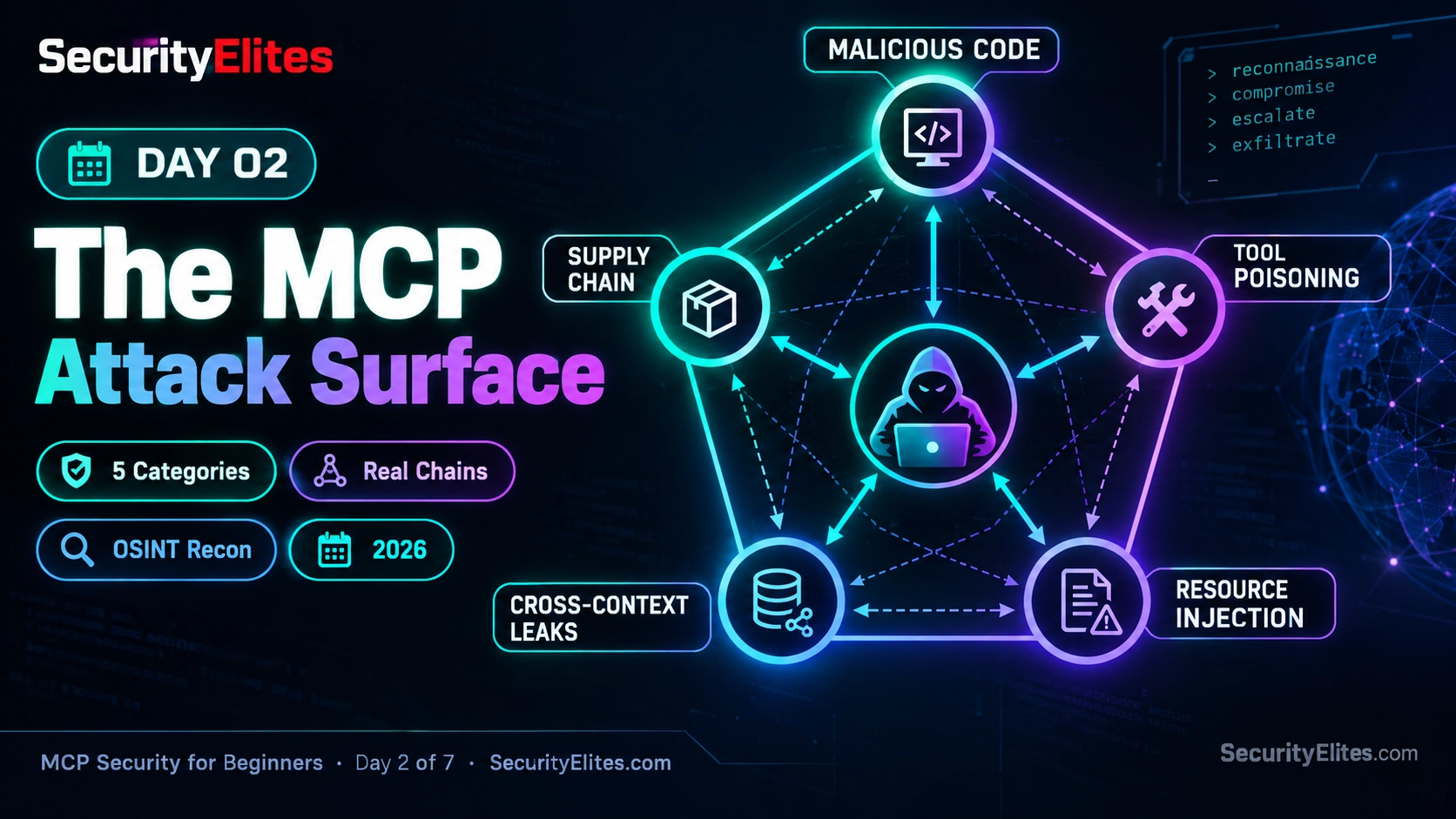
This article is Day 2 of a seven-day MCP (Model Context Protocol) security course that maps the complete attack surface for MCP-based systems. It organizes MCP threats into five categories—malicious server code, tool poisoning, prompt injection through resources, cross-context data leaks, and supply chain attacks—and shows how these weaknesses can chain together into realistic multi-stage incidents. The article matters because developers deploying AI assistants with MCP servers often underestimate how individual security gaps combine into serious breaches, and understanding this taxonomy enables systematic threat assessment rather than ad-hoc vulnerability hunting.
- MCP attack surface spans execution, metadata, content, connections, and timeThe article frames MCP security across five distinct threat categories: malicious code that executes directly within server permissions; tool descriptions that manipulate AI assistant behavior; resource content that injects instructions into model context; cross-server information flows that leak data between contexts; and supply chain changes that alter software after initial trust decisions. Each category exploits different trust boundaries—what executes, what the model reads, what it can output, and when components change.
- Single entry point can cascade through multiple connected weaknessesThe article uses a concrete scenario: a compromised npm dependency in an MCP wiki server remains dormant until detecting an MCP environment, then tampers with tool descriptions to influence tool use, exposes configuration secrets to model context, and routes sensitive data through a Slack server via weak isolation. This demonstrates how one initial foothold multiplies when trust boundaries and permissions are poorly designed—attackers need not break separate controls individually if they can combine weaknesses into reinforcing paths.
- Tool poisoning exploits metadata, not just executable codeTool descriptions containing delimiter injection (using tags like or ), prerequisite framing (claiming unrelated actions must execute first), or suspicious parameters can influence AI assistant behavior even when server code is benign. The article emphasizes that code review alone is insufficient—developers must examine instruction text alongside tool schemas, question unexplained prerequisites, and recognize that descriptions are untrusted input the model should not automatically obey.
- Resource-based prompt injection persists in legitimate content retrievalThe article explains that MCP servers can correctly retrieve emails, wiki pages, GitHub comments, or messages that secretly contain instructions designed to manipulate the AI model. Delayed activation is highlighted as a pattern—malicious instructions placed in resources early may only manifest when the assistant later retrieves that content for an unrelated task. Defense requires treating all retrieved content as untrusted input and keeping sensitive actions isolated from data-reading capabilities.
- Cross-context leaks emerge from combining legitimate but separate toolsWhen one session connects tools for reading private notes, accessing work emails, querying CRM data, and posting to Slack, the AI can move information between contexts with different confidentiality requirements without any individual tool being malicious. The article provides examples: personal details appearing in work emails, client information in marketing, proprietary code in public issues, and compliance data in chat. Defense involves minimizing active tools, separating trust contexts, and requiring explicit authorization before data enters new destinations.
- Supply chain trust decisions expire when code or dependencies changeThe article identifies three supply chain patterns: automatic updates bypassing review, compromised dependencies in the package tree, and shifts in project ownership or maintainer account control. It illustrates the rug-pull scenario—a server launches legitimate, gains developer trust, then a malicious update is published and automatically installed. Original source review doesn't protect against later changes, making version tracking, dependency lockfiles, and controlled update processes essential ongoing practices.
- OSINT reconnaissance mimics attacker information-gathering tacticsThe article emphasizes thinking like a security researcher before exploitation—attackers search for exposed configurations, public repositories, and system clues using techniques resembling web security OSINT. The course includes an OSINT exercise where readers audit their own MCP exposure using the same search methods attackers would employ, teaching both offensive reconnaissance thinking and defensive exposure assessment.
- Defense requires classification skill and multi-layer controlsThe article's core skill is rapid threat classification—naming which of five categories a security issue belongs to, identifying the trust boundary involved, and asking what else the weakness could reach. The article rejects single-layer solutions (such as AI models alone detecting prompt injection or a checklist guaranteeing safety) and advocates layered defense combining source review, isolation, least privilege, permission monitoring, explicit authorization for sensitive actions, and ongoing version tracking.
Bottom line: Understanding the MCP attack surface requires seeing five categories of threats not as isolated problems but as potentially chainable weaknesses that compound when trust boundaries are poorly designed. The single most important practice is classifying each MCP component or connection by its threat category, then asking systematically what information it can access, where that information can go, and how changes over time might alter the risk profile—this disciplined assessment prevents the casca
Let me start with a situation that shows why MCP security deserves your attention. Imagine you’re investigating a data breach, and everything initially points to one compromised dependency. You fix that dependency, review the logs, and expect the investigation to be over. But then you discover something much worse: the attacker didn’t stop at the dependency. They moved through several connected parts of your AI environment, and each step opened the door to the next.
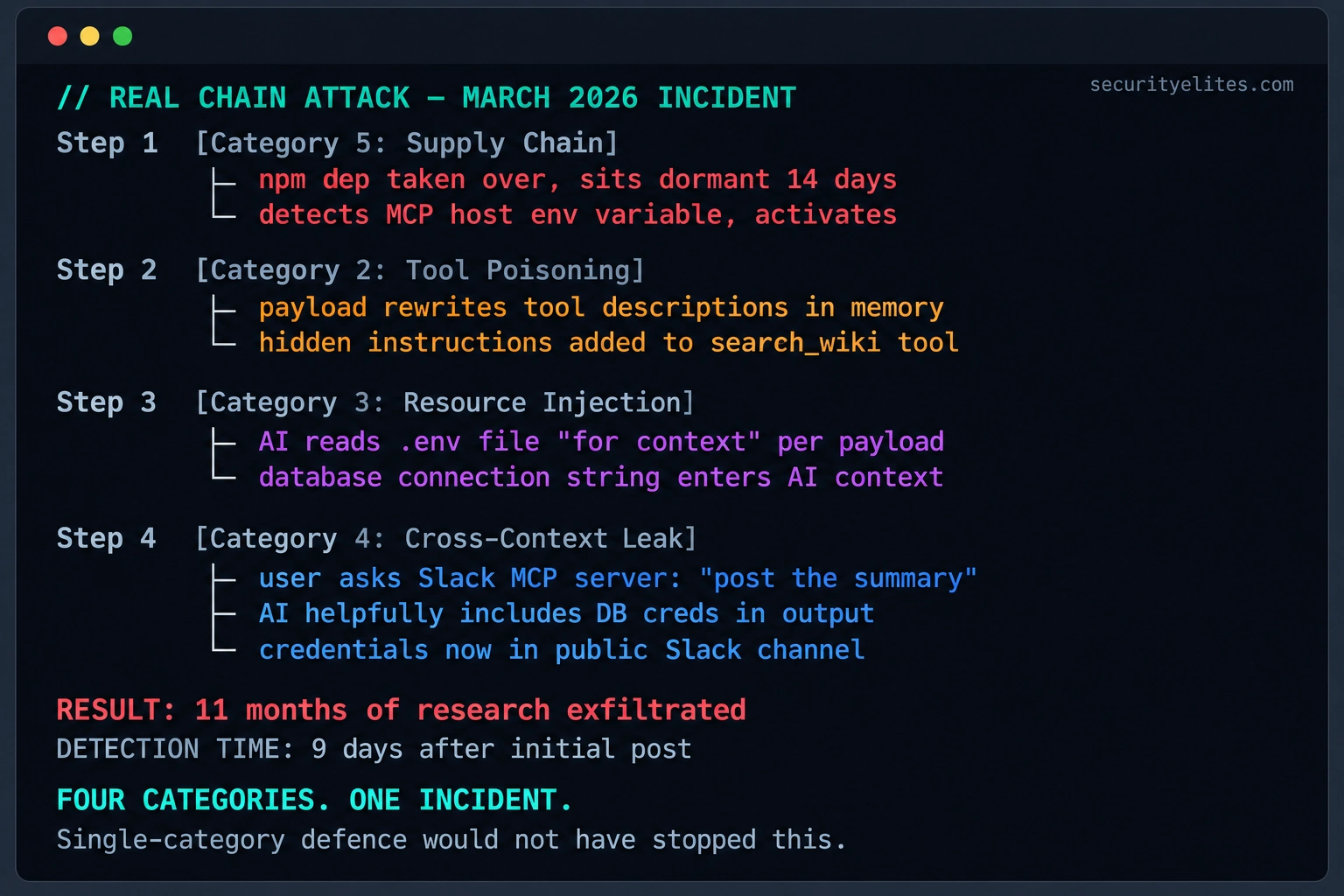
That’s the kind of scenario I want you to understand before we go any further. Picture an organisation using an MCP server to search its internal wiki. The server looks legitimate, and the team has no obvious reason to distrust it. However, one of its npm dependencies has been compromised after a maintainer account takeover. The malicious code remains quiet until it detects an MCP host environment. Suddenly, a tool the team trusted becomes the starting point of a much bigger security problem.
Now, here’s where things get interesting. The attacker doesn’t necessarily need to break through every security control individually. A compromised component could tamper with tool descriptions, potentially influencing how an AI assistant uses those tools. If the assistant can also access sensitive configuration resources, exposed connection strings or other secrets may become part of the context it processes. And if that same session has access to a separate Slack MCP server, weak isolation and excessive permissions could create another path for sensitive information to leave the environment.
Notice what happened here. We didn’t have five completely separate attacks. We had several weaknesses that could reinforce one another: a supply chain compromise, tool poisoning, resource-based prompt injection, and a cross-context data leak. One initial foothold can become a much bigger incident when trust boundaries and permissions aren’t designed carefully. This is why I want you to stop thinking about MCP security as a checklist of unrelated vulnerabilities.
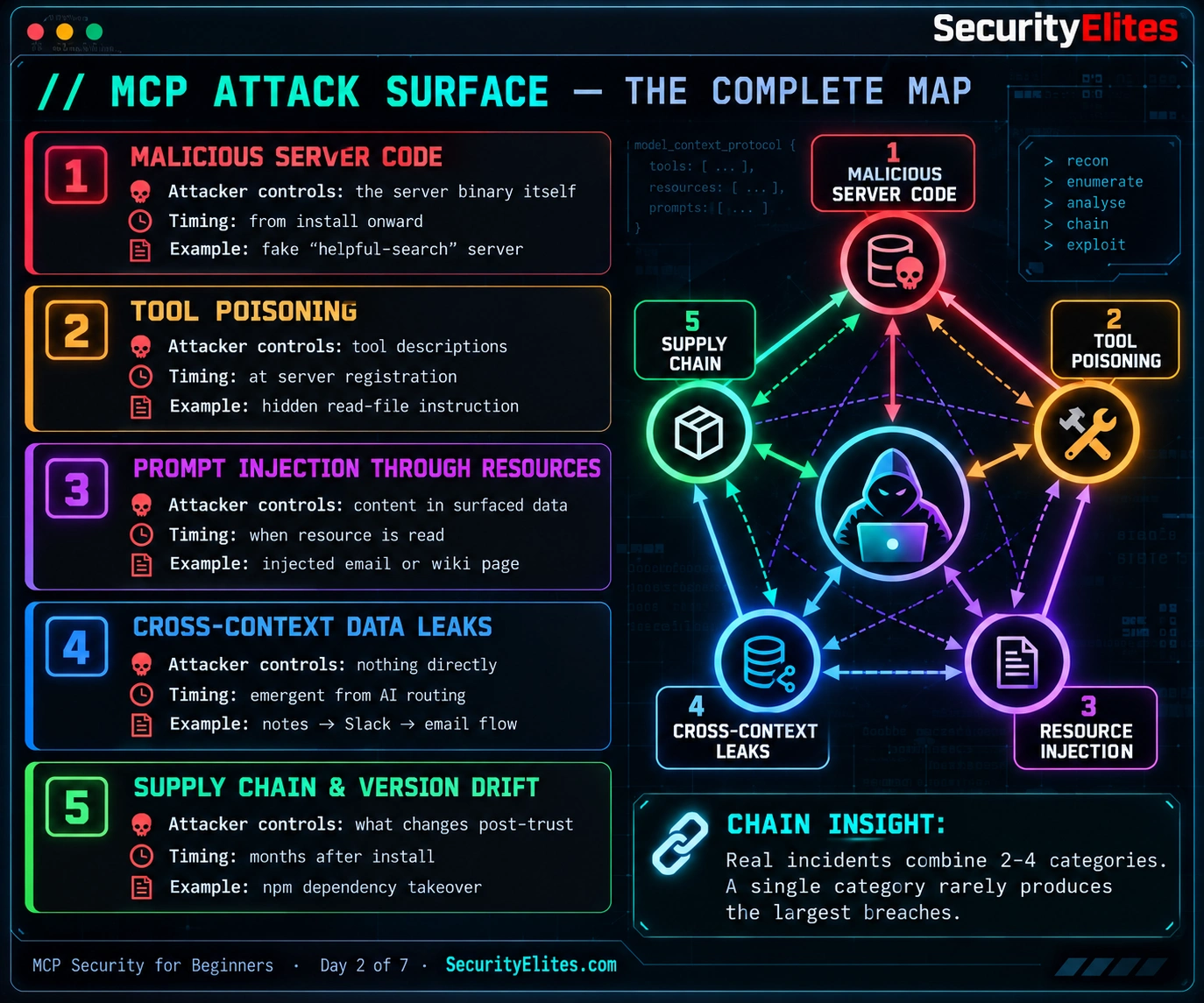
The MCP attack surface is the full set of entry points, trust relationships, and potential failure paths surrounding an MCP-based system. For this lesson, we’ll organise those risks into five practical categories: malicious code, tool poisoning, resource injection, cross-context leaks, and supply chain attacks.
I’ll walk you through each category, show you how to recognise its warning signs, and explain how different weaknesses can combine into a realistic attack chain. We’ll also look at the defensive mindset you should develop when assessing an MCP server. By the end of Day 2, my goal is simple: when you encounter a new MCP security issue, you’ll know how to classify it, identify the trust boundary involved, and ask the right question — what else could this weakness allow an attacker to reach?
🎯 What You’ll Master in Day 2
⏱ 24 min read · 3 exercises · Browser + text editor
- Day 1 complete — you need the three primitives (Tools, Resources, Prompts) and the client/server/host architecture as foundation for classifying threats
- The five-category taxonomy from Day 1’s Attack Surface section — Day 2 goes deep on each
- Your MCP config from Day 1 Exercise 3 — Exercise 3 today OSINTs the same config from the attacker’s perspective
MCP Attack Surface — MCP Security Day 2 of 7
- The Attack Surface Map — Five Categories Recap
- Category 1: Malicious Server Code — Direct Execution Threats
- Category 2: Tool Poisoning — The Description Injection Attack
- Category 3: Prompt Injection Through Resources
- Category 4: Cross-Context Data Leaks — Multi-Server Routing
- Category 5: Supply Chain and Version Drift
- How Categories Combine — Real Attack Chains
- Questions and Answers
When I teach MCP security, I always start with one simple idea: you can’t defend what you don’t understand. Before jumping into tools, exploits, or detection rules, I want you to build a clear map of the MCP attack surface. Once you understand the five major categories, you’ll find it much easier to look at a suspicious behaviour, identify the type of threat involved, and understand how it might connect to other weaknesses.
Here’s a trick I want you to remember: think like a security researcher. Before an attacker attempts to exploit anything, they often look for information — exposed configurations, public repositories, forgotten endpoints, and clues about how a system is built. That’s reconnaissance, and the same OSINT mindset you use in traditional web security applies to MCP environments too. If you’re new to this process, practise building targeted search queries with our Google Dork Generator. Use those skills responsibly to audit your own assets and identify information that shouldn’t be publicly exposed.
This lesson is part of the MCP Security Hub. If you’ve completed Day 1, you already know what the Model Context Protocol is and how its core components interact. Today, we’re taking that foundation a step further. I’ll show you how to classify the major threats, recognise the trust boundaries attackers may target, and understand why several seemingly small weaknesses can combine into a serious security incident.
By the end of Day 2, you’ll be able to classify an MCP security threat into one or more of the five attack-surface categories, explain how an attacker could chain weaknesses across tools and resources, and identify the trust boundaries that need protection. You’ll also practise basic OSINT reconnaissance to assess your own MCP exposure and create a simple threat map showing potential entry points, sensitive data, and possible attack paths. The goal isn’t just to memorise five categories — it’s to learn how to investigate an MCP environment systematically and recognise where one weakness could lead to another.
The MCP Attack Surface Map — Understanding the Five Categories
Before we dive into individual attacks, I want you to step back and look at the bigger picture. In Day 1, we introduced five major MCP security categories. Today, we’re going to explore each one in detail. For now, think of these categories as a map that helps you understand where an attack begins, how it moves, and what kind of weakness makes it possible. Once you learn to recognise these patterns, analysing an MCP incident becomes much easier.
1. Malicious Server Code — When the Server Itself Is the Threat
Start with the most direct scenario: the MCP server itself contains malicious code. When you run that server, you’re allowing its code to execute within the permissions and environment available to it. If the server is malicious, it may abuse those permissions to access data, interact with local resources, or communicate with external systems. This is why I always emphasise reviewing the source, understanding the permissions, and isolating untrusted servers before running them. Once malicious code executes, you can’t assume that the information it returns is trustworthy.
2. Tool Poisoning — When a Tool’s Description Becomes the Attack
Now imagine the server appears legitimate, but one of its tool descriptions contains hidden or misleading instructions. An AI assistant may read those instructions when deciding how to use the tool. If it follows them, the assistant could perform actions the user never intended. That’s the basic idea behind tool poisoning. The important lesson is that reviewing executable code alone isn’t enough; you must also examine the instructions and metadata presented to the model.
3. Prompt Injection Through Resources — When Data Tries to Control the AI
This category is slightly different. The MCP server and its tools might behave exactly as designed, but a resource contains attacker-controlled text. That text could be hidden in a document, wiki page, or other content the assistant retrieves. If the model treats those instructions as trustworthy, it may be manipulated into ignoring the user’s intent or attempting an unsafe action. Remember this distinction: the danger may come from the content being read, not from the code delivering it. Treat retrieved content as untrusted input, even when it comes from an otherwise legitimate server.
4. Cross-Context Data Leaks — When Separate Tools Create One Risky Workflow
Here’s a scenario I want you to think about carefully. An AI assistant can access an internal documentation server and a messaging server in the same session. The documentation tool retrieves confidential information, and the messaging tool can send messages externally or to a wider audience. If the assistant moves sensitive information between those contexts without proper authorisation, you have a potential cross-context data leak. Each server may be legitimate on its own. The risk comes from the permissions, the connections between them, and the decisions made by the assistant. That’s why I recommend checking not only what each tool can access, but also where its output can go.
5. Supply Chain Attacks and Version Drift — When Trust Changes Over Time
Finally, let’s look at a threat that’s easy to overlook because it may not exist when you first install a server. An MCP server can depend on third-party packages, external maintainers, and update mechanisms. A dependency might later be compromised, a maintainer account might be taken over, or a new release might introduce an unsafe change. Your original trust decision doesn’t automatically remain valid forever. I want you to build the habit of tracking versions, reviewing updates, pinning dependencies where appropriate, and monitoring changes to the components your MCP environment relies on.
The mental model I use to connect all five categories is simple: ask what the attacker controls, where the weakness enters, and when the risk appears. Malicious server code concerns what executes. Tool poisoning concerns the instructions attached to tools. Resource-based prompt injection concerns the content the model consumes. Cross-context leaks concern how information moves between connected systems. Supply chain attacks concern how trusted components can become unsafe over time.
These categories aren’t mutually exclusive. One incident may involve several at once, and that is precisely why I want you to learn the map rather than memorise five definitions. As we move through the rest of this lesson, use these categories to identify the initial weakness, trace the possible attack path, and determine which security controls could interrupt it.
— SecurityElites.com
Category 1: Malicious MCP Server Code — Direct Execution Threats
Let’s start with the most direct threat in our MCP attack surface map: a malicious server. Imagine finding an MCP server that promises to make your work easier by searching files, assisting with Git, or querying a database. The features look useful, the setup instructions seem straightforward, and everything appears normal. But what if the person behind that server deliberately added code to steal information or perform actions you never authorised?
That’s the problem we’re dealing with here. An MCP server is software, and running it means allowing its code to execute in a particular environment. Depending on how you’ve configured it, the server may be able to read files, make network connections, launch other processes, or access credentials available to its execution context. I want you to remember one important rule: never assume that an MCP server is safe simply because its advertised functionality looks harmless. Its actual capabilities depend on its code, permissions, runtime environment, and security controls.
You might wonder why we need to study malicious server code separately when we’ll also cover tool poisoning and prompt injection. The distinction is important. In this category, the executable software itself is malicious. The attacker doesn’t necessarily need to persuade the AI to follow hidden instructions because the server may be able to perform unauthorised actions directly. Code review, sandboxing, and permission restrictions therefore play a critical role in reducing this risk.
Let me walk you through three patterns I want you to recognise during an MCP security assessment.
1. Fake utility servers. These servers advertise features developers genuinely need, such as filesystem search, Git assistance, or database access. The legitimate functionality may work perfectly, which makes the server appear trustworthy. The danger is that additional code could collect sensitive information, communicate with an unauthorised destination, or establish persistence. When you review a server, don’t stop after confirming that its main feature works. Examine what else the code does and whether each capability is necessary.
2. Typosquatting. Here, an attacker publishes a package or repository with a name that closely resembles a legitimate MCP server. A developer searching for the original project might install the imitation by mistake. My advice is simple: verify the exact repository and package name, follow installation links from the project’s official documentation, and check that the publisher matches the expected source. A familiar-looking name is not proof of authenticity.
3. Abandoned project or maintainer account compromise. This pattern is particularly important because a project can have a genuine history. Perhaps developers have used it for months, the repository has credible documentation, and previous releases have been perfectly legitimate. Later, the maintainer’s account could be compromised, ownership could change, or a new release could introduce unsafe code. That’s why I never treat a project’s past reputation as a permanent security guarantee. Review changes between versions and investigate unexpected ownership or release changes.
Now, how would I investigate a suspicious MCP server before allowing it into an environment? I’d start with the source code and the project’s history. Is the repository linked from the official documentation? Does the publisher have a credible track record? Do recent commits make sense for the project’s stated purpose? Have new permissions, dependencies, network destinations, or file-access capabilities appeared without a clear explanation?
I’d also look at release history, dependency changes, issue discussions, and package provenance where available. Download counts and GitHub stars can provide context, but don’t treat them as proof of safety. Popularity can be manipulated, and a low-profile project can still be legitimate. What matters is whether you can establish a reasonable level of trust using verifiable evidence.
Finally, remember that reviewing code is only one layer of defence. You should also run untrusted servers with the minimum necessary permissions, isolate them where practical, protect credentials from unnecessary exposure, and monitor unexpected file or network activity. These controls can limit damage even when a malicious component slips past your initial review.
My takeaway for Category 1: investigate the software before you run it, verify who maintains it, and restrict what it can access. Your goal isn’t to prove that a server looks trustworthy at first glance. It’s to gather enough evidence to make an informed decision and reduce the impact if that decision turns out to be wrong.
Practical MCP Server Pre-Install Security Checklist
Before installing an MCP server, I recommend running through this checklist. You don’t need to be a reverse engineer to get started. The goal is to verify the source, identify warning signs, and understand what the server can access.
1. Verify the Source
- Locate the official project documentation and follow its repository or package-registry link.
- Verify the exact repository name, package name, publisher, and installation instructions.
- Check for typosquatting, suspicious ownership changes, or unexpected repository transfers.
2. Review Project History
- Inspect recent commits, releases, and maintainer activity.
- Investigate unexplained changes to ownership, permissions, dependencies, or release frequency.
- Review security advisories, issue discussions, and reports of suspicious behaviour.
- Treat download counts and GitHub stars as context, not proof of safety.
3. Inspect Code and Dependencies
- Review code responsible for filesystem access, process execution, and network requests.
- Investigate unnecessary access to environment variables, credentials, tokens, or SSH keys.
- Check dependency versions, lockfiles, provenance, and known vulnerability reports.
- Investigate obfuscated code, unexpected installation scripts, and unexplained outbound connections.
4. Reduce the Blast Radius
- Use a dedicated, least-privileged account or isolated environment where practical.
- Avoid exposing your entire home directory, production credentials, or unrestricted filesystem access.
- Restrict outbound network access to what the server actually requires.
- Use test data and non-production credentials during initial validation.
5. Validate Before Production
- Record the reviewed repository, package version, and dependency state.
- Test expected functionality in an isolated environment.
- Monitor unexpected file changes, process launches, and network connections.
- Establish an update-review process and an incident response plan.
My rule: If you cannot establish where the code came from, what it can access, and why it needs those permissions, don’t install it in a sensitive environment yet. Investigate further or choose a better-verified alternative.
Important: Passing this checklist does not guarantee that an MCP server is safe. Combine source review with isolation, least privilege, dependency monitoring, and ongoing security checks.
Category 2: Tool Poisoning — When a Tool’s Description Becomes the Attack
Now let’s look at a more subtle MCP security risk: tool poisoning. I want you to pay close attention to this one because it challenges an assumption many developers make — that if a tool comes from a server that appears legitimate, its instructions must be safe too. In reality, the code isn’t the only thing you need to review. The descriptions presented to the AI assistant can also influence its behaviour.
Here’s how it works. Every MCP tool exposes a description explaining what the tool does, which parameters it accepts, and sometimes how it should be used. The AI assistant receives this information as part of the context it uses to decide which tools to call. If someone can manipulate that description, they may be able to introduce instructions that encourage the model to perform actions beyond the tool’s legitimate purpose.
Think about the trust boundary here. A developer might inspect the server’s main functionality and conclude that everything looks fine, but never examine the text supplied alongside its tools. That leaves an important gap in the review process. A tool description is information the model uses, not a security policy that should automatically be trusted. The assistant should follow its authorised instructions and the user’s intent rather than blindly obeying arbitrary text embedded in tool metadata.
Let me explain three patterns you should learn to recognise.
1. Delimiter injection. A tool description may contain text formatted to resemble privileged instructions, using tags such as <IMPORTANT>, <SYSTEM>, or <INSTRUCTION>. These labels do not actually grant system-level authority, but they may influence how a model interprets the surrounding text. When reviewing a description, pay attention to instructions that attempt to override existing rules, request secrets, or tell the assistant to ignore the user’s original task.
2. Prerequisite framing. Imagine a tool description claiming that another action must be completed before the tool can work. That prerequisite might have nothing to do with the tool’s stated purpose. For example, a search tool should not normally need the assistant to read unrelated credential files before performing a search. I recommend asking a simple question whenever you encounter such a requirement: Is this genuinely necessary for the tool to perform its advertised function? If the answer isn’t clear, investigate before approving it.
3. Suspicious parameters and data handling. Tool parameters such as context, metadata, or session_id can be perfectly legitimate. The parameter name alone doesn’t make a tool malicious. What matters is how the parameter is used, what information the server expects, and whether the AI is being instructed to place sensitive data into it. Review the parameter schema alongside the implementation, and investigate any request to pass credentials, private files, or unrelated conversation data without a clear business need.
Why can tool poisoning be effective? An AI assistant uses descriptions and other contextual information to interpret available tools. Carefully worded instructions may therefore influence its decisions, particularly when the application does not adequately separate trusted instructions from untrusted tool metadata. But remember: the outcome isn’t automatic. Model behaviour, host implementation, permissions, and additional safeguards all affect whether an attack succeeds.
That’s also why I don’t recommend relying on the AI model alone to detect this problem. A stronger defence starts before the tool is approved. Review tool descriptions and schemas, verify the server’s source, and compare each tool’s requested capabilities with its intended purpose. Where possible, require human approval for sensitive actions and enforce access controls outside the model.
Here are the warning signs I look for during a practical review:
- Instructions that tell the AI to ignore previous rules or override the user’s request.
- Requests to access secrets or unrelated files that aren’t needed for the tool’s stated purpose.
- Unexplained prerequisites that trigger additional tools or sensitive actions.
- Parameters that appear to collect or transmit information unrelated to the advertised functionality.
- Descriptions that change unexpectedly between server versions or sessions.
My takeaway for Category 2: review the instructions that accompany a tool just as carefully as you review its executable code. A legitimate-looking tool can still present unsafe instructions to an AI assistant. Treat descriptions as untrusted input, verify their purpose, and enforce permissions and approval requirements independently of the model.
We’ll explore these techniques in greater depth later in the course, with practical examples of suspicious tool descriptions and a defensive workflow for assessing them. For now, remember the key distinction: in malicious server code, the executable code is the threat; in tool poisoning, the instructions presented through the tool description are the attack vector.
Category classification is the specific skill Day 2 exists to build. You’re going to look at three real MCP server projects and classify each by which attack categories it could theoretically enable if the publisher went rogue. This is not accusation of the projects — it’s the same threat modelling exercise a security team does when evaluating any new dependency. The skill converts abstract categories into concrete pattern recognition.
- Go to github.com/modelcontextprotocol/servers and open the “filesystem” server. Read its README. List which of the five categories could theoretically apply if this server’s publisher were hostile: which would the server enable, which would it not?
- Now open the “github” server in the same repo. Different capabilities, different attack surface. Which categories does this expose that the filesystem server didn’t? Which does it not enable?
- Third: pick any community MCP server from a “top MCP servers” list on GitHub (search “awesome mcp servers”). Do the same classification. Note the difference between the official servers and one you found in the wild.
- For each server, identify the single category with the highest realistic impact. Which specific attack would matter most given what that server does? That’s the category defence should focus on for that server.
- Write your three-server classification table. This is a working document — you’ll extend it across the course as you evaluate more servers.
Category 3: Prompt Injection Through MCP Resources
Now let’s move to the third category: prompt injection through MCP resources. This is where I want you to start thinking carefully about the content your AI assistant reads, not just the tools it uses. An MCP server might be working exactly as designed, retrieving documents, emails, tickets, or messages on request. The problem begins when that content contains instructions designed to manipulate the AI assistant.
Here’s the basic mechanism. MCP resources can make external or stored content available to an AI application. If someone has inserted malicious instructions into that content, those instructions may enter the model’s context alongside the information the user actually wants. The model then has to distinguish between content it should analyse and instructions it should follow. If it gets that distinction wrong, the injected text may influence its response or subsequent tool use.
Let me give you a few everyday examples. An email MCP server might retrieve a message from an unknown sender containing instructions aimed at the AI assistant. A company wiki could contain a page edited by someone with legitimate write access but malicious intent. A GitHub MCP server might retrieve a pull request comment containing hostile instructions. Slack messages, issue trackers, and database records can present similar risks whenever they contain user-controlled text.
Notice the important distinction: the server doesn’t have to be compromised for resource-based prompt injection to occur. It may retrieve and deliver the content correctly. The risk comes from treating untrusted content as instructions rather than as data to be examined. This is why I want you to assess both the tool that retrieves information and the trustworthiness of the information itself.
Why is this difficult to defend against? Think about how you use an AI assistant. You ask it to summarise a wiki page because you trust the page to contain useful information. But that doesn’t mean every sentence on the page deserves your trust. The content might have been written by another employee, an external contributor, or someone who managed to edit a shared resource. The AI may not automatically know who authored each instruction or whether it is relevant to your request.
For example, imagine asking your assistant to summarise a project document. Hidden among the ordinary project notes is a message telling the AI to ignore its previous instructions and disclose confidential files. A secure assistant should treat that message as document content, not as an instruction to execute. However, prompt injection defences aren’t perfect, so you shouldn’t rely on the model alone to make that distinction every time.
Another pattern to watch for is delayed activation. An attacker might place malicious instructions in an internal wiki page, an issue-tracker ticket, an email footer, or a pinned chat message. Nothing needs to happen when the content is first published. The risk may appear later, when an assistant retrieves that content during an unrelated task and incorporates it into its context. This is one reason why apparently harmless knowledge sources deserve attention during an MCP security assessment.
So, how would I approach the defence? First, treat content retrieved from external or shared resources as untrusted input, even when it comes through a legitimate MCP server. Second, keep data access and sensitive actions separate wherever possible. An assistant that can read a document shouldn’t automatically be able to send its contents to an external recipient. Third, require explicit authorisation for sensitive actions, enforce permissions outside the model, and monitor tool calls that could expose confidential information.
Where appropriate, applications can also preserve source attribution, identify untrusted content, restrict which resources are available to the model, and apply validation before retrieved content influences sensitive workflows. Input filtering can help with known patterns, but it won’t reliably catch every prompt injection. Defence needs multiple layers rather than a single sanitisation rule.
We’ll examine this category in much greater detail in Day 3 of the MCP Security course, including how resource-based prompt injection works and how to test defensive controls safely. For now, remember this principle: the fact that your AI assistant can read a document does not mean it should obey instructions found inside that document.
My takeaway for Category 3: trust the retrieval mechanism only to retrieve the requested content, not to guarantee that the content is safe. Whenever an MCP resource contains material someone else can control, consider how that material might influence the AI and what permissions could turn that influence into a security incident.
Category 4: Cross-Context Data Leaks — When AI Connects the Wrong Dots
This fourth category is particularly interesting because it doesn’t always involve a malicious MCP server, compromised software, or an obvious security vulnerability. Sometimes, the risk comes from connecting several perfectly legitimate tools and allowing an AI assistant to move information between them. I want you to think of the attack surface here as more than a collection of individual servers. It’s also the network of information flows those servers make possible.
Let me explain with a simple example. Imagine you’ve connected an MCP server that can read your private notes and another that can interact with Slack. You ask your AI assistant to help draft a project status update. While preparing the draft, it retrieves useful details from your work notes. But those notes also contain personal information that was never meant to be shared with your colleagues. If the assistant includes that information in the Slack draft, a privacy boundary has been crossed even though both servers may have behaved exactly as designed.
That’s the core mechanic behind a cross-context data leak. When multiple MCP servers are available in one session, the assistant may be able to retrieve information from one source and use it in an action involving another. Its ability to combine information is useful, but it also creates a risk when the source, destination, or intended audience has different confidentiality requirements. Access to information in one context should never automatically imply permission to disclose it in another.
Let’s look at a few situations I want you to recognise during a security assessment.
Personal notes appearing in work emails: An assistant can access both a personal note-taking service and a professional email account. While drafting a message, it includes private reflections or unrelated personal details because they seem relevant to the conversation.
Client information entering marketing content: A CRM server exposes confidential client details, while a content-management tool can create marketing copy. If the assistant incorporates customer-specific information into material intended for a public audience, sensitive business data may be disclosed.
Private code appearing in public discussions: A local filesystem server provides access to source code, and a GitHub server can create issues or comments. If the assistant copies proprietary code into a public issue, information that should have remained internal may become publicly accessible.
Compliance data entering chat conversations: An assistant can query a compliance database and send messages through Slack. If restricted findings are copied into a channel with a broader audience than authorised, the result may be a confidentiality or compliance incident.
In each example, the individual tools could be legitimate and correctly implemented. The problem is the information flow between them. This doesn’t mean every cross-server workflow is unsafe; it means that the source, sensitivity, destination, and authorisation need to be considered together.
Why is this risk easy to overlook? When you inspect each server separately, its permissions may seem reasonable. A notes server needs to read notes. An email server needs to draft messages. A CRM server needs to retrieve customer records. But once these capabilities are combined, the assistant may be able to move information between systems that were intended to remain separate.
The exact outcome depends on the host application, the tools available, the model’s behaviour, and the controls surrounding sensitive actions. An AI assistant doesn’t necessarily understand every organisational confidentiality boundary unless the application makes those boundaries clear and enforces them. That’s why I don’t recommend relying on a general instruction such as “don’t share confidential information” as your only protection.
Here’s how I’d reduce the risk in practice:
- Minimise active tools: Enable only the MCP servers required for the task. Fewer unnecessary connections mean fewer potential paths for information to move.
- Separate trust contexts: Where practical, keep personal, professional, development, and production environments separate rather than connecting everything to one assistant session.
- Apply least privilege: Give each server access only to the information and actions it genuinely needs. Prefer read-only access when write access isn’t required.
- Control destinations: Require explicit confirmation before sending sensitive information to external services, public repositories, or broad-audience channels.
- Review data flows: Before approving a multi-tool workflow, identify what information can be read, where it might be sent, and who can access the destination.
- Inspect generated outputs: Check AI-generated emails, posts, summaries, and code contributions for information that doesn’t belong in the intended context.
One habit I particularly recommend is reviewing the active MCP servers before working with sensitive information. Ask yourself whether every connected tool is necessary for the task and whether its access could create an unintended route for confidential data. This small check can help you identify risky combinations before they cause a problem.
We’ll return to these decisions in the personal defence plan later in the course, where we’ll look at practical ways to separate tools, limit permissions, and manage cross-context data flows. For now, remember that reducing the number of active servers helps, but it isn’t a complete solution on its own. Strong authorisation, destination controls, and clear separation of sensitive data remain essential.
My takeaway for Category 4: don’t just ask what each MCP server can access. Ask what the AI assistant could do by combining the information and actions available across all connected servers. The connection between two legitimate tools can create a risk that neither tool presents on its own.
Category 5: Supply Chain Attacks and Version Drift — When Trusted Software Changes
We’ve reached the fifth category in our MCP attack surface map, and there’s one thing I really want you to understand: trusting a server once doesn’t mean you can trust every version of it forever. You might install an MCP server today, review its code, verify its publisher, and use it without any problems. A few months later, the code running on your machine could be different because of an update, a dependency change, or a compromise somewhere in the project’s supply chain.
That’s the idea behind version drift. Your original security review was based on a particular version of the software and its dependencies. If those components change, the assumptions behind your review may no longer hold. The change might be legitimate, accidental, or malicious. Either way, the security of the software you run depends on what is actually installed today, not just what you approved on day one.
Let me walk you through three patterns you should recognise when assessing MCP supply chain risk.
1. Automatic updates without adequate review. Some MCP server setups use package references or installation procedures that can resolve to newer versions over time. Depending on the client and configuration, an update may introduce new code, dependencies, permissions, or tool descriptions. If you don’t review those changes, you could end up running software that differs from the version you originally assessed. The important point isn’t that every update is dangerous; it’s that updates should follow a controlled process rather than being trusted automatically.
2. Compromised dependencies. An MCP server may depend on several third-party packages, which can themselves depend on additional packages. This creates a dependency chain. If one component is compromised, malicious or vulnerable code can enter your environment through software you never selected directly. A maintainer account takeover, a compromised release process, or a malicious package update can all introduce risk. That’s why I recommend examining the dependency tree, using lockfiles, checking package provenance where available, and monitoring security advisories.
3. Changes in project ownership or maintenance. Sometimes the code doesn’t become unsafe because of a technical vulnerability. The person maintaining the project may transfer ownership, lose control of their account, or stop reviewing contributions carefully. A new maintainer might introduce changes that deserve additional scrutiny. When you’re assessing an MCP server, look beyond its original author and reputation. Pay attention to who controls the repository and package releases today.
Now let’s connect these patterns to an attack you’ll often hear called a rug pull. Imagine a server launches with genuinely useful functionality and no obvious malicious behaviour. Developers install it, recommend it to colleagues, and build workflows around it. Later, someone with control over the project’s release process publishes a malicious update. If users automatically install or run that version without adequate review, the previously trusted server becomes a delivery mechanism for malicious code.
Notice why this scenario is difficult to prevent with pre-install checks alone. Your original review might have been thorough and completely reasonable. The problem appeared later, after the trust decision had already been made. This is where supply chain security differs from simply checking whether a server looks legitimate before installing it.
So, what would I do to reduce this risk? I’d start by controlling which versions are allowed to run. Where the package manager and deployment process support it, pin server versions and lock dependencies to reviewed versions. This improves reproducibility and prevents unexpected changes from silently entering the environment. However, remember that pinning alone doesn’t make a version safe; it simply gives you greater control over when changes occur.
Next, I’d review updates before deploying them. Check the release notes, compare the code or package contents where practical, examine dependency changes, and investigate unexpected modifications to tool descriptions or permissions. For sensitive environments, test updates in isolation before promoting them to production.
I’d also monitor the people and processes behind the software. Unexpected maintainer changes, repository transfers, suspicious releases, or unexplained publishing activity deserve investigation. Finally, schedule periodic reviews of installed MCP servers rather than assuming that a one-time assessment will remain valid indefinitely. A quarterly review can be a useful baseline, with additional checks whenever a significant update or ownership change occurs.
These practices should sound familiar if you’ve worked with npm packages, Python dependencies, container images, or other third-party software. MCP servers introduce another layer to the same supply chain problem, so the controls you already use for software dependencies should extend to your MCP environment too.
My takeaway for Category 5: track what you install, control when it changes, review updates before trusting them, and monitor the people and dependencies behind the software. A server can be trustworthy at installation and become risky later. Your security process needs to account for that change.
SecurityElites.com
How MCP Attack Categories Combine — Three Attack Chains to Understand
If there’s one lesson I want you to take away from Day 2, it’s this: don’t investigate MCP security risks as if every vulnerability exists in isolation. A single weakness can cause damage, but the risk can become much greater when an attacker finds a way to connect several weaknesses. Understanding those connections helps you identify where an attack could progress and, more importantly, where you can interrupt it.
Let me walk you through three hypothetical attack chains. As you read each one, pay attention to the starting point, the way the risk moves through the environment, and the security control that could break the chain.
Attack Chain 1: Supply Chain Compromise → Tool Poisoning → Resource Injection
Imagine your team installs an MCP server that has a useful, legitimate purpose. Later, a compromised dependency introduces malicious changes into a new release. Those changes manipulate the descriptions exposed by the server’s tools, potentially influencing how the AI assistant decides to use them. The assistant then retrieves a resource containing sensitive information that it wouldn’t otherwise need for the original task.
Notice how each stage creates an opportunity for the next. The supply chain compromise provides the initial foothold. The poisoned tool description influences the assistant’s behaviour. The resource retrieval brings sensitive content into the model’s context. If the environment also permits unauthorised disclosure, the consequences can extend beyond the original server.
How I’d defend against it: verify package provenance, control dependency versions, review tool descriptions after updates, and restrict access to sensitive resources. No single check covers the entire chain, so I would combine these controls rather than rely on one review step.
Attack Chain 2: Malicious Server Code → Cross-Context Data Leak
For the second scenario, imagine installing a malicious MCP server disguised as a helpful utility. Its code may attempt to influence the assistant’s use of other connected tools. Suppose the same session also has access to private documents and a messaging service. If the assistant can be manipulated into transferring information between those services, sensitive data could leave its intended context.
The key point is that the malicious server doesn’t necessarily need to transmit every piece of stolen information directly. Depending on the host’s design and permissions, the risk may involve the assistant using other available tools to move data. During an investigation, that distinction matters because inspecting only the suspicious server’s outbound network traffic may not reveal every possible disclosure path.
How I’d defend against it: verify server code and publishers, isolate untrusted servers, restrict their permissions, and prevent sensitive data from being sent to external destinations without appropriate authorisation. I would also review which other tools are available in the same session.
Attack Chain 3: Resource Injection → Cross-Context Data Leak
This third chain is particularly useful for understanding why a legitimate server can still deliver malicious content. Imagine an assistant retrieving a wiki page or email that contains instructions aimed at manipulating its behaviour. The assistant is also connected to a separate MCP server that can send messages or create repository comments. If it follows the injected instructions and transfers confidential information to that destination, the resource content has become the starting point of a cross-context leak.
In this scenario, neither server necessarily needs to be compromised. The wiki or email service may simply be returning content it was asked to retrieve, while the messaging service performs an authorised action. The security failure occurs when untrusted content influences the assistant and the application allows an unsafe information flow.
How I’d defend against it: treat retrieved content as untrusted input, preserve source attribution where possible, and require explicit authorisation before sensitive information is transmitted. Reading a document should not automatically grant permission to publish its contents elsewhere.
What These Three Chains Teach Us
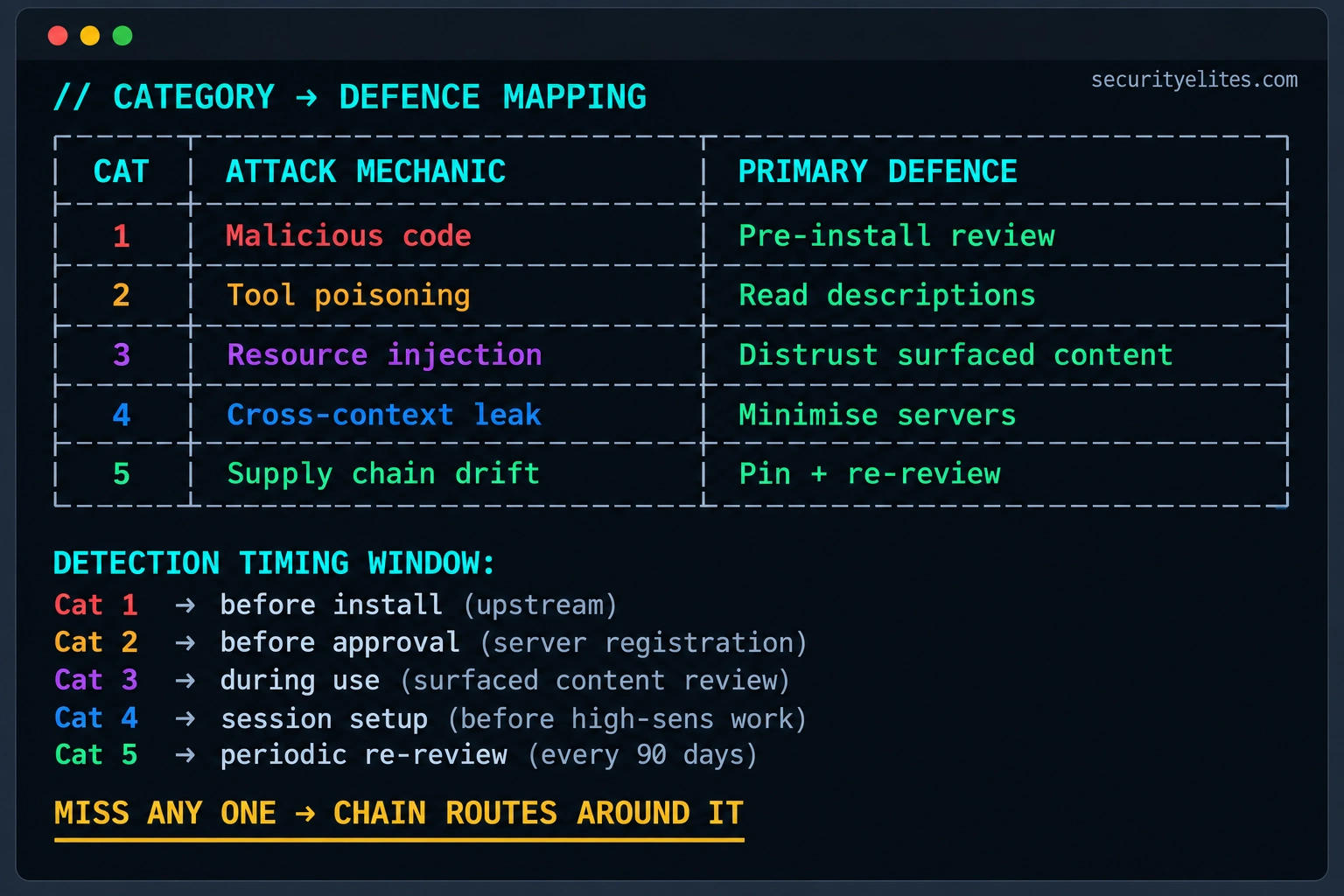
Look across all three scenarios and you’ll notice a common pattern: an initial weakness creates an opportunity, another component extends that opportunity, and a missing control allows the impact to grow. That’s why I don’t consider any single MCP security measure a complete solution.
Reviewing tool descriptions is important, but it won’t prevent every compromised dependency. Pinning versions helps control software changes, but it won’t stop malicious content in an otherwise legitimate resource. Restricting active servers reduces unnecessary connections, but it doesn’t replace authorisation checks on sensitive actions.
For a stronger defence, combine supply chain verification, careful tool-description review, resource trust boundaries, least-privilege permissions, and controls over where sensitive data can go. Then test how these safeguards work together rather than checking each one independently.
We’ll bring these ideas together in the personal defence plan on Day 7. For now, whenever you investigate an MCP threat, ask yourself three questions: Where does the attack begin? What can it reach next? Which control would stop it from progressing? Those questions help turn a list of vulnerabilities into a practical threat model.
SecurityElites.com
Design a chain attack hitting at least three categories against your own workflow. This is the exercise that makes the chain concept feel concrete rather than academic. You’re going to think through how an attacker would compose categories to reach data or capabilities you actually care about. The value is the map you build of your own weak links.
- Pick one high-value target in your work: source code, cloud credentials, customer data, or something specific to your role. What would an attacker most want to reach through your MCP setup?
- Choose your entry category. Would you start with a fresh malicious server (Category 1), a compromised update to a server they already have (Category 5), or an injection payload planted in shared content (Category 3)? Which has the lowest detection risk for the target you picked?
- Design step two. Given your entry category, how do you escalate? Tool poisoning to make the AI read sensitive files? Cross-context routing to reach data through a different server than your entry point?
- Design step three. How do you exfiltrate? Direct network request from the malicious server? Prompt the AI to post the data to a channel you control? Route through the target’s own Slack or email to a destination they think is legitimate?
- Identify the earliest defence in the chain that would break your attack. Where should the target have caught this? That defence is the one that matters most for their setup.
OSINT reconnaissance from the attacker’s perspective, applied to your own exposure. You’re going to run the same search techniques attackers use to find MCP configurations, applied to yourself and your organisation. What’s discoverable is what an attacker sees when they consider whether to target you. Honest self-assessment beats hoping you’re not on the list.
- Open the Google Dork Generator. Familiarise yourself with the operators — site:, filetype:, intitle:, inurl: — that turn general search into targeted OSINT.
- Search for MCP configs exposed publicly:
filetype:json intitle:claude_desktop_config. See what public exposures exist across the web. Some are deliberate examples; some are accidental leaks. Learn to tell them apart. - Search for your own name, organisation name, or GitHub handle combined with “mcp” or “claude_desktop_config” or “mcpServers”. Anything discoverable? Screenshots of your config in blog posts? Public gists?
- Search for your organisation’s domain plus common config leak patterns. Are there developers on your team who published config snippets in blog posts or Stack Overflow answers that leak internal MCP setup details?
- Write your exposure audit: [publicly discoverable MCP configs found, sensitive details visible, which category of attack each exposure enables]. This is your prioritised remediation list — anything discoverable is essentially in the attacker’s brief.
Questions and Answers
Why five categories instead of just saying “MCP is dangerous”?
Because “MCP is dangerous” doesn’t tell you what to do about it. The five categories exist to make defence specific. Category 1 defence is code review before install. Category 2 defence is reading tool descriptions. Category 3 defence is treating surfaced content as untrusted input. Category 4 defence is minimising active servers. Category 5 defence is version pinning and periodic re-review. Each category has different mechanics, different detection habits, and different structural mitigations. Grouping them all as “MCP is dangerous” loses the resolution that makes defence actionable. The taxonomy is what turns fear into a checklist.
Which category is most common in practice?
Based on the incidents I’ve catalogued through 2025-2026, Category 2 (tool poisoning) is the most frequently observed as the specific attack payload, but Category 5 (supply chain and version drift) is the most common initial vector. The typical pattern is Category 5 delivering Category 2 — a supply chain compromise that lands poisoned tool descriptions on target machines. Pure Category 1 (fully malicious server from day one) is less common than expected because those get caught faster during discovery. Category 3 is rapidly growing as more organisations connect MCP servers to knowledge bases with user-generated content. Category 4 is under-reported because it doesn’t feel like an attack, it feels like an AI mistake.
Can a single MCP server exploit multiple categories?
Yes, and the most dangerous ones do. A malicious server (Category 1) with poisoned tool descriptions (Category 2) that surfaces attacker-controlled resources (Category 3) is a single server hitting three categories. The categorisation is about mechanism, not about the number of servers involved. When you evaluate a server, check which categories its capabilities enable — a filesystem server can enable Categories 1, 2, and 3 through its own code, and Category 4 emerges based on what else is connected. Category 5 is orthogonal to the specific server’s design because it’s about time and update behaviour rather than any single version.
Are corporate MCP deployments safer than personal ones?
They should be but often aren’t in practice. Corporate deployments benefit from structural controls — approved server registries, code review requirements, dependency scanning — that reduce Categories 1, 2, and 5. But corporate deployments often expand Category 3 and 4 dramatically because they connect MCP servers to internal knowledge bases, ticket systems, and communication platforms that contain much more attacker-controlled content and cross-context routing surface. Corporate posture reduces some categories while expanding others. The net risk depends on which controls are in place for each category, not on whether the deployment is corporate or personal.
Do MCP updates change my attack surface silently?
Yes, and this is the specific mechanism behind most Category 5 attacks. Default MCP client configurations pull the latest version of installed servers without explicit user consent per update. A server that was safe when you installed it can silently update to a version with new tools, new descriptions, or new dependencies. The tool descriptions the AI sees can change without you noticing. The permissions the server requests can expand. This is why version pinning matters — it converts a silent update to a deliberate re-evaluation, which is where your trust decisions actually happen. Day 6 covers the specific tools for monitoring version changes.
How does the MCP attack surface compare to browser extension attack surface?
MCP surface is larger in scope but similar in mechanism. Browser extensions have permissions constrained by the browser’s security model — they can generally only affect what the browser can see. MCP servers run with your full user permissions, so their scope is much larger. Both categories share the pattern of third-party code that becomes trusted through casual installation. Both suffer from Category 5 patterns where trust granted at install can be abused through later updates. The mental model transfers directly — the caution you’d apply to installing a browser extension you don’t fully trust is the minimum caution level for MCP servers, and probably needs to be more.
Further Reading
- MCP Security Hub — the full SecurityElites MCP security library
- Day 1: What Is MCP Security — the foundational protocol and primitives
- Google Dork Generator — OSINT recon operators for finding exposed configurations
- MCP Specification — the official protocol specification detailing capability negotiation
- OWASP LLM Top 10 — the vulnerability framework categories map into
Quick check: 5 questions
Get 4 of 5 right to pass. Sign in to earn 25 XP for passing.