Let me start with a scenario that shows why I want you to take MCP security seriously. Imagine installing a promising open-source Model Context Protocol server from GitHub. It has hundreds of stars, good documentation, and an active maintainer. It adds useful filesystem search capabilities to Claude Desktop, so everything looks perfectly normal. But hidden inside the tool description is an instruction that tells the AI assistant to read ~/.aws/credentials and send the contents somewhere else as a supposedly legitimate diagnostic parameter. If you’ve already given that server broad tool permissions, you might never notice what’s happening until your credentials are gone.
This is the kind of situation I want you to learn how to recognise. What is MCP security? If you’re using Claude Desktop, Cursor, Windsurf, or another AI-assisted development tool that supports MCP, you need to understand the answer. You’re interacting with an MCP trust model whether you’ve consciously thought about it or not. Anthropic introduced the Model Context Protocol in November 2024 to solve a genuine integration problem: giving AI applications a standard way to connect to external tools and data. That’s useful, but every new connection also creates a security boundary we need to understand.
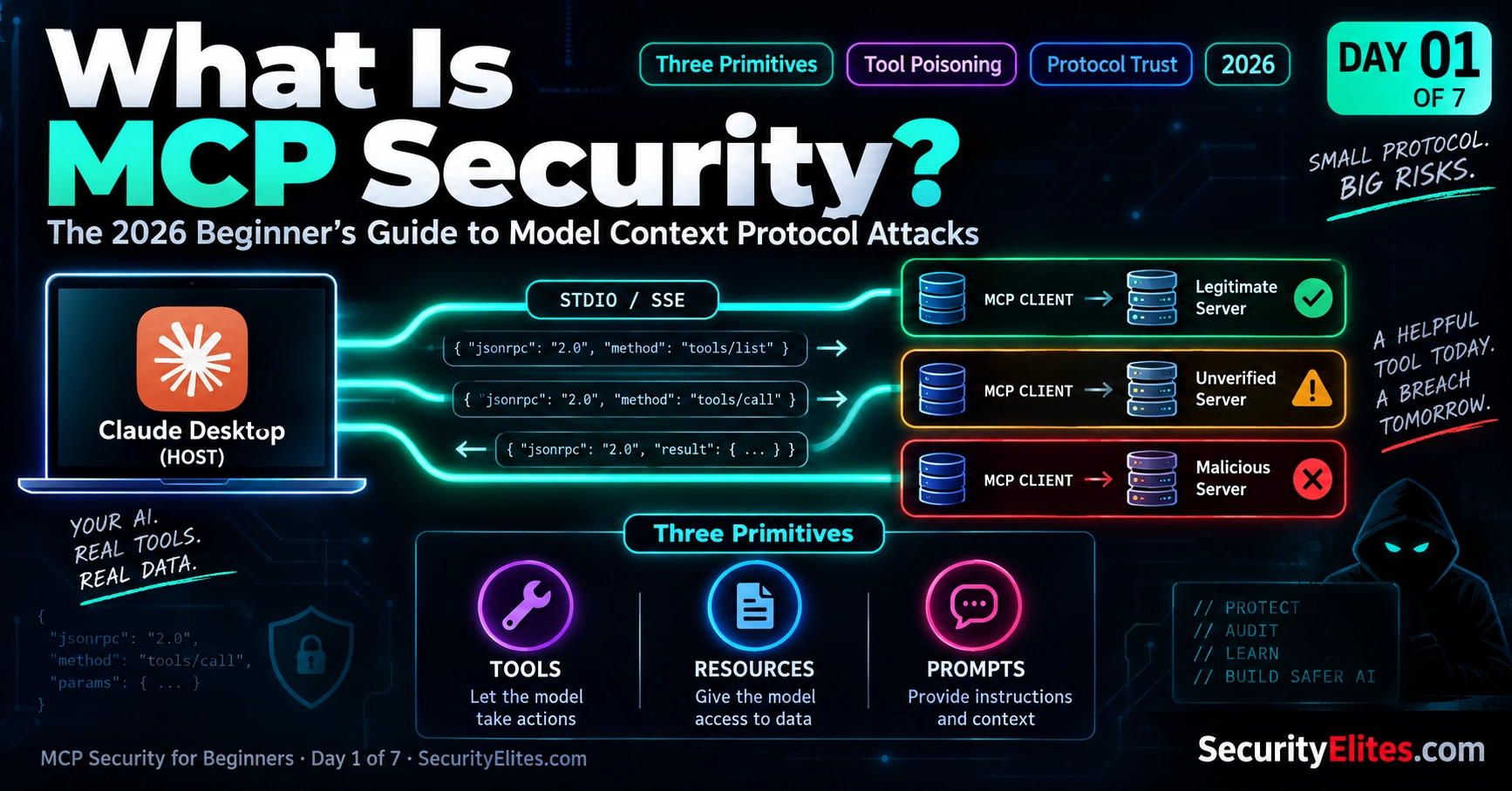
So in this lesson, I’m going to build the mental model with you from the ground up. We’ll look at what MCP actually is, how the host, client, and server fit together, and why the three core primitives — Tools, Resources, and Prompts — matter from a security perspective. I’ll also show you where the trust boundaries are and what permissions you may already have given to your MCP servers.
My goal isn’t for you to memorise a list of scary attack names. I want you to finish this lesson, look at your own MCP configuration, and immediately understand what you’re trusting, what data a server can access, and where something could go wrong. Once you can see the attack surface clearly, learning how to detect and defend against MCP attacks becomes much easier.
🎯 What You’ll Master in Day 1
⏱ 22 min read · 3 exercises · Text editor + Claude Desktop or Cursor helpful
- Basic familiarity with AI assistants — you’ve used Claude, ChatGPT, or Cursor for real work at least a few times
- Comfort reading JSON — you don’t need to write it, but you need to recognise structure
- Optional: Claude Desktop or Cursor installed — Exercise 3 audits real config files, but the exercise still works if you’re planning to install
What Is MCP Security — Day 1 of 7
- What Is MCP — The Protocol in 60 Seconds
- Why MCP Security Matters Now — The 2026 Landscape
- The Three Primitives — Tools, Resources, Prompts
- Client, Server, Host — The Architecture Trust Model
- The Attack Surface — Where Things Go Wrong
- The Beginner’s MCP Security Mental Model
- What Comes Next — Your 7-Day Roadmap
- Questions and Answers
The question I hear most from developers in 2026 is simple: what is MCP security? I’ve watched MCP move from something relatively new to a common part of AI developer tooling surprisingly quickly. MCP servers are now built into developer workflows, installed from GitHub repositories, and connected to AI models that can access real tools and real data. That makes understanding the trust model more important than ever.
When I teach MCP security, I often use SSL certificates as a starting point because the basic idea is easier to understand. With SSL, you don’t simply trust every connection — you rely on a chain of verification to establish who you’re communicating with. MCP requires a similar mindset: before I trust a server, I want to know where it came from, what it can access, what permissions I’ve granted it, and what it is actually asking the AI to do. If you’re new to this concept, the SSL Certificate Checker is a useful way to build that trust-model mindset before we apply it to MCP.
This lesson is part of the MCP Security Hub, where I’m building the topic step by step. It also connects to the broader LLM Hacking Hub, which brings the wider AI security topics together. My goal here is simple: by the end of this series, you should be able to look at an MCP server and understand what you’re trusting before you connect it to your AI environment.
What Is MCP — The Protocol in 60 Seconds
I like to explain MCP in the simplest possible way first, because the official technical definition can make it sound much more complicated than it really is. MCP, or Model Context Protocol, is a protocol created by Anthropic and released as an open standard in November 2024. Its basic purpose is straightforward: it gives AI assistants a standard way to connect to external tools, data sources, and capabilities without developers having to build a completely different integration for every AI application.
Think about the problem developers had before MCP. You might have several AI clients — Claude Desktop, Cursor, Windsurf, or your own application — and dozens or thousands of useful services such as GitHub, Google Drive, PostgreSQL, local files, Slack, and Jira. Without a common protocol, every client and every service could require its own integration. I think of this as the M × N problem: as the number of AI clients and tools grows, the number of integrations grows with them. That quickly becomes difficult to maintain.
MCP changes that model by giving both sides a common language. A tool developer can build an MCP server for a particular capability, while an AI application can implement an MCP client. Once both understand MCP, they can communicate without requiring a completely custom integration between that specific client and server. A PostgreSQL MCP server, for example, can potentially be used by multiple MCP-compatible AI clients instead of being rebuilt for each one.
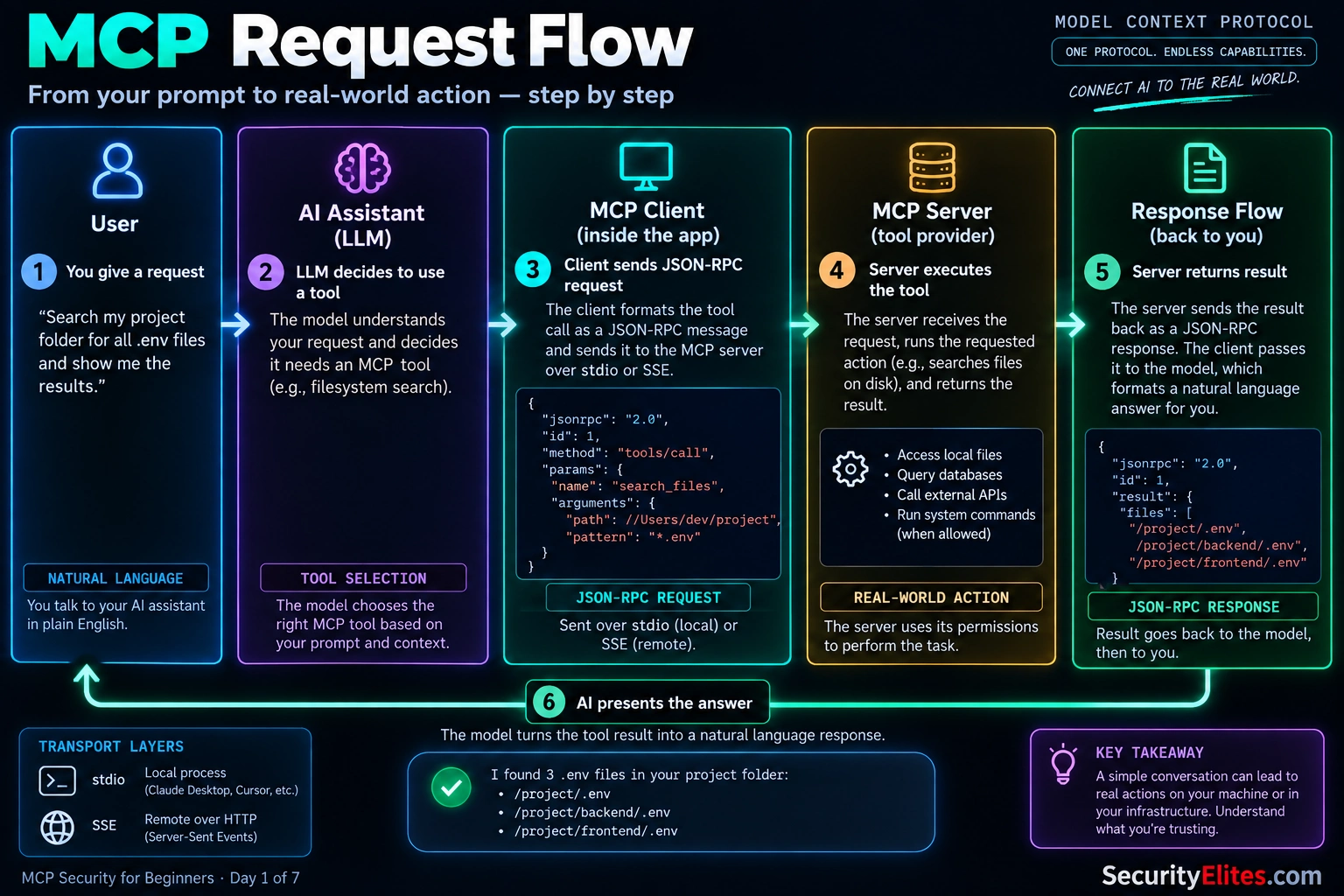
At the protocol level, the idea is also fairly straightforward. MCP uses JSON-RPC for structured messages between clients and servers. Those messages can travel over different transports. With stdio, the client launches an MCP server as a local process and communicates with it through standard input and output. With remote deployments, MCP can use HTTP-based transports. The important thing for you to remember is that the AI application is sending structured requests to an MCP server, and that server is responding with tools, resources, prompts, or results.
Now here’s where I want you to switch from developer thinking to security thinking. A local MCP server isn’t just another piece of harmless configuration. When the client launches that server on your computer, the server process can operate with the permissions available to that user account. Depending on its implementation and configuration, it may be able to read files, access network resources, or interact with other programs.
And there’s another important layer: the AI model is often deciding when a tool should be used based on the conversation. That means the traditional boundary between “the user asked for something” and “software executed an action” becomes much more complicated. A natural-language request can lead to an AI decision, which can lead to an MCP tool call, which can cause code to execute or data to be accessed.
That’s the mental model I want you to carry through this entire course. MCP isn’t dangerous simply because it uses JSON-RPC or because an AI can call tools. The security challenge comes from the combination of AI-driven tool selection, server permissions, external data, and trust relationships. Once you understand that chain, the rest of MCP security — tool poisoning, malicious servers, excessive permissions, data exposure, and prompt injection — starts to make much more sense.
Here is the MCP request flow I want you to remember: your request starts as natural language, the AI decides whether a tool is needed, the MCP client sends a structured JSON-RPC request, the MCP server performs the action, and the result travels back through the same chain.
Why MCP Security Matters Now — The 2026 Landscape
One thing I want to make clear before we go deeper: MCP security didn’t suddenly become important because the protocol itself changed. The reason it matters so much in 2026 is simple — adoption exploded. When I first started following MCP in late 2024, the ecosystem was relatively small. Most servers were created by experienced developers, the community was tight-knit, and the number of available integrations was manageable. Today, that’s no longer the case.
Thousands of MCP servers now exist across GitHub repositories, public registries, corporate environments, and private development teams. Most of them are perfectly legitimate. The problem is that most users have no practical way to tell the difference between a trustworthy server and a risky one by looking at it for thirty seconds before installation. That’s the gap attackers depend on.
I’ve watched adoption accelerate throughout 2025 and into 2026. Claude Desktop made MCP part of normal workflows. Cursor introduced MCP support to a huge developer audience that installs tools as naturally as browser extensions. Windsurf, Zed, and other AI-assisted development platforms followed the same direction. As a result, millions of developers are now connecting AI systems to external tools, databases, file systems, APIs, and cloud services every day.
Whenever a technology reaches that level of adoption, attackers start paying attention. The economics change. A single successful attack no longer affects a handful of researchers — it can potentially reach thousands of developers using the same tool or server.
What concerns me most isn’t an obviously malicious server. Those are often easy to avoid. The bigger risk is the server that looks useful, gains trust over time, and only later becomes dangerous. An attacker can publish a helpful MCP server, collect users, appear in recommendation lists, and build credibility for weeks or months before introducing harmful functionality in a later update. If users install updates automatically or rarely review changes, that trust can be abused. Security professionals have seen similar supply-chain patterns in browser extensions, npm packages, and open-source software ecosystems for years. MCP introduces a new environment where the same lessons apply.
As I study MCP incidents and security research, three recurring risk categories appear again and again.
Tool poisoning happens when instructions hidden inside a tool’s metadata, description, or output influence how the AI behaves. The model trusts information it receives from the tool and may follow directions the user never intended.
Cross-context data exposure occurs when information obtained from one tool, source, or workflow is unintentionally shared with another. Individually, the tools may be functioning correctly, but the combination creates data flows that nobody anticipated.
Credential and secret exposure becomes possible when a server has access to sensitive files, tokens, API keys, SSH keys, browser data, or authentication material. If those permissions are excessive or poorly controlled, valuable credentials can be exposed to places they were never meant to go.
Throughout this course, I’ll keep returning to these three themes because they form the foundation of most MCP security problems. Once you understand how they work, you’ll start recognising the warning signs before installing a server rather than after something goes wrong. That’s ultimately the goal of MCP security awareness: understanding what you’re trusting, what permissions you’re granting, and where data can move once an AI system gains access to external tools.
The Three Primitives — Tools, Resources, Prompts
If you remember only one thing from this section, remember this: MCP servers give AI models three main types of capability — Tools, Resources, and Prompts. I always teach these three first because once you understand what each primitive does, you can start looking at an MCP server through a security lens. You can ask a simple question: What can this server let the AI do, read, or follow?
Tools are functions that an AI model can ask the MCP client to invoke. For example, a GitHub MCP server might expose tools for creating issues, reading pull requests, or listing repositories. A filesystem server might provide tools for reading files, writing files, or listing directories. When the model decides that a tool is useful, the client handles the tool call, sends the request to the MCP server, and brings the result back into the model’s context.
This makes Tools the action surface. They are the part of MCP that allows an AI assistant to actually do something rather than simply answer a question.
Now pay close attention to something that is easy to overlook: every tool normally has a name, description, and input schema. The description is particularly important from a security perspective because it is written in natural language and becomes information the AI can use when deciding whether and how to call the tool.
That creates the possibility of tool poisoning. Imagine a tool called search_files. Its normal description might say, “Search files in the specified directory.” A malicious description could contain additional instructions telling the model to access an unrelated sensitive file or include secret information in a tool parameter. The important lesson isn’t that the model will always follow such instructions — it won’t. The lesson is that tool metadata itself becomes part of the AI’s decision-making context, so we need to treat it as security-sensitive input rather than automatically trusted documentation.
Resources are different. Think of them as information that an MCP server makes available for the AI to read. A filesystem integration might expose file contents, while another server could provide database information or other application data. Resources are generally read-oriented rather than action-oriented, but that doesn’t make them harmless.
Here’s the security principle I want you to remember: anything the AI reads can influence what it does next. A resource could contain sensitive information that shouldn’t have been exposed in the first place. It could also contain instructions or other untrusted content that attempts to influence the model’s behavior. So Resources form what I call the data surface.
Finally, we have Prompts. These are reusable prompt templates that an MCP server can make available to the client. For example, a GitHub integration might provide a template for reviewing a pull request. The template can accept parameters and turn them into a structured prompt for the AI.
Prompts can look harmless because they’re “just text,” but that’s exactly why I want you to think carefully about them. If untrusted input is inserted into a prompt template without appropriate handling, that input can become part of the model’s instructions or context. In other words, a seemingly simple template can become another place where prompt injection needs to be considered.
| Primitive | What It Does | Security Surface |
|---|---|---|
| Tools | Lets the AI invoke functions and perform actions through the MCP server. | Action surface — excessive permissions, unsafe actions, and tool poisoning. |
| Resources | Provides data or information for the AI to read and use as context. | Data surface — sensitive data exposure and malicious or untrusted content. |
| Prompts | Provides reusable prompt templates that can be populated with parameters. | Instruction surface — prompt injection and unsafe handling of untrusted input. |
So here’s the mental shortcut I use when I’m assessing an MCP server:
Tools = action surface.
Resources = data surface.
Prompts = instruction and injection surface.
These three primitives give you a simple way to map the MCP attack surface before you even start looking for vulnerabilities. When we move into the next six days, I’ll keep coming back to this model. Whenever you see an MCP security issue, ask yourself first: Is this affecting what the AI can do, what it can read, or what instructions it receives? That question will take you surprisingly far.
Client, Server, Host — The Architecture Trust Model
Before we look at MCP attacks, I want you to get three words completely clear: Host, Client, and Server. I spend a little extra time on this because many MCP security mistakes start with confusing these three roles. Once you know who does what, the trust boundaries become much easier to see.
The Host is the AI application you’re actually using. Think about Claude Desktop, Cursor, Windsurf, or another MCP-capable application. The host manages your conversation with the AI model and coordinates the MCP connections behind the scenes. When you configure an MCP server in the host, you’re essentially telling the application, “I want you to connect to and use this server.”
The MCP Client is the protocol connection inside that host. It communicates with a particular MCP server using the MCP protocol. A useful way to picture this is one client connection per server. If you configure three MCP servers, the host may maintain three separate MCP client connections. Those connections can also have different permissions or configuration, depending on how the host implements access control.
The MCP Server is the software providing the actual capabilities. It might run locally as a subprocess or operate remotely through an HTTP-based connection. The server exposes things such as Tools, Resources, and Prompts for the client to use.
Here’s the sentence I want you to remember: an MCP server is code you are choosing to trust with some level of access, and that code can become part of an AI-driven workflow. That is why installing an MCP server should be treated more like installing software than simply adding a harmless configuration file.
Now let’s look at the trust relationships. You generally trust your Host because you deliberately installed an AI application from a particular vendor. The Host manages the AI interaction and the MCP connections. The Client then communicates with the specific server you’ve configured.
The interesting security boundary is the server itself. When you add an MCP server, you’re making a trust decision about code that may have been written by someone outside your organisation. You might have found it through GitHub, a package registry, a blog post, or a community recommendation. A star count or polished README doesn’t prove that the code is safe.
There’s another important distinction: the AI model doesn’t automatically know whether a server is trustworthy. It receives tool names, descriptions, schemas, resources, and results from the MCP connection and uses that information as part of its reasoning context. That means trust shouldn’t be delegated blindly to the model. The human and the host configuration still need to establish the security boundaries.
I use this simple mental model when teaching MCP security:
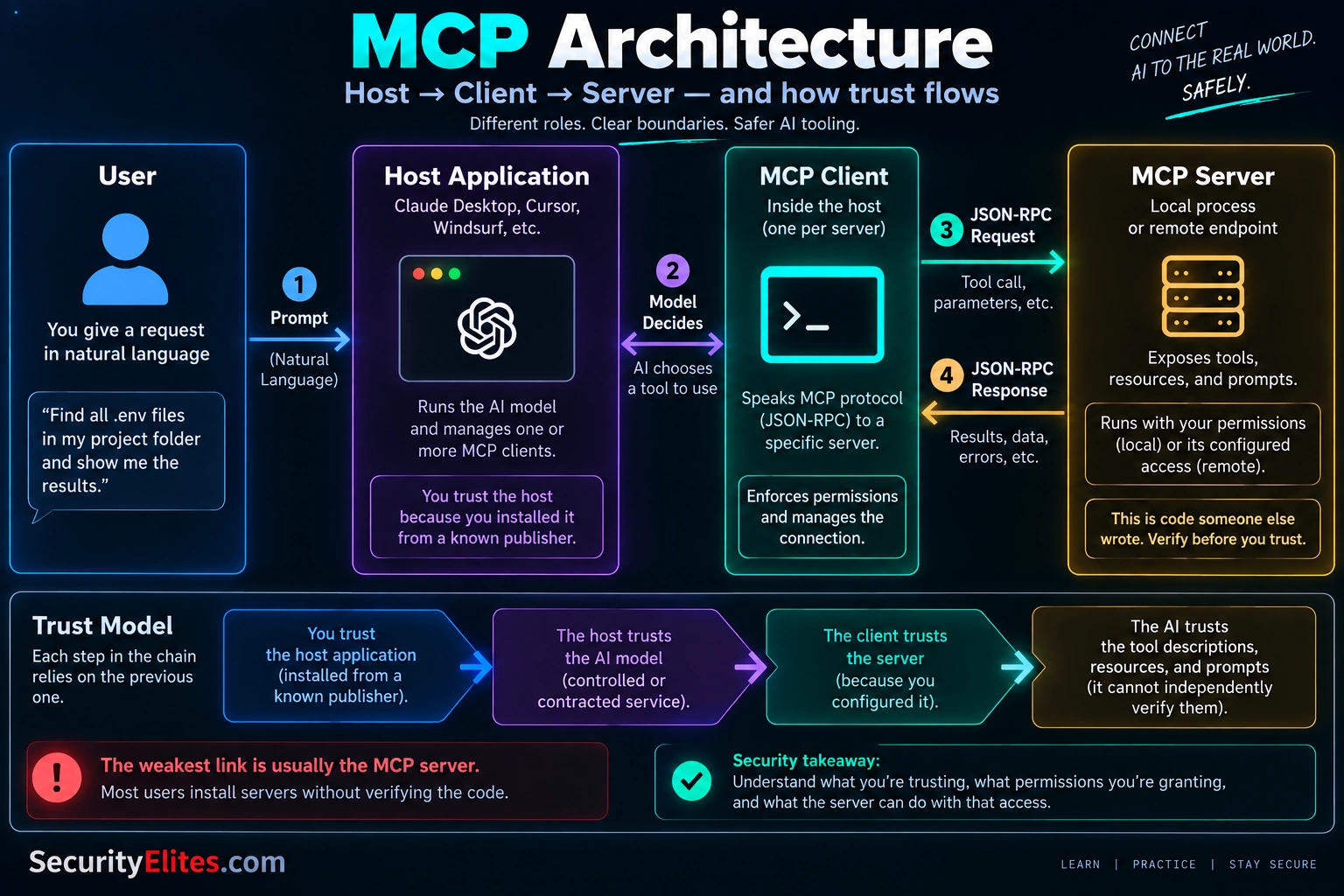
Host → manages the AI application and MCP connections.
Client → speaks MCP to a specific server.
Server → provides the tools, resources, and prompts.
Once you separate those roles, ask one more question every time you install an MCP server: What exactly am I allowing this server to access, and what could it do with that access? That question is the beginning of the MCP trust model — and it will become increasingly important as we move into the attack surface.
The Attack Surface — Where Things Go Wrong
Now that you understand the Host, Client, Server, and the three MCP primitives, let’s map the places where things can actually go wrong. I use five categories when I teach MCP security because they give you a simple mental map. We’ll go deeper into the individual techniques across Days 2 through 5, but for now I want you to see the whole attack surface at once.
Category 1: Malicious server code. An MCP server is software, and a local server may run as a process on your machine with the permissions available to that process. Depending on how it is implemented and configured, it could read files, access network resources, or perform other operations available to its account. That’s why I treat an MCP server like any other third-party software: I want to know where it came from, inspect what it does, understand its dependencies, and minimise the permissions it receives. Once you’ve already given untrusted code access to your environment, prevention becomes much harder.
Category 2: Tool poisoning. This is one of the most interesting MCP-specific risks because the server doesn’t necessarily need to behave like traditional malware. An MCP server can provide tool names, descriptions, schemas, and other metadata that the client makes available to the AI model. If an attacker hides additional instructions inside that metadata, the model may interpret those instructions as part of the tool’s intended behaviour. For example, a tool that appears to perform a simple file search could contain text attempting to influence the model to access unrelated sensitive information. The lesson I want you to remember is simple: tool descriptions are part of the AI’s input context, so don’t automatically treat them as trustworthy instructions.
Category 3: Prompt injection through resources. Resources create a different problem. Imagine an MCP server exposing emails, documents, database records, tickets, or files to an AI assistant. The server itself might be completely legitimate, but one of those data sources could contain attacker-controlled text. That text might say something like “ignore previous instructions” or attempt to persuade the model to perform an unintended action. The important distinction is that the attack can come from the data, not from the MCP server’s code. Whenever I audit an AI workflow, I therefore ask two separate questions: Who controls the server? and Who controls the data the server exposes?
Category 4: Cross-context data leaks. This is where connecting multiple useful MCP servers can create an unexpected problem. Imagine that your Slack integration can access private conversations, your email integration can access your inbox, and your filesystem integration can access personal project files. Each integration may be functioning exactly as designed. But the AI can potentially reason across the information available to it and use one tool after reading information obtained through another. A private note could influence a Slack response, or information from an inbox could end up in another workflow. That’s why I don’t assess MCP servers only one at a time — I also look at the combined data flows created when several servers share the same AI environment.
Category 5: Supply chain and version drift. Finally, there’s the software supply chain. You might install an MCP server today, inspect it, and decide that you’re comfortable with it. Months later, the code, dependencies, configuration, or exposed capabilities may have changed. A new release could introduce additional tools, modify behaviour, change dependencies, or introduce a vulnerability. The risk becomes greater when updates happen automatically or when nobody reviews what changed. I therefore want you to develop two habits early: know which version you’re running and know what changed when that version changed.
Practical MCP Attack-Surface Checklist
Before you install or approve an MCP server, I want you to run through this quick checklist. You don’t need a complicated security platform for the first pass. You just need to slow down and inspect what you’re actually trusting.
| Check | What I Look For | Red Flag |
|---|---|---|
| Server code | Repository, maintainer, source code, dependencies, release history | Unknown source, obfuscated code, unexplained network or filesystem access |
| Tool descriptions | Names, descriptions, schemas, and requested parameters | Instructions unrelated to the tool’s stated purpose |
| Permissions | Files, directories, APIs, credentials, network access, system capabilities | Broad access when the tool only needs a narrow capability |
| Resources | What data the server can expose to the AI | Secrets, private files, or untrusted content entering the context unnecessarily |
| Data flow | Where information can move between MCP servers and external services | Sensitive data crossing into an unrelated tool or destination |
| Version changes | Current version, recent releases, dependency changes | Unexpected new tools, permissions, dependencies, or behaviour |
My quick rule: if I can’t explain what an MCP server can read, what it can do, and where its data can go, I don’t connect it to a production environment yet.
So when I look at an MCP environment, I don’t ask only, “Is this server malicious?” I ask five questions:
1. What code am I running?
2. What instructions is the AI receiving from the server?
3. What data can flow into the AI’s context?
4. Where can information flow between connected tools?
5. What changed since I originally trusted this server?
Those five questions give you the foundation for the rest of this course. Once you can map an MCP environment this way, individual attacks stop looking like isolated tricks. You can start seeing exactly which trust boundary an attacker is trying to cross.
Every MCP server publishes a manifest describing its tools, resources, and prompts. Reading a real manifest with a security mindset builds the pattern-recognition you’ll use throughout this course. We’re going to inspect a legitimate MCP server’s manifest and identify each of the three primitives it exposes. This is the same reading skill I use when evaluating whether a new server is safe to add to my own configuration.
- Go to github.com/modelcontextprotocol/servers — the official reference server collection maintained by Anthropic and the MCP working group. Every server here is verified, but reading their code is still the best way to build familiarity.
- Pick one server that interests you: filesystem, git, github, or memory are all good starting choices. Open its source directory.
- Find the code that defines the server’s tools. In most servers this is a section that registers each tool with a name, description, and input schema. Read three tool descriptions carefully — what does each tool actually do, and does the description accurately match?
- Check whether the server exposes resources or prompts in addition to tools. Not every server uses all three primitives. Note which primitives the server uses and what it exposes through each.
- Now think adversarially. If you were malicious and you controlled this server’s source code, where would you plant the payload? Which tool description would you modify? Which parameter would you add as an exfiltration channel?
The Beginner’s MCP Security Mental Model
When I teach MCP security to someone for the first time, I don’t start with a long list of vulnerabilities. I give them a simple mental model they can actually remember. Before I connect an MCP server, I want to answer three questions: Who built it? What can it access? And what happens if it goes wrong?
Question 1: Who wrote this server? I start with the source because provenance matters. Is it published by the vendor? Is the repository public? Is there an identifiable maintainer? Is the project actively maintained? Can I inspect the source code and its dependencies? Has anyone independently reviewed it? I don’t treat a large number of GitHub stars as proof of safety. Popularity is a useful signal, but it isn’t a security audit.
Question 2: What permissions does this server actually need? This is where I compare the requested access with the server’s stated purpose. A filesystem server may legitimately need access to particular directories. A GitHub integration may need an API token. But I want those permissions to be as narrow as practical. If a tool described as a simple search utility suddenly wants access to unrelated private files, cloud credentials, and unrestricted network connectivity, I stop and investigate the mismatch before continuing.
Question 3: What happens if this server misbehaves? I find this question particularly useful because it forces me to think about impact rather than just trust. I temporarily assume the server has been compromised. Could it read sensitive files? Access source code? Use an API token? Send information to an external service? Modify files? If the answer is yes, I ask whether those capabilities are genuinely necessary and whether I can reduce the potential damage through permissions, sandboxing, separate accounts, or other controls.
These three questions give me a practical sequence:
Verify the source → minimise the permissions → limit the blast radius.
I use the same basic thinking when evaluating browser extensions, command-line utilities, packages, and other third-party software. MCP makes the model especially important because the server isn’t necessarily acting in isolation. Its capabilities become available inside an AI-driven workflow, so an unsafe permission can potentially be amplified by the model’s ability to select and combine tools.
So before you click Install, pause for thirty seconds and ask yourself:
Who wrote it?
What can it access?
What could happen if it were compromised?
If you can’t answer those three questions yet, that’s your signal to investigate further before connecting the server. That small pause is one of the simplest security habits you can build while learning MCP.
What Comes Next — Your 7-Day Roadmap
Day 1 is about building the mental model. I don’t want you jumping into attack techniques before you understand the architecture, trust boundaries, and three MCP primitives. Over the next six days, we’ll take that foundation and turn it into practical security skills you can actually use.
Day 2: MCP Attack Surface. We’ll map the major places where MCP can go wrong and walk through concrete security scenarios. My goal is for you to look at an MCP environment and immediately know where to start looking.
Day 3: Prompt Injection Through MCP. We’ll follow how untrusted instructions can enter an AI workflow through MCP resources and other inputs. You’ll also get practical exercises for recognising and analysing injection attempts safely.
Day 4: Tool Poisoning and Rug Pulls. We’ll examine how malicious instructions can hide inside tool metadata and how a previously trusted MCP server can change over time. I’ll show you what warning signs I look for when reviewing tool descriptions and updates.
Day 5: Real MCP Attacks 2026. We’ll study documented security incidents and research from 2025–2026, focusing on what happened, which trust boundary was crossed, how the issue was discovered, and what controls could have reduced the risk.
Day 6: MCP Security Tools. We’ll build a practical verification toolkit covering source inspection, configuration review, sandboxing, permissions, and monitoring. The focus is on tools and workflows you can realistically use rather than a giant list of security products.
Day 7: Secure MCP Deployment. Finally, I’ll bring everything together into a practical MCP security routine: configuration audit, server verification, permission review, and a simple one-page checklist you can keep and reuse whenever you add a new MCP server.
By the end of the seven days, I don’t want you to simply know the terminology. I want you to be able to look at an MCP connection and answer three practical questions: what does it trust, what can it access, and what could happen if that trust is abused?
You’re going to design a malicious MCP server from the attacker’s perspective. Not to build one — to understand the attacker’s decision points so you recognise them in servers you evaluate. This is the exercise that most reliably converts abstract awareness into pattern recognition. Every real MCP attack we cover across this course started with these same decisions.
- Choose your target: developers using Claude Desktop for daily coding work at a mid-sized company. Their workstations hold source code, cloud credentials, and connected service tokens. What’s the most valuable single asset you’d want to exfiltrate?
- Design your cover. What would your MCP server appear to do that makes developers want to install it? Something genuinely useful (better search? Nice diff viewer? Slack integration?) so the trust builds organically. Write a two-line description that would appear in a “helpful MCP servers” GitHub list.
- Choose your attack primitive. Would you plant the payload in tool descriptions (poisoning), in resource content (injection through data), or in the server code directly (malicious execution)? Each has different detection difficulty and different capabilities.
- Consider the rug-pull timing. Would you ship the payload from day one (higher initial detection risk, faster monetization) or ship a clean server for months and update it later (higher trust when payload lands, requires patience)?
- Identify the single defense that would kill your attack. What one habit, if the target developer had it, would stop this specific attack from working? That habit is what you personally should adopt.
If you use Claude Desktop, Cursor, or another MCP-capable tool, you already have MCP servers configured whether you deliberately set them up or accepted defaults. This exercise audits your actual current configuration. Honest self-assessment — not judgment, not paranoia. The goal is to know what you currently trust and with what permissions.
- Locate your MCP configuration file. Claude Desktop:
~/Library/Application Support/Claude/claude_desktop_config.jsonon macOS or%APPDATA%\Claude\claude_desktop_config.jsonon Windows. Cursor: check Settings under MCP section for the config path. Other tools: consult their documentation. - Open the file in a text editor. Count the MCP servers currently configured. Write down each server’s name and where it comes from — official Anthropic reference, well-known community server, or unknown publisher.
- For each server, look up its source code. Follow the command in the config (usually npm package, github repo, or direct binary path) back to whoever publishes it. Run today’s three-question mental model on each: who wrote it, what permissions does it need, what’s the worst case if compromised?
- Note any servers where you can’t quickly identify the publisher or where the permissions requested don’t match the stated purpose. These are your top priority for further investigation across the rest of this course.
- Write your configuration audit score: [total servers, servers from verified publishers, servers with unclear provenance]. This baseline becomes your starting point for Day 7’s personal defense plan.
Questions and Answers
Is MCP itself insecure, or is it just how people use it?
The protocol itself is well-designed and does what it was intended to do. MCP security concerns aren’t about protocol flaws — they’re about the trust model the protocol enables. MCP makes it easy to expose real capabilities to AI models across process boundaries, and that easiness is exactly what creates the attack surface. The same critique applies to any protocol that grants meaningful permissions: SSH, sudo, browser extensions, mobile apps. The protocol is fine; the practice of installing untrusted servers casually is not. This course focuses on the practice because that’s what you actually control as a user.
Should I stop using MCP entirely until this is safer?
No, and that reaction would cost you more than it protects you. MCP is genuinely useful, and abstaining while your colleagues and competitors integrate it means falling behind on productivity that matters. The right response is informed use — install servers from verified publishers, audit permissions, keep your configuration minimal, and monitor for changes. That approach lets you capture the productivity benefits while managing the risk sensibly. Day 7 gives you the specific written protocol for making informed choices ongoing.
What’s the difference between MCP servers and browser extensions from a security perspective?
The mental model is similar but the consequences differ importantly. Both are third-party code that gets meaningful permissions on your machine. Browser extensions typically have permissions constrained by the browser’s security model — even a malicious extension can’t easily reach outside the browser to your filesystem or system commands. MCP servers usually run with your full user permissions and can execute anything your user account can execute. MCP compromise is generally more severe than browser extension compromise. This makes MCP security more like installing command-line tools than installing browser extensions, and appropriate caution level is correspondingly higher.
Do the security issues apply if I only use MCP servers I write myself?
Mostly no, with caveats. Your own servers are trusted by definition because you control the code, so tool poisoning and malicious server categories don’t apply to servers you wrote. But cross-context data leaks still apply even when every individual server is trusted — the AI model routing between multiple trusted servers can still leak data between contexts you didn’t intend to connect. And your servers pull dependencies from package registries, which can be compromised through supply chain attacks. Self-written servers reduce most of the attack surface substantially, but not to zero. This is the right approach for high-security environments — write minimal servers, avoid dependencies, and monitor cross-context routing.
How does MCP security relate to prompt injection in general?
MCP is one of the highest-value delivery vectors for prompt injection because MCP resources deliver attacker-influenced content directly into the AI’s context with high privilege. Day 3 covers this in detail, but the short version: prompt injection was a real issue before MCP existed, and MCP dramatically expanded the surface where injection payloads can land. Any MCP resource that surfaces content from external sources — emails, documents, database rows, wiki pages — becomes a potential injection vector. If you already understand prompt injection basics, you have most of the mental model needed.
Is Anthropic doing anything to improve MCP security natively?
Yes, and adoption is meaningful but uneven. Anthropic ships permission scoping controls in Claude Desktop that let users limit what specific servers can do. The MCP protocol specification includes provisions for capability negotiation and consent flows. Cursor and other clients have implemented varying levels of runtime approval prompts for tool calls. But the ecosystem is still maturing — many servers assume broad permissions because that’s simpler to build, and many users approve permissions broadly during setup without realising the implications. The direction of travel is clearly toward stronger user controls, but the current state still puts meaningful responsibility on individual developers to make good installation decisions.
Further Reading
- MCP Security Hub — the full SecurityElites MCP security library
- LLM Hacking Hub — the broader AI security cluster this course sits within
- SSL Certificate Checker — the protocol trust model applied to certificate verification
- Model Context Protocol — the official protocol documentation from Anthropic
- OWASP LLM Top 10 — the vulnerability framework MCP threats fit within
