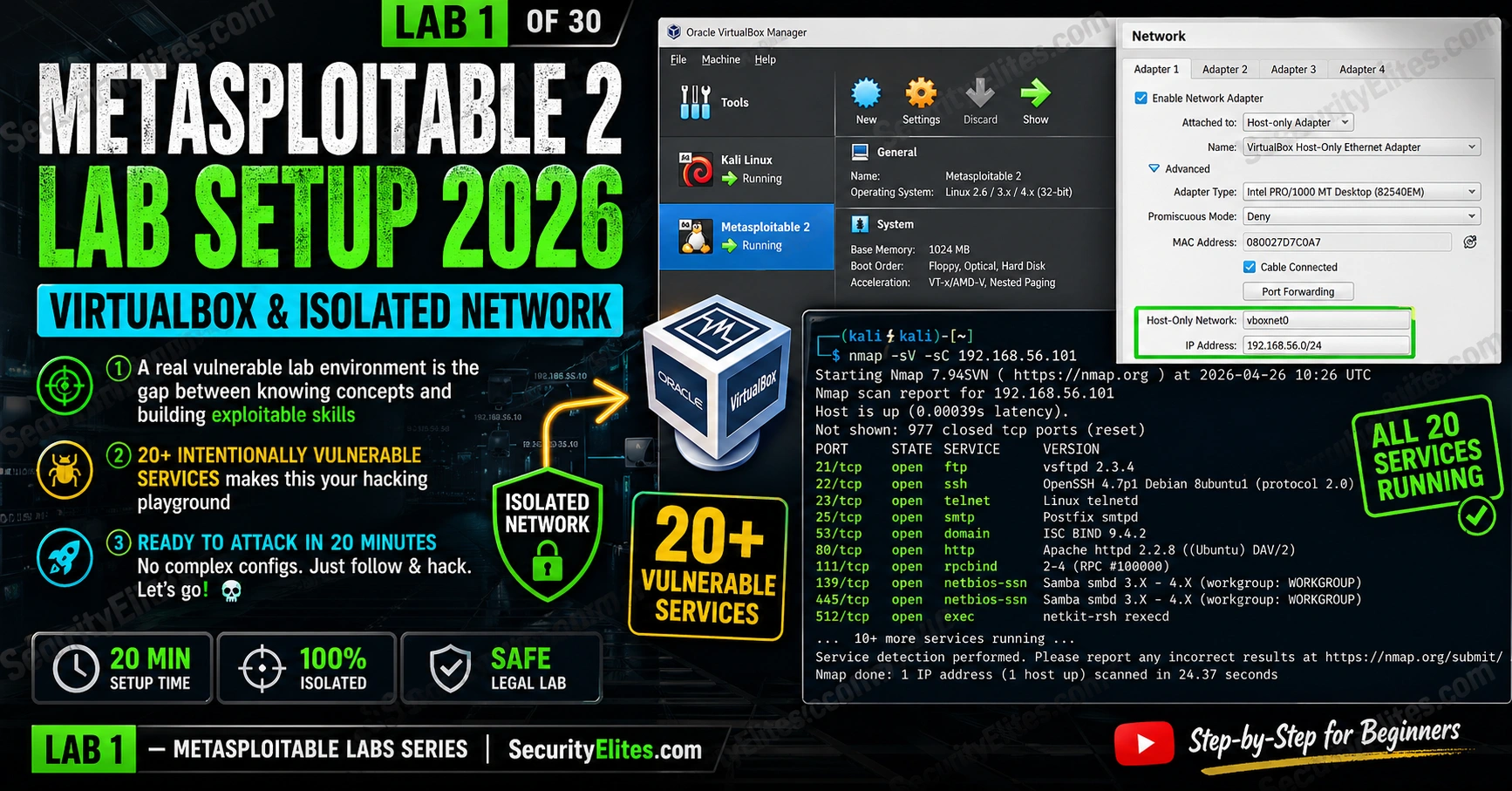
This article is a complete setup guide for Lab 1 of a Metasploitable 2 hands-on lab series, teaching network penetration testing through exploitation of intentionally vulnerable services. The article walks through downloading Metasploitable 2, configuring it in VirtualBox on an isolated host-only network, and verifying 20+ vulnerable services are running before any exploitation begins. Network isolation is emphasized as critical—misconfiguration exposes dangerous vulnerabilities to external systems and violates security policy.
- Why network isolation is mandatory before exploitationMetasploitable must run exclusively on a VirtualBox host-only network (vboxnet0 at 192.168.56.0/24) with no internet access or connection to the main network. If Metasploitable boots with a 10.0.2.x address, it's on NAT and has internet access—this is a security failure that must be corrected before any lab work. The article repeatedly emphasizes that connecting vulnerable services to any reachable network is 'potentially illegal' and creates risk to other systems beyond the learner's host.
- Supply chain backdoors in production binariesMetasploitable contains two real-world supply chain attack examples: vsftpd 2.3.4 (port 21) had a deliberate backdoor compiled in and distributed as the official release on SourceForge for several days in 2011 (CVE-2011-2523), triggered by sending a username containing ':)' to get a root shell on port 6200. UnrealIRCd 3.2.8.1 (port 6667) similarly had a backdoor where sending 'AB;' followed by a command executes it (CVE-2010-2075). Both demonstrate how compromised upstream sources can distribute weaponized binaries at scale.
- Immediate-access services requiring no credentialsMetasploitable includes multiple services accessible without authentication: port 1524 provides an instant root shell via netcat with no exploit needed, MySQL root account has no password (connect with mysql -h 192.168.56.101 -u root and read files or write shells via LOAD_FILE and OUTFILE), VNC on port 5900 requires no authentication and provides direct GUI access, and phpMyAdmin on port 80 grants full database access via default empty password.
- Samba RCE through username injectionSamba 3.0.20 on ports 139 and 445 has the 'username map script' vulnerability (CVE-2007-2447): when this configuration option is set, Samba passes the username to a shell script, allowing shell metacharacter injection in the username field to achieve remote code execution without authentication. This is exploitable via a single Metasploit command (exploit/multi/samba/usermap_script) and produces a root shell.
- Three exercises validate complete setupExercise 1 (15 minutes) imports Metasploitable into VirtualBox, verifies the VM boots with msfadmin credentials, and confirms services are running via 'ps aux'. Exercise 2 (10 minutes) verifies network isolation by confirming ping 8.8.8.8 fails from Metasploitable and ping 192.168.56.101 succeeds from Kali, and validates SSH access with msfadmin credentials. Exercise 3 (10 minutes) uses nmap to inventory all 20+ services and creates a clean snapshot for restoring between labs.
- Web application stack runs on ports 80 and 8180Port 80 hosts DVWA at /dvwa/ (pre-installed with admin/password credentials and 10 vulnerability modules), Mutillidae at /mutillidae/ (40+ vulnerabilities across OWASP Top 10), phpMyAdmin at /phpmyadmin/ (with root and empty password access to execute SQL queries and write shells via SELECT INTO OUTFILE), and TWiki at /twiki/ (with arbitrary command execution via wiki markup). Port 8180 runs Apache Tomcat with default manager credentials (tomcat/tomcat) allowing deployment of malicious WAR files containing JSP shells.
- Common setup failures and their fixesIf Metasploitable shows 10.0.2.15 instead of 192.168.56.x, the network adapter is configured as NAT instead of host-only—fix by shutting down and changing Settings → Network → Adapter 1 to Host-Only. If ping fails to Metasploitable, verify Kali's vboxnet0 adapter is enabled via 'ip addr show | grep 192.168.56' and bring up the interface with 'sudo dhclient eth1' if needed. If 'unable to mount root fs' appears during boot, the VMDK is attached as SATA instead of IDE—add an IDE controller and reattach the disk.
- Progression from DVWA to network exploitation mindsetDVWA labs (30-lab prerequisite series) teach web application vulnerability testing (SQLi, XSS, CSRF, etc.). Metasploitable extends this to network-layer service exploitation using the Metasploit framework, requiring a fundamentally different mindset—thinking like a network penetration tester rather than a web security researcher. The article positions this transition as 'the biggest jump in the learning path' between the two skillset domains.
Bottom line: Before executing any exploitation lab, Metasploitable must be correctly isolated on a host-only network where ping to external IPs fails, all 20+ vulnerable services are verified running via nmap, and a clean snapshot is saved for lab restoration. Network misconfiguration exposes real vulnerabilities to the host system or beyond and negates the security value of the lab environment.
FREE
Part of the Metasploitable Labs Series
🎯 What You’ll Build in Lab 1
⏱️ 25 min setup · 3 exercises · Lab 1
✅ Before You Start
- DVWA Labs Complete — completing the 30-lab DVWA series built the web application pentesting foundation. Metasploitable extends this to network service exploitation and Metasploit framework usage.
- VirtualBox 7.x installed. At least 8GB RAM total. 10GB free disk space. Kali Linux VM already working.
📋 Hacking Lab 1 — Metasploitable Lab Setup
The DVWA lab series covered web application exploitation across 30 labs. Metasploitable shifts the focus to network-layer service exploitation — the techniques covered in the Metasploitable Labs series. The first step is a correct lab environment — everything else depends on it.
Download and Extract Metasploitable 2
Create the VirtualBox VM
⏱️ 15 minutes · VirtualBox installed, VMDK downloaded
Follow the setup steps exactly. The network configuration is the critical step — if Metasploitable reaches the internet, it’s a security risk to you and potentially to others. Verify isolation before starting any exploitation lab.
VirtualBox → New → Metasploitable2 → Linux → Other Linux 64-bit
Memory: 512MB
Hard disk: Use existing → select Metasploitable.vmdk
Step 2: Verify VM settings before first boot
Settings → System → Boot Order: Hard Disk first
Settings → Display → Video Memory: 16MB
Settings → Network → (configure in Exercise 2)
Step 3: First boot test
Start Metasploitable2 VM
Wait for boot (30-60 seconds)
Login: msfadmin / msfadmin
Run: ifconfig
Note the eth0 IP address
Step 4: Verify basic services from console
ps aux | grep -E “ftp|ssh|apache|mysql|postgres”
Should show multiple services running
Confirm: VM boots, you can login, services are running.
📸 Screenshot your Metasploitable2 boot screen with msfadmin login. Share in #metasploitable-labs.
Configure the Isolated Network
⏱️ 10 minutes · Both VMs running
After the network reconfiguration, verify that isolation is correct before any exploitation work. The isolation check is a 2-minute test that prevents lab sessions from accidentally attacking external systems.
ping -c 3 8.8.8.8 # Must FAIL (no internet)
ifconfig # Should show 192.168.56.x
From KALI terminal:
# Show kali’s lab interface
ip addr show | grep 192.168.56
# Ping Metasploitable
ping -c 3 192.168.56.101 # Must SUCCEED
# SSH test
ssh msfadmin@192.168.56.101 # Accept fingerprint, password: msfadmin
# You should get a shell
exit
# HTTP test
curl http://192.168.56.101 # Should return DVWA homepage HTML
Isolation check matrix:
✅ Kali → Metasploitable: SUCCESS (ping, ssh, http all work)
✅ Metasploitable → Internet: FAIL (ping 8.8.8.8 unreachable)
If both checks pass: lab is correctly configured.
📸 Screenshot both the Metasploitable ping failure (8.8.8.8) and Kali ping success (to Metasploitable). Share in #metasploitable-labs.
Verify Services and Create Snapshot
⏱️ 10 minutes · Kali Linux + Metasploitable running
Before any exploitation work, document the baseline service inventory and create a clean snapshot. The snapshot is your restore point for every subsequent lab — essential when labs modify system state.
nmap -sV –top-ports 100 192.168.56.101
Expected services:
21/tcp ftp vsftpd 2.3.4 (BACKDOORED!)
22/tcp ssh OpenSSH 4.7p1
23/tcp telnet Linux telnetd
25/tcp smtp Postfix
80/tcp http Apache 2.2.8
139/tcp netbios Samba
445/tcp smb Samba
3306/tcp mysql MySQL 5.0.51a
5432/tcp postgres PostgreSQL 8.3.0
5900/tcp vnc VNC (no auth!)
6667/tcp irc UnrealIRCd (BACKDOORED!)
8009/tcp ajp13 Apache Jserv
8180/tcp http Apache Tomcat/Coyote
Step 2: Verify DVWA is accessible
curl http://192.168.56.101/dvwa/login.php | grep -i “dvwa”
# Should return HTML with DVWA login page content
Step 3: Verify phpMyAdmin
curl http://192.168.56.101/phpmyadmin/ | grep -i “phpmyadmin”
Step 4: Create snapshot in VirtualBox
VirtualBox → Metasploitable2 → Machine → Take Snapshot
Name: “Clean Install – Lab 1 Complete”
Description: “All services verified running. Network isolated. Lab 1 complete.”
Now every lab in this series starts with: Restore to this snapshot → begin exploitation.
📸 Screenshot your full Nmap service scan output. Share in #metasploitable-labs.
The 20+ Vulnerable Services — What You’re About to Attack
The services overview I always give students before any exploitation: know what’s there before you touch it. The network isolation step is the one I verify twice — a misconfigured adapter puts vulnerable services on a reachable network. My VirtualBox setup for Metasploitable follows specific settings to avoid the most common boot failure. The Metasploitable 2 download step is the only one I recommend doing from a specific source — SourceForge only. Metasploitable 2 is running right now on your vboxnet0 network. Here’s what’s listening on those 23 open ports — and why each one matters for the labs ahead.
vsftpd 2.3.4 (port 21) — The backdoored FTP server. In 2011, someone uploaded a version of vsftpd with a deliberate backdoor: sending a username containing a smiley face :) triggers a root shell on port 6200. It was distributed as the official vsftpd 2.3.4 release on SourceForge for several days before discovery. CVE-2011-2523. This is Lab 3’s first target.
Samba smbd 3.0.20 (ports 139, 445) — The username map script vulnerability. Samba’s “username map script” configuration option, when set, passes the username to a script via the shell. Injecting shell metacharacters into the username field achieves RCE without authentication. CVE-2007-2447. Metasploit module: exploit/multi/samba/usermap_script. Produces a root shell.
UnrealIRCd 3.2.8.1 (port 6667) — Another supply chain backdoor, this time in the IRC daemon. Sending the string AB; followed by a command triggers the backdoor. CVE-2010-2075. Metasploit module: exploit/unix/irc/unreal_ircd_3281_backdoor. Used in Lab 4.
MySQL 5.0.51a (port 3306) — The MySQL root account has no password. Connect directly with mysql -h 192.168.56.101 -u root — no password prompt. From the MySQL shell, SELECT LOAD_FILE('/etc/passwd') reads arbitrary files and SELECT '' INTO OUTFILE '/var/www/html/shell.php' writes a web shell if FILE privilege is available.
VNC (port 5900) — Virtual Network Computing with no authentication configured. Connect with vncviewer 192.168.56.101:5900 from any VNC client — you get the Metasploitable desktop with no credentials. Direct GUI access to the target system.
Port 1524 — The hidden bindshell — The most direct path to a root shell: nc 192.168.56.101 1524. No exploit, no credentials, no escalation. Instant root shell. This port is the emergency “did my exploitation break something?” recovery point during lab sessions — and a good reminder that thorough port scanning always includes high ports.
Troubleshooting — Common Setup Issues
The most common lab setup problems I troubleshoot and their fixes. Most issues come down to network configuration — the host-only adapter is the source of 80% of “can’t connect” problems.
If all troubleshooting steps fail: restore from the Lab 1 snapshot (if taken before the network issue), re-verify the host-only adapter configuration, and confirm vboxnet0 is created in VirtualBox’s Host Network Manager before starting the VMs. The clean snapshot is your most reliable recovery point.
Web Applications on Metasploitable — What’s Running on Port 80
The web application stack on Port 80 is what I map before starting any web exploitation lab. Port 80 on my Metasploitable instance is not just one web application — it’s a full web application testing platform. The Apache server hosts several intentionally vulnerable applications, each targeting different vulnerability classes. These overlap directly with the DVWA labs and extend them with additional frameworks.
DVWA (Damn Vulnerable Web Application) at /dvwa/ — The same DVWA from your previous lab series, here pre-installed on Metasploitable. All 10 vulnerability modules at configurable security levels. Login: admin/password.
Mutillidae at /mutillidae/ — OWASP’s vulnerable web application. More complex than DVWA with 40+ vulnerabilities across OWASP Top 10 categories. Includes HTML5 web storage vulnerabilities, clickjacking, and source code review challenges.
phpMyAdmin at /phpmyadmin/ — MySQL admin interface with root/empty password access. From phpMyAdmin, you can read/write any database, execute SQL queries, and potentially write PHP web shells via SELECT ... INTO OUTFILE if write permissions allow.
TWiki at /twiki/ — A legacy wiki application with known arbitrary command execution via specially crafted wiki markup. One of the first things security researchers found when testing Metasploitable in 2011.
Apache Tomcat at port 8180 — The Tomcat manager at http://192.168.56.101:8180/manager/html accepts default credentials (tomcat/tomcat). From the manager, you can deploy a malicious WAR file containing a JSP shell — a standard Metasploit technique covered in a later lab.
📋 Metasploitable 2 Reference — Lab 1
🏆 Lab 1 Complete — Metasploitable 2 Lab Setup
Metasploitable 2 running in VirtualBox, isolated on vboxnet0, all 20+ services verified, clean snapshot created. The lab environment is ready. Lab 2 starts immediately with the first exploitation — Nmap enumeration to build the full attack surface map before selecting targets.
🧠 Quick Check
❓ Frequently Asked Questions — Metasploitable 2 Setup
What is Metasploitable 2?
Is Metasploitable 2 safe to run?
What attacks can you practice on Metasploitable 2?
What login credentials does Metasploitable 2 use?
What is the difference between DVWA and Metasploitable?
Do I need a powerful computer for Metasploitable 2?
DVWA Complete Pentest Challenge — Lab 30
Lab 2: Metasploitable Nmap Enumeration
📚 Further Reading
- Lab 2 — Metasploitable Nmap Enumeration — The next lab. Full Nmap enumeration of all Metasploitable services with version detection and vulnerability scripts — building the complete attack surface map before exploitation begins.
- DVWA Labs Series — The prerequisite lab series. 30 labs covering web application vulnerabilities that are also present in Metasploitable’s built-in DVWA installation.
- Metasploitable Labs Hub — The full series overview. All exploitation labs mapped to specific Metasploitable services and CVEs.
- Metasploitable 2 Official Download — The only authorised download source for Metasploitable 2. Download from SourceForge directly — avoid third-party mirrors which may contain modified VMs with additional malware.
- Rapid7 — Metasploitable 2 Exploitability Guide — Official Rapid7 documentation mapping each Metasploitable service to its exploit, CVE number, and Metasploit module. The authoritative reference for planning your lab exploitation sequence.
