FREE
Part of the Metasploitable Lab Series
This lab is the bridge from setup to exploitation. Before you touch a single exploit in Metasploit, you need to know exactly what’s running, what versions, and what OS you’re dealing with. Miss this phase and you’re guessing. Do it right — using the technique I’m walking you through here — and your exploit selection goes from random to surgical. If you haven’t set up your lab yet, start with the Metasploitable Lab Setup guide first, then come back here. This lab sits inside the broader ethical hacking methodology — enumeration is Phase 2, and it drives everything that follows.
🎯 What You’ll Master in This Lab
⏱️ ~90 minutes · 3 exercises · browser + terminal + analysis
Before You Start — What You Need
- You need Metasploitable 2 running in VirtualBox or VMware — set it up here if you haven’t already
- You need Kali Linux with Nmap installed — Nmap ships with Kali by default, so just open a terminal
- You need both VMs on the same host-only or NAT network — they must be able to reach each other
- You need your Metasploitable IP address — you’ll confirm this in Step 1 using host discovery
- You need root or sudo access on Kali — OS fingerprinting requires elevated privileges
Lab Contents — Metasploitable Nmap Enumeration Lab 2026
- Step 1 — Find Your Metasploitable Target on the Network
- Metasploitable Nmap Enumeration — Full TCP Port Scan
- Service Version Detection — What’s Actually Running on Each Port
- OS Fingerprinting — Confirm What You’re Actually Attacking
- NSE Scripts — Pull Vulnerability Intelligence Automatically
- UDP Scanning — The Ports Everyone Forgets
- Reading Your Results — Building the Target Profile
In Lab 1 you got Metasploitable running and confirmed the VM is reachable. Now the real work starts. Enumeration is the phase that separates a useful pentest from a lucky guess — it’s where you build the intelligence that determines which exploits are worth running. Skip it and you’re firing blind. Do it properly and by the time you open Metasploit you’ll already know exactly which module to load. If you want to see the full range of free labs this methodology connects to, check the SecurityElites Labs — 47 Free Hacking Labs list. And when you need quick reference on the specific Nmap flags we’re using today, the SecurityElites tools section has you covered.
Step 1 — Find Your Metasploitable Target on the Network
Before any other scan runs, I always confirm the target IP with a host discovery sweep. Not because I don’t trust the setup — but because scanning the wrong IP in a lab environment wastes time, and on a real engagement it’s a cardinal sin. On Metasploitable labs your subnet is usually 192.168.x.x or 10.0.x.x depending on your VM adapter config. Here’s how to pin it down in under 30 seconds.
Two hosts up. The .1 is your gateway or host adapter. The .101 with the VirtualBox MAC address — that’s Metasploitable. Lock that IP in. Every command from here uses it as the target.
If you’re on a NAT network rather than host-only, use the ARP scan variant — it’s faster and more reliable on local segments:
ping 192.168.56.101. If you get replies, Nmap will too. If you don’t, check your VM network adapter settings. Both VMs must be on the same virtual network segment or nothing works.Metasploitable Nmap Enumeration — Full TCP Port Scan
Here’s the mistake I see beginners make constantly: they run a default Nmap scan, see the top 1000 ports, think they’ve got the full picture, and miss half the attack surface. Metasploitable has services running above port 1000 that are wide open. The only way to catch all of them is -p- — all 65535 ports. Yes, it takes longer. No, you can’t skip it.
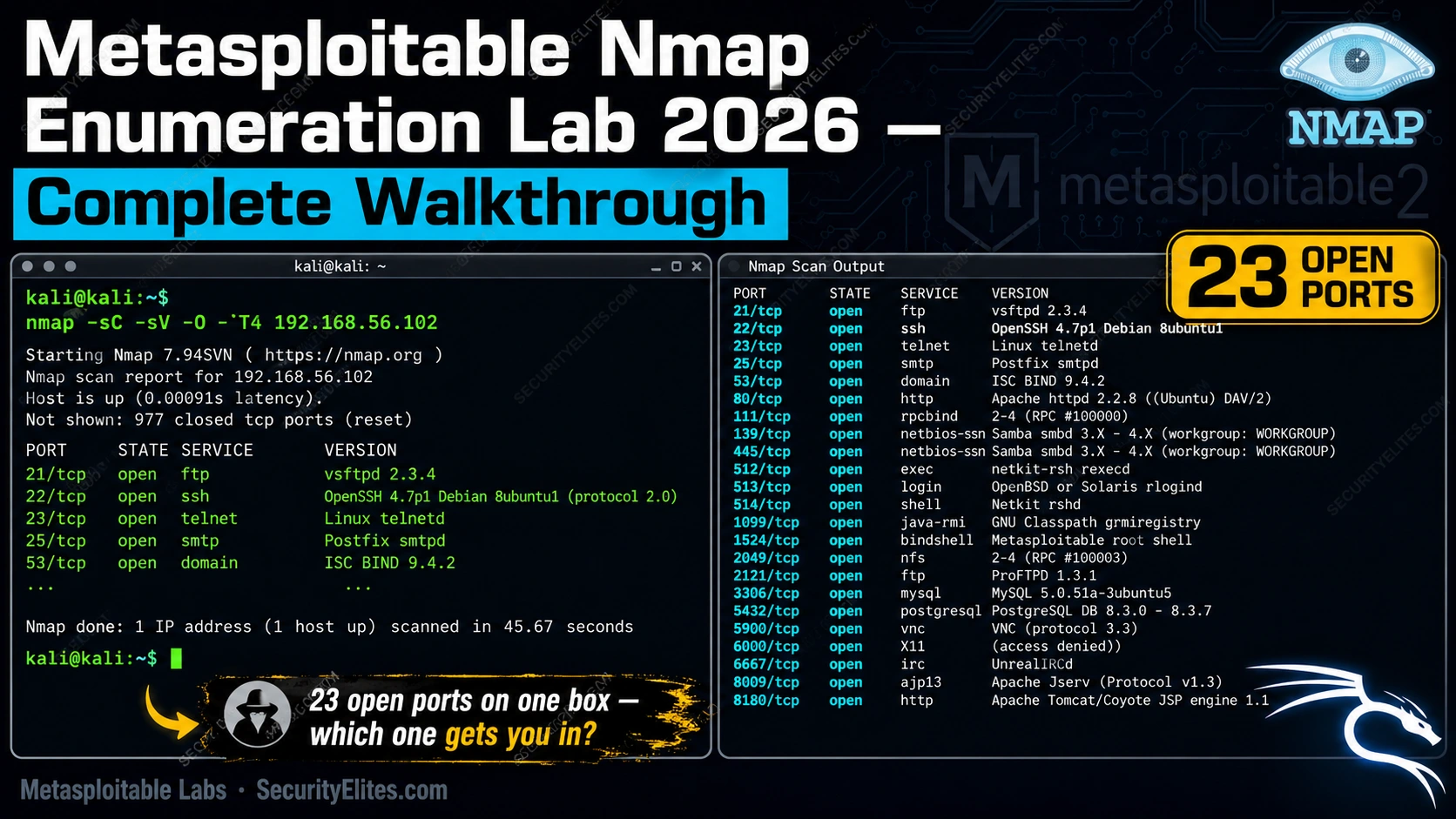
That output is a gift. Port 21 — FTP running vsftpd with the infamous backdoor. Port 23 — Telnet, cleartext credentials. Port 3306 — MySQL exposed directly to the network with no firewall. Port 8180 — that’s Tomcat, running an outdated version with a manager interface that accepts default credentials. Each one of those lines is a potential entry point.
22/tcp open ssh
23/tcp open telnet
80/tcp open http
3306/tcp open mysql
5432/tcp open postgresql
8180/tcp open unknown
-T4 timing template is aggressive. On a local lab VM it’s fine — scans complete in 2–3 minutes. On a real engagement, aggressive timing generates noise that shows up in IDS logs and firewall alerts. In your lab, it’s the right call. On authorised external tests, drop to -T2 or -T3 and add --scan-delay.🛠️ EXERCISE 1 — BROWSER (15 MIN · NO INSTALL)
Before you run a single scan, I want you to research the target. This is exactly what I do on real engagements — OSINT on the software stack before touching the network. Here’s the drill.
- Go to Exploit-DB and search “vsftpd 2.3.4” — read the exploit entry and note what the vulnerability is and what port it uses
- Search “Metasploitable 2 open ports” on Google — find an official or community reference listing the known services and cross-check against the port list above
- Go to Shodan.io and search for “Metasploitable” — note what Shodan reports for publicly exposed Metasploitable installs (this shows you what misconfigured lab VMs look like from the internet)
- For each port in the list above (21, 22, 23, 25, 80, 3306, 8180), write one sentence describing what the service does and what class of vulnerability it typically exposes
- Record your findings — you’ll use this knowledge to prioritise exploit selection in Lab 3
✅ What you just learned: You built a pre-scan intelligence profile of the target. On a real engagement, this OSINT phase runs before you touch the network — it shapes your scan strategy and stops you from wasting time on services that have no known attack surface. That’s what separates methodical testers from script kiddies.
📸 Screenshot your Exploit-DB and Shodan findings and share in the #metasploitable-labs Discord channel — tag your port-to-vulnerability mapping so others can compare notes.
Service Version Detection — What’s Actually Running on Each Port
Port numbers tell you a service is there. Version numbers tell you whether it’s exploitable. The difference between “port 21 is open” and “vsftpd 2.3.4 is running on port 21” is the difference between a note in your report and a shell on the box. The -sV flag is how you get there.
Read that output slowly. Every version number is a potential CVE lookup. Here’s what each one means for your exploit phase:
- vsftpd 2.3.4 — backdoored version. Trigger it with a smiley-face username and you get a shell on port 6200. This is one of the most famous intentional vulnerabilities in any training platform.
- OpenSSH 4.7p1 — ancient. Released in 2008. Username enumeration vulnerabilities exist for this version range.
- Apache 2.2.8 — multiple known CVEs including directory traversal and mod_negotiation information disclosure.
- MySQL 5.0.51a — running without authentication controls in this lab context. Direct root access with no password.
- Apache Tomcat on 8180 — manager interface accessible with default credentials (tomcat/tomcat). WAR file upload = remote code execution.
-sV uses two methods. For some services it reads the banner the service sends on connection. For others, it sends probe packets and analyses the response. The --version-intensity flag (0–9) controls how aggressive those probes get. Default is 7. In a lab, run intensity 9 for maximum detail: --version-intensity 9.22/tcp open ssh OpenSSH 4.7p1 Debian
80/tcp open http Apache httpd 2.2.8
3306/tcp open mysql MySQL 5.0.51a
8180/tcp open http Apache Tomcat 1.1
OS Fingerprinting — Confirm What You’re Actually Attacking
You might think you know the OS — it’s a Linux VM, it says so right there in the OpenSSH banner. But on real engagements you don’t have that luxury. You have an IP address and a list of open ports, and you need to know whether you’re hitting Ubuntu 8.04, CentOS 6, or a Windows Server 2003 box with OpenSSH bolted on. OS fingerprinting with -O removes the guesswork.
The wrong OS assumption on a live engagement has real consequences. Fire a Linux exploit at a Windows system — best case it fails silently, worst case you crash a production service and the client calls their lawyer. Confirm before you exploit. Always.
Reading OS Confidence Scores — What “Aggressive” Scan Actually Adds
That 95% confidence figure matters. Nmap builds its OS guess by sending crafted TCP/IP packets and comparing the responses against a database of known OS fingerprints. The higher the score, the closer the match. If you see anything below 80%, don’t trust it — run the scan again with more open ports available, since OS detection accuracy improves with more response data.
The -A flag isn’t just OS detection — it layers in version detection, the default NSE script set, and traceroute in a single command. It’s the “give me everything in one pass” flag. On a lab VM it’s the most efficient starting point. On a real engagement, it’s loud — every NSE script it fires generates traffic that shows up in logs. In your Metasploitable lab, run it freely. On authorised tests, run the components separately and selectively.
🧠 EXERCISE 2 — THINK LIKE A HACKER (20 MIN · NO TOOLS)
You’ve just completed OS fingerprinting against a target on an authorised engagement. Here are the results. Work through these questions before moving on — this is exactly the analysis I run in my head before opening Metasploit.
Scenario: Your -A scan returns the following against a target in scope: OS — Linux 2.6.18, OpenSSH 4.7p1 on port 22, vsftpd 2.3.4 on port 21, Apache 2.2.8 on port 80, MySQL 5.0 on port 3306 (no authentication required). The client has told you this is a production web server that processes customer orders.
- Question 1 — Prioritisation: Given the OS version (Linux 2.6.18) and the service versions listed, which three vulnerabilities would you prioritise first and why? What is your ordering rationale — reliability of exploitation, severity of impact, or speed to shell?
- Question 2 — Risk vs reward: The vsftpd 2.3.4 backdoor is reliable and fast — but it’s also incredibly noisy. The MySQL no-auth access is quieter but gives you database access, not a shell. On a production system processing live customer orders, which would you attempt first during an authorised test, and what’s your justification?
- Question 3 — OS context: The Linux 2.6.18 kernel was released in 2006. What class of local privilege escalation vulnerabilities does this kernel generation expose? How does this change your post-exploitation plan once you have an initial shell?
Answer reveal — think through your own answers first:
Q1: Most testers prioritise vsftpd 2.3.4 first — it’s a reliable, single-command exploit with a known Metasploit module, and it lands you an OS-level shell. MySQL no-auth is second because database access often yields application credentials. Apache 2.2.8 is third — HTTP exploits require more enumeration to weaponise effectively.
Q2: On a live production system, MySQL no-auth first — it’s read-only investigation, it doesn’t crash anything, and you can extract credentials quietly. The vsftpd backdoor triggers a listening port (6200) which generates obvious firewall/IDS alerts. Save the louder exploits for when stealth no longer matters.
Q3: Linux 2.6.18 is vulnerable to multiple local privilege escalation exploits including CVE-2009-1185 (udev) and several dirty-pipe-era predecessors. Once you have a low-privilege shell, these kernel exploits are your path to root. Document the kernel version immediately after landing the initial shell — it drives your next move.
✅ What you just learned: OS fingerprinting doesn’t just confirm “it’s Linux” — it tells you the kernel generation, which drives your privilege escalation strategy, not just your initial exploit selection. Every experienced pentester reads OS results through two lenses simultaneously: initial access and post-exploitation. Start doing that now, in the lab, and it’ll be instinct by the time you’re on a real engagement.
📸 Write your own answers to all three questions before reading the reveal — then share your prioritisation rationale in the #think-like-a-hacker Discord channel.
NSE Scripts — Automated Vulnerability Intelligence on Every Open Port
The version scan told you what is running. NSE tells you what’s broken. The Nmap Scripting Engine is the jump from passive reconnaissance to active vulnerability intelligence — and against Metasploitable, it’s the closest thing to having an automated exploit researcher run ahead of you.
Three scripts matter most for your first Metasploitable pass. Run them in this order.
That scan will take several minutes against Metasploitable. Let it run. When it finishes, search the output for the word “VULNERABLE” — Metasploitable returns multiple hits here. On a real engagement I ran last year, a client’s internal server returned the exact same vsftpd result from this scan that Metasploitable returns in the lab. The script output was word-for-word identical. That’s how unchanged some of these vulnerable deployments are in the wild.
Building a Custom NSE Script Chain for the Metasploitable Surface
Once you’ve run the three individual scans, chain them. This single command combines service detection, the vuln category, SMB-specific checks, and FTP anonymous detection into one pass — and saves the result in all three output formats for your report.
vuln, auth, exploit, brute, discovery. Against Metasploitable use vuln and auth. The exploit and brute categories actively attempt exploitation — know which category you’re running before you pull the trigger.vuln script category generates significant traffic and IDS alerts on real networks. In an authorised assessment it’s fine — but always confirm with your client whether stealth rules apply before running NSE vuln scripts against production systems. Lab work has no such constraint.UDP Enumeration — The Scan Most Beginners Skip
Every beginner runs TCP scans. The experienced tester runs UDP too — because SNMP on port 161, TFTP on port 69, and NFS on port 2049 don’t show up in your TCP results. On Metasploitable, SNMP is open and completely misconfigured. I’ve found more lateral movement paths through SNMP on real engagements than through half the TCP services that everyone is hunting.
-sU -p- against all 65,535 UDP ports can take hours. Always start with --top-ports 100 for initial enumeration. Add specific ports (-p 161,69,2049) if you have a reason to investigate those services. Never run -sU -p- on a real engagement without timing constraints agreed with the client.SNMP port 161 open on Metasploitable means the default community string public is likely active. On a real target, an open SNMP port with the default community string is a critical finding — it exposes system information, interface addresses, ARP tables, and running process lists without any authentication. I’ve used SNMP enumeration to map entire internal network segments on real engagements where the firewall blocked everything else.
Reading the Results — What Metasploitable Nmap Enumeration Actually Tells You
You’ve run the scans. Now you translate output into an attack surface map. Six services on Metasploitable have documented public exploits — and your Nmap enumeration just identified all of them. Here’s how to read each one as a practitioner would.
| Port | Service | Why It Matters | CVE Reference |
|---|---|---|---|
| 21/tcp | vsftpd 2.3.4 | Backdoor triggers a root shell on port 6200 | CVE-2011-2523 |
| 445/tcp | Samba 3.x | Remote code execution via ms08-067 and username map script | CVE-2007-2447 |
| 6667/tcp | UnrealIRCd 3.2.8.1 | Backdoor command execution — no auth required | CVE-2010-2075 |
| 8180/tcp | Apache Tomcat | Default credentials (tomcat/tomcat) allow WAR file upload → RCE | Default creds |
| 3306/tcp | MySQL 5.0.51a | Root login with no password — direct database access | Misconfiguration |
| 3632/tcp | distcc 1.x | Unauthenticated remote code execution as daemon user | CVE-2004-2687 |
That table is your attack surface map. Every row your Nmap enumeration confirmed is a door into the system. Your job as a tester — and this applies identically on real engagements — is to document each one before touching any of them. The map comes before the move. Check out the ethical hacking methodology section to see how this enumeration phase fits the full penetration testing workflow.
🌐 EXERCISE 3 — BROWSER ADVANCED (20 MIN · CVE RESEARCH)
This is your intelligence phase. You’ve enumerated the services — now you research them the way a professional would before touching a single exploit. You’re building a vulnerability brief, not just running a scan.
- Step 1: Open Exploit-DB in your browser. Search for “vsftpd 2.3.4”. Note the exploit module path, the author, and the date it was published.
- Step 2: Open NVD (nvd.nist.gov) and search for CVE-2011-2523. Record the CVSS v3 base score, the attack vector, and the privileges required.
- Step 3: Repeat the NVD search for CVE-2007-2447 (Samba) and CVE-2010-2075 (UnrealIRCd). Record the CVSS scores for both.
- Step 4: Rank the three CVEs by CVSS score. Which would you exploit first on a real engagement, and why — is it purely the score, or does attack vector and privileges required change your decision?
- Step 5: Document your findings in a simple table: CVE | Service | CVSS Score | Attack Vector | Your Exploit Priority. That table is a real deliverable — it’s what goes in the findings section of a pentest report.
✅ What you just learned: Enumeration output is only useful when you connect it to public vulnerability intelligence. The combination of Nmap service version data plus NVD CVSS scores plus Exploit-DB availability is exactly the workflow a professional uses to prioritise findings in a real engagement report. You just ran that workflow.
📸 Share your completed CVE priority table in the #dvwa-labs Discord channel — compare your exploit ordering with other students and explain your reasoning.
You’ve Mapped the Target — Now You Know What to Hit
Run through what you actually built in this lab. You have a complete host discovery result, a full TCP port list, version strings for every service, OS fingerprint data, NSE vulnerability confirmations with CVE references, UDP surface coverage, and a six-service attack map with documented public exploits. That’s not a beginner exercise — that’s a professional enumeration deliverable.
Every piece of that output has a purpose in the next lab. The vsftpd version string drives your Metasploit module selection. The Samba version drives your ms08-067 check. The Tomcat port number tells you where to point your browser for the manager panel. Metasploitable Nmap enumeration isn’t just practice — it’s the prerequisite for every exploit you’ll run against this target.
The gap between someone who hacks and someone who tests professionally is documentation discipline. You can enumerate and exploit in the same sitting — plenty of people do. The professionals document every scan, save every output file, and map every service before they touch the first exploit. Do it that way in the lab, and it’ll be automatic when a client is watching.
Lab 3 takes the attack surface map you just built and starts working through it — starting with the services that your Metasploitable Nmap enumeration flagged as highest priority. Browse the full SecurityElites Labs library and check the ethical hacking methodology section to see where this enumeration phase sits in the complete kill chain.
📋 Metasploitable Nmap Enumeration — Command Reference Card
Metasploitable Nmap Enumeration — Frequently Asked Questions
Why does my Nmap scan show different ports each time?
If you’re seeing inconsistent port results, the most common cause is scan timing. With -T5 (insane timing) Nmap sends packets so fast that some responses don’t arrive in time and ports appear closed. Drop to -T4 for lab work — it’s fast enough and reliable. A second cause is the Metasploitable VM itself: if it’s under load or just booted, some services take a few seconds to start listening. Wait 30 seconds after the VM boots before scanning.
What is the default IP for Metasploitable 2?
Metasploitable 2 doesn’t have a fixed IP — it picks up an address from your local DHCP server (or VMware/VirtualBox’s virtual DHCP). That’s why host discovery is the first step. Run sudo nmap -sn 192.168.x.0/24 on your subnet to find it. The easiest method: log into the Metasploitable console directly (credentials: msfadmin / msfadmin) and run ifconfig — the IP is shown immediately. Do the host discovery exercise anyway — it’s a real skill.
How long does a full -p- scan take against Metasploitable?
With -T4 on a local network, a full -p- scan against Metasploitable takes between 2 and 6 minutes depending on your hardware and network configuration. If it’s taking longer than 10 minutes, check that both VMs are on the same virtual network adapter (Host-Only or NAT — not bridged to a slow physical network). The bottleneck is almost always the network adapter configuration, not the scan itself.
Can I use these Nmap commands on real targets?
Only on systems you own or have explicit written authorisation to test. Nmap scanning is legal against your own infrastructure and against authorised targets in a pentest engagement. Running these commands against systems without permission is illegal in most jurisdictions regardless of intent — that applies to -sV just as much as --script=vuln. Keep your Nmap activity inside your lab until you have a signed scope document for an authorised engagement.
What’s the difference between -sV and -A in Nmap?
-sV does service and version detection only — it probes each open port and identifies what software is running and which version. -A is aggressive mode and includes everything -sV does, plus OS detection (-O), a default NSE script scan (-sC), and traceroute. The tradeoff: -A is noisier and slower. In a lab against Metasploitable, use -A freely. On a real stealthy engagement, separate your scans — run -sV first, then add -O and scripts only where needed.
Which Metasploitable service should I exploit first after enumeration?
For learning: start with vsftpd 2.3.4 on port 21. It’s a single Metasploit module, it returns a root shell every time, and the entire process from module selection to shell takes under two minutes. That clean success builds the right mental model for how exploit modules work. For a real engagement: start with MySQL on port 3306 — no-auth database access is silent, doesn’t trigger IDS, and gives you credential data that drives every subsequent step. Save the vsftpd backdoor for when you understand what the root shell gives you and how to use it without making noise.
Further Reading
- SecurityElites Tools — Free browser-based tools including port scanner and WHOIS lookup to supplement your Nmap lab work.
- Metasploitable Lab Setup 2026 — The Lab 1 guide covering VM configuration, network adapter settings, and first-boot verification for Metasploitable 2.
- SecurityElites Labs — 47 Free Hacking Labs — The full lab library covering Metasploitable, DVWA, and TryHackMe — mapped by skill level and attack technique.
- Nmap Official Reference Guide — The complete Nmap documentation covering every flag, timing template, and NSE script category referenced in this lab.
- MITRE ATT&CK T1046 — Network Service Discovery — The threat intelligence framework entry that maps Nmap enumeration to real adversary tactics, techniques, and procedures.
