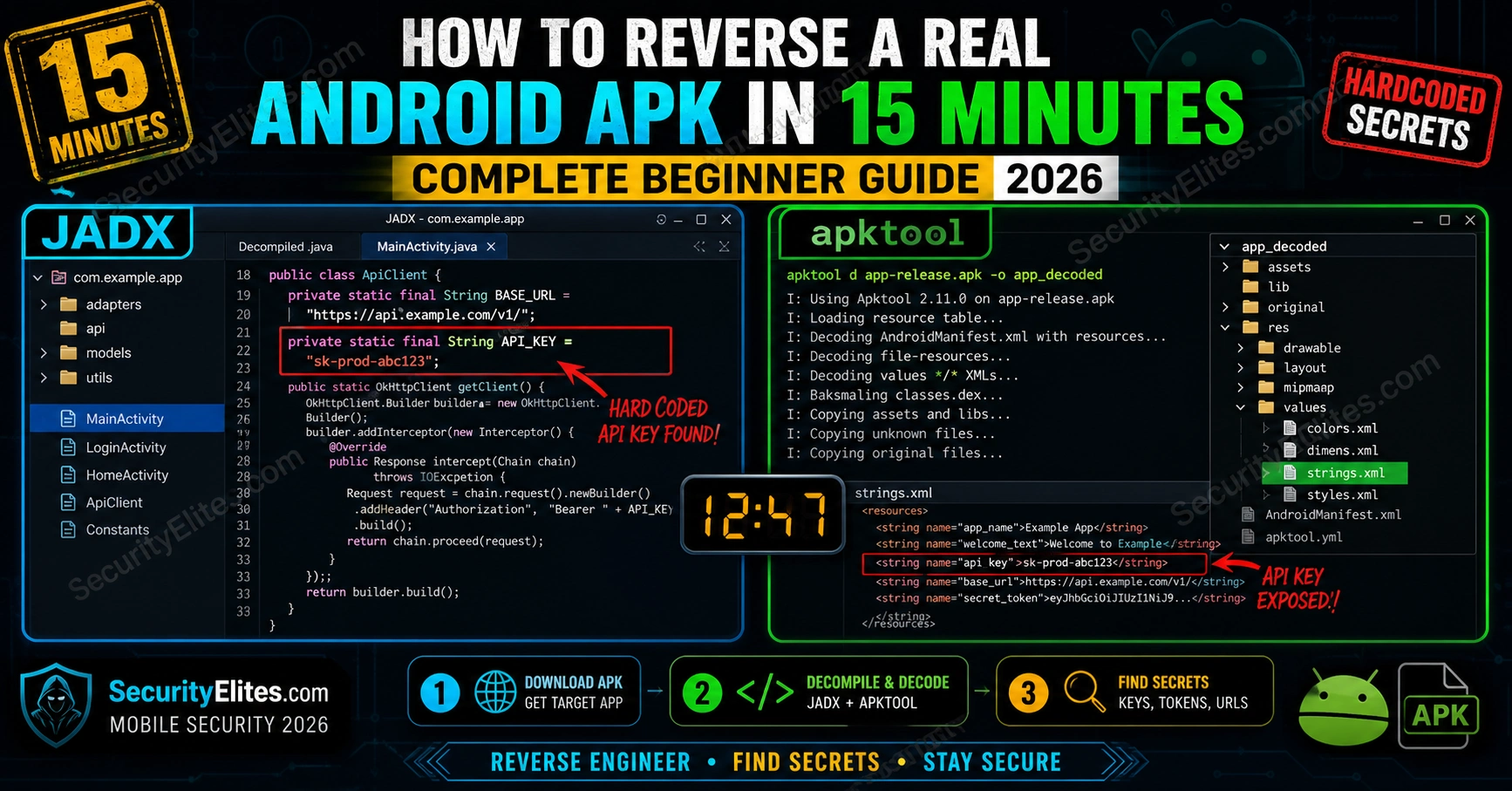
Every Android APK is a ZIP file containing Java bytecode, resources, and a manifest. Unzip it, decompile it, and you have the developer’s source code in a readable form. The hardcoded API key, the debug endpoint, the credentials baked in for “development only” — they’re all there. I’ve found production AWS credentials, Stripe secret keys, and internal admin panel URLs in publicly available apps this way. Here’s the exact workflow that takes any APK from download to decompiled source in 15 minutes.
🎯 What You’ll Learn
Understand the APK file structure and what each component contains
Decompile any APK to readable Java source using JADX
Decode resources and manifest with apktool
Find hardcoded secrets, API keys, and debug endpoints systematically
Use MobSF for automated static analysis
⏱️ 30 min read · 3 exercises
🔗 Related Resources
Tools needed: JADX (jadx-gui), apktool, MobSF (Docker) — all free, all open source
APK reverse engineering is one of the highest-ROI skills in mobile bug bounty — the same methodology that finds hardcoded secrets in one app works on every Android app. The Kali Linux Commands reference has all the grep patterns for secret hunting. The ethical hacking hub covers the broader mobile security attack surface.
APK Structure — What You’re Actually Looking At
My first step on any APK analysis is understanding the file structure before opening any tool. An APK is a ZIP file. Renaming it to .zip and extracting it gives you the raw contents — useful for a quick look, but not for reading code. The code is in classes.dex (compiled Dalvik bytecode) — readable only after decompilation. Here’s what each file contains.
assets/ → raw files shipped with app (configs, databases)
lib/ → native libraries (.so files)
META-INF/ → signature files, certificate
# Most valuable for finding secrets
classes.dex → decompile with JADX → find hardcoded strings in Java source
assets/ → config files, local databases, certificates
res/values/ → strings.xml — app-wide string constants including API endpoints
JADX — Decompile Java Source in One Click
JADX is the tool I reach for first — it gives the most readable source output of any decompiler. JADX is the tool I use first on every APK. It converts the .dex bytecode back to readable Java source code — not perfect reconstruction, but close enough to find logic, API calls, hardcoded values, and authentication flows. The GUI version makes navigation trivial.
FINDINGS: production API key + internal debug endpoint — both report-worthy
📸 JADX decompiled source showing two findings in a single class file: a hardcoded production API key (sk-prod-…) and an internal debug URL pointing to port 8080. These appear in the decompiled Java exactly as the developer wrote them. The API key is used in every request header — any app user could extract it by reversing the APK. The debug URL exposes an internal endpoint that may not be accessible from the internet but could be found via SSRF or internal recon. Both are High severity findings for a bug bounty report.
apktool — Decode Resources and Manifest
apktool decodes the binary-encoded AndroidManifest.xml and res/ resources into human-readable XML. The manifest is critical — it shows every permission the app requests, every exported activity (potential deeplink attack surface), and every declared service. These are attack surface components JADX alone doesn’t surface cleanly.
The secret-hunting grep patterns I run are the same on every APK engagement. After decompiling with JADX, the secret-finding phase is grep-based. The patterns I run catch the majority of hardcoded credentials in production apps. The trick is running them against the right output directories.
find jadx_output/resources/assets/ -type f | xargs grep -l “key\|secret\|token\|password” 2>/dev/null
🛠️ EXERCISE 1 — BROWSER (10 MIN · NO INSTALL)
Decompile an APK Online Using JADX Web
⏱️ 10 minutes · Browser only — no local tools needed
Before setting up local tools, confirm the methodology with an online JADX instance. This is the fastest way to understand what decompiled Android source looks like.
Step 1: Get a test APK
Download OWASP DIVA (Damn Insecure and Vulnerable App):
https://github.com/payatu/diva-android/raw/master/DivaApplication.apk
Step 2: Use JADX online
Go to: http://jadx.joba.me/ (or search “JADX online decompiler”)
Upload DivaApplication.apk
Wait for decompilation.
Step 3: Browse the source
Expand the package tree on the left.
Find the main application packages.
Look for any class with “Secret”, “Key”, “Auth”, “Login” in the name.
Step 4: Search for hardcoded values
Use the search function (Ctrl+F or search box).
Search: “hardcode” · “secret” · “key” · “password”
DIVA is intentionally vulnerable — you should find some.
Document: list any hardcoded values you find and their class location.
✅ DIVA (Damn Insecure and Vulnerable Android App) is specifically built for practising mobile security — it has intentional hardcoded credentials, insecure data storage, and input validation failures across 13 challenges. The hardcoded credentials challenge is usually the second or third challenge in the DIVA series. Finding them through JADX source analysis rather than dynamic testing is the static analysis approach that scales to any app.
📸 Screenshot showing a hardcoded value in the decompiled source. Share in #mobile-security.
MobSF — Automated Static Analysis
My workflow pairs MobSF automated scanning with targeted manual JADX review. MobSF (Mobile Security Framework) automates most of what I described above — it decompiles the APK, scans for secrets, analyses the manifest, checks for dangerous permissions, and produces a scored report. I run it in parallel with manual analysis: MobSF finds the obvious, manual analysis finds what it misses.
Every APK is different. Design the analysis sequence you’d run on a real bug bounty target — before opening any tool.
SCENARIO: You’re analysing a banking app APK for a bug bounty program.
In-scope: the Android app binary and its API endpoints.
QUESTION 1 — What do you check first?
MobSF automated scan vs JADX manual review — which do you start with?
Why might starting with automated be wrong?
QUESTION 2 — Manifest analysis priorities
List the 3 most dangerous manifest attributes to find in a banking app.
For each: what attack does it enable?
QUESTION 3 — Secret hunting priority
You find 50 results from your grep patterns.
How do you triage which are worth reporting?
What makes a hardcoded value a reportable bug vs expected app behaviour?
QUESTION 4 — Escalation
You find a hardcoded API key.
What do you do to confirm its impact before reporting?
(Hint: don’t just report “I found a key” — prove what the key does)
QUESTION 5 — Report framing
A hardcoded production API key in a public APK.
What is the CVSS severity and why?
What remediation do you recommend?
✅ The escalation question (Q4) is what separates Medium reports from Critical ones. Finding an API key means nothing until you know what it accesses. Use the key against the API — what endpoints does it authenticate? Does it access user data? Does it have write access? The difference between “hardcoded API key found” (Medium, $500) and “hardcoded API key provides read access to all 2 million users’ transaction history” (Critical, $15,000) is the escalation proof. Always test the key in a controlled way before reporting.
📸 Document your analysis methodology. Share in #mobile-security.
⚡ EXERCISE 3 — KALI TERMINAL (20 MIN)
Full Local APK Analysis — JADX + apktool + grep
⏱️ 20 minutes · Kali Linux · JADX + apktool installed
Run the complete 15-minute APK reverse engineering workflow against DIVA locally. This is the exact command sequence I run on every APK at the start of a mobile assessment.
Step 2: Quick ZIP extraction (see file structure)
cp DivaApplication.apk diva.zip
unzip diva.zip -d diva_raw/
ls diva_raw/
What files and folders do you see?
Step 3: JADX decompile
jadx -d jadx_out/ DivaApplication.apk
ls jadx_out/sources/
ls jadx_out/resources/
Step 4: Secret hunting
cd jadx_out/sources/
grep -rn “hardcode\|password\|secret\|key\|token” . –include=”*.java” -i
How many results? Any hardcoded values?
Step 5: apktool decode
cd ../..
apktool d DivaApplication.apk -o apktool_out/
cat apktool_out/AndroidManifest.xml | grep -i “debug\|backup\|exported”
cat apktool_out/res/values/strings.xml
Step 6: Document
List every sensitive finding with: class name, line number, value, risk level.
✅ DIVA will return multiple hardcoded credential findings from Step 4 — it’s built that way. The key learning from the JADX output is how readable decompiled Android Java actually is. It’s not perfect decompilation — variable names are sometimes obfuscated, some control flow is altered — but hardcoded string literals (API keys, URLs, credentials) are preserved exactly as the developer wrote them. Those never get obfuscated by the compiler.
📸 Screenshot your grep output showing DIVA hardcoded values. Share in #mobile-security.
📋 APK Reverse Engineering — Quick Reference
jadx -d output/ app.apk # Decompile to Java source
jadx-gui app.apk # GUI browser
apktool d app.apk -o output/ # Decode resources + manifest
docker run -p 8000:8000 opensecurity/mobile-security-framework-mobsf:latest # MobSF
APK Reversed — What’s Next
APK structure, JADX decompilation, apktool manifest decoding, systematic secret hunting, and MobSF automated analysis. The 15-minute workflow works on any Android app. For the dynamic analysis side — intercepting network traffic, testing API endpoints found in the source — that’s the natural next step after static analysis.
🧠 Quick Check
You decompile an APK and find: private static final String STRIPE_SECRET = “sk_live_4xKeh…”. What is the first action you take before filing a bug bounty report?
❓ Frequently Asked Questions
Is it legal to reverse engineer Android apps?
For bug bounty: check the program’s scope. Most mobile bug bounty programs explicitly allow static analysis of their APKs. For personal apps you own: legal. For APKs available on the Play Store that you’ve downloaded: static analysis for security research is generally permitted under fair use/reverse engineering exemptions in most jurisdictions, though this varies. Always act within the bug bounty program scope and never attempt to exploit findings against production systems beyond what the program allows.
What is the best tool for APK decompilation?
JADX for Java source decompilation — best output quality and the GUI makes navigation easy. apktool for resource decoding and manifest extraction — essential companion to JADX. MobSF for automated comprehensive scanning. For obfuscated apps, Ghidra or IDA Pro handle native library (.so) analysis. Most bug bounty findings come from JADX + manual grep analysis.
What are the most common findings in APK reverse engineering?
Hardcoded API keys and credentials (production keys baked into source), debug endpoints left in release builds, insecure data storage (SQLite databases, SharedPreferences storing sensitive data in plaintext), android:debuggable=”true” in production manifests, exported activities without proper authentication, cleartext HTTP traffic, and weak or absent certificate pinning.
How do you bypass APK code obfuscation?
ProGuard/R8 obfuscation renames classes and methods but cannot obfuscate string literals — hardcoded credentials remain readable. For logic obfuscation, look at the call flow rather than class names. For heavily obfuscated apps, dynamic analysis (Frida hooking) is often more effective than static analysis. Native libraries (.so files) require Ghidra or IDA Pro for decompilation.
What is MobSF and is it better than manual analysis?
MobSF (Mobile Security Framework) is an automated static and dynamic analysis platform for Android and iOS apps. It’s fast and catches common issues but misses application-specific logic bugs and context-dependent vulnerabilities. The best approach: run MobSF first to surface obvious issues quickly, then do targeted manual JADX analysis in areas MobSF flagged or missed. Manual analysis consistently finds higher-severity issues than automated scanning alone.
How do you report a hardcoded API key found in an APK?
Report structure: (1) Finding title: “Hardcoded [Service] API Key in APK — [Class Name]”, (2) Location: fully qualified class name + line number, (3) Verification: show the key is valid with a read-only API call result, (4) Impact: what data/actions the key enables, (5) Remediation: remove from source, use environment variables or secure key storage, rotate the exposed key immediately. Include both the JADX screenshot and the API verification response as evidence.
← Previous
Command Injection WAF Bypass Payloads 2026
Next →
Linux Sudo Privilege Escalation Methods 2026
📚 Further Reading
Ethical Hacking Hub— The broader mobile security attack surface including dynamic analysis, traffic interception, and API testing that follows from the static analysis workflow above.
Kali Linux Commands Reference— The full grep pattern library for secret hunting after APK decompilation — JADX, apktool, and strings command syntax all included.
Web Application Security Hub— The API endpoints you find in decompiled Android source are web application targets. This hub covers testing those endpoints with the same methodology used for web app pentesting.
OWASP Mobile Application Security Testing Guide— The authoritative reference for mobile app security testing. Covers static and dynamic analysis methodology, tool usage, and the complete Android and iOS security testing guide.
MobSF GitHub Repository— Installation docs, Docker setup, API reference, and issue tracker for MobSF. The automated analysis platform that complements manual JADX and apktool analysis.
ME
Mr Elite
Owner, SecurityElites.com
The most valuable APK finding I’ve made was in a publicly available app with a million downloads. The developer had included a full set of production AWS credentials — access key, secret key — hardcoded in the networking class. The credentials had IAM permissions for S3 read/write access to the company’s user data bucket. The app was downloaded a million times. Anyone who had reversed it in the past year could have had access. It took me nine minutes from download to confirmation. The developer rotated the credentials within two hours of my report and it paid out at the top of their bounty range. That’s the value of learning this skill.
Founder of Securityelites and creator of the SE-ARTCP credential. Working penetration tester focused on AI red team, prompt injection research, and LLM security education.