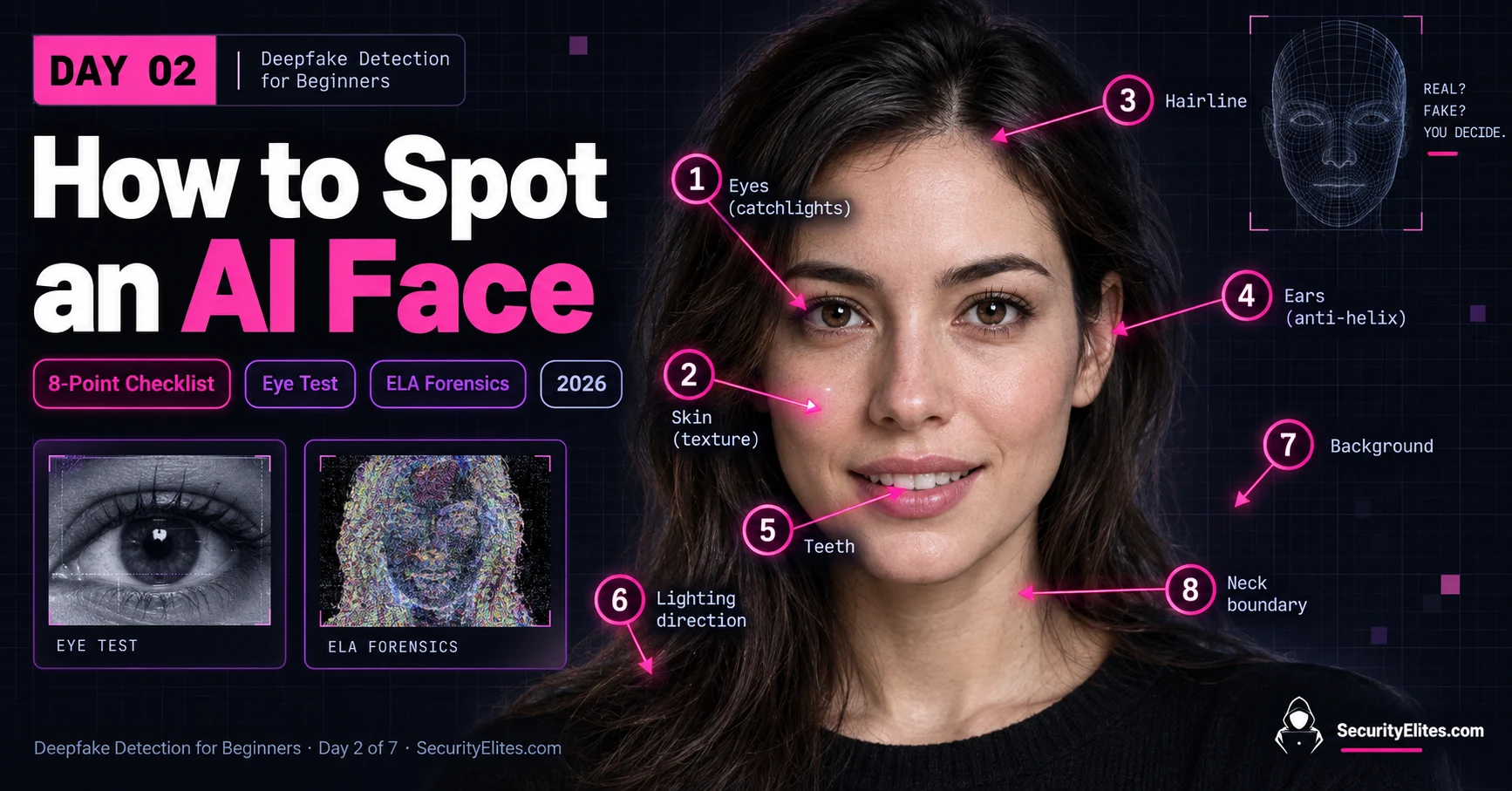
This article teaches systematic visual detection of AI-generated faces through an eight-point anatomical checklist, moving beyond vague intuition to repeatable analysis. It combines practical detection techniques with explanations of why certain artifacts appear, grounded in how AI image generators learn from training data. The content matters because AI-generated profile photos are already appearing in large numbers—the article opens with an example of 43 fake LinkedIn profiles in a single hiring batch—and learning to identify them is increasingly relevant for security, hiring, and information verification.
- Ears remain most reliable detection pointEars contain complex three-dimensional structures—helix, anti-helix, tragus, anti-tragus, and lobule—that require generators to model multiple interconnected folds and surfaces convincingly. AI-generated ears commonly show flattened or absent anti-helix structures, smooth tragus regions, and anatomically impossible curves, because portrait training data rarely emphasizes ear-frontal photography. The article rates ears five-star reliability even in 2026, making them the first zone to check in the workflow.
- Eyes require physics-based consistency checkingRather than asking if eyes 'look realistic,' the article teaches three specific sub-checks: pupil symmetry (comparing sizes under consistent lighting), catchlight consistency (verifying reflections make physical sense given the light source and eye separation), and iris texture (inspecting for natural irregularity rather than painted-on appearance). Catchlights are physics-based tells because both eyes viewing the same environment should produce reflections that correspond to one another—a large rectangular window reflection in one eye with a completely different shape in the other indicates p
- Skin texture no longer reliably indicates AIModern diffusion-based generators produce convincing skin that closely matches real biological surfaces, so the older advice that 'AI skin always looks too smooth' no longer holds. Real photographs can also appear unnaturally smooth due to beauty filters, retouching, studio lighting, or smartphone processing. The article rates skin texture two-star reliability and recommends treating it only as supporting evidence when combined with inconsistencies in other zones, not as a standalone detector.
- Hairline boundaries reveal compositing and rendering limitsThe article identifies four specific hairline checks: floating hair that doesn't emerge naturally from the scalp, unnatural hair-to-background transitions (strangely uniform blur rather than realistic flyaway strands), suspicious symmetry (perfectly mirrored strand patterns across both sides), and color changes at boundaries that don't match the lighting. Real hair shows individual strands following different paths with natural overlap and gaps; AI-generated hair sometimes renders as a detached texture layer on top of the head.
- 3D consistency across face features matters mostThe article emphasizes checking whether all facial features describe the same physical lighting environment and camera perspective. If the nose appears lit from upper-left but a nearby cheek highlight suggests opposite direction without explaining a secondary light source, or if different features seem constructed from slightly different camera angles, this reveals rendering inconsistency. This is distinct from individual feature quality—the face must behave as a coherent three-dimensional object with unified physics rather than a collection of independently plausible parts.
- Lighting and shadow direction reveals physics failuresThe article explains that AI struggles with deterministic physics because current architectures learn statistics from training data rather than modeling physics explicitly. All shadows in an image should point consistently relative to the primary light source—if eyebrow shadows point lower-left but nose shadows point lower-right without explanation, this indicates inconsistency. For face-swap deepfakes specifically, background warping near face edges and mismatched lighting between the swapped face and surrounding scene serve as compositing tells.
- Detection requires pattern accumulation, not single artifactsThe article explicitly rejects using any single anomaly as definitive proof of AI generation—one malformed ear, one strange reflection, or one smooth patch doesn't prove anything, because real photographs contain blur, compression, unusual lighting, and natural anatomical variation. Instead, the method requires identifying multiple independent inconsistencies that 'point in the same direction,' combining physical implausibility across different zones to build a stronger evidence case. This mindset shift from finding one 'AI giveaway' to systematic pattern-matching is central to the article's t
- Free tools supplement but cannot replace human analysisThe article discusses Hive Moderation as a browser-based detection tool that provides confidence scores, but emphasizes knowing what the tool actually tells you and where it can mislead. Hive scores above 80% indicate high confidence AI-generation, 50-80% indicates uncertainty (requiring manual verification), and below 50% suggests probably real but still requiring checklist cross-checking for high-stakes content. The article states human detection and automated detection are more reliable in combination than either alone, because human pattern recognition sometimes catches artifacts tool trai
Bottom line: Systematic AI face detection is a learnable skill built on understanding where generators fail—not by developing intuition about whether something 'looks fake,' but by developing a repeatable eight-zone checklist (eyes, skin, hairline, ears, teeth, lighting, background, neck boundary) that tests physical consistency and three-dimensional coherence. Modern AI-generated faces can fool individual feature inspection, so the real detection power comes from identifying multiple independent inconsisten
Let me start with a story that changed the way I look at profile photos.
Earlier in 2026, a hiring manager was reviewing around 200 LinkedIn applications for an engineering role. Forty-three of the profile photos were AI-generated. The interesting part? She didn’t catch them herself. A junior HR team member noticed something unusual after about an hour of screening.
It wasn’t the eyes. It wasn’t the skin. It wasn’t even the hairline.
It was the ears.
In almost every suspicious image, something was wrong. One ear was missing because of the angle or hair. In other cases, the visible ear didn’t have the same anatomical detail you’d expect when you compared it with the other side. Once she started looking specifically at the ears, the pattern became surprisingly obvious. She flagged all 43 profiles, and 17 were later confirmed as bot accounts during additional checks.
What I find most interesting about that story isn’t the number 43. It’s how she found them. She didn’t need expensive forensic software or years of experience. She had learned one simple visual check and knew how to apply it systematically.
That’s exactly what I want to teach you today.
How to spot AI generated faces is a learnable skill. You don’t need some mysterious “AI instinct.” You need to know what to look for, understand why those details can go wrong, and build the habit of checking them in the same order every time.
That’s the approach I use when I’m examining suspicious images. Instead of staring at a face and asking, “Does this look fake?”, I break the image into specific zones and test each one.
Today, I’ll walk you through my complete 8-point checklist. We’ll look at the eyes and their catchlights, skin texture, hairlines, ears, teeth, lighting direction, background details, and the boundary between the face and neck.
I’ll also show you two free browser-based tools and, more importantly, explain what each tool can actually tell you — and what it can’t.
By the end of this lesson, I don’t want you to simply know that AI faces can contain artifacts. I want you to be able to open an unfamiliar profile photo, slow down for a few seconds, run through the checklist, and make a much more informed judgment about whether you’re looking at a real photograph or an AI-generated face.
🎯 What You’ll Master in Day 2
⏱ 24 min read · 3 exercises · Free tool access needed
- Day 1 complete: What Are Deepfakes? — you need the GAN and diffusion basics before today’s artifact list makes sense
- A browser with 2 tabs — no installations required for any tool used today
- 15 minutes to try both free tools (Hive Moderation, FotoForensics) as you work through the checklist
How to Spot AI Generated Faces — Day 2 of 7
- Why Faces Are Readable — The Biological Asymmetry Advantage
- The Eye Test — Catchlights and the Specularity Problem
- Skin Texture — The Over-Smooth Tell
- Hairline and Boundary Blending
- Ears, Teeth, and the 3D Consistency Problem
- Lighting Direction and Background Coherence
- The 2026 Difficulty Update — What Still Works
- Questions and Answers
If you’ve ever searched for how to spot AI generated faces, you’ve probably noticed the same problem I did: most guides tell you to “look at the eyes” or “watch for strange skin” and then stop there. That’s not much help when you’re staring at a convincing 2026-generated portrait and trying to decide what, specifically, looks wrong.
So in this lesson, I’m going to do something different. I’m going to show you exactly what I look for, where I look for it, and why each area can reveal useful clues. We’ll work through the face zone by zone—eyes, skin, hairline, ears, teeth, lighting, background, and the face-to-neck boundary—so you have a repeatable process instead of relying on a vague feeling that something looks “off.”
I’ll also walk you through two free browser-based forensics tools that you can use alongside the visual checklist. The important part is knowing what the tools are actually telling you—and where their results can mislead you. Recent research makes that limitation especially important: human detection accuracy varies substantially by the type of synthetic image, while automated detectors can also struggle when they encounter generators or image conditions they weren’t designed for.
And if the image you’re investigating came from a suspicious webpage, don’t stop at the face. The same generative AI ecosystem can be used to create convincing websites and phishing infrastructure. That’s where the Phishing URL Scanner fits into the workflow.
This lesson feeds directly into the AI Deepfake Hub, complements my How to Spot AI Deepfakes 2026 reference guide, and connects to the LLM Hacking Hub as part of the wider AI security cluster.
One final point before we start: I’m not going to teach you that one strange ear, one weird reflection, or one smooth patch of skin proves an image is fake. It doesn’t. Modern generators are too good for that, and real photographs can contain plenty of unusual artifacts too. The skill I’m teaching you is to combine multiple clues, test whether they are physically and anatomically consistent, and know when an image deserves deeper investigation.
Why Faces Are Readable — The Biological Asymmetry Advantage
Before I give you the 8-point checklist, I want you to understand why checking faces works so well in the first place.
I always start my face-detection training here because there’s something working in your favour: your brain is already exceptionally good at reading faces. You don’t have to consciously calculate every feature when you recognise someone. You see a face and your brain starts processing it almost immediately.
Think about the last time you recognised a friend from across a crowded room. You probably didn’t stop and think, “The distance between the eyes matches, the nose has this particular shape, and the jawline looks familiar.” You simply knew who it was. Your brain picked up a huge collection of small visual signals and combined them almost instantly.
That’s one reason faces are such a useful target for spotting AI-generated imagery. We’re extremely sensitive to small inconsistencies in faces, particularly when something looks almost right but doesn’t quite fit together.
This is where the uncanny valley comes in. You’ve probably experienced it yourself. You look at a face and can’t immediately explain what’s wrong, but something about it feels slightly unnatural. Maybe the expression doesn’t match the eyes. Maybe the skin looks too uniform. Maybe the proportions are subtly strange.
I’ve had that reaction many times when examining suspicious images. And here’s the important lesson: don’t dismiss that feeling, but don’t rely on it either. Treat it as a signal to investigate.
That’s the difference between intuition and a repeatable detection method.
Your brain is very good at saying, “Something doesn’t look right.” The problem is that it isn’t always good at telling you exactly why. The 8-point checklist fixes that problem by giving you specific places to look.
Instead of staring at an entire face and asking, “Is this AI?”, I want you to break the image down. Check the eyes. Then the skin. Then the hairline. Then the ears. Move through the teeth, lighting, background, and finally the boundary between the face and neck.
Why these areas?
Because AI image generators learn statistical patterns from enormous collections of photographs. They can produce a face that looks extremely convincing at first glance, while still struggling with small relationships between individual features. A generator may get the overall appearance right while producing a locally inconsistent detail.
And that’s exactly what makes systematic inspection so useful.
For example, an AI system might create two ears that look plausible independently but don’t have the anatomical detail you’d expect when you compare them. It might create realistic-looking eyes but give them catchlights that don’t agree with the apparent light source. Skin can look convincing from a distance while becoming strangely uniform when you zoom in. A hairline can look natural until you follow individual strands into the forehead.
None of these clues is automatically proof of AI generation. That’s important. One strange ear doesn’t make a photograph a deepfake. Real photographs contain blur, compression, unusual lighting, occlusion, and natural anatomical variation.
What I’m looking for is a pattern of inconsistencies.
That’s why I don’t want you to develop a vague “AI face instinct.” I want you to develop a process. Your initial intuition can tell you where to look, and the checklist gives you a structured way to test what you’re seeing.
Once you practise this a few times, something interesting happens. The details you previously noticed only as a vague feeling of “something is off” start becoming recognisable signals. You stop just seeing a strange face and start being able to say, “The catchlights don’t agree with the lighting,” or “The ear anatomy looks inconsistent,” or “The hairline contains an unusual transition.”
That’s the skill we’re building in this lesson: turning an instinctive reaction into conscious, repeatable analysis.
The Eye Test — Catchlights and the Specularity Problem
When I’m checking a suspicious AI-generated face, I usually end up at the eyes very quickly. There’s a good reason for that: the eyes contain several details that have to agree with the lighting, anatomy, and environment at the same time.
And that gives us something useful. Instead of asking whether the eyes “look realistic,” I can compare the two eyes against each other and against the rest of the image.
Once you know what you’re looking for, this part of the inspection takes only a few seconds. I normally break it into three quick checks.
Sub-check 1: Pupil symmetry.
Start by looking at the two pupils side by side. Under broadly similar lighting conditions, a healthy person’s pupils will generally be very similar in size because both eyes respond to the same ambient light. So if one pupil looks noticeably larger than the other, I treat that as something worth investigating.
But don’t immediately call it a deepfake. Pupil size can vary for legitimate reasons, including differences in illumination, focus, perspective, or medical factors. What matters is whether the difference makes sense in the context of the photograph.
Here’s my practical trick: zoom in rather than staring at the whole face. At normal size, small differences are easy to miss. At 200–300%, you can compare the pupils, iris boundaries, and surrounding eye structure much more carefully.
Sub-check 2: Catchlight consistency.
This is one of my favourite checks because it brings physics into the investigation.
Catchlights are the bright reflections you see on the surface of the eye. They’re produced by light sources around the person—a window, a softbox, a lamp, the sky, or even a camera-mounted light. Because both eyes are looking at the same environment, those reflections should generally make sense relative to one another.
Imagine someone sitting beside a large window on their left. I’d expect the window reflection to appear in both eyes, with its position changing appropriately because the eyes are separated by a few centimetres. If one eye contains a large rectangular reflection while the other has a completely different-shaped highlight with no obvious explanation, I stop and investigate.
Sometimes the problem is even simpler: one eye has a strong catchlight and the other appears to have none at all. That isn’t automatically proof of AI generation, but it can be a useful clue when it doesn’t agree with the apparent lighting setup.
This is what I mean by looking for physical consistency rather than visual perfection. A generated face can look incredibly realistic overall, but the reflections still have to make sense as reflections.
Sub-check 3: Iris texture.
Now zoom into the iris itself. Real irises contain extremely complex structures—fibres, pigmentation, radial patterns, crypts, and variations in colour and density. You don’t need to be an ophthalmologist to notice that real iris texture tends to have a certain irregularity to it.
AI-generated irises can sometimes look convincing at normal viewing size but become less convincing when enlarged. You may see repetitive patterns, unusually smooth regions, texture that appears painted onto the surface, or details that don’t quite follow the natural structure of the iris.
Again, I wouldn’t use this clue on its own. Image compression, sharpening, camera quality, and resolution can all change how an iris looks. What I’m looking for is whether the texture remains structurally believable when I zoom in.
So why can these checks be useful?
Because generating a convincing face isn’t just about producing two realistic-looking eyes. The eyes have to agree with each other, with the lighting, with the person’s position, and with the physical environment represented in the photograph.
Modern generative models are much better at these details than earlier systems were, so I don’t rely on a single “AI giveaway.” Instead, I look for multiple independent inconsistencies that point in the same direction.
That’s the mindset I want you to develop.
Don’t look at the eyes and ask, “Do these look AI-generated?”
Ask better questions:
- Do the pupils appear consistent with the lighting?
- Do the catchlights make sense in both eyes?
- Does the iris texture look structurally natural?
- Does everything agree with the apparent light source and camera position?
If the answers start stacking up in the wrong direction, you’ve got a much stronger reason to investigate the image further.
Skin Texture — The Over-Smooth Tell
After the eyes, I usually move to the skin. But I want to give you an important warning upfront: skin texture is no longer a reliable standalone way to identify an AI-generated face. Modern image generators have become extremely good at producing convincing skin.
That doesn’t mean the skin is useless. It just means you have to know exactly what you’re looking for—and you have to treat it as one clue among several.
Start with a simple question: does the skin behave like a real biological surface?
Real skin isn’t perfectly smooth. Even a professionally photographed face contains tiny variations in texture and colour. If you zoom into a cheek, you may see pores, fine vellus hair, subtle changes in pigmentation, small expression lines, and variations caused by blood flow beneath the skin.
At normal viewing size, most of those details disappear. That’s why I recommend zooming in. Around 200% is usually enough to make the texture easier to inspect without turning the image into an unreadable mass of pixels.
One area I like to check is the cheek between the corner of the mouth and the ear. I’m not looking for a specific number of pores or some magical “AI skin pattern.” I’m looking for natural variation.
Does the texture change as the face curves? Does it become slightly different around the nose, cheeks, forehead, and jaw? Are there believable transitions between smoother and rougher areas?
AI-generated skin can sometimes look suspiciously uniform. The face may have that almost perfect, airbrushed appearance where every part of the cheek has the same smoothness. At first glance it can look beautiful. When I’m checking an image for authenticity, though, that perfection makes me pause.
Another thing I watch for is texture that doesn’t seem connected to the underlying shape of the face. Real skin follows the three-dimensional structure underneath it. Texture around a cheekbone, for example, should behave like texture on a curved biological surface. If the apparent texture looks more like a generic pattern laid over the image, that’s another clue.
There’s an important historical point here. Older generative models, including early GAN-based systems, often produced different kinds of artifacts from today’s diffusion-based generators. Earlier outputs could contain strange high-frequency noise or inconsistent fine details. Modern diffusion models are generally much better at producing convincing skin, so the old advice that “AI skin always looks too smooth” is no longer dependable.
I’ve seen plenty of AI-generated portraits where the skin looks completely convincing at first inspection. I’ve also seen genuine photographs that look unnaturally smooth because of beauty filters, aggressive retouching, studio lighting, compression, or smartphone processing.
That’s why I never make the call based on skin alone.
Instead, I ask myself three questions:
- Is the texture naturally varied?
- Does the texture follow the contours of the face?
- Does the skin make sense alongside the other evidence in the image?
If the skin looks suspicious but the eyes, ears, lighting, and other areas are completely consistent, I keep investigating rather than declaring the image fake.
And that’s an important principle for this entire checklist: AI detection isn’t about finding one perfect giveaway. It’s about accumulating independent clues.
So keep the skin check in your routine, but don’t give it too much weight. In my experience, it’s one of the weaker signals in the eight-point checklist today. The real value comes when an unusual skin pattern appears alongside other inconsistencies that are much harder to explain naturally.
Hairline and Boundary Blending
The hairline is one of the first places I check when the ears aren’t giving me a clear answer. It’s a particularly useful area because hair has to do several things at once: follow a believable growth pattern, interact naturally with the forehead, respond to the light, and separate cleanly from the background.
And that’s a lot for an image generator to get right.
Think about what you’re actually looking at when you see real hair. You’re not seeing one solid object. You’re seeing thousands of individual strands following different paths from the scalp. Some overlap. Some stick out. Some catch the light. Some disappear into shadow. Near the forehead, the transition between skin and hair is especially complex.
When I’m checking a suspicious portrait, I don’t start by asking whether the hairstyle looks fashionable or realistic. I follow the boundary between the hair and the skin and then the boundary between the hair and the background.
There are four things I particularly look for.
1. Hair that appears to float.
Zoom into the roots around the forehead and temples. Does the hair actually appear to emerge from the scalp, or does it look like a layer sitting on top of the head?
Sometimes AI-generated hair has a slightly detached appearance. The individual strands don’t seem to originate naturally from the scalp, and the transition from skin to hair feels more like a rendered texture than real growth.
This isn’t always obvious at normal resolution. That’s why I zoom in and follow a few strands backward toward the scalp rather than looking at the hairstyle as a whole.
2. An unnatural hair-to-background transition.
Next, I follow the outer edge of the hair. This is where things can get interesting.
Real photographs often contain individual flyaway hairs, tiny gaps, overlapping strands, and areas where the background is visible between hairs. Depending on focus and lighting, some of those strands will be sharp while others will naturally soften.
In a suspicious image, I may instead see a strangely uniform blur around the entire hairline. The background can appear to bleed into the hair, or the edge can look artificially smooth compared with the rest of the photograph.
But here’s an important caveat: blur alone doesn’t prove anything. Depth of field, motion blur, JPEG compression, portrait-mode processing, and background replacement can all create soft hair edges in genuine photographs.
What I’m looking for is whether the softness makes sense for the camera and lighting conditions.
3. Suspicious symmetry.
This one is easy to check.
Real hair is usually a little messy. Even carefully styled hair has small differences from one side to the other. The part isn’t perfectly mathematical, strands don’t fall in exactly matching patterns, and the volume can change depending on the direction of the light and the person’s pose.
So when I see two sides of a hairstyle that are almost perfectly mirrored—similar strand patterns, identical curls, matching volume, and matching lengths—I take a closer look.
Again, symmetry isn’t proof of AI. A carefully styled haircut can be highly symmetrical. I’m interested in excessive or implausible symmetry combined with other anomalies.
4. Colour changes at the boundary.
Finally, I inspect the colour where the hair meets the forehead and where it meets the background.
Sometimes generated images contain subtle transitions that don’t quite make optical sense. The hair may change tone right along the boundary, or the edge may contain a strange mixture of hair colour and skin or background colour.
This can happen because the model is trying to represent several overlapping materials in the same tiny region: hair, skin, and whatever sits behind the head.
When I see a suspicious colour transition, I don’t immediately label it a compositing artifact. I first ask whether the lighting could explain it. Backlighting, colour spill, lens characteristics, and image processing can produce legitimate edge effects too.
So my practical hairline test is simple: follow the boundary. Start at the forehead, move around the temples, follow the outer hair edge, and compare what you’re seeing with the apparent focus and lighting of the photograph.
If the ears are completely hidden and I can’t use them, the hairline becomes even more useful. But I still treat it as supporting evidence rather than a final verdict.
That’s the pattern you’ll see throughout this checklist: I’m not looking for one artifact that screams “AI.” I’m looking for several small details that fail to agree with one another.
And when the hairline, eyes, ears, and lighting all start telling the same story, my confidence goes up considerably.
Ears, Teeth, and the 3D Consistency Problem
If the ears are visible, I pay very close attention to them. In fact, when I’m assessing a suspicious portrait, the ears are often one of the first areas I check.
There’s a simple reason: ears contain a surprising amount of three-dimensional structure in a very small area. An image generator doesn’t just have to produce an ear-shaped outline. It has to create several folds and surfaces that fit together convincingly, respond to the lighting, and remain consistent with the person’s head.
That’s why ears can still be useful in deepfake detection. But I want to make one thing clear: there is no single anatomical feature that proves an image is AI-generated. Modern generators have improved dramatically, and genuine photographs can also make ears difficult to interpret because of resolution, hair, angle, shadows, or compression.
So rather than asking, “Does this ear look weird?”, I look at its structure.
Start with the helix. That’s the curved outer rim of the ear. Follow it around the outside and see whether the shape looks continuous and three-dimensional.
Then look inside it. The anti-helix forms a prominent internal fold and contributes much of the ear’s characteristic structure. You don’t need to memorise medical diagrams to inspect it. Just look for believable internal folds rather than a flat, generic shape.
Next, look near the ear canal. The tragus is the small cartilage projection at the front of the ear, while the anti-tragus sits opposite it. Finally, check the lobule, or earlobe, at the bottom.
When I zoom into a suspicious ear, I’m essentially asking: do these parts connect in a way that makes sense as a three-dimensional object?
One common problem I’ve seen in generated images is an ear that has the right overall silhouette but very little convincing internal structure. The outer rim looks plausible, but the folds inside appear flattened, simplified, or oddly connected. In other cases, the ear seems to contain the right components individually, but their spatial relationship doesn’t quite make sense.
That’s a much more useful observation than simply saying, “The ear looks strange.”
And here’s another test I like: compare both ears when they’re visible.
Human ears aren’t mirror images. They naturally differ in size, angle, shape, and small anatomical details. So I’m not expecting perfect symmetry. What I’m looking for is whether both ears appear to belong to the same person and the same three-dimensional head.
If one ear has a completely different internal structure, or the apparent orientation doesn’t agree with the person’s head position, I’ll mark that as a clue and move on to the other zones.
Then I check the teeth.
Teeth are interesting because they create another three-dimensional consistency problem. When someone smiles, individual teeth have to line up with the mouth, gums, lips, jaw, and perspective of the face. AI-generated portraits can sometimes produce teeth that look convincing individually but become strange when you inspect their spacing, edges, alignment, or relationship to the gums.
I look for things like repeated shapes, unusually uniform teeth, strange gaps, fused-looking teeth, or edges that don’t follow the natural curvature of the dental arch.
But teeth also come with a major false-positive risk. Real photographs can distort teeth because of motion, JPEG compression, sharpening, low resolution, or aggressive beauty processing. So I don’t treat slightly strange teeth as evidence by themselves.
The same principle applies to the ears.
One malformed feature is a clue. Several independent inconsistencies are evidence worth investigating.
That’s the habit I want you to build as you work through this checklist. Don’t zoom into an ear, find one unusual fold, and immediately declare the image fake. Ask whether the anatomy, perspective, lighting, and surrounding features all agree.
If they don’t, you’ve found something valuable. Record it, move to the next zone, and see whether the rest of the image supports the same conclusion.
That’s how I use ears and teeth in practice: not as a magic detector, but as a fast way of testing whether the face behaves like a coherent three-dimensional object.
Teeth are the next thing I check when they’re clearly visible.
Teeth can give you useful clues because real mouths contain small variations. Teeth aren’t perfectly identical in size or shape. You may see slight differences in colour, spacing, alignment, wear, or the amount of each tooth that’s visible. Even a very polished smile usually has some natural irregularity.
AI-generated teeth can sometimes look too uniform. Every tooth may have almost exactly the same shape, spacing, brightness, and alignment. At normal size, that can look like a perfect Hollywood smile. When I zoom in, though, I may start seeing details that don’t quite behave like individual teeth.
One particularly useful area is the boundary between the teeth and the lips. If the teeth are partially covered by a lip, I expect to see a believable transition. In some generated images, that boundary becomes muddy or overly smooth. Individual teeth can appear to merge together, creating what looks more like a continuous white surface than a collection of separate structures.
But, just as with skin and ears, I don’t use this as a standalone test. A genuine photograph taken at low resolution can make teeth look merged or overly smooth too. Whitening, portrait retouching, compression, and sharpening can also remove the tiny differences I’m looking for.
So my question isn’t, “Are these teeth too perfect?”
It’s: “Do the individual structures remain believable when I zoom in?”
Then I move to the bigger question: does the entire face behave like one coherent 3D object?
This is what I call the 3D consistency check, and it’s one of the most useful ways to connect several clues in the image.
Start with the lighting. If the left side of the nose is strongly illuminated and the right side is in shadow, that tells you something about where the light is coming from. That same light should affect the cheeks, forehead, eye sockets, lips, chin, and neck in a broadly consistent way.
I don’t expect perfectly calculated shadows. Real photographs are messy. There can be multiple light sources, reflected light, fill lighting, environmental bounce, and post-processing. But the overall geometry should still make sense.
For example, if the nose appears to be lit strongly from the upper left, but a nearby cheek highlight seems to come from the opposite direction without an obvious secondary light source, I’ll take a closer look. If the face suggests one camera angle while the ears, nose, mouth, or jaw appear to have been constructed from slightly different perspectives, that’s another useful clue.
The same applies to highlights. A highlight on the forehead, nose, lips, and cheeks should broadly correspond to the surfaces those highlights are sitting on. If different facial features seem to follow different lighting logic, the image may contain a rendering inconsistency.
Here’s the important distinction: I’m not looking for perfect physics. I’m looking for contradictions.
A real photograph can contain complicated lighting and unusual shadows. An AI-generated image can also contain perfectly convincing lighting. What interests me is when two or more parts of the face appear to describe different physical environments.
Once you start looking this way, the face becomes much easier to analyse. Instead of inspecting individual features in isolation, you’re asking whether the eyes, nose, cheeks, mouth, jaw, and neck all appear to exist in the same three-dimensional space.
That’s the real purpose of this check. AI-generated faces don’t have to contain an obvious anatomical mistake to be suspicious. Sometimes the individual parts look perfectly reasonable. It’s the relationship between those parts—the geometry, perspective, shadows, and highlights—that reveals the inconsistency.
So when I finish checking the teeth, I take one step back and look at the whole face again.
Do all the pieces still look like they belong to the same physical person standing under the same light?
If the answer is no, I don’t make the verdict yet. I simply add another piece of evidence to the checklist and continue.
Hive Moderation’s free AI-image detection tool runs uploaded images through a neural network trained to distinguish real from AI-generated. I want you to test the tool against your own eyes — predict the result before seeing the tool’s output. This calibrates where your human detection sits relative to automated detection, and shows you when to trust each. The most valuable data comes from the cases where you and the tool disagree.
- Go to hivemoderation.com — the free demo tool for individual images works without an account, though you may need to click through their AI detection product page.
- Select 3 images to test: (a) one you’re confident is a real photograph — a family photo, a colleague’s LinkedIn, a photo from a news article; (b) one clearly AI-generated from thispersondoesnotexist.com; (c) one you’re genuinely unsure about — an influencer photo, a stock image, a recently-posted profile from an unfamiliar account.
- Before uploading each, write down your prediction (real or AI) and your confidence level as a percentage (50%, 75%, or 95%). Be honest — don’t inflate your confidence.
- Upload each image to Hive. Record the tool’s verdict and its confidence score. Note whether it’s above 80% (high confidence AI), between 50 and 80% (uncertain zone — never determine on Hive alone here), or below 50% (probably real).
- Compare your predictions to Hive’s output. Where did you and the tool agree? Where did you diverge? For every divergence, look at the image again using today’s 8-point checklist — was there something specific in one of the eight zones you missed the first time?
Lighting Direction and Background Coherence
Lighting is physics. Physics is deterministic. AI struggles with deterministic physics because it’s not modelled explicitly in current generation architectures — it’s learned statistically from training examples.
Here’s the check. Identify the primary light source in the image — usually you can tell from where the highlights fall on the forehead, the cheekbones, and the bridge of the nose. If the light is coming from the upper right, all shadows should fall to the lower left, consistently. The shadow under the nose should point lower-left. The shadow under the chin should point lower-left. The shadow cast by the eyebrow ridge should darken the eye socket on the same side as the shadow direction. Every shadow in the image should be consistent with that single light source.
AI-generated faces sometimes have conflicting shadow directions. The eyebrow shadow suggests light from one direction, but the nose shadow suggests light from a slightly different direction. The cheekbone highlight is inconsistent with the jaw shadow. These inconsistencies are subtle — they don’t scream “fake” — but once you’re specifically looking for them, they appear more often than you’d expect in AI portraits.
Background coherence is a related check specifically useful for face-swap deepfakes rather than full-synthesis portraits. When a face has been swapped into a real photo, the face lighting frequently doesn’t match the scene lighting. A face lit from the studio lamp attached to the source video gets composited into a scene lit by sunlight streaming through a window. The mismatch is usually subtle but consistent — the face is lit from a different direction than the background objects around it. Watch also for background warping near face edges — a compositing tell where the pixels around the swapped face have been subtly distorted during the blending process. Straight lines in the background that pass close to the face may curve slightly. Right angles may soften. This isn’t a full-synthesis artifact — it’s specifically a face-swap tell.
The 2026 Difficulty Update — What Still Works
Before we move on, I want to reset your expectations about AI face detection in 2026.
If you’ve seen older deepfake tutorials, you’ll probably remember the classic advice: look for strange skin, perfect symmetry, distorted teeth, weird fingers, or an obviously unnatural face. Those clues were useful because early image generators made some spectacular mistakes.
Things have changed.
Modern image generators are much better at producing realistic skin, facial proportions, expressions, and overall symmetry. So if your detection method is based entirely on what looked suspicious in 2020, you’re going to miss a lot of today’s generated images.
That doesn’t mean visual detection is useless. It means you have to become more systematic.
What I still pay close attention to in 2026
For me, the strongest visual clues are usually the ones that require several parts of the image to agree with one another.
Eye reflections are a good example. A catchlight is not just a decorative white spot; it’s a reflection of something in the environment. When the reflections in both eyes don’t make sense relative to the apparent light source, that’s worth investigating.
Ears can also be useful, particularly when they’re large enough and sharp enough to inspect. The complicated folds of the ear give you several anatomical relationships to evaluate at once. But I don’t assume that a strange-looking ear means AI. Hair, perspective, shadows, resolution, and image compression can all make real ears difficult to interpret.
I also continue to check hairlines closely. Hair has to transition between skin, individual strands, and background while responding to the same lighting and depth-of-field characteristics as the rest of the image. Subtle inconsistencies can still appear there, especially when you zoom in.
Notice the common theme: I’m checking relationships, not hunting for one magic artifact.
What has become much less useful
Some of the classic AI tells have become significantly weaker.
Obvious over-smoothed skin is a good example. Modern generators can produce remarkably convincing skin texture, and real photographs can also look unnaturally smooth because of beauty filters, retouching, portrait-mode processing, or compression.
The same is true of facial symmetry. “AI faces are too symmetrical” was useful advice when models frequently produced obviously artificial symmetry. Today, I wouldn’t make a judgment based on symmetry alone. Real faces have asymmetry, but generated faces can reproduce plenty of natural-looking variation too.
Even obvious 3D inconsistencies are less dependable than they once were. Modern models have become much better at maintaining coherent facial geometry and lighting, particularly in straightforward portrait compositions.
So here’s the shift I want you to remember:
Older detection was often about spotting mistakes. Modern detection is about testing consistency.
That’s a significant difference.
In the past, you might look at a face and immediately notice something obviously wrong. Today, a high-quality generated portrait may pass your first visual impression completely. You have to deliberately slow down and inspect specific zones.
That’s why I don’t want you asking, “Does this face look fake?”
Instead, I want you asking:
- Do the eyes agree with the lighting?
- Do the catchlights make physical sense?
- Does the iris structure remain believable when enlarged?
- Does the skin texture follow the face’s contours?
- Does the hair actually connect naturally to the scalp?
- Do the ears have coherent three-dimensional anatomy?
- Do the teeth remain distinct and structurally believable?
- Do the shadows and highlights agree across the entire face?
That is the skill shift.
And there’s one more principle I want you to take seriously: visual inspection is not authentication. A convincing face can pass a human checklist, and a genuine photograph can fail one or more of these checks because of poor image quality or aggressive processing.
So in a real security investigation, I use the checklist to decide what deserves further investigation—not to make an absolute claim from pixels alone.
That’s also how I explain it in corporate awareness training. Your first impression might catch an obvious deepfake. A systematic checklist gives you a much better chance of catching the subtle ones.
And that’s why I’m teaching you the human layer before we get to automated tools. Tools can help analyse an image, but you still need to understand what you’re looking at, what a result actually means, and where the tool can fail.
The goal isn’t to become someone who can always say “real” or “fake.” The goal is to become someone who knows when an image deserves a second look—and knows exactly where to look.
Understanding which artifacts are hardest for attackers to correct tells you where to focus your attention. Sophisticated attackers using premium tools will have corrected the easy tells — the ones that remain are the reliable ones. I want you to think from the attacker’s side about your own checklist. This is exactly how I prioritise my own detection habits in real investigations.
- Review the 8-point checklist from today. For each zone, estimate: how hard would it be for a skilled attacker using current 2026 tools to fully correct this artifact? Rate each zone 1 to 5, where 1 means “already corrected by most tools” and 5 means “very hard to correct even with the best tools available in 2026.”
- The zones you rated 4 or 5 are your priority detection zones — the ones that remain reliable even against high-quality deepfakes. These get most of your attention time.
- Now flip perspective: if you were building a deepfake specifically to evade the 8-point checklist, which single zone would you spend the most generation effort on correcting? Why did you pick that one?
- Which zone is both hard to fix AND easy to miss when a defender isn’t specifically looking for it? That combination — high defensive value, low defender awareness — is the most dangerous gap in your detection process.
- What’s the shortest 3-zone sequence you could run in under 30 seconds that would catch most 2026-quality deepfakes? Write those three zones down — that’s your quick-check protocol.
ELA — Error Level Analysis — is a forensic technique that reveals JPEG compression inconsistencies across different regions of an image. Real photographs have uniform compression throughout the image. Edited or AI-composited images often show ELA inconsistencies where generated regions have different compression signatures than the original ones. This is one of the most powerful free forensics tools available anywhere, and it works entirely in your browser at fotoforensics.com — no download, no account.
- Go to fotoforensics.com — free, no account needed. The interface is deliberately minimal because the tool was built by forensic professionals for other forensic professionals.
- Upload 3 test images: one confirmed real photo (your own, or a well-known news photograph), one from thispersondoesnotexist.com, and one that you’re uncertain about — a suspicious social media photo works well.
- For each image, run ELA (the primary tool on the site). What you’re looking for: does the face area show significantly different ELA levels than the background? Are there sharp boundaries in the ELA map that don’t correspond to actual content boundaries in the image?
- Compare the ELA output between the real photo and the AI-generated face carefully. What’s visually different? Real photos typically show relatively uniform ELA across the whole frame. Face-swapped images show a bright rectangular or oval region where the face was edited in.
- Note the important limitation: ELA is not reliable for detecting very high-quality AI-generated images that were generated fresh — not edited into an existing photo. A fresh diffusion output has uniform compression throughout because it was rendered as a single image. But ELA is highly reliable for detecting face-swaps where an AI face was edited into a real photo — and that’s the most common attack scenario in identity fraud and NCII cases.
Questions and Answers
Do these techniques work on video screenshots or only photos?
They work on video screenshots, but with important caveats. A single frame extracted from a deepfake video is essentially a still image, so the 8-point checklist applies. However, video deepfakes have their own artifacts that don’t appear in individual frames — temporal inconsistency between frames, tracking lag between face and head motion, missing physiological signals like the blood-flow colour changes covered on Day 3. Running the 8-point checklist on a video screenshot catches obvious frame-level failures, but a video that passes at the frame level can still fail at the temporal level. For video content, use today’s checklist as a first pass and then apply Day 3’s temporal analysis for the fuller picture.
I ran an image through Hive and it said 95% AI generated but I’m certain it’s real — who’s right?
Neither, until you look more carefully. Automated detection tools like Hive can produce false positives, particularly on photos with unusual lighting, heavy makeup, professional retouching, or beauty filters that were popular on the training data for real photos. High-quality retouched studio portraits sometimes score as AI-generated because they share statistical properties with AI output — smoothed skin, symmetric lighting, ideal proportions. Run the full 8-point checklist manually and see what it says. If the checklist finds artifacts, trust the tool. If the checklist finds nothing wrong, you’re likely looking at a heavily retouched real photo, and the tool’s high AI score is a false positive worth reporting to Hive if they have a feedback mechanism.
What about photos that are real but heavily edited with Photoshop?
The 8-point checklist and ELA both work differently for Photoshop-edited photos than for AI-generated photos, and both are relevant. Photoshop edits are typically local — a person changes one specific thing (removes a blemish, whitens teeth, adjusts jaw shape) — while AI generation affects the whole face. ELA catches Photoshop edits particularly well because they leave sharp compression inconsistencies at the edit boundaries. The 8-point checklist catches AI generation. A photo can be both AI-generated and Photoshopped — running both checks tells you which parts of an image were touched by which technology.
Are there artifacts specific to particular AI tools like DALL-E versus Stable Diffusion versus Midjourney?
Yes, and this is an area of active research. Each major model has characteristic artifacts because of its specific training data and architecture. Midjourney tends toward slightly painterly output, over-saturated colours, and a distinctive skin tone rendering. DALL-E 3 handles text within images better than other models but has characteristic face compositing tells. Stable Diffusion varies enormously by which fine-tune is being used. For a beginner, focusing on the model-agnostic 8-point checklist is more useful than trying to identify which model produced a specific fake — the checklist works across all models because it targets the shared architectural weaknesses.
Do the checklist techniques work on selfies from phone cameras with beauty filters?
Beauty filters create a genuine ambiguity zone. A heavy beauty filter smooths skin, enlarges eyes, alters jaw shape, and applies subtle facial reshaping — all of which produce artifacts similar to AI-generated faces. The 8-point checklist can flag heavily filtered selfies as AI-generated when they’re actually real photos with aggressive filtering applied. For selfies, I recommend checking for what filters can’t fake reliably: catchlight consistency and ear anatomy. Beauty filters affect skin and general face shape but rarely touch these zones. If eyes and ears look real, the photo is likely a real person with filtering. If eyes and ears look AI-generated, you’re looking at an actual deepfake.
Can these tells be corrected in the next generation of AI models?
Some will be, some won’t be. The tells that will likely close in the next generation include ear anatomy — as AI companies deliberately expand training data to include more ear-frontal images — and 3D lighting consistency, as researchers work on physics-aware generation. The tells that are harder to close include eye catchlight consistency, because it requires modelling reflections from a specific light environment rather than statistical patterns, and iris texture, because it requires modelling biological tissue rather than surface patterns. The likely 2027 or 2028 update to this course will retire ears from the top of the checklist and elevate eyes and physiological signals like rPPG to primary. The arms race continues — but the direction of travel is clear: physics-based tells outlast anatomy-based tells because physics is harder for AI to simulate than anatomy.
Further Reading
- How to Spot AI Deepfakes 2026 — the reference article that complements this course
- AI Deepfake Penetration Testing 2026 — the professional testing angle on today’s techniques
- Phishing URL Scanner — for the fake sites that often distribute AI-generated content
- Hive Moderation — the tool used in today’s Exercise 1
- Sensity AI — the professional deepfake detection platform for enterprise use
