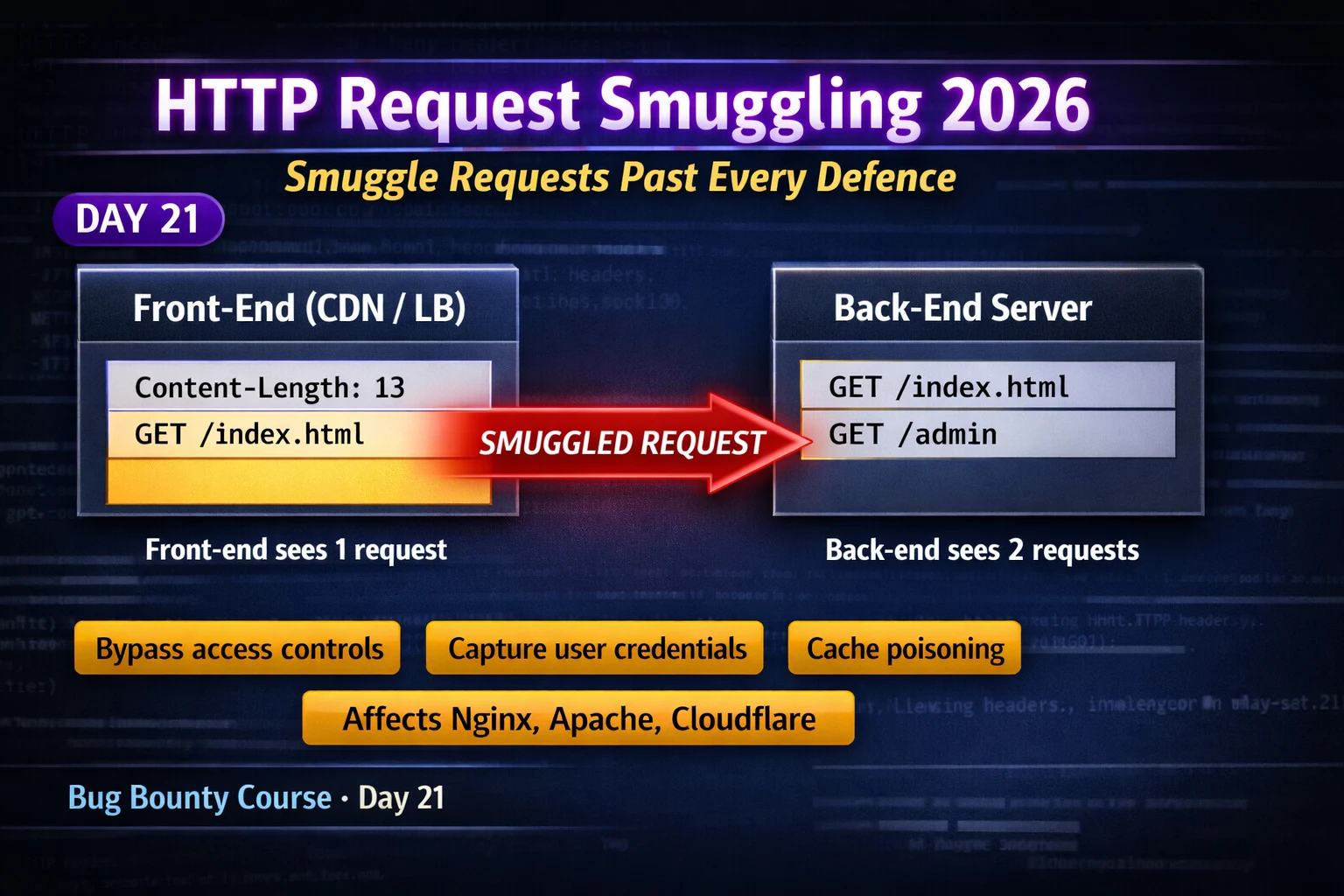
This article is a technical educational module on HTTP Request Smuggling for bug bounty hunters, part of a 180-day course. It explains how front-end and back-end servers parsing HTTP request boundaries differently creates a vulnerability allowing attackers to inject hidden requests that bypass security controls, and covers detection techniques, exploitation scenarios (access control bypass, credential capture, cache poisoning), and remediation strategies. The vulnerability remains highly prevalent in 2026 because most applications still use HTTP/1.1 between infrastructure layers, making it one of the highest-severity and highest-paying bug bounty vulnerability classes.
- The desync condition and protocol ambiguityHTTP/1.1 specifies two headers for determining request body boundaries: Content-Length (exact byte count) and Transfer-Encoding: chunked (length via hexadecimal chunk prefixes). When both appear in one request, the HTTP/1.1 specification says they should never coexist, but different servers make different decisions about which to honor. If the front-end and back-end make different choices, they disagree about where the first request ends, allowing bytes intended as the body to be interpreted as a second request by the back-end.
- CL.TE attack mechanism and payload structureIn CL.TE attacks, the front-end honors Content-Length while the back-end honors Transfer-Encoding. The attacker sends a payload with Content-Length: 13 and Transfer-Encoding: chunked, where the body contains a zero-length chunk terminator (0rnrn) followed by the smuggled request. The front-end reads all 13 bytes and forwards them; the back-end reads only up to the chunk terminator and leaves the smuggled bytes in its read buffer, which prepend to the next user's incoming request.
- TE.CL attack reversal and danger factorsTE.CL attacks reverse the relationship—front-end honors Transfer-Encoding while back-end honors Content-Length. The attacker sends a properly-formatted chunked body that terminates early according to chunks, but specifies a larger Content-Length. The front-end forwards what it considers complete; the back-end reads only Content-Length bytes, finds it has received fewer bytes than specified, and waits for more data (which arrives as the next user's request). TE.CL attacks are typically harder to trigger because they require less common server configurations and are more dangerous during testing
- Automated detection using Burp HTTP Request SmugglerThe HTTP Request Smuggler extension by James Kettle (available in Burp BApp Store) automates safe detection by sending probe requests designed to elicit differential responses or timeouts indicating a desync condition, without actually poisoning the connection state. After installation, right-clicking a request and selecting Extensions > HTTP Request Smuggler > Launch runs automated tests for CL.TE, TE.CL, and HTTP/2 downgrade variants. A confirmed detection showing a 10-second timeout response indicates the back-end is waiting for more data due to the desync condition.
- Access control bypass via smuggled internal requestsIf the front-end blocks requests to /admin through path-based access controls, an attacker can craft a smuggling payload where the outer request targets a public endpoint (passing the front-end check) while a smuggled inner request targets /admin. The back-end forwards the smuggled request as if it came from the trusted front-end. Combined with back-end IP allowlisting that trusts the front-end's IP, using Host: localhost in the smuggled request can bypass access control entirely, reaching admin interfaces blocked to normal users.
- Credential capture through connection poisoningIn multi-user environments sharing back-end connection pools, an attacker can craft a smuggled request with an incomplete POST body specifying a large Content-Length value. The back-end waits for the remaining bytes, which arrive as the next user's incoming request. If the attacker's outer request targets a reflection endpoint (even one that only echoes parameters in error messages), the complete next user's request—including their POST body, cookies, session tokens, and credentials—gets appended and reflected back to the attacker, enabling direct credential theft from live users.
- HTTP/2 downgrade variants and modern vulnerability scopeHTTP/2 was designed to eliminate request smuggling through binary framing, but vulnerabilities emerge when front-ends accept HTTP/2 connections and downgrade to HTTP/1.1 when forwarding to back-ends. H2.CL attacks inject a Content-Length header via HTTP/2 pseudo-headers that conflicts with frame length; when downgraded to HTTP/1.1, this creates the same desync condition. H2.TE attacks inject Transfer-Encoding: chunked (explicitly forbidden in HTTP/2 spec) that many front-ends faithfully include in the downgraded request. Both variants remain prevalent in 2026 and are tested by the HTTP Request
- Bug bounty reporting and severity justificationRequest smuggling reports require detailed technical specification: the exact desync type (CL.TE or TE.CL), the specific request pair with exact header values, evidence of desync (timing oracle results or error responses), and demonstrated impact (access control bypass, credential capture, or cache poisoning). Access control bypass to admin functionality is consistently scored as P1 Critical on major programmes. When calculating blast radius, the report should quantify worst-case impact across all users sharing connection pools—even low-probability credential capture affecting a large user pop
Bottom line: HTTP Request Smuggling exploits protocol-level ambiguity in how front-end and back-end servers parse HTTP request boundaries, bypassing authentication and access controls, capturing other users' credentials, and poisoning caches at scale—it remains one of the highest-severity and highest-paying vulnerabilities in 2026 because most applications still use HTTP/1.1 between infrastructure layers. Detection is automated via Burp's HTTP Request Smuggler extension, but manual verification and careful h
FREE
Part of the Bug Bounty Mastery Course
🎯 What You’ll Master Today
⏱️ 60 min · 3 exercises · Burp Suite + PortSwigger labs
📋 Prerequisites — Complete Before Day 21
- Day 12: File Upload Bug Bounty — intermediate HTTP manipulation skills needed before tackling the complex header interactions in request smuggling
- Day 18: OAuth Attacks — understand multi-layer auth flows; smuggling exploits the same front-end/back-end trust relationships that OAuth attacks target
- Burp Suite installed and configured as browser proxy — all exercises require active Burp Proxy interception
📋 HTTP Request Smuggling 2026 — Contents
How HTTP Request Smuggling Works — The Desync Condition
Modern web applications typically use a front-end server — a CDN, reverse proxy, or load balancer — that forwards requests to back-end origin servers. HTTP/1.1 allows multiple requests over a single TCP connection (keep-alive). When the front-end forwards these requests to the back-end, it needs to correctly determine where one request ends and the next begins. HTTP/1.1 specifies two headers for this purpose: Content-Length (specifying the exact byte count of the body) and Transfer-Encoding: chunked (specifying body length through a series of chunks with hexadecimal length prefixes).
The specification says both headers should never appear in the same request. When they do, different servers make different decisions about which to honour. If the front-end and back-end make different decisions — one honours Content-Length, the other honours Transfer-Encoding — they disagree about where the request body ends. The bytes the front-end includes as part of the first request body may be interpreted by the back-end as the beginning of a second request. That second request was smuggled in without going through the front-end’s security checks.
Content-Length: 13
Transfer-Encoding: chunked
0
SMUGGLED
POST / HTTP/1.1
body: [chunk “0\r\n\r\n” = empty]
SMUGGLED ← next user’s request appended
CL.TE Attack — Front-End Uses Content-Length
In a CL.TE attack, the front-end uses the Content-Length header to determine the body size and forwards the entire CL-length body to the back-end. The back-end uses Transfer-Encoding and processes the chunked body — reading each chunk and its hex length prefix until it encounters the zero-length terminator chunk (0\r\n\r\n). Any bytes after the terminator that were included in the CL-sized body are left in the back-end’s read buffer and treated as the beginning of the next request.
The attack payload places a zero-length chunk terminator early in the body, followed by the smuggled request prefix. The front-end reads the full CL-sized body and forwards all of it. The back-end reads up to the zero-length chunk and stops, leaving the smuggled prefix in its buffer. When the next request arrives from any user, the back-end prepends the buffered smuggled prefix to that request — resulting in a malformed request that may reach different application logic or expose the next user’s request to the attacker.
⏱️ 20 minutes · Free PortSwigger account required
Create a free account if you don’t have one.
Find: “HTTP request smuggling, basic CL.TE vulnerability”
Click “Access the lab”
Step 2: Install HTTP Request Smuggler extension in Burp
Burp Suite > Extensions > BApp Store
Search: “HTTP Request Smuggler” by James Kettle
Install and confirm it appears in Extensions list
Step 3: Use the extension to detect the vulnerability
With the lab open in browser proxied through Burp:
Right-click any request in Burp Proxy > HTTP History
Extensions > HTTP Request Smuggler > Launch
Watch the extension’s output — it will identify CL.TE
Step 4: Manually craft the exploit
In Burp Repeater, build the CL.TE payload:
POST / HTTP/1.1
Content-Length: 13
Transfer-Encoding: chunked
0
SMUGGLED
– Disable Update Content-Length in Repeater
– Send the request, then immediately send a normal POST
– Observe if the second request errors: “Invalid method SMUGGLED…”
Step 5: Confirm the lab’s intended exploit
Follow PortSwigger’s solution guidance.
Note: what was the exact impact demonstrated?
Document the Content-Length value and the smuggled prefix.
📸 Screenshot the error response confirming the smuggled bytes reached the back-end as a new request. Post to #day-21-smuggling on Discord.
TE.CL Attack — Front-End Uses Transfer-Encoding
In a TE.CL attack, the relationship is reversed: the front-end honours Transfer-Encoding and the back-end honours Content-Length. The attacker sends a request where the chunked body terminates early according to the chunks, but the Content-Length header specifies a larger body size. The front-end reads the chunks and forwards what it considers the complete chunked body. The back-end reads based on Content-Length and finds it has received fewer bytes than expected — it waits for more data, which arrives as the next user’s request.
TE.CL attacks are typically harder to trigger because they require the front-end to properly honour Transfer-Encoding while the back-end ignores it — a less common configuration. They are also more dangerous in testing because the malformed state left on the back-end connection can affect subsequent users unpredictably. PortSwigger recommends always testing in a private browser tab and pausing briefly between repeated smuggling attempts to avoid poisoning real user sessions during authorised testing.
Content-Length: 3
Transfer-Encoding: chunked
8
SMUGGLED
0
Reads: “8\r\n” (3 bytes) = body
Remaining: “SMUGGLED\r\n0\r\n\r\n“
← buffered as start of next request
Detection with Burp HTTP Request Smuggler
Manual detection of request smuggling requires careful timing analysis and careful handling of connection state — mistakes can affect other users on the same back-end connection. The HTTP Request Smuggler extension by James Kettle automates this detection safely. It sends a series of probe requests designed to elicit differential responses or timeouts that indicate a desync condition, without sending payloads that would actually poison the connection state for other users.
After installation via BApp Store, right-clicking any request in Burp History and selecting Extensions > HTTP Request Smuggler > Launch starts the automated scan. The extension tests for CL.TE, TE.CL, and HTTP/2 downgrade variants. Results appear in the extension’s output window with severity assessments. Confirmed vulnerabilities are flagged for manual verification — the extension confirms the condition but you must manually verify the actual impact through a controlled exploit attempt.
High-Impact Exploitation Scenarios
Access control bypass. If the front-end enforces path-based access controls — blocking requests to /admin or /internal based on the request URL — a smuggled request can target these paths without going through the front-end check. The outer request targets a public endpoint (passing the front-end check). The smuggled inner request targets the restricted endpoint and is forwarded directly by the back-end as if it came from the trusted front-end. Combined with back-end IP allowlisting that trusts the front-end’s IP, this bypass can provide full access to admin interfaces.
Credential capture. In environments where multiple users share back-end connection pools, a specifically crafted smuggled request can cause the next user’s incoming request to be appended to yours. If you control an endpoint that reflects input — even just a parameter that appears in an error message — you can receive the next user’s complete HTTP request including their POST body, cookies, and any credentials or CSRF tokens they submitted. This is one of the highest-severity exploitation paths: it turns a smuggling vulnerability into credential theft from other live users.
Cache poisoning at scale. If the application uses a caching layer and the smuggled request causes a cacheable response to be stored under the wrong cache key, subsequent users requesting the legitimate URL receive the attacker’s poisoned response. This scales the impact from one affected user to every user who requests the cached URL — turning a single smuggling request into a widespread XSS or open redirect affecting all visitors.
⏱️ 20 minutes · Burp Suite + PortSwigger lab
Search: “HTTP request smuggling to bypass front-end security controls”
Access the lab — it has a /admin path blocked by the front-end proxy
Step 2: Confirm the front-end block
Try to directly browse to /admin — observe the 403 “Not an admin” response
This confirms the front-end is enforcing the restriction
Step 3: Build the bypass smuggling request in Burp Repeater
New request with these headers:
POST / HTTP/1.1
Content-Type: application/x-www-form-urlencoded
Content-Length: [calculate]
Transfer-Encoding: chunked
[chunk size hex]
[normal POST data]
0
GET /admin HTTP/1.1
Host: localhost
Content-Length: 10
x=
Step 4: Critical Repeater settings
– Uncheck “Update Content-Length” in Repeater
– Go to Repeater > Inspector (or right panel) > ensure HTTP/1 not HTTP/2
Step 5: Send the smuggling request, then immediately send a normal GET /
Observe: does the second response return admin content?
If yes: the smuggled GET /admin reached the back-end as a trusted request
Document: exact Content-Length, chunk sizes, and response difference.
📸 Screenshot the admin response returned via the smuggled request. Post to #day-21-smuggling on Discord.
HTTP/2 Downgrade Smuggling — 2026 Variants
HTTP/2 was expected to eliminate request smuggling because it uses binary framing rather than header-based length determination. It did not. A class of vulnerabilities discovered in 2020–2021 (H2.CL and H2.TE) exploits the architecture where the front-end accepts HTTP/2 connections but downgrades to HTTP/1.1 when forwarding to the back-end. The front-end rewrites the HTTP/2 binary frames into HTTP/1.1 text headers for the back-end — and in doing so, may faithfully include Content-Length or Transfer-Encoding headers that were in the HTTP/2 pseudo-headers, creating a desync at the HTTP/1.1 back-end level.
H2.CL attacks inject a Content-Length header via HTTP/2 that conflicts with the actual HTTP/2 frame length. When downgraded, the resulting HTTP/1.1 request has an ambiguous body length that the back-end resolves differently from the front-end. H2.TE attacks inject a Transfer-Encoding: chunked header into an HTTP/2 request — something the HTTP/2 spec explicitly forbids but many front-ends will still faithfully include in the downgraded HTTP/1.1 forwarded request. Both variants remain prevalent in 2026 and are tested by the HTTP Request Smuggler extension.
⏱️ 20 minutes · PortSwigger Web Security Academy
Search: “Exploiting HTTP request smuggling to capture other users’ requests”
Access the lab. Read the brief — it has a comment function that reflects input.
Step 2: Understand the attack chain
The goal: craft a smuggled request that causes the NEXT user’s request
to be appended to yours and then reflected in the comment function.
You receive their POST body including credentials.
Step 3: Build the payload
Outer request: POST to the comment endpoint
Inner smuggled request: another POST to the comment endpoint
but with only a partial body — the remaining bytes come from
the next user’s request being appended
Content-Length of inner request: deliberately large (e.g. 800)
This causes the back-end to wait for 800 bytes
The next user’s request provides those bytes
Step 4: Send the payload and wait
After sending the smuggling request:
Check the comments section
Does a new comment appear containing HTTP request headers?
Does it contain another user’s session cookie or credentials?
Step 5: Extract the captured data
If successful — note what was captured: session cookie, credentials
How would you use this to take over the victim’s account?
Document the full attack chain for your report.
📸 Screenshot the captured victim request in the comments, showing the session cookie or credentials. Post to #day-21-smuggling on Discord. Tag #day21complete
Reporting and Remediation
HTTP request smuggling reports require more technical detail than most vulnerability classes because the mechanism is non-obvious to developers who haven’t encountered it. A strong report includes: the exact desync type (CL.TE or TE.CL), the specific request pair (outer request + smuggled inner request with exact header values), evidence of the desync (timing oracle result or error response), the demonstrated impact (access control bypass, credential capture, or cache poisoning), and the remediation recommendation. Always note whether HTTP/2 is available on the target — H2 end-to-end is the most complete fix.
Remediation options for developers: enforce HTTP/2 end-to-end eliminating the HTTP/1.1 desync entirely; reject or normalise requests containing both Content-Length and Transfer-Encoding headers at the front-end; disable HTTP/1.1 keep-alive between the front-end and back-end (forces new connections for each request, eliminating connection poisoning); configure the back-end to reject ambiguous requests with a 400 rather than attempting to parse them.
🧠 QUICK CHECK — HTTP Request Smuggling
📋 HTTP Request Smuggling Quick Reference — Day 21
🏆 Mark Day 21 Complete — HTTP Request Smuggling
Request smuggling demonstrates how protocol-level ambiguity creates application-level impact across every user. Day 22 covers GraphQL — a completely different attack surface with its own class of introspection, injection, and broken authorisation vulnerabilities.
❓ Frequently Asked Questions — HTTP Request Smuggling 2026
What is HTTP request smuggling?
What is the difference between CL.TE and TE.CL?
How do you detect HTTP request smuggling safely?
What is the impact of HTTP request smuggling?
How do you fix HTTP request smuggling?
Is HTTP request smuggling still relevant in 2026?
Day 20: Clickjacking Bug Bounty
Day 22: GraphQL Bug Bounty
📚 Further Reading
- Day 20: Clickjacking Bug Bounty — Like request smuggling, clickjacking exploits a front-end/back-end trust gap — the browser renders a page differently from what the user perceives. Both classes reward understanding layered architecture.
- Bug Bounty Mastery Course Hub — Full 180-day course overview. Day 21 request smuggling is one of the advanced protocol-level exploits in Phase 1. The vulnerability complexity increases across Days 21–25.
- PortSwigger — HTTP Request Smuggling Complete Guide — The definitive resource by James Kettle — covers all attack variants from basic CL.TE through HTTP/2 downgrade attacks with labs for every technique.
- James Kettle — HTTP Desync Attacks: Request Smuggling Reborn (2019) — The original research paper that re-popularised request smuggling and introduced the systematic CL.TE/TE.CL framework used by every practitioner today.
