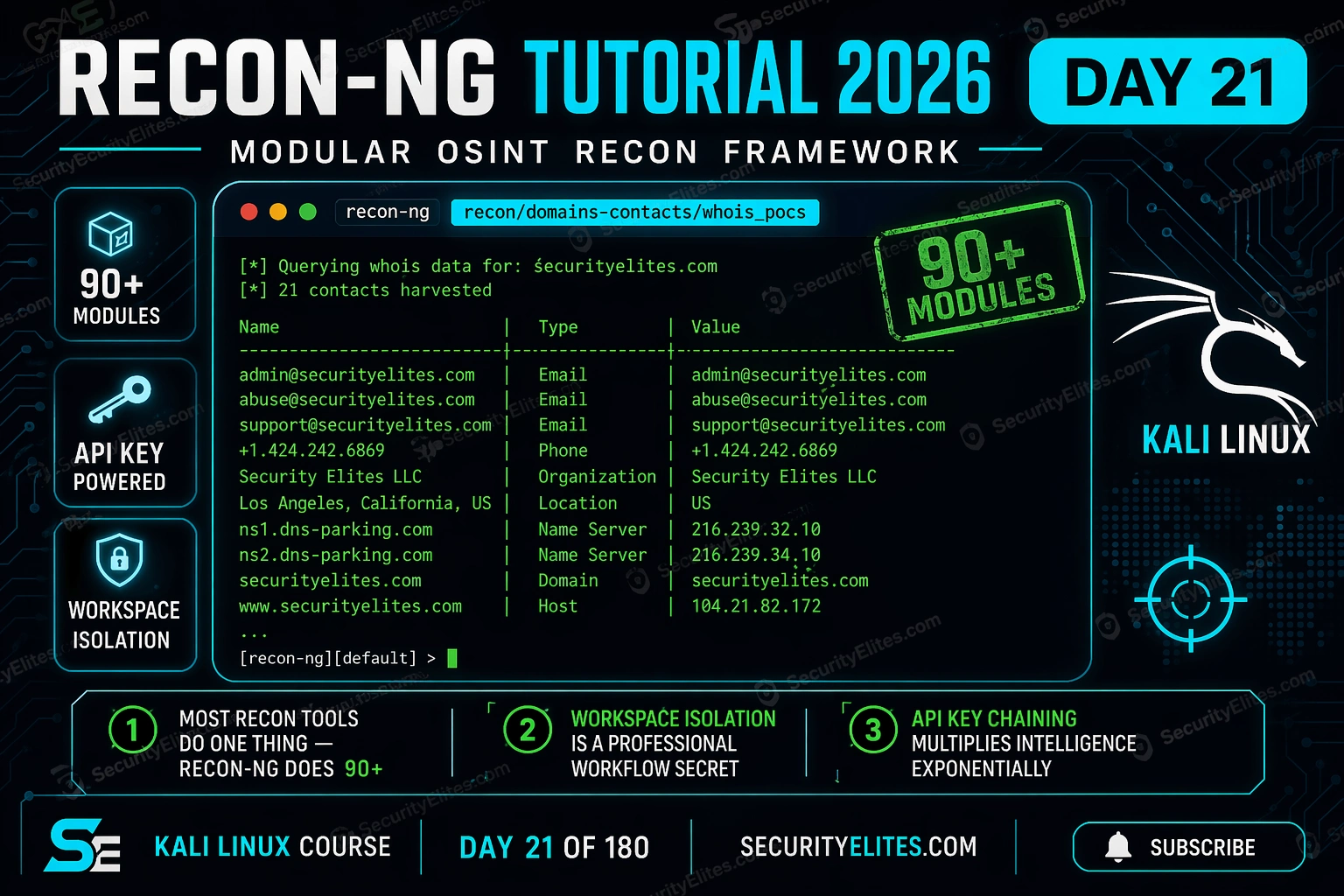
This tutorial presents recon-ng as a modular OSINT framework that unifies passive reconnaissance through chained modules and centralized SQLite databases, addressing the inefficiency of running separate single-purpose tools and manually transferring data between them. The article demonstrates how recon-ng's workspace isolation, naming convention system, and module chaining produce comprehensive intelligence profiles—contacts, subdomains, IP addresses, and breach correlations—from a single domain without active network contact. For penetration testers and red teamers, this structured approach replaces copy-paste workflows with systematic collection that scales to professional engagements and generates client-ready reports.
- Database architecture enables data flow between modulesRecon-ng stores all reconnaissance data in a single SQLite database per workspace with tables for domains, hosts, contacts, credentials, ports, and vulnerabilities. Modules read from one table and write results to another, so the output of a domains-to-contacts module automatically becomes available input for the next module in the chain. This eliminates manual copying between tools and allows SQL queries to export exactly the subset of data needed for specific deliverables.
- Module naming convention encodes purpose and dependenciesModule names follow the pattern category/input_table-output_table/module_name—for example, recon/domains-contacts/whois_pocs reads from domains and writes to contacts. This naming tells users instantly what data a module requires, what it produces, and whether it can run (if the input table is empty, the module cannot execute). This removes ambiguity about module sequencing and dependencies.
- Workspace isolation prevents client data mixingEach engagement requires a separate workspace, which maintains its own SQLite database. Without this separation, domains and contacts from Client A would end up in the same tables as Client B's data, risking accidental inclusion of Client A information in Client B's deliverable. The article emphasizes this is a data hygiene requirement, not optional, and takes only five seconds to implement.
- API keys multiply output by 3-10x without configuration burdenModules accessing Shodan, Hunter.io, SecurityTrails, and FullContact APIs return significantly more results than public-only variants. Keys are registered globally across all workspaces using 'keys add keyname value', and the same modules work identically with or without keys—just with reduced output. Free tiers from services like Hunter.io exist for learning and early engagements.
- Professional reconnaissance chain moves from domains to actionable intelligenceThe article describes a sequenced module chain: whois_pocs extracts registrant contacts from domain WHOIS, hackertarget discovers subdomains, resolve converts subdomains to IP addresses, hunter_io finds employee emails with job titles, and HIBP checks if those employees appear in known breaches. Each output feeds the next and produces a prioritized target list for social engineering or credential-stuffing assessment before any active scanning occurs.
- HIBP breach correlation identifies high-value social engineering targetsRunning the recon/contacts-credentials/hibp module against discovered employee email addresses identifies which employees have appeared in known data breaches. An employee like 'Sarah Chen' appearing in three separate breaches is marked as a top candidate for phishing simulation and credential spraying because her email is confirmed valid and she may still use compromised passwords.
- Shodan network range queries reveal server software and CVEs passivelyThe recon/netblocks-hosts/shodan_net module queries a discovered network range through Shodan and returns all hosts in that range with their server software versions, open ports, and banners. The article shows finding Apache/2.2.14 (end-of-life with critical CVEs) on a specific IP without sending any packets to the target—enabling vulnerability assessment before active scanning begins.
- Reporting modules generate client-ready HTML and CSV exportsThe reporting/html and reporting/csv modules export the entire database or custom SQL query results into professional deliverables. Users configure filename, creator name, and customer name, then the module compiles all collected data into a structured report. This allows reconnaissance findings to be delivered immediately after data collection concludes.
Bottom line: Recon-ng's modular architecture and database chaining transform passive OSINT from a manual, error-prone process of running isolated tools into a systematic, repeatable methodology that collects more comprehensive intelligence in less time than traditional single-purpose tools can achieve separately. The core professional advantage is workspace isolation for engagement data hygiene, module naming that prevents execution errors, and SQL-based export enabling precise client reporting—making recon-
FREE
Part of the Kali Linux Course — 180 Days
Here’s what changed my approach to reconnaissance: I ran recon-ng on a target during a corporate pentest and in 20 minutes had more verified employee emails, associated domains, and network ranges than I’d collected manually in two hours. The workspace kept it all organised by engagement. The module chain handled the repetitive lookups automatically. I spent my time analysing, not copying and pasting between tabs.
Recon-ng Tutorial on Kali Linux Day 21 is the day recon-ng becomes your primary reconnaissance framework. Leave this lab with workspaces configured, modules installed, API keys wired in, and your first full domain intelligence collection run completed.
How are you currently handling passive OSINT collection?
🎯 What You’ll Master in Day 21
⏱️ Day 21 · 3 exercises · Kali Linux terminal
✅ Prerequisites
- Kali Linux running (any install method) — seeKali Linux Post-Installation Steps
- theHarvester experience fromDay 9
— recon-ng extends everything you learned there
- Maltego basics fromDay 13
— helps contextualise recon-ng’s relationship-mapping approach
📋 Recon-ng Tutorial Day 21 – Contents
- Recon-ng Architecture — Why Workspaces and Modules Change Everything
- Installation and First Launch
- Workspaces — Professional Engagement Isolation
- Marketplace — How Modules Get Into Your Install
- Your First Module Run — Domains to Contacts
- API Keys — Multiplying Your Intelligence Output
- Module Chaining — Building the Full Intelligence Picture
- Exporting and Reporting
Recon-ng Architecture — Why Workspaces and Modules Change Everything
Most OSINT tools do one thing. Sublist3r finds subdomains. theHarvester finds emails. Shodan finds open ports. You run them separately, copy results between them, maintain a spreadsheet to track what came from where. It works, but it doesn’t scale.
Here’s what makes the architecture different. At the core is a SQLite database — one per workspace — with tables for domains, hosts, contacts, credentials, ports, and vulnerabilities. Modules read from those tables, do their work, and write back to them. The output of a domains module automatically becomes input for the next hosts module. Everything in one place, queried with SQL, exported in one step.
The naming convention encodes the entire module’s purpose: category/input_table-output_table/module_name. So recon/domains-contacts/whois_pocs tells you it’s a recon module, it reads from the domains table, writes to the contacts table, and uses WHOIS point-of-contact data. You know what it does before you run it.
Installation and First Launch
It ships with Kali Linux. If you’re on a minimal install or it’s missing, one apt command brings it in. The launch drops you into a Metasploit-style console — that resemblance is deliberate. Most red teamers run both tools in the same session and the interface similarity cuts the context-switch overhead.
Workspaces — Professional Engagement Isolation
The default workspace is called “default” and you should never use it for real work. Every engagement gets its own workspace. The reason is simple: if you run recon-ng against Client A in the same workspace as Client B, their domains end up in the same domains table, their contacts mix, and your output reports are a mess. More seriously, you risk including Client A’s data in a deliverable for Client B.
I create the workspace before I write a single module command. It takes five seconds and it’s the difference between a professional engagement and a data hygiene problem.
Marketplace — How Modules Get Into Your Install
When you first install recon-ng, almost no modules are present — they’re in the marketplace and you pull them as needed. This is deliberate: installing only what you need keeps the tool lean and means you’re not dragging in dependencies for 90 modules you’ll never run.
The marketplace search is powerful. Search by module name, category, or the API it requires. I always install the same core set at the start of every engagement and add specialised modules as the reconnaissance develops.
megacorp.com
john.smith@megacorp.com · registrar-abuse@megacorp.com
mail.megacorp.com · dev.megacorp.com · vpn.megacorp.com
mail.megacorp.com → 203.0.113.44
⏱️ 15 minutes · No tools needed
Before running a single module, professional recon planners map what they want to find and which modules will get them there. Your job here is to design the chain, not run it.
a mid-sized financial services company. Your scope: the company’s
primary domain and all subdomains. Your goal: build an intelligence
baseline before active scanning.
QUESTION 1 — What do you want to collect?
List 5 types of intelligence that would be most valuable
for the subsequent active testing phase. For each one, identify
which recon-ng table it would live in.
QUESTION 2 — Which modules get you there?
Using the module naming convention (category/input-output/name),
predict which module categories would produce each of your 5
intelligence types. Don’t look them up — reason from the names.
QUESTION 3 — What order do you run them?
Some modules depend on output from previous modules.
Order your 5 modules from first to last run, explaining
why each depends on the previous one’s output.
QUESTION 4 — Which API keys matter most?
You have budget for 2 API key subscriptions (free tiers don’t count).
Which 2 paid API integrations would most expand your intelligence
output for a financial services target specifically?
QUESTION 5 — What doesn’t recon-ng find?
Name 2 intelligence types that passive OSINT tools including
recon-ng cannot collect, and explain why active techniques
are required for each.
📸 Write out your module chain order and share in #kali-linux-course
Your First Module Run — Domains to Contacts
The first module I run on every new engagement is whois_pocs. WHOIS point-of-contact records give you names, emails, and sometimes phone numbers directly associated with domain registrations. Not every domain exposes this — privacy protection shields many — but when it does, it’s a guaranteed-accurate primary contact with no ambiguity about their association with the target.
API Keys — Multiplying Your Intelligence Output
Without API keys, recon-ng uses public data only. With the right keys, every module run returns 3-10× more data from the same target. The free tiers from Shodan, Hunter.io, and SecurityTrails are enough for learning — pay tiers are worth it for client work.
Module Chaining — Building the Full Intelligence Picture
The real power is running these in sequence. Start with domains, discover hosts, resolve those hosts to IPs, then run Shodan against the IPs for service banners and open ports. Each step feeds the next and the database grows with every module run. I don’t move to active scanning until recon-ng has populated all five core tables with solid passive data.
Exporting and Reporting
At the end of a recon session, you need the data out of the database and into a format clients can read. The reporting modules handle this. HTML gives you a professional-looking report. CSV lets you import into spreadsheets or feed other tools. The full SQL query capability means you can also export exactly the subset of data you need for a specific deliverable.
⏱️ 20 minutes · Kali Linux required
You designed the chain in Exercise 1. Now run it against a real domain you have authorisation to test — use your own domain, your lab domain, or a domain specifically set up for OSINT practice like reconng.com (a recon-ng demo target). Work through the full collection sequence.
recon-ng
workspaces create day21_practice
Step 2: Install core modules
marketplace install recon/domains-contacts/whois_pocs
marketplace install recon/domains-hosts/hackertarget
marketplace install recon/hosts-hosts/resolve
marketplace install reporting/html
marketplace install reporting/csv
Step 3: Add your practice target domain
db insert domains
# Enter: your-practice-domain.com
Step 4: Run the domain-to-contacts chain
modules load recon/domains-contacts/whois_pocs
run
db query SELECT * FROM contacts
Step 5: Run domain-to-hosts
modules load recon/domains-hosts/hackertarget
run
db query SELECT * FROM hosts
Step 6: Resolve hosts to IPs
modules load recon/hosts-hosts/resolve
run
db query SELECT host, ip_address FROM hosts WHERE ip_address IS NOT NULL
Step 7: Check database summary
db summary
Step 8: Export HTML report
modules load reporting/html
options set FILENAME /home/kali/day21_report.html
run
# Open /home/kali/day21_report.html in Firefox
📸 Screenshot your db summary output showing populated tables. Share in #kali-linux-course
⏱️ 15 minutes · Free API key required (5 min to register)
Register a free Hunter.io API key and wire it into recon-ng. Then rerun the same target and compare how many contacts you get with vs without the key. The difference demonstrates exactly why API keys matter.
Go to: hunter.io
Create free account
Dashboard → API Key → copy your key
Step 2: Add key to recon-ng
keys add hunter_api YOUR_KEY_HERE
keys list
# Confirm hunter_api is set
Step 3: Install hunter_io module
marketplace install recon/domains-contacts/hunter_io
Step 4: Run against same target from Exercise 2
workspaces load day21_practice
modules load recon/domains-contacts/hunter_io
run
Step 5: Compare contact count
db query SELECT COUNT(*) FROM contacts
# Compare: whois_pocs alone vs whois_pocs + hunter_io
Step 6: Check email format pattern
db query SELECT email FROM contacts WHERE email IS NOT NULL
# What email format does this company use?
# firstname.lastname? flastname? firstname only?
# Note the format — it’s used for generating target email lists
📸 Screenshot the contact count comparison (before and after Hunter.io key). Share in #kali-linux-course
📋 Recon-ng Commands — Day 21 Reference Card
Advanced Module Chaining — Building a Full Intelligence Baseline
The basic chain gets you contacts and hostnames. The professional chain extends further: company relationships, network ranges, social profiles, and technology stack fingerprinting. Each additional data point narrows your attack surface and prioritises your manual testing time.
Here’s the chain I run on every corporate penetration test engagement before I touch a single active scanning tool. Start from a domain and end with a structured intelligence picture across all tables.
The credentials table is the most operationally significant output. When HIBP (Have I Been Pwned) confirms that specific employee emails appeared in data breaches, it tells you two things: those email addresses are valid and actively used, and those users may still be using compromised passwords on the target network. That’s a phishing simulation shortlist and a password spraying candidate list generated purely from passive OSINT.
Recon-ng vs Maltego vs theHarvester — When to Use Each
These three tools cover overlapping intelligence domains but have distinct strengths. Knowing which to reach for in which scenario saves time and produces better intelligence than defaulting to the same tool every engagement.
theHarvester — fastest single-purpose tool for quick email and hostname discovery. Run it first because it completes in 2-3 minutes with no configuration. The intelligence quality is good for known sources. No workspace concept — results are a dump to stdout. Use for: quick pre-engagement check, confirming a domain is live, initial contact harvest before setting up a full recon-ng workspace.
Recon-ng — my primary tool for the main reconnaissance phase on every structured engagement. The workspace keeps engagement data isolated, the SQL interface pulls exactly what I need for any specific deliverable, and the module chain handles what would otherwise be manual copy-paste between five different tools. Use it when you need to document methodology and present outputs — not just collect them.
Maltego — best for visualising relationship graphs between entities. The GUI interface makes it easy to show non-technical stakeholders how a single employee LinkedIn profile connects to their work email, corporate network, personal social accounts, and prior employer. Use for: client debriefs, threat intelligence presentations, and any situation where visualising the connection map matters more than raw data volume.
Sarah Chen (Marketing Director) has credentials in 3 breaches — top phishing simulation and credential-stuffing candidate
✅ Day 21 Complete — Recon-ng Operational
Workspaces, marketplace, module chaining, API keys, reporting. Day 22 adds Shodan to the chain — passive network intelligence that tells you what services are running on every IP address recon-ng just discovered, without sending a single packet to the target.
🧠 Day 21 Check
❓ Recon-ng FAQ
What is recon-ng used for in ethical hacking?
How is recon-ng different from Maltego?
Does recon-ng require API keys?
Is recon-ng legal to use?
How do recon-ng workspaces work?
What are the best recon-ng modules for domain recon?
Day 20 — Medusa Tutorial
Day 22 — Shodan Tutorial
📚 Further Reading
- Day 9 — theHarvester Tutorial — The single-purpose email and domain harvester that recon-ng extends. Understanding theHarvester first makes the module architecture of recon-ng click immediately.
- Day 13 — Maltego Tutorial — The GUI-based OSINT graph tool that complements recon-ng. Use recon-ng for bulk collection, Maltego for visualising the relationship map for clients.
- Subdomain Enumeration Tools 2026 — Amass, Subfinder, and Assetfinder compared — the active subdomain discovery tools that extend what recon-ng’s passive modules collect.
- Recon-ng GitHub Repository — Official source, module documentation, and contribution guidelines. The wiki has the complete module reference with input/output table specifications for every installed module.
- Kali Linux — Recon-ng Tool Page — Official Kali documentation for recon-ng including package version, dependencies, and the full command reference for the current Kali release.
