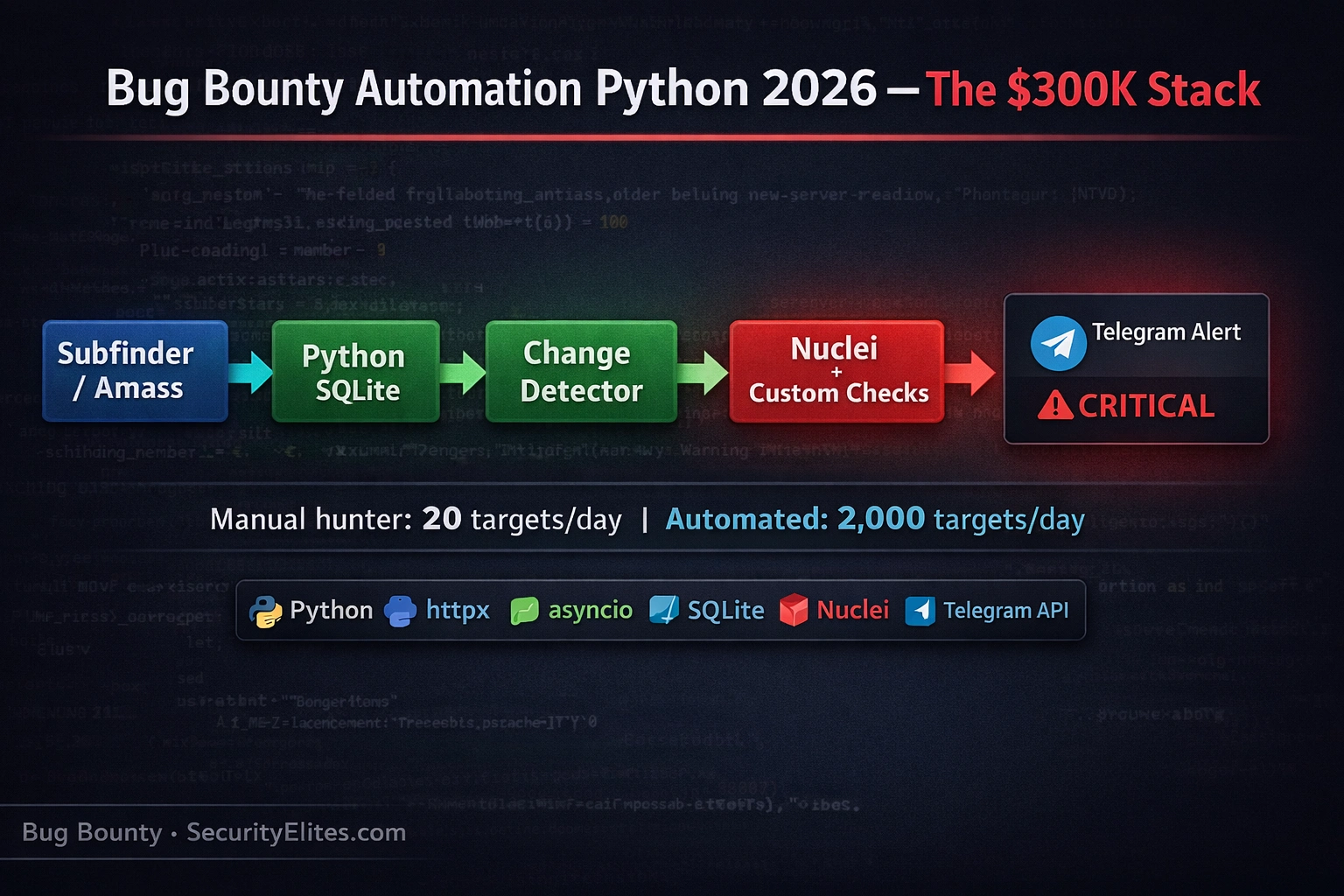
This article presents a complete technical architecture for building a continuous Python-based bug bounty automation pipeline that runs 24/7 on a $5/month VPS. The author argues that top earners ($150K–$300K annually) succeed not through superior hacking skills but through automation that captures new asset discovery windows (12–48 hours post-deployment) that manual hunters miss entirely. The pipeline chains four specialized layers—subdomain recon, HTTP fingerprinting, vulnerability scanning, and triage notification—to process hundreds of targets continuously while manual hunters handle dozens per week.
- The throughput differential dominates earningsManual hunters check 10–20 targets daily with weekly new-asset review cycles, capturing approximately 1% of scope activity. Automated pipelines process 500–2,000 targets daily with continuous six-hour review intervals, covering full scope width. The article demonstrates this is not a skill gap but a coverage gap: a manual hunter competing against continuous automation on a program with hundreds of wildcard domains sees roughly 1% of the opportunity that automation captures, making earnings differential inevitable.
- SQLite deduplication prevents notification noiseLayer 1 uses an SQLite database with PRIMARY KEY constraints on subdomains. New discoveries raise IntegrityError on duplicate insert, allowing the pipeline to distinguish genuinely new assets from re-discovered known ones. Without this deduplication, every six-hour run would reprocess all known subdomains and flood notification channels with duplicates. This single design decision is called 'the most important' in the article because it transforms a noisy script into a professional pipeline that only alerts on truly novel findings.
- Body hash change detection flags deploymentsLayer 2 uses httpx to fingerprint each host with status code, title, server header, and SHA-256 body hash. Six hours later, identical requests are made and hashes recomputed. Any hash mismatch signals deployment, configuration change, or functionality modification worth investigating manually. The pipeline stores fingerprints in SQLite and only passes changed assets to Layer 3, ensuring vulnerability scanning focuses on assets with meaningful changes rather than static targets.
- Nuclei templates plus custom Python checksLayer 3 wraps Nuclei's template library (thousands of patterns for known vulnerabilities like exposed panels, misconfigured headers, default credentials, and CVEs) and adds custom Python functions for program-specific patterns. Example: hardcoded AWS keys using regex or custom headers unique to the target's internal tooling. This dual approach combines broad vulnerability coverage (Nuclei) with program-specific edge (Python), giving automation users an advantage over generic scanner runs.
- Severity filtering and deduplication in alertsLayer 4 filters notifications to high and critical severity findings only—lower severities train users to ignore alerts through noise. Each finding is hashed using template-ID and matched-at URL; if that hash exists in an SQLite sent_alerts table, the notification is suppressed. The alert message includes emoji (red circle for critical, orange for high), template ID, target, and URL to make each 3am notification immediately actionable and self-contained.
- Token bucket rate limiting prevents bansThe article emphasizes that unthrottled automation has ended bug bounty careers. A DomainRateLimiter class implements token bucket per-domain rate limiting at 2 requests per second—safe enough to avoid triggering rate limits while maintaining reasonable throughput. Without this, fifty concurrent httpx workers could burst to fifty requests per second against a single domain, causing load issues or triggering security alerts. Rate limiting is called 'non-negotiable' for responsible automation.
- Program automation policies are legally bindingThe article repeatedly emphasizes reading program automation policies before deployment. Phrases like 'automated scanning requires prior written approval' or 'do not run automated scanners' are binding conditions of participation. Violating automation policies can result in permanent bans and forfeiture of pending payouts. The guidance is unambiguous: when in doubt, email the program team and ask permission before running any automation.
- Six-hour cron execution captures opportunity windowsThe orchestrator script runs via cron every six hours on the VPS, executing all four layers in sequence. New subdomains deployed at 2am are discovered by 2am, fingerprinted by Layer 2, scanned by Layer 3, and produce Telegram alerts by 3am if vulnerabilities exist. This speed captures the 12–72 hour window where new assets are most vulnerable—before security teams review them. Manual hunters checking weekly miss this entire window.
Bottom line: Continuous bug bounty automation on a minimal infrastructure (Python, SQLite, a $5 VPS, and six-hour cron cycles) provides the decisive competitive advantage in modern bug bounty hunting: capturing new asset discovery windows that manual hunters fundamentally cannot reach. The pipeline's four-layer architecture—recon, fingerprinting, scanning, and notification—must be built with strict deduplication and severity filtering to avoid noise, combined with mandatory program policy compliance and rate
Where are you with bug bounty automation?
🎯 What You’ll Build After This Article
⏱️ 40 min read · 3 exercises · Authorised targets and programme-approved use only
📋 Bug Bounty Automation Python 2026 — Contents
- Why Automation Is Now Non-Negotiable for Serious Bug Bounty
- Pipeline Architecture — The Four Layers
- Layer 1: Continuous Subdomain Recon with SQLite Deduplication
- Layer 2: HTTP Asset Discovery and Change Detection
- Layer 3: Nuclei Integration and Custom Python Checks
- Layer 4: Triage Filtering and Telegram Notifications
- Rate Limiting, Scope Validation, and Responsible Automation
- VPS Deployment and Cron Scheduling
Bug bounty automation builds directly on the manual reconnaissance skills covered throughout the 60-Day Bug Bounty Course. If you haven’t read the subdomain enumeration deep-dive yet, Day 6: Subdomain Enumeration covers the manual foundation that this automation layer wraps. The goal of automation is not to replace understanding — it is to apply your skills continuously at a scale that manual work cannot match.
Why Bug Bounty Automation Is Now Non-Negotiable
Programme scopes have grown dramatically. A typical enterprise VDP in 2026 covers hundreds of wildcard domains, multiple cloud infrastructure footprints, mobile applications, internal tools exposed through SSO, and APIs. The attack surface is enormous and constantly changing. New microservices deploy daily. Developer test environments appear and disappear. Feature branches get accidentally exposed to the internet. Every one of these events is a potential bug bounty finding, and the window of opportunity — the time between deployment and hardening — is often 12–48 hours.
Manual hunters process 10–20 targets per day with focused attention. Automated hunters process 500–2,000 targets per day continuously. This is not a skill differential — it is a throughput differential. The arithmetic is straightforward: a hunter checking new assets manually once a week is competing against automation that checks the same scope every six hours. On a programme with hundreds of wildcard domains, the manual hunter sees roughly 1% of the new asset activity that continuous automation captures. The findings follow the same distribution.
The automation threshold for serious bug bounty is lower than most hunters expect. You do not need a sophisticated multi-server distributed system to gain most of the throughput benefit. A single Python script running on a $5/month VPS, executing a four-tool pipeline every six hours, provides the most valuable capability: continuous monitoring of new asset discovery and automatic alerting when something interesting appears. The code in this article implements exactly that pipeline.
Pipeline Architecture — The Four Layers
The bug bounty automation pipeline I use and recommend has four layers. Each layer has a single responsibility. Each feeds the next. Each can be improved or replaced independently without breaking the others. This separation of concerns is what makes the pipeline maintainable as you scale to more programmes and more targets over time.
Layer 1 is continuous recon — discovering new subdomains and assets as they appear. Layer 2 is change detection — tracking which assets are live HTTP services and flagging when their responses change. Layer 3 is vulnerability detection — running templated and custom checks against assets that warrant scanning. Layer 4 is triage and notification — filtering the findings to only actionable ones and pushing them to wherever you work. The critical design principle is that each layer acts only on genuinely new information — Layer 2 only processes new subdomains from Layer 1, Layer 3 only scans assets that are new or changed, Layer 4 only sends alerts for findings not already seen. This prevents the pipeline from endlessly reprocessing known data and flooding your notification channel with noise.
Layer 1: Continuous Subdomain Recon with SQLite Deduplication
The recon layer wraps subfinder — a Go tool that queries dozens of passive DNS and certificate transparency sources simultaneously. Python’s subprocess module calls subfinder, parses its stdout output, and stores discovered subdomains in a local SQLite database. The database serves as the deduplication layer: a subdomain with a PRIMARY KEY constraint will raise an IntegrityError on insert if it already exists. Catching that error is how we identify genuinely new discoveries versus re-discovered known assets.
Running this layer every six hours means a new subdomain that appears at 2am is in your pipeline by 2am. The SQLite first_seen timestamp tells you exactly when each asset was discovered, which is useful for demonstrating to programmes that you found a vulnerability on a recently deployed asset — the timestamp is part of the bug bounty report timeline evidence. The layer only returns the list of new subdomains from each run, so subsequent pipeline layers never see duplicates.
⏱️ 15 minutes · Browser only — no install required
Go to: https://github.com/projectdiscovery
Find and read the README for these 5 tools:
subfinder / httpx / nuclei / dnsx / naabu
For each, write down: (a) what it does, (b) its input format, (c) its output format.
Understanding I/O formats is the foundation of building pipelines.
Step 2: Understand the pipeline concept on GitHub
Search GitHub for: bug bounty automation python
Find one open-source pipeline (examples: trickest/resolvers, tomnomnom/hacks, or similar).
Examine its architecture: What triggers it? How does it store state?
How many tools does it chain? What notification mechanism does it use?
Step 3: Read a programme automation policy
Go to: https://hackerone.com/programs
Pick any public programme with a large scope.
Find the programme’s policy page and look for the automation section.
Common phrases: “automated scanning tools”, “rate limiting”, “prior written approval”.
Does this programme explicitly allow automation? Explicitly prohibit it? Say nothing?
Step 4: Calculate your opportunity window
Pick a programme scope with 5 wildcard domains.
Estimate: if each domain has 50–100 subdomains on average,
and each subdomain has 3–5 discoverable endpoints,
how many total assets does this programme have?
If you checked manually once per week vs automated every 6 hours,
how many cycles of new-asset discovery would you miss per week manually?
📸 Screenshot the 5-tool I/O format table you created and the programme automation policy section you found. Post to #bb-automation on Discord.
Layer 2: HTTP Asset Discovery and Change Detection
Subdomain discovery gives you hostnames. Layer 2 converts those hostnames to live HTTP services and builds fingerprints of each one. A fingerprint captures the essential identity of a service’s response: status code, page title, server header, and a hash of the response body. The hash is the critical element for change detection. When the pipeline runs again in six hours, it fetches the same endpoints and computes new hashes. Any hash change signals something changed on that endpoint — a new deployment, modified configuration, added functionality, or removed authentication. Each change is worth investigating manually.
The Python httpx library is the right choice for this layer because it supports both synchronous and asynchronous request models, maintains efficient connection pools, and handles redirects cleanly. Running fifty concurrent workers with ThreadPoolExecutor lets you fingerprint 500 hosts in roughly a minute on a standard VPS — fast enough that the full pipeline completes well within the six-hour cron interval even for large scopes.
Layer 3: Nuclei Integration and Custom Python Checks
Layer 3 is where the pipeline does actual vulnerability detection. Nuclei handles the commodity checks — its template library covers thousands of known vulnerability patterns including exposed admin panels, default credentials, known CVEs in popular software, misconfigured security headers, and exposed sensitive files. Running Nuclei against the list of new and changed assets from Layer 2 gives you comprehensive coverage of known patterns at scale, automatically, on every new asset that appears.
Custom Python checks are where your edge over other automation users comes from. Every programme-specific pattern you identify through manual testing can be encoded as a Python function that runs alongside Nuclei. Examples: a check that looks for hardcoded AWS keys in JavaScript files (a pattern Nuclei templates cover broadly, but a custom check can apply programme-specific naming conventions), a check for specific API versioning endpoints you’ve identified as frequently misconfigured in this programme’s stack, or a check for headers or response patterns unique to this company’s internal tooling that external Nuclei templates would never know about.
Layer 4: Triage Filtering and Telegram Notifications
The notification layer is where most automation pipelines fail. Generating findings is easy. Generating actionable, deduplicated, severity-filtered notifications that tell you exactly what to look at — without burying the critical alert in a flood of informational noise — requires deliberate design. A notification system that sends every Nuclei finding, including informational and low severity, will train you to ignore the channel. When the critical finding arrives, you won’t see it because you’ve learned to dismiss the noise.
The filtering rules are simple: only notify on high and critical severity findings. Only notify on a specific finding once — store sent findings in SQLite and check before every notification. Include enough context in the message to make the alert self-contained: target URL, template ID, severity, and a deep link to the Nuclei template documentation. The goal is that when a Telegram notification arrives at 3am, you can read it, immediately understand what it is and why it matters, and decide in thirty seconds whether it warrants waking up to investigate.
Rate Limiting, Scope Validation, and Responsible Automation
Unthrottled automation has ended bug bounty careers. Programmes have banned hunters permanently for running aggressive scanners that caused load issues on production systems. The rule is simple and non-negotiable: your automation must respect the programme’s systems as if they were your own. This means explicit rate limiting at the per-domain level, immediate backoff on 429 responses, and reading every programme’s automation policy before deployment.
Two requests per second per domain is a safe baseline that avoids triggering rate limiting on most web applications while still giving you reasonable throughput. The token bucket implementation below ensures this limit is maintained across concurrent workers — without it, fifty concurrent httpx requests can burst to fifty requests per second against a single domain, which will get you banned and may cause real service degradation.
VPS Deployment and Cron Scheduling
The full pipeline runs as a single orchestrator script that imports and calls each layer in sequence. A cron job on a $5/month VPS executes this script every six hours. The VPS needs: Python 3.10+, subfinder, httpx, Nuclei, and your pipeline code. The setup is straightforward and the monthly cost is offset by a single low-severity bug bounty payout.
⏱️ 12 minutes · Paper or text editor — no tools
automation builder faces. For each, choose your answer and justify it
with specific technical reasoning.
PROBLEM 1 — Storage:
You need to store subdomain history, HTTP fingerprints, and sent alerts.
Options: SQLite (local file) vs PostgreSQL (server) vs Redis (in-memory)
Factors to consider: concurrent write safety, query patterns needed,
operational complexity, recovery after VPS restart.
Which do you choose for a single-VPS pipeline and why?
PROBLEM 2 — False Positive Rate:
Your Nuclei integration produces 50 findings per week.
After manual review, only 8 are real vulnerabilities.
The 42 false positives waste your time and train you to ignore alerts.
Describe three technical mechanisms (NOT template-level changes)
you would implement at the pipeline layer to reduce false positive rate.
PROBLEM 3 — What NOT to Automate:
Name three vulnerability classes you would NOT include in automated scanning
and handle only manually. For each, explain: why automated scanning creates
unacceptable risk (legal, technical, or policy-level), and how you would
prioritise manual testing for that class instead.
📸 Post your architecture decision answers to #bb-automation on Discord — especially your false positive reduction techniques.
⏱️ 20 minutes · Browser + Telegram app — no server required
Open Telegram. Search for @BotFather.
Send: /newbot
Follow the prompts — give it a name and username.
Save the bot token that BotFather provides. Format: 123456789:ABCdef…
Step 2: Get your Chat ID
In Telegram, send a message to your new bot.
Open this URL in your browser (replace BOT_TOKEN):
https://api.telegram.org/bot{BOT_TOKEN}/getUpdates
Find “chat”: {“id”: XXXXXXXXX} in the response — that’s your Chat ID.
Step 3: Send a test message via the API
In your browser address bar, open this URL (replace both values):
https://api.telegram.org/bot{BOT_TOKEN}/sendMessage?chat_id={CHAT_ID}&text=Pipeline+Test+OK
If a message appears in your Telegram chat, your notification layer works.
Step 4: Simulate a critical alert
Open this URL (replace BOT_TOKEN and CHAT_ID):
https://api.telegram.org/bot{BOT_TOKEN}/sendMessage?chat_id={CHAT_ID}&text=🔴+CRITICAL+exposed-admin-panel+target.example.com&parse_mode=HTML
Does the red circle emoji render? This is exactly what your pipeline
will send you at 3am when it finds something real.
Step 5: Research Telegram bot rate limits
Search: “Telegram bot API rate limits”
What is the maximum messages per second a bot can send?
What happens if you exceed it?
How would you handle this in the notifier.py code?
📸 Screenshot the test message appearing in your Telegram chat. Post to #bb-automation on Discord with tag #notification-layer.
🧠 QUICK CHECK — Bug Bounty Automation Python 2026
📋 Bug Bounty Automation Python — Key Architecture Reference
❓ Frequently Asked Questions — Bug Bounty Automation Python 2026
Is bug bounty automation allowed on all programmes?
How much does a continuous bug bounty automation VPS cost?
What Python libraries are essential for this pipeline?
Can automation replace manual testing?
How do I avoid getting banned for automated scanning?
What is the typical opportunity window for new bug bounty assets?
60-Day Bug Bounty Course
Subdomain Enumeration Tools 2026
📚 Further Reading
- Day 6: Subdomain Enumeration Bug Bounty — The manual foundation that this automation layer wraps — understanding how subfinder, amass, and crt.sh work before automating them makes your pipeline more effective and debuggable.
- Subdomain Enumeration Tools 2026 — Comprehensive comparison of the best subdomain enumeration tools — subfinder, amass, dnsx, and others — with performance benchmarks and use case guidance.
- 60-Day Bug Bounty Mastery Course — Full course hub — automation is the capstone of the 60-day methodology, built on the manual skills established in Days 1–25.
- Nuclei — GitHub Repository — Official Nuclei repository with full template library, JSON output documentation, and integration examples for building pipelines like the one in this article.
- Subfinder — GitHub Repository — Official subfinder repository with API key configuration guide, passive source list, and output format documentation for Python integration.
Where are you with bug bounty automation?
🎯 What You’ll Build After This Article
⏱️ 40 min read · 3 exercises · Authorised targets and programme-approved use only
📋 Bug Bounty Automation Python 2026 — Contents
- Why Automation Is Now Non-Negotiable for Serious Bug Bounty
- Pipeline Architecture — The Four Layers
- Layer 1: Continuous Subdomain Recon with SQLite Deduplication
- Layer 2: HTTP Asset Discovery and Change Detection
- Layer 3: Nuclei Integration and Custom Python Checks
- Layer 4: Triage Filtering and Telegram Notifications
- Rate Limiting, Scope Validation, and Responsible Automation
- VPS Deployment and Cron Scheduling
Bug bounty automation builds directly on the manual reconnaissance skills covered throughout the 60-Day Bug Bounty Course. If you haven’t read the subdomain enumeration deep-dive yet, Day 6: Subdomain Enumeration covers the manual foundation that this automation layer wraps. The goal of automation is not to replace understanding — it is to apply your skills continuously at a scale that manual work cannot match.
Why Bug Bounty Automation Is Now Non-Negotiable
Programme scopes have grown dramatically. A typical enterprise VDP in 2026 covers hundreds of wildcard domains, multiple cloud infrastructure footprints, mobile applications, internal tools exposed through SSO, and APIs. The attack surface is enormous and constantly changing. New microservices deploy daily. Developer test environments appear and disappear. Feature branches get accidentally exposed to the internet. Every one of these events is a potential bug bounty finding, and the window of opportunity — the time between deployment and hardening — is often 12–48 hours.
Manual hunters process 10–20 targets per day with focused attention. Automated hunters process 500–2,000 targets per day continuously. This is not a skill differential — it is a throughput differential. The arithmetic is straightforward: a hunter checking new assets manually once a week is competing against automation that checks the same scope every six hours. On a programme with hundreds of wildcard domains, the manual hunter sees roughly 1% of the new asset activity that continuous automation captures. The findings follow the same distribution.
The automation threshold for serious bug bounty is lower than most hunters expect. You do not need a sophisticated multi-server distributed system to gain most of the throughput benefit. A single Python script running on a $5/month VPS, executing a four-tool pipeline every six hours, provides the most valuable capability: continuous monitoring of new asset discovery and automatic alerting when something interesting appears. The code in this article implements exactly that pipeline.
Pipeline Architecture — The Four Layers
The bug bounty automation pipeline I use and recommend has four layers. Each layer has a single responsibility. Each feeds the next. Each can be improved or replaced independently without breaking the others. This separation of concerns is what makes the pipeline maintainable as you scale to more programmes and more targets over time.
Layer 1 is continuous recon — discovering new subdomains and assets as they appear. Layer 2 is change detection — tracking which assets are live HTTP services and flagging when their responses change. Layer 3 is vulnerability detection — running templated and custom checks against assets that warrant scanning. Layer 4 is triage and notification — filtering the findings to only actionable ones and pushing them to wherever you work. The critical design principle is that each layer acts only on genuinely new information — Layer 2 only processes new subdomains from Layer 1, Layer 3 only scans assets that are new or changed, Layer 4 only sends alerts for findings not already seen. This prevents the pipeline from endlessly reprocessing known data and flooding your notification channel with noise.
Layer 1: Continuous Subdomain Recon with SQLite Deduplication
The recon layer wraps subfinder — a Go tool that queries dozens of passive DNS and certificate transparency sources simultaneously. Python’s subprocess module calls subfinder, parses its stdout output, and stores discovered subdomains in a local SQLite database. The database serves as the deduplication layer: a subdomain with a PRIMARY KEY constraint will raise an IntegrityError on insert if it already exists. Catching that error is how we identify genuinely new discoveries versus re-discovered known assets.
Running this layer every six hours means a new subdomain that appears at 2am is in your pipeline by 2am. The SQLite first_seen timestamp tells you exactly when each asset was discovered, which is useful for demonstrating to programmes that you found a vulnerability on a recently deployed asset — the timestamp is part of the bug bounty report timeline evidence. The layer only returns the list of new subdomains from each run, so subsequent pipeline layers never see duplicates.
⏱️ 15 minutes · Browser only — no install required
Go to: https://github.com/projectdiscovery
Find and read the README for these 5 tools:
subfinder / httpx / nuclei / dnsx / naabu
For each, write down: (a) what it does, (b) its input format, (c) its output format.
Understanding I/O formats is the foundation of building pipelines.
Step 2: Understand the pipeline concept on GitHub
Search GitHub for: bug bounty automation python
Find one open-source pipeline (examples: trickest/resolvers, tomnomnom/hacks, or similar).
Examine its architecture: What triggers it? How does it store state?
How many tools does it chain? What notification mechanism does it use?
Step 3: Read a programme automation policy
Go to: https://hackerone.com/programs
Pick any public programme with a large scope.
Find the programme’s policy page and look for the automation section.
Common phrases: “automated scanning tools”, “rate limiting”, “prior written approval”.
Does this programme explicitly allow automation? Explicitly prohibit it? Say nothing?
Step 4: Calculate your opportunity window
Pick a programme scope with 5 wildcard domains.
Estimate: if each domain has 50–100 subdomains on average,
and each subdomain has 3–5 discoverable endpoints,
how many total assets does this programme have?
If you checked manually once per week vs automated every 6 hours,
how many cycles of new-asset discovery would you miss per week manually?
📸 Screenshot the 5-tool I/O format table you created and the programme automation policy section you found. Post to #bb-automation on Discord.
Layer 2: HTTP Asset Discovery and Change Detection
Subdomain discovery gives you hostnames. Layer 2 converts those hostnames to live HTTP services and builds fingerprints of each one. A fingerprint captures the essential identity of a service’s response: status code, page title, server header, and a hash of the response body. The hash is the critical element for change detection. When the pipeline runs again in six hours, it fetches the same endpoints and computes new hashes. Any hash change signals something changed on that endpoint — a new deployment, modified configuration, added functionality, or removed authentication. Each change is worth investigating manually.
The Python httpx library is the right choice for this layer because it supports both synchronous and asynchronous request models, maintains efficient connection pools, and handles redirects cleanly. Running fifty concurrent workers with ThreadPoolExecutor lets you fingerprint 500 hosts in roughly a minute on a standard VPS — fast enough that the full pipeline completes well within the six-hour cron interval even for large scopes.
Layer 3: Nuclei Integration and Custom Python Checks
Layer 3 is where the pipeline does actual vulnerability detection. Nuclei handles the commodity checks — its template library covers thousands of known vulnerability patterns including exposed admin panels, default credentials, known CVEs in popular software, misconfigured security headers, and exposed sensitive files. Running Nuclei against the list of new and changed assets from Layer 2 gives you comprehensive coverage of known patterns at scale, automatically, on every new asset that appears.
Custom Python checks are where your edge over other automation users comes from. Every programme-specific pattern you identify through manual testing can be encoded as a Python function that runs alongside Nuclei. Examples: a check that looks for hardcoded AWS keys in JavaScript files (a pattern Nuclei templates cover broadly, but a custom check can apply programme-specific naming conventions), a check for specific API versioning endpoints you’ve identified as frequently misconfigured in this programme’s stack, or a check for headers or response patterns unique to this company’s internal tooling that external Nuclei templates would never know about.
Layer 4: Triage Filtering and Telegram Notifications
The notification layer is where most automation pipelines fail. Generating findings is easy. Generating actionable, deduplicated, severity-filtered notifications that tell you exactly what to look at — without burying the critical alert in a flood of informational noise — requires deliberate design. A notification system that sends every Nuclei finding, including informational and low severity, will train you to ignore the channel. When the critical finding arrives, you won’t see it because you’ve learned to dismiss the noise.
The filtering rules are simple: only notify on high and critical severity findings. Only notify on a specific finding once — store sent findings in SQLite and check before every notification. Include enough context in the message to make the alert self-contained: target URL, template ID, severity, and a deep link to the Nuclei template documentation. The goal is that when a Telegram notification arrives at 3am, you can read it, immediately understand what it is and why it matters, and decide in thirty seconds whether it warrants waking up to investigate.
Rate Limiting, Scope Validation, and Responsible Automation
Unthrottled automation has ended bug bounty careers. Programmes have banned hunters permanently for running aggressive scanners that caused load issues on production systems. The rule is simple and non-negotiable: your automation must respect the programme’s systems as if they were your own. This means explicit rate limiting at the per-domain level, immediate backoff on 429 responses, and reading every programme’s automation policy before deployment.
Two requests per second per domain is a safe baseline that avoids triggering rate limiting on most web applications while still giving you reasonable throughput. The token bucket implementation below ensures this limit is maintained across concurrent workers — without it, fifty concurrent httpx requests can burst to fifty requests per second against a single domain, which will get you banned and may cause real service degradation.
VPS Deployment and Cron Scheduling
The full pipeline runs as a single orchestrator script that imports and calls each layer in sequence. A cron job on a $5/month VPS executes this script every six hours. The VPS needs: Python 3.10+, subfinder, httpx, Nuclei, and your pipeline code. The setup is straightforward and the monthly cost is offset by a single low-severity bug bounty payout.
⏱️ 12 minutes · Paper or text editor — no tools
automation builder faces. For each, choose your answer and justify it
with specific technical reasoning.
PROBLEM 1 — Storage:
You need to store subdomain history, HTTP fingerprints, and sent alerts.
Options: SQLite (local file) vs PostgreSQL (server) vs Redis (in-memory)
Factors to consider: concurrent write safety, query patterns needed,
operational complexity, recovery after VPS restart.
Which do you choose for a single-VPS pipeline and why?
PROBLEM 2 — False Positive Rate:
Your Nuclei integration produces 50 findings per week.
After manual review, only 8 are real vulnerabilities.
The 42 false positives waste your time and train you to ignore alerts.
Describe three technical mechanisms (NOT template-level changes)
you would implement at the pipeline layer to reduce false positive rate.
PROBLEM 3 — What NOT to Automate:
Name three vulnerability classes you would NOT include in automated scanning
and handle only manually. For each, explain: why automated scanning creates
unacceptable risk (legal, technical, or policy-level), and how you would
prioritise manual testing for that class instead.
📸 Post your architecture decision answers to #bb-automation on Discord — especially your false positive reduction techniques.
⏱️ 20 minutes · Browser + Telegram app — no server required
Open Telegram. Search for @BotFather.
Send: /newbot
Follow the prompts — give it a name and username.
Save the bot token that BotFather provides. Format: 123456789:ABCdef…
Step 2: Get your Chat ID
In Telegram, send a message to your new bot.
Open this URL in your browser (replace BOT_TOKEN):
https://api.telegram.org/bot{BOT_TOKEN}/getUpdates
Find “chat”: {“id”: XXXXXXXXX} in the response — that’s your Chat ID.
Step 3: Send a test message via the API
In your browser address bar, open this URL (replace both values):
https://api.telegram.org/bot{BOT_TOKEN}/sendMessage?chat_id={CHAT_ID}&text=Pipeline+Test+OK
If a message appears in your Telegram chat, your notification layer works.
Step 4: Simulate a critical alert
Open this URL (replace BOT_TOKEN and CHAT_ID):
https://api.telegram.org/bot{BOT_TOKEN}/sendMessage?chat_id={CHAT_ID}&text=🔴+CRITICAL+exposed-admin-panel+target.example.com&parse_mode=HTML
Does the red circle emoji render? This is exactly what your pipeline
will send you at 3am when it finds something real.
Step 5: Research Telegram bot rate limits
Search: “Telegram bot API rate limits”
What is the maximum messages per second a bot can send?
What happens if you exceed it?
How would you handle this in the notifier.py code?
📸 Screenshot the test message appearing in your Telegram chat. Post to #bb-automation on Discord with tag #notification-layer.
🧠 QUICK CHECK — Bug Bounty Automation Python 2026
📋 Bug Bounty Automation Python — Key Architecture Reference
❓ Frequently Asked Questions — Bug Bounty Automation Python 2026
Is bug bounty automation allowed on all programmes?
How much does a continuous bug bounty automation VPS cost?
What Python libraries are essential for this pipeline?
Can automation replace manual testing?
How do I avoid getting banned for automated scanning?
What is the typical opportunity window for new bug bounty assets?
60-Day Bug Bounty Course
Subdomain Enumeration Tools 2026
📚 Further Reading
- Day 6: Subdomain Enumeration Bug Bounty — The manual foundation that this automation layer wraps — understanding how subfinder, amass, and crt.sh work before automating them makes your pipeline more effective and debuggable.
- Subdomain Enumeration Tools 2026 — Comprehensive comparison of the best subdomain enumeration tools — subfinder, amass, dnsx, and others — with performance benchmarks and use case guidance.
- 60-Day Bug Bounty Mastery Course — Full course hub — automation is the capstone of the 60-day methodology, built on the manual skills established in Days 1–25.
- Nuclei — GitHub Repository — Official Nuclei repository with full template library, JSON output documentation, and integration examples for building pipelines like the one in this article.
- Subfinder — GitHub Repository — Official subfinder repository with API key configuration guide, passive source list, and output format documentation for Python integration.
