Those people gave a weather app permission to check their location. That is all they did. What happened to that data after — the aggregation, the AI-powered inference about the nature of each location visit, the resale to buyers with specific interests in identifying who visited specific kinds of facilities — they had no knowledge of and no control over.
That case is the clearest documented illustration of what location data actually means when it leaves your phone. Not raw GPS coordinates. Not abstract data points. Specifically: who visited a sensitive medical facility, when, and where they live. The data broker sold that. The buyer wanted exactly that. The app that collected the location data had nothing to do with any of that downstream use — the app collected what it was permitted to collect, and the data pipeline did the rest. This guide covers how that pipeline works, what AI does with location data that makes it so analytically powerful, and the specific controls that reduce what gets collected.
🎯 What You’ll Know After Reading AI Location Tracking Tutorial
⏱️ 12 min read · 2 practical exercises + 1 thinking exercise · works on iPhone or Android
✅ What You Need
- Your phone — iPhone or Android — Exercise 1 walks through the exact location permission audit on both platforms
- A Google account if you use Google Maps or any Google services — Exercise 2 covers deleting your stored location history
- No technical background required — the exercises are step-by-step and the settings paths are given for both major platforms
📋 AI Location Tracking Privacy — Contents
How Location Data Flows From Your Phone to AI Systems
The pipeline starts at your phone’s GPS chip, which records precise coordinates — accurate to a few metres. Apps with location permission access those coordinates. This is the part most people understand: you gave the weather app permission to know your location, and it uses that to show you local weather. What’s less visible is what happens to the data after it’s served its stated purpose.
Most apps include advertising SDKs — software components from advertising networks, embedded in the app code, that collect data independently of the app’s own function. When you open a game and it has your location permission, the game may use location for nothing at all, but the advertising SDK embedded in the game collects your coordinates and transmits them to the advertising network’s servers alongside a device identifier that links your location to your profile across every other app that uses the same SDK. One SDK can be embedded in thousands of apps simultaneously. Location data from each of those apps feeds into the same profile.
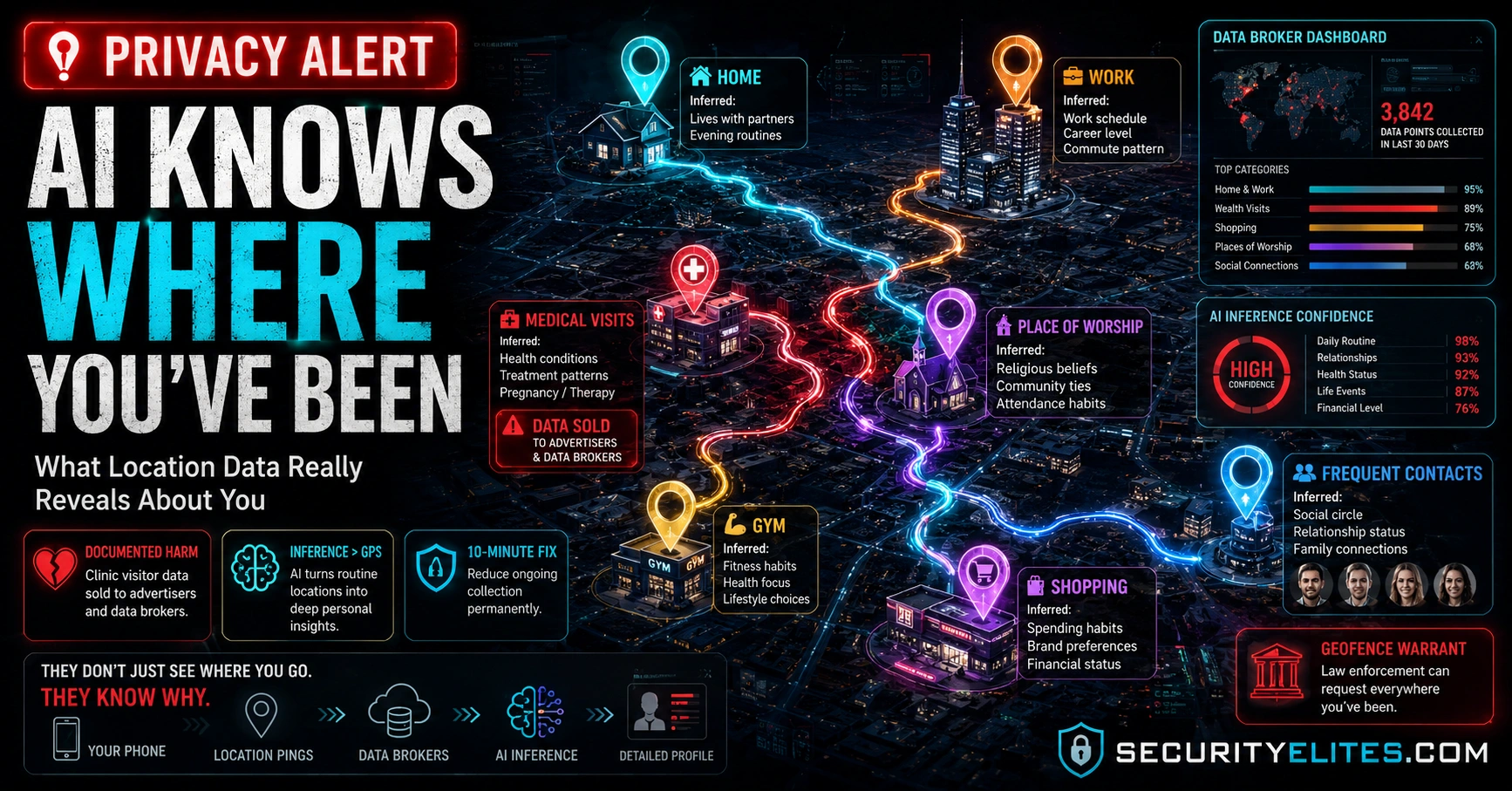
Advertising networks and data brokers buy this aggregated location data. They apply AI to it. The AI doesn’t see raw coordinates — it sees a movement history, and it enriches that history into an understanding of who you are and how you live. Your home is where your phone is every night. Your workplace is where it is during working hours. The specialist clinic is a regular destination with a medical facility business category. The house you visit every Sunday evening is a relationship. The AI identifies all of this without knowing your name — the device identifier is enough to build a profile that’s sold and resold across the data broker ecosystem.
What AI Infers From Your Movement History
Raw GPS coordinates are not the product data brokers sell. The product is the inference layer — what AI analysis determines about you from patterns in those coordinates. This distinction matters because people often assume that location data is only sensitive if someone knows what the addresses mean. The AI knows what the addresses mean. It cross-references coordinates against business registries, healthcare facility databases, residential property records, and business category maps. It doesn’t need to know your name to know where you worship, receive medical care, or who you’re in a relationship with.
The inference is more revealing than the raw data in most cases. Knowing you were at coordinates 51.4975, -0.1357 on a Tuesday afternoon tells an attacker very little. Knowing that those coordinates are a fertility clinic in London, that you’ve been there four times in six weeks, and that before and after each visit you’re at a residential address in Clapham — that’s a detailed picture of a private medical situation, extracted from a weather app’s location permission, enriched by AI, and available for purchase.
The Documented Harms From Location Data Misuse
The clinic visitor dataset is the most widely reported case, but it’s not isolated. In 2021, a Catholic news publication purchased a commercial location dataset and used it to track the movements of a Catholic priest — identifying that his phone had been at a gay bar and at the home of another man. The priest resigned. The data that identified him had been collected through ordinary apps. The data broker sold it as a general commercial dataset with no specific intended use. The buyer applied their own analysis.
Law enforcement use of location data without warrants is documented and ongoing. The ACLU and EFF have both reported cases where police departments purchased location data from brokers to identify attendees at protests, immigration events, and other legally protected assemblies — data that would have required a warrant to obtain from a carrier or platform directly, but which is available commercially without legal process. Courts are still working through the constitutional questions this raises. The data collection that makes it possible is happening now regardless of how those legal questions resolve.
Google’s Sensorvault — a historical location database assembled from Android users’ location history — became a law enforcement tool through geofence warrants. A geofence warrant asks for the device identifiers of every phone that was within a specified geographic area during a specified time period. Everyone near a crime scene, a protest, or any other location of interest — not just suspects — potentially appears in the response. Google has received thousands of these warrants. Challenging them requires knowing they were issued, which the targets typically don’t.
Permission Types — What “While Using” vs “Always” Actually Means
The difference between “While Using” and “Always On” location access is the difference between a tap and a continuous stream. “While Using” provides location data only when you have the app open and in the foreground. The moment you switch to another app or lock your phone, location access stops. “Always On” provides location data continuously — in the background, while you sleep, while the app is closed. It’s active whenever your phone is active, not whenever you’re actively using that app.
Very few apps need “Always On” location access for their stated function. Maps and navigation need it during active navigation — not while the app is closed. Fitness tracking apps may need it during a workout. Family safety apps with specific consent-based tracking functions may need it. Beyond those categories, “Always On” location access is a data collection feature more than a functional requirement. An app that requests “Always On” access and has no plausible continuous-location function is asking for something it doesn’t need — which is a reasonable prompt to ask why.
⏱️ 10 minutes · Your phone · iPhone Settings or Android Settings
Most people find 20–40 apps with some form of location access when they look at this list for the first time. Most of those apps have no functional need for precise or continuous location. Revoking the access takes under a minute per app and immediately reduces what goes into the data pipeline.
For each app in the list, apply these rules:
SET TO NEVER:
❌ Games — no location function
❌ Shopping / retail apps — they want location for targeting
❌ News and media apps — city-level is already too much
❌ Banking apps — they don’t need it (suspicious if they ask)
❌ Productivity apps — calendar, notes, to-do
❌ Most utility apps — calculators, converters, etc.
❌ Food delivery apps — use When In Use if needed,
but review whether they actually need location vs
just wanting it for behavioural targeting
SET TO WHILE USING ONLY:
✅ Weather apps — needs your location, but only when open
✅ Food/restaurant discovery — needs location when browsing
✅ Taxi/rideshare apps — needs location when booking
✅ Video calling apps — some use location for call routing
ALSO: Turn off Precise Location for weather and local apps
They need to know your city. They don’t need GPS coordinates.
Tap the app → toggle “Precise Location” off.
SET TO ALWAYS (only these specific use cases):
⚠️ Maps/navigation — only if you use background navigation
⚠️ Fitness trackers — only during active workouts
Check System Services at the bottom of the list:
→ Location-Based Ads: OFF
→ Location-Based Apple Suggestions: your preference
→ Significant Locations: OFF (removes home/work inference)
→ Share My Location: review who you’ve shared with
ANDROID — Settings → Apps → Permissions → Location
Same logic applies:
Deny: games, shopping, news, utilities, banking
Allow only while using: weather, food, transport, social media
Allow all the time: navigation only during active use
ALSO: Enable automatic permission removal
Google Play → Settings → General → Permission manager
→ “Automatically remove permissions” for unused apps
📸 Screenshot showing your location services list after the audit — before and after if you can. Share in #privacy-controls on X.
Precise vs Approximate Location
iOS introduced a “Precise Location” toggle for each app — the ability to grant location access but limit it to an approximate area rather than GPS-level coordinates. The difference is significant. GPS-level precision places you at a specific address. Approximate location places you in a neighbourhood or postal code area — accurate to a kilometre or more. A weather app showing you the forecast for your city doesn’t need to know which street you’re on. A news app showing local stories doesn’t need your exact home address derivable from GPS coordinates.
The practical application: for any app where you grant “While Using” access, also check whether precise location is on or off. If the app’s function doesn’t require knowing your specific GPS coordinates — only your general area — turn precise location off. You’re still providing location access for the app’s stated purpose; you’re just not providing the GPS-level precision that makes the data useful for the kind of inference the previous section described.
How to Audit and Control Your Location Data
The permission audit in Exercise 1 reduces ongoing collection. But if you’ve had location permissions granted to many apps for months or years, there’s a historical record of your movements in Google’s systems and potentially in data broker databases. That historical data has already been processed and potentially already sold — you can’t recall it. But you can delete what’s still in Google’s account and stop future accumulation.
⏱️ 10 minutes · Browser · Google account
Google’s Location History is a timestamped record of everywhere your Android device or signed-in apps have been. If you’ve had it on — which is the default — you may have years of movement history stored in your Google account. This exercise deletes it and stops future accumulation.
Sign in if needed
Step 2: Data & Privacy → History Settings → Location History
You’ll see your location history settings and a link to
“Manage History” which opens Google Maps Timeline
Step 3: Review what’s there.
Google Maps Timeline shows your movement history plotted
on a map — every place your phone has been recorded.
Scroll back in time. This is what Google has.
Step 4: Delete the history.
In Location History settings: “Delete all Location History”
Confirm deletion.
This removes your historical location data from Google’s
active storage. (Note: may persist in backups for a period.)
Step 5: Set auto-delete or pause.
Option A — Pause: toggle Location History OFF entirely.
Google Maps trip suggestions and some features won’t work
as well, but no new location history accumulates.
Option B — Auto-delete: set deletion window to 3 months.
Location history is retained for 3 months then purged.
Keeps recent data for Maps features, limits historical record.
Step 6: Also check Web & App Activity.
myaccount.google.com → Data & Privacy → Web & App Activity
This may contain location signals from search queries.
→ Auto-delete → 3 months
Step 7: On Android — Google Maps location sharing.
Google Maps → your profile photo → Location Sharing
Review who you’ve shared your real-time location with.
Remove anyone who doesn’t need ongoing access.
📸 Screenshot showing Location History paused or set to auto-delete. Share in #privacy-controls on X.
⏱️ 10 minutes · No tools · Just a realistic assessment of your phone usage
Before applying controls, understanding what’s already been collected focuses the effort. This exercise maps what a data broker AI could already infer about you from existing location data — not to be alarming, but to make the controls make concrete sense.
Think through each inference category and whether there’s
data that would support it:
HOME ADDRESS:
Is your phone at the same address every night?
Any data broker AI has inferred this already.
It’s the single most reliably derivable inference from
any device with location history.
WORKPLACE:
Do you go to the same location regularly during working hours?
Inferred. This is your employer, available without you
ever telling any app who you work for.
MEDICAL:
Have you visited any specialist clinic, hospital, or
healthcare facility in the last year?
If you had location access granted to any app at the time:
the visit is recorded. The facility type is inferrable
from the business category of the address.
What does a data broker infer from that visit?
RELATIONSHIPS:
Which residential addresses do you visit regularly?
Parents, partner, close friends — these are inferrable
from repeat visits to non-commercial addresses.
BELIEFS AND ACTIVITIES:
Do you attend a place of worship regularly?
Have you attended any political events or protests?
Both are location-inferrable from the addresses.
ROUTINE:
When do you leave home? What route do you take?
When do you return? Are you ever home alone?
Daily routine inference creates a physical security
profile as well as a data profile.
QUESTION: If you were a data broker selling profiles,
which of these inferences about yourself would you most
want a stranger to not have access to?
That inference is your highest-priority protection target.
📸 Share your inference map (without the sensitive details obviously) in #privacy-controls on X.
📋 Location Privacy — Complete Control Checklist
✅ Location Privacy Audit Complete
How location data flows from your phone to data broker AI systems without any hacking involved, what AI infers from movement patterns — home address, medical visits, relationships, beliefs — the documented cases of that inference causing real harm, the difference between precise and approximate location, and a complete 10-minute permission audit that reduces ongoing collection permanently. The pipeline can’t be stopped entirely — data brokers will find other inputs — but revoking permissions from apps that don’t need location access is the control that stops the largest single data stream at its source.
🧠 Quick Check
❓ Location Privacy FAQ
Can AI track your location without your permission?
Has location data actually caused harm?
Does airplane mode stop location tracking?
What is a geofence warrant?
Is it illegal for data brokers to sell my location data?
If I delete my Google location history, is it gone?
Do apps still get my location if I set them to “While Using”?
Smart Home AI Security 2026
How to Protect Yourself From AI 2026
📚 Further Reading
- How to Protect Yourself From AI 2026 — The complete consumer protection guide covering voice cloning scams, identity fraud, phishing, investment scams, and every practical protection — location privacy in the broader context of all AI threats.
- Is AI Always Listening? 2026 — How voice assistants handle your audio data — the microphone equivalent of the location permission question covered here.
- AI Surveillance 2026 — Location tracking in the broader context of AI-powered surveillance systems — facial recognition, behavioural profiling, and the aggregation of multiple data streams.
- EFF — Location Tracking — The Electronic Frontier Foundation’s comprehensive location privacy guide including the legal landscape, documented cases, and technical controls — the primary source for the advocacy and legal context referenced in this guide.
- Google Data and Privacy — Manage and delete your Google location history directly — the starting point for Exercise 2.
