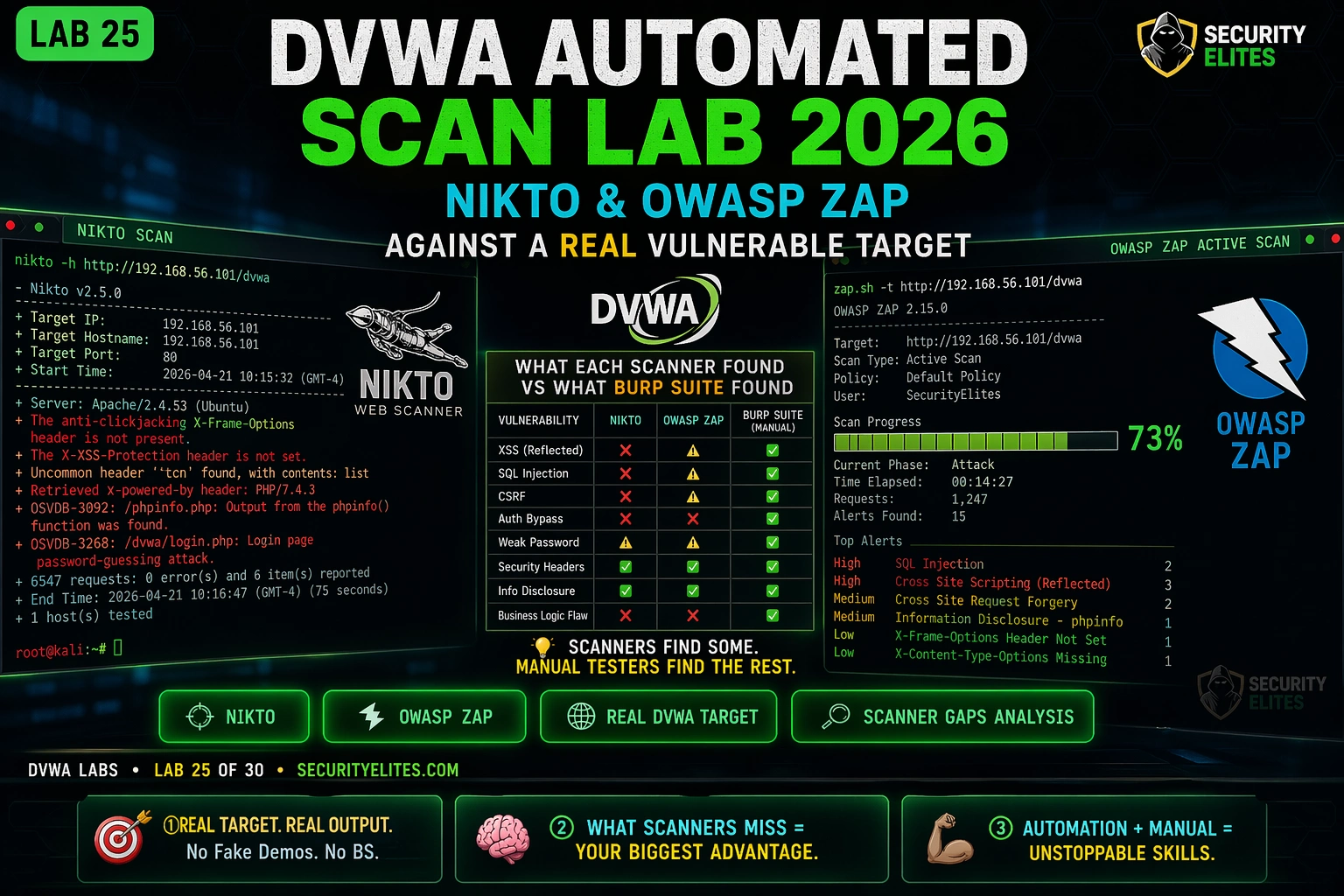
This lab demonstrates how professional penetration testers use Nikto and OWASP ZAP as complementary automated scanning tools against DVWA (Damn Vulnerable Web Application), then systematically identifies what each tool finds and critically what they miss. The article argues that automated scanners provide breadth coverage of server and application-level issues, but structured gaps—particularly CSRF, IDOR, and business logic flaws—require manual testing to achieve comprehensive vulnerability assessment.
- Nikto operates at server level, not application levelNikto scans 6,700+ items in 2-5 minutes, checking for dangerous files, server header version disclosures, outdated software signatures, insecure HTTP methods, and default configurations. The article emphasizes that Nikto does not send SQL injection payloads into form fields or test application logic; it provides server-level baseline reconnaissance (e.g., Apache version, missing security headers, phpMyAdmin exposure) that would take 30 minutes to check manually.
- ZAP requires authenticated session configurationOWASP ZAP is a full web application proxy and scanner that spiders applications, crawling links and forms, then runs active scanning by submitting attack payloads. The article identifies authentication as the critical configuration challenge: if ZAP cannot log in, it scans only pre-login pages and misses everything behind authentication. The lab requires manually exploring DVWA in ZAP's managed Firefox browser, logging in, and browsing all pages so ZAP builds a complete site map before running active scanning.
- CSRF detection requires contextual understandingThe article demonstrates CSRF as the most significant gap in automated scanning. ZAP cannot detect CSRF because confirming exploitability requires determining whether a form submission lacks an unpredictable anti-CSRF token and whether the server accepts requests from different origins—contextual verification that requires a human tester to examine HTTP requests, craft a cross-origin form submission, and verify server behavior. Automated scanners cannot perform this multi-step contextual analysis.
- Scanner gap analysis table quantifies testing methodologyThe lab constructs a matrix comparing DVWA vulnerability categories against what Nikto, ZAP, and manual Burp testing detect. The pattern shows: Nikto finds only server-level issues (security headers, version disclosure); ZAP finds injection vulnerabilities where payloads match templates at Low security; manual Burp finds everything. File Inclusion and Command Injection at higher security levels require evasion techniques beyond standard payload lists, demonstrating why multi-layer methodology is necessary.
- Automated scanners miss business logic and multi-step attacksThe article identifies consistently missed vulnerability categories: CSRF (contextual token validation), IDOR and access control flaws (require multi-account testing), business logic vulnerabilities (require application context), multi-step attack chains, and stored XSS across different pages. These structural gaps justify manual penetration testing as a necessary complement to automated scanning, not a replacement for it.
- Professional workflow integrates scanning and verification phasesThe lab teaches three sequential phases: configuration (setting scope, authentication, scan intensity), triage (categorizing findings by exploitability), and verification (manual reproduction in Burp Repeater before reporting). The article argues most professionals skip phase one and produce out-of-scope noise; most beginners skip phase three and submit unverified scanner reports. This gap between scanner output and verified findings is where false positives and misclassifications occur.
- Running Nikto before ZAP establishes efficient sequenceThe article recommends running Nikto first (5 minutes, server-level) while reading scope documents, then ZAP (20-60 minutes, application-level), then manual Burp testing for depth. This sequence allows Nikto to complete baseline reconnaissance in the background, ZAP to test authenticated application endpoints, and manual testing to focus on the most interesting attack surfaces and context-dependent vulnerabilities.
- Tool selection must match the vulnerability category being testedThe article demonstrates that Nikto's inability to find SQL injection, XSS, or CSRF is not a failure—it is working exactly as designed as a server scanner. ZAP's inability to confirm CSRF exploitability is structural, not a configuration issue. The professional lesson is that tool selection must explicitly match what is being tested: server reconnaissance requires Nikto; application-level payload testing requires ZAP; contextual vulnerability confirmation requires manual Burp analysis.
Bottom line: Automated scanners (Nikto and ZAP) are mandatory for breadth coverage and efficiency, identifying server-level issues and obvious injection vulnerabilities in minutes rather than hours, but they structurally cannot detect CSRF, IDOR, business logic flaws, or multi-step attacks—making manual testing an essential and irreplaceable complement to comprehensive penetration testing. The professional methodology combines all three: Nikto for server reconnaissance, ZAP for application scanning, and manu
FREE
Part of the DVWA Lab Series — 30 Labs
Lab 25 puts you on the other side of that equation. You’re going to point Nikto and ZAP at a target you already know is full of vulnerabilities — DVWA — and watch what they find. More importantly, you’re going to watch what they don’t find. The gap between what an automated scanner reports and what DVWA actually contains is the clearest illustration of why manual testing exists. The scanner finds SQL injection in the obvious form field. It misses the CSRF, the file inclusion at medium security, and the access control bypass entirely.
That gap is the thing every ethical hacker needs to understand before they build their first professional pentest methodology.
Which automated scanning tool have you used before?
🎯 DVWA Automated Scan Lab 25 Objectives
⏱️ Lab 25 · 3 terminal exercises · DVWA + Nikto + OWASP ZAP
✅ Prerequisites
- DVWA running — Docker or VirtualBox fromLab 1
- Burp Suite integration fromLab 24
— the manual baseline you’ll compare against scanner output
- Kali Linux with Nikto installed —
sudo apt install niktoif missing
📋 DVWA Automated Scan Lab 25 Contents
Nikto — Web Server Scanner Fundamentals
Here’s what it’s checking across those 6,700+ items: dangerous files that shouldn’t be publicly accessible, server headers that leak version numbers, outdated software signatures, insecure HTTP methods left enabled, and default configuration that nobody changed from the install defaults. It’s not sending SQL injection payloads into form fields — that’s not what it does. What it does is give you a server-level picture in under two minutes that would take 30 minutes to check manually. That baseline matters before you start application-level testing.
On a real engagement I run Nikto first, while I’m reading the scope document and taking notes. It runs in the background and finishes by the time I’m ready to start manual testing. The three findings I pay most attention to: version disclosures (are there CVEs for this server version?), missing security headers (quick wins for the report), and any exposed admin paths I hadn’t already found.
⏱️ 20 minutes · Kali Linux + DVWA running
Nikto against a known-vulnerable target gives you a reference dataset — you know what the target contains, so you can evaluate exactly what Nikto finds and what it misses. Work through every line of output.
# Docker:
docker ps | grep dvwa
docker inspect [container_id] | grep IPAddress
# VirtualBox:
ip addr show eth0 (inside DVWA VM)
Step 2: Run Nikto with credentials
nikto -h http://DVWA_IP/dvwa -id admin:password -o /tmp/nikto_dvwa.txt
# Let it run — takes 3-8 minutes
Step 3: While Nikto runs — list DVWA’s known vulnerabilities
Navigate to DVWA in your browser
Count: how many vulnerability categories appear in the menu?
List them: Brute Force, Command Injection, CSRF, File Inclusion…
This is your ground truth — what does DVWA actually contain?
Step 4: Analyse Nikto output
cat /tmp/nikto_dvwa.txt
For each finding:
a) What is the finding description?
b) Is it a real security issue or informational?
c) How does it relate to DVWA’s known vulnerabilities?
Step 5: Count and categorise findings
How many findings are: High / Medium / Low / Informational?
How many of DVWA’s 15 vulnerability categories did Nikto detect?
Which vulnerability categories does Nikto completely miss?
📸 Screenshot your Nikto output. Share in #dvwa-labs
OWASP ZAP — Application-Level Scanning
ZAP is a full web application proxy and scanner — the open-source equivalent of Burp Suite for scanning purposes. It spiders the application (crawling all links and forms), then runs its active scanner (sending attack payloads to each discovered endpoint). The key difference from Nikto: ZAP tests application logic by submitting requests to forms and APIs with malicious payloads.
The authentication challenge is where most people stumble with ZAP on authenticated applications. If ZAP can’t log in, it scans the pre-login pages only and misses everything behind authentication. For DVWA, you need to either provide ZAP with the login form fields and credentials, or start with a manual authenticated browse and let ZAP build its context from that session.
| DVWA Vulnerability | Nikto | ZAP (Low) | Manual Burp |
| SQL Injection | ❌ | ✅ | ✅ |
| XSS Reflected | ❌ | ✅ | ✅ |
| CSRF | ❌ | ❌ | ✅ |
| File Inclusion | ❌ | ⚠️ | ✅ |
| Command Injection | ❌ | ⚠️ | ✅ |
| Security Headers | ✅ | ✅ | ✅ |
⏱️ 25 minutes · OWASP ZAP + DVWA running
ZAP’s value over Nikto is application-level testing. Configure it with a live authenticated session and run the active scanner — then compare what it finds against what you know DVWA contains.
zaproxy &
Quick Start → Manual Explore → URL: http://DVWA_IP/dvwa → Launch Browser
Step 2: Log in and browse all DVWA pages manually
In the ZAP-managed Firefox:
Log in as admin/password
DVWA Security → set to Low
Browse every vulnerability page: click each link in the DVWA menu
Submit at least one form on each page (even with test input)
Goal: build a complete site map in ZAP’s Sites tree
Step 3: Run Active Scan
Return to ZAP main window
In Sites tree → right-click DVWA_IP → Attack → Active Scan
Scope: DVWA_IP only
Scan Policy: Default Active Scan Policy
Click Start Scan
Step 4: Monitor scan progress
Active Scan tab shows progress
Alerts tab updates in real time as findings appear
Let scan complete (10-20 minutes)
Step 5: Review alerts by risk level
Alerts tab → sort by Risk (High first)
For each High/Medium alert:
a) What vulnerability did ZAP detect?
b) Which DVWA page/form was affected?
c) What payload did ZAP use to trigger the finding?
d) Is this a true positive or false positive?
Step 6: Compare ZAP findings against Nikto findings
Which vulnerabilities appear in both?
Which vulnerabilities appear in ZAP only?
Which DVWA vulnerabilities appear in neither?
📸 Screenshot ZAP Alerts tab showing High-risk findings. Share in #dvwa-labs
SQL Injection — /vulnerabilities/sqli/
Confirmed
Cross Site Scripting — /vulnerabilities/xss_r/
Confirmed
Absence of Anti-CSRF Tokens
Confirmed
X-Frame-Options Header Not Set
Confirmed
Cookie Without SameSite Attribute (×3)
Confirmed
⏱️ 20 minutes · Results from Exercises 1 and 2 required
The gap analysis is the most professionally valuable output from this lab. It teaches you exactly when to trust a scanner and when to keep testing manually. Build it from your actual Nikto and ZAP results.
Browse DVWA menu → list all categories
You should have at least: Brute Force, Command Injection, CSRF,
File Inclusion, File Upload, SQL Injection, SQL Injection (Blind),
Weak Session IDs, XSS DOM, XSS Reflected, XSS Stored, CSP Bypass,
JS Attacks, Open HTTP Redirect
Step 2: For each category, check Nikto results
Did Nikto flag anything related to this category?
Mark: Yes / No / Partial
Step 3: For each category, check ZAP alerts
Did ZAP flag anything related to this category?
Mark: Yes / No / Partial
Note the ZAP alert risk level if found
Step 4: For each category you’ve previously completed in Labs 1-24
Mark whether manual Burp testing finds it: Yes (all labs do)
Step 5: Build the table and find the gaps
Create a table: Vulnerability | Nikto | ZAP | Manual
Identify: which categories are scanner-only gaps?
Answer: What is the MINIMUM testing methodology that catches all 14 categories?
Step 6: Write 3 sentences summarising when automated scanning is sufficient
vs when manual testing is required.
This is the methodology statement for your future pentest reports.
📸 Screenshot your gap analysis table. Share in #dvwa-labs
📋 Lab 25 Reference — Scanner Commands
✅ Lab 25 Complete — Scanner Capabilities and Gaps Understood
Nikto for server-level breadth, ZAP for application-level scanning, manual Burp for everything they miss. Lab 26 is the final methodology lab: authentication bypass — pulling together session management, parameter tampering, and access control testing into a single coherent workflow.
🧠 Lab 25 Check
❓ DVWA Automated Scan FAQ
What does Nikto find on DVWA?
What does OWASP ZAP find on DVWA?
What is the difference between Nikto and OWASP ZAP?
What vulnerabilities do automated scanners miss?
How long does a ZAP active scan take on DVWA?
Should I use Nikto or ZAP for real penetration testing?
Lab 24 — Burp Suite Integration
Lab 26 — Authentication Bypass
A professional automated scan workflow has three phases that this lab teaches in sequence. Phase one is configuration: setting scope correctly so scanners don’t waste time on third-party assets, configuring authentication so scanners test protected endpoints, and setting appropriate scan intensity for the target environment. Phase two is triage: reading scan output and categorising findings by confirmed-exploitable, likely-exploitable, and informational. Phase three is verification: taking every confirmed-exploitable finding into Burp Repeater to document exact reproduction steps. Most labs skip phase one entirely and wonder why their scanner output is full of out-of-scope findings. Most beginners skip phase three and submit scanner reports without manual verification — programmes reject those immediately. This lab builds all three phases as a single workflow.
The hardest skill to develop with automated scanning isn’t running the tools — it’s reading the output and deciding what needs manual verification. Automated scanners produce false positives, miss context-dependent vulnerabilities, and sometimes flag informational issues at High severity because of misconfigured templates. Every finding from Nikto and ZAP in this lab needs a manual verification step before it goes in a report. The automation does the coverage work: scanning 6,448 paths in two minutes, testing hundreds of vulnerability patterns simultaneously. Your job is the analysis: what does this finding mean in the context of this application, what’s the actual impact, and is it exploitable or just theoretical? That analysis is what separates a scanner output from a penetration test report.
📚 Further Reading
- Lab 24 — Burp Suite Integration — The manual testing baseline you’re comparing against scanner output in this lab. The gap analysis is most meaningful when you’ve completed the same vulnerability categories manually first.
- Kali Linux Day 24 — OWASP ZAP Tutorial — Full ZAP configuration guide including custom scan policies, authentication context setup, and API scanning — extends the basic ZAP workflow from this lab to professional assessment use.
- Bug Bounty Automation Lab Under $100 — Nuclei is the automated scanner used in professional bug bounty automation — how its template-based approach compares to ZAP’s active scanning for production reconnaissance.
- Kali Linux — Nikto Official Documentation — Complete Nikto command reference covering all scan modes, output formats, tuning options, and the full list of checks Nikto performs by category.
- OWASP ZAP Official Documentation — The complete ZAP documentation covering authentication configuration, scan policy tuning, scripting, and API-based automation — the reference for advanced ZAP usage beyond this lab’s scope.
