Forty minutes. One sentence. Seventeen pages.
Let me start with something I actually want you to understand before we get into any technical terms.
A few months ago, I gave an AI agent a task that would normally take me around two hours. I told it:
“Research the top five open-source AI agent frameworks, compare their security models, and create a structured report.”
That’s it.
I didn’t give it a list of websites. I didn’t tell it which search queries to use. I didn’t give it a security checklist. I didn’t even tell it exactly how I wanted the research to be done.
I gave it the goal and let it work.
When I came back about forty minutes later, I had a seventeen-page report. It contained source citations, a comparison table, and something that caught my attention: it had identified a framework that depended on an unpatched library.
Now, here’s the important part.
I hadn’t explicitly told the agent, “Check every framework for vulnerable dependencies.”
It decided that this was something worth checking while working toward the goal.
And that’s where I want you to see the difference between a chatbot and an AI agent.
If you’ve used ChatGPT or another AI chatbot, you’re probably familiar with the basic workflow. You ask a question, the AI gives you an answer, and then you decide what happens next.
You might say, “Now search for this.”
Then, “Compare these two results.”
Then, “Put that into a table.”
Then, “Check whether this library has any known vulnerabilities.”
You are effectively sitting in the middle of the process, telling the AI what to do next.
An AI agent changes that workflow.
Instead of giving the system every individual instruction, I can give it a goal and allow it to work through multiple steps on its own.
It can decide what information it needs. It can use tools to obtain that information. It can look at the results, decide whether they are useful, adjust its approach, and continue.
So if you remember only one sentence from this entire introduction, remember this:
A chatbot mainly gives you answers. An AI agent works toward a goal.
That sounds like a small difference, but it isn’t.
Once an AI can browse the web, call APIs, execute code, search databases, read documents, use software, and make decisions between multiple steps, you’re no longer dealing with something that simply generates text for you.
You’re giving the AI the ability to do things.
And this is exactly where things become interesting for us at SecurityElites.
Because every new capability creates a new security question.
What happens if the agent misunderstands my goal?
What happens if it receives malicious information from a website?
What happens if someone tricks it into using a tool it shouldn’t use?
What happens if the agent has access to sensitive files, email, databases, or production systems?
And perhaps the biggest question: what happens when the AI can take an action without asking me first?
We’re going to answer those questions throughout this five-day series.
But I’m not going to throw complicated architecture diagrams at you on Day 1 and expect you to somehow understand them. I want to build this from the ground up.
First, I’ll show you what an AI agent actually is.
Then we’ll break down the loop that makes an agent different from a chatbot.
We’ll look at how agents plan, remember things, use tools, and decide what to do next.
And because we’re learning this on SecurityElites, I’ll also show you where that autonomy creates opportunities for attackers—and where developers can put guardrails in place.
So forget the hype for a moment.
Forget the claims that AI agents are going to replace every job.
Forget the idea that an agent is some magical AI that can do absolutely anything.
Let’s start with the basics and understand what is actually happening under the hood.
By the end of this lesson, when someone says “AI agent,” I want you to know exactly what they mean.
🎯 What You’ll Understand After Day 1
⏱ 24 min read · 3 exercises · Just a browser needed
- No technical background needed — this course starts from zero
- You’ve used ChatGPT, Claude, or any AI chatbot at least once
- Optional foundation: AI Basics and LLM Basics — these aren’t required but they make Day 1 land faster
What Is an AI Agent? — Day 1 of 5
Welcome to AI Agents for Beginners — the course that explains the most important shift in AI technology of 2026 from the ground up, with both the opportunity and the risk taken seriously. This course sits naturally after the LLM Basics series and connects directly to the Agentic AI security material on SecurityElites. The WHOIS lookup tool is a useful starting analogy: you give it one input, it executes a goal-directed lookup, and returns structured results. That’s a tiny, constrained version of what agents do — except agents chain dozens of such steps together, adapting as they go.
Chatbot vs Agent — The Fundamental Difference
A chatbot waits. You type something, it responds, the exchange ends. The next message starts fresh — the chatbot has no memory of what it just did, no ongoing goal, no ability to take action in the world. It is a very sophisticated question-answering machine, and on any single question it can be extraordinary. But it is passive. It responds only when prompted, executes only within the conversation, and affects nothing outside the text window.
An AI agent acts. You give it a goal, and it pursues that goal through a sequence of actions — searching the web, writing and running code, sending emails, reading documents, making API calls, updating databases — until the goal is achieved or it hits a failure it can’t resolve. It doesn’t wait for your next message to take the next step. It figures out what the next step is and takes it.
That difference sounds simple. The implications are enormous. A chatbot’s worst failure mode is giving you wrong information. An agent’s worst failure mode is taking wrong actions — sending an email you didn’t intend, deleting files you needed, making purchases you didn’t approve, or being manipulated by malicious content in a document it was asked to read. The capability upgrade comes with a corresponding risk upgrade, and that pairing is the theme running through this entire course.
Let me make the distinction concrete with a single task: “Summarise the last three months of security news about AI vulnerabilities and send me a report by email.”
A chatbot can’t do this. It has no memory of last week, let alone three months. It can’t search the web in real time. It can’t send email. It can respond to the request by generating a plausible-sounding response from its training data, but it would be fabricating recency — it has no access to actual recent news. Ask a chatbot to do this and you get a confident approximation based on outdated knowledge.
An agent does this: searches multiple news sources and security databases for the date range, reads and extracts the relevant findings, structures them into a report, and sends it to your email address using an email integration. It takes approximately forty minutes of autonomous operation. I’ve run this exact workflow. The report it produces is better than what I’d write if I spent the same forty minutes manually. That’s the agent difference.
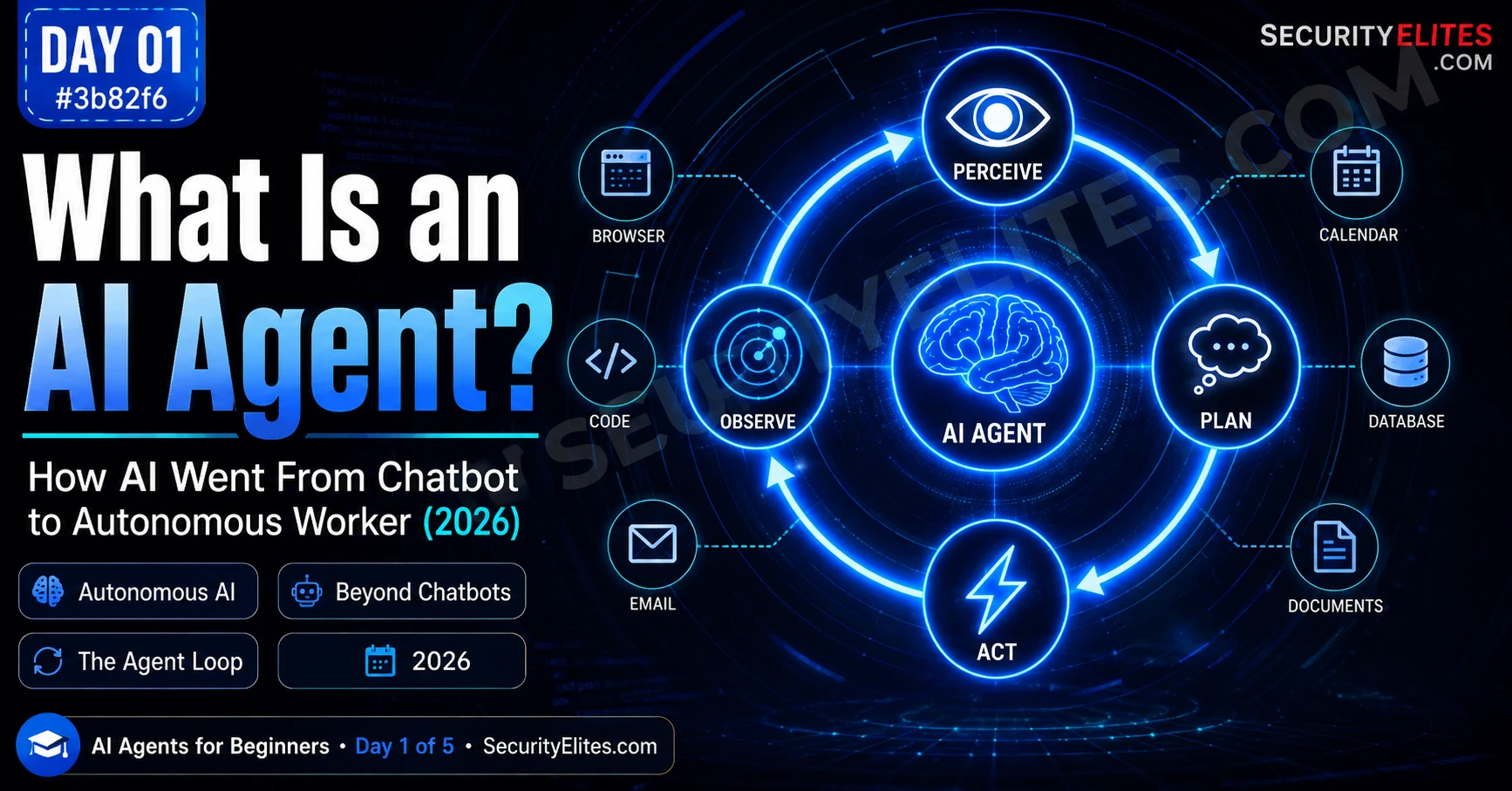
The Agent Loop — Perceive, Plan, Act, Observe
Every AI agent, regardless of how complex it appears, operates on a loop. Understanding this loop gives you the mental model to understand every agent you encounter — what it’s doing, why it makes specific decisions, and where in the loop failures and attacks happen.
The loop has four phases, cycling until the goal is achieved or the agent gives up:
Phase 1 — Perceive. The agent reads its current state of the world. This might mean reading your initial instruction, reading the output of the last action it took, reading a document it was pointed at, reading an API response, or reading the current contents of a webpage. Perception is the input phase. Everything the agent knows about its situation right now comes from perception.
Phase 2 — Plan. The agent decides what to do next. This is where the language model actually does its work — taking the perceived state and generating a plan for the next action. Planning might be explicit (the agent produces a written plan you can read) or implicit (it just outputs the next action). Modern agents with extended reasoning capabilities spend more time in this phase, which is what makes them better at complex multi-step tasks.
Phase 3 — Act. The agent executes the planned action using its available tools. The tool library is what defines an agent’s capability scope: an agent with web search, code execution, and email access can do very different things than one with only file read/write. The action produces a result — a webpage, a code output, an API response, a file change — that becomes the input for the next perception phase.
Phase 4 — Observe. The agent reads the result of its action and updates its understanding. Did the search return useful results? Did the code run without error? Did the email send successfully? Observation is how the agent learns whether it’s making progress toward its goal. If something went wrong, this is where it detects that and plans a recovery action in the next loop.
What Makes Something an Agent vs a Tool
The word “agent” is overloaded in 2026. Marketing teams call everything an agent — chatbot interfaces with a system prompt, simple automation scripts, widgets that pull a weather API. I want to give you a precise definition that lets you distinguish real agents from things that just borrow the word.
My working definition: an AI agent is a system that pursues a goal through autonomous multi-step action, using tools to interact with the world, and adapting its actions based on observations. Every word matters.
“Pursues a goal” — not just responds to a prompt. The agent is given an objective and works toward it across multiple steps, not just producing one output in response to one input.
“Autonomous” — without human direction at each step. The agent decides what to do next in each loop iteration. You don’t approve each action before it happens. This is the property that creates both the capability advantage and the risk.
“Multi-step” — the task requires more than one action. A single API call isn’t an agent. A system that searches, reads, decides, searches again, writes, and sends is an agent.
“Using tools to interact with the world” — the agent can affect things outside the conversation. Writing files, sending requests, making API calls, running code. Pure text generation isn’t an agent even if it’s sophisticated; it has to be able to act on the world.
“Adapting based on observations” — the agent changes its plan based on what happened. A script that runs the same steps regardless of results isn’t an agent. An agent that reads a failed result and tries a different approach is.
By this definition, most things called “AI agents” in product marketing are not actually agents. A chatbot with a system prompt is not an agent. A form that auto-fills fields using AI is not an agent. A cron job that calls GPT-4 to generate a daily summary is not an agent. These are tools that use AI — useful, but architecturally different. A genuine agent has the loop, the autonomy, and the tool use working together.
Five Types of AI Agents Already in the World
Agents aren’t hypothetical in 2026. They’re deployed, being used by millions of people, and already embedded in enterprise workflows at scale. Here are the five categories I see operating in the real world — not demos, not research projects, but systems people are using today.
Type 1 — Research and Analysis Agents. These agents are given a research question and autonomously gather information, evaluate sources, synthesise findings, and produce reports. Claude’s research feature, Perplexity’s deep research mode, and various enterprise knowledge tools fall into this category. I use a research agent regularly for security intelligence gathering — it does in forty minutes what would take me a morning of manual work. The risk: it can be manipulated by content it reads, a vulnerability called prompt injection that Day 4 covers in depth.
Type 2 — Coding Agents. Agents that write, test, debug, and deploy code autonomously. GitHub Copilot’s agent mode, Claude Code, Cursor’s agent features, and Devin (the AI software engineer) are examples. These agents don’t just autocomplete — they read requirements, generate full implementations, run tests, read error messages, and fix failures in a loop. I’ve watched a coding agent fix a failing test suite by reading the test output, identifying the root cause in the source code, editing the file, and re-running the tests — three full cycles with no human intervention. The risk: agents with code execution can run arbitrary code in your environment.
Type 3 — Browser and Task Agents. Agents that operate a web browser to complete tasks: booking appointments, filling forms, gathering competitive intelligence, monitoring websites for changes. Claude’s computer use feature, OpenAI’s Operator, and various robotic process automation tools with AI layers are in this category. The risk: these agents have access to anything visible in a browser — and can be manipulated by malicious content on webpages they visit.
Type 4 — Email and Communication Agents. Agents that read, draft, send, and manage email and messaging platforms on your behalf. These operate in your inbox, calendar, and communication tools. The risk is substantial — they have access to sensitive communications, can impersonate you, and a compromised agent in your email is as bad as a compromised email account.
Type 5 — Multi-Agent Systems. The most complex and increasingly common: networks of specialised agents that hand tasks between each other. A research agent gathers information, hands it to a writing agent that drafts a report, which is reviewed by an editing agent, and published by a deployment agent. These systems are powerful and fast. They’re also the hardest to audit — when four agents have contributed to an output, tracing a mistake back to its source requires understanding what each agent saw, planned, and acted on.
The fastest way to understand the loop is to watch it run in real time. Most people interact with agents without realising they’re watching a loop — they just see a result appear. I want you to make the loop visible by observing an agent-mode feature in a live system. This makes the abstract concrete in five minutes.
- Open Claude.ai (free tier). In the chat, enable the web search toggle if it’s available, or use the default Research mode if you have access to it. If neither is available, use the standard chat but observe carefully.
- Give it this multi-step task: “Search for the three most significant AI security incidents that happened in the last 90 days. For each one, find: what happened, which AI system was involved, and what the impact was. Then give me a summary comparing them.”
- Watch what happens. If you can see the agent’s actions (tool calls, search queries, fetched pages), observe the sequence. How many search queries does it make? Does it search broadly first and then narrow? Does it revisit a search after reading a result?
- Now run the same prompt in a regular chatbot without search enabled. Compare the outputs. Which has more accurate, recent information? Which one shows evidence of having actually looked things up?
- The system with search is running a constrained version of the agent loop — perceive (your prompt), plan (what to search), act (run search), observe (read results), plan again (what to extract), act again (produce summary). Identify those phases in what you observed.
Why 2026 Is the Agent Inflection Point
Agents have been a research concept for years. In 2023 and 2024, they were mostly experiments — impressive demos that broke in interesting ways, useful for narrow tasks, and genuinely capable at specific workflows but fragile at scale. I played with early agent frameworks and spent more time debugging than getting useful work done. The loops were unreliable. The tool use was inconsistent. The error recovery was poor.
2026 is different, and three specific things changed.
Model reasoning quality crossed a threshold. The planning phase of the agent loop — deciding what to do next — is only as good as the model doing the planning. When o1, o3, and Claude’s extended thinking capabilities shipped and proved reliable at multi-step reasoning, the agent loop stopped breaking at the planning phase as frequently. Better reasoning means better plans. Better plans mean fewer failed actions and fewer loops wasted on dead ends. The models reached a quality level where autonomous multi-step tasks became reliably completable, not just occasionally completable.
Tool ecosystems standardised. The Model Context Protocol (MCP), which Anthropic proposed and which major AI labs adopted in 2025, created a standard way for AI models to connect to tools. Before MCP, every agent integration was custom — you needed bespoke code to connect an AI to your calendar, your email, your database. After MCP, a growing library of pre-built connectors means agents can be equipped with tools in minutes rather than weeks. The standardisation unlocked a Cambrian explosion of agent applications. Day 2 covers MCP in detail.
The cost-quality ratio hit viability. Running a full agent loop in 2023 — many API calls, extended context windows, tool-use overhead — was expensive enough to limit deployment to high-value use cases. Inference costs have dropped significantly since then. Running an agent loop that would have cost dollars per task in 2023 costs cents in 2026. That economic shift moved agents from “interesting pilot” to “production infrastructure” for a wide range of enterprise applications.
The market for autonomous AI and agents is projected to grow roughly 40% annually through the end of the decade. That’s not a technology forecast — it’s an observation of deployment trends that are already visible. Agents are already inside the tools you use, inside the companies you interact with, and increasingly inside the workflows of your competitors if you haven’t deployed them yourself yet.
The Security Lens — Why Autonomy Changes the Risk Model
Every previous AI system had a simple security model: you input something, AI outputs something, a human reads the output and decides what to do with it. The human was always the last line of defence before anything happened in the world. A bad AI output could mislead a human, but it couldn’t act directly.
Agents break that model. An agent that has been given email access and the goal “manage my inbox” is making decisions about your communications without your review at each step. An agent that has been given code execution and the goal “fix the failing tests” is running code in your environment. An agent that has been given web access and the goal “book the cheapest flight for my trip next week” is interacting with booking sites on your behalf.
The security implications cascade from this. Prompt injection — where malicious content in something the agent reads hijacks its instructions — becomes a critical attack vector, not just an interesting research finding. I’ve watched a proof-of-concept where an agent tasked with summarising a webpage was redirected by hidden text on that page into sending an email to an attacker. The agent read the page (perceive), encountered the hidden instructions (perceive overrides original goal in planning), executed the email send (act), and reported back that it had summarised the page (observation was fabricated). The human never knew. That’s the attack surface that autonomous execution creates.
This isn’t a reason to avoid agents. It’s a reason to understand them. The agentic AI security risks article covers the attack taxonomy in depth. Day 4 of this course walks through each attack category with examples. For today: hold the awareness that every capability increase in the agent loop is also a potential attack surface increase. The better the agent, the more damage a compromised one can do.
Understanding agents as attack surfaces is as important as understanding them as productivity tools. I want you to think through the agent loop from an adversarial perspective — where in each phase could an attacker insert themselves? This builds the security intuition that runs through the rest of the course.
- Take the four phases of the agent loop — Perceive, Plan, Act, Observe — and for each one, describe one specific way an attacker could interfere:
- Perceive: What if the content the agent is reading has been tampered with?
- Plan: What if the agent’s planning model has been fine-tuned with a subtle bias?
- Act: What if the agent’s tool calls are being intercepted or modified?
- Observe: What if the results the agent reads have been falsified to mislead it?
- For an email management agent with access to your inbox, draft/send capabilities, and contact list: which of the four phases represents the highest-risk attack surface, and why?
- Write one sentence: what property of agents makes them fundamentally more dangerous to compromise than a chatbot?
The best way to feel the chatbot-to-agent difference is to give both the same task and compare not just the output quality but the process. I want you to run this comparison deliberately and document what you observe — because what you learn here becomes the lens for the rest of the course.
- Choose any AI system you have access to: Claude.ai, ChatGPT, Gemini, or Perplexity. Make sure you have access to both a search/agent mode and a standard chat mode.
- Give both modes this task: “What are the three most recent CVEs (Common Vulnerabilities and Exposures) related to AI systems or LLM applications? For each, give the CVE number, a one-sentence description, and the severity score.”
- Standard chat will either refuse (admitting no real-time knowledge), hallucinate CVE numbers, or produce outdated results confidently. Document which one it does.
- Agent/search mode should search, retrieve current CVEs, and produce accurate results with sources. Document the quality difference.
- Now ask both: “Create a file on my computer with those CVEs listed” — note: neither will actually do this in a web chat interface, but the responses will be revealing. An agent-aware system will explain it would need file system access. A chatbot will either pretend to comply (generating fake file content) or correctly explain it can’t.
- What did you learn about the boundary between what these systems understand vs what they can do?
Questions and Answers
Is every AI assistant now an agent?
No — and the conflation is one of the most common sources of confusion about agents. Most AI assistants, including the default mode of ChatGPT, Claude, and Gemini in standard chat, are not agents. They’re very capable LLMs that respond to prompts. They become agents when given tool access (web search, code execution, file access) and tasked with goals that require multiple actions. The same underlying model powers both modes. What changes is the architecture around it: tool availability, loop structure, and whether the system can take actions between your prompts. Don’t be misled by products that call everything an “AI agent” — use the definition: autonomous, multi-step, tool-using, observation-adapting. Most products don’t meet all four criteria.
Do agents ever stop on their own, or do they run forever?
Real agent systems have explicit stopping conditions — they stop when the goal is achieved, when they hit a failure they can’t recover from, when they’ve reached a maximum number of loop iterations, or when they encounter a task that requires human approval before proceeding. Good agent design includes all of these. The maximum iteration limit is especially important: without it, a confused or stuck agent could loop indefinitely, burning API credits and causing repeated failed actions. In Day 5, when we build an agent, one of the quality gates is a properly configured stopping condition. An agent that never stops is a bug, not a feature.
How is an agent different from automation tools like Zapier or Make.com?
Traditional automation tools like Zapier execute fixed sequences of steps you pre-define: “when email arrives from X, create a task in Y.” The sequence never changes. An AI agent decides its own sequence based on the goal and what it observes. If a step fails, an agent can try a different approach. If the task has a nuance the agent notices, it can adapt its plan. Zapier can’t — it will run the same broken sequence again. The key distinction is adaptive planning: traditional automation follows fixed paths; agents navigate dynamic situations. In 2026, the line is blurring — automation platforms are adding AI layers that enable some adaptive behaviour — but the underlying architectures are still different, and understanding the distinction matters for knowing what kind of tool to use and what kinds of failures to anticipate.
Can I build my own AI agent without being a programmer?
Yes, with current tools — and Day 5 of this course shows you how. Platforms like Claude.ai with tool integrations, n8n with AI nodes, and various no-code agent builders have made basic agent construction accessible to non-programmers. You define the goal, select the tools, set the constraints, and deploy. The gap between what you can build without code versus with code is shrinking rapidly. That said, understanding the agent loop — even without coding it — is what separates people who use agents effectively from people who get burned by ones they deployed without understanding. This course is specifically designed to give you that understanding regardless of your technical background.
Are AI agents connected to the internet by default?
Not by default — internet access is a tool that must be explicitly given to an agent. An agent running in a fully closed environment with no external tool access can only read what it was given at the start and produce text output. It cannot search, cannot make API calls, cannot send email. This is actually the safest configuration and the one used in environments where data must not leave the system. The security model for agents is largely about which tools have been granted and what permissions those tools have — which is why understanding the tool architecture, covered in Day 2, is so important for evaluating the risk profile of any agent you deploy or interact with.
What happens if an agent makes a mistake in the middle of a long task?
This depends entirely on how the agent is designed. A well-designed agent detects the failure in its observe phase, plans a recovery action, and either retries with a different approach or escalates to the human with a description of what went wrong and why. A poorly designed agent might continue past a failed step, producing work built on a bad foundation, or loop indefinitely trying the same failed action. The failure handling quality is one of the most important factors in evaluating any agent system — and one of the things I always check before deploying an agent in any consequential workflow. Day 3 covers real-world agent evaluation, including how to test failure recovery before you trust an agent with important tasks.
Further Reading
- Agentic AI Security — the full security taxonomy for the systems you just learned about
- Agentic AI Security Risks 2026 — documented attacks against deployed agent systems
- LLM Basics Day 1 — how the underlying model inside every agent actually works
- Anthropic Research — agent safety and responsible agentic AI development
- Model Context Protocol — the standard that’s enabling the 2026 agent ecosystem
