I once watched an AI agent fail at a task it had completed perfectly just twenty minutes earlier. The goal was the same. The tools were the same. Even the model was the same. So what went wrong?
The problem turned out to be surprisingly simple: the conversation had become so long that the agent’s context window was filling up. Somewhere along the way, the information about what it had already done was pushed out. The agent wasn’t deliberately ignoring its previous work — it had effectively forgotten it. It started repeating steps that were already finished.
That experience made one thing very clear to me: if you want to understand why AI agents sometimes behave brilliantly and sometimes seem to lose the plot, you need to understand memory.
Memory is what helps an agent keep track of a long-running task, remember useful information, and maintain some sense of continuity. But there’s another side to it that doesn’t get nearly enough attention: memory can also become an attack surface. If an attacker can influence what an agent remembers, retrieves, or trusts, the consequences can be much more serious than a simple wrong answer.
And then there’s MCP — the Model Context Protocol. MCP changed the conversation around agent memory and tool use by giving AI systems a standard way to connect with external data and tools instead of keeping everything trapped inside a single conversation window.
In this lesson, we’re going inside the agent loop. We’ll look at the different types of memory, how agents decide which tools to use, how they break complex goals into smaller steps, and what MCP actually does under the hood. No marketing language — just the architecture and the ideas you need to understand how modern AI agents really work.
🎯 What You’ll Understand After Day 2
⏱ 24 min read · 3 exercises · Browser needed
- Completed Day 1: What Is an AI Agent?
- Remember: the four-phase loop, the five agent types, the autonomy-risk relationship
How AI Agents Work — Day 2 of 5
- The Three Types of Agent Memory
- The Context Window — The Agent’s Working Memory Limit
- How Tools Work — Selection, Execution, and Failure
- What MCP Actually Is — And What It Changed
- How Agents Plan — Chain-of-Thought, ReAct, and Tree-of-Thought
- Putting It Together — A Full Agent Architecture
- Questions and Answers
Day 1 established what an agent is and why the loop matters. Today goes inside the loop — the mechanisms that make it work, the constraints that make it fail, and the protocol that made 2026’s agent boom possible. The DNS lookup tool on SecurityElites illustrates the tool selection concept neatly: an agent given a domain investigation task would call that tool as one action in its loop — perceive the domain, plan a lookup, execute the tool call, observe the result. Today you’ll understand exactly how that decision to call a specific tool gets made.
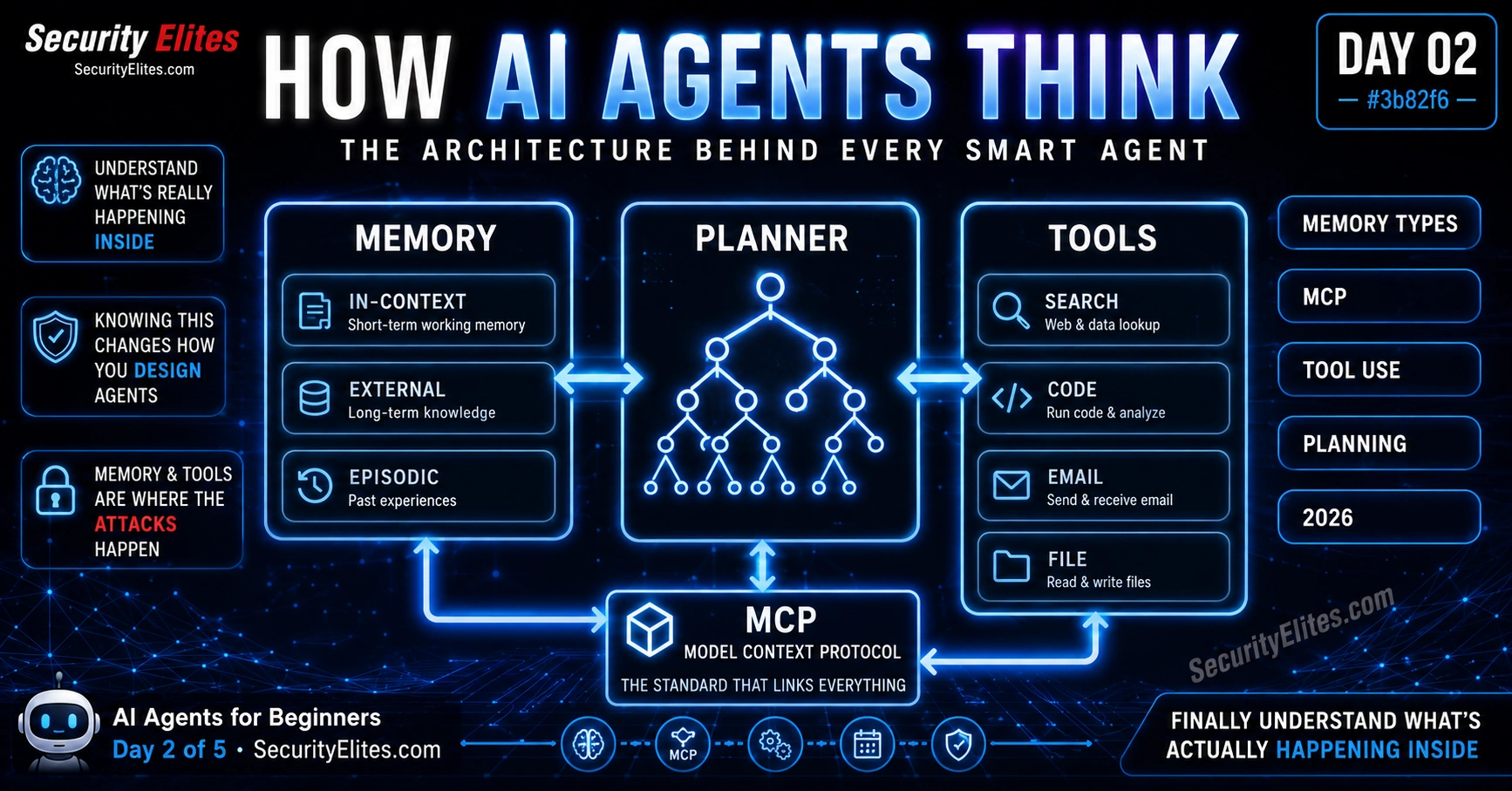
The Three Types of Agent Memory
Memory is what allows an agent to maintain coherence across a task longer than a single exchange. Without memory, every loop iteration would start from scratch. With memory, the agent can track what it’s done, what it found, what went wrong, and what it still needs to do. There are three distinct types of memory in agent systems, and understanding the difference between them is essential for understanding why agents behave the way they do.
Type 1 — In-Context Memory. This is the agent’s working memory — everything currently in the conversation window. The original instruction, every tool call made so far, every result received, every observation noted. In-context memory is fast, immediately accessible, and directly influences every planning decision. It’s also strictly limited by the model’s context window. When the context fills up, older information gets pushed out. This is why long tasks can cause agents to “forget” earlier steps — the records of those steps have been pushed out of the working memory.
My rule for in-context memory: it’s reliable for tasks that complete in under thirty to forty loop iterations for current frontier models. For longer tasks, you need external memory.
Type 2 — External Memory. Storage outside the conversation window that the agent can explicitly read from and write to. This might be a database, a vector store (for semantic search over past information), a file system, or a key-value store. The agent reads external memory by making a tool call: “retrieve notes about this project,” “search the knowledge base for previous findings,” “read the saved state from yesterday’s session.” External memory removes the context window constraint — an agent can maintain coherent state across tasks that take days or weeks if it’s properly writing and reading external memory at each loop iteration.
The security implication of external memory is significant. What an agent writes to external storage persists. If an agent is manipulated into writing false information to its own memory, every future task that reads from that memory will be operating on corrupted data. This is a class of attack I find particularly interesting because it’s durable — the compromise outlasts the individual task.
Type 3 — Episodic Memory. The agent’s record of past completed tasks — what goal was given, what approach worked, what failed, and what the final result was. Episodic memory is what allows agents to improve over repeated similar tasks. The first time an agent researches AI security news, it might try five different approaches before finding the most efficient path. With episodic memory, the second time it runs a similar task it retrieves: “last time I searched X first, then Y, and the results from Y were better — start there.” This is a primitive form of learning from experience without retraining the underlying model.
The Context Window — The Agent’s Working Memory Limit
The context window is the maximum amount of text the model can process at once — everything it can “see” in a single inference call. This is the hardest constraint in agent design, and the one that most beginners underestimate.
Current frontier models have context windows ranging from 128,000 to 1,000,000 tokens (roughly 100,000 to 750,000 words). That sounds enormous, and for many tasks it is. But agent tasks fill context faster than you’d expect. Every loop iteration adds: the tool call itself, the tool result, the agent’s observation, and any planning notes. A research task that makes twenty web searches, reads each result, and produces summaries has generated roughly 40,000–80,000 tokens by the time it finishes — easily half a 128K context window, just for the working trace of the task.
When the context fills, the model can no longer see earlier parts of the conversation. The original instruction might still be there (most frameworks keep the system prompt anchored at the beginning), but the records of steps taken in the middle of the task get compressed or dropped. This produces the “forgetting” behaviour I described in the opening — the agent revisiting completed work because it has no record of having done it.
The engineering solutions are context compression (summarising older parts of the context to save space), external state management (writing progress notes to external memory at regular intervals), and task decomposition (breaking long tasks into shorter sub-tasks each with their own fresh context). Good agent frameworks handle this automatically. Poor ones don’t, and your agent runs off the end of the cliff mid-task with no warning.
How Tools Work — Selection, Execution, and Failure
Tools are the agent’s hands — the mechanisms through which it acts on the world beyond generating text. A tool is a function the agent can call with specified parameters. The agent is given a list of available tools at the start of the task. In each planning phase, it decides which tool (if any) to call next based on what it needs to accomplish.
Tool selection is handled by the language model — the same model doing the planning decides which tool is appropriate for the next action. This is done through a specific prompting format: the model is shown the available tools with their names, descriptions, and parameter schemas, and it produces a structured output specifying which tool to call and with what arguments. The agent framework intercepts that output, executes the actual tool call, and feeds the result back into the context.
Common tool categories in deployed agents:
Information retrieval tools — web search, database query, document reading, API data fetching. These tools only read; they don’t change the world. They’re the lowest-risk category because a failed or manipulated retrieval tool produces bad information, but doesn’t directly cause irreversible action.
Code execution tools — running Python, JavaScript, shell commands. These tools can do essentially anything a programmer with system access can do. They’re the highest-risk category. An agent with code execution can modify files, install software, make network connections, and in some configurations, do things that are very difficult to undo. I treat code execution tools as requiring explicit scoping: what directories can be read, what can be written, what network access is permitted.
Communication tools — email send/receive, Slack messages, calendar events. These tools have social consequences: they create records, affect other people, and can cause significant harm if misfired. A mistakenly sent email to a client is worse than a mistakenly generated text that was never sent.
File system tools — read, write, delete, move files. The delete capability deserves special attention: it’s irreversible in most contexts. I never give an agent file deletion capability without an explicit human approval gate before any deletion occurs.
Tool failure handling is where most production agents reveal their quality. When a tool fails — network error on a web search, permission denied on a file write, rate limit on an API — a good agent detects the failure in its observation phase, plans a recovery, and either retries, uses an alternative tool, or escalates to the human. A poor agent treats the failure as a successful result (misreading the error message) and continues building on a broken foundation.
What MCP Actually Is — And What It Changed
The Model Context Protocol (MCP) is an open standard, proposed by Anthropic and adopted across the AI industry in 2025, that defines how AI models connect to external tools and data sources. Before MCP, connecting an AI agent to a tool required custom integration code for every tool-model pair. After MCP, any tool that implements the MCP standard works with any model that supports it, through a common interface.
The analogy I find most useful: before MCP, connecting AI to tools was like the pre-USB era — every device needed its own proprietary connector. MCP is the USB standard for AI tool integration. Once a tool is MCP-compatible, it connects to any MCP-supporting model. Once a model supports MCP, it can use any MCP-compatible tool.
What this means practically: the number of tools available to any MCP-supporting agent is now determined by the MCP connector ecosystem, not by what the specific agent developer happened to build integrations for. In 2026 there are MCP connectors for Google Drive, Slack, GitHub, Jira, Notion, databases, dozens of APIs, local file systems, and hundreds of other services — each built once and available to all. An agent I build using Claude today can use the same GitHub connector that someone else’s agent uses with a different model.
The security implication of MCP: the attack surface is now shared. A vulnerability in an MCP connector that serves many agents is more dangerous than a vulnerability in a custom integration that serves one. MCP standardisation is an unambiguously good thing for the ecosystem — but it also means the security community needs to audit shared connectors more rigorously than custom ones. The MCP server attacks article covers the specific attack vectors that have emerged against the MCP ecosystem.
Memory behaviour is easiest to observe when you deliberately push against its limits. I want you to run a task that tests both in-context memory and external memory behaviour — watching where the agent maintains coherence and where it loses track. This exercise makes the abstract limitation concrete.
- Open any agent-capable AI (Claude.ai with search, Perplexity research mode, ChatGPT with browsing). Start a fresh conversation.
- Give it this multi-stage task: “I’m going to give you five separate research questions. After you answer all five, I want you to write a summary that connects the themes across all five. Here’s question 1: What are the main types of AI agent memory?”
- After it answers, ask questions 2-5, one at a time: (2) What tools do AI agents typically have access to? (3) What is MCP and why does it matter? (4) How do agents handle tool failures? (5) What is the biggest security risk in agentic AI systems?
- After all five answers, ask for the cross-theme summary. Observe: does it accurately reference all five answers? Does it miss or misremember anything from the earlier questions? Does it conflate information from different questions?
- Now deliberately test the limit: scroll back and check whether the agent correctly remembers specific details from question 1 when you ask it to expand on them after question 5. The further back in context, the less reliable the recall for most models.
How Agents Plan — Chain-of-Thought, ReAct, and Tree-of-Thought
The planning phase of the agent loop isn’t a single technique — there are distinct approaches to how an agent reasons about what to do next, and they produce meaningfully different behaviour. Understanding the three main approaches helps you evaluate agents you encounter and design better ones when you build.
Chain-of-Thought (CoT) planning. The agent produces explicit reasoning before each action — a step-by-step thought process that walks through what it knows, what the options are, and what it should do next. You can often see this in agent outputs as a “thinking” section or scratchpad before the actual action. CoT planning improves reliability on complex tasks because it forces the model to be explicit about its reasoning, which catches logical errors that implicit reasoning misses. The downside: it uses more tokens per loop iteration.
ReAct (Reasoning + Acting). An interleaved approach where the agent alternates between reasoning steps and action steps. Reason: “I need to find the CVE ID for this vulnerability.” Act: call the web search tool. Reason: “The search returned three results, the second looks most relevant.” Act: fetch the full page. Reason: “The CVE ID is CVE-2026-XXXX, now I need the severity score.” Act: search for the CVSS score. ReAct is the most common pattern in deployed agents because it naturally maps to the perceive-plan-act-observe loop and produces action traces that are readable and auditable. I prefer ReAct for any task where auditability matters — the trace of reasoning steps makes it possible to understand what the agent was thinking at each decision point.
Tree-of-Thought (ToT) planning. The agent explores multiple possible approaches in parallel, evaluating each branch before committing to one. Instead of the linear “reason, act, observe” of ReAct, Tree-of-Thought generates several candidate plans, evaluates them, and selects the most promising before starting execution. This is more computationally expensive but produces better results on tasks where the right approach isn’t immediately obvious. Think of it as the agent mentally running a few scenarios before committing to one — the way a skilled human planner considers multiple strategies before choosing.
In 2026, most deployed agents use a combination: chain-of-thought or ReAct for the main execution loop, with tree-of-thought evaluation when facing a decision point where multiple approaches are viable. The choice of planning strategy significantly affects how the agent behaves when things go wrong. A pure CoT agent that encounters a failed tool call might not generate the explicit reasoning to evaluate alternatives. A ReAct agent will produce a reasoning step that reads: “the tool call failed with a rate limit error, I should wait and retry” — making the recovery decision explicit and readable.
Putting It Together — A Full Agent Architecture
Now that the components are clear, let me show you how they fit together in a real agent. This is the architecture of a research agent — one of the most common deployed agent types — with every component identified.
You are a research agent. Goal: [research task]. Tools available: web_search, fetch_page, write_file.
Constraints: only fetch from .gov/.edu/known-reliable domains. Max 20 loop iterations.
IN-CONTEXT MEMORY (grows with each loop):
[system prompt] + [loop 1: reason+act+observe] + [loop 2: …] + … + [loop N: current]
EXTERNAL MEMORY (read/written via tool calls):
progress_notes.md — written every 5 loops: “completed X, next is Y”
findings.json — structured extraction of key data as it’s found
TOOL EXECUTION (each loop’s act phase):
web_search(“query”) → {results: […]} — information retrieval, read-only
fetch_page(“url”) → {content: “…”} — information retrieval, read-only
write_file(“path”, “content”) → {success} — state persistence, irreversible
PLANNING (ReAct pattern, each loop):
REASON: “Found 3 relevant papers. Need to check if any have CVE references.”
ACT: web_search(“site:nvd.nist.gov [paper topic]”)
OBSERVE: {results: [{title: “CVE-2026-…”, …}]}
STOPPING CONDITIONS:
goal_achieved → True | iterations_used → 20 | critical_failure → escalate
Reading an agent’s architecture at this level — what memory types it uses, what tools it has, what planning pattern it follows, what stopping conditions are set — tells you almost everything you need to know about its capability profile and its risk profile. Agents that lack external memory will fail on long tasks. Agents with write_file and no explicit constraint on what can be written are higher risk. Agents with no stopping condition can loop indefinitely. This architecture view is what I use when evaluating any agent I’m asked to deploy or trust with consequential work.
Memory and tools aren’t just capabilities — they’re attack surfaces. Every memory type can be corrupted. Every tool can be misused. I want you to map the attack surface of a realistic agent: an email management agent that reads your inbox, drafts replies, and can send on your behalf. This is not hypothetical — these agents exist and are deployed.
- For each of the three memory types, describe one specific attack against an email management agent:
- In-Context: How could a malicious email hijack the agent’s current task by injecting instructions into its in-context memory?
- External: If the agent stores contact categorisation (VIP, spam, regular) in an external database, how could an attacker manipulate that database to change how the agent handles specific senders?
- Episodic: If the agent learns from past sending patterns (“Mr Elite usually responds to vendor emails within 24 hours”), how could an attacker craft a scenario that teaches the agent a harmful pattern?
- For each of the four tool categories (retrieval, code execution, communication, file system), identify which one this email agent should have and with what scope constraint. Should it have code execution at all? Should file system access be read-only or read-write?
- What single change to the agent’s design would have the highest impact on reducing its attack surface?
MCP is best understood by seeing it in action. In this exercise you’ll look at an MCP connector, understand what it exposes, and think through the tool scope implications — the same evaluation I do before connecting any tool to an agent I’m deploying. Even if you can’t connect a live MCP server today, you can read the connector specification and evaluate it.
- Navigate to modelcontextprotocol.io and browse the server directory or documentation. Find a connector for a service you use (GitHub, Google Drive, Slack, etc.) or pick any one that interests you.
- For the connector you chose: what tools does it expose? List each tool and what it can do. Pay attention to which tools read-only, which ones write, and which ones can delete.
- Rate each tool on a 1-5 risk scale: 1 = read-only, no real-world consequences if misused; 5 = can delete or send data that can’t be undone. Note your highest-rated tool.
- If you connected this MCP server to an AI agent given a task like “help me manage my [service]” — which tool would an attacker most want to manipulate the agent into calling, and why?
- What permission scope constraint would you add to the connector to reduce that risk without losing the main usefulness?
Questions and Answers
How long does a typical agent keep information in memory?
In-context memory lasts exactly as long as the conversation — when the session ends, the context is gone. External memory persists until explicitly deleted, which can mean indefinitely for well-designed agent systems. Episodic memory typically persists across sessions by design, since its purpose is to enable improvement over repeated tasks. The practical implication: an agent you interact with once and an agent you use daily have very different memory profiles. A daily-use agent with external and episodic memory may have detailed records of your preferences, your communication patterns, and your past instructions — which is useful and also a privacy consideration worth being aware of.
Do all agents support MCP, or is it optional?
MCP is a standard, not a requirement. Agents built before MCP or by teams that chose not to adopt it use custom tool integrations. In 2026, most major agent platforms support MCP because the ecosystem benefits are significant — access to hundreds of pre-built connectors rather than building each integration from scratch. But plenty of enterprise agents use custom integrations for proprietary tools that don’t have MCP connectors, or for tools where the team wanted specific security controls that a generic connector doesn’t provide. MCP adoption is growing but not universal. When evaluating an agent system, always check which tool integrations are MCP connectors and which are custom — they have different security audit requirements.
Can an agent remember things from one conversation to the next?
Only if it has external memory and is designed to use it across sessions. By default, most consumer AI agents start each conversation fresh — no memory of previous conversations. Claude’s memory feature, and similar features in other AI assistants, are implementations of external memory: the system stores summaries of past conversations and retrieves relevant ones at the start of new sessions. Full agent systems designed for ongoing work typically include more sophisticated external memory — structured databases rather than conversation summaries — specifically to enable coherent multi-session operation. Whether cross-session memory is active is always worth checking when you deploy or use an agent, because it determines what the agent “knows” about you and your work from previous interactions.
What stops an agent from using a tool in a way I didn’t intend?
Several things, in order of reliability: tool scope constraints (the most reliable — if the tool can’t delete files, the agent can’t delete files regardless of what it plans); quality gates in the agent’s planning (checking whether an action is appropriate before executing it); human approval gates on specific high-risk actions; and the model’s general alignment training (least reliable — an aligned model is less likely to misuse tools, but this isn’t a security guarantee). The principle I apply: rely on scope constraints for preventing irreversible actions, not on the model’s judgment. The model’s judgment is for planning what to do; the scope constraints are for ensuring that “what to do” stays within acceptable boundaries regardless of planning quality.
Further Reading
- MCP Server Attacks — what happens when the connector standard becomes an attack surface
- Autonomous AI Agents Attack Surface — the complete security taxonomy for deployed agents
- AI App Dev Day 1 — if you want to build agents yourself, this is the prompting foundation
- Model Context Protocol — official MCP documentation and connector directory
- Anthropic Research — agent safety and responsible agentic AI development
