One spent about forty minutes working on its own and came back with something that genuinely impressed me. Two others technically completed their tasks, but when I looked at the results, I realized I could have got almost the same thing from a quick web search. Another appeared to finish perfectly — until I checked the sources and discovered that two of the five citations had simply been made up. And then there was the one that asked me for clarification three separate times before finally completing a task that, honestly, shouldn’t have needed clarification at all.
Same broad category of technology. Five very different experiences.
And that, more than any flashy demo, is what real-world AI agents look like in 2026. The technology is absolutely capable of doing useful work. I’ve seen it happen. But the hype is just as real, and the two are now so tightly mixed together that figuring out what an agent actually does versus what its marketing says it can do isn’t always obvious.
I’ve spent a lot of time testing and comparing these systems, including watching where they succeed, where they struggle, and where they confidently get things wrong. So in this lesson, I’m going to show you the same framework I use when evaluating an agent.
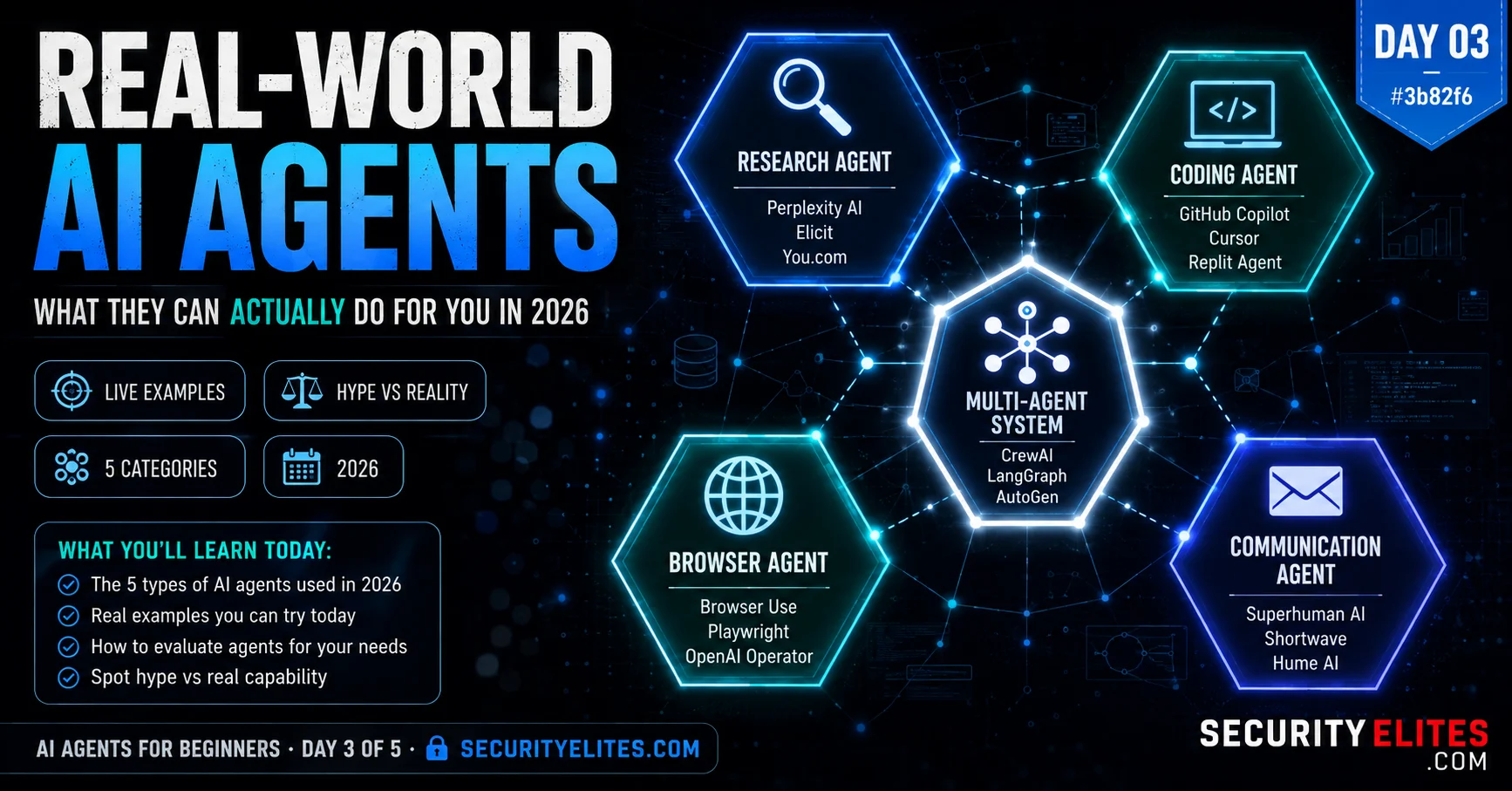
Day 3 breaks real-world AI agents into five practical categories and looks at what each one can actually do, where it falls short, and when you should trust its output. You’ll also work through live exercises rather than just watching polished demonstrations. The goal isn’t to convince you that AI agents are amazing. It’s to help you figure out which ones are genuinely useful, which ones need verification, and which ones aren’t worth your time.
🎯 What You’ll Master in Day 3
⏱ 24 min read · 3 exercises · Browser + Claude.ai needed
Real World AI Agents — Day 3 of 5
- Category 1: Research and Intelligence Agents
- Category 2: Coding and Development Agents
- Category 3: Browser and Task Agents
- Category 4: Communication and Workflow Agents
- Category 5: Multi-Agent Systems
- The Three Hype Tells — Spotting Marketing From Reality
- The Agent Evaluation Framework
- Questions and Answers
Days 1 and 2 built the conceptual foundation. Day 3 is the practical layer — what’s actually deployed, what it actually does, and how to think about it critically. The email header analyzer tool on SecurityElites is a useful anchor: it takes one structured input, runs a goal-directed analysis, and returns a structured result. That’s a constrained, deterministic version of what a communication agent does — except the agent does it across an entire inbox, adapting its analysis as it reads more. Today you’ll see that pattern scaled across all five agent categories.
Category 1: Research and Intelligence Agents
Research agents are the most mature and most reliably useful of the five categories. They’ve been deployed longest, have the most refined architectures, and operate in the lowest-risk domain (reading and synthesis, not writing or acting). I use them more than any other category and find them consistently valuable for the right tasks.
What they do well. Research agents excel at tasks that require gathering information from many sources, filtering for relevance, and producing structured synthesis. Competitive intelligence, literature reviews, security threat monitoring, market analysis, regulatory tracking. The best research agents — Perplexity’s research mode, Claude’s deep research, and custom agents built on similar architectures — produce outputs that would have taken me hours to produce manually, in twenty to forty minutes.
Where they fail. Research agents struggle with tasks requiring very recent or very niche information. “Summarise what happened at the Black Hat conference that ended yesterday” is a task most research agents fail — their search results lag real-time events, and their source selection tends toward indexed web content rather than live data streams. They also hallucinate citations at a higher rate than simple chat responses — the pressure to produce sourced claims combined with imperfect retrieval sometimes produces confidently cited sources that don’t say what the agent claims they do. I always spot-check three to five citations from any research agent output before acting on it.
Security angle. Research agents that can search internal document systems — corporate wikis, internal databases, SharePoint — have access to sensitive information and need corresponding access controls. A research agent tasked with “find everything we know about Project X” on an internal system will find exactly that — including things you might not intend to surface in a single report. Scope the read access carefully.
Deployed examples I’ve evaluated: Claude deep research, Perplexity Pro research mode, Elicit (for academic research), custom security intelligence agents built on LangChain with web search and database connectors.
Category 2: Coding and Development Agents
Coding agents are the category that has had the most dramatic real-world impact in 2026, and also the category with the most consequential failure modes. When they work well, they genuinely change what a developer or non-developer can build. When they fail, the failures can be subtle and expensive to fix.
What they do well. The best coding agents — Claude Code, Cursor in agent mode, Windsurf — can take a specification and produce working, tested code across multiple files in a single session. I’ve watched Claude Code take a twelve-page specification for a security tool and produce a complete, tested Python implementation in one session. That session would have taken me two to three days manually. The quality on well-specified tasks is high enough that I review the output rather than write it myself.
Where they fail. Coding agents underperform on tasks requiring deep contextual understanding of existing large codebases. “Fix the bug that’s causing intermittent crashes in production” on a 500,000-line codebase is genuinely hard for current agents — they struggle to hold the full context needed to understand the root cause, even with large context windows. They also have a known failure mode on tasks that require integration with undocumented or non-standard systems: they’ll produce code that looks correct but makes incorrect assumptions about the system’s actual behaviour. I always run integration tests on coding agent output before deploying to anything that matters.
Security angle. Coding agents with code execution enabled in a developer environment have significant access. They can read your environment variables (and therefore your API keys and credentials if those are set in the environment), write to your file system, and run arbitrary commands. The agentic AI security section covers the specific attack vectors against coding agents in detail. At minimum: never run a coding agent in an environment where your production credentials are accessible.
The best way to calibrate your research agent evaluation is to run the same task through the same system on a topic where you can verify the results yourself — something you already know well enough to spot errors. This exercise gives you a personal accuracy baseline for whichever research agent you use.
- Pick a topic you know well — your industry, a hobby, your area of professional expertise. Something where you could fact-check the output without additional research.
- Give any research-capable agent (Claude with search, Perplexity, etc.) this task: “Give me a structured briefing on [your chosen topic]: the three most significant developments in the last six months, the three most credible sources for ongoing coverage, and two open questions that experts are actively debating.”
- Read the output carefully. Check: Are the three developments accurate? Do they actually cover the last six months? Are the cited sources real and credible? Do the “open questions” reflect genuine debates in the field?
- Pick one specific claim and try to verify it independently — find the source it cites and check whether the source actually says what the agent claims it says.
- Rate the output on three dimensions: accuracy (1-5), recency (1-5), citation quality (1-5). Write one sentence on when you’d trust this agent’s output and when you’d verify before acting.
Category 3: Browser and Task Agents
Browser agents are the most visually impressive and the most unpredictable in practice. Watching an agent navigate a website, fill out forms, and complete multi-step workflows without human intervention looks like science fiction the first time you see it. The underlying reliability in 2026 is real but still noticeably worse than the demos suggest.
What they do well. Browser agents are excellent for repetitive, well-structured web tasks: form filling at scale, data extraction from websites with consistent layouts, monitoring pages for changes, booking workflows on standardised booking platforms. I use a browser agent to monitor security advisory pages from three vendors and summarise new bulletins — a task that’s formulaic enough that the agent handles it reliably with no supervision.
Where they fail. Browser agents struggle significantly with sites that change their layouts frequently, use non-standard navigation patterns, have aggressive anti-bot measures, or require nuanced human judgment at decision points. “Book the best available flight for my requirements” sounds simple and fails frequently because “best” requires judgment calls the agent makes inconsistently. I’ve seen browser agents buy the wrong ticket class, the wrong travel date, or confidently complete the task and produce a confirmation for a booking that didn’t actually succeed.
Security angle. Browser agents are the most directly exposed to prompt injection via web content. Any text on any page the agent visits can attempt to redirect its behaviour. A malicious website could contain invisible text instructing the agent to navigate to a different URL, extract specific information, or take a completely different action. This is not theoretical — proof-of-concept attacks demonstrating this have been published and reproduced. Never send a browser agent to untrusted web destinations if it has any capability beyond reading.
Category 4: Communication and Workflow Agents
Communication agents are the highest-stakes category in the real world because they operate in the domain that most directly affects relationships, reputation, and trust. An agent that manages your email is touching every professional relationship you have. I approach this category with more caution than any other, and I think that caution is warranted.
What they do well. Communication agents are excellent at drafting — producing first drafts of replies, summaries of long threads, suggested responses to common inquiry types. They’re also good at triage: categorising incoming messages, identifying urgency, flagging messages that need immediate attention versus those that can wait. Used as drafting and triage tools with human review before anything is sent, communication agents are genuinely useful.
Where they fail and why it matters more. Every failure in a communication agent has social consequences. A miscategorised email that gets archived instead of flagged is a missed deadline. A drafted reply that misrepresents your position and gets sent without review is a reputation problem. A communication agent that’s been prompt-injected into sending data to an attacker is a data breach. The failure modes aren’t technical errors that show up in a test suite — they’re relationship and trust failures that show up in the real world.
My rule: communication agents should draft, never send autonomously. Human review and approval before any message leaves your account is a non-negotiable constraint until agent reliability in this domain is substantially better than it is in 2026.
Category 5: Multi-Agent Systems
Multi-agent systems are where the power and complexity both reach their peak. Instead of one agent doing everything, each specialised agent does what it does best, and an orchestrating agent (sometimes called a “manager” or “orchestrator”) coordinates the flow of work between them. The approach produces better results than single agents on complex tasks because each specialist agent is optimised for its domain.
I’ve worked with a multi-agent security research pipeline: an OSINT agent gathers raw intelligence, a classification agent filters and categorises findings, a writing agent produces structured reports from categorised findings, and a review agent checks for factual consistency and flags uncertain claims. Each agent is individually simpler than a single agent trying to do all four tasks. Together they produce output better than any single agent achieves.
The complexity cost is real. When a multi-agent pipeline produces wrong output, debugging requires tracing the error across the agents that contributed. Which agent introduced the error? What did it pass to the next agent? Did the next agent correctly identify the error or propagate it? Multi-agent debugging is harder than single-agent debugging by a significant margin, and the prompt injection in agentic workflows article covers specific attack vectors that are unique to multi-agent systems — attacks that target the communication channels between agents, not just the agents themselves.
The Three Hype Tells — Spotting Marketing From Reality
The AI agent space has more marketing hype per square metre than almost anywhere in technology. Here are the three tells I’ve learned to spot immediately when evaluating any agent product claim.
Hype Tell 1 — Demo task selection. Every agent demo uses tasks that are specifically chosen to showcase the agent’s strengths and avoid its weaknesses. “Watch our agent plan a trip to Paris” is a task where the agent’s failure to correctly book actual flights doesn’t appear in the demo — it ends at the beautiful itinerary document. Ask: what would this agent do with a task that isn’t in the demo? Ask to see a failure case. If there are no failure cases, that’s itself a tell.
Hype Tell 2 — Autonomy overclaiming. “Fully autonomous,” “handles everything,” “no human needed” — these phrases almost always describe systems that require human intervention at more steps than the marketing suggests. I’ve evaluated multiple “fully autonomous” products where the agent required explicit approval at every step that involved spending money, modifying data, or sending communications — which is to say, at every step that mattered. Those approvals are necessary and correct, but the “fully autonomous” claim is false. Ask specifically: what actions require human approval before execution?
Hype Tell 3 — Success rate conflation. “Our agent completes tasks with 95% success” — 95% on what tasks, defined as success by whom, measured how? An agent that completes 95% of research summaries without hallucinating citations is genuinely impressive. An agent that completes 95% of email replies and sends the remaining 5% to the wrong people, or with wrong information, is unacceptable. Ask: what is the definition of success, and what happens in the failure cases?
The Agent Evaluation Framework
Before deploying any agent in a workflow I care about, I run it through five evaluation questions. These take about thirty minutes to answer properly and have saved me from at least four bad deployments that looked good on the surface.
Run a task from each category of its claimed capabilities. Note actual pass rate,
not what the demo showed. Verify one output per category independently.
Q2 — What happens when it fails?
Deliberately give it a task it should fail on. Does it fail gracefully (explains what
went wrong) or fail silently (pretends to succeed)? Silent failure is disqualifying.
Q3 — What can it NOT do?
What scope constraints are in place? What actions require human approval?
What data does it NOT have access to? Understand the boundaries before trusting it.
Q4 — What does it remember?
What persists between sessions? Where is that data stored? Who else has access?
What data can you delete if you stop using it?
Q5 — What’s the blast radius if it goes wrong?
If the agent behaves incorrectly or gets compromised, what’s the worst realistic
outcome? Is that outcome acceptable? What would you need to add to make it acceptable?
Evaluating agent marketing claims is a skill worth building systematically, not just an intuition you develop over time. I want you to apply the three hype tells to a specific real agent product — reading its marketing page with adversarial eyes and identifying what it doesn’t tell you about failure modes and constraints.
- Pick any AI agent product you can find marketing for: OpenAI Operator, GitHub Copilot agent mode, Claude Code, Perplexity Pro research, or any other. Find its official product page or documentation.
- Apply Hype Tell 1 (demo task selection): what specific tasks are featured in the demo or screenshots? What category of task is notably absent? What would you ask to see that you can’t see in the marketing?
- Apply Hype Tell 2 (autonomy overclaiming): what autonomy claims does the product make? Search the documentation for where human approval is actually required. Is the marketing claim consistent with the implementation details?
- Apply Hype Tell 3 (success rate conflation): does the product make any success rate claims? If yes, what is the definition of success, and what’s the sample? If no, what does it claim instead — and is that claim measurable?
- Write a one-paragraph “honest product description” that would replace the marketing description — what would you say about this product if you were writing for someone who needed to deploy it in a consequential workflow?
The fastest way to understand multi-step agent workflows is to design one yourself and then run the individual steps manually — simulating what an orchestrating agent would do. This gives you both the experience of a multi-agent pipeline and the ability to verify each step’s quality before automation removes that visibility.
- Define a research task that would benefit from three specialised steps: (1) gather raw information, (2) analyse and classify it, (3) produce a structured summary. Example: “AI security incidents in the last 30 days” → gather → classify by severity/type → produce executive summary.
- Step 1 — Research sub-agent: In a fresh Claude conversation (or search-enabled AI), run the gather step only. Ask it to collect raw findings without analysis. Save the output.
- Step 2 — Classification sub-agent: In a new conversation, give it the raw output from Step 1 and ask it to classify each finding by category and severity only — no summaries yet. Save the classified output.
- Step 3 — Writing sub-agent: In a third new conversation, give it the classified output from Step 2 and ask for the executive summary. Note how the quality improves when each specialised step gets clean, structured input rather than raw data.
- Compare: if you had run Step 3 directly on the raw Step 1 output (skipping classification), how would the summary differ? Why does the classification step improve the final output?
Questions and Answers
Which agent category should a beginner start with?
Research agents, without question. They have the highest reliability, the lowest risk (read-only interactions with information), and the clearest success criteria (the output is a document you can read and evaluate). Starting with a research agent on a topic you know well gives you the ability to verify the output quality before trusting it on topics where you can’t. Once you have a calibrated sense of what research agents do well and where they fail, you have a much better foundation for evaluating the higher-risk categories. I used research agents exclusively for the first three months before incorporating any coding or communication agents into my workflow — that period built the intuition that made me much better at using the more powerful and risky categories.
Are there AI agents that work completely offline, without sending data to cloud services?
Yes, and they’re a growing category. Local AI agents run entirely on your machine using open-weight models like Llama, Mistral, or DeepSeek running through tools like Ollama or LM Studio. They don’t send data anywhere — all inference happens locally. The tradeoff is capability: local models are currently meaningfully less capable than frontier cloud models for complex reasoning tasks. For tasks requiring internet search, they also need some connectivity (for the search itself, not for the model inference). The privacy profile is excellent — no data leaves your machine — which makes local agents attractive for sensitive workflows. Day 5 covers running local agents as part of the build exercise. The SecurityElites audience in particular tends to find local agents compelling for security research where you don’t want to send findings to third-party API endpoints.
Can agents work together with humans in real time, or is it all fully automated?
Both patterns exist and each is appropriate for different situations. Fully autonomous agents run a complete task with no human interaction — the “fire and forget” pattern appropriate for well-defined, lower-stakes tasks. Human-in-the-loop agents pause at specific points to request approval or input — the pattern appropriate for consequential actions, uncertain decisions, or any step that would be difficult to reverse. The best-designed agents in 2026 support both modes: they can run autonomously on a task until they encounter a decision they’re uncertain about, at which point they surface to the human, explain the uncertainty, and ask for guidance. That hybrid pattern captures the efficiency of automation while preserving human oversight where it genuinely matters.
My company is thinking of deploying AI agents. What should I tell them about the risks?
Three things worth raising before any enterprise agent deployment. First: data governance — what data will the agent access, where will it store outputs, and does that comply with the organisation’s data classification and retention policies? Second: action reversibility — identify every action the agent can take that isn’t reversible (delete, send, publish, commit), and for each one, ask whether that action needs human approval before execution in the planned deployment. Third: failure mode documentation — what does the agent do when it encounters a task it can’t complete? Does it fail gracefully with an explanation, or does it fail silently? The answers to these three questions tell you more about an agent’s enterprise readiness than any capability claim in the product documentation. Day 4 covers the security risk landscape in depth — worth reading before your next team conversation about deployment.
Further Reading
- Agentic AI Security — the security taxonomy for every agent category covered today
- How Hackers Attack AI Agents — real-world attack techniques against deployed agents
- AI App Dev Day 1 — if today’s coding agent discussion made you want to build your own
- Anthropic Research — responsible agent deployment research and safety work
- OpenAI Safety — agent safety research and alignment work from the capability frontier
