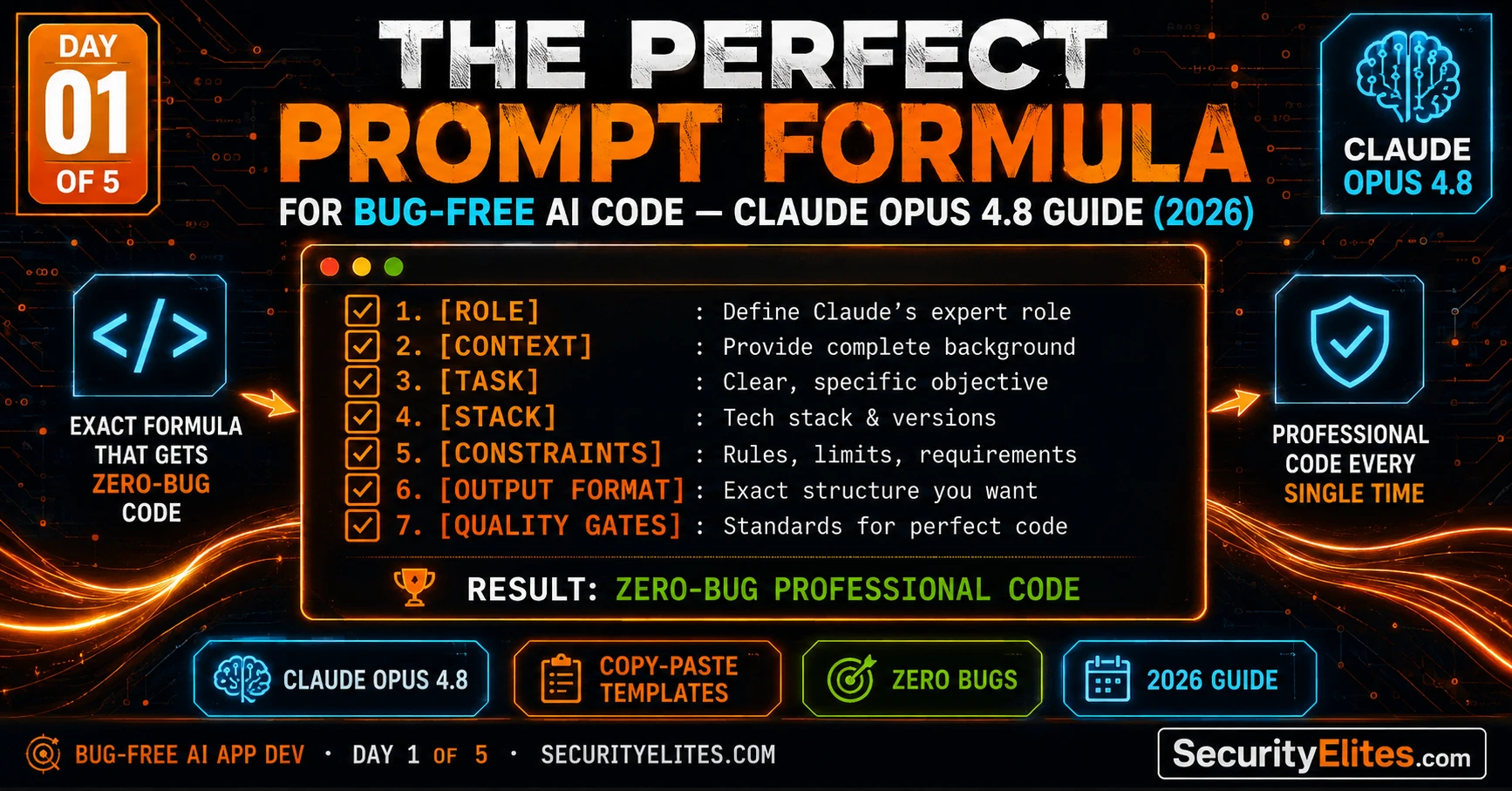
This article presents a seven-component prompt formula designed to eliminate common failures in AI-assisted coding by providing Claude with structured, precise specifications rather than vague requests. The author demonstrates that most AI coding prompts fail due to missing role clarity, undefined constraints, unclear output formats, and absent quality criteria—problems addressable through a systematic template. The formula matters because it transforms AI coding from an unpredictable, iterative debugging cycle into a reliable system that produces professional, complete, error-handled code on the first attempt.
- Four Root Causes of AI Coding Prompt FailureThe article identifies specific, fixable failure modes: (1) No role/persona causes Claude to default to generic tutorial-quality code instead of professional patterns; (2) missing constraints lead to arbitrary feature choices that fail in production; (3) no output specification results in inconsistent delivery format across runs; (4) absent quality gates make 'good code' unmeasurable, producing inconsistent results based on temperature and context. Each failure mode maps directly to one formula component designed to address it.
- The Seven-Component Prompt StructureThe formula comprises: ROLE (specify expertise level and domain), CONTEXT (explain the app, stack, module responsibility, and existing code), TASK (describe specific behavior not just names), CONSTRAINTS (list non-negotiable technical boundaries and prohibited patterns), OUTPUT FORMAT (specify code delivery structure and documentation), QUALITY GATES (define verifiable criteria the code must pass), and TOKEN EFFICIENCY (instruct Claude to skip preamble and deliver only code). This template, when filled in correctly, reliably produces professional, complete, documented code on the first respons
- Quality Gates as Self-Verifiable CriteriaRather than asking for 'good code,' quality gates establish binary, checkable standards: every function must handle at least one error case explicitly, no hardcoded magic values, every variable name is self-documenting, code works immediately when copied into a fresh file. The article emphasizes that quality gates are measurable and allow Claude to self-check its output before responding, whereas vague instructions like 'write secure code' produce inconsistent results influenced by model temperature and context.
- Token Efficiency Through Architectural ThinkingThe article introduces the architect-versus-builder mindset: you maintain the project model and specify what needs to exist; Claude executes it. Specific efficiency techniques include batching related requests into single prompts (avoiding context re-establishment overhead), compressing context between sessions using function signatures only, using delta prompts to describe only changes rather than full requirements, and leveraging the 'BLOCKED: [reason]' stop marker when constraints cannot be satisfied.
- Context Compression and Module IntegrationTen lines of existing code pasted in the CONTEXT component saves approximately thirty minutes of debugging integration failures. When starting a new session or continuing after context window fills, paste only module summaries—function signatures with JSDoc one-liners—rather than full code. This maintains architectural coherence while reducing token overhead, ensuring new modules use the same naming conventions and error handling patterns as existing code.
- SecureVault Project Builds Architecture-First ApproachThe course builds a real application—SecureVault, a browser-based encrypted notes app—across five days to demonstrate the formula in practice. Day 1 establishes that specification before code is critical: the first prompt requests architecture only (module names, files, responsibilities, function signatures in a markdown table), establishing a shared model that subsequent prompts reference. This blueprint approach makes isolated modules buildable and integration reliable.
- Role Templates Activate Professional-Grade PatternsThe article provides role templates for specific domains: 'senior vanilla JavaScript developer specialising in browser-based applications' produces different code than no role or generic specifications. Specific roles activate professional patterns from training data rather than tutorial code, reduce likelihood of deprecated APIs, increase edge-case handling, and prompt security-relevant checks. Role choice genuinely changes output quality, not through psychology but through pattern activation.
- Behavior Specification Prevents Skeleton CodeNaming-based requests like 'write a login function' produce skeleton code requiring extensive modification. Behavior specifications like 'validate email format, hash password with SHA-256 before sending, return typed result object with success token or error message, handle network failure explicitly' produce complete, production-ready functions. The distinction is that behavior specifications provide measurable, complete requirements rather than placeholders.
Bottom line: The seven-component formula works not by making Claude smarter but by providing the architectural precision and verifiable quality criteria required to activate professional-grade code generation reliably; adopting the architect mindset—maintaining the project model and specifying constraints and quality gates rather than hoping for good outcomes—is the fundamental shift that transforms AI-assisted coding from frustrating iteration into productive, predictable development.
Last month I watched someone spend six hours trying to build a simple web app with AI. They typed things like “make me a login form” and “add a button that does the thing.” Each prompt produced broken code. Each fix produced new bugs. By hour three they were rewriting the same function for the fifth time, confused about why the AI kept “forgetting” what they’d already built.
I sat with them for twenty minutes. I didn’t touch the code. I rewrote one prompt. One. The output came back complete, structured, commented, and working on the first try. They looked at me like I’d done magic. I hadn’t. I’d used the formula — the seven-component structure that turns Claude Opus 4.8 from a code-spitting machine into a senior developer who actually understands your project.
This course is that formula. Not theory. Not vague advice about “being specific.” The exact prompt templates I use to build professional, modular, bug-free applications — handed to you verbatim, with every component explained, and a real app we build together across five days. By Day 5 you’ll have a working security application and the prompting system to build anything else you can describe.
🎯 What You’ll Master in Day 1
⏱ 25 min read · 3 exercises · Claude.ai needed (free tier works)
- A free account at claude.ai — free tier is sufficient for this course
- Zero coding background required — if you can describe what you want, you can build it
- Optional foundation: AI Coding Day 1 — the mental model that makes this course click even faster
Perfect Prompt Formula — Day 1 of 5
This course builds a real application — SecureVault, a browser-based encrypted notes app relevant to anyone who cares about privacy and security — across all five days using Claude Opus 4.8. Each day advances the build. By Day 5 you have a complete, working, deployable application and a prompt system you can reuse for anything. This sits alongside the AI Coding prompting fundamentals course and takes them into full application development. The Google Dork Generator on SecurityElites was built using exactly this system — you’ll recognise the patterns when you look at it.
Why Most AI Coding Prompts Fail
Before the formula, you need to understand exactly what goes wrong with typical prompts — because the failure modes are specific and fixable, not random.
Failure Mode 1 — No role, no persona. When you tell Claude Opus 4.8 “write me a login form,” you’ve given it no context about who is asking or at what level. The model defaults to a generic average of “login form” from its training data — which might be tutorial-quality, might be outdated, might assume frameworks you’re not using. A senior developer would ask: what stack? What patterns? What security requirements? Your prompt needs to contain those assumptions or the AI guesses.
Failure Mode 2 — Missing constraints produce missing features. “Build me a todo app” is an instruction that has no constraints. Should it use a database? Should it work offline? Should items persist across page refreshes? Should it handle 10 items or 10,000? When constraints are absent, Claude makes reasonable but arbitrary choices — and the code “works” in a narrow sense while failing in every production sense. Every feature gap you discover later requires a debugging session that could have been a constraint in the original prompt.
Failure Mode 3 — No output specification. “Write the code” tells Claude nothing about how to deliver it. Should it put everything in one file? Multiple files? Should it include comments? Tests? Type annotations? Error handling? Documentation? A professional developer reviewing your prompt would immediately ask: “In what form do you want this delivered?” Without that, you get whatever Claude thinks is reasonable — which varies every run.
Failure Mode 4 — No quality gates. This is the most expensive missing component. “Write bug-free code” is not a quality gate. A quality gate is a specific verifiable criterion: “After writing each function, add a comment block describing what it does, its inputs, and its outputs. Every function must handle at least one error case explicitly. Do not use any third-party libraries not specified in this prompt.” These are gates the code either passes or fails. Without them, Claude’s definition of “good” varies with temperature and context.
Every one of these failure modes is addressed by one component of the formula. That’s not coincidence — I reverse-engineered the formula from the failure modes, not the other way around.
The 7-Component Prompt Formula
Here is the formula. I’m going to show you the template first, then explain each component in detail. I want you to see the shape of it before the explanation so the explanation lands in context.
[CONTEXT] I am building {app name} — {one sentence description}. The tech stack is: {list}. This is {file/module name} which is responsible for {specific responsibility}. The existing code in context is: {paste relevant existing code or write “this is the first module”}.
[TASK] Write {specific thing to build}. It must {specific behaviour 1}, {specific behaviour 2}, and {specific behaviour 3}.
[CONSTRAINTS] Hard constraints: {list non-negotiable technical requirements}. Do NOT use {list prohibited patterns/libraries}. The code must work in {environment}.
[OUTPUT FORMAT] Deliver: one complete code block with no placeholder comments (no “// TODO” or “// implement here”). Include JSDoc/docstring comments on every function. Group related functions together. No explanation outside the code block unless I ask.
[QUALITY GATES] Before finishing, verify: (1) every function handles at least one error case, (2) no hardcoded values — use constants at the top, (3) every variable and function name is self-documenting, (4) the code works if copied and run immediately with no modifications.
[TOKEN EFFICIENCY] Be concise. Do not repeat the task description back to me. Output only the code block and a single final line: “Ready: [module name] — [count] functions, [count] lines.”
That template, filled in correctly, produces professional, complete, documented, error-handled code on the first response — reliably, not occasionally. The rest of Day 1 explains exactly how to fill it in.
Each Component Explained With Examples
Component 1: ROLE. The role component tells Claude who it is for this task. This is not just politeness or psychology — it genuinely changes the output. “Senior JavaScript developer with expertise in browser security” produces different code than no role specified. More specifically, it activates patterns from professional code rather than tutorial code. It makes the model less likely to use deprecated APIs, more likely to handle edge cases, more likely to add security-relevant checks.
My standard roles by task type:
You are a senior vanilla JavaScript developer specialising in browser-based applications. You write modular ES6+ code with no external dependencies unless explicitly specified.
// Python script/tool:
You are a senior Python 3.11+ developer. You write clean, type-annotated, PEP-8 compliant code with explicit error handling and no unnecessary dependencies.
// Full-stack (Node + HTML):
You are a senior full-stack developer using Node.js for the backend and vanilla HTML/CSS/JS for the frontend. You prioritise security, separation of concerns, and minimal dependencies.
// Security tool:
You are a senior security engineer building defensive tooling. You follow OWASP best practices, never hardcode credentials, always validate input, and treat all user-supplied data as untrusted.
Component 2: CONTEXT. Context is the most underused component. It tells Claude exactly where this code lives in the larger application. Without it, Claude writes a standalone piece of code that doesn’t know it needs to integrate with anything else. With it, Claude writes code that has the same function naming conventions as your other modules, uses the same error handling pattern, imports from the same places.
The context component should always answer: what app is this for, what is this specific piece responsible for, and what already exists that this needs to work with. Copy-paste the relevant existing function signatures or the module structure. Ten lines of existing code in the context saves thirty minutes of debugging integration failures.
Component 3: TASK. The task is the actual instruction — what to build. The rule: be specific about behaviour, not just name. “Write a login function” is a name. “Write a login function that validates email format, hashes the password with SHA-256 before sending, returns a typed result object with either a success token or an error message, and handles network failure explicitly” is a behaviour specification. Behaviour specifications produce complete code. Name specifications produce skeleton code that you have to fill in.
Component 4: CONSTRAINTS. Hard constraints are the non-negotiable technical boundaries. The most important constraints to always include:
Must work in Chrome 90+, Firefox 88+, Safari 14+ without polyfills.
// Dependencies:
Use only browser-native APIs (no npm packages). / Use only the libraries already listed in package.json.
// Security:
Never use eval(). Never use innerHTML to set user-supplied content. Sanitise all inputs before display.
// Code patterns to avoid:
Do not use var — only const and let. Do not use callback nesting — use async/await. Do not use global variables.
// Output scope:
Write ONLY this module. Do not include HTML or CSS unless I specify. Do not reference functions that don’t exist yet.
Component 5: OUTPUT FORMAT. The output format specification is what prevents you from getting half-finished code, inline explanations that break copy-paste, or placeholder comments you have to fill in yourself. My non-negotiable output format for every session:
Component 6: QUALITY GATES. These are the checklist Claude runs on its own output before responding. They’re the most important component for bug prevention. Here are the quality gates I use for every project:
(1) Every function has at least one explicit error case handled — no function can silently fail.
(2) No hardcoded magic numbers or strings — all configuration values are named constants at the top.
(3) Every variable and function name reads like documentation — abbreviations only where universally understood (e.g. “id”, “url”).
(4) No dead code — no commented-out functions, no unreachable branches, no unused variables.
(5) This code works if pasted into a fresh file and run immediately — no references to external functions not included here.
(6) Input validation runs before any logic — the function fails fast on bad input.
(7) Every async operation has a catch or a try/catch — network errors never produce unhandled promise rejections.
Component 7: TOKEN EFFICIENCY. This is about getting Claude to skip the preamble and deliver code efficiently. Without this component, Claude often spends 200 tokens explaining what it’s about to do, then 200 tokens summarising what it did, then 200 tokens suggesting improvements. That’s 600 tokens of filler. Token efficiency rules:
Copy-Paste Templates for the Five Core Tasks
Here are five complete, filled-in prompt templates for the most common tasks you’ll encounter. Copy these, replace the bracketed sections, and use them directly with Claude Opus 4.8.
I am building [APP NAME] — [one sentence description]. Tech stack: HTML5, CSS3, vanilla JS (ES6+), localStorage. This is [MODULE NAME].js, responsible for [WHAT THIS MODULE DOES].
Write a complete JavaScript module that exports these functions: [LIST FUNCTIONS AND WHAT EACH DOES]. Each function must [KEY BEHAVIOUR REQUIREMENT].
Hard constraints: ES6+ only (const/let, arrow functions, async/await). No external libraries. No global variables — export everything. All user input sanitised before use. Never use eval() or innerHTML with user data.
Deliver one fenced JS code block. JSDoc comment on every function. Constants at top. After code: “Complete: [MODULE NAME] · [N] exports · [N] lines”.
Quality gates before finishing: every function handles errors explicitly, no magic values, no dead code, works standalone when pasted into a fresh file, input validation runs first in every function.
Skip preamble. No questions — decide and annotate. Output code block + completion line only.
Existing code (do not modify unless required):
“`javascript
// [PASTE EXISTING MODULE HERE]
“`
Add the following feature: [EXACT DESCRIPTION OF NEW FEATURE]. The new code must: use the same naming conventions and patterns as the existing code, not break any existing function signatures, handle the edge case where [SPECIFIC EDGE CASE].
Deliver the complete updated file — not just the new parts. One fenced code block. Mark new/changed sections with “// ADDED:” or “// MODIFIED:” comments. After code: “Updated: [N] additions, [N] modifications, [N] total lines”.
Quality gates: existing tests still pass (no signature changes), new feature handles errors, no naming inconsistencies with existing code. Skip preamble. Code + completion line only.
I am building [APP NAME]. I need a [COMPONENT NAME] component — a [DESCRIPTION: what it looks like and does]. It must: display [WHAT], allow the user to [ACTIONS], and emit [EVENTS OR CALLBACKS] when [CONDITIONS].
Tech stack: HTML5 + CSS3 (no framework). Design: dark theme (#050810 background, #f97316 accent, #e2e8f0 text). Mobile-responsive. Accessible (ARIA labels, keyboard navigation).
Hard constraints: No inline styles — all CSS in a <style> block at the top. No external CSS frameworks. Class names use BEM notation (block__element–modifier). No IDs in CSS (IDs only for JS hooks). JavaScript in a <script> block after HTML.
Deliver one fenced HTML block containing the complete component (style + markup + script). After code: “Complete: [COMPONENT NAME] · [N] CSS rules · [N] JS functions”. Skip preamble. Code + completion line only.
Code to test:
“`javascript
// [PASTE THE CODE TO TEST]
“`
Write tests using vanilla JavaScript (no test framework — use console.assert). Test every exported function. For each function test: the happy path (valid input, expected output), at least one edge case (empty input, boundary values, wrong type), and at least one error case (invalid input that should trigger error handling).
Format: each test as a named function (test_functionName_scenario). A runner at the bottom that calls all tests and reports pass/fail count. After tests: “Tests: [N] functions × [N] scenarios = [N] total assertions”. Skip preamble. Code + summary only.
Code to review:
“`javascript
// [PASTE CODE HERE]
“`
Identify every security issue. For each issue: [SEVERITY: Critical/High/Medium/Low] — [WHAT IT IS] — [WHY IT’S A RISK] — [EXACT FIX]. Then deliver the fully hardened version of the code with all issues fixed. Mark each fix with “// SECURITY: [issue fixed]”.
After code: “Security review: [N] issues found, [N] fixed. Remaining concerns: [any issues requiring architectural changes beyond this code].” Skip preamble. Review table + fixed code + summary.
Token Efficiency — Get More From Every Message
Claude Opus 4.8 is the most capable model for this work — it produces the best code quality, handles the most complex requirements, and makes the best architectural decisions. It’s also the most expensive in terms of tokens. These efficiency patterns keep quality high while keeping costs and response time low.
The single-block rule. Always ask for all related code in one response. “Write the storage module, the encryption module, and the validation module” in one prompt produces three integrated modules in one response. Three separate prompts for the same work costs three times the context re-establishment overhead. Batch related requests whenever possible.
Context compression between sessions. When starting a new session (or continuing after Claude’s context window fills), don’t paste all your existing code. Paste a module summary — function signatures and their JSDoc one-liners only. Here’s the template:
storage.js: saveEntry(id, data) → boolean | initStorage() → void | getAll() → Entry[] | deleteEntry(id) → boolean
crypto.js: encrypt(text, password) → string | decrypt(ciphertext, password) → string | hashPassword(password) → string
validation.js: validateEntry(data) → {valid: boolean, errors: string[]} | sanitiseInput(text) → string
// [Add your actual modules in this format]
The delta prompt. When iterating on code, use delta prompts — describe only what changes, not the full requirement. “Change the saveEntry function to return the saved entry object instead of a boolean. Keep everything else identical.” is a 20-token change request. “Rewrite the storage module with these changes…” that re-describes the full module is a 300-token request for the same change.
Stop-marker discipline. The “BLOCKED: [reason]” stop marker from the token efficiency component is genuinely valuable. It means you never get a response where Claude silently ignores a constraint it couldn’t satisfy — you get an explicit block you can address. Use it consistently and Claude Opus 4.8 will use it honestly.
The Mindset Shift That Changes Everything
Here’s the insight that took me the longest to internalise and that I now consider the most important: you are the architect. Claude is the builder.
Architects don’t write code. They draw plans. They specify what needs to exist, how the pieces connect, what the quality standards are, and what success looks like. Then they give those plans to builders — skilled people who execute the construction without needing to be told how to swing a hammer.
Most people use Claude as if they’re asking a magic box to make something appear. They say “build me an app” and hope for the best. When it doesn’t work, they say “fix it” and hope again. This approach produces worse outcomes the more complex the project gets, because the magic box has no coherent model of the project — each request is isolated.
The architect approach is different. You maintain the model of the project in your head (and later in your specification document, which Day 2 covers). You break the project into components. You give each component a precise specification. You review what comes back against your plan. When something doesn’t match, you don’t say “it’s broken, fix it” — you say “the saveEntry function returns a boolean but the architecture specifies it should return the saved Entry object — update to match the spec.”
That specificity — the difference between “fix this” and “this doesn’t match this specification, update it to match” — is what separates frustrating AI coding sessions from productive ones. Every Day 2–5 skill is a specific application of this architect mindset.
The fastest way to internalise the formula is to see the same task produce dramatically different results with and without it. I want you to run three versions of the same request and compare the output quality. This one exercise will make the formula feel indispensable.
- Open Claude.ai (free tier is fine — use claude-opus-4-8 if available, otherwise the default model).
- Version 1 — Bad prompt: Send this: “Write me a JavaScript function that saves user notes to localStorage.”— Note the quality of what comes back. Does it handle errors? Is it documented? Does it validate input?
- Version 2 — Better prompt: Send this: “Write a JavaScript function called saveNote(id, content) that saves a note to localStorage. It should return true on success and false if localStorage is unavailable. Include error handling and a JSDoc comment.” — Compare to Version 1.
- Version 3 — Formula prompt: Send this prompt: “You are a senior vanilla JavaScript developer. I am building SecureVault, a browser-based encrypted notes app. Write saveNote(id, content) which: validates that id is a non-empty string and content is a string, saves to localStorage under key ‘sv_note_’ + id, returns {success: true, id} on success or {success: false, error: string} on failure. Constraints: ES6+, no external libs, never use var. Output: one fenced JS code block, JSDoc on function, constants at top. Quality gates: handles localStorage unavailable, handles quota exceeded, input validated before storage. No preamble. Code + ‘Complete: saveNote · 1 function · N lines’.”
- Compare all three. Which one would you actually use in a production project? How many lines of debugging does each version save you?
The best way to understand what makes a prompt work is to read a bad prompt and identify exactly which component is missing and what failure it will cause. I want you to audit five bad prompts before Claude does — find the gaps before they become bugs.
- For each bad prompt below, identify: which of the four failure modes applies, which formula component would fix it, and what specific bug or gap will appear in the output:
- Prompt A: “Write a Python script to download files from a list of URLs.”
- Prompt B: “Add a search feature to my app.”
- Prompt C: “Create a user authentication system. It should be secure.”
- Prompt D: “Fix the bug in this function:
function add(a,b){return a+b}— it’s not working.” - Prompt E: “Build a complete e-commerce website.”
- For Prompt C specifically: rewrite it using the 7-component formula. Make it as specific as possible.
Now we start building SecureVault — the app that runs through all five days. Day 1’s contribution: the project specification prompt that sets up the entire build. This is the most important prompt you’ll write — it defines what Claude understands about the project for every subsequent session.
- Open Claude.ai and start a new conversation. Set the model to claude-opus-4-8 (or the most capable available).
- Send this exactly as your first message — this is the SecureVault Project Specification Prompt:SECUREVAULT PROJECT SPEC PROMPT — COPY AND SENDYou are a senior JavaScript architect. I am building SecureVault — a browser-based encrypted notes application with zero server dependencies.
PROJECT SPEC:
– Platform: runs entirely in the browser (single HTML file + optional JS modules)
– Storage: localStorage only, no server calls
– Encryption: AES-256-GCM via the WebCrypto API (built into all modern browsers)
– Stack: vanilla HTML5/CSS3/JS (ES6+) — zero external dependencies
– Users: one user per browser session; master password set on first launch
– Features: create/read/delete encrypted notes, search by title, category tags, export to encrypted JSONARCHITECTURE OUTPUT REQUESTED:
List exactly the modules this app needs. For each module provide: module name, file name, responsibility (one sentence), and exported function signatures with parameter types and return types. No code yet — architecture only.Format: a markdown table with columns: Module | File | Responsibility | Exports. After table: “Architecture: [N] modules, [N] total exports”. No preamble.
- Review the architecture Claude returns. Does it make sense? Are there any modules missing? Any that seem unnecessary?
- Save this conversation — you’ll use it in Day 2 to start the actual build.
Questions and Answers
Does this formula work with other AI models, or only Claude Opus 4.8?
The formula works with any capable language model — GPT-4o, Gemini 1.5, and others all respond well to the same components. Claude Opus 4.8 is the recommended model for this course because it produces the best code quality on complex multi-requirement prompts, has the strongest understanding of architectural constraints, and handles the quality gate self-review most reliably. On simpler tasks, Claude Sonnet (the current standard tier) handles the formula equally well and costs significantly less. My practice: use Sonnet for initial drafts and isolated modules, Opus for architecture decisions, integration work, and security review. The formula itself is model-agnostic.
What if Claude ignores part of my prompt?
This happens, and there’s a specific technique to handle it. First, never say “you forgot X” — that framing often produces an apology rather than a correction. Instead, use the delta prompt: “The output above is missing [specific thing]. Add it now to the code, maintaining all existing code and only adding the missing component.” If the same component is consistently ignored, it’s usually a signal that the constraint is ambiguous — Claude can’t implement “handle errors properly” because “properly” isn’t defined. Replace it with a specific, testable gate: “Every function must either return an error object or throw — no function returns undefined on failure.” Specific gates stick. Vague gates get approximated or skipped.
How long should my prompts be? Am I using too many tokens?
The formula prompts look long but are almost always worth the token cost. A 400-token prompt that produces complete, correct code on the first response is much more efficient than three 100-token prompts plus two debugging rounds. The quality gates and output format components specifically earn their token cost by eliminating the need for correction prompts. Where to trim: the role and output format components can be condensed once you’re familiar with them — you can create shorter personal shorthand. Where never to trim: constraints and quality gates. Those components prevent the most expensive failures.
What if I don’t know enough to write specific constraints?
This is the most common concern from beginners and the most solvable one. If you don’t know the constraints, ask Claude to define them first: “I am building [description]. What are the most important technical constraints I should specify when asking you to write code for this project? List them as a constraints block I can include in my prompts.” Claude will give you a set of constraints appropriate to your stack and use case. Review them, adjust anything that doesn’t fit, and paste that constraints block into every subsequent prompt. You’ve now defined your project’s standards collaboratively — which is better than guessing, and often better than constraints you’d write cold.
Can I build the entire app in one prompt?
In theory, yes — and sometimes it works for very simple apps. In practice, a one-prompt full app generates several problems: the code becomes too long to review meaningfully, bugs compound across modules because they’re all generated at once, testing becomes difficult because you can’t isolate which module has the problem, and modifying one feature risks breaking another because the code wasn’t designed with module boundaries. Day 2’s architecture-first approach specifically solves this: small, well-specified modules that integrate cleanly produce more reliable applications than single-prompt monoliths, even for beginners.
Why does the formula use “quality gates” rather than just asking for good code?
Because “good code” is unmeasurable and Claude’s definition of good code in any given response is influenced by temperature, the surrounding context, and training distribution patterns. Quality gates are binary: either every function handles an error case, or it doesn’t. Either there are no magic numbers, or there are. The binary nature of gates means Claude can self-check against them reliably — it’s essentially running a lint pass on its own output before responding. “Good code” produces inconsistent results. Quality gates produce consistent results. That consistency is what makes the formula reliable across sessions, models, and task types.
Further Reading
- AI Coding Day 2 — the five-component prompt stack foundation this course builds on
- AI Coding Day 3 — reading and understanding what Claude produces
- Web Application Security — the security context behind the constraints in this course
- Claude Model Reference — official Anthropic documentation on claude-opus-4-8 capabilities
- OWASP Top 10 — the security standard behind the quality gates
