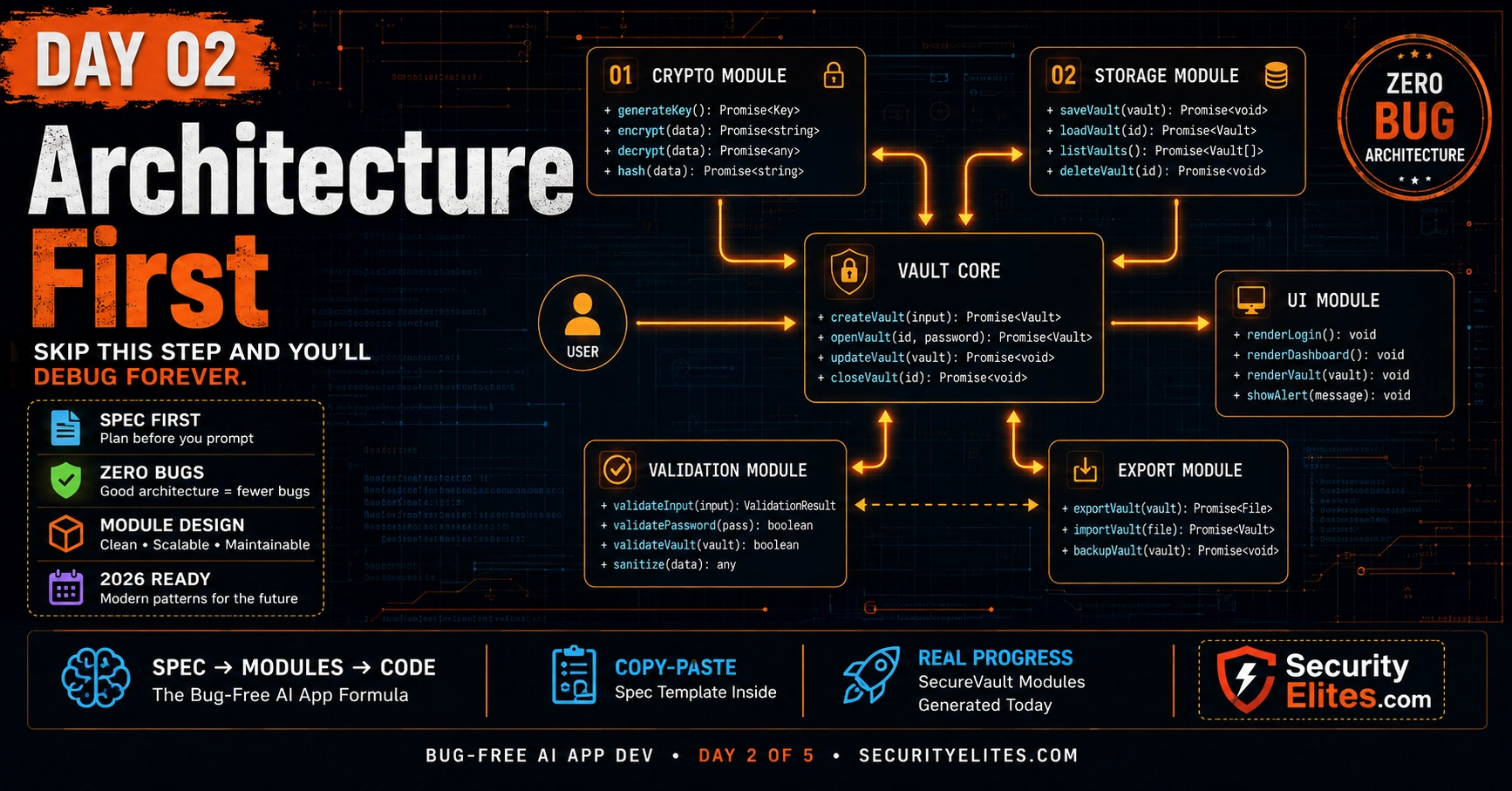
This article teaches an architecture-first methodology for AI-assisted application development, specifically for building bug-free apps with AI code generation. It argues that 80% of bugs in AI-generated applications are integration failures—gaps between modules—rather than logic errors, and that designing complete application structure before writing code eliminates these failures. The article provides a four-phase architecture process (Specification, Module Map, Data Contracts, File Structure) with prompt templates and demonstrates it through a complete SecureVault encrypted notes app blueprint.
- Integration bugs dominate AI developmentThe article reports that approximately 80% of bugs in AI-assisted projects are not logic errors within functions but integration failures between modules—such as Function A returning a string where Function B expects an object, or Module X sending unvalidated data that Module Y assumes is validated. These bugs exist in the gaps between modules, in unspoken assumptions about data shapes and interfaces. Architecture work closes these gaps by specifying every interface before code is written.
- Four-phase architecture process structureThe methodology consists of: Phase 1 (Specification Document) answers what the app does and doesn't do with a template covering features, non-features, data model, and security requirements; Phase 2 (Module Map) decomposes the application into single-responsibility modules with dependencies mapped; Phase 3 (Data Contracts) defines function signatures and data shapes in JSDoc before any module is written; Phase 4 (File Structure) determines build order following dependency trees so modules with no dependencies are built first.
- Data contracts prevent gap bugsData contracts are JSDoc type definitions that establish agreements between modules about data shape before any module exists. The article demonstrates this with a contracts.js file that defines shared types like Entry, OperationResult, and CryptoKey that all modules reference. When both the storage module and UI module import the same @typedef Entry from contracts.js, they are guaranteed to agree on Entry structure because they use the same definition, eliminating shape disagreement bugs.
- Non-features section prevents scope creepThe specification template includes an explicit NON-FEATURES section listing what the app deliberately does not do. The article argues that specifications missing this section consistently experience mid-build feature additions that weren't originally planned, requiring changes to already-built modules and introducing regression bugs. Making the scope boundary explicit and enforceable prevents this integration breakdown.
- Claude consistency with architecture anchorWhen Claude Opus is given the module map in each coding prompt, it uses the architecture as a consistency anchor and generates code that fits the specified architecture rather than making independent choices. This ensures naming conventions stay consistent across modules, error patterns standardize, and data shapes align—because all modules reference the same contracts and architecture specifications written before any code was generated.
- Author's real-world rewrite dataThe author reports skipping architecture in earlier projects resulted in every application requiring at least one complete module rewrite, with one project requiring rebuilding three modules mid-integration after discovering incompatible data shapes. Since implementing architecture-first across all projects, the author reports zero complete rewrites, attributing this directly to specifying interfaces before building implementations.
- Build order follows dependency treeModules with zero dependencies are built first, followed by modules that depend on those foundations, ensuring every module can be immediately tested in isolation before it depends on something that doesn't exist yet. For SecureVault, this means contracts.js and utils.js are built first (no dependencies), followed by validation.js and storage.js (depend on contracts), then entry-service.js (depends on crypto, storage, and validation), then app.js (depends on entry-service and ui-components).
- Crypto module security constraintsThe article specifies crypto.js requires PBKDF2 with 100,000 iterations using SHA-256, AES-256-GCM encryption with unique random IV per encrypt call generated with crypto.getRandomValues (never Math.random), and a salt round-trip requirement where saltFromBase64(saltToBase64(s)) must produce byte-identical results. The decrypt function must throw with a specific error message on any failure rather than returning undefined or the generic WebCrypto error.
Bottom line: Before writing any code with AI assistance, invest 1-2 hours in architecture work: define specifications, decompose into single-responsibility modules, establish data contracts that all modules reference, and determine build order by dependency. This upfront design eliminates 80% of integration bugs that would otherwise emerge during module connection, typically saving days of debugging and preventing project rewrites.
The most expensive mistake in AI-assisted development isn’t a bad prompt. It’s a great prompt for the wrong thing. I’ve watched people write beautifully structured prompts that produce perfectly clean code — code that later needs to be thrown away because it doesn’t fit into the application they’re building. The module works. The app doesn’t. Because nobody designed the app before building the modules.
In traditional software development, skipping the architecture phase is the single most reliable predictor of a project that requires complete rewrite. With AI coding, it’s even more dangerous: Claude Opus 4.8 will confidently build whatever you ask it to build, with no hesitation and no red flags. If what you asked for doesn’t fit the overall system, you’ll find out at integration time — when changing one module breaks three others and debugging takes longer than the original build.
Today I teach you the architecture-first system: how to design a complete application structure before writing a single line of code, how to use Claude as an architecture partner rather than a code printer, and how to create a specification document that makes every subsequent coding session fast, precise, and integration-safe. By the end of today, SecureVault has a complete blueprint and its first real module.
🎯 What You’ll Master in Day 2
⏱ 25 min read · 3 exercises · Claude.ai needed
- Completed Day 1 and saved your SecureVault architecture table from Exercise 3
- Have the 7-Component Formula handy — we use it for every prompt today
AI app architecture planning — Day 2 of 5
Day 1 gave you the prompt formula. Today’s work is everything that happens before the first coding prompt — the design phase that separates 6-hour debugging sessions from 10-minute integration runs. Our password strength checker tool was built with this exact architecture-first approach: three modules (scoring logic, feedback generator, UI renderer) defined independently, integrated cleanly. Day 2 shows you how that design process works.
Why Architecture Prevents 80% of Bugs
I track the root causes of bugs in every AI-assisted project I work on or review. The breakdown is consistent: roughly 80% of bugs are not logic errors within a function — they’re integration failures. Function A returns a string where Function B expected an object. Module X assumes data was validated before it arrives, but Module Y sends it unvalidated. The UI component expects an array but gets null on the first render. These bugs don’t exist in the modules themselves — they exist in the gaps between modules, in unspoken assumptions about what gets passed where.
Architecture work closes those gaps before the code is written. When you define that the saveEntry() function returns {success: boolean, id: string, error?: string} before writing it, every module that calls saveEntry() knows exactly what to expect. There are no gap bugs because there are no gaps — every interface is specified.
The secondary benefit of architecture-first: Claude Opus 4.8 uses your architecture as a consistency anchor. When you give Claude the module map in each coding prompt (“this module is part of the following architecture: [paste map]”), it generates code that fits the architecture rather than making independent choices that might conflict. Module after module, the naming conventions stay consistent, the error patterns stay consistent, and the data shapes stay consistent — because they were all specified before any module was written.
I used to skip architecture and jump straight to prompting. I can tell you exactly what that costs: every project I built that way required at least one complete module rewrite, and one of them required rebuilding three modules after discovering mid-integration that they’d been designed with incompatible data shapes. The rewrite took longer than the original build. Since I started doing architecture first — every project — I’ve had zero complete rewrites. That’s not a coincidence. It’s a direct consequence of specifying interfaces before building implementations — and it’s why architecture comes first in this course, not as a nice-to-have but as the foundational step the whole system depends on.
Phase 1: The Specification Document
The specification document is a one-page description of the application that answers the questions every developer needs before writing any code. It’s not a technical document — it’s a decisions document. It records every decision about what the app will and won’t do, so those decisions don’t get made differently in different modules.
Here is the specification template I use for every project. Fill in the brackets and you have a complete spec:
ONE-LINE DESCRIPTION: [What it does for whom]
PLATFORM: [Browser / Node.js / Mobile / etc.]
TECH STACK: [Languages, frameworks, libraries — be exhaustive]
DEPENDENCIES: [Third-party packages, or “zero external dependencies”]
STORAGE: [localStorage / IndexedDB / PostgreSQL / etc.]
AUTH: [None / session / JWT / OAuth — describe flow]
FEATURES (exhaustive list):
– [Feature 1: one verb phrase]
– [Feature 2: one verb phrase]
– [Add all features before starting — new features added later break architecture]
NON-FEATURES (explicitly out of scope):
– [Thing this app deliberately does NOT do]
– [This section prevents scope creep mid-build]
DATA MODEL:
– [Entity 1]: { field: type, field: type, … }
– [Entity 2]: { field: type, field: type, … }
SECURITY REQUIREMENTS:
– [Specific security rule 1]
– [Specific security rule 2]
BROWSER/ENVIRONMENT TARGETS: [Chrome 90+, Firefox 88+, Safari 14+]
PERFORMANCE TARGETS: [Load time, response time, storage limits]
ACCESSIBILITY: [WCAG 2.1 AA / keyboard navigable / screen reader support]
The non-features section deserves special attention. Every specification I review that’s missing a non-features section has the same problem: mid-build, someone (or Claude, when given vague prompts) decides to add a feature that wasn’t originally planned. The new feature requires changes to modules already built. Those changes introduce regression bugs. The non-features section makes the scope boundary explicit and enforceable.
Phase 2: The Module Map
Once the spec is complete, the next phase is decomposing the application into modules. A module is a single JavaScript file (or class, or function group) with a single, well-defined responsibility. The principle: if you can’t describe what a module does in one sentence without using “and,” it needs to be split.
Use this prompt to generate the module map from your spec:
[PASTE YOUR SPEC DOCUMENT]
Decompose this application into modules following single-responsibility principle. For each module provide:
1. Module name (PascalCase)
2. File name (kebab-case.js)
3. Single-sentence responsibility (one sentence, no “and”)
4. Depends on: [list other modules it imports from, or “none”]
5. Exported functions: [name(params): returnType for each]
Rules: UI and logic must be in separate modules. Validation must be a separate module. Utilities (shared helpers) get their own module. No circular dependencies. The file that runs in the browser must be the only one that touches the DOM.
Deliver as a markdown table. After table: total module count, dependency tree depth (max hops from entry point to deepest module). No preamble.
The dependency rules in this prompt are the most important part. UI and logic separation prevents the single most common maintenance nightmare in browser apps: logic tangled into event handlers that can’t be tested, reused, or modified without breaking the display. The no-circular-dependencies rule prevents the situation where Module A needs Module B which needs Module A — a deadlock that produces confusing import errors.
Phase 3: Data Contracts — Functions That Agree Before They Exist
A data contract is the agreement between two modules about the shape of data they exchange. It’s the most important concept in preventing integration bugs, and it’s almost universally skipped by beginners because the bugs it prevents don’t show up until integration — after you’ve built everything and are trying to connect it.
Here’s the pattern. Before writing any module code, define what every function returns and what every function expects as input — in precise typed terms. In JavaScript without TypeScript, you do this with JSDoc. Here’s the prompt that generates data contracts from your module map:
Module map:
[PASTE YOUR MODULE MAP TABLE]
For each exported function in every module, define:
1. @param tags with name, type, and description for every parameter
2. @returns tag with type and description
3. @throws tag if the function can throw
4. A @typedef for any custom object type used as param or return value
Rules: Every return type must be explicit — no implicit void or any. Error returns must be typed: use {success: false, error: string} pattern, never null or undefined for errors. Use union types for functions that can return different shapes: {success: true, data: T} | {success: false, error: string}.
Deliver a single JavaScript file containing only JSDoc @typedef and @callback declarations — no function bodies. This file is the “contracts.js” that all modules reference. After file: “Contracts: [N] types defined, [N] functions contracted”. No preamble.
The contracts file doesn’t contain any running code — just type definitions. But it becomes the single source of truth that all modules reference. When I write the storage module, I import the @typedef Entry from contracts. When I write the UI module, it also imports @typedef Entry. They’re now guaranteed to agree on what an Entry looks like, because they’re both using the same definition.
* @typedef {Object} Entry
* @property {string} id – UUID v4
* @property {string} title – Display title (1-100 chars, sanitised)
* @property {string} ciphertext – AES-GCM encrypted content
* @property {string} category – Tag category slug
* @property {number} createdAt – Unix timestamp ms
* @property {number} updatedAt – Unix timestamp ms
*/
/**
* @typedef {Object} OperationResult
* @template T
* @property {boolean} success
* @property {T} [data] – Present when success is true
* @property {string} [error] – Present when success is false
*/
/**
* @typedef {Object} CryptoKey
* @property {CryptoKey} encryptKey – WebCrypto key for encryption
* @property {Uint8Array} salt – PBKDF2 salt (16 bytes)
*/
Phase 4: File Structure and Build Order
The final architecture step is deciding what files exist, where they live, and in what order they should be built. The build order follows the dependency tree: modules with no dependencies are built first, modules that depend on others are built after their dependencies. This ensures every module you build can be immediately tested in isolation — it doesn’t depend on something that doesn’t exist yet.
[PASTE MODULE MAP WITH DEPENDENCIES]
Generate:
1. The complete file structure as a directory tree (ascii art format)
2. The build order: which modules to write in which sequence, with the reason for each ordering decision
3. The index.html script tag order for loading these modules in the browser
4. A “smoke test” file — a minimal HTML page that imports all modules and calls one function from each to verify they load without errors
Format: directory tree first, then numbered build order list, then script tags, then smoke-test HTML. No preamble.
SecureVault Architecture — Complete Blueprint
Here is the complete SecureVault architecture produced by running the four-phase process. This is the blueprint for everything we build in Days 3–5.
One clarification before you continue: the spec, module map, contracts, and build order below are the output of running Phases 1–4 against the SecureVault spec — I’ve run them already so the whole course builds one consistent application rather than nine readers ending up with nine slightly different architectures. The four prompt templates above are yours to keep and reuse on your own projects starting today. If you’d like to see them in action right now: paste the Module Map Generation Prompt with the SecureVault spec from Day 1 into a fresh Claude conversation and compare what comes back to the blueprint below. You’ll find it’s the same nine modules, possibly with different naming — which is itself a useful lesson: architecture decisions have a “right shape” even when the exact names vary, and the blueprint below is what we’ll use as the shared standard for the rest of the course so every module you build integrates correctly with every other reader’s build too.
─────────────────────────────────────────────────────────────────────────────────────────────
Contracts | contracts.js | Type definitions only — no logic | none
Utils | utils.js | UUID generation, timestamp, sanitisation | none
Crypto | crypto.js | AES-GCM encrypt/decrypt via WebCrypto | none
Storage | storage.js | localStorage CRUD for Entry objects | Contracts, Utils
Validation | validation.js | Input validation and sanitisation rules | Contracts
EntryService | entry-service.js | Business logic: create/read/delete entries| Crypto, Storage, Validation
UIComponents | ui-components.js | Render functions: card, modal, toast | Contracts
App | app.js | Event wiring, state, DOM interaction | EntryService, UIComponents
Index | index.html | Shell HTML, CSS, loads all modules | All
Step 2: utils.js — No dependencies. UUID, timestamp, sanitise. Self-contained tools.
Step 3: crypto.js — No dependencies. WebCrypto wrapper. Testable in isolation.
Step 4: validation.js — Depends only on Contracts (types). Validates data shapes.
Step 5: storage.js — Depends on Contracts + Utils. Pure localStorage I/O.
Step 6: entry-service.js— Depends on Crypto + Storage + Validation. Business logic hub.
Step 7: ui-components.js— Depends on Contracts only. Render functions, no business logic.
Step 8: app.js — Depends on EntryService + UIComponents. Entry point, wires everything.
Step 9: index.html — Loads all modules in order. CSS + shell HTML.
Today you generate the SecureVault contracts file and the utils module — Steps 1 and 2 of the build order. These are the foundation everything else sits on. I’ll give you the exact prompts. You run them and verify the output.
- Open your saved SecureVault architecture session in Claude.ai (or start a new one with the project spec from Day 1, Exercise 3).
- Generate contracts.js — send this prompt:CONTRACTS.JS PROMPT — COPY AND SENDYou are a senior JavaScript architect. Generate contracts.js for SecureVault — a browser-based encrypted notes app. This file contains ONLY JSDoc @typedef definitions — no executable code. Define types for: Entry (id: string UUID, title: string, ciphertext: string, category: string, createdAt: number, updatedAt: number), OperationResult<T> (success: boolean, data?: T, error?: string), CryptoBundle (encryptKey: CryptoKey, salt: Uint8Array), CryptoConfig (salt: string base64, verifyCiphertext: string base64, verifyIv: string base64 — persisted to storage, used to derive the same key across sessions and verify the master password on unlock), ValidationResult (valid: boolean, errors: string[]). Every type must be fully documented with @property descriptions. Deliver: one fenced JS code block (JSDoc only, zero executable lines). After code: “Contracts: [N] types”. No preamble.
- Generate utils.js — send this prompt in the same conversation:UTILS.JS PROMPT — COPY AND SENDYou are a senior vanilla JavaScript developer. Generate utils.js for SecureVault — a browser-based encrypted notes app with zero external dependencies. This module provides shared utility functions. Export exactly: generateId() → string (UUID v4 using crypto.getRandomValues, no external library), getCurrentTimestamp() → number (Unix ms), sanitiseText(text: string) → string (strips HTML tags, trims, max 500 chars), truncateText(text: string, maxLength: number) → string (truncates with ellipsis, preserves words). Constraints: ES6+, zero external deps, all inputs validated, no global vars. Deliver one fenced JS code block with JSDoc on every function. Quality gates: generateId never returns duplicates in 1000 calls, sanitiseText handles null/undefined input without throwing, all functions pure (no side effects). After code: “Complete: utils.js · 4 exports”. No preamble.
- Save both files. Create a folder called
securevault/on your computer and savecontracts.jsandutils.jsthere. - Quick sanity check: open the browser console (F12), paste the utils.js code, and run
generateId()three times. Each call should return a unique string.
Architecture flaws become bugs at integration time — they’re invisible until you try to connect two modules that were designed with conflicting assumptions. I want you to audit the SecureVault architecture for integration risks before they materialise as bugs. Find the gaps.
- Review the SecureVault module map. For each module boundary — each place where one module calls a function in another — ask: what assumptions does the caller make about the data it receives? What could go wrong if those assumptions are violated?
- Specifically check these three boundaries that are highest-risk in practice:
- EntryService calls Crypto — what happens if WebCrypto is unavailable (some browser privacy modes disable it)?
- EntryService calls Storage — what happens if localStorage is full (quota exceeded)?
- App calls EntryService — what happens if the user’s master password is wrong (decryption fails)?
- For each risk: does the current data contract handle it? Does OperationResult cover the failure mode? If not, what would you add to the architecture?
- Write one paragraph describing the most dangerous gap you found and how you’d close it before Day 3’s build begins.
Generate the crypto.js module — the most security-critical piece of SecureVault. This is where AES-256-GCM encryption lives. The prompt template below is especially precise because crypto code that almost works is more dangerous than crypto code that clearly fails. I’ll walk you through verifying the output.
- In your SecureVault Claude session, send this prompt:CRYPTO.JS PROMPT — COPY AND SENDYou are a senior security engineer. Generate crypto.js for SecureVault — a browser-based encrypted notes app using the Web Crypto API only (zero external libraries). Export exactly these functions: deriveKey(password: string, salt: Uint8Array) → Promise<CryptoKey> (PBKDF2, 100000 iterations, SHA-256, produces AES-GCM key), encrypt(plaintext: string, key: CryptoKey) → Promise<{ciphertext: string, iv: string}> (AES-256-GCM, random IV per encrypt, returns base64 strings), decrypt(ciphertext: string, iv: string, key: CryptoKey) → Promise<string> (AES-256-GCM decrypt, throws with message “Decryption failed — wrong password or corrupted data” on any failure), generateSalt() → Uint8Array (16 bytes, crypto.getRandomValues), saltToBase64(salt: Uint8Array) → string (encodes salt for storage), saltFromBase64(saltB64: string) → Uint8Array (decodes stored salt back to Uint8Array for deriveKey). Security constraints: never log the key or plaintext, never use Math.random for crypto purposes, always use crypto.getRandomValues, IV must be unique per encrypt call, PBKDF2 iterations must be constant (not configurable), salt encoding must round-trip exactly (saltFromBase64(saltToBase64(s)) produces byte-identical Uint8Array to s). Deliver one fenced JS code block, JSDoc on every function. Quality gates: deriveKey uses correct algorithm params, encrypt uses random IV stored alongside ciphertext, decrypt failure produces clear error message not undefined, salt round-trip is byte-exact. After code: “Complete: crypto.js · 6 exports”. No preamble.
- Review the output. Specifically verify: (1) IV is generated with
crypto.getRandomValuesinside the encrypt function, (2) PBKDF2 uses SHA-256 and the iteration count is 100,000, (3) the decrypt catch block throws with the specific error message (not re-throws the generic WebCrypto error). - Save
crypto.jsto your securevault/ folder. Test it in the browser console: paste the code, then rungenerateSalt()— should return a Uint8Array of 16 bytes. Then runsaltToBase64(generateSalt())— should return a base64 string. ThensaltFromBase64(saltToBase64(mySalt))— should byte-match the originalmySalt. - Why this matters: the salt is what makes
deriveKey(password, salt)produce the same encryption key every time, given the same password. If the salt isn’t saved and reused, every page refresh would derive a different key — and every existing entry would become permanently undecryptable. saltToBase64/saltFromBase64 exist because localStorage only stores strings, but deriveKey needs a Uint8Array. Day 3’s storage.js will persist the base64 salt; Day 3’s entry-service.js will retrieve it on every unlock.
Questions and Answers
Does architecture-first work for small scripts and simple tools?
For very small scripts (under 100 lines, single purpose), architecture-first is overkill — use Template 1 from Day 1 directly. The architecture process pays off for anything with more than two modules, any feature that will grow over time, and anything where multiple people will work on the codebase. The rule of thumb I use: if the application has more than three “nouns” (things like Entry, User, Category) or more than two “verbs” that operate on the same data (create, read, update, delete, export), it needs architecture work before coding. SecureVault has three nouns (Entry, CryptoKey, ValidationResult) and four verbs — architecture is clearly warranted.
What if my app needs features I haven’t planned yet?
This is the scope creep question, and the answer is: re-architecture before adding the feature. Don’t add the feature to an existing module — add it as a new module (or module extension) following the same four-phase process. The cost of a fifteen-minute architecture session before adding a major feature is always less than the cost of debugging the integration failures that come from bolting new features onto modules that weren’t designed for them. For SecureVault, if you later want to add import functionality, you’d add an ImportService module in the architecture, define its data contracts, and build it following the same module spec. The existing modules don’t need to change.
How specific do data contracts need to be?
As specific as possible for things that cross module boundaries; as minimal as needed for things internal to a module. The contracts.js file should define every type that appears in a function signature of any exported function. Internal helper functions (not exported) can have looser typing because they’re only called from within the module that defined them. The test: if two different modules both need to work with the same data, that data needs a contract. If only one module ever touches it, a contract is helpful but not critical for integration safety.
Can Claude design the architecture for me, or do I need to do it myself?
Claude can do an excellent first draft of the architecture — that’s what the module map generation prompt produces. But you need to review and approve it, not just accept it. Claude will produce a technically valid architecture that may not match your mental model of the application, may split responsibilities differently than you’d prefer, or may include modules you don’t need. Review each module and ask: does this match my intent? Is this the right level of granularity? Are the dependencies going in the right direction? The architecture review is one of the highest-leverage activities in the whole process — ten minutes of review here can save hours of restructuring later.
Further Reading
- AI Coding Day 2 — the five-component prompt stack foundation this course builds on
- AI Coding Day 3 — reading and understanding what Claude produces
- Web Application Security — the security context behind the constraints in this course
- Claude Model Reference — official Anthropic documentation on claude-opus-4-8 capabilities
- OWASP Top 10 — the security standard behind the quality gates
