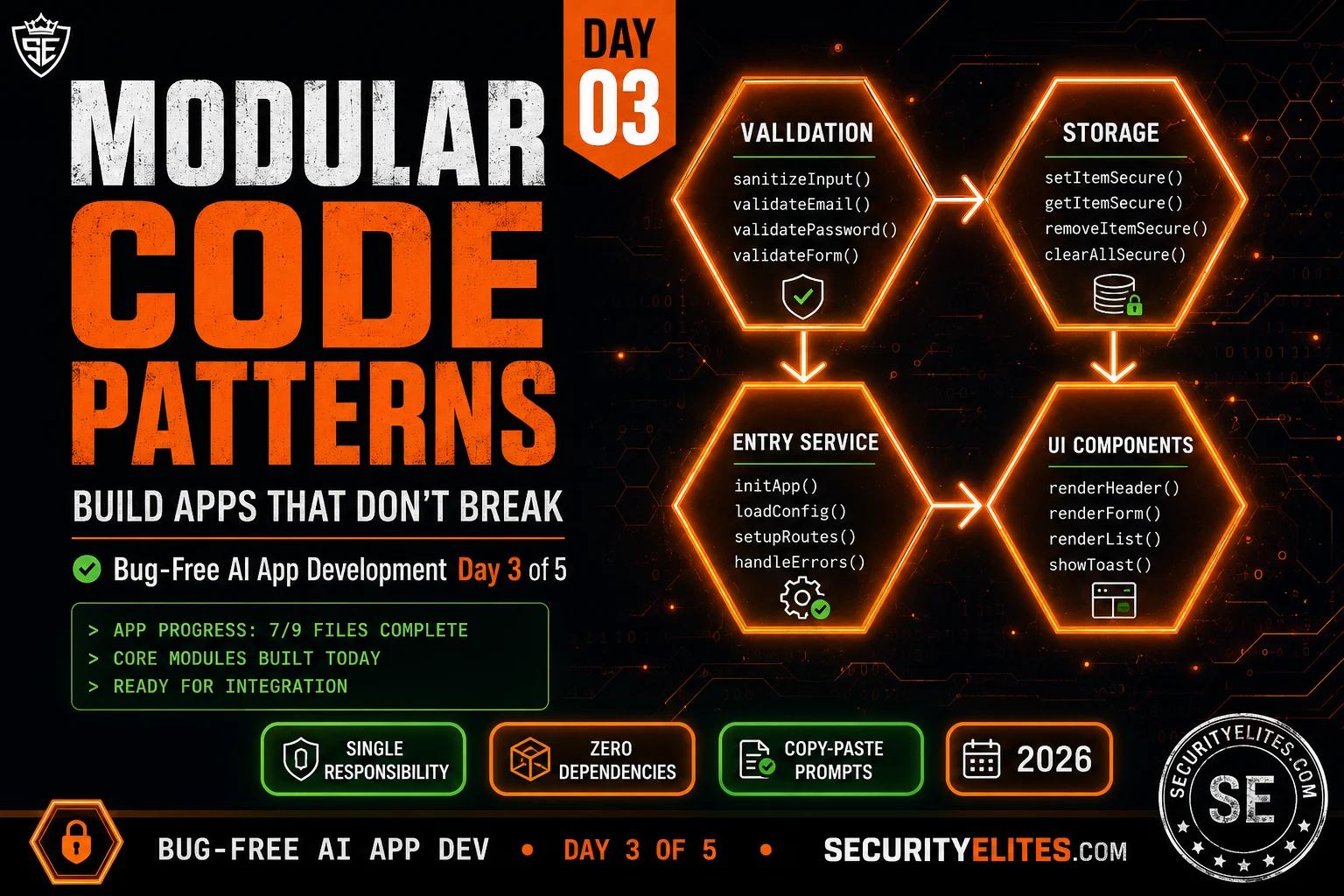
Professional codebases feel different from normal one’s. Professional code is modular. Each file does one thing. Each function does one thing. You can read any function in isolation and understand exactly what it does, what it needs, and what it returns — without reading anything else.
This structure isn’t an aesthetic choice. It’s the property that makes code debuggable, testable, reusable, and maintainable. And it’s the single pattern I’ve found has the highest leverage when prompting Claude Opus 4.8 for application code. Modular prompts — one module, one responsibility, complete specification — produce dramatically better output than monolithic prompts, even for experienced users of the formula.
Today I give you the four module patterns that cover 90% of application development. Validation. Storage. Business logic. UI rendering. Four templates, four prompts, four modules for SecureVault. By the end of today, seven of nine files are complete and the core application logic is working.
🎯 What You’ll Master in Day 3
⏱ 25 min read · 3 exercises · Claude.ai + code editor needed
- Completed Day 2 — have your securevault/ folder with contracts.js, utils.js, crypto.js
- Have the SecureVault module map and contracts handy to paste into prompts
Modular Code Patterns — Day 3 of 5
Day 3 is the most productive day of the course — four modules, four exercises, SecureVault goes from foundation to functionally complete core. The AI Coding Day 3 covers how to read AI-generated code once you have it. Today we focus on how to ask for it in patterns that produce the right code the first time. Our CEH practice exam follows the same pattern philosophy — modular question banks loaded on demand, validation layer separating input from scoring, UI rendering decoupled from answer logic.
Single Responsibility — The One Rule That Prevents Everything Else
Single Responsibility Principle: each module should have one, and only one, reason to change. A validation module changes when validation rules change. A storage module changes when the storage mechanism changes. If a single file would need to change when either validation rules or storage mechanisms change, it’s doing two things — and it will produce bugs when those two concerns pull in different directions.
The prompt-level consequence: when you write a prompt for a module, you should be able to describe its responsibility in one sentence without using “and.” If your description is “this module validates input AND saves to storage,” you’re specifying two modules in one prompt. Split it. The resulting code will be cleaner, easier to test, and more reliable.
I test every module I specify against this rule before writing the prompt. I ask myself: “If the storage backend changed from localStorage to IndexedDB, which modules would need to change?” The answer should be exactly one: the Storage module. If the answer is “the Storage module and also the EntryService module and also the App module,” the storage concerns have leaked across module boundaries and the architecture needs fixing before any code gets written.
I’ve found that beginners struggle most with the service module boundary — it’s tempting to put validation logic inside the service because “it’s all part of creating an entry.” Resist that. The service calls the validator. The service doesn’t contain validation logic. That distinction means you can change your validation rules by editing exactly one file, with zero risk to the service, storage, or UI modules. That kind of surgical changeability is what makes AI-built codebases maintainable long-term, not just functional on day one.
Pattern 1: The Validation Module
The validation module is the gatekeeper. Every piece of data enters the system through validation. Nothing that isn’t validated ever reaches storage or business logic. The validation module’s only job is to accept raw input and return a typed result describing whether the input is valid and if not, exactly why.
Key properties of a good validation module: it has no side effects (it never writes to storage or the DOM), it never throws (it always returns a ValidationResult), it validates one thing per function (not “validate the whole entry” as one function — separate functions for title, content, category), and its error messages are user-facing (not “invalid input” — “Title must be between 1 and 100 characters”).
I always include one constraint in my validation prompts that beginners typically miss: the validator must accept any type as input, not just the expected type. This sounds obvious but it’s the difference between a validator that works in tests and one that works in production. In tests, you call validateTitle("My Note") with a proper string. In production, a user pastes something unusual, a browser extension modifies the form data, or a JavaScript coercion somewhere produces a number where a string was expected. My validation prompt always includes “accepts any type as input — never assumes type” as a hard constraint. That single line eliminates an entire class of runtime TypeError crashes.
The error aggregation rule is the other thing I insist on: validateEntry() must report all errors, not just the first. Nothing is more frustrating as a user than fixing one validation error only to be told about a different one that existed from the start. Aggregated errors require one round-trip to fix everything. Stopping at the first error requires N round-trips for N issues. The prompt quality gate “validateEntry reports ALL errors, not just first” costs one sentence to specify and produces dramatically better user experience.
Export exactly: [LIST EACH FUNCTION — e.g., validateTitle(title: any) → ValidationResult, validateContent(content: any) → ValidationResult, validateCategory(category: any) → ValidationResult, validateEntry(entry: any) → ValidationResult].
Rules for each validator: (1) accepts any type as input — never assumes type, (2) returns ValidationResult {valid: boolean, errors: string[]} — never throws, (3) error messages are user-facing (complete sentence, polite), (4) validates one field per function — validateEntry() calls the individual validators and aggregates results.
Specific validation rules: [LIST RULES — e.g., title: non-empty string, 1-100 chars, no HTML tags; content: string, 1-5000 chars; category: one of [‘personal’, ‘work’, ‘finance’, ‘health’, ‘other’]].
Deliver one fenced JS code block. JSDoc on every function. Quality gates: every validator handles null/undefined/wrong type without throwing, validateEntry aggregates all field errors (not short-circuit on first error), no regex that could cause catastrophic backtracking. After code: “Complete: validation.js · [N] validators”. No preamble.
Pattern 2: The Storage Module
The storage module is the single place in the entire application that talks to localStorage. No other module ever calls localStorage.setItem or localStorage.getItem directly. This single-access-point pattern means that if you later want to change from localStorage to IndexedDB, you change exactly one file — and nothing else in the application needs to know.
Key properties: all storage operations return OperationResult (never throw or return null), the module handles quota exceeded errors explicitly, all keys are prefixed (to avoid collisions with other code on the same domain), and the module is synchronous where possible (localStorage is synchronous — don’t wrap it in unnecessary async).
The quota exceeded case is one I’ve been bitten by in production. localStorage has a 5MB limit per origin, and it’s not difficult to hit that with a notes app where users store longer entries. An application that doesn’t handle quota exceeded will throw a DOMException that — without explicit handling — looks to the user like a blank crash. My storage prompt always includes “handle QuotaExceededError explicitly with a user-friendly error message.” This gives the user a meaningful message (“Storage is full — delete some old notes to save new ones”) rather than a silent failure.
I also always add a key prefix constant at the top of the storage module. For SecureVault I use sv_. This prevents the nightmare scenario where your app’s keys collide with another script on the same domain — a scenario that causes subtle, hard-to-reproduce data corruption bugs that only appear in specific browser environments. One constant, zero collision risk.
Export exactly: initStorage() → void (sets up storage namespace, runs migration if needed), saveEntry(entry: Entry) → OperationResult<Entry>, getEntry(id: string) → OperationResult<Entry>, getAllEntries() → OperationResult<Entry[]>, deleteEntry(id: string) → OperationResult<boolean>, clearAll() → OperationResult<boolean>, getStorageStats() → {count: number, sizeBytes: number, quotaUsed: number}, saveCryptoConfig(config: CryptoConfig) → OperationResult<boolean> (persists salt + verification ciphertext as JSON under a dedicated key), getCryptoConfig() → OperationResult<CryptoConfig | null> (returns null — not an error — if no config has ever been saved, which signals first-run setup).
Constants: KEY_PREFIX = ‘sv_entry_’, META_KEY = ‘sv_meta’, CRYPTO_CONFIG_KEY = ‘sv_crypto_config’. All localStorage keys must use KEY_PREFIX for entries. Constraints: handle localStorage unavailable (private browsing), handle QuotaExceededError explicitly with user-friendly error message, never store passwords or encryption keys (CryptoConfig contains only the salt and a verification ciphertext — neither is the password or the derived key, both are safe to store), JSON parse errors must be caught and return OperationResult with error.
Quality gates: initStorage() is safe to call multiple times (idempotent), getAllEntries() returns empty array (not error) when no entries exist, getCryptoConfig() returns {success: true, data: null} (not an error) when no config exists yet, every function returns OperationResult — never null/undefined/throws. After code: “Complete: storage.js · [N] exports”. No preamble.
The two CryptoConfig functions are the piece that makes SecureVault actually work across sessions. getCryptoConfig() returning null is how app.js will know “no master password has ever been set — show the setup screen” versus “a vault already exists — show the unlock screen.” Without this, there’s no reliable way to distinguish first-run from returning-user, and no way to retrieve the salt needed to re-derive the same encryption key on every subsequent unlock.
Pattern 3: The Service Module (Business Logic)
The service module is the brain of the application. It coordinates between the other modules to execute the application’s features. The service module knows about validation, storage, and crypto — it orchestrates them. It never touches the DOM directly (that’s the UI module’s job) and never talks to localStorage directly (that’s the storage module’s job).
The service module’s functions map directly to user-visible actions: create an entry, read an entry, delete an entry, search entries. Each function runs the full workflow: validate input → encrypt → save → return result. The calling code (app.js) doesn’t need to know anything about validation rules or encryption — it just calls createEntry() and gets a typed result back.
Export exactly: hasExistingVault() → boolean (calls storage.getCryptoConfig() — returns true if a CryptoConfig exists, false if this is first run), initService(password: string) → Promise<OperationResult<{isNewVault: boolean}>>, createEntry(title: string, content: string, category: string) → Promise<OperationResult<Entry>> (validate → encrypt content → save → return saved entry), getEntry(id: string) → Promise<OperationResult<{entry: Entry, content: string}>> (load → decrypt content → return both entry metadata and plaintext), getAllEntries() → OperationResult<Entry[]> (returns metadata only — no decryption), deleteEntry(id: string) → OperationResult<boolean>, searchEntries(query: string) → OperationResult<Entry[]> (searches title and category fields only — never decrypts for search), isInitialised() → boolean.
initService(password) logic — this is the most important part, implement exactly: (1) Call storage.getCryptoConfig(). (2) IF no config exists (first run): generate a new salt via crypto.generateSalt(), derive a key via crypto.deriveKey(password, salt), encrypt the fixed string “SECUREVAULT_VERIFY” with that key to produce a verification ciphertext+iv, build a CryptoConfig {salt: crypto.saltToBase64(salt), verifyCiphertext, verifyIv}, save it via storage.saveCryptoConfig(), store the derived key in the module-level variable, return {success: true, data: {isNewVault: true}}. (3) IF a config exists (returning user): decode the stored salt via crypto.saltFromBase64(config.salt), derive a key via crypto.deriveKey(password, decodedSalt), attempt crypto.decrypt(config.verifyCiphertext, config.verifyIv, derivedKey). (4) IF decrypt succeeds AND the result equals “SECUREVAULT_VERIFY”: store the derived key in the module-level variable, return {success: true, data: {isNewVault: false}}. (5) IF decrypt throws OR the result does not match: do NOT store any key, return {success: false, error: “Incorrect password”}.
Security constraints: the derived CryptoKey is stored in a module-level variable (not localStorage, not window, not sessionStorage), isInitialised() returns false if initService has not been called or if the last call returned success:false, every operation that requires the key checks isInitialised() first and returns an error if not initialised. Quality gates: createEntry validates before encrypting (never encrypts invalid data), getEntry decryption error returns OperationResult error (not throw), search never decrypts content (only searches plaintext metadata), a wrong password on a returning user NEVER stores a key and ALWAYS returns the exact error string “Incorrect password” so app.js can show that specific message. After code: “Complete: entry-service.js · [N] exports”. No preamble.
Read the initService logic carefully — it’s the single most important piece of business logic in the entire application, and it’s the part most beginners would never think to specify. Without the verification ciphertext, there’s no way to detect a wrong password on unlock: deriveKey() never fails, it just produces some key from some password — a wrong password silently produces a wrong key, and every decrypt() call on existing entries would then fail with “wrong password or corrupted data,” which is technically true but arrives too late and in the wrong place (scattered across every entry, not as a single clear “incorrect password” message at unlock time). The verification ciphertext is a small, fixed piece of known plaintext encrypted once at setup specifically so that one decrypt attempt at unlock time can confirm or reject the password before the user ever sees their entry list.
Pattern 4: The UI Components Module
The UI components module contains pure render functions — functions that take data and return HTML strings or DOM elements. Nothing else. No event listeners. No fetch calls. No storage. Just: data in → HTML out. This purity makes UI components testable (you can call them with test data and inspect the output), reusable (the same card component works anywhere you need to render an entry), and safe (no business logic leaks into the presentation layer).
Event listeners live in app.js, not ui-components.js. This separation means you can completely redesign the UI without touching business logic, and you can change business logic without breaking the UI rendering.
Export exactly: renderEntryCard(entry: Entry) → string (a card showing title, category badge, createdAt formatted as “Jan 15 2026”, a View button with data-id attribute, a Delete button with data-id attribute — no content preview as content is encrypted), renderModal(content: string, title: string) → string (a modal overlay with header, scrollable body, close button), renderToast(message: string, type: ‘success’|’error’|’info’) → string (a notification toast with appropriate icon), renderEmptyState(message: string) → string (friendly empty state with icon and message), renderSearchBar() → string (search input with clear button), renderCategoryBadge(category: string) → string (coloured badge for the category name).
Design: #050810 background, #f97316 accent, #e2e8f0 text, #1e293b borders. All classes use BEM: sv-card, sv-card__title, sv-card__badge, etc. No inline styles — classes only. Security: all text content must be escaped using a local escapeHtml() helper — never use raw interpolation of user data into HTML. Deliver one fenced JS code block. After code: “Complete: ui-components.js · [N] components”. No preamble.
The Isolation Test — Verify Before You Integrate
Before connecting any module to the application, run the isolation test. The isolation test is a minimal browser-runnable script that imports the module and calls each function with known inputs, checking that outputs match expectations. This catches bugs in individual modules before they combine with other modules and become integration bugs that are much harder to trace.
I want to be direct about why I consider this step non-negotiable. The most painful debugging sessions I’ve had with AI-built applications weren’t caused by bad code inside a single module — they were caused by two correctly-written modules that disagreed on something the architecture didn’t specify. One function returned null when it found nothing; the calling code expected an empty array. Both pieces of code were individually sensible. Together they caused a crash that took over an hour to trace because I never tested the modules in isolation first. I would have caught it in three minutes if I’d run the isolation test.
The test works because it forces a hard boundary between “this module is correct” and “this module is correctly connected.” Once you know every module passes its isolation test, any bug in the running application is definitionally an integration bug — a connection problem, not a module problem. That narrows your debugging search space from “any of eight files” to “the wiring between two specific files.” That’s the difference between a ten-minute fix and a two-hour debugging session.
My routine: I run the isolation test immediately after Claude generates each module. Not after the whole build. Not at integration time. Right after generation, while the module is still isolated in a browser console tab. If it fails, I use the Day 1 formula to get a corrected module before I’ve built anything on top of it. Building on top of a module I haven’t tested is building on sand.
One more thing I always add to my isolation tests that the basic template doesn’t include: an adversarial input section. I call every function with inputs that are technically valid types but semantically hostile — a title that’s exactly the maximum allowed length, a category that’s a valid string but not in the allowed list, a timestamp that’s zero or negative. These are the inputs real users will eventually provide, and they’re the ones that reveal validation logic gaps before they become production bugs. It takes two extra test cases per function and it has saved me far more debugging time than it costs.
Build validation.js and storage.js today — modules 4 and 5 in the build order. Use the templates above, filled in for SecureVault. I’ll give you the filled-in prompts directly.
- In your Claude session, send the validation.js prompt:SECUREVAULT VALIDATION.JS — COPY AND SENDYou are a senior JavaScript developer. Generate validation.js for SecureVault — a browser-based encrypted notes app. Zero external dependencies. Depends on: contracts.js (types only). Exports: validateTitle(title: any) → ValidationResult, validateContent(content: any) → ValidationResult, validateCategory(category: any) → ValidationResult, validatePassword(password: any) → ValidationResult, validateEntry(entry: any) → ValidationResult. Rules: title: non-empty string, 1-100 chars, no HTML; content: string, 1-10000 chars; category: one of [‘personal’,’work’,’finance’,’health’,’other’]; password: string, min 8 chars, at least 1 uppercase, 1 number; validateEntry calls all field validators and aggregates errors. Every validator: accepts any type, never throws, returns {valid: boolean, errors: string[]} with user-friendly error strings. Quality gates: handles null/undefined/number input for every validator, validateEntry reports ALL errors not just first, no regex catastrophic backtracking. After code: “Complete: validation.js · 5 validators”. No preamble.
- Send the storage.js prompt using the template above filled in for SecureVault. Save both files to securevault/.
- Run isolation tests on both: paste validation.js in your browser console and test:
validateTitle('')(should fail),validateTitle('Test Note')(should pass),validateTitle(null)(should not throw). Then paste storage.js and test:initStorage()(no error),getCryptoConfig()(should return{success: true, data: null}on a fresh browser — this null is what tells app.js “no vault exists yet, show setup”).
Module boundaries are the lines in your architecture diagram. Breaking them is exactly what creates bugs. I want you to deliberately think about what happens when module boundaries get violated — because recognising violations in code Claude generates is how you catch them before they cause problems.
- Consider these three code snippets. For each one, identify which module boundary is being violated and what bug it will eventually cause:
- Snippet A: Inside
validation.js:if (validateTitle(title).valid) { localStorage.setItem('draft_title', title); } - Snippet B: Inside
storage.js:const result = validateEntry(entry); if (!result.valid) return {success: false, error: result.errors.join(', ')}; - Snippet C: Inside
ui-components.js:const entries = await entryService.getAllEntries(); entries.data.forEach(e => renderEntryCard(e));
- Snippet A: Inside
- For Snippet B specifically: what seems reasonable about it? Why is it still a boundary violation even though the intent is good?
- Describe the exact bug each violation will cause — not “it’s bad practice” but the specific runtime behaviour that breaks.
Build the final two core modules: entry-service.js and ui-components.js. Then run the smoke test — a script that imports all six modules and confirms they all load and connect correctly.
- Send the entry-service.js prompt from the Pattern 3 template above (use the full filled-in version from Day 3). Save to securevault/.
- Send the ui-components.js prompt from Pattern 4. Save to securevault/.
- Request the smoke test from Claude:SMOKE TEST PROMPT — COPY AND SENDGenerate a smoke-test.html file for SecureVault. It imports all six JS modules in this order: contracts.js (no import — types only), utils.js, crypto.js, validation.js, storage.js, entry-service.js, ui-components.js. The test script (inline in HTML): (1) calls generateId() and asserts it returns a string, (2) calls validateTitle(‘Test’) and asserts valid is true, (3) calls validateTitle(”) and asserts valid is false, (4) calls initStorage() without error, (5) calls renderEmptyState(‘No notes yet’) and asserts it returns a string containing ‘No notes yet’, (6) calls isInitialised() and asserts it returns false (service not yet initialised), (7) calls generateSalt() and asserts it returns a Uint8Array. Logs each test result with ✅ or ❌. Final log: “Smoke test: [N]/7 passed”. Deliver complete HTML file ready to open in browser. No preamble.
- Open smoke-test.html in your browser and check the console (F12). All 7 tests should pass.
Questions and Answers
What if Claude generates code that violates the module boundaries I specified?
It happens occasionally, especially when the constraints aren’t exhaustive. The most reliable fix: use the exact violation check as a quality gate. Add to your prompt’s quality gates section: “This module must NOT import from [list prohibited modules]. This module must NOT call localStorage directly. This module must NOT contain any DOM manipulation.” These negative constraints catch violations before the code is delivered. If Claude still generates a violation, use a delta prompt: “In the output above, line [N] calls localStorage.setItem directly — this violates the storage module boundary. Remove this call. The module must only interact with storage through the imported storage module.” Specific, line-referenced corrections produce clean fixes.
How many modules is too many?
There’s no hard limit, but a useful heuristic: if you’re building a module for a function group smaller than three functions, it’s probably not a module — it’s a set of helpers that belongs in an existing module. The overhead of a module (import declaration, module-level constants, export structure) is worth it when the module has stable, well-defined responsibilities with three or more related functions. Modules with one function exist (sometimes a single important transformation warrants isolation) but they should be rare. For SecureVault’s size (a small but complete browser app), nine modules including the entry point is a reasonable number. Projects ten times larger might have thirty to fifty modules.
Should I use ES6 modules (import/export) or the module pattern I see in older code?
For new browser-based projects in 2026: use ES6 modules (import/export with type=”module” script tags). They’re supported natively in all modern browsers, produce clean dependency graphs Claude can reason about precisely, and work well with the architecture approach. The older patterns (IIFE, revealing module) were workarounds for the absence of native modules — there’s no reason to use them in new work. The one exception: if you’re building something that must run in very old browsers or environments without module support (some embedded browser environments, certain testing setups) — in those cases, use the IIFE pattern and ask Claude to specify that in the Role component of your formula.
Is validation always a separate module, or can it live inside the service?
Always separate, and here’s the concrete reason: validation logic changes at a different rate and for different reasons than service logic. You might tighten the title length rule (validation change) without changing anything about how entries are created (service change). If validation is inside the service, that change requires touching the service — which risks breaking service logic through merge conflicts or accidental modifications. When they’re separate, the validation change touches only validation.js and the service is untouched. This is the single responsibility principle in its most practical form: separate what changes for different reasons.
Further Reading
- How to Audit AI Generated Code Security — the full security review process beyond today’s basics
- AI Powered Exploit Code Generation — what attackers do with the same tools you’re learning
- Vibe Coding Security Risks — the broader consequences of skipping verification
- Replit — run and test code online without any installation
- PortSwigger Web Security — learn about XSS and other vulnerabilities that affect the code you build
