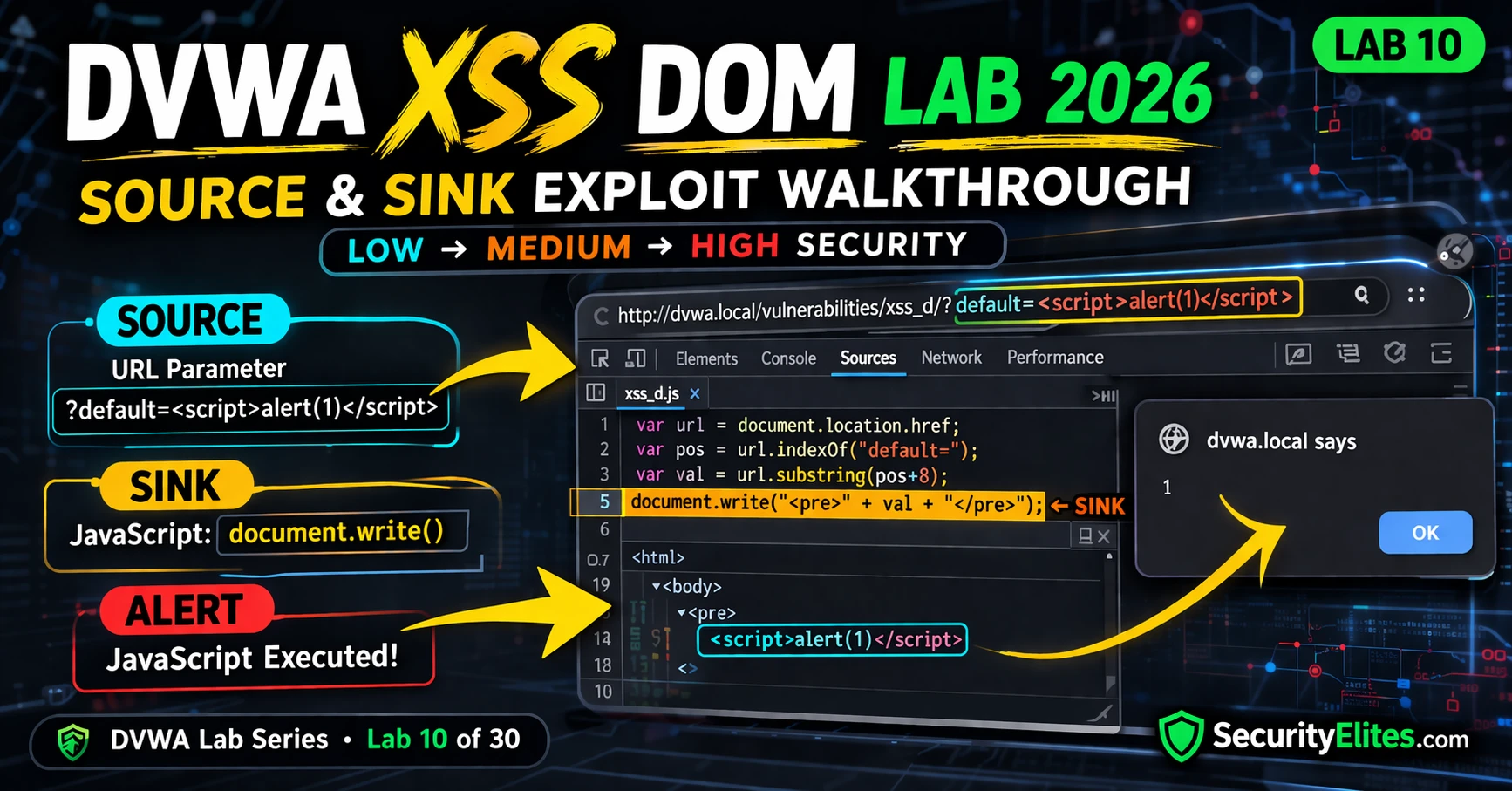
This article is a practical security training lab on DOM-based Cross-Site Scripting (DOM XSS), the third variant of XSS vulnerabilities. It explains why DOM XSS is fundamentally different from reflected and stored XSS: the malicious payload never reaches the server, making it invisible to Web Application Firewalls (WAFs) and server-side defences. The lab teaches readers how to identify vulnerable source-to-sink data flows in JavaScript and exploit them at three security levels, demonstrating why client-side sanitisation is the only effective defence.
- DOM XSS bypasses all server-side defencesUnlike reflected and stored XSS where the server processes the payload, DOM XSS executes entirely in the browser through JavaScript that reads URL parameters or fragments and writes them to the DOM without sanitisation. WAFs, server-side input validation, and output encoding cannot prevent attacks on data that never reaches the server. The article demonstrates that when JavaScript reads document.location and passes it directly to document.write() without checking the content, the malicious script executes in the victim's browser while server logs show only a normal page request.
- Source-to-sink data flow defines DOM XSSEvery DOM XSS vulnerability has two components: a source (attacker-controlled input like document.location.search or window.location.hash) and a sink (dangerous functions like document.write(), innerHTML, or eval() that execute code from their input). The Low security exercise demonstrates this directly: the attacker crafts a URL with ?default=, the JavaScript reads this parameter as the source, document.write() serves as the sink, and the browser executes the injected script without the server ever seeing it.
- URL fragments are never sent to serverThe High security exercise reveals a critical defence gap: URL fragments (everything after #) stay in the browser and are never included in HTTP requests sent to the server. This means server-side validation of the query parameter (?default=English) can pass while a malicious script in the fragment (#) still executes. The server receives a request for a legitimate page, the WAF inspects nothing suspicious, but the JavaScript reads the full URL including the fragment and processes the payload entirely client-side.
- Context escape and event handlers bypass filtersThe Medium security level filters tags using string replacement, but the article demonstrates this is insufficient. By understanding the injection context—that the input lands inside a element's value—an attacker can close the element with and inject an tag with an onerror event handler. This bypasses the script tag filter because event handler attributes on any HTML element can execute JavaScript, and the filter has no concept of HTML context or attribute-based execution.
- Whitelisting provides stronger defence than blacklistingHigh security implements whitelist validation: the server only accepts specific known-good values (language names) and rejects anything else. This prevents both script tag injection and event handler escape techniques because any unrecognised value is filtered before reaching the DOM. However, the article shows this server-side whitelist can still be bypassed if the JavaScript reads from the URL fragment, which the server-side validation never processes, illustrating why client-side defences are essential.
- Dangerous patterns in modern frameworksThe article identifies specific vulnerable coding patterns in popular frameworks: React's dangerouslySetInnerHTML, Angular's bypassSecurityTrustHtml, and jQuery's $() when passed HTML strings from URL parameters. These explicitly bypass built-in XSS protections and create DOM XSS vulnerabilities. The owner's personal anecdote describes finding DOM XSS in a React SPA that had passed a security review because the vulnerability existed in a client-side routing component reading window.location.hash with dangerouslySetInnerHTML—server-side controls and previous reviews had missed it entirely.
- Client-side sanitisation is the correct defenceThe article identifies textContent instead of innerHTML and the DOMPurify library as the proper technical remediation. Since the payload is processed entirely client-side where server-side controls cannot reach it, only JavaScript-based sanitisation at the sink—before the dangerous function executes—can prevent DOM XSS. Waiting for server validation is ineffective because the payload never travels to the server in the first place.
- Finding DOM XSS requires source code reviewThe article emphasises that automated server-side detection methods fail against DOM XSS, making manual code review essential. Practitioners should examine JavaScript in DevTools, trace URL parameters and hash fragments to sinks like document.write() and innerHTML, and test every component that controls page content or navigation state. The article recommends using Burp Suite's DOM Invader extension alongside manual review of React, Angular, and Vue components for dangerous patterns.
Bottom line: DOM XSS is a client-side vulnerability where JavaScript reads untrusted data from the URL (especially URL fragments) and writes it to the DOM without sanitisation, making it invisible to server-side WAFs, validation, and encoding—the payload never reaches the server. The only effective defence is client-side sanitisation at the sink using DOMPurify or textContent instead of innerHTML, combined with manual code review to identify dangerous source-to-sink patterns in JavaScript.
FREE
Part of the DVWA Lab Series — 30 Labs
🎯 What You’ll Learn in Lab 10
⏱️ 35 min · 3 browser-based exercises
✅ Prerequisites
- DVWA running locally (Lab 1: Setup Guide)
- Labs 8 and 9 complete (Reflected XSS and Stored XSS)
- Browser DevTools open (F12) — Sources and Console tabs
📋 Lab 10 Contents — DOM XSS
In Lab 9 you exploited Stored XSS to hijack sessions. Lab 10 completes the XSS trilogy with DOM-based XSS — the most technically distinct of the three. While reflected and stored XSS both involve the server reflecting or serving malicious content, DOM XSS is a client-side vulnerability processed entirely in the browser. Understanding all three is required for comprehensive web application security testing in the DVWA Lab Series.
DOM XSS Explained — Sources, Sinks, and Why the Server Never Sees It
Every DOM XSS vulnerability has two components: a source (where attacker-controlled data enters the JavaScript environment) and a sink (where that data is written to the DOM or executed). The most common source in DVWA’s DOM XSS module is document.location — the current page URL, which an attacker controls by crafting a malicious link. The sink is document.write() — a function that writes HTML directly to the page, including any script tags or event handlers in the string it receives.
Low Security — Direct URL Parameter to document.write()
⏱️ Time: 12 minutes · DVWA at Low security · Browser DevTools open
📸 Screenshot the alert executing AND the Network tab showing no server-side payload. Share in #dvwa-labs on Discord.
Medium Security — Escaping the Select Element Context
Medium security strips <script> tags from the input using a simple string replacement. This prevents the direct script tag injection used in the Low security exploit. However, XSS does not require script tags — any HTML element that can execute JavaScript through event handlers is equally effective. The key to the Medium security bypass is understanding the injection context: the value is being inserted inside a <select> element’s option list. To break out of this context and inject event handlers, we close the select element first.
⏱️ Time: 12 minutes · DVWA at Medium security
📸 Screenshot the DOM Elements panel showing the injected img element after the closed select. Share in #dvwa-labs on Discord.
High Security — Whitelist Enforcement
High security implements a whitelist approach rather than a blacklist. Instead of trying to strip known-bad patterns (which attackers always find ways around), the server validates that the default parameter value is one of a specific list of acceptable language names. Any value not on the whitelist is replaced with a safe default. This closes both the Low security script injection and the Medium security event handler bypass — an attacker cannot inject arbitrary HTML because any value that does not match the whitelist is rejected before it reaches the DOM.
⏱️ Time: 10 minutes · DVWA at High security · View Source
📸 Screenshot the Network tab showing the server received only “?default=English” while the alert still executed from the fragment. Share in #dvwa-labs on Discord. Tag #domxss2026
DOM XSS in Real Applications — Where to Look
DOM XSS is common in modern single-page applications (SPAs) built with React, Angular, and Vue — not because these frameworks are insecure, but because developers sometimes use dangerous patterns: React’s dangerouslySetInnerHTML, Angular’s bypassSecurityTrustHtml, and jQuery’s $() when passed an HTML string from a URL parameter. In bug bounty, check every URL parameter that appears to control page content or navigation state, every hash fragment that affects page rendering, and any JavaScript that uses eval() with URL-derived data.
🧠 QUICK CHECK — Lab 10
📋 Lab 10 Key Takeaways — DOM XSS Reference
🏆 Mark Lab 10 as Complete
Lab 10 completes the XSS trilogy. You now understand all three XSS types: reflected (server reflects input), stored (server stores and serves input), and DOM-based (browser JavaScript processes input without server involvement). DOM XSS’s server-invisibility makes it the most technically interesting of the three and a consistent finding in modern web application testing.
❓ Frequently Asked Questions – DVWA XSS DOM Lab
What is DOM XSS and how is it different from reflected or stored XSS?
What are sources and sinks in DOM XSS?
Why does DOM XSS bypass WAF and server-side controls?
How do I find DOM XSS vulnerabilities in real applications?
What comes after DVWA Lab 10?
Lab 9: DVWA XSS Stored 2026
Lab 11: DVWA Blind SQL Injection 2026
📚 Further Reading
- DVWA XSS Reflected Lab 2026 — Lab 8 covers the server-reflected XSS variant — understanding reflected XSS provides the baseline comparison that makes DOM XSS’s client-side nature distinctive.
- DVWA XSS Stored Lab 2026 — Lab 9 covers persistent XSS stored in the database — the most dangerous XSS type by impact, since it affects every user who loads the compromised page.
- XSS Complete Guide — The complete XSS category covering all three variants, CSP bypass techniques, XSS-to-account-takeover chains, and real bug bounty XSS findings with PoC structure.
- PortSwigger DOM XSS Labs — PortSwigger Web Academy’s DOM XSS module with interactive labs covering all common source-sink combinations including jQuery, AngularJS, and modern framework DOM XSS patterns.
- DOMPurify — Client-Side Sanitisation Library — The standard client-side HTML sanitisation library that correctly prevents DOM XSS by stripping dangerous HTML before it reaches any sink — the correct technical remediation recommendation.
