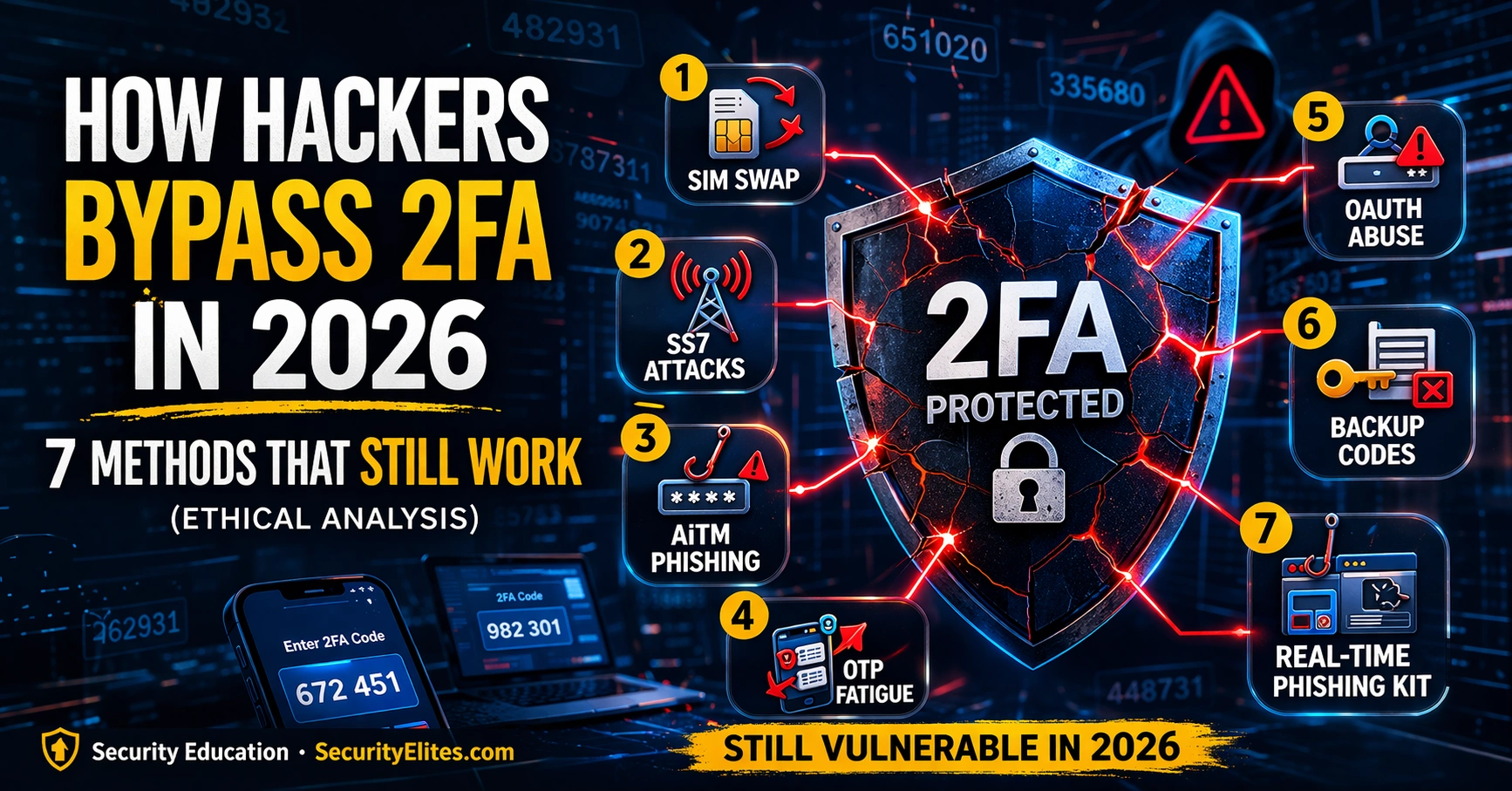
This article analyzes seven documented methods attackers use to bypass two-factor authentication in 2026, demonstrating that different 2FA types offer vastly different security levels. The analysis covers techniques from social engineering-based SIM swapping to sophisticated real-time phishing proxies, explaining how each method works and which 2FA implementations resist them. Understanding these bypass techniques is critical for defenders because 2FA remains a significant security layer for most users, but its effectiveness depends entirely on which authentication method is deployed.
- SMS 2FA vulnerable to four major attacksSMS-based 2FA can be bypassed via SIM swapping (social engineering carrier staff to transfer phone numbers), SS7 protocol attacks (intercepting SMS at the network level with telecom infrastructure access), adversary-in-the-middle phishing (real-time OTP relay), and backup code abuse. SIM swapping requires no technical skill and exploits the human element of carrier customer service verification. SS7 attacks are limited to nation-state and sophisticated criminal actors with telecom infrastructure access, but documented incidents show both remain viable.
- Adversary-in-the-middle phishing defeats app and push 2FAAiTM phishing uses a reverse proxy that sits between the victim's browser and the legitimate site, immediately forwarding entered credentials and one-time passwords in real time to complete legitimate authentication before the 30-second OTP window expires. Tools like Evilginx2 automate this setup, presenting a perfect visual mirror of the real site because it proxies actual content. The attacker then captures the authenticated session cookie, achieving 2FA bypass for any time-limited code-based method. Detection is difficult because victims see no visual difference from legitimate login and ma
- MFA fatigue specifically targets push notificationsThis attack requires only valid username and password, then triggers repeated push notification requests asking 'Approve sign-in?' until the victim either approves one to stop alerts, accidentally approves while managing notifications, or is socially engineered by someone claiming to be IT support. The Uber 2022 breach exemplified this method combined with social engineering. Defenses include requiring number matching (the app displays a number that must be entered to approve rather than one-tap approval) and limiting push requests per time period.
- FIDO2 hardware keys resist all seven documented methodsFIDO2 security keys like YubiKey are immune to SIM swapping, SS7 attacks, AiTM phishing, MFA fatigue, backup code abuse, OAuth consent abuse, and real-time phishing kits. Hardware keys refuse to authenticate on domains other than the registered legitimate domain (WebAuthn cryptographically verifies domain origin), making them unaffected by proxy-based phishing. The article explicitly states no known practical remote bypass exists for FIDO2, making it the only 2FA method offering complete documented protection against the seven techniques described.
- Backup codes and recovery paths bypass 2FAAccount recovery mechanisms (backup codes, recovery phone numbers, recovery email addresses) are frequently weaker than the 2FA they protect. An attacker accessing the recovery email account can reset the second factor entirely. Backup codes stored in syncing cloud notes are accessible to anyone compromising the cloud account. The recovery mechanism is a parallel authentication path whose security must match or exceed the 2FA it protects—storing codes in password managers rather than email or notes is critical.
- OAuth token grants persistent access without authenticationOAuth consent abuse does not break 2FA but sidesteps it entirely. When users grant OAuth applications broad permissions (email, contacts, files, calendar), the application receives an access token that authorizes API access without requiring authentication on each use or triggering 2FA. Malicious OAuth applications accessed through phishing links cause users to complete normal login including 2FA, then grant permissions to what appears legitimate. The resulting token provides persistent API access regardless of 2FA method, meaning the attacker never authenticates to the service at all.
- Email account is highest-priority targetThe article emphasizes that email is the most critical account because compromising it enables password resets on every other account. Moving email from SMS 2FA to authenticator app as a minimum, or FIDO2 hardware key ideally, is the single highest-impact defensive action. The article's vulnerability matrix and exercise frameworks consistently identify email security as the foundation for protecting all downstream accounts and the primary target an attacker would pursue via SIM swap or other methods.
- Practical hardening prioritizes app codes then hardware keysFor non-state-actor threat models, the article identifies three high-impact improvements: switching email from SMS to authenticator app (blocks SIM swap on most critical account), enabling number matching on push notification apps (blocks MFA fatigue), and storing backup codes in password manager instead of email or notes. These changes eliminate most common 2FA bypass routes without purchasing hardware. Adding FIDO2 hardware keys provides additional protection against AiTM phishing and is necessary for high-value targets.
Bottom line: FIDO2 hardware security keys are the only 2FA method with documented resistance to all seven bypass techniques, making them the strongest available protection, but immediate practical improvements—upgrading email to authenticator apps, enabling number matching in push notifications, and securing backup codes in password managers—significantly reduce vulnerability to the most common attacks for users unable to deploy hardware keys immediately.
🎯 What This Guide Covers
⏱️ 45 min read · 3 exercises
📊 What 2FA method do you use for your most important accounts?
📋 The 7 Methods — Quick Navigation
- SIM Swapping — Hijacking Your Phone Number
- SS7 Protocol Attacks — Intercepting SMS at the Network Level
- Adversary-in-the-Middle (AiTM) Phishing — Real-Time OTP Relay
- MFA Fatigue — Bombing Until Approval
- Backup Code and Account Recovery Abuse
- OAuth Consent Abuse — Bypassing 2FA Entirely
- Real-Time Phishing Kits — Evilginx2 and Session Hijacking
Method 1 — SIM Swapping: Hijacking Your Phone Number
SIM swapping involves convincing a mobile carrier’s customer service to transfer a target’s phone number to a new SIM card controlled by the attacker. With sufficient personally identifiable information — often gathered from data breaches, social media, or social engineering — an attacker calls the carrier, claims to be the account holder, and requests a SIM replacement. Once the number is transferred, all SMS codes sent to that number go to the attacker’s SIM instead.
SIM swapping attacks have been responsible for some of the most publicly reported account compromises, particularly targeting cryptocurrency holders and social media accounts with high monetary or influence value. The attack requires no technical skill — it exploits the human element of carrier customer service. Carriers have improved verification processes but social engineering of low-paid customer service representatives remains viable in documented incidents.
Method 2 — SS7 Protocol Attacks: Intercepting SMS at the Network Level
SS7 (Signalling System 7) is the protocol suite that underpins global telephone network routing. It was designed in 1975 when the only entities with access to the signalling network were trusted telecoms operators — security through exclusivity rather than cryptographic authentication. Today, access to SS7 infrastructure can be obtained by nation-state actors, criminal groups with telecom connections, and researchers who have demonstrated the attacks at security conferences.
An SS7 attack against SMS 2FA works by issuing SS7 location update messages that redirect SMS delivery from the target’s carrier to the attacker’s controlled intercept point. The victim receives no notification that their SMS messages are being silently forwarded. SS7 attacks require telecom infrastructure access that places them firmly in the nation-state and sophisticated criminal threat actor category — they are not practical for opportunistic attackers. However, for high-value targets including politicians, executives, journalists, and cryptocurrency holders, SS7-capable threat actors are a documented real risk.
⏱️ Time: 10 minutes · Browser · your account security settings
(email, banking, work SSO, social media, cloud storage)
Step 2: For each account, check what 2FA method is enabled:
– Settings → Security → Two-Factor Authentication
Note: SMS code? App? Push? Hardware key? None?
Step 3: For each account using SMS 2FA — check if the account
ALSO allows account recovery via SMS
(Recovery method bypasses = Method 5 in this article)
Step 4: Check if any accounts have unused backup codes stored
somewhere (email drafts, notes app, Google Drive)
If yes — this is a risk vector (Method 5)
Step 5: For each account, check if they support hardware keys:
Google: yes (passkeys + YubiKey)
Microsoft: yes (FIDO2 keys)
GitHub: yes (security keys)
Most banks: no (SMS only)
Step 6: Rate each account’s 2FA security:
🔴 SMS only → vulnerable to Methods 1, 2, 7
🟡 Authenticator app → vulnerable to Methods 3, 7
🟠 Push notification → vulnerable to Methods 3, 4, 7
🟢 FIDO2 hardware key → resistant to all 7 methods
📸 Share your anonymised 2FA audit results (no account names needed) in #security-hygiene on Discord.
Method 3 — Adversary-in-the-Middle (AiTM) Phishing: Real-Time OTP Relay
AiTM phishing is the most technically sophisticated and most commonly used method for bypassing authenticator app 2FA in targeted attacks. A reverse proxy sits between the phishing page and the legitimate website. When the victim enters credentials and their OTP, the proxy immediately forwards them in real time — completing the legitimate authentication before the 30-second OTP window expires. The proxy captures the resulting authenticated session cookie and the attacker uses it directly, bypassing 2FA entirely because authentication has already been completed.
Tools like Evilginx2 automate the entire proxy setup. The phishing page is a perfect mirror of the legitimate site because it is literally proxying the real site’s content. Detection is difficult because the victim sees no visual difference from the legitimate login experience, and many phishing detection services that check page content see mostly legitimate site content being proxied.
Method 4 — MFA Fatigue: Bombing Until Approval
MFA fatigue specifically targets push notification-based 2FA. The attacker needs only the correct username and password — then they trigger repeated authentication requests that send push notifications to the victim’s phone. Each notification asks “Approve sign-in?” The attack relies on the victim eventually approving a notification to make the alerts stop, or approving it accidentally while dismissing legitimate notifications, or being social-engineered with a simultaneous contact claiming to be IT support.
The Uber breach of 2022 is the most widely cited example of MFA fatigue combined with social engineering. Countermeasures include requiring a number match in push notifications (the app shows a number and the notification requires the user to enter the same number — they cannot just click Approve), limiting the number of push requests per time period, and switching to TOTP app codes that require manual entry rather than a single tap approval.
Method 5 — Backup Code and Account Recovery Abuse
Every 2FA system provides an account recovery mechanism for when the second factor is lost. These recovery mechanisms — backup codes, recovery phone numbers, recovery email addresses — are frequently weaker than the 2FA they are meant to back up. An attacker who can access the recovery email account can trigger a 2FA recovery that resets the second factor entirely. Backup codes stored in a notes application that syncs to a cloud service are accessible to anyone who compromises that cloud account. The recovery mechanism is a parallel authentication path that bypasses 2FA — its security must match or exceed the 2FA it protects.
⏱️ Time: 10 minutes · No tools · theoretical attacker scenario
engagement. The target employee uses SMS 2FA on their corporate
email (Google Workspace). The employee’s personal social media is
public and shows their phone carrier and general location.
Design a THEORETICAL attack chain to bypass the SMS 2FA.
(This is a mental exercise for understanding the attack — do
not attempt any part of this on real accounts without written
authorisation.)
Consider:
1. What publicly available information would you gather first?
(Full name, carrier, account identifiers, recent activity?)
2. For a SIM swap attempt — what information does a carrier
typically require to verify identity for a SIM replacement?
What OSINT sources could provide this?
3. What ONE additional account compromise would maximise
impact if the SIM swap succeeded?
(Hint: think about what resets all other account passwords)
4. How would the attacker make the SIM swap less detectable?
(timing relative to normal business hours, etc.)
5. Most importantly: what single defensive measure would
completely block this entire attack chain?
(Hint: it involves removing SMS 2FA from the most critical account)
📸 Share your attack chain analysis in #security-education on Discord.
Method 6 — OAuth Consent Abuse: Bypassing 2FA Entirely
OAuth consent abuse does not break 2FA — it sidesteps it completely. When a user grants an OAuth application access to their account, the application receives an access token that authorises API access. This token provides access to the account’s data and functionality without requiring authentication on each use — and without triggering 2FA. A malicious OAuth application that tricks a user into granting broad permissions (access to email, contacts, files, calendar) gains persistent account access regardless of the 2FA method protecting the login screen. The attacker never needs to authenticate at all — the OAuth token is the credential.
Phishing emails with “Sign in with Google” links to malicious OAuth applications are a documented attack vector. The user completes the normal Google login including 2FA, then on the OAuth consent screen grants permissions to what appears to be a legitimate productivity tool. The malicious application’s token provides persistent API access to their Google Workspace data.
Method 7 — Real-Time Phishing Kits: Session Cookie Hijacking
Beyond AiTM proxies, purpose-built real-time phishing kits capture and replay authentication sessions with less infrastructure requirement. The kit presents a credential collection page, the operator watches a live dashboard, and when credentials including OTPs are submitted, the operator manually logs in to the real service within the OTP window. This requires an operator who is watching the phishing panel in real time — it is not fully automated. But it works against any 2FA method that produces a time-limited code, and requires no special infrastructure beyond a phishing page and a fast operator.
⏱️ Time: 12 minutes · Browser · account security settings
most critical accounts. Priority order:
TIER 1 — YOUR EMAIL ACCOUNT (highest priority):
If Google Workspace or Gmail:
Settings → Security → 2-Step Verification
Add a passkey or security key if supported
Minimum: switch from SMS to Authenticator app
Enable: Advanced Protection Program if you are high-risk
If Microsoft 365:
Account Settings → Security → Advanced Security Options
Add security key or switch to Microsoft Authenticator
Enable: number matching in Authenticator push notifications
TIER 2 — WORK/SSO ACCOUNT:
Contact your IT/security team
Request hardware key or passkey provisioning
Request that MFA fatigue protection (number matching) is enabled
TIER 3 — FINANCIAL ACCOUNTS:
Most banks only offer SMS 2FA — note this limitation
Enable carrier SIM PIN/SIM lock with your carrier
(Prevents SIM swap without additional carrier PIN verification)
For any account where you remove SMS 2FA:
Save the new backup codes in a password manager (not email/notes)
Test the new method before removing the old one
Document: what 2FA method are you using on each critical account
after this exercise?
📸 Share your improved 2FA configuration summary in #security-hygiene on Discord. Tag #2fasecurity2026
🧠 QUICK CHECK — 2FA Bypass
📋 2FA Bypass Methods — Quick Reference 2026
❓ Frequently Asked Questions – How Hackers Bypass 2FA
Can two-factor authentication be bypassed?
What is an adversary-in-the-middle 2FA phishing attack?
What is MFA fatigue and how does it work?
What is the most secure 2FA method?
Does using an authenticator app make you safe?
Ethical Hacking Hub
100-Day Ethical Hacking Course (Free)
📚 Further Reading
- 100-Day Ethical Hacking Course — The free ethical hacking course covers authentication attacks in depth — including OTP bypass techniques, session hijacking, and multi-factor authentication security assessment methodology.
- Rate Limiting Bug Bounty 2026 — Rate limiting bypass on authentication endpoints directly enables brute force attacks that precede MFA fatigue — the prerequisite credential acquisition step.
- Evilginx2 Official Documentation — The official Evilginx2 project covering AiTM phishing framework setup, phishlet configuration for major services, and session cookie extraction — used by security researchers to demonstrate FIDO2 necessity.
- CISA — Implementing Phishing-Resistant MFA — The US Cybersecurity and Infrastructure Security Agency’s official guidance on phishing-resistant MFA implementation, covering FIDO2 deployment and migration from SMS-based authentication.
